


 Homepage
 Forum
Forum Drivers
 HMM-Manuals
 MTM
MTM Feed
Feed
Hi all, looking for a little help with a 'long' fan replacement. Can I use thermal paste for both the processor and video chip? After taking the fan off it looked like there is two different materials as the processor paste looked grey and the video chip 'paste' had a black look to it... Is it the same stuff? Thanks in advance for any help..
Maybe the video chip had a thermal pad?
Take a look at our
ThinkPads.com HOME PAGE
For those who might want to contribute to the blog, start here: Editors Alley Topic
Then contact Bill with a Private Message
ThinkPads.com HOME PAGE
For those who might want to contribute to the blog, start here: Editors Alley Topic
Then contact Bill with a Private Message
T42 fan replacement
T42 fan replacement
Last edited by GLE3 on Mon Oct 14, 2013 10:24 pm, edited 1 time in total.

Re: T42 fan replacement
Yes you can use the same thermal compound for both the CPU and GPU.
...Knowledge is a deadly friend when no one sets the rules...(King Crimson)
Cheers,
George (your grouchy retired FlexView farmer)
my music if anyone cares: https://www.youtube.com/@TheWaterMemory
PMs requesting personal tech support will be ignored.
Cheers,
George (your grouchy retired FlexView farmer)
my music if anyone cares: https://www.youtube.com/@TheWaterMemory
PMs requesting personal tech support will be ignored.
Re: T42 fan replacement
AFAIK, but the long fan came with a thermal pad for the GPU and these can be replaced with a copper shim.
Code: Select all
IBM T42 (2373) | T43 (2668) | T60 (2768) | T61p (8890) | X61 (7674)
Debian & RHEL

Re: T42 fan replacement
Best way to go about it is.
1. remove pink pad and black goo from cooler.
2. remove heatshield from GPU using dental floss, just cut it off as you would a slice cheese, clean off old thermal compound.
3. cut out a piece of aluminum or copper same size as the GPU core.
4. file or sand the metal piece so that it has the right thickness to even out the height difference between GPU and video memory.
5. bend the cooler so that the GPU pad fits the lower profile of the video chip, while keeping good contact with the CPU.
6. apply cooler paste to CPU, GPU and video memory.
7. put the metal piece on the GPU and put cooler paste on top of it.
8. mount the cooler and enjoy much lower temps then would have otherwise been possible.
A pic of the result:
http://cdn.head-fi.org/2/26/26cb88f7_AUT_6501.jpeg
Pic of GPU without heatshield, GPU is in the middle sorrounded by memory chips:
http://www.pc-erfahrung.de/fileadmin/Gr ... ity_01.jpg
Temps don't go above the low 70C for my T43p no matter the load, before the mod, the GPU would quickly reach above 90C full load.
The reason why R9600 and FGL GPU's get hot, is that the heatshield doesn't touch the GPU core, there is a gap filled with thermal compound.
On late generation V3200 chips the issue was fixed as they used lower profile video memory, but the cooler remained the same, so the fit was obviously compromised.
Late generation V3200 chips still reach the low mid 80's under load.
1. remove pink pad and black goo from cooler.
2. remove heatshield from GPU using dental floss, just cut it off as you would a slice cheese, clean off old thermal compound.
3. cut out a piece of aluminum or copper same size as the GPU core.
4. file or sand the metal piece so that it has the right thickness to even out the height difference between GPU and video memory.
5. bend the cooler so that the GPU pad fits the lower profile of the video chip, while keeping good contact with the CPU.
6. apply cooler paste to CPU, GPU and video memory.
7. put the metal piece on the GPU and put cooler paste on top of it.
8. mount the cooler and enjoy much lower temps then would have otherwise been possible.
A pic of the result:
http://cdn.head-fi.org/2/26/26cb88f7_AUT_6501.jpeg

Pic of GPU without heatshield, GPU is in the middle sorrounded by memory chips:
http://www.pc-erfahrung.de/fileadmin/Gr ... ity_01.jpg
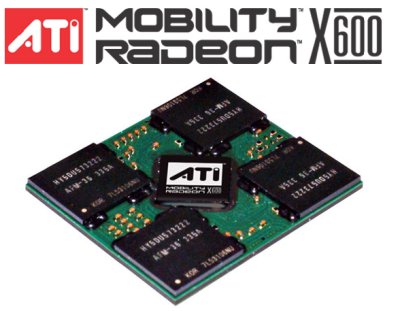
Temps don't go above the low 70C for my T43p no matter the load, before the mod, the GPU would quickly reach above 90C full load.
The reason why R9600 and FGL GPU's get hot, is that the heatshield doesn't touch the GPU core, there is a gap filled with thermal compound.
On late generation V3200 chips the issue was fixed as they used lower profile video memory, but the cooler remained the same, so the fit was obviously compromised.
Late generation V3200 chips still reach the low mid 80's under load.
ThinkPad A30
Pentium III-M 933MHz
Crucial 2x256MB 133MHz CL2
Mobility Radeon 16MB
15" UXGA FlexView
Zheino Classic A 32GB
Samsung SpinPoint M5S 160GB
NEC DVD+-RW ND-6650A
Broadcom MiniPCI BCM43222 802.11n Dual Band
AKE BC168 USB 2.0
26P8287 203 "Malaysia"
46L4697
02K6898
02K6753
-
- Similar Topics
- Replies
- Views
- Last post
-
-
ThinkPad W500 Replacement "TAB" Keycap (I-39 Style)
by Commando303 » Wed Nov 19, 2025 11:27 am » in ThinkPad W500/W510/W520 and W700/W701 Series - 1 Replies
- 6443 Views
-
Last post by Commando303
Fri Nov 21, 2025 7:44 am
-
-
-
Looking for X201 replacement keys/domes and 3mm stem to 4mm adapter.
by ThinkIsaac » Mon Dec 15, 2025 4:17 pm » in ThinkPad X200/X201/X220 and X300/X301 Series - 0 Replies
- 4948 Views
-
Last post by ThinkIsaac
Mon Dec 15, 2025 4:17 pm
-
-
-
x220 tablet battery replacement
by Timpel_800 » Tue Dec 30, 2025 8:29 am » in ThinkPad X200/X201/X220 and X300/X301 Series - 2 Replies
- 3868 Views
-
Last post by Timpel_800
Fri Jan 02, 2026 6:14 am
-
-
-
Does anyone have a replacement ThinkPad 600 audio/mic cable!
by EpicOtterLover » Sat Jan 24, 2026 4:31 pm » in ThinkPad Legacy Hardware - 0 Replies
- 4758 Views
-
Last post by EpicOtterLover
Sat Jan 24, 2026 4:31 pm
-
Who is online
Users browsing this forum: No registered users and 101 guests