


 Homepage
 Forum
Forum Drivers
 HMM-Manuals
 MTM
MTM Feed
Feed
i have thinkpad T23 when plugged with power supply and battery installed the battery light blinks on orange all the time.
and battery never holds charge, already bought a new one and same problem, i think the problem is inside laptop
i read something about the battery fuse failure. how can this issue be solved or could be other kind of failure?
Thank you
Take a look at our
ThinkPads.com HOME PAGE
For those who might want to contribute to the blog, start here: Editors Alley Topic
Then contact Bill with a Private Message
ThinkPads.com HOME PAGE
For those who might want to contribute to the blog, start here: Editors Alley Topic
Then contact Bill with a Private Message
T23 no charging battery problem, battery works in other t23
-
rkawakami
- Admin Emeritus

- Posts: 10327
- Joined: Sun Jun 04, 2006 1:26 am
- Location: San Jose, CA 95120 USA
- Contact:
Re: T23 no charging battery problem, battery works in other t23
Welcome to thinkpads.com!
There's several threads here that have discussed this issue but given the nature of the forum's searching function (it excludes terms such as "battery" and "problem"), you may have been overwhelmed by the results of the search....
A typical problem that I've seen with the T23 not charging the battery has to do with a part on the motherboard which breaks loose. It's an inductor and is located at G6 in the following photo:
http://www.kawakami-ca.com/ibm_t2x/mobo ... legend.jpg
The inductor is the fairly large, black square with a circular ring on top. You can check to see if it's partially (or totally) disconnected from the board and if it is, take it off, clean the metal pads on the bottom (there's probably a black film on them) and then re-solder it back on. It may also be possible that one of the fuses in that same area is bad. In the lower right corner of G6, there's a white block with silver endcaps. That's the main fuse for the battery but if you are getting the orange light, then I'd guess that it's okay. There's a (much) smaller fuse to the left that's labeled "F9"; check that one as well. You will need an ohmmeter in order to check the fuses. And the T23 Hardware Maintenance Manual will help you with taking the system apart and putting it back together:
http://www-307.ibm.com/pc/support/site. ... IGR-4UYM3F
There's several threads here that have discussed this issue but given the nature of the forum's searching function (it excludes terms such as "battery" and "problem"), you may have been overwhelmed by the results of the search....
A typical problem that I've seen with the T23 not charging the battery has to do with a part on the motherboard which breaks loose. It's an inductor and is located at G6 in the following photo:
http://www.kawakami-ca.com/ibm_t2x/mobo ... legend.jpg
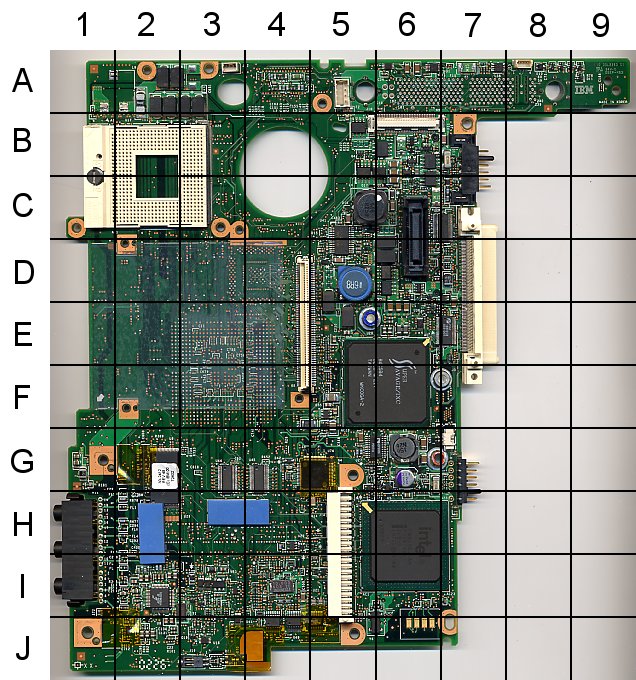
The inductor is the fairly large, black square with a circular ring on top. You can check to see if it's partially (or totally) disconnected from the board and if it is, take it off, clean the metal pads on the bottom (there's probably a black film on them) and then re-solder it back on. It may also be possible that one of the fuses in that same area is bad. In the lower right corner of G6, there's a white block with silver endcaps. That's the main fuse for the battery but if you are getting the orange light, then I'd guess that it's okay. There's a (much) smaller fuse to the left that's labeled "F9"; check that one as well. You will need an ohmmeter in order to check the fuses. And the T23 Hardware Maintenance Manual will help you with taking the system apart and putting it back together:
http://www-307.ibm.com/pc/support/site. ... IGR-4UYM3F
Ray Kawakami
X22 X24 X31 X41 X41T X60 X60s X61 X61s X200 X200s X300 X301 Z60m Z61t Z61p 560 560Z 600 600E 600X T21 T22 T23 T41 T60p T410 T420 T520 W500 W520 R50 A21p A22p A31 A31p
NOTE: All links to PC-Doctor software hosted by me are dead. Files removed 8/28/12 by manufacturer's demand.
X22 X24 X31 X41 X41T X60 X60s X61 X61s X200 X200s X300 X301 Z60m Z61t Z61p 560 560Z 600 600E 600X T21 T22 T23 T41 T60p T410 T420 T520 W500 W520 R50 A21p A22p A31 A31p
NOTE: All links to PC-Doctor software hosted by me are dead. Files removed 8/28/12 by manufacturer's demand.
-
- Similar Topics
- Replies
- Views
- Last post
-
- 4 Replies
- 7562 Views
-
Last post by dcfbf
Fri Dec 12, 2025 2:40 am
-
-
[WTB] Thinkpad x61 battery (battery life doesn't matter as long as it works)
by Redaa » Sun Jan 25, 2026 6:08 am » in Marketplace - Forum Members only - 2 Replies
- 6359 Views
-
Last post by Redaa
Sun Jan 25, 2026 6:27 am
-
-
-
Battery use and charging etiquette for Classic ThinkPads?
by johnny1093 » Wed Oct 29, 2025 1:50 pm » in Thinkpad - General HARDWARE/SOFTWARE questions - 2 Replies
- 14991 Views
-
Last post by johnny1093
Sat Nov 01, 2025 8:46 pm
-
-
-
LCD IAXG01M works in x22, with caveats
by blegas78 » Sun Nov 02, 2025 7:28 pm » in ThinkPad X20/X30/X40 Series incl. Tablets - 3 Replies
- 7458 Views
-
Last post by Plunkyy
Wed Dec 03, 2025 8:31 pm
-
Who is online
Users browsing this forum: No registered users and 43 guests