


 Homepage
 Forum
Forum Drivers
 HMM-Manuals
 MTM
MTM Feed
Feed
Does anyone know what are the specifications of the Powered USB on X series computers/X41T? I'm looking for the maximum ampers and voltage.
Also, I'm looking for a connector or cable for this port. I have HP combo drive that needs 5V/3A to work. It supplied with different Powered USB cable (probably HP's connector type). I want to make a cable from my Powered USB port to this drive.
I'll be happy to have more information about that. If you know something, or you know a site about that - please let me know.
Thanks,
Yotam
Take a look at our
ThinkPads.com HOME PAGE
For those who might want to contribute to the blog, start here: Editors Alley Topic
Then contact Bill with a Private Message
ThinkPads.com HOME PAGE
For those who might want to contribute to the blog, start here: Editors Alley Topic
Then contact Bill with a Private Message
Powered USB port
Powered USB port
X41 Tablet 18666TU 1.5GHz CPU, 60GB HDD, 1.5GB RAM, DVD-CDRW
Are you sure it's only 15V? It has more than 2 connections inside there. Doesn't it have some sort of voltage, like 5.25" power connector that has both 12V and 5V?tsammyc wrote:However the output is around 15V and you are quite likely to fry the HP drive.
And if not, do you know about any suitable transformer from 15V to 5V? Do you have any other idea for this situation?
Thanks!
X41 Tablet 18666TU 1.5GHz CPU, 60GB HDD, 1.5GB RAM, DVD-CDRW
Ok. I found that cable and it costs here $30+tax.
Now I'm looking for some specs like voltage and ampers of the powered usb port but can't find.
Can anyone who has IBM CD/DVD drive with powered usb cable (like the external combo drive or the multi burner plus) can tell me what is the voltage of his drive, and how many ampers it uses?
(You have to look in the label under the drive for "input" information - and write down the voltage (V) and ampers (A or mA)).
Thanks!
Now I'm looking for some specs like voltage and ampers of the powered usb port but can't find.
Can anyone who has IBM CD/DVD drive with powered usb cable (like the external combo drive or the multi burner plus) can tell me what is the voltage of his drive, and how many ampers it uses?
(You have to look in the label under the drive for "input" information - and write down the voltage (V) and ampers (A or mA)).
Thanks!
X41 Tablet 18666TU 1.5GHz CPU, 60GB HDD, 1.5GB RAM, DVD-CDRW
I'd like that info too.
BTW it's interesting you mention you found that HP also uses a Powered USB (USB PlusPower) design, but with a different connector than the USB PlusPower specs that IBM seems to use?
Link found from this thread (which you already read I realize)...
BTW it's interesting you mention you found that HP also uses a Powered USB (USB PlusPower) design, but with a different connector than the USB PlusPower specs that IBM seems to use?
Link found from this thread (which you already read I realize)...
Yeah, I found this link and also this one. I don't exactly understand the difference, and don't understand if this is the exact port I have in my X41T.beq wrote:I'd like that info too.
BTW it's interesting you mention you found that HP also uses a Powered USB (USB PlusPower) design, but with a different connector than the USB PlusPower specs that IBM seems to use?
Link found from this thread (which you already read I realize)...
I replaced the drive with Compaq's one because it was not CD-RW, so now I have Compaq's drive, and it has (surprise!) the same usb+power connector. It is weird connector - regular usb "A" connector with a metal pin near it. Probably, the power is provided on this pin and grounded with the USB connection.
What is also weird is the fact that IBM does not list any power specs of the port or the drives that use it ANYWHERE.
X41 Tablet 18666TU 1.5GHz CPU, 60GB HDD, 1.5GB RAM, DVD-CDRW
Sorry for the late reply. I don't sign on very often. I have a X40. I got that $25 IBM cable and measured the output using a voltmeter and it was 15V. I went ahead and fabricted a cable to convert the IBM power connector to a smaller one that fit my External Liteon USB DVD-RW (which is DC in 5V) hoping that it would work. It blew a fuse and had to be sent to Liteon for service.
Later, I found a cable that combines the output of two USB ports to power some hard drives. That didn't work either and during the course, it blew out both USB ports on the X40 motherboard, which was repaired under warranty.
I've given up. About a year ago, someone posted that he had gotten one of the low power USB DVD-RWs to work with the X40 off a single USB port
Later, I found a cable that combines the output of two USB ports to power some hard drives. That didn't work either and during the course, it blew out both USB ports on the X40 motherboard, which was repaired under warranty.
I've given up. About a year ago, someone posted that he had gotten one of the low power USB DVD-RWs to work with the X40 off a single USB port
Thanks for your reply. It really helps me.
15V is sure alot but don't you think there is a way to lower it by using any transformer or resistor? I really afraid to damage my notebook. After reading your story I think not to try this.
Thank you.
15V is sure alot but don't you think there is a way to lower it by using any transformer or resistor? I really afraid to damage my notebook. After reading your story I think not to try this.
Thank you.
X41 Tablet 18666TU 1.5GHz CPU, 60GB HDD, 1.5GB RAM, DVD-CDRW
USB-powered optical drive
I took the geeky route and bought an enclosure that runs off USB and a bare DVD burner drive to go in it. The enclosure can be found at http://www.centrix-intl.com/?DirectBuy= ... =EX-BLK-01 and the drive I got was the Poineer dvr-k15 (though I hear the dvr-k051 (slot load disc), Panasonic (Mat****a) UJ-845, and NEC ND-6500A work well too). I like the combo cause it's really slim and light. The enclosure runs fine on one USB drive, but if you need more power, just plug in the second cable. I haven't tried burning with it yet though. Targus has a drive (http://h30094.www3.hp.com/product.asp?s ... fg_id=1335) that does the same thing but it's more expensive (mine was about $130 total).
In my research I also found a USB->power cable that has an inline battery. Interesting, and outputs 5V. http://www.bixnet.com/usbcawibuba.html
Note that none of these options use the IBM "powerUSB" port, which doesn't seem to be very standardized.
Hope this helps.
Dan.
In my research I also found a USB->power cable that has an inline battery. Interesting, and outputs 5V. http://www.bixnet.com/usbcawibuba.html
Note that none of these options use the IBM "powerUSB" port, which doesn't seem to be very standardized.
Hope this helps.
Dan.
Re: USB-powered optical drive
Hey that's interesting, thanks for the link vagabond. I also found other interesting stuff there like this notebook-to-desktop IDE adapter:vagabond wrote:In my research I also found a USB->power cable that has an inline battery. Interesting, and outputs 5V. http://www.bixnet.com/usbcawibuba.html
http://www.bixnet.com/notslimcdtod.html
Anyways, the site seems to imply that most regular 12.7mm notebook optical drives use a common 50-pin ATAPI connector (located in the same position)?
http://bixnet.net/images/SlimCD-Rear.jpg

I was wondering if IBM's new UltraBay Slim 9.5mm optical drives also use this same connector?? It's hard for me to tell based on the photo.
I sent an email to Bixnet asking if they have any products that support IBM's 9.5mm optical drives (such as USB enclosures, converters to USB or desktop IDE, etc).
If the IBM UltraBay Slim drives use this same connector, then perhaps I won't even need a USB enclosure. I can just hook the drive up to the abovementioned Bixnet desktop IDE adapter (or this Addonics desktop SATA adapter), then daisy chain that to any of the available IDE/SATA-to-USB adapters.
Incidentally I've been buying a lot of these IDE/SATA/USB adapters recently.
Examples of board adapters:
http://www.addonics.com/products/io/
http://www.cooldrives.com/sata-to-ide.html
http://www.cooldrives.com/ide-to-sata.html
http://www.cooldrives.com/idedeusdemiv.html
http://www.cooldrives.com/usb-2-direct- ... rives.html
http://www.cooldrives.com/usb20dicoide.html
http://www.cooldrives.com/usbtoidebrad.html
Examples of inline cable adapters:
http://www.cooldrives.com/25355inusb20.html
http://www.cooldrives.com/seatatousb20.html
http://store.yahoo.com/insidecomputer/usb20235hadr.html
http://www.cooldrives.com/usb20toidead.html
http://www.cooldrives.com/sata-drive-to ... ble-1.html
Anyways back to topic, I remember someone had posted that Centrix USB enclosure, and I see that they advertise it as requiring no AC adapter, but they also include a PS/2-to-USB cable in case you need more power than the USB port provides (since the PS/2 port provides a lot more power). I hear that all burners require more power than 5V/500mA (2.5W) of a single normal USB port to do burning, do you think this is true?
And as you probablyu know, your Bixnet link also offers notebook optical drives in a USB enclosure with built-in battery that works on a similar principle as the USB-cable-with-battery (the battery provides extra power above that provided by the USB bus power, and it recharges from the USB bus power when the optical drive is idle). Example (too bad they don't offer the empty enclosure by itself)
I currently have an Addonics MFR also with built-in battery, but it's thicker because of the extra functionality. They also offer regular external notebook optical drives, but full power consumption is listed at 7.5W! That would be a real problem if it's referring to sustained power consumption, as opposed to some peak burst consumption (since many USB ports in the real world today supposedly can provide 1A or higher temporarily)?
And as you probablyu know, your Bixnet link also offers notebook optical drives in a USB enclosure with built-in battery that works on a similar principle as the USB-cable-with-battery (the battery provides extra power above that provided by the USB bus power, and it recharges from the USB bus power when the optical drive is idle). Example (too bad they don't offer the empty enclosure by itself)
I currently have an Addonics MFR also with built-in battery, but it's thicker because of the extra functionality. They also offer regular external notebook optical drives, but full power consumption is listed at 7.5W! That would be a real problem if it's referring to sustained power consumption, as opposed to some peak burst consumption (since many USB ports in the real world today supposedly can provide 1A or higher temporarily)?
Re: USB-powered optical drive
Well Bixnet said the IBM 9.5mm UltraBay Slim optical drive does have the standard 50-pin ATAPI connector on the inside, but as with many laptops, the drive uses a connection adapter plate screwed on the rear, similar to:beq wrote:Anyways, the site seems to imply that most regular 12.7mm notebook optical drives use a common 50-pin ATAPI connector (located in the same position)?
http://bixnet.net/images/SlimCD-Rear.jpg
I was wondering if IBM's new UltraBay Slim 9.5mm optical drives also use this same connector?? It's hard for me to tell based on the photo.
I sent an email to Bixnet asking if they have any products that support IBM's 9.5mm optical drives (such as USB enclosures, converters to USB or desktop IDE, etc).
http://bixnet.net/images/SlimCD-RearAdapterDisplay.jpg
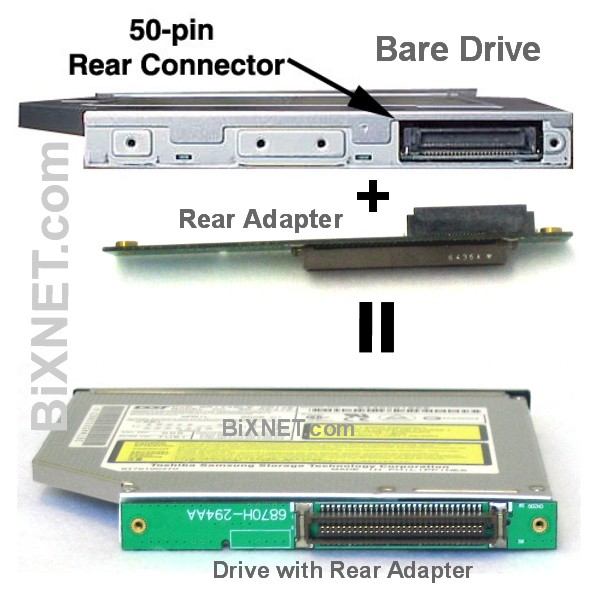
They said on the IBM UB Slim drive I can remove the adapter plate (via 3 screws) and suggested I use their desktop IDE adapter (paired with an IDE-to-USB adapter I suppose). Unfortunately they don't carry any ultraslim USB enclosure meant for 9.5mm optical drives.Bixnet site wrote:If your original CD drive’s rear connector looks different from this drive, it may have a special rear adapter added to the drive’s rear connector. Some laptop uses the rear adapter to change the position and shape of the rear connector. In this case, you need to remove that rear adapter from original drive and re-use the rear adapter with the new drive.
...
Tech Note: This drive is a bare drive only. To install this drive into your laptop, you may need to re-use your current CD drive's mounting frame and rear connector adapter. If your current CD drive is a removable module, it normally has a connection adapter added on the back of the drive and mounting frames added around the drive, you need to remove them from original drive and re-use them on this new drive.
But that seems like too much trouble to use the IBM UB Slim as an external USB drive. I want to still be able to swap this drive into the X4 dock at home, and it's too much effort to unscrew/rescrew the rear connector adapter plate each time!
$ vs. performance
Yeah, but 250 bucks? Yikes! I'd rather carry an extra cable, especially since I'll probably only need it when burning.beq wrote:-snip-
And as you probablyu know, your Bixnet link also offers notebook optical drives in a USB enclosure with built-in battery that works on a similar principle as the USB-cable-with-battery (the battery provides extra power above that provided by the USB bus power, and it recharges from the USB bus power when the optical drive is idle). Example (too bad they don't offer the empty enclosure by itself)
-snip-
My hope and perpetual dream is that someday everything will be as small, light, powerful, and cool (& cheap!) as I'd like. Note the important words "perpetual" and "dream."
Dan.
Re: USB-powered optical drive
I tried this combo..except with the slot loading Pioneer DVR-K05. Works pretty well. So far it reads/writes CDs/DVDs using one usb cable. Although the DVD I burned only burned at 2.4x, I think it's more a media issue than the drive or lack of power. I'm going to try with some other media when I get the chance.vagabond wrote:I took the geeky route and bought an enclosure that runs off USB and a bare DVD burner drive to go in it. The enclosure can be found at http://www.centrix-intl.com/?DirectBuy= ... =EX-BLK-01 and the drive I got was the Poineer dvr-k15 (though I hear the dvr-k051 (slot load disc), Panasonic (Mat****a) UJ-845, and NEC ND-6500A work well too). I like the combo cause it's really slim and light. The enclosure runs fine on one USB drive, but if you need more power, just plug in the second cable. I haven't tried burning with it yet though.
-
- Similar Topics
- Replies
- Views
- Last post
-
-
T430 violently hisses and becomes unresponsive after being powered on for a bit
by interspersed » Tue Aug 05, 2025 5:40 am » in ThinkPad T430-T495 / T530-T590 Series - 0 Replies
- 6019 Views
-
Last post by interspersed
Tue Aug 05, 2025 5:40 am
-
-
-
WTB: Lenovo USB-C Port Replicator 4XH1C12753
by stanleylieber » Fri Nov 21, 2025 10:07 pm » in Marketplace - Forum Members only - 0 Replies
- 1550 Views
-
Last post by stanleylieber
Fri Nov 21, 2025 10:07 pm
-
-
- 0 Replies
- 659 Views
-
Last post by jonas-fr
Mon Jan 05, 2026 5:53 pm
-
-
ThinkPad external classic keyboard ribbon cable to USB adapter board by 'xy3dg12'
by TrackPointClassic » Wed Sep 17, 2025 12:20 pm » in GENERAL ThinkPad News/Comments & Questions - 4 Replies
- 5946 Views
-
Last post by notAperson535
Sun Jan 25, 2026 8:34 pm
-
Who is online
Users browsing this forum: No registered users and 63 guests