Page 1 of 1
LF: IBM Tower Case [PIC]
Posted: Wed Jan 28, 2009 1:49 am
by Temetka
I am looking for the case from a Intellistation or Thinkcenter.
Must be big enough to hold a standard size ATX motherboard, a few HD's and a few optical drives. Would prefer one with 2 3.5" front accessible bays for floppy or zip and a mulicard, front mount FW400 / USB2 ports.
Does not need power supply.
Examples:
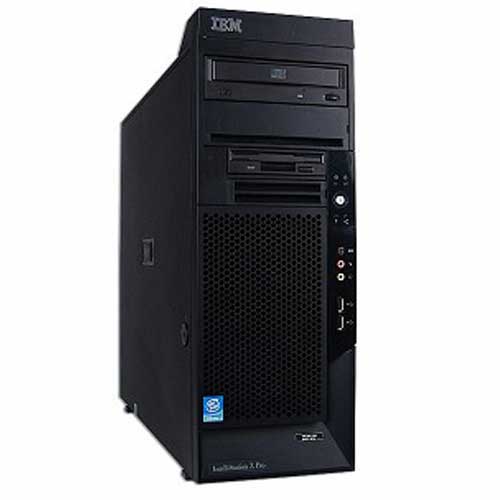


I have roughly $50 budgeted and I have a ton of 478 and 775 CPU's, RAM, notebook HD and SODIMMS I can offer as trade as well. Plus high end 15k SCSI gear, ultra 320 and 160 controllers and more.
Re: LF: IBM Tower Case [PIC]
Posted: Wed Jan 28, 2009 4:13 am
by Cunha
It would be fun to use an IBM tower to build a nice desktop. Good idea.
(will pay 5 dollars more than O.P.)
Just kidding.
Re: LF: IBM Tower Case [PIC]
Posted: Fri Jan 30, 2009 3:38 pm
by RealBlackStuff
Re: LF: IBM Tower Case [PIC]
Posted: Mon Feb 02, 2009 2:37 am
by Temetka
I'd rather a dead system.
All I need is the case, not a working system.
My machine at work is in exactly that same case, which I bought off e-bay about 2 years ago for cheap. For the new build i'd prefer the case style of the machine in the first picture of this thread.
Anyone?
Re: LF: IBM Tower Case [PIC]
Posted: Mon Feb 02, 2009 5:51 am
by jronald
Contact these people
http://www.harddriveinc.net/servlet/StoreFront
Before they moved to their present location
They had a few hundred of these cases
Ron
Re: LF: IBM Tower Case [PIC]
Posted: Wed Feb 04, 2009 1:01 am
by Radioguy
If money weren't an object right now, I'd want to build a new desktop out of a case like this too.

Re: LF: IBM Tower Case [PIC]
Posted: Mon Feb 09, 2009 6:06 pm
by gb_ibmguy
Just my $0.02,
Why not get an Intellitation 6221 and ramp it up? I bought both of mine on Ebay for $125.00 each. Add 6 Gig of ram and 2 300 Gig SCSI drives and you have a very nice box. These things are built! 2 SCSI UW320 interfaces, nice video card. Noisy fans though. Even if you gut the case, you can sell the parts. They support 2 Xeon 3.2 processers too!
Just a thought
Re: LF: IBM Tower Case [PIC]
Posted: Tue Feb 10, 2009 8:41 am
by mazzinia
Putting my nose inside... how are the internals of a 6221? (airflow, accessibility,wind tunnels,drive cages,screwless/screws,thermal dissipation, etc etc) There are plenty of images on ebay, but all of the external chassis... never of the internals.
Steel or ... ?
Re: LF: IBM Tower Case [PIC]
Posted: Tue Feb 10, 2009 6:33 pm
by gb_ibmguy
All steel, case, and internals. easy to service and upgrade. (After taking apart an a31, piece of cake) HEAVY!. 450 watt power supply! Good cooling, the 3 stock fans move a ton of air but are loud (easily fixed). There is only enough space to get 2 standard SCSI drives in the bays. IBM specs say it will hold 3 drives, but, no way. My main workstation has 1 CD-Rom, 1 DVD/CD burner and 2 SCSI drives with only 6 Gigs of ram with two 3.2 Xeon processors (system supports up to 8 gigs and two 3.6 Xeon processors). Wildcat video card with two DVI outputs. Lots of space for extra cards. All in all, for $250.00 total cost, not a bad unit!!!
Enjoy!
Re: LF: IBM Tower Case [PIC]
Posted: Fri Feb 13, 2009 5:26 am
by Temetka
gb_ibmguy wrote:Just my $0.02,
Why not get an Intellitation 6221 and ramp it up? I bought both of mine on Ebay for $125.00 each. Add 6 Gig of ram and 2 300 Gig SCSI drives and you have a very nice box. These things are built! 2 SCSI UW320 interfaces, nice video card. Noisy fans though. Even if you gut the case, you can sell the parts. They support 2 Xeon 3.2 processers too!
Just a thought
Because I already have all the parts necessary to build a machine. I just need a case to go with it. For my money nothing says "This is a Man's Computer" more than an IBM case.
Re: LF: IBM Tower Case [PIC]
Posted: Fri Feb 13, 2009 6:03 am
by Radioguy
Re: LF: IBM Tower Case [PIC]
Posted: Sat Feb 14, 2009 7:45 pm
by Temetka
Lol.
No.
The wife would kill me.
That and it reminds me of clowns. As we all know, clowns are evil.
Still looking for one of the cases in my first post though.
Re: LF: IBM Tower Case [PIC]
Posted: Sat Feb 14, 2009 8:43 pm
by hart22
Temetka:
Do a Google shopping search for "ThinkCentre Chassis".
This result may interest you. The
parts lookup indicates it is the case for an M51, with 2 x 3.5" bays and 2 x 2.5" bays, exactly matching the general specs of your first image. Costs ~$70.
Otherwise searching "ThinkCentre Chassis" or "Intellistation Chassis" brings up lists of online storefronts where you can obtain part numbers to feed into the Lenovo parts lookup.
Re: LF: IBM Tower Case [PIC]
Posted: Sat Feb 14, 2009 9:19 pm
by Temetka
You Sir, are a saint.
Thank you.
Re: LF: IBM Tower Case [PIC]
Posted: Sun Feb 15, 2009 12:47 am
by closersource
We use Thinkcentre towers at work, and needless to say I had the same idea a while back. There are some factors you might want to consider before you go for it though.
Some Thinkcentre M Series towers are slimmer than the ATX standard and thus have their power supplies in non-standard orientation or dimensions. That means you might be forced to use the IBM OEM power supply.
The shorter Thinkcentre A Series can only accommodate micro-ATX boards and might also have similar PSU dimension problems. Furthermore the case is cramped and airflow is not the best. Your best shot is to stick with the pro workstations/servers.
Let me know how it goes, I would also be interested in a nice conservative clean-cut bare sub-50 IBM tower.
Re: LF: IBM Tower Case [PIC]
Posted: Sun Feb 15, 2009 3:36 am
by virge
http://cgi.ebay.com/ws/eBayISAPI.dll?Vi ... 0347899177
Sub $50 for a brand new ThinkCentre case with power supply.
I have no association with the seller.
Re: LF: IBM Tower Case [PIC]
Posted: Sun Feb 15, 2009 2:23 pm
by closersource
Thanks for the link. It's a good deal, but unfortunately both the OP and I are not keen on micro-ATX cases. The IBM case designs are deceivingly tall and slim. It is part of why I want one, but the latter property makes fitting a standard ATX PSU inside tough on the workstation class Thinkcentres.
Re: LF: IBM Tower Case [PIC]
Posted: Sun Feb 15, 2009 3:09 pm
by mazzinia
I'm looking around, out of curiosity (the request of the OP hit my fantasy, sort of way), but I've the feeling that finding just a case is not exactly easy. Plenty of systems still working around, with even relatively low costs (for the ones dating back to the last P3 Xeons)... but in all cases there's a still working system inside.
Even found a batch of New in the box & with full warranty xServer 255 in Tower configuration for 170 euro each...
Re: LF: IBM Tower Case [PIC]
Posted: Sun Feb 15, 2009 9:48 pm
by Temetka
Thanks but I need a full tower. I already have a MicroATX case from IBM holding my other comp. I am looking to build something a tad more beefy in terms of hardware and as such will require a bigger case.
Re: LF: IBM Tower Case [PIC]
Posted: Tue Feb 17, 2009 5:00 pm
by aau007
I have a xSeries 220 server tower available but you have to pick it up for $50 cash unless you want to pay for all shipping charge.
Re: LF: IBM Tower Case [PIC]
Posted: Wed Feb 18, 2009 7:35 pm
by Temetka
Got pics?
Re: LF: IBM Tower Case [PIC]
Posted: Wed Feb 18, 2009 9:06 pm
by aau007
Temetka wrote:Got pics?
PM'd you a link to the picture.
Re: LF: IBM Tower Case [PIC]
Posted: Tue Dec 07, 2010 5:25 pm
by alfio
how'd this experiment turn out? it would be good to know which cases will work with aftermarket powersupplies and atx motherboards (rather than buying blindly and trying to see if stuff fits)
Re: LF: IBM Tower Case [PIC]
Posted: Thu Dec 09, 2010 7:36 am
by mazzinia
Hi,
I cannot speak for the original poster, since I don't have any similar box from ibm here... but I've, around a week ago, got an HP C8000, that is using the same chassis of the HP x8x00.
The psu area has holes for traditional screws, allowing to change it with a standard one, but I don't know how the mb plate is (related to mounting holes) since i've not dismantled it. The overall build is very solid (more than by simply watching it on picture), and probably the front panel connector could be needing a small tweak to plug to a standard mb
Re: LF: IBM Tower Case [PIC]
Posted: Fri Dec 10, 2010 1:17 am
by Temetka
Someone asked how it went so here's a few pics:
Internal shot
http://i27.photobucket.com/albums/c163/ ... IM0531.jpg
You can see the black IBM tower on the right side
http://i27.photobucket.com/albums/c163/ ... IM0529.jpg
A light up blue fan, cause why not?
http://i27.photobucket.com/albums/c163/ ... IM0532.jpg
Specs:
Fry's Version of an 855GME motherboard
3.2GHZ P4 Extreme Edition
3GB DDR400 RAM
Radeon 96oo Pro 256MB AGP 8x Video Card
60GB HD for Linux
120GB HD for Windows
Dual Layer DVD Burner
Creative Labs Sound Blaster Pro
Antec 500W Earthpower PSU
The system runs great. It makes an excellent backup / testing / mess around with box.
I had to do a bit wiring for the power and reset switches as IBM did not use the standard 2-pin black connectors for after maket PC motherboards. Other than that it works great.
As a bonus, this machine is pretty darned quiet compared with my double wide server case with dual redundant 700W PSU's, 6HD's and 10 internal fans.
Re: LF: IBM Tower Case [PIC]
Posted: Fri Dec 17, 2010 2:13 pm
by alfio
Temetka wrote:
I had to do a bit wiring for the power and reset switches as IBM did not use the standard 2-pin black connectors for after maket PC motherboards. Other than that it works great.
As a bonus, this machine is pretty darned quiet compared with my double wide server case with dual redundant 700W PSU's, 6HD's and 10 internal fans.
nice work! i just received my purchase of a similar case. can you give a bit more detail on the wiring that you did? i'd hate to wire my board up to the new case and have it short out
Re: LF: IBM Tower Case [PIC]
Posted: Sun Dec 19, 2010 1:32 pm
by alfio
quick follow-up: i took my case apart and transfered everything over to the IBM case. i'm sort of guessing on the USB plug and i'm hoping it will work without cutting and soldering. everything else seems good
two questions for you Temetka: 1) were you able to use the ethernet indicator? i don't think my mobo has a place to plug that into but it would be useful to have. 2) were you able to use the front audio panel?
Re: LF: IBM Tower Case [PIC]
Posted: Wed Feb 26, 2025 4:22 am
by thomase13
Hello all — it’s been quite a while!
I am having to build another machine and after the fiasco that was my attempt to do this with an IBM NetVista desktop case, I feel wary of trying again, though you’ve made it sound easy, so I would love to hear about the real deal!
Very close to simply pulling the trigger on a
“new” case for my mostly new machine.
(Amazingly
the only case I can find that actually has any external drive bays! (Crazy; right?) Also just discovered it was first sold in 2013, so I guess that explains it!
I used to think that cases were all about the same, but now I find they’ve almost entirely eliminated any removable disk (or even disc) drives. But on the plus side (for this case), I get USB 3 on the front panel, as well as filters for the airflow (which makes me wonder why on Earth this is a new innovation, but it seems like most people are just beginning to clue into the concept of air hygiene)
So it is somewhat more functional, however, the IBM cases in this thread are also pretty functional, and nothing can beat them for beauty of design! (though I think the Cooler Master case is actually pretty decent for a generic case design excepting the strange-looking protuberance on the right side!)
Slightly off the thread topic, but I was also looking into keyboards, and getting one that’s ergonomic
and has a pointing device is pretty challenging!
Strongly considering a ThinkPad external keyboard, and found some on eBay in beautiful condition, though they’re mostly upwards of $650! I remember considering buying one about a decade ago just in case I wanted one and they were less available in the future, and I probably should have — I bet they weren’t more than $100 back then!
Temetka! It looks like you’re still active here, so I’d love to hear what happened!

Waiting with bated breath!

Thomas
Re: LF: IBM Tower Case [PIC]
Posted: Wed Feb 26, 2025 5:24 am
by axur-delmeria
thomase13 wrote: ↑Wed Feb 26, 2025 4:22 am
Slightly off the thread topic, but I was also looking into keyboards, and getting one that’s ergonomic
and has a pointing device is pretty challenging!
Strongly considering a ThinkPad external keyboard, and found some on eBay in beautiful condition, though they’re mostly upwards of $650! I remember considering buying one about a decade ago just in case I wanted one and they were less available in the future, and I probably should have — I bet they weren’t more than $100 back then!
The SK-8855 (USB version of the Thinkpad T410/T420 keyboard) has long been discontinued, so there aren't a lot of them left.
Check out the
Tex Shinobi, which emulates the look of the SK-8855 but has Cherry MX mechanical keyswitches, or its
DIY version which is cheaper but requires sourcing your own switches (and assembling it yourself).
Re: LF: IBM Tower Case [PIC]
Posted: Wed Feb 26, 2025 11:26 am
by TPFanatic


