Thinkpad 25 triple-screen desk setup with IBM Thinkvision L200p monitors
Posted: Mon Jan 29, 2018 3:04 pm
My current office setup
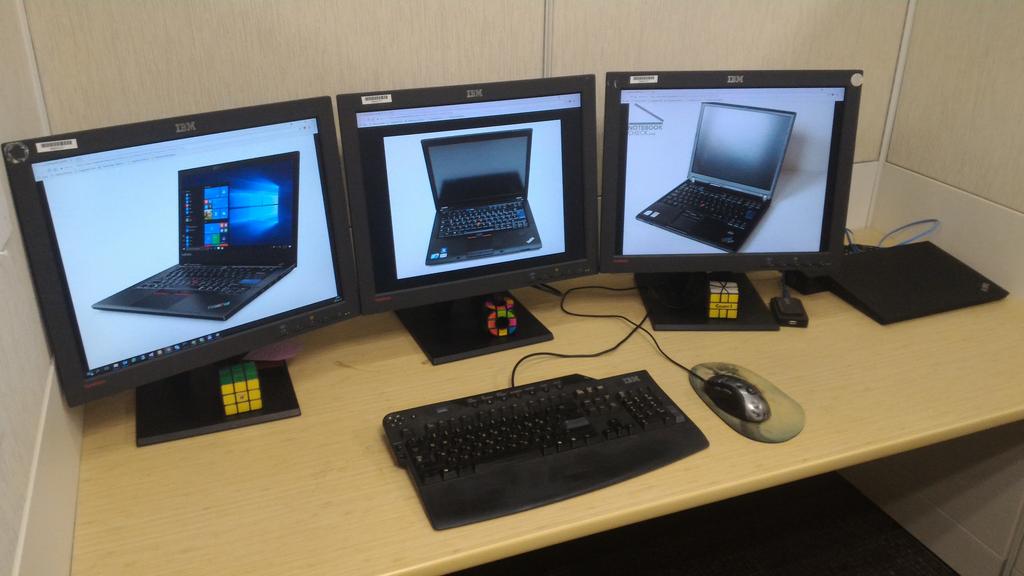
The TP25 supports 3 simultaneous display outputs (The T410 without Optimus only supported 2), so I added a third IBM L200p to the existing two, for my first ever triple-monitor desk setup.
The Thinkvision L200p is an IPS UXGA (1600x1200) monitor. These units are probably 13-14 years old, and still hold up impressively well (although obviously lost some brightness which was not so high to begin with). I run them all on 100% brightness to be comfortable (in comparison, my DELL monitors at home are rarely run over 50% brightness). The L200p is not the last 20" UXGA Thinkvision - it was succeeded by the L201p, with a thinner bezel and an improved stand which was less stiff and also supported pivot - but somehow L201p units were much less abundant in the wild - I don't think I've ever seen one in use.
The monitors are all connected to the Ultra Dock:
1. Dock DP (Display Output 1) ⟶ DP-to-DVI dongle ⟶ Monitor DVI
2. Dock DVI (Display Output 2) ⟶ Monitor DVI
3. Dock VGA (Display Output 3) ⟶ Monitor VGA
The dock only has 2 digital video outputs shared between the 4 connectors, so the third output has to be VGA. It is a bit blurrier, which is easy to notice if you are used to 100% sharp digital displays, but it does not affect comfort. I could get a third digital output out of the Thunderbolt or HDMI connectors on the laptop itself, but that would ruin the snap-on docking experience. Out of curiosity, I tried a a 4-display configuration (including the laptop LCD), but I believe this is not supported - Windows would detect all 4 displays, but would only display to 3 of them (any combination).
The keyboard is the IBM/Lenovo Enhanced Performance USB Keyboard. I've been using them almost exclusively for the past 10 years, and I really like them. Wrote about my experience a bit here. The mouse is the popular at one time Logitech MX518. It is very comfortable to me, but the rubberized coating on the sides is wearing off somewhat (after 5.5 years of regular use).
Also pictured: USB 3.0 hub (as there are no conveniently accessible USB ports when the laptop is docked), Rubik's Cube, Rubik's Void Cube, Square-1. No, my desk is not normally this tidy - I cleaned it up for the photo.
The TP25 supports 3 simultaneous display outputs (The T410 without Optimus only supported 2), so I added a third IBM L200p to the existing two, for my first ever triple-monitor desk setup.
The Thinkvision L200p is an IPS UXGA (1600x1200) monitor. These units are probably 13-14 years old, and still hold up impressively well (although obviously lost some brightness which was not so high to begin with). I run them all on 100% brightness to be comfortable (in comparison, my DELL monitors at home are rarely run over 50% brightness). The L200p is not the last 20" UXGA Thinkvision - it was succeeded by the L201p, with a thinner bezel and an improved stand which was less stiff and also supported pivot - but somehow L201p units were much less abundant in the wild - I don't think I've ever seen one in use.
The monitors are all connected to the Ultra Dock:
1. Dock DP (Display Output 1) ⟶ DP-to-DVI dongle ⟶ Monitor DVI
2. Dock DVI (Display Output 2) ⟶ Monitor DVI
3. Dock VGA (Display Output 3) ⟶ Monitor VGA
The dock only has 2 digital video outputs shared between the 4 connectors, so the third output has to be VGA. It is a bit blurrier, which is easy to notice if you are used to 100% sharp digital displays, but it does not affect comfort. I could get a third digital output out of the Thunderbolt or HDMI connectors on the laptop itself, but that would ruin the snap-on docking experience. Out of curiosity, I tried a a 4-display configuration (including the laptop LCD), but I believe this is not supported - Windows would detect all 4 displays, but would only display to 3 of them (any combination).
The keyboard is the IBM/Lenovo Enhanced Performance USB Keyboard. I've been using them almost exclusively for the past 10 years, and I really like them. Wrote about my experience a bit here. The mouse is the popular at one time Logitech MX518. It is very comfortable to me, but the rubberized coating on the sides is wearing off somewhat (after 5.5 years of regular use).
Also pictured: USB 3.0 hub (as there are no conveniently accessible USB ports when the laptop is docked), Rubik's Cube, Rubik's Void Cube, Square-1. No, my desk is not normally this tidy - I cleaned it up for the photo.


 I distinctly remember a huge difference in ghosting between my 2007FP (LG 20" UXGA) and T42's Flexview LCD (LG 15" SXGA+). I think desktop panels have always been ahead of laptop panels in most parameters, ghosting included.