My Switch To SSD - HDTach Results Inside
Posted: Fri Jun 22, 2012 1:53 am
So I was previously using a WD Scorpio Black 750GB HDD in my T60p. It was nice and roomy, and about as fast as I would expect a HDD to be on a SATA-I bus. Well, I wanted to speed things up more so I put in a Samsung 830 Series 256GB SSD to see how it did. The SSD is definitely faster than the laptop lol (probably about 4X since it supports SATA-III). Despite this, the increase in speed is noticeable since SSDs do a heck of a lot better in sequential reads/writes than HDDs. Here are some screenshots from HDTach.
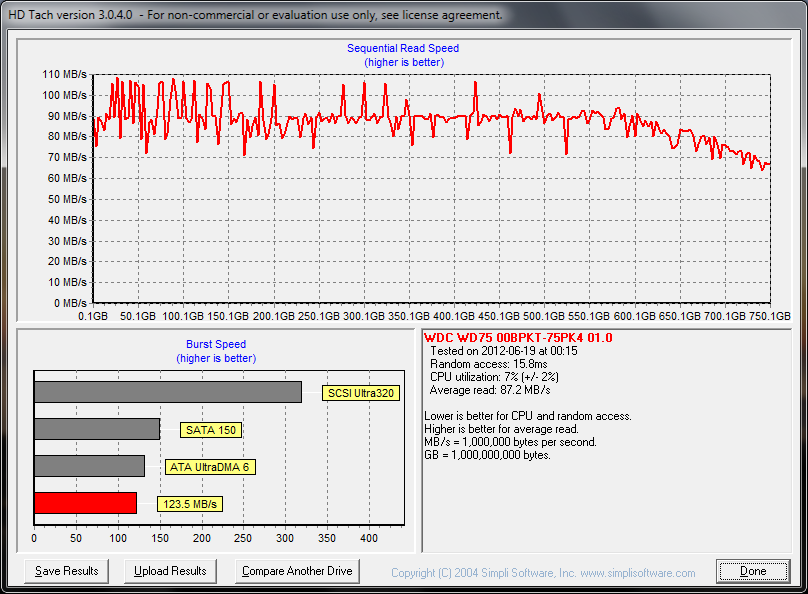
The 750GB HDD.
The new 256GB SSD.
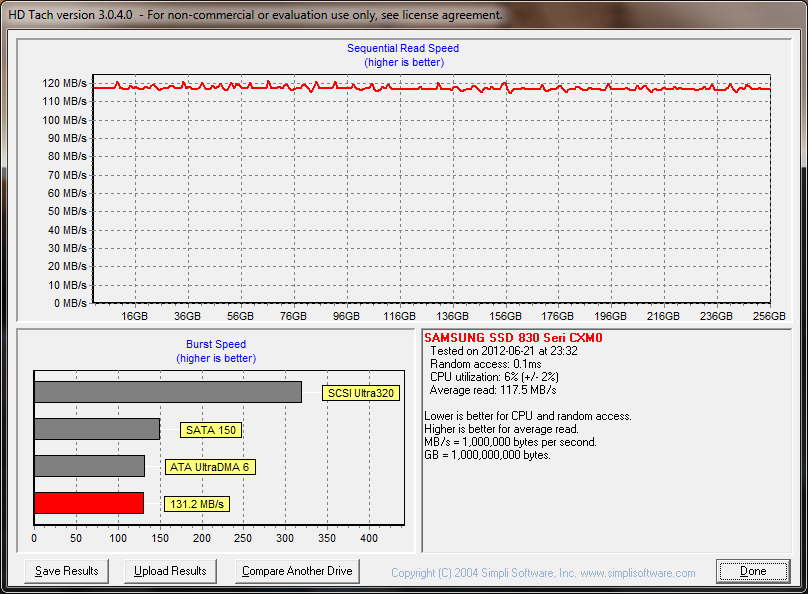
Comparing whole averages, the SSD is 35% faster in sequential reads (117.5 MB/s vs 87.2 MB/s). Ignoring the slow performance on the inside diameter of the platter, the SSD is still ~28% faster in sequential reads (117.5 MB/s vs ~92MB/s). Burst speed is pretty similar and only 6% higher. CPU utilization is also the same. A huge difference lies in seek time, for obvious reasons. The SSD kills the HDD with a 0.1ms seek time versus the HDD's 15.8ms. Obviously, having no physically moving parts helps a lot with that!
What are my overall impressions? Well, the laptop sort of got a new lease on life from this. Boot times (pressing power button to browsing in Chrome) went from ~46 seconds to ~29 seconds. Applications start up MUCH faster, and web browsing is actually faster since page cache writes/reads cause less of a drag now. Overall, I am very satisfied. Yes, the lower capacity means that I don't keep all of my media & stuff on the SSD. I am keeping the 750GB HDD and running it in an Ultrabay adapter. Speed doesn't really matter for it since it just keeps media now. I am thinking of getting a cheap Ultrabay adapter, gutting everything but a little of the frame, facia & interlock and running like that to shave off some weight. My music and digital photos can live on the SSD since I really don't need much else outside of the house!
Anyway, I highly recommend the upgrade to an SSD. Speeds seem to vary depending on the capacity of the SSD, even within the same product line. 256GB is a little overkill, but it seemed to have the best performance figures (not that it matters on my crusty old SATA-I bus!). I wonder if there are any hardware mods that can be done to improve SATA speeds...? I looked up the datasheets for the Intel chipsets and there's no way to swap to the ICH8 one used in T61p's really. The BGAs are different, and really the only logical choice then is to swap motherboards. Oh well, I am plenty happy with this as it is now!
EDIT:
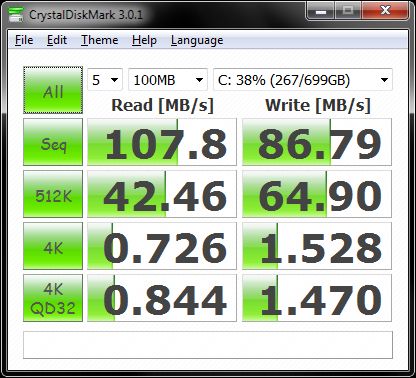
Here are the results from CrystalDiskMark.
WD 750GB HDD
Samsung 256GB SSD
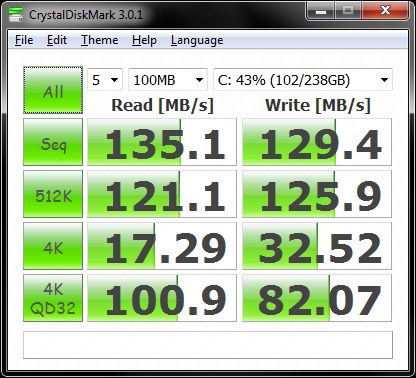
So, again sequential performance is a bit better, but the SSD UTTERLY DESTROYS the HDD in random seek performance. Considering that the seek time on an SSD is less than 1/150th of that for the HDD, this isn't super surprising. Still, it is a huge difference.
The 750GB HDD.
The new 256GB SSD.
Comparing whole averages, the SSD is 35% faster in sequential reads (117.5 MB/s vs 87.2 MB/s). Ignoring the slow performance on the inside diameter of the platter, the SSD is still ~28% faster in sequential reads (117.5 MB/s vs ~92MB/s). Burst speed is pretty similar and only 6% higher. CPU utilization is also the same. A huge difference lies in seek time, for obvious reasons. The SSD kills the HDD with a 0.1ms seek time versus the HDD's 15.8ms. Obviously, having no physically moving parts helps a lot with that!
What are my overall impressions? Well, the laptop sort of got a new lease on life from this. Boot times (pressing power button to browsing in Chrome) went from ~46 seconds to ~29 seconds. Applications start up MUCH faster, and web browsing is actually faster since page cache writes/reads cause less of a drag now. Overall, I am very satisfied. Yes, the lower capacity means that I don't keep all of my media & stuff on the SSD. I am keeping the 750GB HDD and running it in an Ultrabay adapter. Speed doesn't really matter for it since it just keeps media now. I am thinking of getting a cheap Ultrabay adapter, gutting everything but a little of the frame, facia & interlock and running like that to shave off some weight. My music and digital photos can live on the SSD since I really don't need much else outside of the house!
Anyway, I highly recommend the upgrade to an SSD. Speeds seem to vary depending on the capacity of the SSD, even within the same product line. 256GB is a little overkill, but it seemed to have the best performance figures (not that it matters on my crusty old SATA-I bus!). I wonder if there are any hardware mods that can be done to improve SATA speeds...? I looked up the datasheets for the Intel chipsets and there's no way to swap to the ICH8 one used in T61p's really. The BGAs are different, and really the only logical choice then is to swap motherboards. Oh well, I am plenty happy with this as it is now!
EDIT:
Here are the results from CrystalDiskMark.
WD 750GB HDD
Samsung 256GB SSD
So, again sequential performance is a bit better, but the SSD UTTERLY DESTROYS the HDD in random seek performance. Considering that the seek time on an SSD is less than 1/150th of that for the HDD, this isn't super surprising. Still, it is a huge difference.


