Page 1 of 1
Wifi Card upgrade suggestions?
Posted: Thu Jan 11, 2024 1:32 pm
by babysheegoth
Looking upgrade wifi card to something as modern as possible that also makes sense financially.
Also how to remove whitelist from middleton bios?
Re: Wifi Card upgrade suggestions?
Posted: Thu Jan 11, 2024 2:46 pm
by TPFanatic
Middleton bios should already have removed the mpcie whitelist.
Ax210 soldered or adapted onto mpcie format card is the current most modern upgrade.
Other cheap popular choices are 7260ac, 6205n, and 6300n.
If you’re running Windows newer than 7, Anything is better than the 4965agn which crashes Windows due to no proper compatible driver.
Re: Wifi Card upgrade suggestions?
Posted: Sat Jan 13, 2024 9:15 am
by Gonzaleitor
Re: Wifi Card upgrade suggestions?
Posted: Mon Jan 15, 2024 12:46 am
by babysheegoth
Gonzaleitor wrote: ↑Sat Jan 13, 2024 9:15 am
I have them 6300n and it works great. The bottleneck is on the rest of the hardware...

6300n fits in t61? it looks different from ebay listings then the wifi card currently in my laptop?
Re: Wifi Card upgrade suggestions?
Posted: Mon Jan 15, 2024 2:15 am
by RealBlackStuff
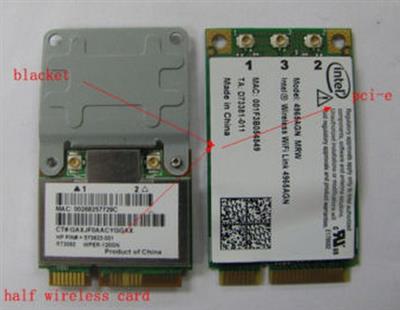
Some cards are full size, some cards are half-size and need an extender bracket, as seen below:
Re: Wifi Card upgrade suggestions?
Posted: Tue Jan 16, 2024 9:41 am
by Gonzaleitor
babysheegoth wrote: ↑Mon Jan 15, 2024 12:46 am
Gonzaleitor wrote: ↑Sat Jan 13, 2024 9:15 am
I have them 6300n and it works great. The bottleneck is on the rest of the hardware...
6300n fits in t61? it looks different from ebay listings then the wifi card currently in my laptop?
Yup, just as RBS said.
Re: Wifi Card upgrade suggestions?
Posted: Mon Jan 22, 2024 11:56 am
by babysheegoth
RealBlackStuff wrote: ↑Mon Jan 15, 2024 2:15 am
Some cards are full size, some cards are half-size and need an extender bracket, as seen below:
I'm having trouble finding extender bracket on ebay if there's a search term or another I place I need to look for it?
Re: Wifi Card upgrade suggestions?
Posted: Mon Jan 22, 2024 12:07 pm
by axur-delmeria
babysheegoth wrote: ↑Mon Jan 22, 2024 11:56 am
I'm having trouble finding extender bracket on ebay if there's a search term or another I place I need to look for it?
Something like this?
https://www.ebay.com/itm/301239090014
Re: Wifi Card upgrade suggestions?
Posted: Tue Jan 23, 2024 9:09 am
by babysheegoth
https://www.ebay.com/itm/114137088482?m ... media=COPY
There's multiple listing some saying Dell model in them. This one saying thinkpad. Is this the right 6300n?
Does it matter what brand the listing labels them as or are they interchangeable in all laptop brands?
Re: Wifi Card upgrade suggestions?
Posted: Tue Jan 23, 2024 11:01 am
by axur-delmeria
babysheegoth wrote: ↑Tue Jan 23, 2024 9:09 am
Does it matter what brand the listing labels them as or are they interchangeable in all laptop brands?
Certain laptop models (most Thinkpads included) have BIOS whitelists that prevent end-users from installing WiFi cards other than the ones that were certified with said laptop models. Installing the Middleton BIOS removes that whitelist on your T61, so it doesn't matter which brand of WiFi card you purchase.
Re: Wifi Card upgrade suggestions?
Posted: Sun Feb 11, 2024 6:15 pm
by sktn77a
I updated my 2200 to a 6205 and then a 6300 in my T430. Didn't really notice any difference!
Re: Wifi Card upgrade suggestions?
Posted: Sun Feb 11, 2024 11:47 pm
by axur-delmeria
sktn77a wrote: ↑Sun Feb 11, 2024 6:15 pm
I updated my 2200 to a 6205 and then a 6300 in my T430. Didn't really notice any difference!
Well, they're all WiFi N cards, and a minor upgrade (2200 --> 6205) at best. The 6300's 450Mbps max only comes into play if your router has 3 transmit antennas. For casual internet use you won't really notice it.
Our WiFi access points at home are WiFi AC1200 (300+866). With two laptops with Intel 6205's connected on the 5GHz band, FTP file transfers between them averaged around 15 megabytes/sec, with bursts up to 20 megabytes/sec. With two laptops with WiFi AC cards (Intel 8260 and 9260) it averages > 20 megabytes/sec. Note that the source and destination directories are on RAM disks to ensure maximum throughput (minimizing bottlenecks caused by writing to HDD or SSD).
Re: Wifi Card upgrade suggestions?
Posted: Thu Feb 27, 2025 3:58 pm
by oxygen14
After flashing Middleton BIOS and upgrading CPU to T9300, how to upgrade the original 4965AG to a dual Wifi+Bluetooth card ? Is the AC7265 good ? The 4965AG has 3 connectors (black/grey/white cables), but the AC7265 has 2. Which cables should be connected ?
Regarding Bluetooth, can Windows 7 work with both radios, the old BT2 module in the lid and a new BT4 chip on mPCIe Wifi card ? My desktop W7 does not want two generic BT dongles, the second shows up with a yellow exclamation mark in Device Manager.
Re: Wifi Card upgrade suggestions?
Posted: Thu Feb 27, 2025 4:25 pm
by TPFanatic
windows will only work with one bluetooth radio. so it'd be like you said, second card with a yellow exclamation mark.
gray wire goes to Main;
black wire goes to Aux;
white wire goes to extra pin, if present -- tape over metal contacts and leave unplugged otherwise.
each antenna is functionally the same so it doesn't actually really matter where they go, but Id is how Lenovo intended.
Re: Wifi Card upgrade suggestions?
Posted: Thu Feb 27, 2025 9:56 pm
by mikemex
Signal quality is better with 3x3 MIMO. But you need to make sure your router supports that (most don't). If your router doesn't, it's better to get an AX210. But the specific model depends on the OS you want. Older cards don't support newer Windows and newer cards can't be run on older versions.
Re: Wifi Card upgrade suggestions?
Posted: Wed Sep 17, 2025 5:35 pm
by sktn77a
axur-delmeria wrote: ↑Sun Feb 11, 2024 11:47 pm
The 6300's 450Mbps max only comes into play if your router has 3 transmit antennas. For casual internet use you won't really notice it.
I have a Netgear R7000 AC1900 router with 3 antennas. I do quite a lot of file transfers over wifi when backing up and it basically wasn't noticeable.
Re: Wifi Card upgrade suggestions?
Posted: Thu Sep 18, 2025 5:41 am
by axur-delmeria
sktn77a wrote: ↑Wed Sep 17, 2025 5:35 pm
I have a Netgear R7000 AC1900 router with 3 antennas. I do quite a lot of file transfers over wifi when backing up and it basically wasn't noticeable.
If you have an AC1900 router, upgrade all your devices to WiFi AC if possible, then set the router to transmit WiFi-AC only (instead of AC+N) on the 5GHz band.