Page 1 of 2
The Definitive X60 Palmrest Temperature Study (pics)
Posted: Mon Jan 29, 2007 2:20 am
by Ken Fox
My X60 has a hot right palm rest, not a new or unique problem, and one I find annoying. People have been using indirect methods of measurement such as internal temperature sensors, with programs like
tpfancontrol There are obvious problems with this method of measurement, such as the fact that the sensor is not really on the right palm rest, and the fact that sensors vary in accuracy and one has no idea how accurate the sensors are in a given X60.
One of the most accurate ways of measuring temperature is with thermocouples, which are simply electronic temperature sensors. I use thermocouples and dataloggers (a thermocouple reader that records measured temperatures at regular intervals) in other pursuits, and hence have them lying around. I figured that I might as well measure the actual temperatures present on the surface of the right palmrest of my X60, which is now around 3 weeks old (see sig for particulars).
Here is a picture of my
"experimental testbed."
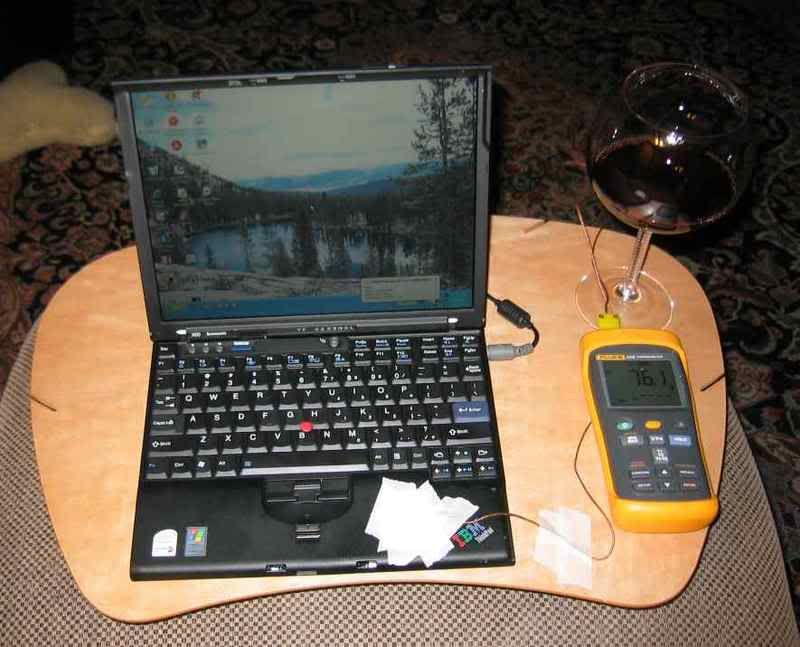
The thermocouple was taped down with many layers of masking tape (to insulate it as best as possible from the ambient temperature) in the middle of the right palmrest, and the far end was plugged into the Fluke datalogger. Before getting this far I validated the accuracy of this particular thermocouple/datalogger combination by immersing the thermocouple ("
TC") in an ice water bath and in boiling water; it was within a degree F in both cases of expected values, and room temperature readings appeared accurate compared to other digital thermometer readouts in my house.
The X60 was plugged into AC power (110v) during the entire period of temperature measurement; as may not be evident from the picture, the larger 8 cell battery was installed.
Since a long night of testing was planned, a glass of Burgundy was called for (but not left in that position given my prior experience trashing an X31 screen with spilled red wine

)
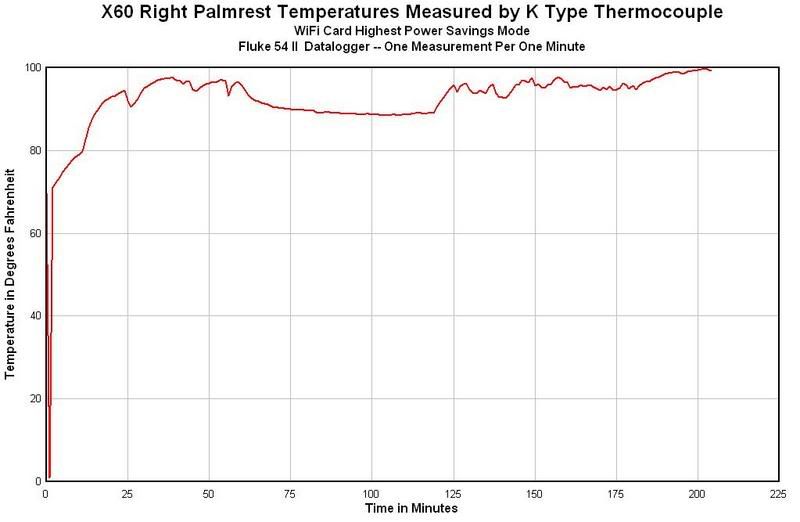
I just left the datalogger on. At first I had the wireless card set on the maximum power savings (lowest power) setting. I used the computer for a brief while and did some large downloads over my wireless internet from my desktop which correlates with higher temperatures shown. Then, I had dinner and the machine set at idle:
Later, I reset the WiFi card power savings to "medium," which is how my laptop was set when I received it from Lenovo. I also did some web browsing and file downloads, which are reflected in the times when the palmrest temperatures were the highest:
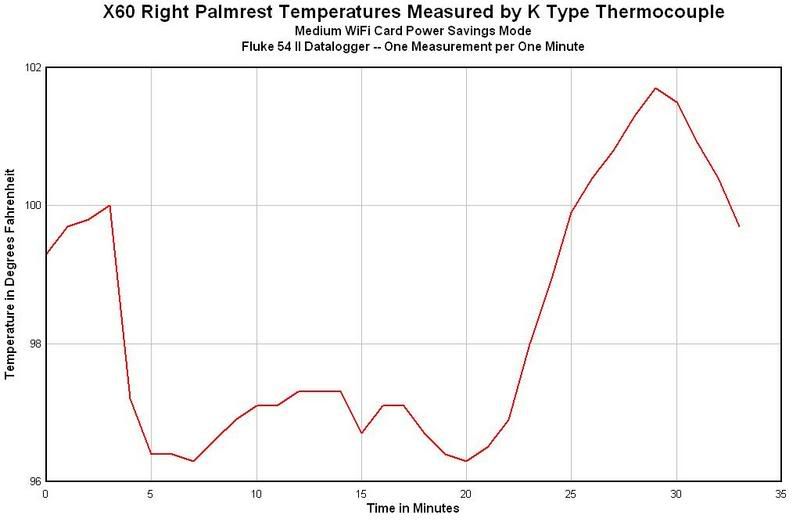
The graphs look different largely because the temperature range on the "medium" power setting is compressed since the machine was already warm at that point so it did not start from room temperature. The effect of setting the WiFi card on maximum power savings setting is to lower palmrest temperatures by a couple of degrees Fahrenheit, a real difference but nothing much to write home about.
I did look at
tpfancontrol reported temps while these temperatures measurements were being recorded. At idle, the APS temp was around 39C and the highest measurement I got with the WiFi card set to High Power Savings was around 46C (although yesterday I had readings of 48 and 49C on this setting). On Medium power savings the APS tended to be a couple of degrees warmer on average, e.g. 46-49C as opposed to maybe 42-44C on high power savings. I found some, but not total agreement (correlation) between APS temps shown on tpfancontrol and the actual palmrest measured temps.
For those who are "fahrenheit challenged," the highest recorded temperature in the study, on medium power savings, 101.8F is about 38.8C. The highest temperature recorded on the highest power savings setting was 99.6F or 37.6C.
The measurements I have taken document the temperatures that will be felt by a right hand resting on the right palmrest of my X60, which has a 1.83 ghz core duo processor, 7K100 100gb hard drive, and 2gb of RAM. In my opinion, they are uncomfortably warm. I haven't yet decided what I am going to do about this, but I'm probably going to call lenovo support and see what options I have.
Posted: Mon Jan 29, 2007 7:40 am
by krypto
Thanks for the excellent information.
I think I've read most of the threads relating to this problem. If the problem is wifi related I'm unsure why on my x60 the temperature problem only occurs when connected to mains.
It doesn't seem to matter what setting I've got my wifi on when I'm operating from battery, the palm rest never gets excessively hot. I've got the same set-up as Ken Fox except 80gb hdd instead of 100gb.
Posted: Mon Jan 29, 2007 8:42 am
by lev
Finally someone with a datalogging thermocouple gets some real data. Good work!
Your data does confirm what I've been saying all along, which is that the APS sensor reading is really only very loosely correlated with the palmrest temp.
Questions:
What was the ambient temp in the room while you were doing these tests?
What was the platform made from, that your photo shows the X60 and datalogger sitting on?
Just to confirm: your X60 has the intel 3945ABG, right?
Also, just to confirm: your X60 does not have bluetooth or WWAN?
Since you have the setup, I have some suggestions for further investigation, should you feel like it:
Try with the wireless completely switched off (you could try both the fn-f5 software switchoff, and the mechanical switch). The idea is to verify that it truly is the wireless that is to blame for the hot palmrest.
Try using tpfancontrol to switch the fan on to maximum, and compare with the fan on a very low setting/switched off. I have a theory that (with the 8-cell battery on the x60s at least) the fan does draw some air past the wireless card.
Try with different power-manager profiles, eg "maximum performance" versus a custom profile with all the settings at minimum power, but with all the idle timers turned off (unlike the default "maximum battery life"). I don't expect this to make much difference, other than perhaps due to a change in fan profile, as described above, but you never know.
Try on battery as well as AC (for completeness, you could repeat all of the above combinations on both battery and AC). Some people have reported that there is a difference, even when the wireless is switched off. Again, I would only expect this to be the case if it was due to the fan-control profile changing.
Anyway, thanks for injecting some real numbers into a discussion that really needed them.
Lev
Posted: Mon Jan 29, 2007 10:40 am
by Ken Fox
Ambient temperature in the room was around 65F, cooler than most people heat their houses. I had accidentally turned off the zone for the furnace to the upstairs, which I just noticed this morning when it was 60F!!!! The thermocouple showed an ambient temp of 65F upstairs just before I started the test.
The "platform" is just a wooden "lap desk."
My X60 has the intel card you reference plus bluetooth, which I don't use but which has been left on. There is no Verizon or other WWAN card.
At this point I don't have much interest in studying the laptop anymore. For one thing, it is about 3 weeks old and I'd like to try to get IBM/Lenovo to simply replace it, rather than have to send it in and risk them making matters worse. This means I need to get on this now. Also, I have every intention of using the laptop with the 8 cell (which in the X60 does not block any intakes our grills, whatever it may do in the X60s), and finding some obscure way I might use this laptop with this and that defeated is just not something I really want to spend time on at this juncture.
Posted: Mon Jan 29, 2007 12:30 pm
by lev
Ken Fox wrote:
My X60 has the intel card you reference plus bluetooth, which I don't use but which has been left on. There is no Verizon or other WWAN card.
I doubt it would make a difference, since most of the bluetooth circuitry sits in the lid of the thinkpad, but you could always try switching off the bluetooth, given that you don't use it. There could always be some obscure interaction due to having two radios operating in close proximity to each other (I read that with 802.11, bluetooth, wwan cards, 3 radios in a small space in modern laptops, the engineering gets tricky to avoid them interfering with each other).
lev wrote:
Since you have the setup, I have some suggestions for further investigation, should you feel like it:
(snip)
At this point I don't have much interest in studying the laptop anymore. For one thing, it is about 3 weeks old and I'd like to try to get IBM/Lenovo to simply replace it, rather than have to send it in and risk them making matters worse. This means I need to get on this now.
That sounds like your best option. They should replace it. I hope the replacement runs cooler. Unfortunately you're the only one who's posted accurate numbers so far, so it's unclear what the typical range of temperatures actually is for these devices

Also, I have every intention of using the laptop with the 8 cell (which in the X60 does not block any intakes our grills, whatever it may do in the X60s), and finding some obscure way I might use this laptop with this and that defeated is just not something I really want to spend time on at this juncture.
Understood. I don't have a X60 in front of me, but the photos I see on the web do show some air intake grilles in the front right corner.
eg:
picture
So the operation of the fan might still have something to do with it. Eg, maybe the sharp increase in temperature between 120-125 minutes on your initial graph is due to the fan shutting down after the thinkpad has been idle for an hour. Or maybe that was just when you finished dinner and went back to using the thinkpad?
Anyways, just for the sake of completeness, what was the power-manager setting you used during this test run?
Thanks for indulging my curiosity.
Lev
Posted: Mon Jan 29, 2007 1:05 pm
by Ken Fox
any suggestions on how to get them to simply replace it rather than repair it?
Also, in answer to your question, the power settings are all on default, as from the factory (I have not even looked at those). The only exception was I reduced the power to the WiFi card for the intial part of the measurements (first graph) and later went back to factory default (second graph) which they call "medium" power savings for the WiFi card, only.
ken
Posted: Mon Jan 29, 2007 3:46 pm
by lev
Ken Fox wrote:
any suggestions on how to get them to simply replace it rather than repair it?
I'm not sure, but if they're willing to take this one as a return (for a refund), then you can just order another one yourself.
Also, in answer to your question, the power settings are all on default, as from the factory (I have not even looked at those).
Interesting. The default setting on my machine as it was shipped to me had it going to standby mode after 25 minutes (when on AC). It doesn't appear that your machine does that, since you left it idle for more than an hour, and it was still hot.
Posted: Mon Jan 29, 2007 6:06 pm
by Ken Fox
Getting them to just "take it back" may be asking a bit much, but if there is a way to accomplish that please let me know who to contact.
I did get rid of "standby after 25 minutes," although I didn't regard that as a power setting. That is the only thing I changed then.
Study Repeated with Original Hardware and Diskload (pic)
Posted: Mon Jan 29, 2007 6:12 pm
by Ken Fox
Since I had to remove my new 7K100 and extra RAM stick (to be sure that I wouldn't lose them when I send the notebook back), I decided to repeat the study with the original 80gb 5400rpm hard drive and the original RAM of 1gb.
I proceeded to update the drivers and Windows XP, and later did some web browsing with IE and with Firefox (there was no obvious difference in system temp in reference to which browser I used at what time). I also downloaded a couple of large files off the Lenovo website, although stopping those downloads did not reduce the measured temps.
Here is a little less than 90 minutes worth of data:
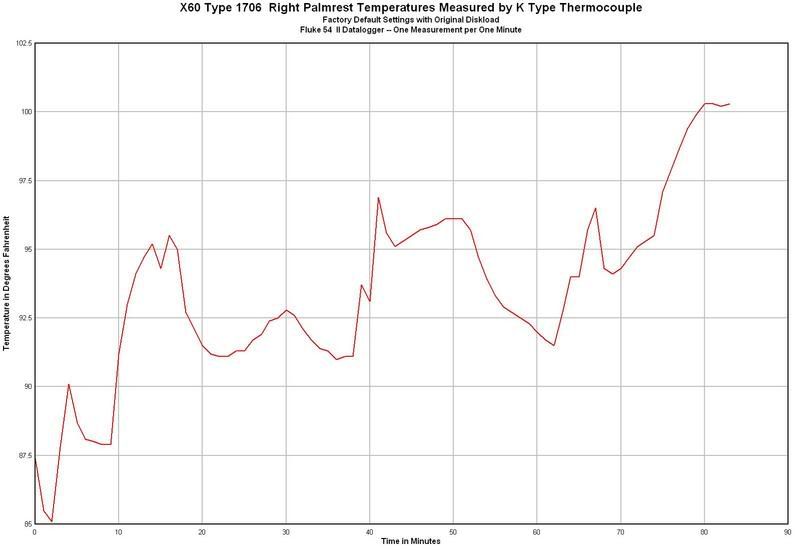
This is pretty convincing evidence to me that the problem is with the laptop as supplied and not the extra RAM or the 7K100 Hard Drive.
Subjectively, I found the palmrest unpleasant to encounter at any temperature in the low 90's fahrenheit and above, and positively noxious above body temperature (~98.6F).
Posted: Mon Jan 29, 2007 7:27 pm
by lev
Ken Fox wrote:
Getting them to just "take it back" may be asking a bit much, but if there is a way to accomplish that please let me know who to contact.
They probably won't take it back for a full refund, (unless you ask nicely and have an especially helpful rep), but I would think you could get them to take it back for a refund minus a restocking fee (15% or something) and then some people have reported that their credit card has allowed them to claim back the restock fee. Assuming you paid with a credit card, of course.
Maybe even if Lenovo wouldn't take it back, restock fee or no, maybe you're lucky and your credit card will still cover you, if you can convince them you were sold a computer that doesn't perform as a computer should.
All of this would be under "extended warranty" or "purchase security" or similar types of credit card benefit, as opposed to requesting a chargeback.
Lev
Posted: Mon Jan 29, 2007 7:54 pm
by Ken Fox
With that as a set of options I'd be inclined to try to let them fix it, realizing that things could get worse before they get better. If it comes back unfixed or with damage, then that would be the time when I'd jump up an down screaming at the top of my lungs

It isn't that I don't want an X60, and it isn't that I don't want this configuration of an X60, but if this is what I'd be stuck with (this heat on the right palmrest), I'd continue to use my X32 as my travel laptop and ebay this if no other solution presented itself.
I haven't even begun to try to work with them beyond the tech support number. I was hoping that someone had a "customer service" number I could call that would get me through to someone other than service or to a sales rep.
Posted: Mon Jan 29, 2007 11:15 pm
by gator
This is one of the best documented threads I have seen on this forum. I have one suggestion for you, Ken. Ask lenovo to send you a new system fan and try putting it on. It might just be a faulty system fan - I don't know where the exhaust grill is on the X60, but if it is on the right (like the X31/32), a faulty fan might be a cause for high temps. After I replaced the fan in my X31, it runs way cooler than before - but hey, it was a used X31 to begin with. I don't know if your 21 day return period is up, but if you are out of it, you can think about trying this.
Posted: Tue Jan 30, 2007 12:23 am
by sugo
The fan is at the top left corner while the palmrest is located at bottom right. I am afraid the fan is not going to help much.
Ken, room temperature 65'F is quite cold to me. If you still find the palmrest too warm, I would have gone back to X32 in your situation as well.
Posted: Tue Jan 30, 2007 1:32 am
by Ken Fox
To gator and sugo,
The fan in the X60 goes on and off. Looking at reported temperatures in tpfancontrol, I think it is working correctly. And none of the reported temps are monstrously high (never seen anything beyond the low 50's C on any of the sensors). So how can there be a reasonably cool internal system with what seems to be a working fan, but uncomfortably high temperatures on the right palmrest? Beats me.
Some have reported that when they sent their laptops in for repair for this problem that the problem was fixed. Generally they have said that the motherboard was replaced.
I'm willing to give it a go in the absence of anything else to do. Fortunately my X32 still functions just fine, and I never intended to get rid of that jewel no matter what (no more PMs from forum participants requesting a sales price on the X32, please; it is not for sale).
If the X60 comes back no better, it is ebay bound since I'm just not going to use it with temps only a degree or two lower than the maximum setting on . . . . my hot tub.
The most surprising thing to me is that with the sorts of things I use laptops for, the X60 is not very noticeably faster than the X32. Also surprisingly, out of my 3 new laptops the 2 obvious keepers are the T43 and the Z61T, both of which I'd thought were likely to be resale bait within a few months of their purchase. The one laptop I'd assumed I'd keep for the duration (the X60) is the one I'm least happy with.
Posted: Tue Jan 30, 2007 4:20 am
by tackat
Next time you post graphs like this, could you please post them using units that are not US centric? I got the impression that this is an international forum and given that Celsius has been internationally accepted I'd like to kindly ask you to use that next time. Thanks in advance

Posted: Tue Jan 30, 2007 10:48 am
by Ken Fox
tackat wrote:Next time you post graphs like this, could you please post them using units that are not US centric? I got the impression that this is an international forum and given that Celsius has been internationally accepted I'd like to kindly ask you to use that next time. Thanks in advance
If you had read my posts carefully rather than just briefly looking at the graphs

you would have noticed that I DID give celsius conversions for the highest temperatures reached. To reiterate from the first post,
"For those who are "fahrenheit challenged," the highest recorded temperature in the study, on medium power savings, 101.8F is about 38.8C. The highest temperature recorded on the highest power savings setting was 99.6F or 37.6C."
For your reference, human body core temperature is approximately 98.6F or 37C. In operation my X60 has peak right palmrest temperatures above that and idling temps (when not being used) below that. I find the average temps when the laptop is in use, which are a tiny bit below body core temperature, to be uncomfortable, and those temps observed during intensive websurfing or file transfers, that are above body core temp., to be intolerable.
I hope this answers your questions and I will endeavor in the future to be a better citizen of the world
Est-ce que ça supportable?
Great News
Posted: Tue Jan 30, 2007 4:47 pm
by Ken Fox
I got the easyserv box today for sending in the laptop for repair. I noticed that the return label was for Selectron, which given stuff I've read here was scary. I called the number and spoke first with a woman and later with a man, a senior tech. I described the problem to the tech and he said that palmrest temps like these are unacceptable. He asked me how long I'd had it, and given that it was less than 30 days, he suggested I call lenovo, give the sales person all the case numbers on the machine (there were FIVE), and request a replacement.
I did this. The woman I spoke to at Lenovo was very nice and once she looked at the case file she immediately offered an exchange of the machine for a new one. She said, "we stand behind our equipment and when there is a defective machine, we replace it."
So, I'm boxing up the old one and should get a new machine within a week and a half.
Goes to show you, every dog has his day.
Posted: Tue Jan 30, 2007 7:53 pm
by gator
keep us posted!
Posted: Tue Feb 13, 2007 1:16 am
by Ken Fox
gator wrote:keep us posted!
Lenovo did in fact take the first X60 back (beginning of last week; my credit card has already been credited) and I received the new one today.
I swapped back in the 1gb extra RAM chip, ran a couple of passes of Memtest86+ (passed, not surprising, had run that extra RAM chip through 4 passes before on the old one), and swapped back in the 7K100 I'd pulled out of the old one. It seems as though they've upgraded the Bluetooth module as the system needed to load in some new drivers (found new hardware; "enhanced bluetooth blah blah blah"), otherwise no issues.
Right palmrest in this new laptop is still warm however not painfully hot as was the other one. I'll have to use it some more to be sure it doesn't get very hot with further use.
I'm not going to put the Thermocouple on the palmrest of this one unless it gets so hot that I feel compelled to measure it.
Posted: Tue Feb 13, 2007 1:45 am
by pianowizard
Ken, I have forgotten whether the T43's palmrest gets hot.; how warm does yours get? I would like to know because my T60 (which replaced my T43) feels pretty warm even with the wireless card on minimum power, and I don't recall the T43 ever getting so warm. This T60 is not as warm as the X60s that I had, but still a little uncomfortable.
Posted: Tue Feb 13, 2007 2:30 am
by Ken Fox
pianowizard wrote:Ken, I have forgotten whether the T43's palmrest gets hot.; how warm does yours get? I would like to know because my T60 (which replaced my T43) feels pretty warm even with the wireless card on minimum power, and I don't recall the T43 ever getting so warm. This T60 is not as warm as the X60s that I had, but still a little uncomfortable.
The T43 palmrest is just like the one on my X32; as cool as the ambient temperature in the room. It has a 2ghz processor in it and is not noticeably slower with my usage than my Z or X models with core duos.
For what it is worth, my Z61T is NOT warm on the palmrest even though it has the speediest processor in my little thinkpad collection, a T2500 Core Duo 2ghz. Of course it is that weird 14" widescreen configuration which may have given them a little bit more space to spread out the heat.
I'd be curious to know if other current laptops of similar computing power to the X61 and T60 have similar issues of heat radiating up to places that hands lie in order to type on them and use them.
I never measured high internal temps on the former X60. The highest temp I got on any of the sensors was around 52C. BUT, the heat was radiating out of a place that was unpleasant to be exposed to rather than just going out a side or back vent.
By the way, I continue to like my T43 very much and don't regret getting it over getting a T60 for twice as much. What's more, I can use my old docking station with DVI, which I bought for the former T42, and did not have to buy one of the newer versions for several hundred bucks.
Posted: Tue Feb 13, 2007 9:08 am
by gunston
interesting!!!
have a look on my X60s temperature reading...
http://img353.imageshack.us/img353/4884 ... ingzy3.jpg
Posted: Tue Feb 13, 2007 11:07 am
by Ken Fox
Those look relatively similar to what I got with the first one, and the right palmrest was either very very warm or almost too hot to use when I got readings like that.
I did not however find a 1:1 relationship with any of those numbers, even the APS number, and palmrest temps.
How does the machine feel when you use it?
Posted: Thu Feb 15, 2007 4:19 am
by gunston
well, it warm and still bearable for me.
I did try a few X60/s from my colleagues, they are all relatively got the same Level of Warm here.
what about your APS temp. reading, would you mind to show me?
is it interesting to know, or maybe i should return my X60s to IBM, one to one exchange with a new one?
Posted: Thu Feb 15, 2007 9:00 am
by wizardofoz
Well its seems I must not use the rest that much...until today... when I happened to notice how warm it was....
Now granted at my home I typically use the system closed with external monitor keyboard and mouse and in aircon room.
Interestingly IBM just replaced my motherboard and this may be related to the default bios settings perhaps or just the fact that normally when operating on the internal keyboard i dont have the unit on the AC power as I happened to be doing today.
I have now unplugged the supply and will see if the situation improves or not, but so far it would appear to be somewhat cooler.
Ambient temp is probably about 25-30 Deg C now (as always in Singapore)
Cheers
Paul
Posted: Thu Feb 15, 2007 11:03 am
by Ken Fox
gunston wrote:well, it warm and still bearable for me.
I did try a few X60/s from my colleagues, they are all relatively got the same Level of Warm here.
what about your APS temp. reading, would you mind to show me?
is it interesting to know, or maybe i should return my X60s to IBM, one to one exchange with a new one?
I don't have a plot of APS temps and I no longer have the offending machine as it has gone back to Lenovo. The highest I saw on the APS measurement was about 52C and at that temp I had my highest recorded palmrest readings with the thermocouple, around 102 degrees F, roughly 39C.
There is no absolute agreement between any of the sensor readings and the actual measured palmrest readings. I think those internal sensor readings are of limited value and it is best to measure the actual palmrest temps with a thermocouple if you have access to one.
I can't tell you what you should do with your X60. You would need to contact Lenovo to find out what your options are at this point. If you have had the machine for more than 30 days, exchange for another one is probably not an option they will offer.
My new one has now been used extensively for 2 evenings. I have not altered the WiFi card settings from the standard "medium" power savings as shipped from the factory. This machine is noticeably cooler than the other one on the palmrest. I have not done any measurements and don't plan to do any as long as it is not uncomfortable.
Posted: Fri Feb 16, 2007 6:36 pm
by tselling
Ken,
Did you take a look at the underside of the palmrest of both machines? Wondering if they changed something in the palmrest to keep the heat from going upwards.
Posted: Fri Feb 16, 2007 8:56 pm
by gunston
tselling wrote:Ken,
Did you take a look at the underside of the palmrest of both machines? Wondering if they changed something in the palmrest to keep the heat from going upwards.
oh, it that true????
something to prevent the heat from radiating upward?
Posted: Sat Feb 17, 2007 12:46 am
by Ken Fox
tselling wrote:Ken,
Did you take a look at the underside of the palmrest of both machines? Wondering if they changed something in the palmrest to keep the heat from going upwards.
Sorry, no.
I have removed the palmrest on my Z61T, in order to upgrade the RAM, but there has not been any reason to do so on either my former or present X60.
I don't know what if anything has changed. The only difference I saw was that when I put my upgraded 7K100 hard drive back in the new one, that had been in the old one, there was a need to upgrade the bluetooth drivers. This suggests to me that something has changed in the system, at least the bluetooth module.
I'm not keen to do any unnecessary disassembly of the laptop, especially since I don't know what the former one looked like in any event.
Posted: Thu May 10, 2007 12:03 am
by Ken Fox
Further use of the replacement X60 shows that when used with a WiFi connection for extended periods, the right palmrest still becomes annoyingly hot. Not as hot to the touch as the first one I had, but annoyingly hot nonetheless. This is a flaw in the design of this laptop and one that should be considered by those considering its purchase, especially those who will use the laptop with continuous WiFi connections, who don't use a USB mouse, and/or touch typists who type a lot, and will leave their right palms in physical contact with the laptop.

