Page 1 of 1
X220T Msata?
Posted: Mon Jan 23, 2017 9:39 am
by blink
Hi have an x220T that i would like to try MSATA in?
I know you can on the non tablet X220, seen a video on you tube. Can anyone please confirm that the x220T also has an MSATA slot & it is the same kind of procedure?
Just installing in a x220 while it doesnt look too difficult still makes me a little nervous, im not too good at this type of thing!
Im not sure if i would attempt on the tablet if it was any harder lol.
Any tips would be appreciated
Thanks
Re: X220T Msata?
Posted: Mon Jan 23, 2017 6:06 pm
by rjwilmsi
As per Lenovo hardware maintenance manual (X220T is 0a60175_04.pdf) the X220T has mSATA slot in same place as regular X220, so it's just a matter of removing screws to lift up keyboard, then palm rest to put mSATA card in the slot and screw it down. It's straightforward, all you need is a screwdriver of the right size and a few minutes' patience. Only tip I'd give is that you don't need to disconnect the ribbon cable to the palmrest, just gently lift up the palmrest with it connected, put the palmrest upside down where the keyboard was to create space to access mSATA slot.
Re: X220T Msata?
Posted: Mon Jan 23, 2017 8:15 pm
by ZaZ
Here's a picture of the mSATA SSD from my X220i, which should be the same:

Re: X220T Msata?
Posted: Mon Feb 13, 2017 8:59 am
by wujstefan
How do you like your mSata in those machines? I've got mine running on a SSD, but am thinking about swapping to msata to reduce weight (since I travel a lot w/ this one and each single gram does matter).
Re: X220T Msata?
Posted: Mon Feb 13, 2017 2:15 pm
by ZaZ
wujstefan wrote:How do you like your mSata in those machines?
I like it a lot. mSATA/M.2 SSD plus a HDD is the best setup in my opinion. Cause you get the SSD(speed) for the boot drive and a platter drive for storage, where speed is not as critical. Those who don't need the HDD can drop it for weight savings. I never understood why more manufacturers don't use this setup, but what do I know? I read it's coming back on the T470, but I don't want to be forced to use Windows 10.
Re: X220T Msata?
Posted: Sun Feb 19, 2017 9:11 pm
by blink
Thanks so much for your help guys & the pics much apprciated. I have managed it so far in my X220i that i use as a music media server hooked up to tv with ultrabase hdd so 1 msata & 2 spinning hdds in it now

.
Still not attempted on my X220T but likely to be my next project.
Re: X220T Msata?
Posted: Fri Mar 03, 2017 7:07 pm
by apojoga
Happy with a 256GB mSATA in my X220. Secondary HDD for data.
Re: X220T Msata?
Posted: Wed Aug 22, 2018 6:48 pm
by bjf
Dear
Please if you can answer me,
I have Lenovo X220 Tablet, It is a different brand than X220
I would like to upgrade it with mSATA also I would like to keep 2Tb hard disk for data and all my music.
I have seen you have done the same,
I would kindly ask you to confirm if you have X220 tablet. Because the X201 never take or read the mSATAT
Regards
Re: X220T Msata?
Posted: Wed Aug 22, 2018 8:14 pm
by TPFanatic
X220 Tablet can use MSATA in its WWAN slot.
Re: X220T Msata?
Posted: Wed Aug 22, 2018 9:57 pm
by axur-delmeria
TPFanatic wrote: ↑Wed Aug 22, 2018 8:14 pm
X220 Tablet can use MSATA in its WWAN slot.
I concur. To dispel your doubts, the
X220T Hardware Maintenance Manual's Chapter 8, Section 1170 provides the instructions for removing and installing an mSATA SSD.
Re: X220T Msata?
Posted: Thu Sep 12, 2024 10:18 am
by DC69
Hello ladies and gentleman.
I am thinking about upgrading mine with a similar combination, mSATA to run the OS and other programs and a large HDD for files and documents. My only question is regarding the form factor of the mSATA. The correct size is the 2242 and not the 2230, right? Any other requirements I should pay attention to when buying?
Thank you.
Re: X220T Msata?
Posted: Thu Sep 12, 2024 10:25 am
by axur-delmeria
DC69 wrote: ↑Thu Sep 12, 2024 10:18 am
Hello ladies and gentleman.
I am thinking about upgrading mine with a similar combination, mSATA to run the OS and other programs and a large HDD for files and documents. My only question is regarding the form factor of the mSATA. The correct size is the 2242 and not the 2230, right? Any other requirements I should pay attention to when buying?
Thank you.
Both are the wrong size, because "2242" and "2230" are for M.2 SSDs.
Let's use this side-by-side photo:
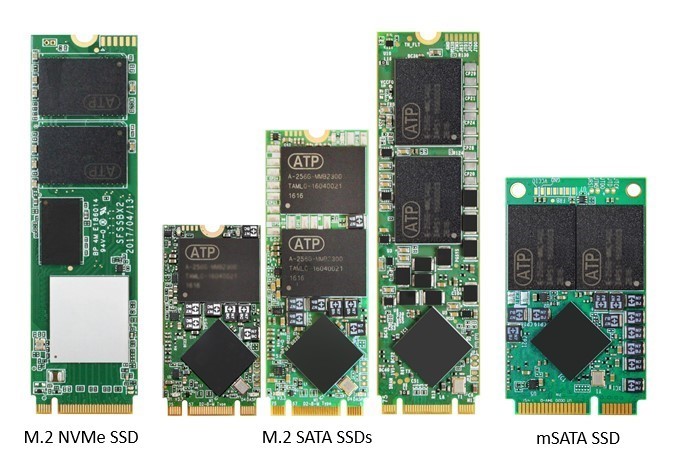
The rightmost one is mSATA. Notice the two holes for the screws.
The second one from the left is an M.2 2242 SSD. Notice that the edge connector (the row of golden contacts at the bottom) is very different from mSATA, and that it's considerably smaller.
Re: X220T Msata?
Posted: Thu Sep 12, 2024 11:37 am
by DC69
axur-delmeria wrote: ↑Thu Sep 12, 2024 10:25 am
DC69 wrote: ↑Thu Sep 12, 2024 10:18 am
Hello ladies and gentleman.
I am thinking about upgrading mine with a similar combination, mSATA to run the OS and other programs and a large HDD for files and documents. My only question is regarding the form factor of the mSATA. The correct size is the 2242 and not the 2230, right? Any other requirements I should pay attention to when buying?
Thank you.
Both are the wrong size, because "2242" and "2230" are for M.2 SSDs.
Let's use this side-by-side photo:
The rightmost one is mSATA. Notice the two holes for the screws.
The second one from the left is an M.2 2242 SSD. Notice that the edge connector (the row of golden contacts at the bottom) is very different from mSATA, and that it's considerably smaller.
Ah, I see. Thank you for explaining.
Re: X220T Msata?
Posted: Wed Nov 12, 2025 6:38 pm
by deickos
blink wrote: ↑Mon Jan 23, 2017 9:39 am
Hi have an x220T that i would like to try MSATA in?
Any tips would be appreciated
Thanks
note the msata ssd will work at sata 2 speeds (whereas the main ssd at sata 3)
Re: X220T Msata?
Posted: Thu Nov 13, 2025 2:28 am
by ZaZ
Fpr typical usage, that's probably not that noticeable.