Page 1 of 1
"ME is in recovery state" Appears when I boot my X220
Posted: Sun Nov 25, 2018 4:08 am
by StarGehzer
When I boot up my X220 (Win7) the first thing to appear on the screen is the words, "ME is in recovery state" in the top left corner.
It never did that before today, and it does it every time I boot, even if I boot to a USB drive.
BIOS is the latest version.
I don't even know what 'ME' is, so how do I get it out of recovery state?
Re: "ME is in recovery state" Appears when I boot my X220
Posted: Sun Nov 25, 2018 7:13 am
by shawross
Have you just updated the Bios?
Maybe see if you can reflash the Bios. Did you use the modded bios or the Lenovo Bios?
You could try either now maybe.
Edit - I just read somewhere where another person had this problem and removed the Bios battery and it came good. Or maybe you could just remove you normal battery and then hold down the power button for 15 secs.
Re: "ME is in recovery state" Appears when I boot my X220
Posted: Sun Nov 25, 2018 1:53 pm
by StarGehzer
Thanks for your reply.
The BIOS was upgraded to the latest version a long time ago. When the issue started I did some research & there were some suggestions that the BIOS was involved so I 're-flashed the BIOS, did the restart, the F9, & reset the things the way I wanted them.
It didn't make any difference.
After reading your note I removed the power cable & the battery then held the power button down for 20 seconds or so, the reinstalled the battery & cable.
When I booted up NO MORE ERROR MESSAGE!

Thank You!
BTW, if anyone can explain what the error message 'ME is in recovery state' actually means, I'd love to know.
Re: "ME is in recovery state" Appears when I boot my X220
Posted: Sun Nov 25, 2018 4:21 pm
by GomJabbar
According to the following post, this is likely caused by corrupted firmware. Sometimes removing all power such as what you did above will fix the problem. I have not seen this message before on my X220, but I did have to remove all power such as you did to resolve boot up problems.
https://www.dell.com/community/Laptops- ... -p/3934825
Re: "ME is in recovery state" Appears when I boot my X220
Posted: Sun Nov 25, 2018 7:36 pm
by shawross
StarGehzer wrote:BTW, if anyone can explain what the error message 'ME is in recovery state' actually means, I'd love to know.
When you did the reset you actually reset the Embedded Controller which runs Intel ME. You actually have 2 different operating systems in your X220. Little is known about the OS that Intel controls.
Re: "ME is in recovery state" Appears when I boot my X220
Posted: Mon Nov 26, 2018 12:38 am
by StarGehzer
GomJabbar wrote: ↑Sun Nov 25, 2018 4:21 pm
According to the following post, this is likely caused by corrupted firmware. Sometimes removing all power such as what you did above will fix the problem. I have not seen this message before on my X220, but I did have to remove all power such as you did to resolve boot up problems.
https://www.dell.com/community/Laptops- ... -p/3934825
Thanks! that link was interesting!
Re: "ME is in recovery state" Appears when I boot my X220
Posted: Mon Nov 26, 2018 12:42 am
by StarGehzer
shawross wrote: ↑Sun Nov 25, 2018 7:36 pm
StarGehzer wrote:BTW, if anyone can explain what the error message 'ME is in recovery state' actually means, I'd love to know.
When you did the reset you actually reset the Embedded Controller which runs Intel ME. You actually have 2 different operating systems in your X220. Little is known about the OS that Intel controls.
Thanks! I wondered if it was a translation issue where perhaps they tried to say something like "I am in recovery mode" ('I' being the computer)
So it actually refers to the Intel ME, which still says nothing about what 'ME' is. LOL
Re: "ME is in recovery state" Appears when I boot my X220
Posted: Mon Nov 26, 2018 6:04 am
by RealBlackStuff
It's the CPU's built-in spyware from
Intel:
Management Engine.
Re: "ME is in recovery state" Appears when I boot my X220
Posted: Mon Nov 26, 2018 3:55 pm
by StarGehzer
THAT is a great link, explained it so I could mostly understand it! LOL
Thanks!
Re: "ME is in recovery state" Appears when I boot my X220
Posted: Wed Jun 19, 2019 9:13 pm
by Bobs
StarGehzer wrote: ↑Sun Nov 25, 2018 1:53 pm
Thanks for your reply.
The BIOS was upgraded to the latest version a long time ago. When the issue started I did some research & there were some suggestions that the BIOS was involved so I 're-flashed the BIOS, did the restart, the F9, & reset the things the way I wanted them.
It didn't make any difference.
After reading your note I removed the power cable & the battery then held the power button down for 20 seconds or so, the reinstalled the battery & cable.
When I booted up NO MORE ERROR MESSAGE!
Thank You!
BTW, if anyone can explain what the error message 'ME is in recovery state' actually means, I'd love to know.
Thanks for this, I have been looking for a fix for 2 days, much appreciated All
Re: "ME is in recovery state" Appears when I boot my X220
Posted: Wed Jun 19, 2019 11:27 pm
by skx
StarGehzer wrote: ↑Mon Nov 26, 2018 3:55 pm
THAT is a great link, explained it so I could mostly understand it! LOL
Thanks!
I highly advise you to clean your X220's Intel ME:
1. as stated by RealBlackStuff, it is malicious lowlevel spyware out of enduser's control and without any benefit for the enduser
2. cleaning the malicious Intel ME is very easy for X220 with its bios chip under the palmrest
3. your X220 Intel ME is already >1 year vulnerable to security exploits which are no longer patched by Lenovo, you can test yourself with INTEL-SA-00086 Detection Tool:
https://downloadcenter.intel.com/download/27150?v=t
4. you only need to buy a cheap 5USD CH341A USB SPI programmer on ebay
All instructions here:
https://github.com/corna/me_cleaner Same difficulty level as flashing a modified EC. Just do it

Re: "ME is in recovery state" Appears when I boot my X220
Posted: Tue Jul 23, 2019 3:18 am
by 31336
Removing ME seems to introduce boot delay, also reported here:
https://github.com/corna/me_cleaner/issues/38
Or are you guys just using Alt Disable Mode (
me_cleaner.py -s)?
(Edit: This probably doesn't happen with Coreboot, so that's another possibililty.)
Re: "ME is in recovery state" Appears when I boot my X220
Posted: Wed Jul 24, 2019 7:27 pm
by skx
31336 wrote: ↑Tue Jul 23, 2019 3:18 am
Removing ME seems to introduce boot delay, also reported here:
https://github.com/corna/me_cleaner/issues/38
Or are you guys just using Alt Disable Mode (
me_cleaner.py -s)?
(Edit: This probably doesn't happen with Coreboot, so that's another possibililty.)
I flashed my devices with lowercase -s.The boot delay is not a bug but a feature

It is like 1a2 seconds and only occurs when coldbooting your machine. It is normal as we disabled ME and the bios is waiting to activate it but it is no longer present. If you want to avoid the boot delay your need to coreboot your machine, instant boot and coreboot is 100% complete for X220 with everything supported. Either flash coreboot or get used to a minor boot delay if you prefer keeping the lenovo bios. Small trade off to avoid having a vulnerable spying machine.
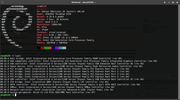
look at my machine, the spyware is no longer available

just flash it!
Re: "ME is in recovery state" Appears when I boot my X220
Posted: Thu Jul 25, 2019 2:42 am
by 31336
skx wrote: ↑Wed Jul 24, 2019 7:27 pm
The boot delay is [...] like 1a2 seconds
Interesting. For me the delay is >5s but I removed everything (
-r -t -d -S). Was your ME firmware 1.5MB or 5MB? Mine was the latter unfortunately (AMT board, FRU # 04Y1834; there was supposedly non-AMT FRU # 04Y1835 with matching specs but it only seems to exist in the HMM).
I wanted to stay with the (sort of) stock BIOS. Before flashing I assumed disabling end-of-POST notification to ME will do away with the delay but that doesn't change anything (and the option to disable ME completely is grayed out):
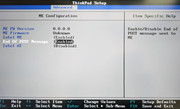
Will experiment with it some more when I have the time (and post an update). I agree getting rid of the rootkit is worth it, boot delay or not.
Re: "ME is in recovery state" Appears when I boot my X220
Posted: Sat Jul 27, 2019 11:40 pm
by skx
31336 wrote: ↑Thu Jul 25, 2019 2:42 am
skx wrote: ↑Wed Jul 24, 2019 7:27 pm
The boot delay is [...] like 1a2 seconds
Interesting. For me the delay is >5s but I removed everything (
-r -t -d -S). Was your ME firmware 1.5MB or 5MB? Mine was the latter unfortunately (AMT board, FRU # 04Y1834; there was supposedly non-AMT FRU # 04Y1835 with matching specs but it only seems to exist in the HMM).
I wanted to stay with the (sort of) stock BIOS. Before flashing I assumed disabling end-of-POST notification to ME will do away with the delay but that doesn't change anything (and the option to disable ME completely is grayed out):
Will experiment with it some more when I have the time (and post an update). I agree getting rid of the rootkit is worth it, boot delay or not.
which bios version do you have?
Re: "ME is in recovery state" Appears when I boot my X220
Posted: Tue Jul 30, 2019 6:10 am
by 31336
skx wrote: ↑Sat Jul 27, 2019 11:40 pm
which bios version do you have?
It's
1.43 from
John McDonnell's website (
direct link to file), which includes modifications by
Oleh and
ValdikSS. It's the latest version with the newer VBIOS (later removed due to stability issues on Linux) and before all the Meltdown/Spectre mitigations of dubious quality and with the potential of slowing down the system.