T420s Optimus quad digital monitor output problem
Posted: Sun Nov 27, 2011 12:56 pm
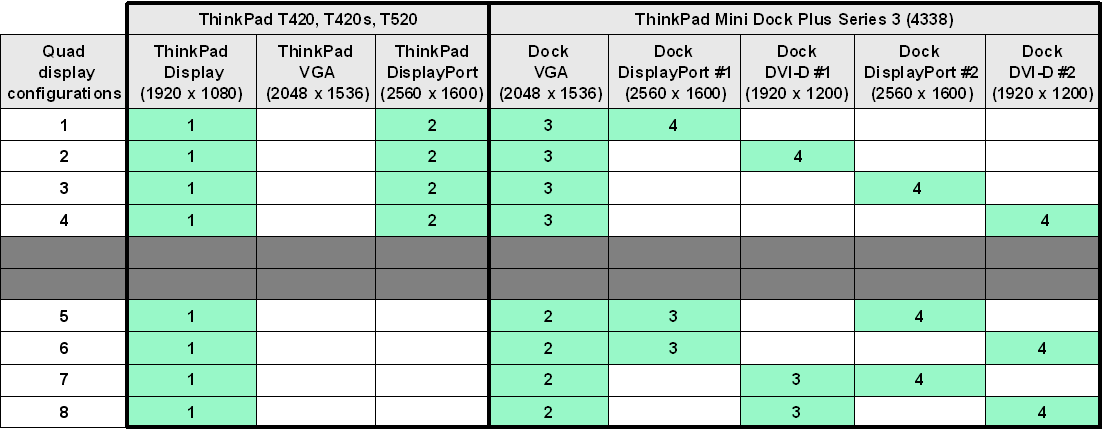
I purchased a Thinkpad T420s with Optimus graphics along with a Mini Dock Plus Series 3 (4338-10U) to replace my triple monitor desktop setup. So far I’ve been unable to replicate Lenovo’s quad digital monitor setup described in the following documentation:
NVIDIA Optimus - ThinkPad Multiple Monitor Configurations
Technical Brief - Thinkpad Multiple Monitor Configurations Using nVidia OPTIMUS Technology
I’m trying to connect three Dell U2410’s (1920x1200) in the following fashion:
• Thinkpad Display (1600x900)
• Monitor 1 – DisplayPort (Thinkpad T420s) (1920x1200)
• Monitor 2 – DVI1/DP1 (Dock) (1920x1200)
• Monitor 3 – DVI2/DP2 (Dock) (1920x1200)
According to the documentation above, this configuration should work. The problem I’m running into is the nVidia NVS 4200 controls all the digital outputs (DVI & Displayport) and will only allow two displays. The Intel IGP controls the T420s display and the VGA outputs. I am able to get the setup running using the VGA output in place of the DVI output on the dock, but this is not an optimal solution.
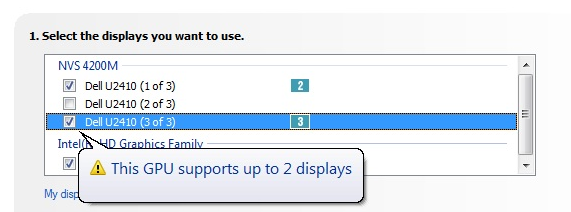
According to the latest Readme.txt for the Optimus drivers:
So far I have been unable to get an answer from Lenovo Tech Support, which I have spent more time educating them on what their product should be capable of.
Latest BIOS (1.30)
Latest Optimus Drivers (8.17.12.7593)
Any help would be greatly appreciated.
NVIDIA Optimus - ThinkPad Multiple Monitor Configurations
Technical Brief - Thinkpad Multiple Monitor Configurations Using nVidia OPTIMUS Technology
I’m trying to connect three Dell U2410’s (1920x1200) in the following fashion:
• Thinkpad Display (1600x900)
• Monitor 1 – DisplayPort (Thinkpad T420s) (1920x1200)
• Monitor 2 – DVI1/DP1 (Dock) (1920x1200)
• Monitor 3 – DVI2/DP2 (Dock) (1920x1200)
According to the documentation above, this configuration should work. The problem I’m running into is the nVidia NVS 4200 controls all the digital outputs (DVI & Displayport) and will only allow two displays. The Intel IGP controls the T420s display and the VGA outputs. I am able to get the setup running using the VGA output in place of the DVI output on the dock, but this is not an optimal solution.
According to the latest Readme.txt for the Optimus drivers:
So if the nVidia NVS 4200M controls all the digital outputs on the Thinkpad and dock, but only supports two displays, how can one use a quad display setup as described in Lenovo’s documentation?NVIDIA Optimus Technology
…
DISPLAY TOPOLOGY
Since Optimus Technology has the ability to use two display adapters, some
display monitors (or displays) are assigned to specific adapter. Below
describes which display adapter controls the display connector for a certain
display monitor.
ThinkPad T420, T420i, T420s, T420si, T520, T520i
NVIDIA NVS 4200M
- Computer's DisplayPort connector
- Docking Station's DVI connector(s) or DisplayPort connector(s)
Intel HD Graphics Family
- (Computer's LCD)
- Computer's analog VGA connector
- Docking Station's analog VGA connector
So far I have been unable to get an answer from Lenovo Tech Support, which I have spent more time educating them on what their product should be capable of.
Latest BIOS (1.30)
Latest Optimus Drivers (8.17.12.7593)
Any help would be greatly appreciated.