Page 1 of 1
USB 3.0 Adaptor or Drive caddy for T520
Posted: Sat Aug 12, 2023 2:06 pm
by freeagent
I see 34mm Expresscard adapters on Amazon and Aliexpress that have one or two USB 3.0 ports. (Some with not so good reviews) Has anyone used these? How much of an improvement in speed will they provide over 2.0.
I would use one of these mainly for backups that take a long time on USB 2.0! I already have a USB 3.0 2Tb Seagate back up drive.
Another option, is to use the T520 DVD drive caddy. But I would have to buy an SSD for that. Only spare HDs I have are 250Gb or less and not SSDs. A 500Gb SSD might do it. They say the SSD transfer speeds are ~6Gb/sec. Approx same as USB 3.0? But what would real world speeds be for USB 3.0 is an Expresscard adapter vs SSD is in the T520 drive caddy?
Re: USB 3.0 Adaptor or Drive caddy for T520
Posted: Sat Aug 12, 2023 3:59 pm
by dr_st
With a fast SSD, the caddy has much higher speed potential.
See
here for testing of a pretty fast thumbdrive (Sandisk Extreme USB 3.0) via the ExpressCard adapters, and
here for some testing of a SATA SSD in an Ultrabay Caddy. To see what you can expect, pay attention specifically to the X220, as it is same generation as your T520.
Re: USB 3.0 Adaptor or Drive caddy for T520
Posted: Sat Aug 12, 2023 5:02 pm
by kfzhu1229
freeagent wrote: ↑Sat Aug 12, 2023 2:06 pm
I see 34mm Expresscard adapters on Amazon and Aliexpress that have one or two USB 3.0 ports. (Some with not so good reviews) Has anyone used these? How much of an improvement in speed will they provide over 2.0.
I would use one of these mainly for backups that take a long time on USB 2.0! I already have a USB 3.0 2Tb Seagate back up drive.
Another option, is to use the T520 DVD drive caddy. But I would have to buy an SSD for that. Only spare HDs I have are 250Gb or less and not SSDs. A 500Gb SSD might do it. They say the SSD transfer speeds are ~6Gb/sec. Approx same as USB 3.0? But what would real world speeds be for USB 3.0 is an Expresscard adapter vs SSD is in the T520 drive caddy?
My experience with those kind of USB adapters is that they will struggle once you have a device that draws a lot of power like an external hard drive and also they protrude a lot.
As for the DVD drive caddy that is the option I go with on my Latitude E6430, I would do the same on the T520, especially since T520's ultrabay is of course hot swappable too. You can just buy a standard height 12.7mm optical drive and transfer the mounting hardware and faceplate of your existing DVD drive over. Works with any standard or slim 2.5" HDD or SSD's. Transfer is definitely more reliable than on USB3.0.
And since you have a T520 and not a T530, might I suggest also look into the now obselete esata port and you can rig up an external enclosure there as well and that will just practically run on sata.
Re: USB 3.0 Adaptor or Drive caddy for T520
Posted: Sat Aug 12, 2023 5:39 pm
by TPFanatic
Only select t520 have the esata port. But you can acquire a mini dock with an esata port.
Re: USB 3.0 Adaptor or Drive caddy for T520
Posted: Sat Aug 12, 2023 8:23 pm
by freeagent
dr_st wrote: ↑Sat Aug 12, 2023 3:59 pm
With a fast SSD, the caddy has much higher speed potential.
See
here for testing of a pretty fast thumbdrive (Sandisk Extreme USB 3.0) via the ExpressCard adapters, and
here for some testing of a SATA SSD in an Ultrabay Caddy. To see what you can expect, pay attention specifically to the X220, as it is same generation as your T520.
Thanks - Great info, just what I needed! I already have a drive caddy, so cost will just be for the SSD. My wife's laptop has USB 3, so I will dedicate my 2TB backup drive to her! And maybe my next laptop will use it too.
BTW kfzhu, I don't have an eSATA port on my T520. CORRECTION: I guess I do - Just did not know it was there or that it could be used as extra usb port!
I do have one other option. I currently have Win 10 on my 256Gb mSATA drive. Main 500GB SSD has two partitions. One for Win 7 and one for data. Maybe I could delete Win 7 (no longer needed) and move Win 10 to one partition of the 500GB drive? Then use mSata for backup. It is only 256Gb, but might be enough. I have an enclosure for it, so can use it externally if need be. Won't help if I lose the laptop though!
Re: USB 3.0 Adaptor or Drive caddy for T520
Posted: Sat Aug 12, 2023 10:37 pm
by kfzhu1229
freeagent wrote: ↑Sat Aug 12, 2023 8:23 pm
BTW kfzhu, I don't have an eSATA port on my T520. CORRECTION: I guess I do - Just did not know it was there or that it could be used as extra usb port!
I do have one other option. I currently have Win 10 on my 256Gb mSATA drive. Main 500GB SSD has two partitions. One for Win 7 and one for data. Maybe I could delete Win 7 (no longer needed) and move Win 10 to one partition of the 500GB drive? Then use mSata for backup. It is only 256Gb, but might be enough. I have an enclosure for it, so can use it externally if need be. Won't help if I lose the laptop though!
Ye I just thought it would be silly if the replacement motherboard you got has no esata port while the one I fixed up from you has that port. That esata port does double as an USB port or you can just use it for SATA since it's basically SATA2 lanes + USB 5V rail. You need the correct enclosure to use it though. I think you mentioned you have a sandisk 2TB external backup drive thing and probably if you open that up there is a standard 2.5" HDD inside if it is the bigger ones.
T530 does not have this port.
Re: USB 3.0 Adaptor or Drive caddy for T520
Posted: Mon Aug 14, 2023 9:04 am
by Colonel O'Neill
I have a few of those flush ExpressCard/34 USB 3.0 adapters. They generally do the job but either sit too loosely in the slot and come out with the cable you're trying to unplug or sit uncomfortably tight and are basically wedged in there for good.
I also kept running into an issue where it would keep the CPU out of idle states, which really sucked up battery life.
Re: USB 3.0 Adaptor or Drive caddy for T520
Posted: Mon Aug 14, 2023 9:17 am
by dr_st
Colonel O'Neill wrote: ↑Mon Aug 14, 2023 9:04 am
I also kept running into an issue where it would keep the CPU out of idle states, which really sucked up battery life.
They do that, but that's not even the worst of them. Some of them (mostly uPD720202-based) are notoriously incompatible with that generation of Intel chipsets (T420/TW520/X220) and seem to trigger constant plug/unplug events which disrupt system UI performance make it unusable.
Re: USB 3.0 Adaptor or Drive caddy for T520
Posted: Mon Dec 09, 2024 8:14 pm
by freeagent
kfzhu1229 wrote: ↑Sat Aug 12, 2023 10:37 pm
Ye I just thought it would be silly if the replacement motherboard you got has no esata port while the one I fixed up from you has that port. That esata port does double as an USB port or you can just use it for SATA since it's basically SATA2 lanes + USB 5V rail. You need the correct enclosure to use it though. I think you mentioned you have a sandisk 2TB external backup drive thing and probably if you open that up there is a standard 2.5" HDD inside if it is the bigger ones.
T530 does not have this port.
Old thread, but thought I would check back in

I have used that esata port just as an extra port for my wireless keyboard. But am I right that that port is also just USB2.0? If so, it wouldn't have helped with external backup speed.
I could I guess try the Expresscard port with USB3.0 adapter.
I got around the wifi 6 issue by buying a Dlink extender on sale. It picks up our Five wifi signal and from there I feed it through the ethernet port. Get about 500Mbps of the 1Gb Fibe. More than enough

No messing with the BIOS again!
Did you ever get to use my old MB?
Re: USB 3.0 Adaptor or Drive caddy for T520
Posted: Mon Dec 09, 2024 9:43 pm
by freeagent
In looking at that Expresscard slot, all I see is what looks like a narrow cover strip. I tried pushing it and prying it, but is doesn't come out.
Theis old machine has been apart more thana few times, so may be something catching? You can see in picture that part of the plastic frame is missing.
So question basically is : how do I remove that strip to make sure that I can install an Expresscard if I get one?

Re: USB 3.0 Adaptor or Drive caddy for T520
Posted: Mon Dec 09, 2024 10:45 pm
by axur-delmeria
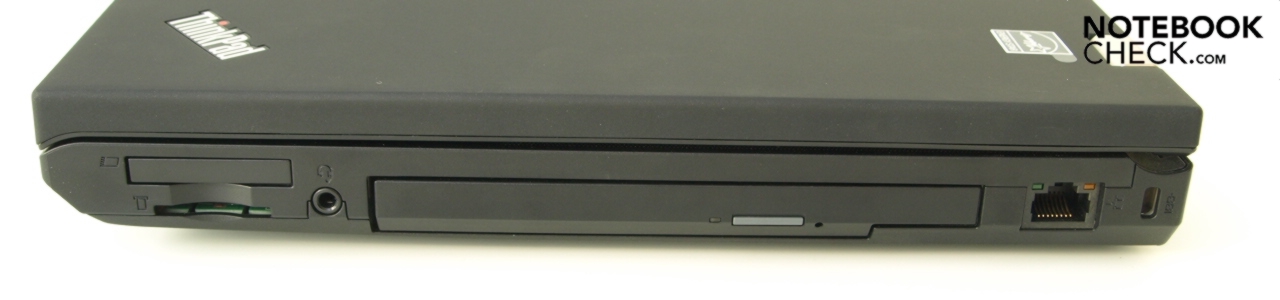
That's not the Expresscard slot. It's the blank cover for the (not installed) smart card reader.
The Expresscard slot is on the right side (where the DVD drive bay is), above the SD card reader slot left of the headphone jack:
Re: USB 3.0 Adaptor or Drive caddy for T520
Posted: Tue Dec 10, 2024 7:21 am
by TPFanatic
StarTech makes what seems to be a higher quality USB 3.0 adapter, I have one in my T60 and it works OK.
https://www.startech.com/en-eu/cards-ad ... ion-anchor
For the eSATA to do anything SATA related you need an actual eSATA cable for example from this business:
https://www.microsatacables.com/sata-2- ... ta22pesusb
I am a satisfied customer of them so I can vouch for their good business.
Re: USB 3.0 Adaptor or Drive caddy for T520
Posted: Tue Dec 10, 2024 3:32 pm
by freeagent
axur-delmeria wrote: ↑Mon Dec 09, 2024 10:45 pm
That's not the Expresscard slot. It's the blank cover for the (not installed) smart card reader.
The Expresscard slot is on the right side (where the DVD drive bay is), above the SD card reader slot left of the headphone jack:
Thanks. I was confused. I thought the USB 3.0 adapters went into the Smart Card slot, which some T520s apparently have, but as you say, my 04W3254 board does not have. The Expresscard slot has what I thought was a dummy insert. But I guess there must be contacts inside. I just hope I connected everything when I swapped the motherboards!

Re: USB 3.0 Adaptor or Drive caddy for T520
Posted: Tue Dec 10, 2024 4:07 pm
by freeagent
The Startech site says that unit has been discontinued. But there are others and I have a link to one that another user has that he says works. This is also Startech and seems a reasonable deal:
https://www.amazon.ca/StarTech-com-ECUS ... B006K25AX4
I have a backup disk that will use USB3, so hopefully that would work with the USB3 adapter.
Regarding the eSATA cable. Does that plug directly onto a 2 1/2"SATA drive and then into the eSATA port? If used that way, is transfer speed higher than USB2.0 speed? The manual says for T520 that USB on eSATA port is USB2.0.
These are low cost add-ons that will increase usability of T520 a bit. Also thinking of going to miniPC seeing I use external monitor and keyboard anyway for everyday use. Easier path to Win 11 and built in wifi6.
Re: USB 3.0 Adaptor or Drive caddy for T520
Posted: Tue Dec 10, 2024 5:58 pm
by TPFanatic
Over esata i believe the throughput is 3GBp/s
Re: USB 3.0 Adaptor or Drive caddy for T520
Posted: Wed Dec 11, 2024 3:38 pm
by freeagent
I ordered that 2-port Startech adapter. Extra 2 USB ports on other side of laptop will help. And higher speed may encourage me to run a backup!
Re: USB 3.0 Adaptor or Drive caddy for T520
Posted: Thu Dec 12, 2024 2:59 am
by axur-delmeria
When I used a USB 3.0 Expresscard on my first X220, I remember buying a USB 3.0 Y-cable so that I could draw additional power from an adjacent USB 2.0 port.
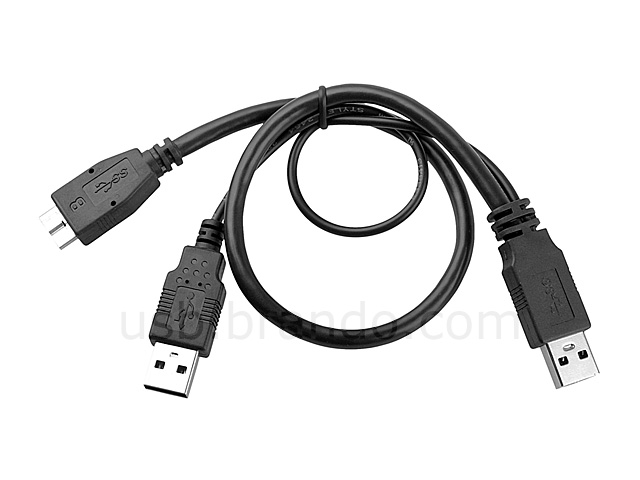
The T520 doesn't seem to have a USB 2.0 port near the Expresscard slot, so you may need to extend the cable for the 2nd USB-A plug.
Re: USB 3.0 Adaptor or Drive caddy for T520
Posted: Thu Dec 12, 2024 9:49 am
by freeagent
axur-delmeria wrote: ↑Thu Dec 12, 2024 2:59 am
When I used a USB 3.0 Expresscard on my first X220, I remember buying a USB 3.0 Y-cable so that I could draw additional power from an adjacent USB 2.0 port.
The T520 doesn't seem to have a USB 2.0 port near the Expresscard slot, so you may need to extend the cable for the 2nd USB-A plug.
The card I bought apparently comes with such a cord. Not sure I would need it though, because my Seagate Backup Plus 2TB drive works when connected to existing USB 2.0 ports. If I do need it, there is USB 2.0 port just around corner at back of T520 on same side.
User Review:
Works with default Microsoft USB 3.0 driver, was able to use Acronis BOOT flash drive and backup system disk without booting into Windows OS. After installing driver in Windows from Startech,com website you can use Disk Eject feature for external drives. Included cable can supply power to external hard drives from USB 2.0 port. Downside - you need to connect devices before starting the laptop. Great addition to those old working laptops.

Re: USB 3.0 Adaptor or Drive caddy for T520
Posted: Mon Dec 23, 2024 9:08 pm
by freeagent
freeagent wrote: ↑Wed Dec 11, 2024 3:38 pm
I ordered that 2-port Startech adapter. Extra 2 USB ports on other side of laptop will help. And higher speed may encourage me to run a backup!
I received the adapter. Plugged it in and don't see it in device manager. Drivers seem to be for win7 and earlier. Their site says it is comparable with win 11 but I don't see a driver. Tried their chatline. Says I am next in line. That was 1/2 hr ago.
With it plugged in, my wireless mouse is affected and moves in huge jumps!
Not looking good. Luckily bought through Amazon.
Re: USB 3.0 Adaptor or Drive caddy for T520
Posted: Mon Dec 23, 2024 11:09 pm
by TPFanatic
The driver should still work. You may have to force install it. I am surprised Win 11 doesnt auto install it
Re: USB 3.0 Adaptor or Drive caddy for T520
Posted: Tue Dec 24, 2024 1:18 am
by dr_st
freeagent wrote: ↑Mon Dec 23, 2024 9:08 pm
With it plugged in, my wireless mouse is affected and moves in huge jumps!
Not looking good. Luckily bought through Amazon.
It must be one of the uPD720202-based ones that have this problem:
dr_st wrote: ↑Mon Aug 14, 2023 9:17 am
Some of them (mostly uPD720202-based) are notoriously incompatible with that generation of Intel chipsets (T420/TW520/X220) and seem to trigger constant plug/unplug events which disrupt system UI performance make it unusable.
If you disable PCIe Power Management in the BIOS, it should work fine, but you would be sacrificing battery life.
Re: USB 3.0 Adaptor or Drive caddy for T520
Posted: Tue Dec 24, 2024 10:05 am
by freeagent
After I gave up on their chatline, I played with it a bit more. I downloaded a driver, but not sure that had any affect. I also had device manager search for new hardware. That caused the adapter to briefly appear, but then it disappeared again!. Finally, I thought I would let Win11 sort it out. Powered off and rebooted. After a while Desktop came back up and lo and behold, the adapter now showed up in DEvice Manager. The interference I had with the wireless mouse was also gone!
So everything is good now. Thanks for the input and enjoy the holidays!
Re: USB 3.0 Adaptor or Drive caddy for T520
Posted: Fri Dec 27, 2024 1:38 pm
by freeagent
The adapter seems to be working fine now. I just completed a backup of my 500GB primary System/Data drive as well as backing up a 256Gb SSD drive in Ultrabay that is quite full (has VM stuff ) That last backup took 20 minutes. Seemed a lot faster than past backups. This is the main use I have for USB3, so I will likely only install the adapter on an as-needed basis.
With 2x8Gb RAM on it's way, I am running out of things to upgrade!
My replacement motherboard has BIOS 1.32. I had updated my original MB to 1.49, but this time going with If it ain't broke, don't fix it"
I haven't noticed any issues so far even after updating to Win11.