The Ultra T410 Guide (No RJ-11 w/ RS-232 please)
Posted: Thu May 13, 2010 3:37 am
These posts will be constantly updated.
BATTERY GUIDE FOUND IN THIRD POST. GET CLOSE TO 7-10 HOURS ON A 9 CELL LIKE I DO
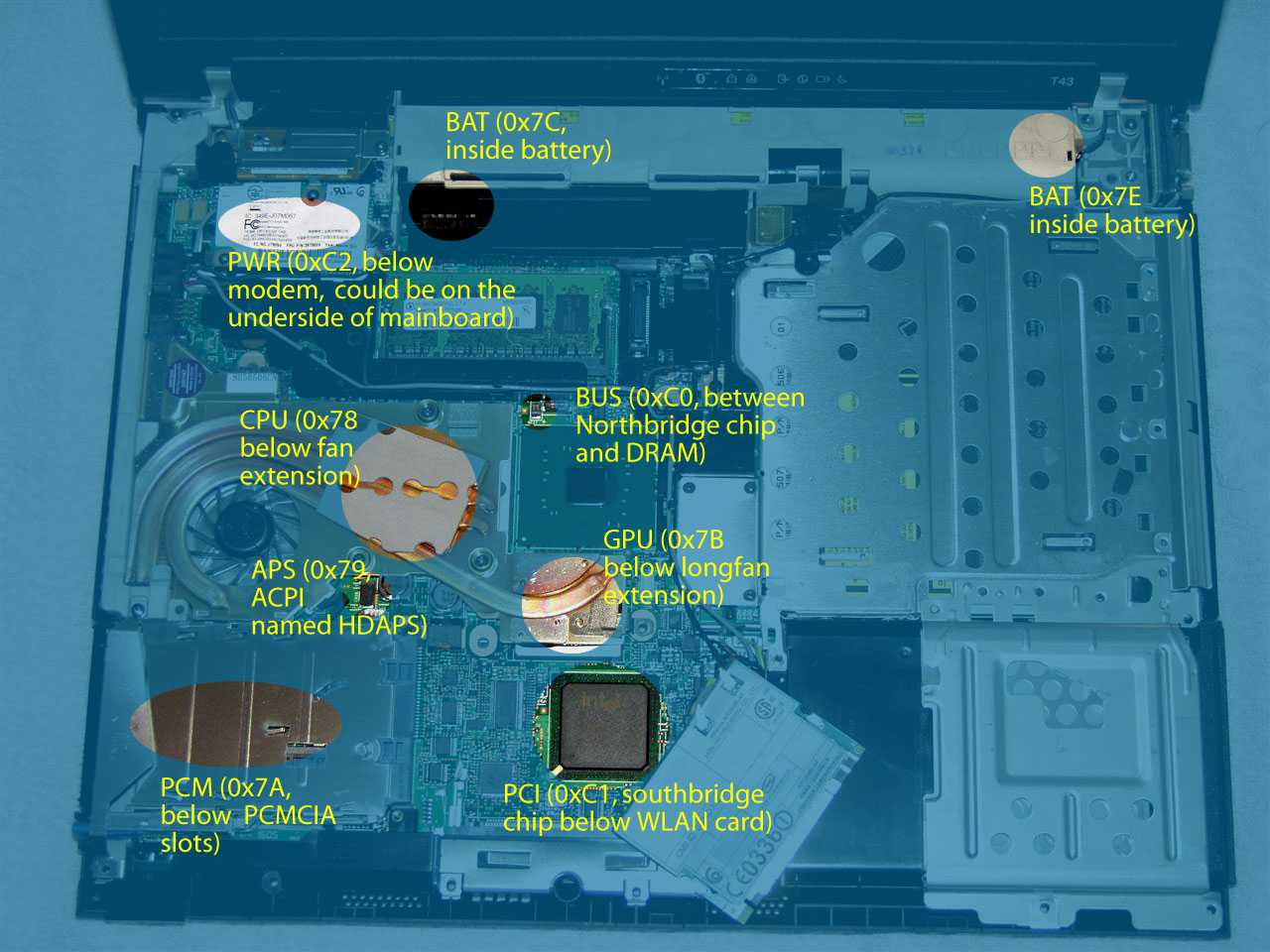
A world first, because nobody decided to *actually* show the insides of a T410.
http://img707.imageshack.us/img707/3799/dsc2182w.jpg
Chassis (Everything in place)
http://img696.imageshack.us/img696/8835/dsc2176.jpg
Chassis (Heatsink removed!)
http://img243.imageshack.us/img243/3262/dsc2174.jpg
Keyboard (No, there is no flex. If there is, see my followup post on how to fix that. I type 150WPM so don't call me a liar, especially with my Model M and Model M13.)
http://img248.imageshack.us/img248/3074/dsc2172o.jpg
Heatsink (Facing up)
http://img232.imageshack.us/img232/2488/dsc2171.jpg
Heatsink (Upside down)
http://img33.imageshack.us/img33/5381/dsc2170.jpg
Bezel (What is this about weak mesh? Bullpuckey, those holes are durable.)
Seeing none of the review sites would do this, I decided to do this.
Boots in 22-25 seconds on a harddrive, running at 41C right now, fan occasionally spooling up to the lowest setting.
HARDWARE MAINTENANCE MANUAL (HMM) FOR T410
http://www-307.ibm.com/pc/support/site. ... MIGR-74470
MAINTENANCE VIDEOS
http://www.lenovoservicetraining.com/io ... index.html
Build quality:
Perfect, don't say it flexes or bows or anything, the T410 I have is inherently better than my T43 in construction period.
Complaints? Go down and maybe I can help you solve them. See all my posts on why the T410 has excellent engineering and why people have funny, old world ideas on quality ("Evil lid, it flexes, therefore it is a cheap, evil, non true Thinkpad!" Silly, thats part of how it is designed to absorb some of the stress to prevent damage to the LCD. Read my many posts) Also refer to my "first impressions" topic! (Locked)
By the way, for an odd test, I pushed one of my replacement T43 keyboards against my T410 keyboard. The T410 keyboard bent/deformed less. What does this say about "keyboard flex?" (Read: Make believe insanity)
The T410 is a Thinkpad as much as the Thinkpads of the past. It is such a good machine that people have enough time to find "flaws" like "flex" and "creaking." Now that is something Lenovo's Marketing department should realize. A machine so good that people can't find actual, valid flaws about it. Amazing.
Tips for cleaning your T410:
Car detailing spray works wonders, I mean it. Spray it onto a microfiber cloth and wipe the exterior, make sure you wipe the exterior dry. (However, please contact the manufacturer and ask them if its safe with plastic, rubber and possibly your LCD!)
DO use a high quality, clean microfiber cloth when wiping your Thinkpad down.
Pentel Hi Polymer OR Staedtler Mars erasers CAN be used to clean the outside of your Thinkpad as well. The Mars erasers will actually darken the rubberized lid a little. The HiPolys are generally nice to just scrub the outside with as well, they'll make your lid look a little more grayish. However they do work wonder on the plastics (Less shiny.)
Isopropyl alcohol is a wonderful alternative for car detailing spray if you need to clean the lid in a jiffy.
Once in a while, remove your keyboard and shake the crums out, then get a can of duster gas or a blower bulb and aim at the heatsink fan. Watch as a cloud of white dust sprays out of the vent ports from your fan. If you plan on removing the heatsink, blast the underside of the fan too and from all sides. If you are using a can of duster gas OR compressed air with limited pressure, hold the fan in place.
Taking your T410 apart anyways? Get a small, soft bristled paintbrush OR a photography brush for lenses and lightly agitate the dust before using a can of duster gas or compressed air with limited pressure. It'll make life easier.
Blast all your ports too, those get dusty over time.
Resolving some of the "problems" with your T410 (Ex: Creaking) Part one of many!
DO NOT USE A POWER TOOL, EVER. YOU MUST USE A SMALL SCREWDRIVER AND BE VERY GENTLE, IF NOT A TORQUEDRIVER FOR SAFETY.
RAM door seems to be arching/buldging out?
Remove the screw retaining it, pop it out of the slot. Insert it on the opposite side from the screw at an angle, ensuring it properly seats with the funky clips. Align the screw and ensure BOTH plastic tabs on the sides ALSO firmly seat. Tighten the screw to torque spec but do not hamfist it.
Keyboard flexes, especially for the escape key or such?
Remove the RAM slot door, remove the keyboard retaining screw, remove the keyboard. See the small pieces of metal that poke up? Lift those slightly, they may of been bent flat. Do one more thing, run your index finger over the top left area of your keyboard bezel. Does it flex? If it does, see the hardware maintance manual. Remove all the screws associated with the keyboard bezel. Push lightly on the left side of the bezel (Near the speaker mesh) and make sure it firmly seats with the lower body plastic. Retighten the screws to torque spec or SLIGHTLY more. The area where the fan is should be extremely firm now (I kid not). Replace the keyboard, your flex will be gone now.
Making your T410 run cooler:
http://forum.thinkpads.com/viewtopic.php?f=45&t=85643
Fan noise driving you nuts? I'll post an update later for my TPFC settings on smart after I did my thermal paste.
Want to get 10 hours of battery life on discrete graphics like I do? I'll also post an update foor that later.
This is, of course, if no one is offended by my post (Oh no, I am an evil harddrive user who can boot in less than 30 seconds! Word 2003 even loads in a second! Oh wait, I also somehow achieve 10 hours and have no weird creaking noises from my T410!) and asks a moderator to close this topic! Oh and to finish some finals up.
BATTERY GUIDE FOUND IN THIRD POST. GET CLOSE TO 7-10 HOURS ON A 9 CELL LIKE I DO
A world first, because nobody decided to *actually* show the insides of a T410.
http://img707.imageshack.us/img707/3799/dsc2182w.jpg
Chassis (Everything in place)
http://img696.imageshack.us/img696/8835/dsc2176.jpg
Chassis (Heatsink removed!)
http://img243.imageshack.us/img243/3262/dsc2174.jpg
Keyboard (No, there is no flex. If there is, see my followup post on how to fix that. I type 150WPM so don't call me a liar, especially with my Model M and Model M13.)
http://img248.imageshack.us/img248/3074/dsc2172o.jpg
Heatsink (Facing up)
http://img232.imageshack.us/img232/2488/dsc2171.jpg
Heatsink (Upside down)
http://img33.imageshack.us/img33/5381/dsc2170.jpg
Bezel (What is this about weak mesh? Bullpuckey, those holes are durable.)
Seeing none of the review sites would do this, I decided to do this.
Boots in 22-25 seconds on a harddrive, running at 41C right now, fan occasionally spooling up to the lowest setting.
HARDWARE MAINTENANCE MANUAL (HMM) FOR T410
http://www-307.ibm.com/pc/support/site. ... MIGR-74470
MAINTENANCE VIDEOS
http://www.lenovoservicetraining.com/io ... index.html
Build quality:
Perfect, don't say it flexes or bows or anything, the T410 I have is inherently better than my T43 in construction period.
Complaints? Go down and maybe I can help you solve them. See all my posts on why the T410 has excellent engineering and why people have funny, old world ideas on quality ("Evil lid, it flexes, therefore it is a cheap, evil, non true Thinkpad!" Silly, thats part of how it is designed to absorb some of the stress to prevent damage to the LCD. Read my many posts) Also refer to my "first impressions" topic! (Locked)
By the way, for an odd test, I pushed one of my replacement T43 keyboards against my T410 keyboard. The T410 keyboard bent/deformed less. What does this say about "keyboard flex?" (Read: Make believe insanity)
The T410 is a Thinkpad as much as the Thinkpads of the past. It is such a good machine that people have enough time to find "flaws" like "flex" and "creaking." Now that is something Lenovo's Marketing department should realize. A machine so good that people can't find actual, valid flaws about it. Amazing.
Tips for cleaning your T410:
Car detailing spray works wonders, I mean it. Spray it onto a microfiber cloth and wipe the exterior, make sure you wipe the exterior dry. (However, please contact the manufacturer and ask them if its safe with plastic, rubber and possibly your LCD!)
DO use a high quality, clean microfiber cloth when wiping your Thinkpad down.
Pentel Hi Polymer OR Staedtler Mars erasers CAN be used to clean the outside of your Thinkpad as well. The Mars erasers will actually darken the rubberized lid a little. The HiPolys are generally nice to just scrub the outside with as well, they'll make your lid look a little more grayish. However they do work wonder on the plastics (Less shiny.)
Isopropyl alcohol is a wonderful alternative for car detailing spray if you need to clean the lid in a jiffy.
Once in a while, remove your keyboard and shake the crums out, then get a can of duster gas or a blower bulb and aim at the heatsink fan. Watch as a cloud of white dust sprays out of the vent ports from your fan. If you plan on removing the heatsink, blast the underside of the fan too and from all sides. If you are using a can of duster gas OR compressed air with limited pressure, hold the fan in place.
Taking your T410 apart anyways? Get a small, soft bristled paintbrush OR a photography brush for lenses and lightly agitate the dust before using a can of duster gas or compressed air with limited pressure. It'll make life easier.
Blast all your ports too, those get dusty over time.
Resolving some of the "problems" with your T410 (Ex: Creaking) Part one of many!
DO NOT USE A POWER TOOL, EVER. YOU MUST USE A SMALL SCREWDRIVER AND BE VERY GENTLE, IF NOT A TORQUEDRIVER FOR SAFETY.
RAM door seems to be arching/buldging out?
Remove the screw retaining it, pop it out of the slot. Insert it on the opposite side from the screw at an angle, ensuring it properly seats with the funky clips. Align the screw and ensure BOTH plastic tabs on the sides ALSO firmly seat. Tighten the screw to torque spec but do not hamfist it.
Keyboard flexes, especially for the escape key or such?
Remove the RAM slot door, remove the keyboard retaining screw, remove the keyboard. See the small pieces of metal that poke up? Lift those slightly, they may of been bent flat. Do one more thing, run your index finger over the top left area of your keyboard bezel. Does it flex? If it does, see the hardware maintance manual. Remove all the screws associated with the keyboard bezel. Push lightly on the left side of the bezel (Near the speaker mesh) and make sure it firmly seats with the lower body plastic. Retighten the screws to torque spec or SLIGHTLY more. The area where the fan is should be extremely firm now (I kid not). Replace the keyboard, your flex will be gone now.
Making your T410 run cooler:
http://forum.thinkpads.com/viewtopic.php?f=45&t=85643
Fan noise driving you nuts? I'll post an update later for my TPFC settings on smart after I did my thermal paste.
Want to get 10 hours of battery life on discrete graphics like I do? I'll also post an update foor that later.
This is, of course, if no one is offended by my post (Oh no, I am an evil harddrive user who can boot in less than 30 seconds! Word 2003 even loads in a second! Oh wait, I also somehow achieve 10 hours and have no weird creaking noises from my T410!) and asks a moderator to close this topic! Oh and to finish some finals up.

 ).
). )
) )
) )
)