Questions regarding the Z61t

R, A, G and Z series specific matters only
Post Reply
Message
Author
micrex22
Junior Member
Junior Member
Posts: 332
Joined: Fri Jan 02, 2015 12:22 am
Location: Vancouver, BC, Canada

Questions regarding the Z61t

#1 Post by micrex22 » Sat Apr 18, 2015 11:24 pm

I finally found a Z61t: they're neat ThinkPads for a variety of reasons (especially for the multimedia flare while being pretty similar to the T6x platform). The titanium lid also steals the show quite a bit, doesn't it? You'd think these would be more sought after as a result of the rather unique design and extra multimedia capabilities (such as having proper speakers that aren't under the touchpad... oh IBM...). Despite that, they seem to be relatively obscure and generally unknown to most people... is that an accurate assumption?

I'm not too crazy about the widescreen (1440x900 vs. 1400x1050) but I'm starting to put up with them now.

Just a few questions for existing owners of these laptops:
#1 Has anyone got the Intel 950 graphics accelerator beyond Windows Vista? (i.e. Windows 7 and/or Windows 8). Intel is notorious for limited driver support.
#2 Has anyone achieved decent operation on a Z61t with an alternative OS, like Linux: and manage to get all features working (i.e. sleep button, ultranav, graphics, sound etc).
#3 Do the laptops have any weak spots / hardware quirks

The intel graphics probably run cooler than the ATI FireGL on the T60p (which is fine since nobody is going to do CAD on a Z61t). In celebration of this event I did go ahead and purchase a new ALPS keyboard for it.

ajkula66
SuperUserGeorge
SuperUserGeorge
Posts: 15731
Joined: Sun Feb 25, 2007 11:28 am
Location: Brodheadsville, Pennsylvania

Re: Questions regarding the Z61t

#2 Post by ajkula66 » Sat Apr 18, 2015 11:31 pm

micrex22 wrote: Despite that, they seem to be relatively obscure and generally unknown to most people... is that an accurate assumption?
Not really. They are pretty well-loved amongst the ThinkPad buffs.
Just a few questions for existing owners of these laptops:
#1 Has anyone got the Intel 950 graphics accelerator beyond Windows Vista? (i.e. Windows 7 and/or Windows 8). Intel is notorious for limited driver support.
W7 32 runs just fine on GMA 950 as long as you're not intent on gaming.
#3 Do the laptops have any weak spots / hardware quirks
Plastic parts - as well as the Ti lids - age less than gracefully. Genuine batteries are getting hard to source. Other than that they are fine little machines IMO.
...Knowledge is a deadly friend when no one sets the rules...(King Crimson)

Cheers,

George (your grouchy retired FlexView farmer)

AARP club members:A31p, T43pSF

Abused daily: R61

PMs requesting personal tech support will be ignored.

jronald
Contributing Member
Contributing Member
Posts: 1792
Joined: Sun Apr 13, 2008 7:11 pm
Location: RTP, North Carolina

Re: Questions regarding the Z61t

#3 Post by jronald » Sun Apr 19, 2015 11:50 am

My daily driver for a bunch of years has been the Z61t. Mine is well optioned and does everything i want it to do. The neatest option on mine is the extra 128 gig of storage I have onboard by using the extra WWAN slot and a hacked BIOS. Mine gets 1 to 3 hours of use per day in some heavy internet/music usage/email.

Rom
I see in my son's eyes, each day, the wonders I have squandered fortunes to possess and have sought my entire lifetime to attain. jrr 09/2011


T400's and T500's

Shredder11
Junior Member
Junior Member
Posts: 259
Joined: Sat Jun 30, 2012 6:25 pm
Location: Bradford, West Yorkshire, England

Re: Questions regarding the Z61t

#4 Post by Shredder11 » Sun Apr 19, 2015 12:43 pm

How well does that drive perform in the WWAN slot, compared with the same kind of drive in the main SATA bay or either the Ultrabay or via say ExpressCard/54 socket?
Z61p x3 (C2D T7600, 3GB, 500GB SSD, BCM70015, Advanced Dock x1, Mini Dock x2)
X61 (C2D T7500, 3GB, 250GB SSD, BCM70015)
X61s (2GB, 120GB SSD)
X60s (CD L2400, 3GB, 160GB)
T43p (P M 760, 2GB, IBM Port Replicator II)
G40 x2 (P4 2.8GHz, 2GB, 60GB)
G41 (P4 3.46GHz, 2GB, 40GB)

micrex22
Junior Member
Junior Member
Posts: 332
Joined: Fri Jan 02, 2015 12:22 am
Location: Vancouver, BC, Canada

Re: Questions regarding the Z61t

#5 Post by micrex22 » Sun Apr 19, 2015 5:21 pm

ajkula66 wrote: Not really. They are pretty well-loved amongst the ThinkPad buffs.
W7 32 runs just fine on GMA 950 as long as you're not intent on gaming.
Plastic parts - as well as the Ti lids - age less than gracefully. Genuine batteries are getting hard to source. Other than that they are fine little machines IMO.
I'm guessing no one tried Windows 8 with acceleration on a Z61t then? I suppose I can try it later (it's more of a curiosity, I'd rather wait for Windows 10 aka 'not 9x').

I've got a good stock of T6x batteries so that's not a problem (T61 batteries have some sort of lockout that causes a T60 to shut down when using them-- but not the other way around, weird). Lenovo still sells T6x batteries last time I checked, although at a generous price of $200+.

Well... since the Z61p units have a higher density screen and FireGLs, I'll stay on the lookout. Always good to have backups of a nice laptop anyways. Guess that means I'll have to sell my T61.

jronald
Contributing Member
Contributing Member
Posts: 1792
Joined: Sun Apr 13, 2008 7:11 pm
Location: RTP, North Carolina

Re: Questions regarding the Z61t

#6 Post by jronald » Sun Apr 19, 2015 5:45 pm

Its not a drive.
The Primary is a Lenovo SSD 120 gig.
The other is this:
http://www.ebay.com/itm/Mini-PCI-E-Exte ... 41886664eb
And this, cracked out of the case
http://www.ebay.com/itm/SanDisk-128GB-C ... 58b7dec934
If I did it again it would be this
http://www.ebay.com/itm/Dual-TF-Micro-S ... 58c105eccc

Ron
I see in my son's eyes, each day, the wonders I have squandered fortunes to possess and have sought my entire lifetime to attain. jrr 09/2011


T400's and T500's

Shredder11
Junior Member
Junior Member
Posts: 259
Joined: Sat Jun 30, 2012 6:25 pm
Location: Bradford, West Yorkshire, England

Re: Questions regarding the Z61t

#7 Post by Shredder11 » Sun Apr 19, 2015 8:04 pm

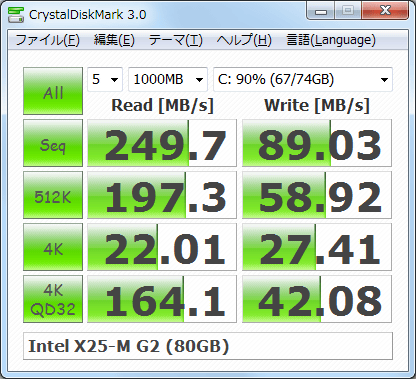
Thanks for that, although you say it is not a drive but it is storage like a normal drive is. So back to my original question.... how fast does it perform? Try installing this simple test software http://crystalmark.info/software/Crysta ... dex-e.html from here http://crystalmark.info/redirect.php?pr ... staller-en and let it run for a few minutes. It will give some results like the pic below after selecting your drive letter:

Image
Z61p x3 (C2D T7600, 3GB, 500GB SSD, BCM70015, Advanced Dock x1, Mini Dock x2)
X61 (C2D T7500, 3GB, 250GB SSD, BCM70015)
X61s (2GB, 120GB SSD)
X60s (CD L2400, 3GB, 160GB)
T43p (P M 760, 2GB, IBM Port Replicator II)
G40 x2 (P4 2.8GHz, 2GB, 60GB)
G41 (P4 3.46GHz, 2GB, 40GB)

jronald
Contributing Member
Contributing Member
Posts: 1792
Joined: Sun Apr 13, 2008 7:11 pm
Location: RTP, North Carolina

Re: Questions regarding the Z61t

#8 Post by jronald » Tue Apr 21, 2015 1:54 pm

Its not particularly fast, and I have never needed to measure it. With that said, 120 gigs or so of music stored on it played through Clementine is many, many hours of entertainment. Thats what I wanted it for, and it does an outstanding job.

Ron
I see in my son's eyes, each day, the wonders I have squandered fortunes to possess and have sought my entire lifetime to attain. jrr 09/2011


T400's and T500's

Sweater Fish Deluxe
Posts: 36
Joined: Wed Jun 17, 2009 9:22 pm
Location: Ukiah, CA

Re: Questions regarding the Z61t

#9 Post by Sweater Fish Deluxe » Sat Apr 25, 2015 10:52 pm

I have the dual microSD adapter like the one jronald posted and I can say that the speed is exactly what the same card would be in an external USB adapter. That's because the WWAN port is just USB through a mPCIe interface. I was having a problem with the adapter connecting as USB1.1 sometimes after waking, but I resolved that by just disabling the USB1 root hub that it was trying to connect through.

The Z61t is by far my favorite Thinkpad of the ones I've owned (T20, T40, T43p, Z61t). I've had mine for about 4 years now and I just like it more and more. It's very solid and reliable and has all the options I want. The only drawback is the 3GB RAM limit. I wish there was a workaround for that, but otherwise it's a great machine. I guess I wouldn't mind a brighter LED backlit screen if it was available, either.

I'm running Win7 64-bit, but I have tried Windows 8 and it works fine. Several Debian-based Linux varieties also work with even less hassle than Windows. I currently have Linux Mint Cinnamon bootable from one of the microSDs in that internal adapter.

micrex22
Junior Member
Junior Member
Posts: 332
Joined: Fri Jan 02, 2015 12:22 am
Location: Vancouver, BC, Canada

Re: Questions regarding the Z61t

#10 Post by micrex22 » Sun Apr 26, 2015 2:15 pm

Sweater Fish Deluxe wrote:I have the dual microSD adapter like the one jronald posted and I can say that the speed is exactly what the same card would be in an external USB adapter. That's because the WWAN port is just USB through a mPCIe interface. I was having a problem with the adapter connecting as USB1.1 sometimes after waking, but I resolved that by just disabling the USB1 root hub that it was trying to connect through.

The Z61t is by far my favorite Thinkpad of the ones I've owned (T20, T40, T43p, Z61t). I've had mine for about 4 years now and I just like it more and more. It's very solid and reliable and has all the options I want. The only drawback is the 3GB RAM limit. I wish there was a workaround for that, but otherwise it's a great machine. I guess I wouldn't mind a brighter LED backlit screen if it was available, either.

I'm running Win7 64-bit, but I have tried Windows 8 and it works fine. Several Debian-based Linux varieties also work with even less hassle than Windows. I currently have Linux Mint Cinnamon bootable from one of the microSDs in that internal adapter.
Awesome, thanks for the info.

I'm sure the screen could be modded with an LED backlight, but it would certainly require some technical knowledge of power regulation and a steady hand to irritatingly open an LCD panel.

The 3 GB RAM limit is something to do with how IBM designed the platform (i.e. it's not an intel limitation as the spec sheet states the memory controller supports a full 4 GB). Later I may investigate some ThinkPad motherboards of the era to see what the hold up may be. It would be nice if the extra 1 GB could be unlocked somehow.

dr_st
Senior ThinkPadder
Senior ThinkPadder
Posts: 6646
Joined: Sat Oct 29, 2005 6:20 am

Re: Questions regarding the Z61t

#11 Post by dr_st » Sun Apr 26, 2015 2:52 pm

micrex22 wrote:The 3 GB RAM limit is something to do with how IBM designed the platform (i.e. it's not an intel limitation as the spec sheet states the memory controller supports a full 4 GB).
Not really.

http://forum.thinkpads.com/viewtopic.php?f=29&t=113755
Current: X220 4291-4BG, T410 2537-R46, T60 1952-F76, T60 2007-QPG, T42 2373-F7G
Collectibles: T430s (IPS FHD + Classic Keyboard), X32 (IPS Screen)
Retired: X61 7673-V2V, A31p w/ Ultrabay Numpad
Past: Z61t 9440-A23, T60 2623-D3U, X32 2884-M5U

Sweater Fish Deluxe
Posts: 36
Joined: Wed Jun 17, 2009 9:22 pm
Location: Ukiah, CA

Re: Questions regarding the Z61t

#12 Post by Sweater Fish Deluxe » Sun Apr 26, 2015 11:47 pm

Yeah, I wouldn't hold out much hope for opening up the RAM. But by all means look into it more! It would definitely be awesome.

I do think there might be a slightly easier way to get an LED screen, though. There's T400 screens that should fit in a Z61t, but an LED backlight would also need a different type of inverter board and so likely also some modifications to the lid and bezel to get everything to fit. It seems like it might work, though I haven't actually seen the parts in person. Anybody here know if anyone's ever tried this on a Z61t?

For now my screen is still pretty bright and has only one dead pixel, but as it gets worse, I'll probably think more seriously about trying out this mod.

micrex22
Junior Member
Junior Member
Posts: 332
Joined: Fri Jan 02, 2015 12:22 am
Location: Vancouver, BC, Canada

Re: Questions regarding the Z61t

#13 Post by micrex22 » Mon Apr 27, 2015 4:38 pm

dr_st wrote:
micrex22 wrote:The 3 GB RAM limit is something to do with how IBM designed the platform (i.e. it's not an intel limitation as the spec sheet states the memory controller supports a full 4 GB).
Not really.

http://forum.thinkpads.com/viewtopic.php?f=29&t=113755
The intel spec sheet does state the memory controller addresses 4 GB.
http://www.intel.com/Assets/PDF/datasheet/309219.pdf

On page 325 Intel explains WHY you don't see all 4 GB of memory that is addressed:
The (G)MCH provides a maximum DRAM address decode space of 4 GB. The (G)MCH does not remap APIC or PCI Express memory space. This means that as the amount of physical memory populated in the system reaches 4 GB, there will be physical memory that exists yet is non-addressable and therefore unusable by the system.
Continuing on page 326:
Voids of physical addresses that are not accessible as general system memory and reside within system memory address range (< TOLUD) are created for SMM-mode and legacy VGA graphics compatibility. It is the responsibility of BIOS to properly initialize these regions. Table 18 details the location and attributes of the regions. How to enable and disable these ranges are described in the (G)MCH Control Register Device 0 (GGC).
Therefore the *BIOS* is responsible for initializing the APIC / PCI express memory spaces. And IBM programmed the *BIOS* to exclude 1 GB for whatever reason. But again, the memory controller does ADDRESS all 4 GB as per the Intel spec sheet.

There's a few other curiosities mentioned in that document that I may go over when I have time to digest all of that information. I encourage anyone else to do so as well. Anyone who says x86 is limited to 3 GB hasn't dealt with much hardware and is afraid of spec sheets.

dr_st
Senior ThinkPadder
Senior ThinkPadder
Posts: 6646
Joined: Sat Oct 29, 2005 6:20 am

Re: Questions regarding the Z61t

#14 Post by dr_st » Tue Apr 28, 2015 3:47 am

micrex22 wrote:On page 325 Intel explains WHY you don't see all 4 GB of memory that is addressed:
The (G)MCH provides a maximum DRAM address decode space of 4 GB. The (G)MCH does not remap APIC or PCI Express memory space. This means that as the amount of physical memory populated in the system reaches 4 GB, there will be physical memory that exists yet is non-addressable and therefore unusable by the system.
This quote explains exactly why you can never get 4GB of addressable RAM. How much is "hidden" depends on how much you want to reserve for PCI devices (you must reserve something).
micrex22 wrote:
Voids of physical addresses that are not accessible as general system memory and reside within system memory address range (< TOLUD) are created for SMM-mode and legacy VGA graphics compatibility. It is the responsibility of BIOS to properly initialize these regions. Table 18 details the location and attributes of the regions. How to enable and disable these ranges are described in the (G)MCH Control Register Device 0 (GGC).
That's pretty meaningless, I think. A few megabytes tops.
micrex22 wrote:Therefore the *BIOS* is responsible for initializing the APIC / PCI express memory spaces. And IBM programmed the *BIOS* to exclude 1 GB for whatever reason.
This was chosen as a safe limit, so that even if you connect plenty of devices, which are hungry for memory space, it is extremely unlikely to run out of space for them. Remember that these systems are designed to support additional expansion (CardBus, ExpressCard, PCIe slot in Advanced Dock), each of which can add devices which request more memory.
micrex22 wrote:There's a few other curiosities mentioned in that document that I may go over when I have time to digest all of that information. I encourage anyone else to do so as well.
I've done so indeed, as did many others. Everything is documented, among other places, in the thread I linked you to.
Current: X220 4291-4BG, T410 2537-R46, T60 1952-F76, T60 2007-QPG, T42 2373-F7G
Collectibles: T430s (IPS FHD + Classic Keyboard), X32 (IPS Screen)
Retired: X61 7673-V2V, A31p w/ Ultrabay Numpad
Past: Z61t 9440-A23, T60 2623-D3U, X32 2884-M5U

axur-delmeria
ThinkPadder
ThinkPadder
Posts: 1269
Joined: Mon May 28, 2012 5:49 am
Location: Metro Manila, Philippines

Re: Questions regarding the Z61t

#15 Post by axur-delmeria » Tue Apr 28, 2015 9:52 am

This matter has been discussed in other threads, like this one: http://forum.thinkpads.com/viewtopic.php?f=29&t=116396

IMO whether it's a BIOS or chipset limitation is a moot point if there's little that can be done about it.
Daily driver: X220 4291-P79 i5-2520M

In reserve: X61 T7500, X60 T2300
In pieces: X60s CS U1300 [board only], two retired but working X61Ts
RIP: 760XD 9546-U9E

Shredder11
Junior Member
Junior Member
Posts: 259
Joined: Sat Jun 30, 2012 6:25 pm
Location: Bradford, West Yorkshire, England

Re: Questions regarding the Z61t

#16 Post by Shredder11 » Tue Apr 28, 2015 10:33 am

I agree and I prefer to just enjoy Thinkpads for what they are and can do, although like others I also like to push them a little within reason. :)
Z61p x3 (C2D T7600, 3GB, 500GB SSD, BCM70015, Advanced Dock x1, Mini Dock x2)
X61 (C2D T7500, 3GB, 250GB SSD, BCM70015)
X61s (2GB, 120GB SSD)
X60s (CD L2400, 3GB, 160GB)
T43p (P M 760, 2GB, IBM Port Replicator II)
G40 x2 (P4 2.8GHz, 2GB, 60GB)
G41 (P4 3.46GHz, 2GB, 40GB)

micrex22
Junior Member
Junior Member
Posts: 332
Joined: Fri Jan 02, 2015 12:22 am
Location: Vancouver, BC, Canada

Re: Questions regarding the Z61t

#17 Post by micrex22 » Thu Apr 30, 2015 5:11 am

One point not mentioned is that the Z61 apparently has an orange thinklight.

Mike Blake
Sophomore Member
Posts: 248
Joined: Sun Mar 30, 2008 4:28 pm
Location: Warwick, Rhode Island

Re: Questions regarding the Z61t

#18 Post by Mike Blake » Sat Oct 03, 2015 3:02 am

micrex22 wrote:One point not mentioned is that the Z61 apparently has an orange thinklight.
Late to the party, but yes it does, and boy did I hate it...

Kasm279
Junior Member
Junior Member
Posts: 260
Joined: Tue Jul 19, 2011 6:07 am
Location: Ririe, Idaho

Re: Questions regarding the Z61t

#19 Post by Kasm279 » Sat Oct 03, 2015 7:06 pm

The Z60t and Z61t have a unique battery. As for graphics acceleration, I was able to install graphics drivers from intel on mine. I think they were these, but it's been a while.

https://downloadcenter.intel.com/downlo ... ows-7-exe-
Main: Latitude E6430
Working ThinkPads: IBM 5155, 755C, 755CX, 760ED, 380Z, 600E (x3), i1420, 570E, X20, T23, T30 x3, T43, Z61t, T60p
WIP: 701c (Broken OS), 600 (LCD), PS/2 L40SX (HDD), 570 (No lid), X31 (HDD, LCD), R51 (HDD), Z60t (HDD), X60 (HDD), T400 (LCD), T43p (?)
Dead: i1420 (Mobo, Keyboard)

TPFanatic
Senior Member
Senior Member
Posts: 538
Joined: Thu Jul 30, 2015 11:29 pm
Location: Hudson, New Hampshire

Re: Questions regarding the Z61t

#20 Post by TPFanatic » Wed Oct 07, 2015 11:38 pm

Mike Blake wrote:
micrex22 wrote:One point not mentioned is that the Z61 apparently has an orange thinklight.
Late to the party, but yes it does, and boy did I hate it...
R series laptops have the orange light too, at least my R50p has it.
Daily driver: lenovo T500 P9700, WUXGA, 8GB
Ultraportable: IBM lenovo X60s
Home theater: lenovo T420

Enable advanced features on older Synaptics touchpads with the registry: http://forum.thinkpads.com/viewtopic.php?f=2&t=122612

Post Reply
  • Similar Topics
    Replies
    Views
    Last post

Return to “ThinkPad R, A, G and Z Series”

Who is online

Users browsing this forum: No registered users and 2 guests