Page 1 of 1
x100e vs. x120e please help me choose
Posted: Fri Jun 10, 2011 12:54 pm
by flyfisherrob
Long time lurker doing lots of reading and first time poster. Thanks to everyone who have given a ton of time to make this forum a great resource. Thank you.
And for my question... I've been reading a lot, YouTube reviews, CNET reviews, etc. and still can't quite decide on which computer to get - the x100e or the x120e. I was hoping that others, who may have purchased one or both of these machines who were using them for similar tasks could weigh in.
What I'm looking for;
I'm 33 years old and a firefighter/paramedic who will be using this machine for working on my masters degree in Organizational Leadership in my evening downtime at work. I will be using Word, Excel, email and internet. I don't really care to edit movies or keep my iTunes library on it. At home I have the option of using a newer 21" iMac for these types of tasks or typing on a screen that is easier to see. Initially I was leaning toward a MacBook Air but I'm already paying 30k for a masters and just don't want to drop the extra 600+ that would be needed into my current computer budget. ULTRA portable is key as I ride my motorcycle to work about 2/3 of the time. I'm looking at dual core and 3-4 gigs of RAM on either type of machine. This system needs to last me 3 years easy until I'm done with grad school. I've looked at other brands of PC's but haven't seen good long term reviews of other computers that live in a backpack. ThinkPads seem to be pretty rugged.
Budget;
Again, about $400 ish but I'm willing and able to be a little flexible in this. The result is I'm looking at used machines on ebay, lenovo outlet, etc. Most computers on ebay will be coming with Office so this is a plus. Ebay machines are also coming with a protective sleeve and maybe an accessory or two that makes it a good buy.
So the question;
For my application does anyone believe the x120e is worth the extra money? The only real downside to the x100e seems to be the processor heating up and the sub-five hour battery life. Neither of these seem to really be issues that I'm concerned with. Many x100e's are selling in the low to mid $300 range but x120e's are in the mid to high $500 range AND most of these don't come with any programs meaning I will then need to drop an additional $150 on office. This takes me near $700 and with in range of a used MBA which, which as I said before I'm trying to not justify the price of.
So, I'm just hoping for a few other thoughts to be thrown out there. Maybe there is something here that I'm not looking at or a spec and or problem that I'm not familiar with. Personal experience is always good too and I would love to hear it.
Thanks so much,
Rob
Re: x100e vs. x120e please help me choose
Posted: Fri Jun 10, 2011 2:42 pm
by bealdrid
A couple weeks ago I was able to get a new X120e (E-240 single core) from lenovo outlet for $357 shipped to my door. Quite a savings vs lenovo.com. Came with Win7 Home Premium 64, 2GB RAM, 3 cell battery. I saw some of the X100e's when they were available going for much more than that. It may be a waiting game, if you check back every day you may find one like I did. I was pretty hooked on the 120e vs the 100e, mostly due to the heat issue. The battery life on my X120e is decent. I have the 3-cell battery. Lasts about 3 hours doing light browsing with wifi on. Good luck!
Re: x100e vs. x120e please help me choose
Posted: Fri Jun 10, 2011 2:42 pm
by underclocker
Welcome to the forum and kudos on the life-saving work.
Assuming you can deal with the small screen size, you are correct that the X100e or X120e are very good choices. For your purposes, I can't see any reason to spend more on the X120e. (I am ruling out the single core CPU offerings in each model, since those are not highly recommended.)
The two biggest advantages (that I can find) about the X120e is the higher performance video chipset and longer battery life. However, apparently this is at the cost of processing power. It seems that the X100e AMD Athlon Neo X2 L335 1.6GHz dual core CPU is a better performer than the X120e AMD Fusion E-350 1.6GHz dual core CPU. Users have reported this and benchmark comparisons do demonstrate this -->
http://www.cpubenchmark.net/cpu_lookup. ... +Core+L335
http://www.cpubenchmark.net/cpu_lookup. ... =AMD+E-350
Also, the X100e supports/includes a WiMax. It's not clear if the X120e will support/offer WiMax.
I'd say the X100e is a fine choice (and I own one).
(One note, my recommendation assumes you are referring to eBay sellers that include
legal licenses for the software they include with laptops. Our forum marketplace prohibits the sale of improperly licensed software, stand-alone or bundled. I feel this is a good policy to follow elsewhere, too.)
Re: x100e vs. x120e please help me choose
Posted: Fri Jun 10, 2011 5:50 pm
by Colonel O'Neill
You can always look for a nice juicy 30% or 40% off Lenovo eCoupon.
Re: x100e vs. x120e please help me choose
Posted: Fri Jun 10, 2011 7:12 pm
by elray
There are enough complaints about the X100e to warrant skipping it in favor of the X120e - which has an HDMI port and a slightly better CPU configuration.
Re: x100e vs. x120e please help me choose
Posted: Fri Jun 10, 2011 9:52 pm
by ZaZ
flyfisherrob wrote:Most computers on ebay will be coming with Office so this is a plus.
That might just be the Office Trial, which comes on every Thinkpad. Another direction you might want to consider is a used X200, which is a better notebook. You might be able to find a X200 in the $400-500 range on ebay if you can be patient. The problem with buying used though is ebay can bit a bit dicey and you're getting a machine with perhaps no warranty. I guess I'd opt for the X120, though I heard the fan can be pretty constant.
Re: x100e vs. x120e please help me choose
Posted: Sat Jun 11, 2011 2:25 am
by Colonel O'Neill
There are loads of nice free Office alternatives out there. (I don't count OpenOffice because it's bloaty. Kingsoft has a really nice free one.)
The X100e is also easier to undervolt than the X120e (RMClock vs lower level hardware stuff) so you can also get 5 hours on the 6-cell. You can also overclock the X100e CPU if you want to go in that direction.
The HD3200 on the X100e is capable of handling 1080p Youtube decode (especially if you slap on the 11.5 Catalyst driver) and should be able to play CS:Source with a dual-core. The single core MV-40 struggles a bit with CSS; it's almost playable. For Word and Internet, you should be fine. Excel, if you're using it for lots of calculations, might be a strain. If you were to put a music player on it, I'd go with foobar or Winamp; iTunes is a resource hog.
Re: x100e vs. x120e please help me choose
Posted: Tue Jun 14, 2011 12:59 am
by force
I will defer the x100e vs x120e discussion to those who have had experience with both (I only have an x120e only). I would lean toward the x120e due to less heat and slightly better graphics performance.
However! If what the good Colonel says is true regarding undervolting, the dual core x100e is probably the better choice since the x120e extras- better graphics, HDMI out- don't seem to be necessary for you.
You could also consider the X61/61s which use the Core2Duo processors which are comparable if not faster than the AMD processors in the x100e/120e. Graphics performance will certainly be worse and the notebook is slightly heavier with an 8-cell for about the same battery life.
The X61 has a 12" 1024x768 which is physically taller than the 11.6" 1366x768 screen in the x100e. The X61 is also less wide than the x100e but makes up for it in the depth/length, especially if you use a 8-cell battery. The x100e being wider allows for a full-size keyboard but less space for palm rests. I prefer the X61 in this regard, since I have no issue with the truncated keys on the keyboard. The x61 is also wedge-shaped and taller in the back whereas the x100e is almost the same thickness throughout.
Here are some pictures (links) which hopefully illustrate the points above. Unfortunately, I don't have any photos directly comparing the X61s to the X120e.
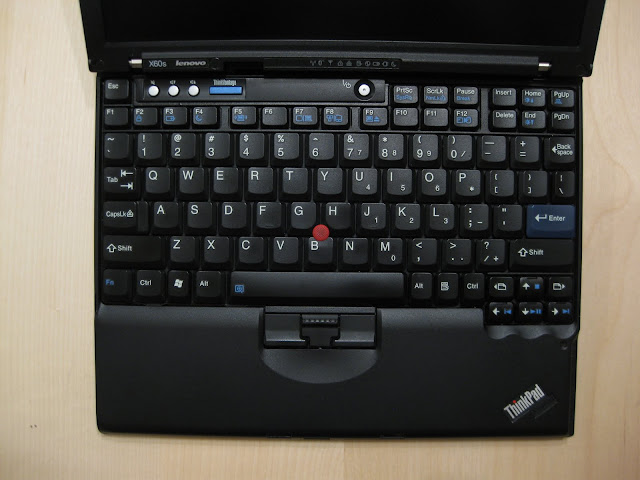
X61 keyboard layout vs
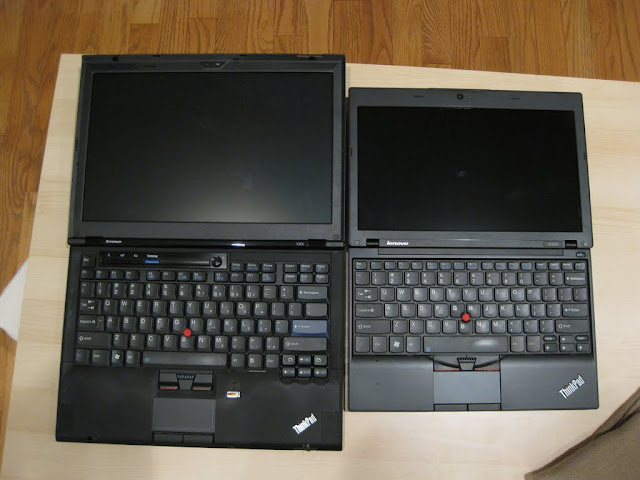
X120e keyboard (on right; compared to X301 with full-sized keyboard) Note the skinny keys on the left and right sides of the keyboard (tab, bksp).
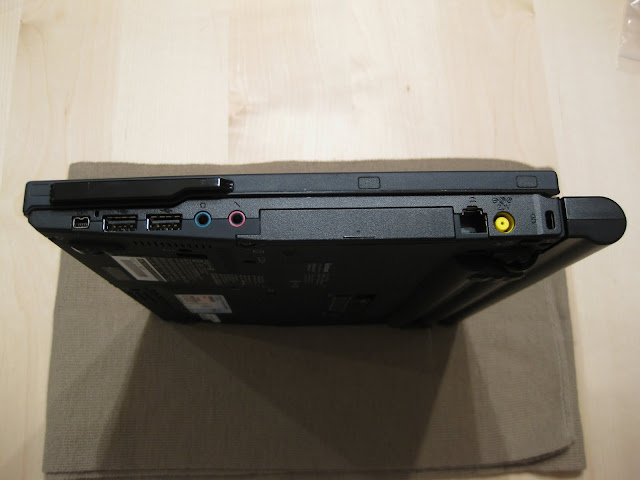
Wedge shape of the X61s. Note that the battery protruding from the bottom is actually where the back of the unit will touch the table. This angles the keyboard nicely for typing. Also note that this is a X61s (slim/low voltage); an X61 will be the same thickness as the battery in the back but have a slightly more molded bottom chassis to accommodate a beefier fan/heatsink for a normal voltage processor.
The
x120e (bottom) is much flatter in comparison.
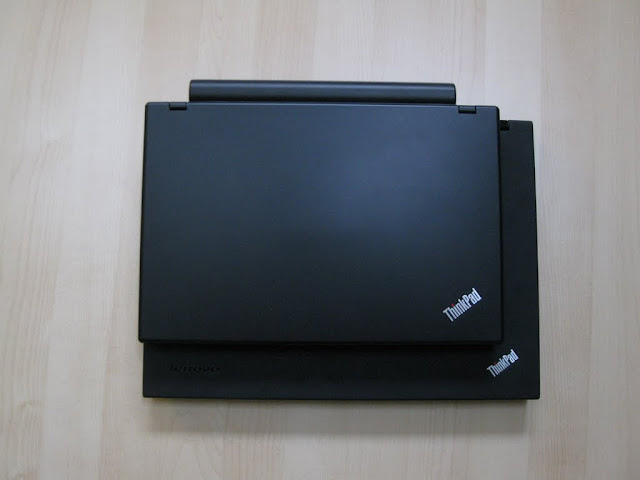
X61s top view vs
X120e top view (top). X61 is more square due to the 4:3 1024x768 display compared to the 16:9 1366x768 screen found in the X120e.
Size wise, I prefer carrying the X120e since it is narrower and fits my backpack of choice much better and is slightly lighter. A X120e with a 3-cell is ridiculously light (as is a X61s with 4-cell slimline), but you'll definitely want to carry around a power adapter to make up for the shorter battery life.
Edit: Forgot to second the MSOffice alternatives. Personally, I've only had experience with OpenOffice.org as a replacement, and only with compatibility with MS Office 2003. I've never had any problems with formula compatibility, but all bets are off if there are VBscript macros embedded within the spreadsheet. Are there academic versions of software offered through the school? If so, you could definitely take advantage of those savings. Microsoft may also have similar discounts for .edu email addresses, or even for the OEM pre-load of Office (must be on the original image).
Re: x100e vs. x120e please help me choose
Posted: Tue Jun 14, 2011 3:17 am
by ZaZ
If you're going to go used, I'd be more inclined towards the X200 over the X6x. You can probably get one on ebay within your budget or stop in the marketplace forum here and someone may be able to hook you up.
Re: x100e vs. x120e please help me choose
Posted: Tue Jun 14, 2011 6:40 am
by Colonel O'Neill
I'd avoid the X61, especially early revisions and/or 4965AGN adapters. They get really hot on the palmrest.
Re: x100e vs. x120e please help me choose
Posted: Wed Jun 15, 2011 10:58 am
by force
Completely forgot about the X200 series. Their perceived weight is just as light, if not lighter, than the X60 series. You'd get a full-size keyboard, widescreen, and an updated processor over the X60.
I have an X60s with an Atheros BGN chip and had a X61s with some Intel chip. Neither of these heat up uncomfortably on the palm rest. If I recall correctly, the X200 moved the wireless card so it's not under the palm rest, which says nice and cool. I have a picture of a x60s on a x200 on a T500 somewhere; I'll try to find and post it for size comparisons.
Edit: grammar
Re: x100e vs. x120e please help me choose
Posted: Thu Jun 23, 2011 12:11 am
by bravo3
If I were you, I'd go for the x100e. Since the applications you'd be running off it is primarily for school, you won't have to bother about justifying the extra cost anymore for MS Office on top of a dual core capability. I have MS office 2007 running on my x100e Win7 and no issues. There is no system performance degradation when I have word, excel and power point running all at the same time with a single multi-tabbed browser open. The only time mine slows down is when I have Thomson Reuters Eikon running together with 3 20-tabbed browsers of Chrome. But the slowness is just a couple of seconds but still noticeable. My hard drive has 14 G B left and the RAM is less than 300 MB now (from 2 GB) with the 3 20-tabbed Chrome screens I have and still snappy. And at the rate I abuse my lappy, it averages 2.75 hours of battery time before I recharge. I do not mind the heat generated with all the activity since I use a cooler pad hooked up via USB.
I hope this helps...

Re: x100e vs. x120e please help me choose
Posted: Tue Jul 12, 2011 8:30 pm
by Brian10161
As a guy who has an X120e I can say it's a good little sub-notebook. It's extremely portable and for me it does all I need. I do manage my iPod on it and for that it works quite well.
I went with the E-350 cpu and it seems quite capable. I haven't had an AMD notebook before that didn't get hot. I find the X120e stays nice and cool even after being on for a while surfing the internet or typing. When I get into music copying or anything that stresses the processor, then it does warm up.
I have only had one problem with it, and that's the power button instantly turning it off. I haven't gotten it sorted 100%, but the latest BIOS seems to have helped somewhat.
Other than that, I can say I really like this little notebook and for the price it was a good buy.
Good luck on both your purchase and your education!