Homepage
 Forum
Forum Drivers
 HMM-Manuals
 MTM
MTM Feed
Feed
==================================
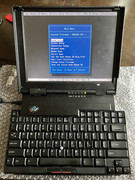
It was a long journey for me to fully restore a working 701c...
I have a 701c in a really bad cosmetic condition. Although it turns on, it shows error code 201, 163, and 161 when booting up. I know 161 and 163, but seldom did I see 201 error so the first mistake I made is to decide working on 201 memory error first.
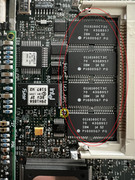
there are 4 chips of 2M memory each (in red circle) on board, and a socket for an extra memory stick. Since I got error at ~00c00000 with 8M+4M and ~00800000 with 8+0M, and I saw a total amount of memory tested is about 7800k instead of 8192k, so I thought it might be the very "last" 2M chip malfunctioned. I do not know the order of chips so from the top I marked them as 1, 2, 3 and 4, guessing I can replace either 1 or 4 to fix it. And I started with chip 1.
I have to say, it's really difficult to desolder this chip cuz it's too close to the plastic socket. I tried the cooling spray and aluminum foil, and I strongly recommend you avoid doing so unless you are 100% sure you have to desolder and solder it. The best solution I learned later is to just leave them or cut its pins. And I still feel like it was a miracle I did not break other thing.
So after I removed chip 1, it gave me a 201 error at 00400000, I can reasonably assume the bad chip was still there and what I can do next is to remove chip 4. And so I got some same chips (called A and B later) from another memory stick, carefully put 1 back and replaced chip 4 with A.
So far it cost me almost 5 hours and it still gave me the error code 201 at 00800000. I was so frustrated so I decided to work on the repainting as 701c[dot]org did. After one week I had everything else done and went back to the darn memory error.
I suspected that the order of chips were in fact [2] [1] [4] [3], so I spent another whole weekend on soldering work and tried different combinations
1) [empty] [empty] [3] [4]: ~4M recognized, error 201
2) [1] [2] [empty] [empty]: ~4M recognized, first time ok (?!), but error 201 after that
3) [1] [empty] [3] [empty]: ~4M recognized, error 201
there are other combinations I've tried but these 3 made me mad...WTF, case 1) and 2) are non sense, and why case 3) still works?
So the last thing I can do is removing all chips. Of course it gave me a long plus a short beep on booting, indicating (video?) memory issue. But when I insert another 16M memory stick it booted to BIOS without error 201.
I, then, replaced the cmos battery, replaced the hdd with CF card solution, installed dos/win31 and all drivers, and an old game for testing. Everything looks fine. So far I've spent like 20 hours on it and I was really tired.
The other day, I read the 701c[org] again and suddenly I realized I might be wrong from the very beginning, it could be some other issue but the memory. So I picked up my soldering iron. After I put [1] and [2] back, I got ~4 M recognized without any error code...AH?
Wait, but where is my other 16M memory? That's easy and I knew it, so I put back all 2M chips. Now it booted flawlessly, with full 8+16M memory.
Now I can confirm that the 201 memory error should be something due to the bad CMOS battery, but I was feeling really bad because I spent too much time on something totally useless. I thought it was the last chip because I saw the memory testing stopped and reported the total memory very close to the actual amount, but in fact it did not work as some other laptop (I had similar issue on a PC98 laptop which stopped at the exact faulty memory address when booting up), and the memory it reported should be the total amount minus about 380k. I cannot remember exactly but I thought someone told me there were shadowed bios or video memory(?) or something else that took hundred kilobytes of memory. So when you see 16000k instead of 16384k at post, it IS normal. (Honestly you won't notice that if it didn't throw any error code)
Then I removed the battery and soldered a holder, tried different CMOS battery again and I got:
1) Good battery (3v): no error
2) Bad battery (~50mv): 201
3) reverse polarity: one long beep and one short beep (do NOT try, please)
During the testing I accidently broke a resistor (yellow circle), luckily I can find another 0 ohm one and put it back.
So, that's the end of the story. In short, when you see the 201 (or maybe other kinds of) memory error, try replacing the CMOS battery. If it still does not work, you can cut the pins of memory chip on board (instead of desoldering them) and plug a memory stick.
BTW: I saw someone said if you put a 64M memory stick and the on board ones will be ignored. I tested 2 memory sticks but neither worked. I don't know if the memory is compatible or not (EDO vs FP?)
 510cs, 555bj, 860, Type 2435
 )
)