Page 1 of 1

What if...a quick test on 330Cs

Posted: Sun May 19, 2024 5:26 pm
by panips
I've always avoided STN/FSTN screens because of their limitations. But for some older laptops, there simply aren't TFT replacements available, so I keep a few around.

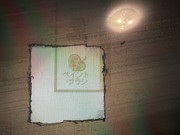
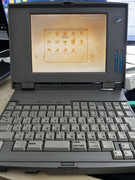
Recently, I learned that STN and TFT screens use different polarizing films. Curious, I decided to experiment with an old STN LCD from a 330Cs. What if I replaced the polarizing film with a standard one (possibly from a TN panel)? So here is pictures:

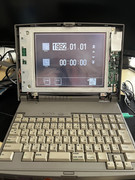
the old 330cs screen
Image

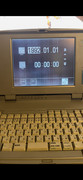
I removed a part of the front polarizer film, and put a normal one in front of the screen. Looks not bad?

Image

Image

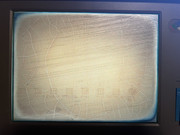
OK then, I just removed them all, and applied a whole front polarizing film. This is the (almost) "white" background
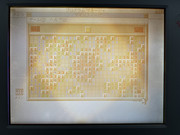
Image

and this is how command.com, command line screen, looks like
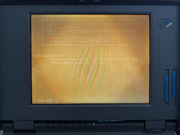
Image

one more picture...
Image

Apparently it's a bad idea to use the normal one which only gives you yellowish screen. And in fact, there was discussions on the "extra" retarder film that helps to adjust the color. For me, I just have no idea why the FSTN film is way more expensive than the normal ones, sometimes you can even get a new LCD assembly with that money. I ordered one for 330Cs, which cost only ~70 bucks. And it's even cheaper for some more common seen DSTN/FSTN LCDs, making me feel like it's not worth fixing the old one.
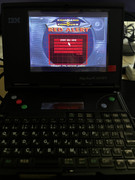
Another laptop I'd keep (but STN one) is the PC110. Fortunately, Kevin made the TFT replacement for it.
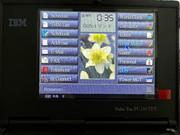
Image

Image

Re: What if...a quick test on 330Cs

Posted: Fri May 31, 2024 4:34 pm
by panips
Just realize that I forget to remove the standby battery so yesterday I tried to tear it down again. While there is no maintenance manual for 330C/Cs, I believe I should share some experiences so other 330x owners won't screw it up like me.

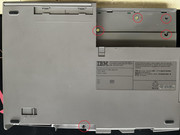
1] so the first step is to remove the AC adapter. There is no battery by default but instead it's a standard 110v AC adapter, remove it and there are several screws here.
2] remove the 5 screws. They have different sizes so don't forget to mark them.
Image

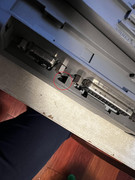
3] one more screw next to the printer connector.
Image

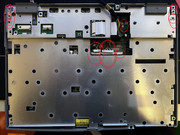
4] last screw next to the RS232 (or VGA I forget), remove green circled one first then the red.
Image

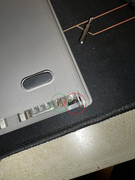
5] now it's safe to remove the cover but be careful about the red circled part, it's fragile here.
Image

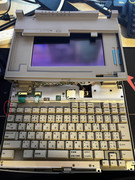
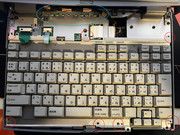
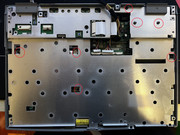
6] it's easy to remove the keyboard by removing 7 screws first. You need to have the cable well organized (green circled place) when you're putting everything back
Image

7] now it's about the display. Left side there are 3 screws, on the right side it has 3 holes but I found 2 screws only. Remove the flat cable carefully, I accidentally broke one.
Image

8] 8 more screws, that's pretty straight forward
Image

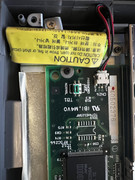
9] OK, almost done. One the bottom left, the little green battery is the standby battery.
Image

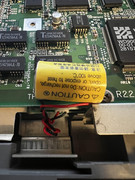
10] not far away from it lies the CMOS battery, which is quite different than the coin battery we can see in some other ThinkPads.
Image

Well, due to the age of this old 330Cs, everything looks so fragile especially some flat cables. I suspected that I broke one cuz I got screen flickering even if I tried to press the connector to ensure they are tight enough.

Good vs Bad
ImageImage

Re: What if...a quick test on 330Cs

Posted: Tue Jun 11, 2024 8:54 am
by solidpro
Edward, Thomas (x3) and Murata...

Click on the pics for a larger image.

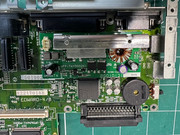
First Thinkpad I've seen where all the PCBs have been given their Thomas The Tank engine names...

Note there are some leaking caps on the 330 which need to be replaced.

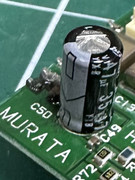
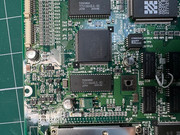
This one, which is part of a rather tricky elevated PCB called Murata (using 8 long standoffs either end) was really obviously leaking:

Image

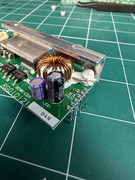
These two on the same elevated sub board were not leaking but you may as well replace them:

Image

There are three surface mounted electrolytics on Thomas-Sub. One of which was leaking:

Image

The main motherboard has 4 surface mounted eletrolytics which showed very very slight signs of crusty failure:

Image

Also, under the keyboard on the bottom left is a horrible parasytic Varta 3-cell hibernation battery.

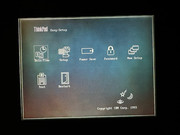
Finally, here is a pic of the slightly unusual BIOS configuration 'easy setup' screen (the Easy-Setup screen is unusually entirely monochrome when the display is a colour DSTN panel):

Image

Not sure of why they decided to put in the astronomical graphics in the bottom-right hand corner....

Re: What if...a quick test on 330Cs

Posted: Thu Sep 05, 2024 1:16 am
by Bondi
solidpro wrote:
Tue Jun 11, 2024 8:54 am
Edward, Thomas (x3) and Murata...

Click on the pics for a larger image.

First Thinkpad I've seen where all the PCBs have been given their Thomas The Tank engine names...

Note there are some leaking caps on the 330 which need to be replaced.

This one, which is part of a rather tricky elevated PCB called Murata (using 8 long standoffs either end) was really obviously leaking:

Image

These two on the same elevated sub board were not leaking but you may as well replace them:

Image

There are three surface mounted electrolytics on Thomas-Sub. One of which was leaking:

Image

The main motherboard has 4 surface mounted eletrolytics which showed very very slight signs of crusty failure:

Image

Also, under the keyboard on the bottom left is a horrible parasytic Varta 3-cell hibernation battery.

Finally, here is a pic of the slightly unusual BIOS configuration 'easy setup' screen (the Easy-Setup screen is unusually entirely monochrome when the display is a colour DSTN panel):

Image

Not sure of why they decided to put in the astronomical graphics in the bottom-right hand corner....
Thanks for the pics and useful info. My 330C unfortunately stopped turning on. Guess it's the caps. Not sure when I'll be able to get them replaced though, I moved to a different place and left it stored.
And the astronomical graphics in the corner are the cursor types one can chose form, iirc. A neat touch from IBM :)

Re: What if...a quick test on 330Cs

Posted: Fri Sep 06, 2024 6:27 am
by solidpro
Totally mind blown. So you can change the pointer to a different one in the Easy Setup? Now I have to try.