Thinkpad 600E doesnt turn on
Posted: Tue Apr 28, 2026 6:16 am
Hello all,
My thinkpad 600E stopped working when restarting from BIOS after doing a system self test.
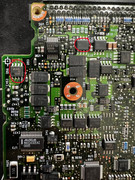
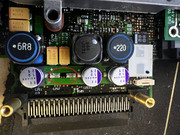
Was running a system self test after getting the 08611 track point error on startup, the errors came up when the motherboard test was in progress, then once that was finished, I pressed restart in the setup and just as the machine went to restart, it shut off and won't turn back on again, seem to make the AC adapter cut out too as the low battery light stops blinking too and i can hear a faint squealing from near the PSU input jack.
Power sequencing thing from powering the laptop with the battery instead of the AC charger when being powered on? (dont know how to explain my mental picture of the probable power up sequence when the laptop is powered up on the AC adapter)
It does stay powered when the battery is plugged in, but it cant start cause its bad. when the battery is removed from the machine it just cuts out and doesnt do anything (battery status LED doesnt blink anymore until AC adapter is unplugged and plugged back in.
Was also running for a hour or two prior.
The PSU used was a Genuine IBM power supply IBM FRU 02K6555
thanks
My thinkpad 600E stopped working when restarting from BIOS after doing a system self test.
Was running a system self test after getting the 08611 track point error on startup, the errors came up when the motherboard test was in progress, then once that was finished, I pressed restart in the setup and just as the machine went to restart, it shut off and won't turn back on again, seem to make the AC adapter cut out too as the low battery light stops blinking too and i can hear a faint squealing from near the PSU input jack.
Power sequencing thing from powering the laptop with the battery instead of the AC charger when being powered on? (dont know how to explain my mental picture of the probable power up sequence when the laptop is powered up on the AC adapter)
It does stay powered when the battery is plugged in, but it cant start cause its bad. when the battery is removed from the machine it just cuts out and doesnt do anything (battery status LED doesnt blink anymore until AC adapter is unplugged and plugged back in.
Was also running for a hour or two prior.
The PSU used was a Genuine IBM power supply IBM FRU 02K6555
thanks