Page 1 of 1
ThinkPad 600 error 1201 *PICS*
Posted: Wed Jul 20, 2011 12:57 pm
by Alex7
Hello ThinkPad users
I've got a TP 600 (without e or x) and it shows error 1201 during boot up and i've run the test procedure. It says that the parallel-, serial- and infrared port is not correct. Everything else is OK.
I've replaced the backup battery with a full 2025 3Volt watch battery but no change of the errors.
Is there any way to bypass the 1201 error? I don't need the parallel, serial and infrared ports.
Maybe with the ctrl-d setup in the config menu?
I've searched this forum and the internet for quite a long time but i didn't found something to fix it.
Thank you for your interest.
Alex
Admin edit: Added PICS warning
Re: ThinkPad 600 error 1201
Posted: Wed Jul 20, 2011 1:12 pm
by Neil
Welcome to the forum! Too bad it's usually problems that bring folks here...
See:
http://www-307.ibm.com/pc/support/site. ... wik-3sr4pw
That error is Serial_B test failure. Caused by System board (infrared). Have you tried to disable infrared in the BIOS? I don't remember if you can or not, but it's worth trying. Not much help, I know, but it's all I have.
Re: ThinkPad 600 error 1201
Posted: Wed Jul 20, 2011 1:37 pm
by Alex7
Thanks Neil
I've searched the whole bios again for a way to disable the infrared port but there is no way.
Maybe there is one in the ctrl-d setup of the config menu but there are just lots of hex datas and i don't know their meanings.
Neil wrote:Too bad it's usually problems that bring folks here...
Sorry


Re: ThinkPad 600 error 1201
Posted: Wed Jul 20, 2011 2:30 pm
by rkawakami
From my (limited) memory, I think that the PS2.exe program can enable/disable the infrared port. Grab a copy from here:
http://support.lenovo.com/en_US/downloa ... IGR-4ZFPEG
but be prepared to deal with DOS command line syntax
.
Re: ThinkPad 600 error 1201
Posted: Wed Jul 20, 2011 2:44 pm
by Alex7
Thanks for that info but the machine don't let me boot because of that 1201 error.
I would be really happy if i could start any program or use any DOS commands on my old TP600.
Re: ThinkPad 600 error 1201
Posted: Wed Jul 20, 2011 3:00 pm
by rkawakami
Ah, sorry. I thought that you were able to boot an OS. It's been a long time since I had to deal with any of the error codes on a 600-series system. Have you tried hitting the ESC key when the error is displayed? That may allow you to continue booting. If not, then about the only thing I can suggest would be to take the system apart and look around the area of the infrared port. There may be some contamination in the area which might be cleaned off with some isopropyl alcohol.
Re: ThinkPad 600 error 1201
Posted: Wed Jul 20, 2011 3:18 pm
by Alex7
I've tried the 'ESC' trick but it didn't work - it is just displaying 76 301 (=keyboard error) and this is normal if a key is pressed during boot up.
I've looked on the motherboard but everything seems to be clean.
Thank you very much for your help.
I think my TP600 is dead

or am i wrong?
Re: ThinkPad 600 error 1201
Posted: Wed Jul 20, 2011 5:04 pm
by rkawakami
I mean to press the ESC key after the 1201 error message is displayed and not to hold it down or press it while the system is first turned on.
Re: ThinkPad 600 error 1201
Posted: Wed Jul 20, 2011 6:14 pm
by Alex7
I've already tried to hit or keep pressing the 'ESC' key at different times but no success at all.
I've studied the hardware maintenance manual but there's no other solution than to change the motherboard. I've read that there is an advanced test menu (press ctrl+a at the normal test menu) but that is showing too: 'change motherboard 100%'.
If i could find a description of the ctrl+d menu and the meaning of all the hex datas... maybe there's a way to disable the boot up test of the Infrared, parallel and serial port but i don't know if the port device is handling other functions of the computer too and when it is damaged than the whole TP600 is junk. Maybe that's why it won't boot...
I need a hardware component description of the motherboard.
IBM, open up your desks
Re: ThinkPad 600 error 1201
Posted: Wed Jul 20, 2011 7:02 pm
by rkawakami
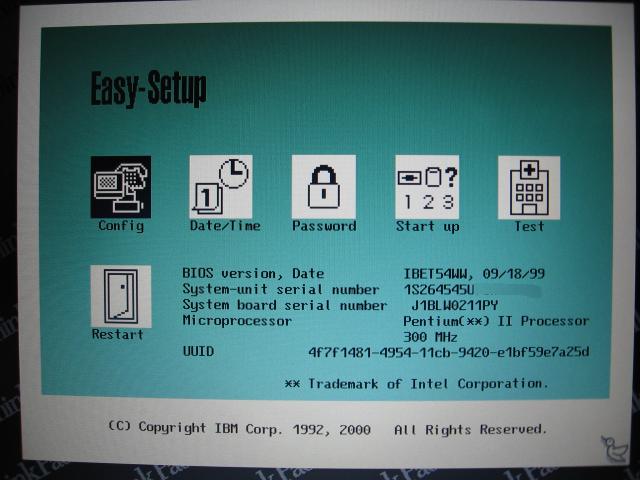
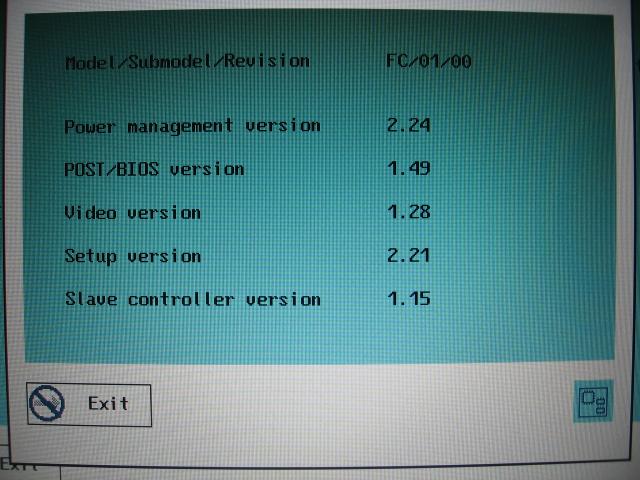
Are you able to determine which BIOS revision you have in your system? I may still have a working 600 system that I can play around with to see if it's possible to determine which byte(s) in the Config menu enables/disables the various COM ports in the system. I'm thinking that if I can use the PS2.exe program to disable the infrared port, then I can take a memory dump of the Config menu before and after running the PS2.exe program and see what changes. It may take me a couple of days to get everything together so don't trash that motherboard quite yet
.
Re: ThinkPad 600 error 1201
Posted: Wed Jul 20, 2011 8:20 pm
by BillP
Wow Ray, that sounds like a lot of work. You can use PS2 to disable the Infra Red port. On the 600X by default the IR port is enabled and the serial port disabled. I need to use the serial port but not the IR port so I use PS2 to set the 600X the way I want it. On the 600E (when I had one) it was necessary to disable the IR port before enabling the serial port to avoid IRQ conflicts. I have a text file listing all the commands for PS2, downloadable at
http://home.roadrunner.com/~bpetrow/PS2.TXT. It's just a print out of the command help listings in PS2 but may reduce the effort for you.
Re: ThinkPad 600 error 1201
Posted: Wed Jul 20, 2011 10:45 pm
by rkawakami
Bill,
Thanks for that info. The reason I'm trying to reverse-engineer the BIOS settings is that the OP apparently cannot boot any OS so therefore it's not possible to even use the PS2.exe program to disable the infrared port. If the PS2.exe program is simply an easy (?) user-interface to setting/clearing some bits in the configuration menu, then what I'm proposing could work. If not, then you're right; it will be some work for naught.
Re: ThinkPad 600 error 1201
Posted: Wed Jul 20, 2011 11:06 pm
by Alex7
@rkawakami
Thanks a lot for all your help. That's really great.
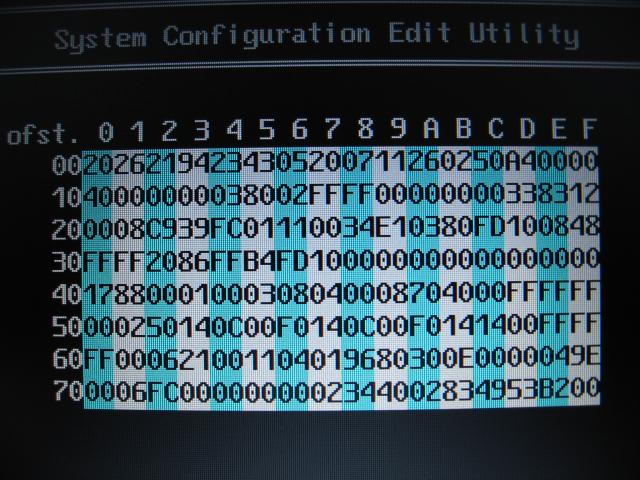
I've made some screenshots with all the infos from my TP600:
Test Procedure results:

Version Infos 1:

Version Infos 2:

----CTRL-D Config Menu:----
01 Base 128 CMOS

02 Extended CMOS - First 64 Bytes

03 Extended CMOS - PCI IRQ Data

04 Extended CMOS - General Config Data

05 Extended CMOS - PCI Device Data

06 Extended CMOS - CardBus Data

07 Extended CMOS - CardBus Data

08 Extended CMOS - Base 114 CMOS Copy

09 Base 64x2 EEPROM

10 ACPI Interface Space Data (Read Only)

Re: ThinkPad 600 error 1201
Posted: Thu Jul 21, 2011 3:50 am
by rkawakami
@Alex7: Thanks for the photos. It looks like you are running an older version of firmware than in my 300Mhz 600 system:

BIOS menu

Revision information
I have had a chance to do some experiments tonight and I've found 5 bytes that may need changing if you want to disable the IR port in the CTRL-D Config menu. However, before you attempt to edit these locations, I would suggest that you first initialize the CMOS using the icon inside the Config area. This will set all of the bytes to their default values and hopefully they will match what I found on my system:

Base128 CMOS
Note that the first couple of bytes in the first line, offset "00" to "03", appears to contain the date and time so the values will be different each time you execute the CTRL-D option. After I performed the Initialize option and took a picture of the CMOS memory, I ran the PS2.exe program and disabled the IR port. I took another picture of the CMOS memory values. Finally, I re-enabled the IR port and took another look at the memory. I then assembled all of the values in this table:
http://www.kawakami-ca.com/ibm_600/PS2_ ... R_port.htm
(also available as a .PDF file here:
http://www.kawakami-ca.com/ibm_600/PS2_ ... R_port.pdf )
Each group of three lines (rows) represents the memory values after the Initialize, the "ps2.exe ir disable" command and the "ps2.exe ir enable" command. Since the Initialize operation is supposed to enable the IR port, I looked for bytes that changed to a different value on the "disable" command but returned to the Initialize value after enabling the IR port. I found three such locations at 22, 2F and 66. However, there were two other bytes that did not change the way I thought they should (70 and 79). Those changed when the IR port was disabled but still remained at their new values when the IR port was re-enabled.
If I were to bet on the simplest change that will disable the IR port, I'd go with byte 22. It changed from a C9 to a C8; one bit went from a "1" (enabled?) to a "0" (disabled?). The other bytes are probably the COM port and IRQ settings. This is just an (semi)educated guess
. Also note that this may only change the status of the IR port. I have not done any testing with disabling the serial and parallel ports.
Re: ThinkPad 600 error 1201
Posted: Thu Jul 21, 2011 8:05 am
by ozzymud
@rkawakami: That's brilliant, and I bet you are spot on with the educated guess about the 1 bit

(Also gives me a good excuse to give the wife when I own more then one when I start collecting that series :O)
Re: ThinkPad 600 error 1201 *PICS*
Posted: Thu Jul 21, 2011 12:25 pm
by Alex7
IT'S ALIVE!!! IT'S ALIVE AGAIN!!! Hoorayyy XD

Thank you all - especially rkawakami for all your hard work! You saved my Thinkpad
Your guess with address 22 was right. That's the only value i've changed and it worked perfect. I've pressed the 'Initialize' button of the config menu first and then i've changed the value of address 22 from C9 to C8. Then i pressed the F2 button and then F3 and after that i restarted my TP600. Then the 1201 error is gone. YEAH!
This is how my 'Base 128 CMOS' looks like:

I've marked all the values that are the same as your 'Base 128 CMOS with IR disabled' values with a red underline.
The only 2 values that matches your 'IR disabled' values are at Address 22 and 66. The value at 66 was already at 08 after initialization. So it was great luck for me that address 22 was the right point to awake my TP600 from the dead XD
Thanks a lot ThinkPad Master Kawakami
Re: ThinkPad 600 error 1201 *PICS*
Posted: Thu Jul 21, 2011 12:52 pm
by rkawakami
Glad to be of assistance. This was an interesting exercise and probably explains how the trackpoint disabling edit was found many years ago.
Re: ThinkPad 600 error 1201 *PICS*
Posted: Thu Jul 21, 2011 1:13 pm
by pkiff
Alex7 wrote:Thanks a lot ThinkPad Master Kawakami
Reading this thread, I also must bow before Master Kawakami and his troubleshooting acumen.

Re: ThinkPad 600 error 1201 *PICS*
Posted: Thu Jul 21, 2011 1:17 pm
by hunterman223
@rkawakami, I just have to say, wow. It's people like you that make this forum so great. Thanks and kudos to you for going the extra mile.
Re: ThinkPad 600 error 1201 *PICS*
Posted: Thu Jul 21, 2011 4:40 pm
by ozzymud
Gotta have something to challenge you from time to time, that's the most fun part of computers... figuring out how stuff works
I want a 600 now just so I can map out everything
Working currently on a boot diskette/cd with an old DOS app called PC Dashboard, it's a sweet little DOS menu program that is very easy to configure and has limitless sub-menus... just press a letter to either run or goto sub-menu... putting ALL possible PS2 commands into it, no more ps2 ? ... just hit the menu item. Can even put help for each command and commands can ask for parameters
Will post it in Legacy when I get it done (the shareware version only has a once a day nag screen)
Re: ThinkPad 600 error 1201 *PICS*
Posted: Thu Jul 21, 2011 5:18 pm
by Neil
A big

to Ray!
Re: ThinkPad 600 error 1201 *PICS*
Posted: Sat Sep 01, 2012 3:48 pm
by bugmn
I am pleased to note that this works for the Thinkpad 560Z as well.
Although the default value is 0x41, changing the same bit (thereby changing the value to 0x40) clears the 1201 error
Re: ThinkPad 600 error 1201 *PICS*
Posted: Sat Sep 01, 2012 4:27 pm
by rkawakami
It's possible that similar machines of that era would have the same memory map for the configuration data. Good to know it works on a 560Z as I also have one myself somewhere around here. I'm surprised that this thread has bubbled up again. Looking around with Google I see it's up at the top of the results when searching for "thinkpad 1201 error".