Page 1 of 2
W520 keyboard in W530?
Posted: Sat Jun 02, 2012 8:53 am
by QWERTY Andreas
Hi. After looking on some pictures, the W530 seems quite similar to the W520. Dont you think it will be possible to swap the keyboards for some die-hard fans?
Just a thougt.
Best Regards
Andreas
Re: W520 keyboard in W530?
Posted: Sat Jun 02, 2012 9:16 am
by dr_st
The keyboard can be swapped, but as far as we all know, some of the keys will not be correctly mapped.
We have been speculating that a BIOS modification might be able to address this.
See discussion here:
http://forum.thinkpads.com/viewtopic.php?f=69&t=104151
Re: W520 keyboard in W530?
Posted: Sat Jun 02, 2012 3:47 pm
by Ibthink
And you have to swap the W530 palmrest out and the W520 palmrest in.
Re: W520 keyboard in W530?
Posted: Mon Jun 04, 2012 5:16 pm
by Q-Ball
dr_st wrote:The keyboard can be swapped, but as far as we all know, some of the keys will not be correctly mapped.
We have been speculating that a BIOS modification might be able to address this.
See discussion here:
http://forum.thinkpads.com/viewtopic.php?f=69&t=104151
Where did you hear that they were swappable (which reviewer, which site)?
Re: W520 keyboard in W530?
Posted: Tue Jun 12, 2012 3:25 pm
by helloguys
Read it from a Chinese forum (
http://forum.51nb.com/thread-1227405-1-1.html) that classic 7-row keyboard might be an option for new ThinkPads (T430, T530, W530, X230, etc.).
It was said ETA was Mid-August 2012. Not sure if it'll be provided as CTO or accessory only.
Re: W520 keyboard in W530?
Posted: Tue Jul 10, 2012 5:51 pm
by jcvjcvjcvjcv
Has anyone actually done the swap on anything else than a X230? (See:
http://www.laptopreviews.com/lenovo-thi ... ew-2012-05 )
Let’s take a look at the keyboards themselves. Physically, they’re the same size. I managed to put the X220 old style keyboard and palm rest onto the X230. It fits perfectly, but before you run out to buy a X220 keyboard in anticipation of getting a X230, the keys are mapped in the BIOS and exchanging them yields some strange results. While the letter characters work normally, the Delete key moves to the Page Up key and controlling the screen brightness is done using Fn + F7 or F8, like it is on the X230.
Especially interested in getting confirmation that a W520 palmrest + W520 keyboard will fit on a W530. If I have to buy a QWERTY keyboard anyway if I buy a W530 from Germany I might just as well get the old palmrest and get a 7-row keyboard in.
EDIT: I assume one needs the part number 04W1369 (W520 palmrest) for a W530 with FPR, without colorsensor?
Re: W520 keyboard in W530?
Posted: Wed Jul 11, 2012 12:58 am
by dr_st
The keyboard is the same throughout the entire lineup, so yes, it will work, and you shouldn't even have to swap palmrests.
But until a modified BIOS is out, the swap is useless.
Re: W520 keyboard in W530?
Posted: Wed Jul 11, 2012 5:44 pm
by jcvjcvjcvjcv
Are you sure about that?
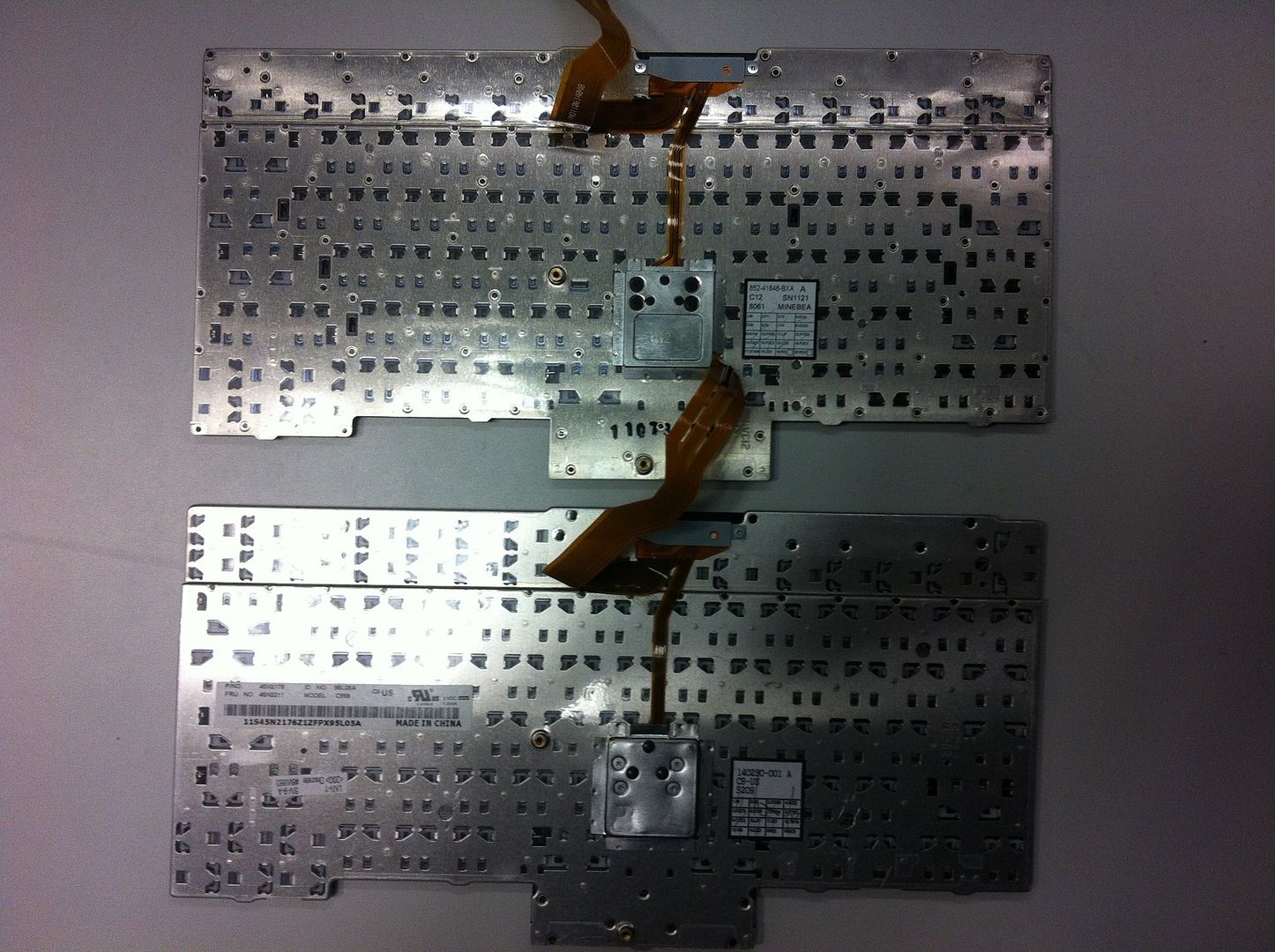
Because I see some differences in the plastic above the keyboard:
W520:

W530:

Or is that just the top strip covering more or less?
Also: the W520 trackpoint buttons won't match with the lines of the W530 palmrest. But that can probably be fixed by switching them out.
If it doesn't require a W520 palmrest: even better! Then it will 'only' cost around €80 to get the classic keyboard
Re: W520 keyboard in W530?
Posted: Thu Jul 12, 2012 3:06 am
by dr_st
Yes, it is just the strip. The keyboard backplate itself, including the dimensions of the buttons, is completely identical.
http://img.photobucket.com/albums/v65/d ... ow-top.jpg
http://img.photobucket.com/albums/v65/d ... bottom.jpg
However, you are right that the buttons won't line up nicely with the palmrest. And you cannot switch them out because the notches at the bottom which hold them in place are somewhat different between the two keyboards.

So for aesthetic purposes one may also want to swap the palmrest. And hope that it will align nicely with the rest of the chassis.

Re: W520 keyboard in W530?
Posted: Thu Jul 12, 2012 8:25 am
by jcvjcvjcvjcv
$60 for a classic keyboard is one thing, $100 for aesthetic purposes is another thing. At least, for me it is.
Also; that increases the price premium for a W530 over a W520 significantly. At some point that simply won't justify the improvements of the W530's internals.
Re: W520 keyboard in W530?
Posted: Fri Nov 09, 2012 10:57 am
by stkris
helloguys wrote:Read it from a Chinese forum (
http://forum.51nb.com/thread-1227405-1-1.html) that classic 7-row keyboard might be an option for new ThinkPads (T430, T530, W530, X230, etc.).
It was said ETA was Mid-August 2012. Not sure if it'll be provided as CTO or accessory only.
Anyone heard more about this? I would be very interested!
Re: W520 keyboard in W530?
Posted: Tue Nov 27, 2012 9:42 pm
by jcvjcvjcvjcv
I guess a lot of us have made up their mind. Some have made peace with this ridiculous keyboard while others bought a W520.
I myself bought a W520
Re: W520 keyboard in W530?
Posted: Tue Nov 27, 2012 11:54 pm
by lead_org
http://www.flickr.com/photos/lead_org/8 ... 0988401400
Here is a T420 with a Precision keyboard. The T430 can also take the normal keyboard, but for some of the machines the keyboard swap over is a very a tight fit. I had to really cram the T420's keyboard into the T430 machine.
Re: W520 keyboard in W530?
Posted: Wed Nov 28, 2012 5:07 pm
by jcvjcvjcvjcv
Nobody is asking to fit a stripped keyboard in a T420

We want it the other way around: a yx20 keyboard in a yx30
Re: W520 keyboard in W530?
Posted: Mon Dec 17, 2012 2:25 pm
by smap77
Back to the Original Question: W520 Keyboard on W530. I'm trying to figure out what is known and what is unknown as to whether or not this can work. I'm willing to throw some money at my problem if it seems like there is a potential to get the "old style" keyboard working in the new laotop.
Since most of the posting has been constrained to the US-style keyboard layout, can we consider that the configuration to discuss (unless otherwise noted)
Physical/Part changes required:
Besides the W520 keyboard FRU, are there additional parts/FRUs which must be replaced?
Software/BIOS changes required:
Will the W520 keyboard have full functionality without additional software or BIOS changes?
Are there known software (not BIOS) solutions that can provide the necessary missing functionality?
Are there any known BIOS resources that can/may provide the missing functionality?
Can anyone make sense of what they know thus far?
@dr_st: can you clarify?
Re: W520 keyboard in W530?
Posted: Mon Dec 17, 2012 2:53 pm
by dr_st
smap77 wrote:Besides the W520 keyboard FRU, are there additional parts/FRUs which must be replaced?
I don't think so. But the keyboard may be tough to align properly, unless parts of the palmrest/bezel are also exchanged. But is that mandatory - probably not.
smap77 wrote:Will the W520 keyboard have full functionality without additional software or BIOS changes?
No. All the keys that shifted will behave as if you are using the W530 keyboard.
smap77 wrote:Are there known software (not BIOS) solutions that can provide the necessary missing functionality?
Generally, it can be done - you can remap keys with Autohotkey or similar utilities. It will not be 100%, though, since - it will only work inside the operating system on which it was installed (i.e., not in BIOS/DOS), it will not provide solution to keys that were removed completely, and some Fn key combinations which are registered on a very low BIOS/HW level will probably not be switchable.
smap77 wrote:Are there any known BIOS resources that can/may provide the missing functionality?
My guess is that the keyboard mapping from the W520 BIOS needs to be ported to the W530 BIOS. But having not done any work on Thinkpad BIOS myself, and not knowing the structure - I wouldn't know where to start.
Re: W520 keyboard in W530?
Posted: Mon Dec 17, 2012 4:02 pm
by wkw
Not sure if I should post this in the T530 forum, but is this possible, putting the classic keyboard on the T530?
Re: W520 keyboard in W530?
Posted: Mon Dec 17, 2012 5:39 pm
by bill bolton
wkw wrote:Not sure if I should post this in the T530 forum, but is this possible, putting the classic keyboard on the T530?
Same as the above discussion, basically...... no

Cheers,
Bill B.
Re: W520 keyboard in W530?
Posted: Thu Dec 27, 2012 4:41 pm
by shammi
I've seen refurbished W520 keyboards on ebay for as low as 20 bucks. Sounds like thats not that bad a price to try out. I would be inclined to do it if I knew all the keys would be at least functional in some form. i.e. I can remap them. Not having the 7th (top) row working at all would make it worthless.
I checked the parts list for W530 and found 3 different classes of keyboards CHY, SRX and LTN. CHY and SRX have back lit options. Googling around told me that those represent the sub manufacturer for the keyboard. Other than that they are identical. So the only options we have for parts are back lit keyboard vs non back lit.
I do like the feel of the new keyboard. Since I use the laptop for heavy coding, I live by my keyboard and the key positions matter a lot to me. The biggest offender is that the context menu button has been replaced with the PrintScreen. To make things worse the context menu button is not even present and I can't use it. I'm going to investigate options to remap that one button at least. As for the others I'm used to a vertical layout for Home/End as well as Pg up/Pg Dn.
Regardless, I'll keep checking here. I'm hoping someone will try it
Re: W520 keyboard in W530?
Posted: Thu Dec 27, 2012 5:18 pm
by shammi
shammi wrote:I've seen refurbished W520 keyboards on ebay for as low as 20 bucks. Sounds like thats not that bad a price to try out. I would be inclined to do it if I knew all the keys would be at least functional in some form. i.e. I can remap them. Not having the 7th (top) row working at all would make it worthless.
Thought about it for a while and decided to go for it. Placed my order for a refurbished W520 keyboard on ebay for 20 dollars. Will be here just after new years. Will let you guys know the outcome.
Everyone here has mentioned that an updated BIOS is required. What about keyboard drivers in the OS?
Re: W520 keyboard in W530?
Posted: Tue Jan 01, 2013 8:03 pm
by shammi
It arrived today. I quickly tried replacing it and sure enough as expected
- I will need to change the palmrest piece for the keyboard to fit in. It won't even sit in place now!!
- The keys were indeed hard coded position wise. So Pg Up was the Delete, etc.
In order to get this working properly I will need to get the W520 plam rest and the BIOS definitely needs to be modified to remap/handle the extra keys correctly.
Re: W520 keyboard in W530?
Posted: Thu Feb 21, 2013 11:03 am
by stkris
Very brave of you, Shammi!
Any BIOS hackers around?
Re: W520 keyboard in W530?
Posted: Wed Jan 20, 2016 1:43 am
by jedisurfer1
shammi wrote:It arrived today. I quickly tried replacing it and sure enough as expected
- I will need to change the palmrest piece for the keyboard to fit in. It won't even sit in place now!!
- The keys were indeed hard coded position wise. So Pg Up was the Delete, etc.
In order to get this working properly I will need to get the W520 plam rest and the BIOS definitely needs to be modified to remap/handle the extra keys correctly.
Any progress on this? I'll have some free time next month and I'm going to do this as I bought a few spare thinkpad w520 keyboards and a palmrest.
Re: W520 keyboard in W530?
Posted: Wed Jan 20, 2016 8:05 am
by RealBlackStuff
Shammi hasn't been on the Forum since March 2013...
Re: W520 keyboard in W530?
Posted: Wed Jan 20, 2016 11:16 am
by ajkula66
jedisurfer1 wrote:
Any progress on this? I'll have some free time next month and I'm going to do this as I bought a few spare thinkpad w520 keyboards and a palmrest.
If there was, I'm dead certain that someone on this forum would've heard about it and posted the appropriate links/info/whatever...
There's honestly not all that much to be gained by going from *20 to *30 generation, and I'd venture a guess that the given state of affairs is the very reason we haven't seen a modded BIOS yet and are - IMO - unlikely to ever see one...
Re: W520 keyboard in W530?
Posted: Wed Jan 20, 2016 11:32 am
by brchan
There hasn't been any new news of this keyboard bios mod. The only real bios mods so far has been whitelist removal from an X230t and bug fix for 100% cpu usage using eGPU + 16GB ram. Both required desoldering/soldering chips and reprogramming using hardware.
Re: W520 keyboard in W530?
Posted: Sat Apr 22, 2017 4:19 pm
by FryPpy
Keyboard mod is
here or
here. And yes i have applyed this mod on my W530 and it worked perfectly. But now this mods (from thinkpad-ec git repo) exists only for previous version of BIOSes (ex 2.65 for W530 while current BIOS from Lenovo is 2.66).
...
Now i'm contining fighting with W520 palmrest because it is not simple plug and play procedure. And be warned - do not use W(T)530 palmrest with color sensor because it makes major incompabilities with W530 structure frame
Re: W520 keyboard in W530?
Posted: Sat Apr 22, 2017 9:13 pm
by brchan
I would not bother with using a W520 palmrest. I tried modifying a bunch of the plastic pieces on the bottom, but it just still wouldn't fit. The W530 palmrest fits perfectly well, albeit slightly tight if you don't hollow out the keyboard inserts fully enough.
Re: W520 keyboard in W530?
Posted: Sun Apr 23, 2017 9:25 am
by FryPpy
brchan wrote:I would not bother with using a W520 palmrest.
I know that. I've read
your topic. But W520 palmrest is sitting near me and i can torture it and rip it apart for free.
After all work my palmrest is sitting well except 2 points: plastic piece near left hingie very hard to sit in place. And central latch under touchpad buttons dont want to fixate. Have removed touchpad buttons and metal bracket but it coudn't help. And ofcourse color sensor:(
PS
Ugly thought - is to swap structure frame;)
Only one good classic keyboard mod i've made - when i have swapped motherboard in X220 and all worked flawlessly.
Re: W520 keyboard in W530?
Posted: Sun May 21, 2017 12:13 pm
by crystal castle
I've just installed a keyboard from an X220t and it has basic functionality. Typing on it now. I haven't done the keyboard mod yet. The keyboard itself doesn't sit in place very well. It doesn't feel unstable, it just doesn't look or feel totally right. There's a gap at the bottom where it looks like it's supposed to slide under the palm rest but can't. The worst part is the bulge at the top near the ThinkVantage and microphone buttons. Can this be easily dealt with? I tried a T520 palm rest but gave up after considerable mutilation, it's just too different, albeit subtlety.