Modifying a R52 fan to fit T43p (PIC WARNING)

T4x series specific matters only
Post Reply
Message
Author
sizzleman
Posts: 17
Joined: Wed Mar 04, 2009 9:58 am
Location: holly, mi

Modifying a R52 fan to fit T43p (PIC WARNING)

#1 Post by sizzleman » Fri Apr 24, 2009 12:27 pm

I have been compiling data about all the different fans for the t4x series. In my research, I found some weird things like there was one fan that was superceded by a fan that was superceded again. Some of the early long fans didn't have that much copper on the GPU. Something else that bothered me was the fact that the fan takes in fresh air where it vents out. I mean, what was the point in the vent on the bottom of the TP? Every fan I have ever seen allows air to move over other parts. And the biggest problem is that in every design there are flat heat pipes.

Good greif, no wonder why the t43s are so hot. Just bad design, and well, just bad.

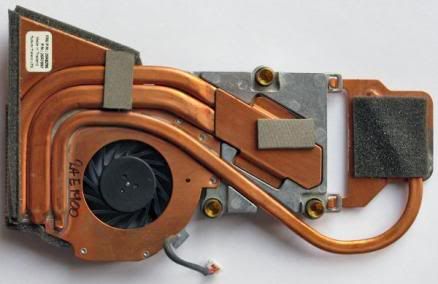
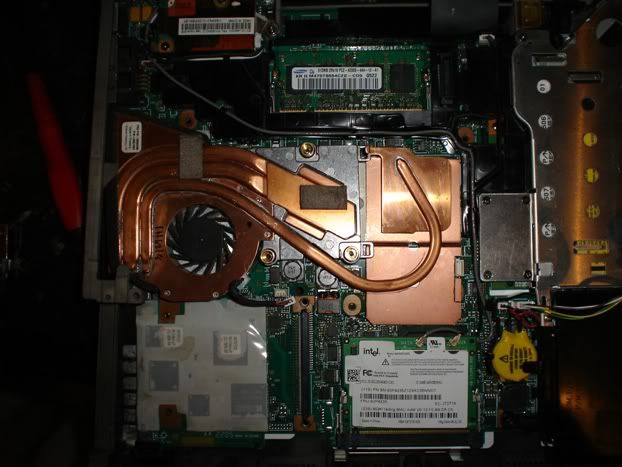
Ok, I will get to the point. During my hunting for the best T4x fan, (I found 13 so far) I came across this fan (26R8296):

Image

Looks purdy. This fan comes from a R52. Which means it will bolt up to a T43P. This fan just about has it all, open heat pipes, a completely different fan the operates at only 0.19A, (did you know that some fans use up to 0.4A?) and even a heat pipe that will go directly to the northbridge.

Have you seen the problem yet? This fan does not cover the GPU for some reason. Which I think is a good thing because the ATI chipset and the northbridge are not level. So it gives me room to modify.

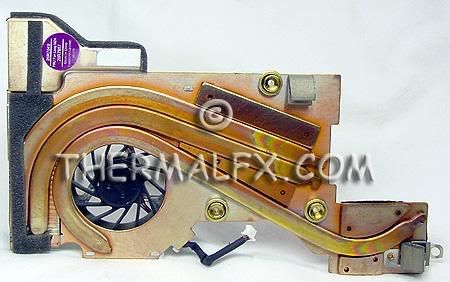
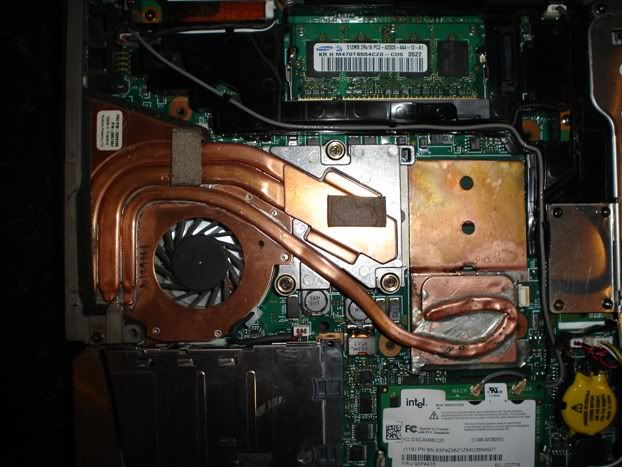
Here is my current fan (26R7957):

Image

My fan functions ok for the most part. I run at about 48c while surfing the net and I get up to ~75c while gaming. But my fan is noisy and the TP gets hot.

The plan is to cut a piece of copper through trial and error then braze the plate to the heat pipe. If I can get the fan to fit and the temp is not where I want it, then I am going to redirect the intake on the fan to force air through the laptop and cool everything off better.

I just picked up one of these through ebay for 11 dollars shipped. Add a couple dollars for materials and I think it will be worth a try. I will take pictures along the way if anyone wants to see. If I get the fan in by next week, I will have it installed by the weekend.
Current rig:
ThinkPad T43p 2669-W8N/2G/15" UXGA/ATI FireGL V3200 128mb
ThinkPad T30 2367-AU3/last TP, don't let the door hit you in the (intentionally left blank)

underclocker
moderator
moderator
Posts: 4016
Joined: Wed Mar 23, 2005 3:52 pm
Location: Wash., D.C.

Re: Modifying a R52 fan to fit T43p (PIC WARNING)

#2 Post by underclocker » Fri Apr 24, 2009 1:37 pm

Improving temps in a T43 is a nice project.

Aren't the R-series fans thicker, I recall they were about 1/3rd thicker? Will they fit under the keyboard on a T43 - maybe on a 15" unit?

Have you seen the nice fan from an Intel GPU T43, it seems to cover the Northbridge and the GPU with a flexible design? For an ATI T43, I'd peel off the plastic from the bottom and apply Arctic Silver to both the Northbridge and the GPU (and the CPU, of course). It has a .19A design fan.

Here is a link to one installed plus some pictures of it alone --> T43 Intel GPU fan picture

Image

Image
T510, i7-620m, NVidia, HD+, 8GB, 180GB Intel Pro 1500 SSD, Webcam, BT, FPR Home
T400s, C2D SP9400, Intel 4500MHD, WXGA+, 8GB, 160GB Intel X18-M G2 SSD, Webcam, BT, FPR Travel
Edge 14 Core i5 | Edge 15 Core i3 | Edge 15 Athlon II X2| Edge 15 Phenom II X4

sizzleman
Posts: 17
Joined: Wed Mar 04, 2009 9:58 am
Location: holly, mi

Re: Modifying a R52 fan to fit T43p (PIC WARNING)

#3 Post by sizzleman » Fri Apr 24, 2009 9:57 pm

Aren't the R-series fans thicker, I recall they were about 1/3rd thicker? Will they fit under the keyboard on a T43 - maybe on a 15" unit?

There aren't a whole lot of places willing to put up information about these fans. Yes, I did see the Intel fan and that was my first choice. But the fan was sold when I went to but it in ebay. There were others, but I just can't see spending any more than 20 dollars on a test part. However, when I was trying to find some specs I did find brand new r52 fans for 12 dollars. Grr, the guy must have just posted them.

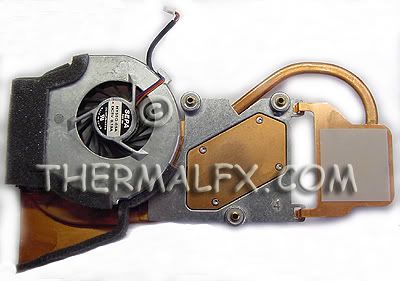
Anywho, when I was logging in the fans, I noticed that the Intel and the R52 have the same fan. Here is the bottom of the R52:


Image

So, if you compare that to the Intel fan then I think it will fit, save for the heat pipes. I also have the advantage of a 15" T43p, so I will have extra room. I will not truely know if it will fit or not until I try it.
Current rig:
ThinkPad T43p 2669-W8N/2G/15" UXGA/ATI FireGL V3200 128mb
ThinkPad T30 2367-AU3/last TP, don't let the door hit you in the (intentionally left blank)

sizzleman
Posts: 17
Joined: Wed Mar 04, 2009 9:58 am
Location: holly, mi

Re: Modifying a R52 fan to fit T43p (PIC WARNING)

#4 Post by sizzleman » Sat May 02, 2009 2:37 am

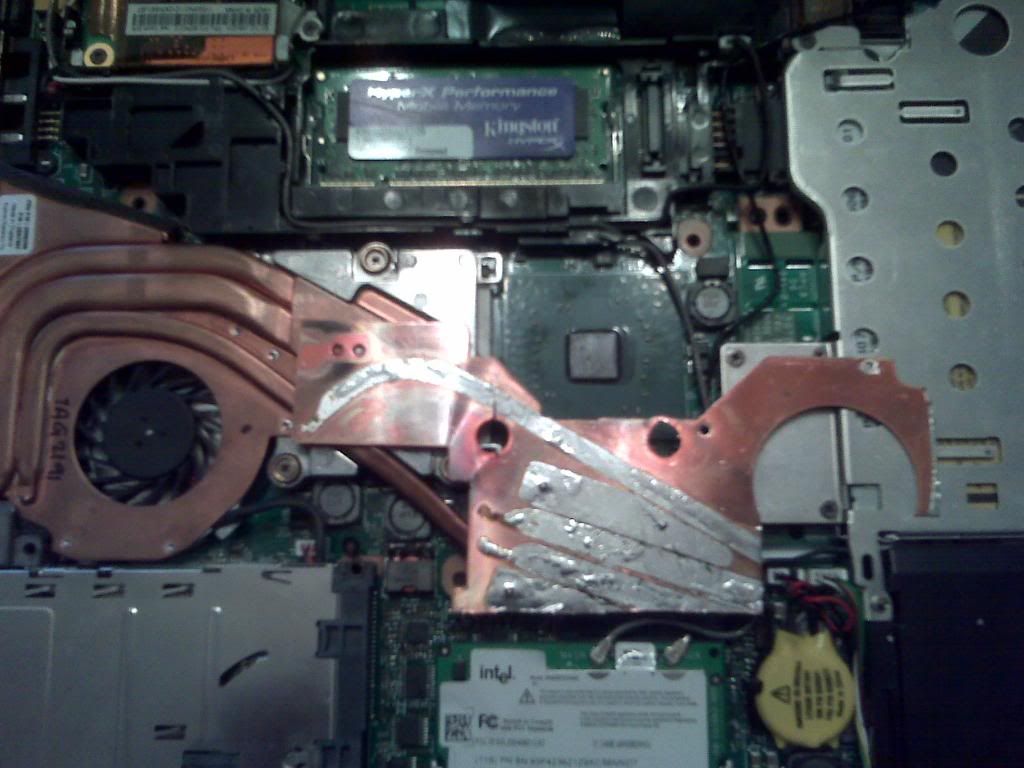
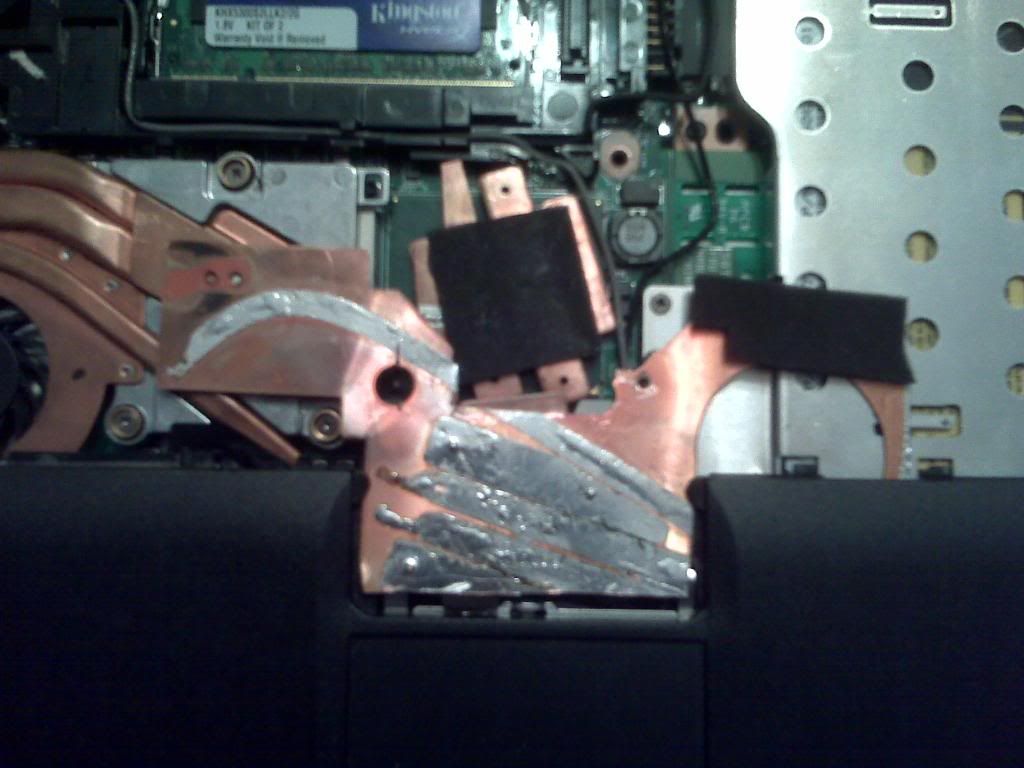
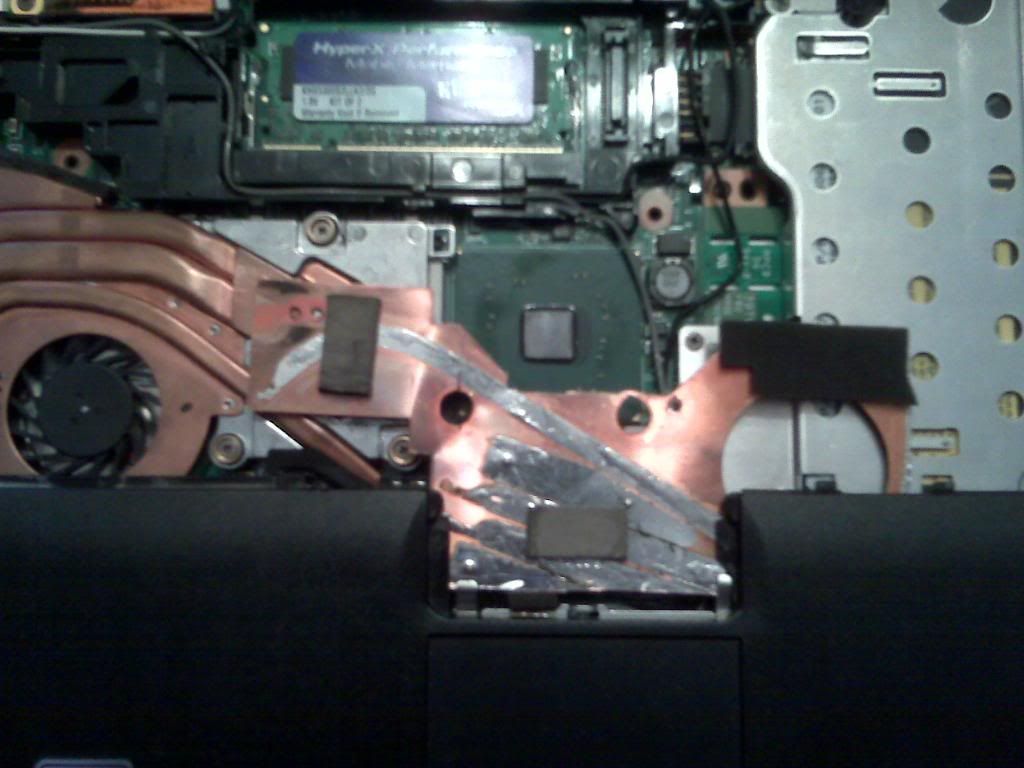
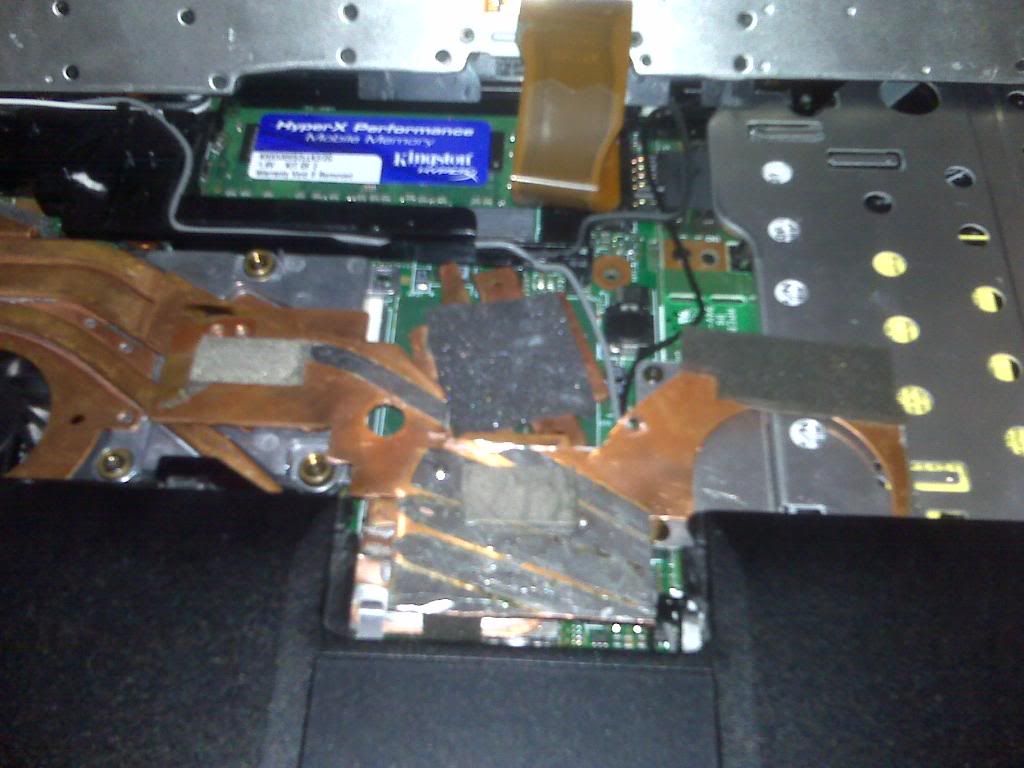
Well, I just spent the past 12 hours trying to mod the R52 fan to fit the T43p. And I have simultaneously made it hotter and cooler. Let me explain.

Stacked up side by side, both fans are actually the same height. The bolt patterns are also the same, but I had to switch the posts between the fans. Seems the posts on the R52 fan are taller and skinnier. This means that I had to bore out the holes on the R52 just a little bit to recieve the posts. Rattail files work wonders.

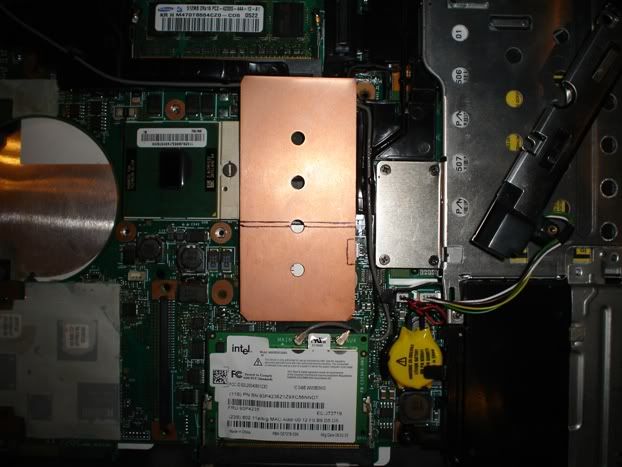
The biggest problem I had was fitting the GPU with a cooler. I went to several stores and asked for a piece of flat copper and they all looked at me strange. Not a good sign. I ended up settling with something plumbers use to fasten multiple lines to a wall. It wasn't great, but had 2 flat ends.

So, I soldered some pieces together and curled the heat pipe directly over the GPU. It didn't look great, but it was functional. I'll add some pics tommarrow.

Everything looked good, so it was time to put it all back together. The only problem I had was that the brace that runs over the fan needed to be shaven down a lil.

I fire up the TP and while booting, the fan actually shut off. Naturally I panic, but I let it continue to boot. As soon as I seen the desktop I start TPfan. Low and behold, 35c on the CPU and it is still loading. After it finishes loading the CPU drops to 34c (with undervolting. I shut off NHC and the CPU rose to 38c). Then the fan finally kicks on. A sigh of relief. I listened closer to the fan and I noticed the pulsating noise is totally gone and the fan is quiet. I couldn't be happier.

Then it happened. The GPU temp kept climbing till it was about 65c at idle. Not good. So I tear it all back apart and add more copper plates to the northbridge and GPU. Restarted and same thing. Grrr. Then I tried a cheesy northbridge cooler without copper, only to get the same results.

I have two thoughts. First is that the R52 fan is messing up the temp sensors causing the GPU temp to rise. Doubtful, but OK. Second is that I need to build a good GPU/northbridge cooler. I actually thought about buying junk fans just to get the copper.

Ahh, well. It is a work in progress. I will update this thread when I get more parts.

Edit: Here is my work so far. The fan as is will not fit on the northbridge because the chip sits lower than the GPU. It would have been nice if it worked the way I wanted, but it didn't happen. I will be getting some scrap long fan coolers soon. Then I will try to use the gpu cooler from 2 of them with the larger heat pipes to form individual northbridge and GPU coolers, or something like that. It all depends on room, temp of GPU, and how much the pipes are willing to cooperate. Wish me luck.

http://i641.photobucket.com/albums/uu13 ... an01/1.jpg

http://i641.photobucket.com/albums/uu13 ... an01/2.jpg

http://i641.photobucket.com/albums/uu13 ... an01/3.jpg

http://i641.photobucket.com/albums/uu13 ... an01/4.jpg
Current rig:
ThinkPad T43p 2669-W8N/2G/15" UXGA/ATI FireGL V3200 128mb
ThinkPad T30 2367-AU3/last TP, don't let the door hit you in the (intentionally left blank)

madkat
Junior Member
Junior Member
Posts: 326
Joined: Wed Jun 18, 2008 1:21 am
Location: Bucharest, Romania

Re: Modifying a R52 fan to fit T43p (PIC WARNING)

#5 Post by madkat » Mon May 11, 2009 3:21 am

afaik you cannot bend heatpipes the way you did without breaking them just enough to leak the gas-thing inside
after doing that - it works just like an ordinary copper wire... not enough for gpu cooling...
ex: T30, TR451, TR453, R51, R52, X40, X60, R61, T400
X200 - P8600 2.66Ghz, 3G, 250G
G50-70 - 3558U 2.4Ghz, 4G, 1T

virge
Senior Member
Senior Member
Posts: 950
Joined: Wed Oct 10, 2007 12:00 am
Location: San Jose, CA

Re: Modifying a R52 fan to fit T43p (PIC WARNING)

#6 Post by virge » Mon May 11, 2009 1:57 pm

madkat wrote:afaik you cannot bend heatpipes the way you did without breaking them just enough to leak the gas-thing inside
after doing that - it works just like an ordinary copper wire... not enough for gpu cooling...
But if you bend them and they don't crack, the heatpipes should still function normally, right?
Current Thinkpads: 600E, 600X, 701C, A31 (Flexview), R51 (Flexview), R60, T42P (Flexview), TR50E, T60 (Flexview), X61s (Ultralight), Z61m (Ti) Non-Thinkpad: Toshiba 100ct

madkat
Junior Member
Junior Member
Posts: 326
Joined: Wed Jun 18, 2008 1:21 am
Location: Bucharest, Romania

Re: Modifying a R52 fan to fit T43p (PIC WARNING)

#7 Post by madkat » Mon May 11, 2009 2:23 pm

you're right... but from the looks of the picture - can you be sure that is NOT cracked? not even microscopically (but enough to let the gas out) ... i am sure that it IS cracked... :(
ex: T30, TR451, TR453, R51, R52, X40, X60, R61, T400
X200 - P8600 2.66Ghz, 3G, 250G
G50-70 - 3558U 2.4Ghz, 4G, 1T

virge
Senior Member
Senior Member
Posts: 950
Joined: Wed Oct 10, 2007 12:00 am
Location: San Jose, CA

Re: Modifying a R52 fan to fit T43p (PIC WARNING)

#8 Post by virge » Wed May 13, 2009 5:37 pm

madkat wrote:you're right... but from the looks of the picture - can you be sure that is NOT cracked? not even microscopically (but enough to let the gas out) ... i am sure that it IS cracked... :(
I dunno.. copper is pretty soft and might bend and stretch a bit without cracking. Then again, based on the pic, I wouldn't bet money on it being undamaged. No offense intended to the OP. I wouldn't do any better bending those pipes! :D
Current Thinkpads: 600E, 600X, 701C, A31 (Flexview), R51 (Flexview), R60, T42P (Flexview), TR50E, T60 (Flexview), X61s (Ultralight), Z61m (Ti) Non-Thinkpad: Toshiba 100ct

sizzleman
Posts: 17
Joined: Wed Mar 04, 2009 9:58 am
Location: holly, mi

Re: Modifying a R52 fan to fit T43p (PIC WARNING)

#9 Post by sizzleman » Fri May 15, 2009 3:54 pm

madkat wrote:afaik you cannot bend heatpipes the way you did without breaking them just enough to leak the gas-thing inside
after doing that - it works just like an ordinary copper wire... not enough for gpu cooling...
Hmm, interesting. And I didn't take any offense either. The whole point of this forum is to problem solve and help others. So anything anyone can add is cool with me.

For starters, I didn't know that there was gas in the chamber of the heat pipe. There was some speculation around the forum about gas, but I forgot about it when I was doing my mod. So I didn't do the proper research :(. No biggie.

My idea of moving the pipe was to wrap it around the heatsink to have the greatest surface area contact. I tried a soldering gun at first, but it wasn't strong enough. Then I used a map gas torch thinking I could heat it up slowly, but the gas proved to be too hot. This caused the pipe to warp. However, I was able to bend the pipe quite a bit before I noticed a flare up.

After reading the last couple of posts, I now realize my mistakes. For one, the end of the pipe that contains the gas shouldn't have been bent that much. Even if I did resolder the pipe correctly, it still wouldn't function properly. The second would be the flare up of the gas leaking out. I had a feeling something bad happened, but I wasn't sure.

I am waiting for a shipment of 10 old T43 fans so I can mod the pipes and copper to the R52 fan. So, I will have plenty to work with. All I have to do is cool the gpu and this will work perfectly.

I do have a question though. My understanding of the heatpipes is the liquid becomes a gas through heat source. The gas is delivered to the heatsink to dissipate heat and to turn the gas into a liquid again. This process would need gravity to feed the liquid back to the heat source. So, If the pipe is flat, would this process be efficient? And, if you leaned the TP to the right, would you get better cooling?

Thanks for the help.
Current rig:
ThinkPad T43p 2669-W8N/2G/15" UXGA/ATI FireGL V3200 128mb
ThinkPad T30 2367-AU3/last TP, don't let the door hit you in the (intentionally left blank)

madkat
Junior Member
Junior Member
Posts: 326
Joined: Wed Jun 18, 2008 1:21 am
Location: Bucharest, Romania

Re: Modifying a R52 fan to fit T43p (PIC WARNING)

#10 Post by madkat » Sat May 16, 2009 1:22 am

no, it doesnt need gravity - is something like capillary effect for the gas/liquid to move around
anyway physics is tot my strongest point - but i did my best to understand this system

here is a link: (hope the moderators are ok with it)

http://www.cheresources.com/htpipes.shtml
http://en.wikipedia.org/wiki/Heat_pipe

from the diagram becomes obvious why it's not ok to bend the pipes in such a steep angle (it damages the capilary walls)
ex: T30, TR451, TR453, R51, R52, X40, X60, R61, T400
X200 - P8600 2.66Ghz, 3G, 250G
G50-70 - 3558U 2.4Ghz, 4G, 1T

Chris_K
Posts: 1
Joined: Sun Oct 07, 2007 7:00 am
Location: Bydgoszcz, Poland

Re: Modifying a R52 fan to fit T43p (PIC WARNING)

#11 Post by Chris_K » Mon Jun 01, 2009 6:49 pm

Hello! This is my first post here. (Please excuse my broken English... I appreciate corrections)
underclocker wrote:Have you seen the nice fan from an Intel GPU T43, it seems to cover the Northbridge and the GPU with a flexible design?
Link to the original thread just for reference: T43 Fan picture from Intel GPU machine - very interesting...
There are some unexplained concerns about usage of these fans with ATI GPUs... I actually have one lying around (bought as a spare one from IBM UK, just to be prepared) but now I think it might not have been such a good idea at all - it seems to be made from brass which means worse heat transfer. We will see, someday. For now I've lost an interest in playing with it, because I doubt my current T43p can be made any colder/quieter. Stock fan setup, linux, tp-fancontrol-basic, CPU frequency scaling, undervolting and ATI PowerPlay make no big reason to complain. I also really hate that messy thermal grease business :| It happened to make things a bit wore with my previous T43 (so for the future I'm also armed with some copper plates).

So, did someone actually test it?

Update: meh. I don't believe it though ;)
Last edited by Chris_K on Tue Jun 02, 2009 7:35 am, edited 2 times in total.
T43p: 14" SXGA+, 2,13GHz, Matshita UJ-862, Fujitsu MHV2120AH (120GB), all goodies, Linux inside
Member of anti-widescreen movement >:>

sizzleman
Posts: 17
Joined: Wed Mar 04, 2009 9:58 am
Location: holly, mi

Re: Modifying a R52 fan to fit T43p (PIC WARNING)

#12 Post by sizzleman » Tue Jun 02, 2009 3:01 am

Thanks madkat for the post.

I found an interesting trait of soldering heat pipes. They carry heat extremely well. :)

My last R52 fan was running like a champ, minus the GPU cooling. It was time to replace the heat pipe running to the GPU and do some modding. Well, just as the old heat pipe became unattached, everything desoldered and I was left with a bunch of parts. I tried to put it back together but ended up frying the fan in the process. Reminds me of humpty dumpty.

If this is ever to work, the soldering must be done to the (working) heat pipe for the GPU. I will fabricate some copper so all I will have to do is solder a plate to the existing heatsink. Accommodations must be made for the red dot track stick, of course. And I will probly have to add more copper to the heat pipe. I just received a new R52 cooler today, so I need some time to work on it and I will post the results.

There was a question reguarding the intel cooler? Unless you split the heatsink in half or build up the copper then it won't work for the ATI chipset. Only because ATI is taller. I realize there is a hinge for the offset. But that much of an offset would make it useless because the plate would not be contacting the entire surface of the chip, only the edges. Hmm, suppose all that cooler would need is a shim under the northbridge. Maybe I will try that if I mess this up again.
Current rig:
ThinkPad T43p 2669-W8N/2G/15" UXGA/ATI FireGL V3200 128mb
ThinkPad T30 2367-AU3/last TP, don't let the door hit you in the (intentionally left blank)

sizzleman
Posts: 17
Joined: Wed Mar 04, 2009 9:58 am
Location: holly, mi

Re: Modifying a R52 fan to fit T43p (PIC WARNING)

#13 Post by sizzleman » Fri Jul 31, 2009 4:08 am

Just wanted everyone to know that I have just completed the mod from an R52 to a T43p fan. I have thought long and hard to solve this since my last post, and it paid off.

There is absolutely no fan pulsation and most of the time, my HD makes more noise. I also reversed the fan intake to pull the hot air out of the laptop. I need to run this beast a few days and run some tests before I can give a full post. Thanks everyone for all your input.
Current rig:
ThinkPad T43p 2669-W8N/2G/15" UXGA/ATI FireGL V3200 128mb
ThinkPad T30 2367-AU3/last TP, don't let the door hit you in the (intentionally left blank)

sizzleman
Posts: 17
Joined: Wed Mar 04, 2009 9:58 am
Location: holly, mi

Re: Modifying a R52 fan to fit T43p (PIC WARNING)

#14 Post by sizzleman » Thu Oct 15, 2009 12:50 pm

Sorry I took so long to post. I had to chew things over with a bunch of Twix :)

Also, I apologize for the long post. There was a lot of work done and I thought it needed to be explained.

My first major obstacle was to overcome was the heat pipe issue. I wanted to get as much contact with the GPU heat sink as possible. Also, the question of, “is the smaller heat pipe from the R52 fan able to carry the heat away and should there be a second pipe installed?” I would have to say mostly and maybe. I will explain as I go through my post.
So, there I was, a brand new R52 fan on the table just taunting me. (All I could think about was when I tried to remove the damaged heat pipe from the last fan. Just as the pipe came loose, the whole fan collapsed and I was left with a bunch of soldered copper.) Hmm, to heat the pipe, or not to heat the pipe, that is the question. I thought about cutting off the most of the GPU plate with a dremmel and dry assemble everything. That idea was quickly nixed because heat will always transfer better if the parts are soldered.

To start, I decided to use a smaller torch, like the ones you can buy from a smoke shop. On the lowest setting, and with care, the GPU plate came off with ease. I let the fan cool down. Now, to see if the pipe was still functioning, I put the tip of the torch at the end of the pipe. If it works, I should feel heat at the fan side. The pipe heated up quickly. So far, so good. (By the way, the last fan’s pipe never acted this way. It was always cold near the fan side. Sleep deprivation + propane torch = bad ideas)

Next step was to figure out how to bend the pipe and where it should lay. Fortunately, I bought 10 scrap T43 fans from fleabay and I could practice desoldering the pipes and different methods of bending them. I found that with enough patience that these pipes can be bent very slowly by hand. No heating needed or wanted. If this pipe gets damaged, the project is over. This was definitely a bonus.

Being that the pipe was so long, I had 2 options. Either I could run it next to the trackpoint and other components (not a good idea), or run it on top of the CD-ROM cage. The only problem with the second option is that it covered one of the screw holes for the keyboard. Well, there are tabs that lock the keyboard in place and I will have 2 screw holes left, so I removed the standoff from the keyboard so it would clear.

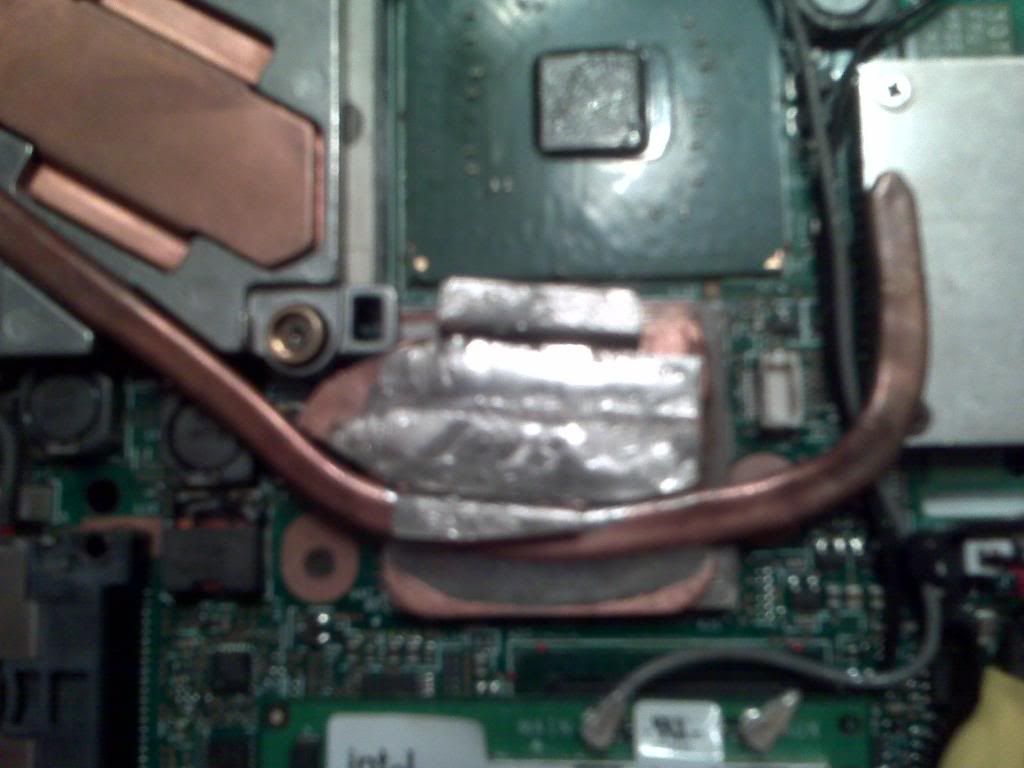
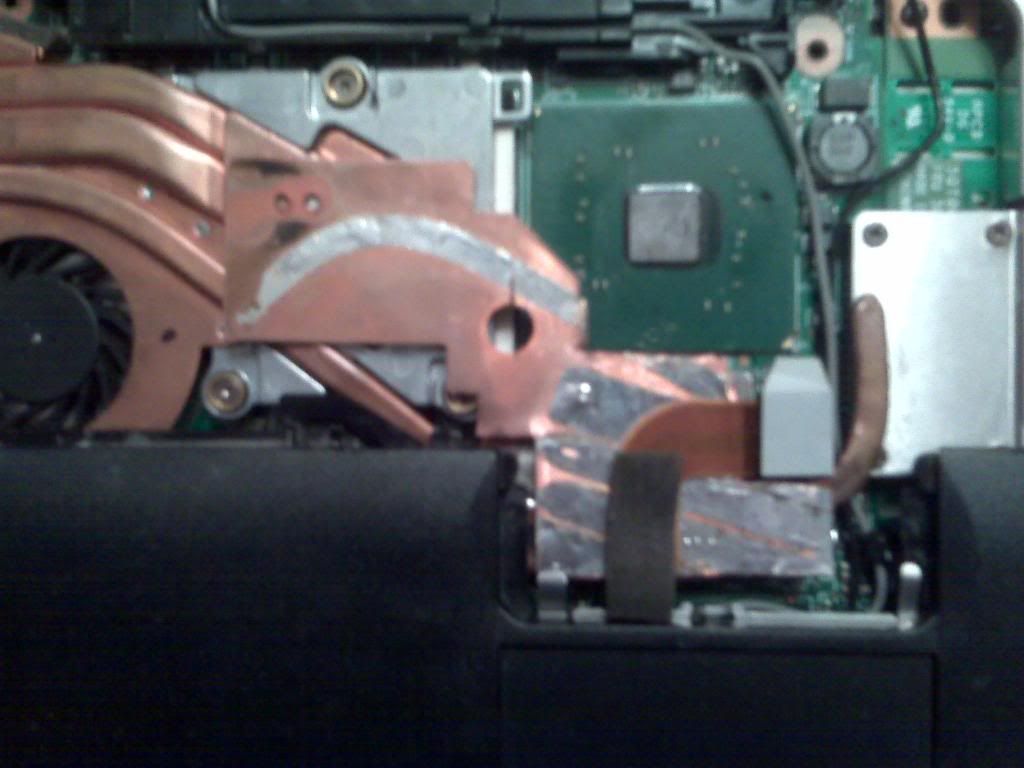
Now came the soldering. The GPU heat sink has to be perfectly flat or it will not work. I found a dead T43 motherboard and base that fit the bill. As the fan was secured, I was able to adjust the pipe and plate into the proper position to solder. I also used some of the thicker copper heat sinks from the junk T43 fans to beef up the GPU heat sink. The soldering was a success and the heat pipe functioned perfectly.

http://i641.photobucket.com/albums/uu13 ... 01/hs1.jpg

(Sorry, a camera phone is all I had at the time)

Initial testing of the new fan proved frustrating. I thought I could use the CD-ROM cage as a secondary heat sink. But this proved to slightly lift the GPU heat sink and raise temps. The pipe now sits just above the cage. Another problem I had was the fan worked good for a few days and then the GPU temp would start climbing. Even though I had the GPU heat sink sitting perfectly when installed, thermal expansion would raise the heat sink just enough to be a problem. The solution was to bend the heat sink back slightly to the main heat sink to create a spring effect. So far, so good.
The best way I know to break in new paste is to surf the web for a few then start gaming, like World of Warcraft. I run TPfancontrol for my fan and monitoring of temps and NHC for my voltages. I was not happy to see my GPU temp running at up to 93c. Back to the drawing board.

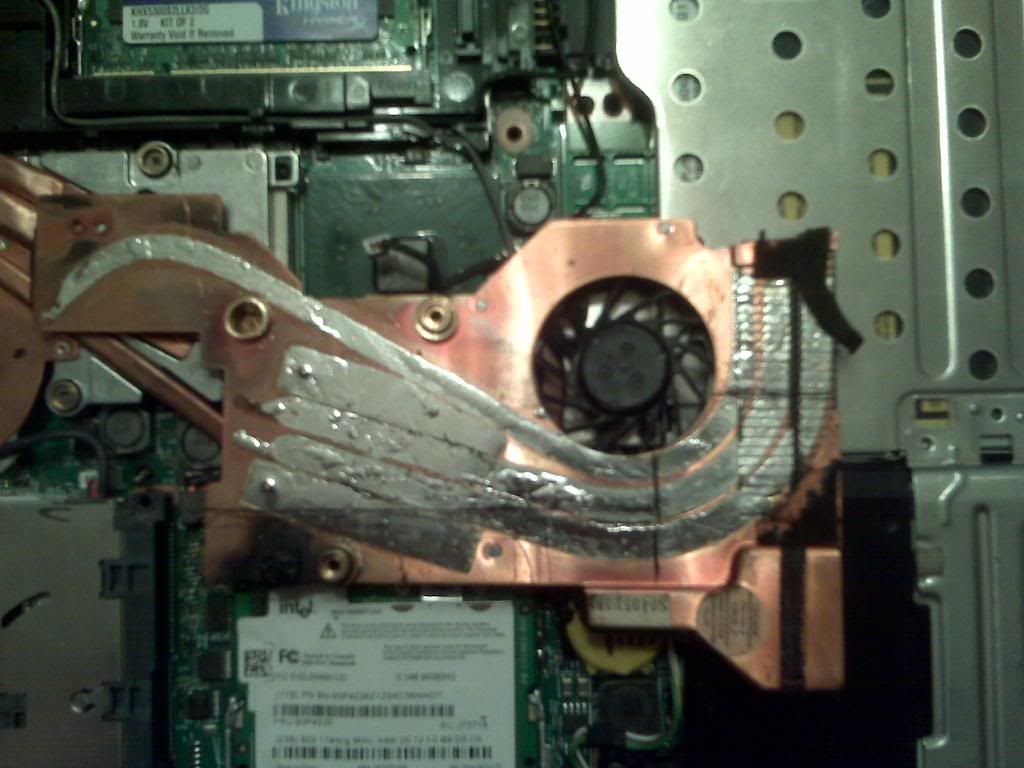
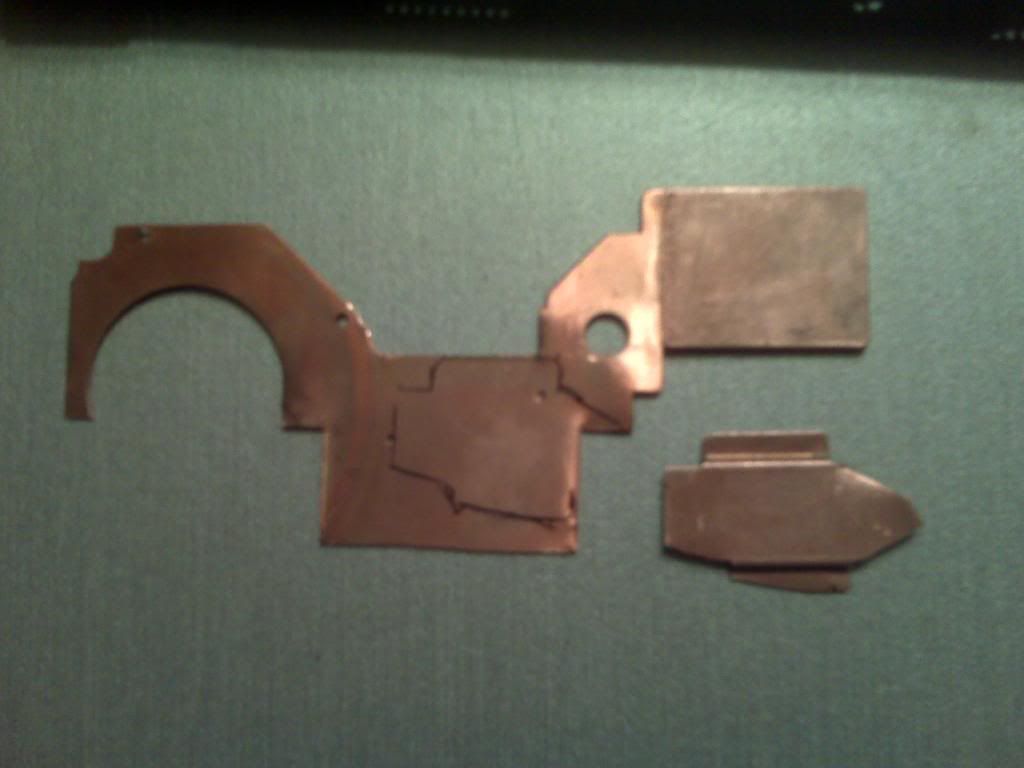
Then I had the idea that there just wasn’t enough copper going to the fan side of the heat sink. I almost installed a second heat pipe next to the existing pipe. But that image of the fan falling apart on me didn’t sit well. This is when I dissected a T43 fan and used the main copper plate to run from the GPU to the fan side of the heat sink. This takes major patience. I also used a copper bracket from my old R52 fan to stand off the new plate.

http://i641.photobucket.com/albums/uu13 ... 01/hs2.jpg
http://i641.photobucket.com/albums/uu13 ... 01/hs3.jpg
http://i641.photobucket.com/albums/uu13 ... 01/hs4.jpg
http://i641.photobucket.com/albums/uu13 ... 01/hs5.jpg
http://i641.photobucket.com/albums/uu13 ... 01/hs6.jpg
http://i641.photobucket.com/albums/uu13 ... 01/hs7.jpg
http://i641.photobucket.com/albums/uu13 ... 01/hs8.jpg

First I soldered the bracket to my new plate and carefully soldered the bracket directly to the GPU heat sink. I didn’t solder the other end of the plate because I wanted to be able to adjust the GPU heat sink perfectly. Then I placed a pad from an old T43 fan on the unsoldered end of the plate, the keyboard would press down on it just enough to let the heat spread without any damage to anything. Voila! While playing WOW, GPU temps dropped to 88c.

I had extra heat sink material, so I made a cooler for the northbridge as well. The PCB of the trackpoint will keep the NB heat sink in place. Just remember to put a pad between the trackpoint and the PCB or the thinkpad will act funny. OK, I was tired :)

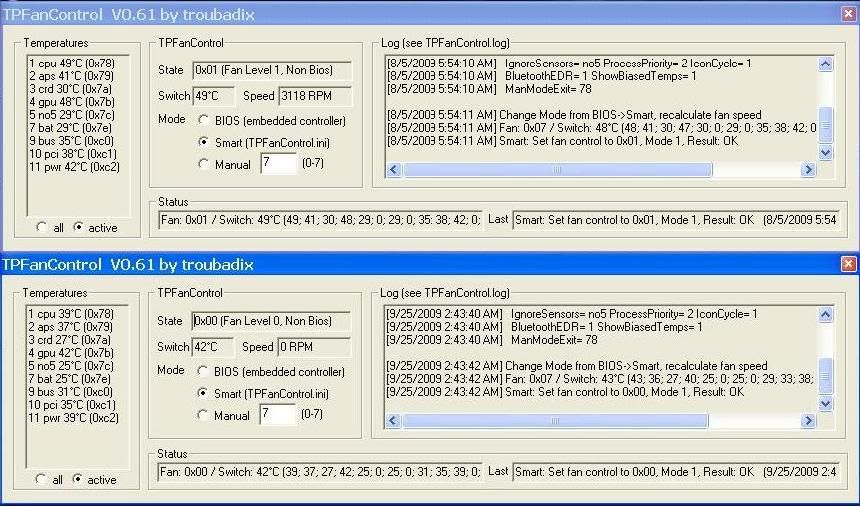
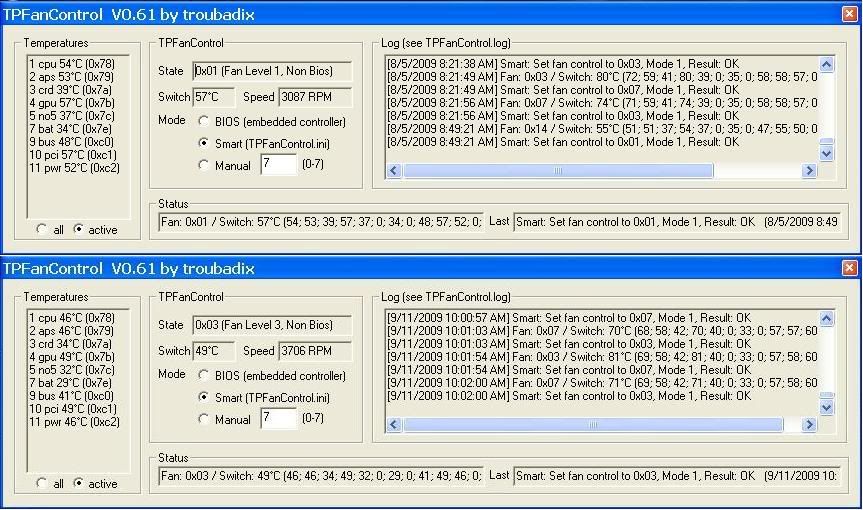
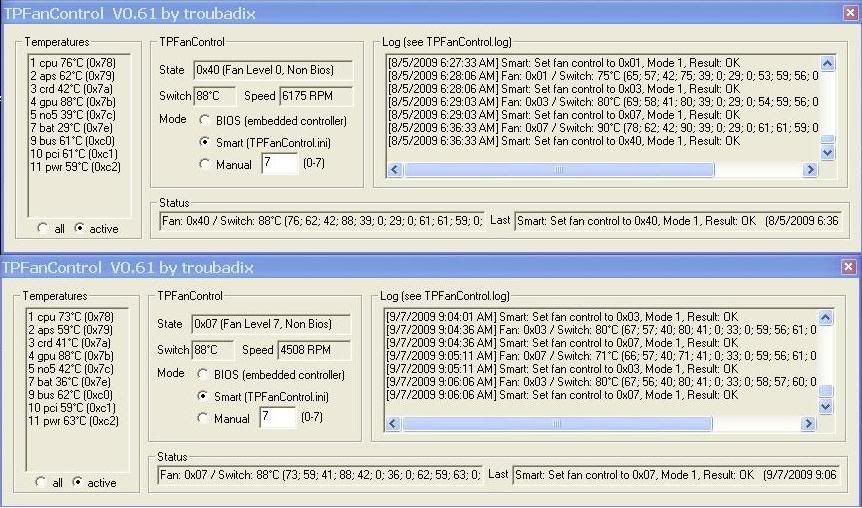
Here are some screenshots of TPFan. The T43 fan is on top and the R52 fan is on the bottom. The ones of WOW were taken by the alt-tab method and hitting print screen as fast as I could while gaming heavy. I made at least 50 attempts with each fan to get the highest reading possible so I know if the fans were doing their job or not. These tests were also taken over weeks of time so I would know when the paste was working at its peak. The ambient room temperature was about 72f (22c).

Cold Boot
http://i641.photobucket.com/albums/uu13 ... ldboot.jpg

Web Surfing
http://i641.photobucket.com/albums/uu13 ... urfing.jpg

Playing WOW
http://i641.photobucket.com/albums/uu13 ... ingWOW.jpg

While most of the tests show all temps are lower, the GPU is still the same under heavy load. Gpu’s will always run hot and this is almost acceptable. So, I bought an nc2000 notebook cooler and dropped the GPU temp down to 80c. Aside from that, there is absolutely no fan pulsation and fan noise is reduced by an estimated 60%. I don’t have a decibel reader so I cannot confirm this. But the R52 fan is way quieter than the old T43 fan.

Oh, and as far as the reversing fresh (hot) air intake of the fan? That proved to be useless. Most of the air is sucked straight out of the case through the top to the fan. I am guessing that if the top of the fan gets restricted somehow then the fan still has a way to cool down.

Also, here are my stable voltages if anyone wants to know. I undervolted the CPU until it crashed, found the next higher setting that worked and then gave it a couple bumps to make sure it was stable.
Voltages

Multiplier......Start....Kinda stable......Rock solid

15.............1.356.........1.068.............1.1
14.............1.308.........1.02..............1.052
12.............1.228.........0.908.............0.94
11.............1.196.........0.892.............0.924
10.............1.148.........0.876.............0.908
9..............1.116.........0.796.............0.828
8..............1.068.........0.78..............0.812
6..............0.988.........0.7...............0.7
Current rig:
ThinkPad T43p 2669-W8N/2G/15" UXGA/ATI FireGL V3200 128mb
ThinkPad T30 2367-AU3/last TP, don't let the door hit you in the (intentionally left blank)

poshgeordie
ThinkPadder
ThinkPadder
Posts: 1101
Joined: Sat Feb 09, 2008 6:19 pm
Location: Newcastle upon Tyne, UK
Contact:

Re: Modifying a R52 fan to fit T43p (PIC WARNING)

#15 Post by poshgeordie » Thu Oct 15, 2009 1:38 pm

Very interesting project and congratulations!

You mention a couple of times about melting the fan when soldering. It's actually quite easy to get the two halves of the fan apart using a dremel to grind the rivets holding the bottom fan casing to the heatsink. To reassemble use some epoxy to glue the two halves together again.

sizzleman
Posts: 17
Joined: Wed Mar 04, 2009 9:58 am
Location: holly, mi

Re: Modifying a R52 fan to fit T43p (PIC WARNING)

#16 Post by sizzleman » Fri Oct 23, 2009 6:50 am

poshgeordie wrote:Very interesting project and congratulations!

You mention a couple of times about melting the fan when soldering. It's actually quite easy to get the two halves of the fan apart using a dremel to grind the rivets holding the bottom fan casing to the heatsink. To reassemble use some epoxy to glue the two halves together again.

I thought about that after I ruined the fan.

The biggest reason I didn't want to solder near the fan side was not from melting the fan, it was because the R52 fan has 9 different pieces that are soldered together, not including the fan. The R52 fan is not assembled like the T43 fan at all. The piece that sits on the CPU is connected to the copper that attaches to the fan by locater pins and solder. There is also the copper intake, copper fin material for the exhaust, a bracket,3 heat pipes and the GPU cooler that are all soldered together. In order for the heat sink to be funtional, you would have to solder 8 of those pieces together perfectly and at the same time. After the heat shield slipped and I melted the fan, it was just easier to buy a new one.

I often wondered if I could just replace the Toshiba, MCF-208AM05 Fan (T43, 26R7957) With the NKW/SEPA HY55H-05A Fan (R52, 26R8296). I remembered something about the R52 where the CPU was sitting a little lower, but I can't remember. Maybe it would clear. And if it would clear, a new fan, drilling a couple of rivets and some glue would fix the fan noise problem for the T43's and it would be an easy fix. Maybe I will try that idea out just to see what happens.
Current rig:
ThinkPad T43p 2669-W8N/2G/15" UXGA/ATI FireGL V3200 128mb
ThinkPad T30 2367-AU3/last TP, don't let the door hit you in the (intentionally left blank)

Post Reply
  • Similar Topics
    Replies
    Views
    Last post

Return to “ThinkPad T4x Series”

Who is online

Users browsing this forum: No registered users and 9 guests