


 Homepage
 Forum
Forum Drivers
 HMM-Manuals
 MTM
MTM Feed
Feed
Add a cable like this: male-male 44-pin : http://www.mittoni.com.au/44pin-25-ide- ... -2467.html
However, the earlier linked adapter is 1.5cm high!
Just unsoldering the SATA-PATA bridge and installing SATA connectors is probably your best bet.
Take a look at our
ThinkPads.com HOME PAGE
For those who might want to contribute to the blog, start here: Editors Alley Topic
Then contact Bill with a Private Message
ThinkPads.com HOME PAGE
For those who might want to contribute to the blog, start here: Editors Alley Topic
Then contact Bill with a Private Message
1.8" SATA to 2.5" IDE converter?
-
RealBlackStuff
- Admin Emeritus

- Posts: 24724
- Joined: Mon Sep 18, 2006 5:17 am
- Location: Loch Garman, Éire
Re: 1.8" SATA to 2.5" IDE converter?
Lovely day for a Guinness! (The Real Black Stuff)
But I actually prefer Murphy's from Cork!
But I actually prefer Murphy's from Cork!

Re: 1.8" SATA to 2.5" IDE converter?
The "new" item http://cgi.ebay.com/ws/eBayISAPI.dll?Vi ... 0508236238 is only 8.3mm high and is the solution for those looking for a 1.8" micro sata ssd to connect to an IDE laptop.RealBlackStuff wrote:... However, the earlier linked adapter is 1.5cm high!
Just unsoldering the SATA-PATA bridge and installing SATA connectors is probably your best bet.
The T43 is a weird animal that may be better served by a different solution but fitting a 1.8" ssd into an IDE hard drive bay should be fairly easy with the "new" adapter which has male IDE connectors, female micro sata connectors, and dimensions that fit.
Re: 1.8" SATA to 2.5" IDE converter?
I don't want to bring a risk of damage to my perfectly working T43p motherboard. That's the reason why I'm finding solution how to install my Hitachi Travelstar 7k500 into main HDD bay using an converter. It seems there is no way for this solutionJust unsoldering the SATA-PATA bridge and installing SATA connectors is probably your best bet.

Current: R51e, X240, T30 and T23 (current project)
Previous: T420, T400, T43p Flexview, T40, R52, T43p 14"
My first ThinkPad was 570
Previous: T420, T400, T43p Flexview, T40, R52, T43p 14"
My first ThinkPad was 570
-
Norway Pad
- ThinkPadder

- Posts: 1161
- Joined: Mon Jul 13, 2009 2:50 pm
- Location: Meridian, ID & Oyer, Norway
- Contact:
Re: 1.8" SATA to 2.5" IDE converter?
Not sure if this one was directed to me, but this one can definitely help if the adapter ends up ending in a wrong position once installed. I have already thought about it, and I have an even shorter cable like this back home, that came from an old laptop drive. This goes for both kind of adapters, but the smaller 1.8 drive gives more left over space to accommodate an "extra" item like this than the 2.5 will. And if the adapter is too big to fit in the bay at all, it won't help anyway.RealBlackStuff wrote:Add a cable like this: male-male 44-pin : http://www.mittoni.com.au/44pin-25-ide- ... -2467.html
There is a person on this forum that once offered to do the PATA/SATA unsoldering operation for the T43, but like Lukee I am also a little afraid that an operation like this can screw up my otherwise good working T43.
Bjorn
THINKPAD collector. Only missing a proper RetroThinkpad.
THINKPAD collector. Only missing a proper RetroThinkpad.
Re: 1.8" SATA to 2.5" IDE converter?
For what it's worth, here's my experience with T42 and a 2.5" PATA SSD here:
http://forum.thinkpads.com/viewtopic.php?f=2&t=92473
http://forum.thinkpads.com/viewtopic.php?f=2&t=92473
-
RealBlackStuff
- Admin Emeritus
- Posts: 24724
- Joined: Mon Sep 18, 2006 5:17 am
- Location: Loch Garman, Éire
Re: 1.8" SATA to 2.5" IDE converter?
If you want to risk it, we have some great 15" R52 machines in The Board Room (see my sig.).Norway Pad wrote:There is a person on this forum that once offered to do the PATA/SATA unsoldering operation for the T43, but like Lukee I am also a little afraid that an operation like this can screw up my otherwise good working T43.
They are cheap enough to 'practice' on.
Lovely day for a Guinness! (The Real Black Stuff)
But I actually prefer Murphy's from Cork!
But I actually prefer Murphy's from Cork!

Suggestion an interesting "free" experiment... :-)
Greetings, all!
I find this thread highly interesting, since I would very much like to replace my currently used 2.5” PATA HDD in my 15” T42p with an Intel X18-M (the SSD properly configured with a correctly sized 1.8” SATA to 2.5” PATA converter to fit inside the internal T42p HDD bay without any hardware modifications to the T42p itself). I wish to continue running Windows XP, and also I want to retain the internal CD/DVD drive in my T42p. My main objective is to achieve an as-fast-as possible (XP) system, (especially in terms of disk reading speed), without having to buy a very expensive 64 GB Transcend PATA SLC SSD, which (in my view) seems to be the best “native” alternative, if the desire is to achieve a fast T42p with sufficient disk space and using the SSD to hold both the Windows XP (NTFS) operating system along with programs etc. I understand that XP does not support TRIM.
In this post GACrabill made reference to a such SATA-to-PATA adapter (available here on eBay) and in particular GACrabill also very interestingly referenced an eBay-buyer (“debaitmonitor”), who….:
[quote="In my message to eBay-member "debaitmonitor", I"]
Dear Sir,
I am contacting you because of your feedback for IDE 44 Pin to 1.8" Micro SATA Adapter where you wrote: "Works great! Adapt Intel X18M SSD to IDE laptop Fits 2.5" Dell HDD caddy Happy"
I am **HIGHLY** interested in replacing the current 2.5" mechanical PATA HDD (in my IBM ThinkPad T42) with a SATA SSD, and kindly ask if this indeed is possible, as you describe? Did you actually manage to replace an IDE/PATA 2.5" mechanical HDD with the X18-M SATA SSD and this adapter?? And if so: Are you able to succesfully boot off this converted-from-SATA-to-PATA-interface-SSD? No issues??
This topic is e.g. discussed in this thread - and you are HIGHLY welcome to post your experience there, if you should be able to find the time for doing this!
Thank you VERY much in advance for your feedback!
Sincerely,
(kindly signed etc.)[/quote]
Then, very soon after…:
As I don’t know much about Dell laptops I just Google’d the model mentioned (“Dell 5150”) and I guess that it must be an “Inspiration 5150” (brief specs found e.g. here). So, all the above seems to be very good news… except the remark: ”…but is very slow with XP?!?!
Although I don’t understand what is meant by this… it yet makes me hesitate in jumping out and buying a fairly expensive 80 GB X18-M (which cost approx. USD 250 here in Denmark).
So, fellow ThinkPad'ers, would anybody perhaps be able and willing to participate in the following international experiment: If you have both an “old” ThinkPad using a 2.5” PATA HDD (preferably a T42/p, but not necessarily), and this Thinkpad is running XP, and if you also already have an Intel X18-M available, or perhaps another 1.8” SATA HDD, then I would be happy to buy and have shipped to you (as a free donation!) one of the above-mentioned adapters. If you then could test it out, in your T42p (or whatever 2.5" PATA-ThinkPad), under Windows XP, using an already-available 1.8” SATA SSD, then the expenses would be minimized for us folks who would otherwise have to go out and buy an expensive 1.8” SATA SSD, perhaps just to discover that it is too slow in e.g a T42p under XP to be worth the substantial investment.
Feel fee to let me know if this is of interest, and also if anybody else have perhaps had success on his/her own whith this or other adapters (such as e.g. perhaps this one or something like this one if they are suitable at all?).
Thanks all for sharing your experience!
Best regards,
Johan
I find this thread highly interesting, since I would very much like to replace my currently used 2.5” PATA HDD in my 15” T42p with an Intel X18-M (the SSD properly configured with a correctly sized 1.8” SATA to 2.5” PATA converter to fit inside the internal T42p HDD bay without any hardware modifications to the T42p itself). I wish to continue running Windows XP, and also I want to retain the internal CD/DVD drive in my T42p. My main objective is to achieve an as-fast-as possible (XP) system, (especially in terms of disk reading speed), without having to buy a very expensive 64 GB Transcend PATA SLC SSD, which (in my view) seems to be the best “native” alternative, if the desire is to achieve a fast T42p with sufficient disk space and using the SSD to hold both the Windows XP (NTFS) operating system along with programs etc. I understand that XP does not support TRIM.
In this post GACrabill made reference to a such SATA-to-PATA adapter (available here on eBay) and in particular GACrabill also very interestingly referenced an eBay-buyer (“debaitmonitor”), who….:
… and previously also:... in his feedback on eBay (dated Jan-07-11 07:12) about this adapter, wrote: Second purchase Works/fits great Adapt 1.8 X18M SSD to 2.5 IDE laptop Thanks!
Now, THIS is surely interesting I thought, but I was yet hesitating a bit, because I couldn’t quite decode how “debaitmonitor” used this adapter in his Dell; as the primary boot-drive holding Win XP or perhaps as a second HDD, like the UltraBay in ThinkPad’s? So, what I therefore did was to contact “debaitmonitor” via the eBay messaging system:… in a prior feedback about the same adapter (feedback dated Dec-10-10 20:32), debaitmonitor wrote: Works great! Adapt Intel X18M SSD to IDE laptop Fits 2.5" Dell HDD caddy Happy
[quote="In my message to eBay-member "debaitmonitor", I"]
Dear Sir,
I am contacting you because of your feedback for IDE 44 Pin to 1.8" Micro SATA Adapter where you wrote: "Works great! Adapt Intel X18M SSD to IDE laptop Fits 2.5" Dell HDD caddy Happy"
I am **HIGHLY** interested in replacing the current 2.5" mechanical PATA HDD (in my IBM ThinkPad T42) with a SATA SSD, and kindly ask if this indeed is possible, as you describe? Did you actually manage to replace an IDE/PATA 2.5" mechanical HDD with the X18-M SATA SSD and this adapter?? And if so: Are you able to succesfully boot off this converted-from-SATA-to-PATA-interface-SSD? No issues??
This topic is e.g. discussed in this thread - and you are HIGHLY welcome to post your experience there, if you should be able to find the time for doing this!
Thank you VERY much in advance for your feedback!
Sincerely,
(kindly signed etc.)[/quote]
Then, very soon after…:
I received the following message via the eBay messaging system where the eBay-member, debaitmonitor, wrote: Hi Johan,
Regarding the IDE 44 Pin to 1.8" Micro SATA Adapter
FUNCTION: Yes, the adapter from microsata cables works fine, boots with both windows 7 and xp (running dual boot). Intel SSD Toolbox recognizes Intel X18M SSD Gen 1, Intel X18M Gen 2 and smart data. Performs "optimize" function on Gen 2 with Windows 7, but is very slow with XP.
FIT: The adpater with X18M attached fits into my Dell 5150 2.5 caddy with about 3/8 inch to spare, enough to disengage and remove the drive. (Dell 5150 uses a removable caddy tray and connector bridge piece between the 44-pin drive side and the motherboard. The 44-pin is flush to the caddy end, the bridge connector extends about 1/8 inch beyond the caddy.)
There's plenty of length room, the assembled height is about 11mm. Should be adaptable to just about any 2.5 drive space.
Your welcome to share this on the referenced forum. I would have, but didn't want t jump through all the registration hoops.
Cheers, Lawrence
- debaitmonitor
As I don’t know much about Dell laptops I just Google’d the model mentioned (“Dell 5150”) and I guess that it must be an “Inspiration 5150” (brief specs found e.g. here). So, all the above seems to be very good news… except the remark: ”…but is very slow with XP?!?!
Although I don’t understand what is meant by this… it yet makes me hesitate in jumping out and buying a fairly expensive 80 GB X18-M (which cost approx. USD 250 here in Denmark).
So, fellow ThinkPad'ers, would anybody perhaps be able and willing to participate in the following international experiment: If you have both an “old” ThinkPad using a 2.5” PATA HDD (preferably a T42/p, but not necessarily), and this Thinkpad is running XP, and if you also already have an Intel X18-M available, or perhaps another 1.8” SATA HDD, then I would be happy to buy and have shipped to you (as a free donation!) one of the above-mentioned adapters. If you then could test it out, in your T42p (or whatever 2.5" PATA-ThinkPad), under Windows XP, using an already-available 1.8” SATA SSD, then the expenses would be minimized for us folks who would otherwise have to go out and buy an expensive 1.8” SATA SSD, perhaps just to discover that it is too slow in e.g a T42p under XP to be worth the substantial investment.
Feel fee to let me know if this is of interest, and also if anybody else have perhaps had success on his/her own whith this or other adapters (such as e.g. perhaps this one or something like this one if they are suitable at all?).
Thanks all for sharing your experience!
Best regards,
Johan
IBM T42p's (2373-Q1U & -Q2U): 2.1 GHz, 15" UXGA FlexView, 2 GB RAM, 128 MB FireGL T2, 128 GB 1.8" SATA SSD, IBM a/b/g, BT, Win 7 Ultimate
IBM T42 (2373-N1G): 1.8 GHz, 15" SXGA+ FlexView, 2 GB RAM, 64 MB Radeon 9600, 64 GB 1.8" SATA SSD, IBM a/b/g, BT, Win 7 Ultimate
IBM T42 (2373-N1G): 1.8 GHz, 15" SXGA+ FlexView, 2 GB RAM, 64 MB Radeon 9600, 64 GB 1.8" SATA SSD, IBM a/b/g, BT, Win 7 Ultimate
Re: Suggestion an interesting "free" experiment... :-)
I may have interpreted the scary sentence differently ... do I really care that "Intel SSD Toolbox" performs the "optimize" function slowly on XP vs. Win7 ?
Will I be scheduling it to run more than once per week ?
The second "other adapter" that you link to is the old version of the one being sold on eBay ... the newer version has the silver electronics piece (capacitor?) attached to the bottom of the circuit board since it interfered with any attempt to attach a 1.8" SSD when it was mounted on the top of the board.
Re: Suggestion an interesting "free" experiment... :-)
The "optimize" function of the Intel Toolbox is simply a manual TRIM - it scans every block on the drive, and clears any which contain deleted files.Johan wrote:Performs "optimize" function on Gen 2 with Windows 7, but is very slow with XP.
He's saying that this function performs very slowly in Windows XP - you don't need to worry about it. The drive will perform OK just using it's internal garbage collection - after some use, it won't be quite as quick as a TRIM drive or an "optimized" drive, but it will still be plenty fast !
Re: 1.8" SATA to 2.5" IDE converter?
Hello everybody,
Johan asked me to give some feedback about an IDC to microSATA converter i recently bought on eBay (it employees the JMicron chip JM20330).
I'm using it with my ThinkPad X31 and a OCZ Onyx drive (32GB value SSD) running Windows XP.
It works absolutely flawless. In my opinion the one and only thing limiting the disks perfomance is the DMA controller of the X31 (sequential read should be 130 MB/s and seq write 70 MB/s according to the disk's specs). The only "issue" is, that the HDD activity LED is not lighting up, when the disk is accessed.
Below is a report of CrystalDiskMark. It's way to early to say something about performance degradation due to the missing TRIM support of Windows XP. But this shouldn't be a big problem. Garbage collection techniques of current SSDs are said to be very effectiv and there are enough ways to wipe a disk manually (e.g. microsoft command line utility sdelete). But something you should care about is aligment. You don't have to do anything if you make a fresh install (including creation of the partition) with a Windows 7 (or Vista) boot medium. But if you want to use Windows XP you have to create a partition with a dedicated tool to be sure, that the partition is aligned with the earase block boundarys. Just google for "alignment ssd" and you will find a solution. With a correctly aligned partition I gained 25 % random write speed (and IOPS), all other speeds are not effected. Moreover you will dramaticly increase the life time of the flash cells.
Regards, enrico
-----------------------------------------------------------------------
CrystalDiskMark 3.0.1 (C) 2007-2010 hiyohiyo
Crystal Dew World : http://crystalmark.info/
-----------------------------------------------------------------------
* MB/s = 1,000,000 byte/s [SATA/300 = 300,000,000 byte/s]
Sequential Read : 83.632 MB/s
Sequential Write : 59.570 MB/s
Random Read 512KB : 78.802 MB/s
Random Write 512KB : 59.288 MB/s
Random Read 4KB (QD=1) : 22.689 MB/s [ 5539.3 IOPS]
Random Write 4KB (QD=1) : 6.560 MB/s [ 1601.6 IOPS]
Random Read 4KB (QD=32) : 25.789 MB/s [ 6296.1 IOPS]
Random Write 4KB (QD=32) : 6.647 MB/s [ 1622.8 IOPS]
Test : 100 MB [C: 20.6% (6.1/29.8 GB)] (x5)
Date : 2011/01/31 16:42:48
OS : Windows XP Home Edition SP3 [5.1 Build 2600] (x86)
Johan asked me to give some feedback about an IDC to microSATA converter i recently bought on eBay (it employees the JMicron chip JM20330).
I'm using it with my ThinkPad X31 and a OCZ Onyx drive (32GB value SSD) running Windows XP.
It works absolutely flawless. In my opinion the one and only thing limiting the disks perfomance is the DMA controller of the X31 (sequential read should be 130 MB/s and seq write 70 MB/s according to the disk's specs). The only "issue" is, that the HDD activity LED is not lighting up, when the disk is accessed.
Below is a report of CrystalDiskMark. It's way to early to say something about performance degradation due to the missing TRIM support of Windows XP. But this shouldn't be a big problem. Garbage collection techniques of current SSDs are said to be very effectiv and there are enough ways to wipe a disk manually (e.g. microsoft command line utility sdelete). But something you should care about is aligment. You don't have to do anything if you make a fresh install (including creation of the partition) with a Windows 7 (or Vista) boot medium. But if you want to use Windows XP you have to create a partition with a dedicated tool to be sure, that the partition is aligned with the earase block boundarys. Just google for "alignment ssd" and you will find a solution. With a correctly aligned partition I gained 25 % random write speed (and IOPS), all other speeds are not effected. Moreover you will dramaticly increase the life time of the flash cells.
Regards, enrico
-----------------------------------------------------------------------
CrystalDiskMark 3.0.1 (C) 2007-2010 hiyohiyo
Crystal Dew World : http://crystalmark.info/
-----------------------------------------------------------------------
* MB/s = 1,000,000 byte/s [SATA/300 = 300,000,000 byte/s]
Sequential Read : 83.632 MB/s
Sequential Write : 59.570 MB/s
Random Read 512KB : 78.802 MB/s
Random Write 512KB : 59.288 MB/s
Random Read 4KB (QD=1) : 22.689 MB/s [ 5539.3 IOPS]
Random Write 4KB (QD=1) : 6.560 MB/s [ 1601.6 IOPS]
Random Read 4KB (QD=32) : 25.789 MB/s [ 6296.1 IOPS]
Random Write 4KB (QD=32) : 6.647 MB/s [ 1622.8 IOPS]
Test : 100 MB [C: 20.6% (6.1/29.8 GB)] (x5)
Date : 2011/01/31 16:42:48
OS : Windows XP Home Edition SP3 [5.1 Build 2600] (x86)
Re: 1.8" SATA to 2.5" IDE converter?
Hi berlibaer,
thanks for the reference. Could you post a link where is possible to buy that microSATA converter? I don't know, if HDD in X31 is originally upside down or not but do you think the adapter will fit into 15" T4x series with normal 2.5" SATA drive?
Thanks!
Lukas
thanks for the reference. Could you post a link where is possible to buy that microSATA converter? I don't know, if HDD in X31 is originally upside down or not but do you think the adapter will fit into 15" T4x series with normal 2.5" SATA drive?
Thanks!
Lukas
Current: R51e, X240, T30 and T23 (current project)
Previous: T420, T400, T43p Flexview, T40, R52, T43p 14"
My first ThinkPad was 570
Previous: T420, T400, T43p Flexview, T40, R52, T43p 14"
My first ThinkPad was 570
Re: 1.8" SATA to 2.5" IDE converter?
Hi,
the converter is the one that johan refered to above (http://cgi.ebay.com/ws/eBayISAPI.dll?Vi ... 0508236238 or http://microsatacables.com/catalog/i196.html). I don't know the t4x series, but the converter plus a 2.5" drive will definitly not fit into a standard 2.5" slot. The converter adds about 2 cm (don't know exactly) in length to the drive and the drive is raised at minimum by the height of the IDC connector plus the strength of the converters PCB.
Don't 2.5" drives have standard SATA connectors? since this converter has microSATA plugs (less power pins) it might not work with a common 2.5" drive!
the converter is the one that johan refered to above (http://cgi.ebay.com/ws/eBayISAPI.dll?Vi ... 0508236238 or http://microsatacables.com/catalog/i196.html). I don't know the t4x series, but the converter plus a 2.5" drive will definitly not fit into a standard 2.5" slot. The converter adds about 2 cm (don't know exactly) in length to the drive and the drive is raised at minimum by the height of the IDC connector plus the strength of the converters PCB.
Don't 2.5" drives have standard SATA connectors? since this converter has microSATA plugs (less power pins) it might not work with a common 2.5" drive!
Re: 1.8" SATA to 2.5" IDE converter?
Thanks berlibaer, understand now... New 2.5" drives have a standard SATA connector but I am interested in a solution of problem how to fit SATA drive into T43p, where is used ATA connector for hard disk drives. And in 15" version of T43p there is about 2 - 3 cm space in the HDD bay which would be very good to use it for an SATA adapter. Then it would be possible to use newest high-capacity SATA drives in this machine. That's the problem which causes my bad sleeping 
Current: R51e, X240, T30 and T23 (current project)
Previous: T420, T400, T43p Flexview, T40, R52, T43p 14"
My first ThinkPad was 570
Previous: T420, T400, T43p Flexview, T40, R52, T43p 14"
My first ThinkPad was 570
-
RealBlackStuff
- Admin Emeritus
- Posts: 24724
- Joined: Mon Sep 18, 2006 5:17 am
- Location: Loch Garman, Éire
Re: 1.8" SATA to 2.5" IDE converter?
Get your sleep back, by ripping out the SATA-PATA bridge, as done by that guy in China.
Lovely day for a Guinness! (The Real Black Stuff)
But I actually prefer Murphy's from Cork!
But I actually prefer Murphy's from Cork!
Re: 1.8" SATA to 2.5" IDE converter?
RBS: I feel that my skills are not sufficient to do the mod My planar is in pretty good condition and I don't want to send it into the silicon heaven...
My planar is in pretty good condition and I don't want to send it into the silicon heaven...Current: R51e, X240, T30 and T23 (current project)
Previous: T420, T400, T43p Flexview, T40, R52, T43p 14"
My first ThinkPad was 570
Previous: T420, T400, T43p Flexview, T40, R52, T43p 14"
My first ThinkPad was 570

Re: 1.8" SATA to 2.5" IDE converter?
You have to do something very bad if you screw up the planar when removing SATA bridge on T43.
But nice find! This adapter would be excellent upgrade to all T40-T42 users though, who want to use 1,8" drives.
But for 2.5" drives, perhaps this would fit to 15" T4x: http://cgi.ebay.com/44-Pin-Male-IDE-SAT ... 255c420a50 ?
But nice find! This adapter would be excellent upgrade to all T40-T42 users though, who want to use 1,8" drives.
But for 2.5" drives, perhaps this would fit to 15" T4x: http://cgi.ebay.com/44-Pin-Male-IDE-SAT ... 255c420a50 ?
X61s:L7500,4GB,128GB SSD,IPS
X32s:PM 758 LV CPU mod,2GB,64GB microSATA SSD,COM mod,IPS
701c,240,380,X60s,560X,570E,600/E,T20,T21,T30,TR451,T42p
Past:560/E/Z,600E,R30,T21,T23,T30,T40,TR451,T40p,T41,T41p,T42,T42p,T43,X20,X22,X23,X24,X31,X40,X41,X60/T,X61/s,X201,T60,T60p,T61,T400,T601p
X32s:PM 758 LV CPU mod,2GB,64GB microSATA SSD,COM mod,IPS
701c,240,380,X60s,560X,570E,600/E,T20,T21,T30,TR451,T42p
Past:560/E/Z,600E,R30,T21,T23,T30,T40,TR451,T40p,T41,T41p,T42,T42p,T43,X20,X22,X23,X24,X31,X40,X41,X60/T,X61/s,X201,T60,T60p,T61,T400,T601p
Re: 1.8" SATA to 2.5" IDE converter?
As I already wrote somewhere here, this adapter would fit perfectly (size seems to be OK) but only problem is that ATA connector on this adapter is designed for normal HDD orientation so it can't be used in ThinkPads where the HDD is originally upside down.But for 2.5" drives, perhaps this would fit to 15"
Current: R51e, X240, T30 and T23 (current project)
Previous: T420, T400, T43p Flexview, T40, R52, T43p 14"
My first ThinkPad was 570
Previous: T420, T400, T43p Flexview, T40, R52, T43p 14"
My first ThinkPad was 570
Re: 1.8" SATA to 2.5" IDE converter?
Yeah, noticed that too. What a bummer.
X61s:L7500,4GB,128GB SSD,IPS
X32s:PM 758 LV CPU mod,2GB,64GB microSATA SSD,COM mod,IPS
701c,240,380,X60s,560X,570E,600/E,T20,T21,T30,TR451,T42p
Past:560/E/Z,600E,R30,T21,T23,T30,T40,TR451,T40p,T41,T41p,T42,T42p,T43,X20,X22,X23,X24,X31,X40,X41,X60/T,X61/s,X201,T60,T60p,T61,T400,T601p
X32s:PM 758 LV CPU mod,2GB,64GB microSATA SSD,COM mod,IPS
701c,240,380,X60s,560X,570E,600/E,T20,T21,T30,TR451,T42p
Past:560/E/Z,600E,R30,T21,T23,T30,T40,TR451,T40p,T41,T41p,T42,T42p,T43,X20,X22,X23,X24,X31,X40,X41,X60/T,X61/s,X201,T60,T60p,T61,T400,T601p
More details & feedback about 1.8" SATA to 2.5" IDE converte
@ GACrabill, Nomgle and berlibaer:
Thank you all very much for your feedback – and especially a big thanks to berlibaer for taking the time and effort to become a user on this forum, simply to reply to a question I asked via the eBay messaging system – because berlibaer is one of the buyers of the IDE 44 Pin to 1.8" Micro SATA Adapter which we amongst other things are discussing here. Your helpfullness is much appreciated, berlibaer!
@ everybody else who are following this thread: I have been collecting a bit more information lately about this adapter; info which I believe other ThinkPad’ers could be interested in and which I therefore wish to share. By ”collecting” I more precisely mean that I have been fortunate to meet some both were knowledgable and very friendly people via eBay; users who have all purchased this specific IDE 44 Pin to 1.8" Micro SATA Adapter and buyers who I therefore contacted hoping that they could perhaps shed a bit more light on how good or bad this adapter could be expected to function on e.g. a ThinkPad T42. Also, I have a received information - from the seller of these adapters - about the compatibility of these adapters (information which I couldn’t quite figure out from the eBay listing). Below are the comments that I have received so far.
[quote="In my message to the eBay-seller of these adapters, "microsatacables", my mail entitled: ”Question about IDE 44 Pin to 1.8" Micro SATA Adapter: 3.3 V or 5 V at 1.8" adapter side?", I"]
<introduction, not of relevance here, so snipped>
I have one question which I kindly ask for your help to clarify - before putting these adapters to work: I have an IBM ThinkPad T42 laptop which uses an ordinary 2.5" PATA/IDE harddrive. I wish to replace this (relatively old and slow!) mechanical HDD with a fast Intel solid-state drive (SSD). However, Intel SSD's are only available as SATA and therefore I wish to use your "IDE 44 Pin to 1.8" Micro SATA Adapter" in my T42 along with the Intel 1.8" SSD model X18-M (the datasheet for which can be found here).
As you will see from the datasheet, the Intel X18-M requires 3.3 V (and will die immediately if being subject to 5 V!). My 2.5" PATA laptop supplies 5 V at the 2.5" PATA connector. In your listing for this adapter you write the following: "Supports both 3.3 V and 5 V Micro SATA 1.8 Inch Drives".
My question is this: I am uncertain what you exactly mean by: "Supports both 3.3V and 5V Micro SATA 1.8 Inch Drives"?? How will the adapter know if the 1.8" SATA drive require 3.3 V or 5 V? Is there a switch or something on the adapter to set to select the voltage?
Sincerely, etc.[/quote]
In reply to this question...
[quote="... coming from our friend in South Australia, eBay'er "ghan66", who"]
Hi Johan,
I used the adapter to replace the flash memory in a HP Thin Client with a 1.8 HDD, not a SSD. I can boot from the HDD and it is OK speed wise. I am using Windows 7 but have not tried Windows XP. Hope this helps. Cheers[/quote]
... and then:
[quote="... I received a reply from eBay'er "paoloberno83" in Italy, who"]
I'm sorry but i can't help you...
My idea was exactly to use a 1,8" ssd in place of the 2,5" hdd but my notebook broke two days after i received the adapter so my plans changed and i bought another notebook...
Remember that you can't send trim commands through the adapter so you should choose a ssd with garbage collction like the ones with sandforce 1200 (i.e. ocz vertex 2) or, better, with the new toshiba controller (the same used in macbook air) like the kingston ssdnow v+180 i was planning to buy...
- paoloberno83[/quote]
... continued by the following eBay’er ”roycearnold”:
I have ordered a couple of these adapters (although they haven't arrived here in Denmark, yet), so when I get an Intel X18-M I'll simply start playing with this SATA-SSD in my good, ol' 15" FlexView/IPS PATA-T42p!
Until then: Please report back if any of you out there who has actually tried to use this IDE-to-SATA adapter with a SSD in a PATA-ThinkPad (a T42 or something else), and have some actual real-life experience. I am in particular "worried about" whether it may perhaps be a better idea to take the (big, and basically unwanted) jump and switch from my stable, completely satisfactory XP to Windows 7, since I would guess that an Intel X18-M would be able to take advantage of TRIM under Windows 7 (in despite of the above comment by paoloberno83, who claim that TRIM commands cannot be sent through this adapter??). It is my "understanding" or "anticipation" or "assumption" that the Intel SSD Toolbox runs internally in the X18-M and is not dependant of, say, this adapter? I however admit that I don't know what is the truth on this matter... TRIM via this adapter? The adapter datasheet is very brief.
All for now. Will update if there's anything to add. Feel very free and welcome to comment!
Best regards,
Johan
Thank you all very much for your feedback – and especially a big thanks to berlibaer for taking the time and effort to become a user on this forum, simply to reply to a question I asked via the eBay messaging system – because berlibaer is one of the buyers of the IDE 44 Pin to 1.8" Micro SATA Adapter which we amongst other things are discussing here. Your helpfullness is much appreciated, berlibaer!
@ everybody else who are following this thread: I have been collecting a bit more information lately about this adapter; info which I believe other ThinkPad’ers could be interested in and which I therefore wish to share. By ”collecting” I more precisely mean that I have been fortunate to meet some both were knowledgable and very friendly people via eBay; users who have all purchased this specific IDE 44 Pin to 1.8" Micro SATA Adapter and buyers who I therefore contacted hoping that they could perhaps shed a bit more light on how good or bad this adapter could be expected to function on e.g. a ThinkPad T42. Also, I have a received information - from the seller of these adapters - about the compatibility of these adapters (information which I couldn’t quite figure out from the eBay listing). Below are the comments that I have received so far.
[quote="In my message to the eBay-seller of these adapters, "microsatacables", my mail entitled: ”Question about IDE 44 Pin to 1.8" Micro SATA Adapter: 3.3 V or 5 V at 1.8" adapter side?", I"]
<introduction, not of relevance here, so snipped>
I have one question which I kindly ask for your help to clarify - before putting these adapters to work: I have an IBM ThinkPad T42 laptop which uses an ordinary 2.5" PATA/IDE harddrive. I wish to replace this (relatively old and slow!) mechanical HDD with a fast Intel solid-state drive (SSD). However, Intel SSD's are only available as SATA and therefore I wish to use your "IDE 44 Pin to 1.8" Micro SATA Adapter" in my T42 along with the Intel 1.8" SSD model X18-M (the datasheet for which can be found here).
As you will see from the datasheet, the Intel X18-M requires 3.3 V (and will die immediately if being subject to 5 V!). My 2.5" PATA laptop supplies 5 V at the 2.5" PATA connector. In your listing for this adapter you write the following: "Supports both 3.3 V and 5 V Micro SATA 1.8 Inch Drives".
My question is this: I am uncertain what you exactly mean by: "Supports both 3.3V and 5V Micro SATA 1.8 Inch Drives"?? How will the adapter know if the 1.8" SATA drive require 3.3 V or 5 V? Is there a switch or something on the adapter to set to select the voltage?
Sincerely, etc.[/quote]
In reply to this question...
Then to the comments received from the eBay-buyers of this adapter, who have very friendly replied me, and who have shared their experience. First:... I immediately received this extensive answer from the expert-seller, Doug, who wrote: The adapters will operate both 5V and 3.3V drives they are built this way. The microSATA drives themselves have a built-in disconnect. This means the that the 3.3 V drives have a disconnect on the 5 V line and the 3.3 V drives have a disconnect on the 5 V line. This is a self-protect device built into the drives.
Doug
Micro SATA Cables
[quote="... coming from our friend in South Australia, eBay'er "ghan66", who"]
Hi Johan,
I used the adapter to replace the flash memory in a HP Thin Client with a 1.8 HDD, not a SSD. I can boot from the HDD and it is OK speed wise. I am using Windows 7 but have not tried Windows XP. Hope this helps. Cheers[/quote]
... and then:
[quote="... I received a reply from eBay'er "paoloberno83" in Italy, who"]
I'm sorry but i can't help you...
My idea was exactly to use a 1,8" ssd in place of the 2,5" hdd but my notebook broke two days after i received the adapter so my plans changed and i bought another notebook...
Remember that you can't send trim commands through the adapter so you should choose a ssd with garbage collction like the ones with sandforce 1200 (i.e. ocz vertex 2) or, better, with the new toshiba controller (the same used in macbook air) like the kingston ssdnow v+180 i was planning to buy...
- paoloberno83[/quote]
... continued by the following eBay’er ”roycearnold”:
... followed by the following expert-user, eBay’er, "ekoperda" (Indiana, USA):... sent by Royce in Georgia, USA, who wrote: Johan,
I've not had an opporttunity to convert the machine the adapter was purchased for so, I can not provide you with any real world feedback. I'll have to look at the forum discussion to see what I can add. But I can say, that you will not be able to acheive full SSD speed compared to a new machine with a real SATA adapter, because of the max performance of the IDE hardware is just now where close. But I would still expect a nice speed bump.
Royce
.. and then I have finally (so far) received the following top-expert reply from the very knowledgable and very friendly eBay'er, ”debaitmonitor” in Arizona...... who, in his reply, wrote: Dear johangran,
The adapter worked fine for me on my tablet PC running Windows 7. Booting is flawless. Some benchmarks:
Crucial C300 128 GB 1.8" SATA SSD with adapter:
Sequential: read 28.97 MB/s, write 29.71 MB/s
4K: read 11.66 MB/s, write 14.66 MB/s
4K-64Thrd: read 14.96 MB/s, write 19.57 MB/s
Acc. time: read 0.319 ms, write 0.808 ms
Score: read 30, write 37, overall 87
Transcend 64 GB 2.5" PATA SSD: (previously installed in the same PC)
Sequential: read 71.41 MB/s, write 16.83 MB/s
4K: read 12.03 MB/s, write 0.48 MB/s
4K-64Thrd: read 15.88 MB/s, write 0.38 MB/s
Acc. time: read 0.304 ms, write 3.770 ms
Score: read 35, write 3, overall 58
(As reported by AS SSD Benchmark on Windows 7.)
I cannot comment on the adapter's performance with Windows XP. Downsides to the adapter: 1. The HDD activity light on my laptop never lights up -- but it used to work fine with a 2.5" PATA drive. 2. While I saw a modest performance increase by upgrading from an older SSD to a modern one, it was not as large as I hoped.
I hope this helps. You may share this report with your bulletin board if you like.
So, that's all for now - quite a bit of information to absorb, I'd say!... where, in his reply, Lawrence wrote: Hi Johan.
Using the SATA - PATA adapter in the main drive caddy of my Inspiron 5150 I had some inconsistent results with Intel Gen2 SSD's. Some times the drives were not recognized and boot issues. With both XP and W7.
My two GEN1 X18M's have worked very well.
The throughput of the SATA - PATA adapter (uses jmicron chip) is slower than other chips I am familiar with. My 5150 has peak speed of UDMA5 and X18M 80GB G1 writes around 20-30Mbps, reads 70-80Mbps (it's the super low seek time that makes SSD snappy). That's still faster reads than my 5400rpm Samsung and WD platter IDE drives @ about 45-50Mbps reads/writes or a WD SATA 7200rpm platter through the newmodeus caddy @ 60/70Mbps read/write.
With a newmodeus optical bay caddy that uses a different chip (marvel maybe), throughputs are much better: X18MG1 60Mbps writes, 90Mbps reads. G2's are a little faster 70/95 write/read. Even through the newmodeus caddy I had some boot problems with G2 drives and have settled on using G1.
Caveat: The crappy Graphics card on the Dell Inspiron 5150, a Nvidia GeForce Go5200 is a >>huge<< weakness and probably contributes to boot issues/difficulties with W7. XP works much better with this machine's configuration. Your mileage will vary.
I do have a successful dual boot XP/W7 installed on the 5150. X18M G1 drive with XP Home through SATA-PATA board in main drive caddy; X18M G1 with Windows 7 Home through newmodeus optical bay caddy. Had to use a modded Nvidia vista graphics driver to get W7 working with consistency.
FWIW, I also have a desktop, UDMA6, X18M G1, running dual XP Home, through a SATA pci card (Rosewill RC209 (?)/ SiliconeImage 3512 (?)chip) controller that gets throughput around 70/115Mbps WRITE/READ. I will be adding a G2 drive with Windows 7. Preliminary tests showed X25 G2 160GB with throughput around 10-15% faster than G1 in the desktop.
That all being said, I just bought a new Dell XPS 15 L501X. Will prob'ly sell the 5150.
Good luck!
Lawrence
I have ordered a couple of these adapters (although they haven't arrived here in Denmark, yet), so when I get an Intel X18-M I'll simply start playing with this SATA-SSD in my good, ol' 15" FlexView/IPS PATA-T42p!
Until then: Please report back if any of you out there who has actually tried to use this IDE-to-SATA adapter with a SSD in a PATA-ThinkPad (a T42 or something else), and have some actual real-life experience. I am in particular "worried about" whether it may perhaps be a better idea to take the (big, and basically unwanted) jump and switch from my stable, completely satisfactory XP to Windows 7, since I would guess that an Intel X18-M would be able to take advantage of TRIM under Windows 7 (in despite of the above comment by paoloberno83, who claim that TRIM commands cannot be sent through this adapter??). It is my "understanding" or "anticipation" or "assumption" that the Intel SSD Toolbox runs internally in the X18-M and is not dependant of, say, this adapter? I however admit that I don't know what is the truth on this matter... TRIM via this adapter? The adapter datasheet is very brief.
All for now. Will update if there's anything to add. Feel very free and welcome to comment!
Best regards,
Johan
IBM T42p's (2373-Q1U & -Q2U): 2.1 GHz, 15" UXGA FlexView, 2 GB RAM, 128 MB FireGL T2, 128 GB 1.8" SATA SSD, IBM a/b/g, BT, Win 7 Ultimate
IBM T42 (2373-N1G): 1.8 GHz, 15" SXGA+ FlexView, 2 GB RAM, 64 MB Radeon 9600, 64 GB 1.8" SATA SSD, IBM a/b/g, BT, Win 7 Ultimate
IBM T42 (2373-N1G): 1.8 GHz, 15" SXGA+ FlexView, 2 GB RAM, 64 MB Radeon 9600, 64 GB 1.8" SATA SSD, IBM a/b/g, BT, Win 7 Ultimate
Update about: 1.8" SATA to 2.5" IDE converter
Update! See the below (the part in red is colored and emphasized by me; this part is in a comment to this, my post above):
... then several e.g. shows up, e.g. TP T43p w/60 gig Hitachi, slow access (although not specificly related to SSD's). Perhaps the thread Slow performance and Read/Write errors with SD cards, and SSDs or Speed up XP for 16gb 900 is a bit more relevant? This is a bit too technical for me! 
Anyhow, surely veeeery interesting!!
Will update, if/when I receive more user-feedback.
Johan
I have no reference to where the above information originally comes from, if it does not come from this (want-to-remain-anonymous) eBay user. If Googl'ing e.g. after this piece:Just received yet another piece of feedback (in privacy) from an eBay'er, who is also using the above-mentioned adapter, and who wrote: Adapter works very well with Intel X18 SSD in X31 after the following change to registry to limit maximum data transfer speed.
True 60+MB/sec continuous read/write is pretty good in X31! Otherwise there was probably some very rare CRC errors and XP limited automatically the speed to minimum -> reason for the observed "very slow XP" behavior.
[HKEY_LOCAL_MACHINE\SYSTEM\CurrentControlSet\Control\Class\{4D36E96A-E325-11CE-BFC1-08002BE10318}\0002]
"DriverDesc"="Primary IDE Channel"
"MasterDeviceType"=dword:00000001
"SlaveDeviceType"=dword:00000000
"SlaveDeviceDetectionTimeout"=dword:00000001
"MasterDeviceTimingMode"=dword:00010010
"MasterDeviceTimingModeAllowed"=dword:fffcffff
"SlaveDeviceTimingMode"=dword:00000000
"ResetErrorCountersOnSuccess"=dword:00000001
[HKEY_LOCAL_MACHINE\HARDWARE\DEVICEMAP\Scsi\Scsi Port 1]
"DMAEnabled"=dword:00000001
"Driver"="atapi"
Code: Select all
"ResetErrorCountersOnSuccess"=dword:00000001Anyhow, surely veeeery interesting!!
Will update, if/when I receive more user-feedback.
Johan
IBM T42p's (2373-Q1U & -Q2U): 2.1 GHz, 15" UXGA FlexView, 2 GB RAM, 128 MB FireGL T2, 128 GB 1.8" SATA SSD, IBM a/b/g, BT, Win 7 Ultimate
IBM T42 (2373-N1G): 1.8 GHz, 15" SXGA+ FlexView, 2 GB RAM, 64 MB Radeon 9600, 64 GB 1.8" SATA SSD, IBM a/b/g, BT, Win 7 Ultimate
IBM T42 (2373-N1G): 1.8 GHz, 15" SXGA+ FlexView, 2 GB RAM, 64 MB Radeon 9600, 64 GB 1.8" SATA SSD, IBM a/b/g, BT, Win 7 Ultimate
... latest updates... comments and feedback VERY welcome! :
Although this thread is not generating much response (??), the reader-count nevertheless seems to steadily increase, so I hope users/readers won’t mind if I continue with the third-in-a-row post, reporting the latest information which friendly and helpful eBay-buyers/users of the 1.8”-to-2.5” SATA-to-PATA adaptor (referenced numorous times above) have kindly shared with me most recently:
PS: I just posted a related thread; see Speed optimization/garbage management in PATA SSD’s under XP.
Johan
... and then...... I received a reply from eBay'er ”rmoonau” in Australia, who wrote: Hi Johan,
Yes, I used this adapter to replace the IDE drive in my Clevo laptop with a Samsung 128GB usata SSD and it worked wonderfully, booted just fine and very fast.
I installed Debian GNU Linux however, not Windows XP or so...
My guess is that Windows 7 would run faster than XP as it does on normal spinning disc media, Debian was much faster to boot than on a normal HDD.
If I get the chance soon, I will post my experience with this adapter to the forum you suggested.
regards,
Robert G. Moonen
Australia
- and finally I received....... still another piece of feedback (in privacy) from an eBay'er, who is also using the above-mentioned adapter, and who wrote: Unfortunately I have no experience with Win7. I have been fully satisfied with the performance obtained using XP and the X18 SATA in X31.
The adapter supports without any problems e.g. SMART commands to X18 SATA drive, so I would bet that even the TRIM should work.. but I have not confirmed this (yet).
More of the registry change can be found in: Slow PC?? or HDD Transfer Rate causing slow PC?
You notice my own changes (in values) to reset the speed to UDMA-4 66MB/s to avoid any problems.
That’s all for now. Should anybody (of the many reading/following this thread) actually start using this adapter, as always: Feel very free to share your experience!... this reply from eBay'er ”miro-ems” in Poland, who very friendly wrote: Dear Johan,
first - excuse me for my "poor" english
My experiments:
T43 (with internal SATA to PATA bridge, adapter - 1,8" SSD Runcore 128GB.
Win XP professional (32 bit) - no problem, boot OK, working OK, very fast but not for me, i need modern OS with internal support SSD.
Win 7 professional (32 bit) - problems with installation OS - in process of instalation LEFT HDD (is unvisible in system until restart).
In second attempt I was cloned other disk with installed Win 7 to 1,8" SSD Runcore and run in T43 - boot OK, but working system from time to time was freezed.
I think this freeze problem is only by T43 because internal SATA to PATA bridge. Win 7 probably using SATA commands, which pass through this internal bridge and adapter PATA to SATA these commands don't know.
In T42 with native PATA interface probably will this adapter work OK.
Conclusion: adapter is probably OK, solving with two serial bridge in T43 is probably much "wild".
So far if I will "high spirit", I try this solution discussing a completely modified T43, so that it can directly install SATA hard drive!
Sincerely,
Miro Pohl (miro-ems)
PS: I just posted a related thread; see Speed optimization/garbage management in PATA SSD’s under XP.
Johan
IBM T42p's (2373-Q1U & -Q2U): 2.1 GHz, 15" UXGA FlexView, 2 GB RAM, 128 MB FireGL T2, 128 GB 1.8" SATA SSD, IBM a/b/g, BT, Win 7 Ultimate
IBM T42 (2373-N1G): 1.8 GHz, 15" SXGA+ FlexView, 2 GB RAM, 64 MB Radeon 9600, 64 GB 1.8" SATA SSD, IBM a/b/g, BT, Win 7 Ultimate
IBM T42 (2373-N1G): 1.8 GHz, 15" SXGA+ FlexView, 2 GB RAM, 64 MB Radeon 9600, 64 GB 1.8" SATA SSD, IBM a/b/g, BT, Win 7 Ultimate
Re: 1.8" SATA to 2.5" IDE converter?
Followers of this thread might want to see How to use SATA SSD as main boot drive for T42... it is strongly related and contain good news!
Johan
Johan
IBM T42p's (2373-Q1U & -Q2U): 2.1 GHz, 15" UXGA FlexView, 2 GB RAM, 128 MB FireGL T2, 128 GB 1.8" SATA SSD, IBM a/b/g, BT, Win 7 Ultimate
IBM T42 (2373-N1G): 1.8 GHz, 15" SXGA+ FlexView, 2 GB RAM, 64 MB Radeon 9600, 64 GB 1.8" SATA SSD, IBM a/b/g, BT, Win 7 Ultimate
IBM T42 (2373-N1G): 1.8 GHz, 15" SXGA+ FlexView, 2 GB RAM, 64 MB Radeon 9600, 64 GB 1.8" SATA SSD, IBM a/b/g, BT, Win 7 Ultimate
-
Norway Pad
- ThinkPadder
- Posts: 1161
- Joined: Mon Jul 13, 2009 2:50 pm
- Location: Meridian, ID & Oyer, Norway
- Contact:
Re: 1.8" SATA to 2.5" IDE converter?
Johan, thanks a lot for bringing up this subject again and for the posts and all the information you have gathered. Due to the fact that I recently moved and started in a new job, I haven't had much time left over this year to play around with my Thinkpads or for this project. Hopefully things will calm down the next months, and I can actually set aside some time for them again.
Bjorn
THINKPAD collector. Only missing a proper RetroThinkpad.
THINKPAD collector. Only missing a proper RetroThinkpad.
Re: 1.8" SATA to 2.5" IDE converter?
Johan, you can count me as at least one person watching this thread with great interest. Please do continue to update us!
Actually, I'm trying to find a way to put an SSD into a 10 year old a22m. (Don't ask - money is not a factor (to an extent), and this thing has a ton of nostalgia value.)
I've more or less determined that the 1.8" SATA to 2.5" PATA solution is my best bet, though I'd never been able to find an adapter that I thought would work. (I just don't trust any of the native PATA parts I've looked into. As far as I understand it, the mainstream parts like the Transcend SLC drives don't have much in the way of garbage collection, and the supposed TRIM capable parts like the Photofast and Runcore drives all seem to have significant issues.) And between this being a Linux machine, and the adapter, I'm fairly sure TRIM will ever be an option for me anyway, so the X18-M seems like a good choice, as I read they're one of the best to have in the absence of TRIM. (Of course, I also have to decide how scared I am by debaitmonitor's issues with the Gen2 Intel SSDs....)
To the point: the linked microsatacables part (http://cgi.ebay.com/ws/eBayISAPI.dll?Vi ... 0508236238) seems very promising. I just have one thing I'm not sure I've got a handle on:
- So your T43s mount the HDD upside down, apparently? My a22m does not. Is that microsatacables part specifically designed to accommodate your situation, or will it work for me too?
You said on February 9th that you had ordered a couple of the adapters. Have you had a chance to put them to the test yet?
Actually, I'm trying to find a way to put an SSD into a 10 year old a22m. (Don't ask - money is not a factor (to an extent), and this thing has a ton of nostalgia value.)
I've more or less determined that the 1.8" SATA to 2.5" PATA solution is my best bet, though I'd never been able to find an adapter that I thought would work. (I just don't trust any of the native PATA parts I've looked into. As far as I understand it, the mainstream parts like the Transcend SLC drives don't have much in the way of garbage collection, and the supposed TRIM capable parts like the Photofast and Runcore drives all seem to have significant issues.) And between this being a Linux machine, and the adapter, I'm fairly sure TRIM will ever be an option for me anyway, so the X18-M seems like a good choice, as I read they're one of the best to have in the absence of TRIM. (Of course, I also have to decide how scared I am by debaitmonitor's issues with the Gen2 Intel SSDs....)
To the point: the linked microsatacables part (http://cgi.ebay.com/ws/eBayISAPI.dll?Vi ... 0508236238) seems very promising. I just have one thing I'm not sure I've got a handle on:
- So your T43s mount the HDD upside down, apparently? My a22m does not. Is that microsatacables part specifically designed to accommodate your situation, or will it work for me too?
You said on February 9th that you had ordered a couple of the adapters. Have you had a chance to put them to the test yet?
-
RealBlackStuff
- Admin Emeritus
- Posts: 24724
- Joined: Mon Sep 18, 2006 5:17 am
- Location: Loch Garman, Éire
Re: 1.8" SATA to 2.5" IDE converter?
Since a 1.8" SSD is so much smaller than a 2.5" HD, it makes no difference whether it's upside down or not, there's plenty room in your A22m HD-bay for either way.SMTBSI wrote:- So your T43s mount the HDD upside down, apparently? My a22m does not. Is that microsatacables part specifically designed to accommodate your situation, or will it work for me too?
In other words, yes, it will work for you too.
Lovely day for a Guinness! (The Real Black Stuff)
But I actually prefer Murphy's from Cork!
But I actually prefer Murphy's from Cork!
Re: 1.8" SATA to 2.5" IDE converter?
Well then, it looks like I may be the sucker that pulls the trigger and gives this a try.
Now the question is: Gen1 or Gen2 X18-M? It may seem like a no-brainer at first, but between debaitmonitor's reports that the Gen1 was so much more trouble-free, and this article - http://www.anandtech.com/show/2829/11 - which suggests that the Gen1 drives actually have better resilience in a TRIM free environment (scroll to the bottom)... it becomes less so.
Of course, we have some folk in here who probably know more about all this than I do suggesting that it may be possible to pass TRIM over the adapter, and Linux 2.6.33 and later have TRIM support, so in the spirit of trailblazing, maybe I should just dive in and try to figure it out. Plus having TRIM support would allow me to deploy the drive in another box in the future, and there aren't even any Gen1 drives on eBay...
Now the question is: Gen1 or Gen2 X18-M? It may seem like a no-brainer at first, but between debaitmonitor's reports that the Gen1 was so much more trouble-free, and this article - http://www.anandtech.com/show/2829/11 - which suggests that the Gen1 drives actually have better resilience in a TRIM free environment (scroll to the bottom)... it becomes less so.
Of course, we have some folk in here who probably know more about all this than I do suggesting that it may be possible to pass TRIM over the adapter, and Linux 2.6.33 and later have TRIM support, so in the spirit of trailblazing, maybe I should just dive in and try to figure it out. Plus having TRIM support would allow me to deploy the drive in another box in the future, and there aren't even any Gen1 drives on eBay...
Re: 1.8" SATA to 2.5" IDE converter?
Just a brief remark here: The Intel X18-M 1st generation ("G1", being 50 nm devices) does not support TRIM, according to No TRIM support for X18-M (80Gb) with 045C8820 firmware? and likewise as described in the Intel Solid-State Drive Toolbox 2.0 User Guide whereas the Intel 2nd generation ("G2) X18-M's (being 34 nm devices) support TRIM, at least under Windows.SMTBSI wrote:Now the question is: Gen1 or Gen2 X18-M? It may seem like a no-brainer at first, but between debaitmonitor's reports that the Gen1 was so much more trouble-free, and this article - http://www.anandtech.com/show/2829/11 - which suggests that the Gen1 drives actually have better resilience in a TRIM free environment (scroll to the bottom)... it becomes less so.
I have to confess, however, that I am unaware of the TRIM issue for Linux. Anyhow, under Windows (XP and/or 7) I would certainly get a an X18-M 2nd generation ("G2"), regardless of debaitmonitor's feedback.
Please keep us updated, if you go ahead with this... thanks!

Johan
IBM T42p's (2373-Q1U & -Q2U): 2.1 GHz, 15" UXGA FlexView, 2 GB RAM, 128 MB FireGL T2, 128 GB 1.8" SATA SSD, IBM a/b/g, BT, Win 7 Ultimate
IBM T42 (2373-N1G): 1.8 GHz, 15" SXGA+ FlexView, 2 GB RAM, 64 MB Radeon 9600, 64 GB 1.8" SATA SSD, IBM a/b/g, BT, Win 7 Ultimate
IBM T42 (2373-N1G): 1.8 GHz, 15" SXGA+ FlexView, 2 GB RAM, 64 MB Radeon 9600, 64 GB 1.8" SATA SSD, IBM a/b/g, BT, Win 7 Ultimate
-
tomatenfisch
- Posts: 8
- Joined: Tue May 31, 2011 8:05 am
- Location: Dresden, Germany
Re: 1.8" SATA to 2.5" IDE converter?
Hi Johan,
I designed a caddy for internal use of the 1.8" SATA to 2.5" IDE converter within thinkpads (approved for T42 14" and 15"). If anybody needs one, too, you can order it from shapeways. A rather extensive report can be found here (sorry, only in German, but after all with a couple of shots).
[update] Just noticed, that the pics are only visible to registered users, so put them in here, too [/update]
I installed a Crucial C300 64GB this way in a 15" T42. Works like a charm so far. However, I can't read the temperatures from the ssd. Does anybody has the same problem?
Thanks, Thomas
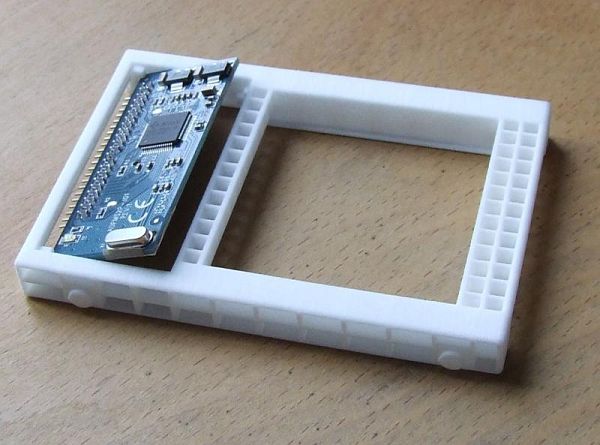
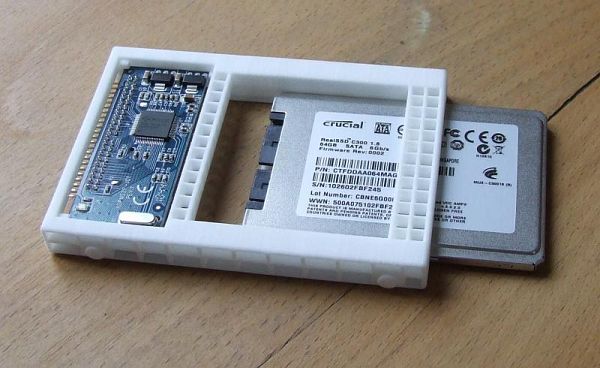
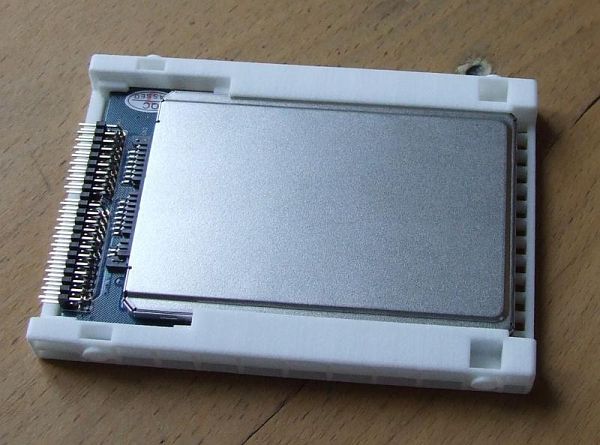
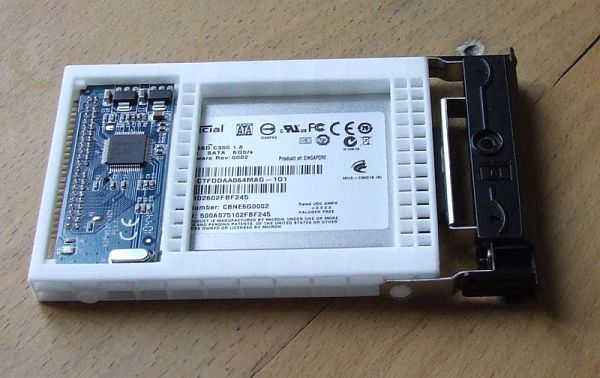
I designed a caddy for internal use of the 1.8" SATA to 2.5" IDE converter within thinkpads (approved for T42 14" and 15"). If anybody needs one, too, you can order it from shapeways. A rather extensive report can be found here (sorry, only in German, but after all with a couple of shots).
[update] Just noticed, that the pics are only visible to registered users, so put them in here, too [/update]
I installed a Crucial C300 64GB this way in a 15" T42. Works like a charm so far. However, I can't read the temperatures from the ssd. Does anybody has the same problem?
Thanks, Thomas
Last edited by tomatenfisch on Wed Jun 22, 2011 5:56 am, edited 2 times in total.
Re: 1.8" SATA to 2.5" IDE converter?
Welcome to the forum, Thomas!
I am going to order a couple of these caddies later (because the minimum order is $25), and I already look forward to have a more stable setup for my 1.8"-to-2.5"-SATA-to-IDE-adapter and my Intel X18-M in my T42, compared to if not having this caddy! My present "installation" is made by tapering the SATA-to-IDE-adapter and the 1.8" X18-M SDD to a normal metal harddisk caddy, and that is far from as stable as I am confident that your caddy will enable.
Thomas, one question: If you e.g. look at IBM T40 T41 T42 T43 14" Hard Drive Caddy w Screws/Cover, and thenn see your caddy, then how do you mount the HDD front cover onto your caddy... there does not seem to be any holes for this purpose in your caddy??
 here is a link to a (Google) translation (into English) of that thread.
Thanks, again, Thomas, for making this caddy available. i am certain that this is an interesting business oppertinity of interest to many users - and I suggest you put it out on eBay as well, perhaps in cooperation with the sellers of the 1.8"-to-2.5"-SATA-to-IDE-adapter? Good luck!
Johan
... and thank you very much for joining and sharing such super-interesting information!tomatenfisch wrote:Hi Johan,
I designed a caddy for internal use of the 1.8" SATA to 2.5" IDE converter within thinkpads (approved for T42 14" and 15"). If anybody needs one, too, you can order it from shapeways.
I am going to order a couple of these caddies later (because the minimum order is $25), and I already look forward to have a more stable setup for my 1.8"-to-2.5"-SATA-to-IDE-adapter and my Intel X18-M in my T42, compared to if not having this caddy! My present "installation" is made by tapering the SATA-to-IDE-adapter and the 1.8" X18-M SDD to a normal metal harddisk caddy, and that is far from as stable as I am confident that your caddy will enable.Thomas, one question: If you e.g. look at IBM T40 T41 T42 T43 14" Hard Drive Caddy w Screws/Cover, and thenn see your caddy, then how do you mount the HDD front cover onto your caddy... there does not seem to be any holes for this purpose in your caddy??
Great information posted there, Thomas - much appreciated! For those readers of this forum who are perhaps not fully fluid in Germantomatenfisch wrote:A rather extensive report can be found here (sorry, only in German, but after all with a couple of shots).
here is a link to a (Google) translation (into English) of that thread.I can't answer this question, but maybe some other readers can? Is this a "feature" of the SSD itself of is it owing to the adapter? Are you sure that the SSD actually provide this information? (see e.g. this post). From the above you will see that the 1.8" to 2.5" SATA to IDE-adapter discussed in this thread is reported not to provide any disk-access information (on the front LED on the ThinkPad), so maybe the absence of the temperature information is yet something simply "missing by design"? I don't know...tomatenfisch wrote:I installed a Crucial C300 64 GB this way in a 15" T42. Works like a charm so far. However, I can't read the temperatures from the ssd. Does anybody has the same problem?
Thanks, Thomas
Thanks, again, Thomas, for making this caddy available. i am certain that this is an interesting business oppertinity of interest to many users - and I suggest you put it out on eBay as well, perhaps in cooperation with the sellers of the 1.8"-to-2.5"-SATA-to-IDE-adapter? Good luck!
Johan
IBM T42p's (2373-Q1U & -Q2U): 2.1 GHz, 15" UXGA FlexView, 2 GB RAM, 128 MB FireGL T2, 128 GB 1.8" SATA SSD, IBM a/b/g, BT, Win 7 Ultimate
IBM T42 (2373-N1G): 1.8 GHz, 15" SXGA+ FlexView, 2 GB RAM, 64 MB Radeon 9600, 64 GB 1.8" SATA SSD, IBM a/b/g, BT, Win 7 Ultimate
IBM T42 (2373-N1G): 1.8 GHz, 15" SXGA+ FlexView, 2 GB RAM, 64 MB Radeon 9600, 64 GB 1.8" SATA SSD, IBM a/b/g, BT, Win 7 Ultimate
-
tomatenfisch
- Posts: 8
- Joined: Tue May 31, 2011 8:05 am
- Location: Dresden, Germany
Re: 1.8" SATA to 2.5" IDE converter?
Hi Johan, just edited my post (put in the pics here, too). As you can see on the last one, the original caddy is not needed any more. It's designed the way, Lenovo did it for their Micro-SATA to SATA Adapter (has kind of screw head imitations for mounting the hdd cover).Johan wrote:Thomas, one question: If you e.g. look at IBM T40 T41 T42 T43 14" Hard Drive Caddy w Screws/Cover, and thenn see your caddy, then how do you mount the HDD front cover onto your caddy... there does not seem to be any holes for this purpose in your caddy??
My first try was to rip off an old IDE HDD and mount the adapter and ssd inside, but it simply didn't really work. Coincidentally, I read an article about rapid manufacturing, learned about Shapeways and then started designing a caddy on my own. This was really exciting.
Thomas
-
- Similar Topics
- Replies
- Views
- Last post
-
-
accidentally flipped a DOM module - now IDE is dead
by my03 » Sat Feb 21, 2026 8:37 pm » in ThinkPad Legacy Hardware - 3 Replies
- 2275 Views
-
Last post by kishy
Wed Feb 25, 2026 10:58 am
-
-
-
Help Enabling SLIC & SATA II After Flashing Middleton BIOS
by tendencyatlas » Tue Dec 09, 2025 3:45 am » in ThinkPad T60/T61 Series - 2 Replies
- 5012 Views
-
Last post by axur-delmeria
Tue Dec 09, 2025 11:02 am
-
-
-
T440P SATA 2.5In Issues
by IndoGreg » Wed Dec 31, 2025 8:54 pm » in ThinkPad T430-T495 / T530-T590 Series - 1 Replies
- 3097 Views
-
Last post by ZaZ
Thu Jan 01, 2026 2:16 am
-
-
-
T480s with SATA SSD?
by dandreye » Thu Mar 12, 2026 6:09 am » in ThinkPad T430-T495 / T530-T590 Series - 2 Replies
- 1153 Views
-
Last post by dandreye
Thu Mar 12, 2026 11:42 am
-
Who is online
Users browsing this forum: No registered users and 64 guests