Lenovo 2014 keyboard layout - WARNING !

General Questions, Rumors, Real news & More
Message
Author
Puppy
Senior ThinkPadder
Senior ThinkPadder
Posts: 2256
Joined: Sat Oct 30, 2004 4:52 am
Location: Prague, Czech Republic

Lenovo 2014 keyboard layout - WARNING !

#1 Post by Puppy » Sun Jan 05, 2014 1:58 pm

Could it have been even worse than 40 models ? Sure https://www.facebook.com/lenovo namely this picture https://fbcdn-sphotos-g-a.akamaihd.net/ ... 8189_o.jpg :jhem:

Update: 14" 2560 x 1440 IPS
http://www.theverge.com/2014/1/5/527729 ... -announced
http://www.youtube.com/watch?v=ykdl9nbwLAc&7063695

Looks quite good, unfortunately the keyboard layout kills it at all :(

Update 2: All current comments on the The Verge article are negative about the keyboard. Who actually wants that ?
Last edited by Puppy on Sun Jan 05, 2014 7:47 pm, edited 3 times in total.
ThinkPad (1992 - 2012): R51, X31, X220, Tablet 8

jcvjcvjcvjcv
Senior Member
Senior Member
Posts: 722
Joined: Tue Jun 26, 2007 8:42 pm
Location: Amsterdam, The Netherlands

Re: Lenovo 2014 keyboard layout - WARNING !

#2 Post by jcvjcvjcvjcv » Sun Jan 05, 2014 2:17 pm

For me the *30 series keyboard was already bad enough.

Besides a whole lot of other keys they now got rid of CAPS lock? I guess they now make stuff "For those who do... search for missing keys"
W520
T61

Puppy
Senior ThinkPadder
Senior ThinkPadder
Posts: 2256
Joined: Sat Oct 30, 2004 4:52 am
Location: Prague, Czech Republic

Re: Lenovo 2014 keyboard layout - WARNING !

#3 Post by Puppy » Sun Jan 05, 2014 2:27 pm

jcvjcvjcvjcv wrote:Besides a whole lot of other keys they now got rid of CAPS lock?
The location of Home/End keys is really creative. Don't you think ? Maybe to sort the keys alphabetically would improve it ...
ThinkPad (1992 - 2012): R51, X31, X220, Tablet 8

dr_st
Senior ThinkPadder
Senior ThinkPadder
Posts: 6647
Joined: Sat Oct 29, 2005 6:20 am

Re: Lenovo 2014 keyboard layout - WARNING !

#4 Post by dr_st » Sun Jan 05, 2014 2:36 pm

Honestly, once you already mess with the layout, it makes little difference where exactly you place which keys.

One can think of advantages to having the Home/End where they are, compared to where they were, and disadvantages too.

It seems that the keyboard team in Lenovo is finally getting some creative freedom after ~2 decades of complete starvation. :lol:

It looks nice, that's true. But touch buttons for the function keys is bad. Almost in every possible case, touch button is worse than a mechanical button. I hate the touch buttons on my "high-end" DELL U2410 monitor, and wish it had normal mechanical buttons like my 2209WA and some "low-end" monitors.
Current: X220 4291-4BG, T410 2537-R46, T60 1952-F76, T60 2007-QPG, T42 2373-F7G
Collectibles: T430s (IPS FHD + Classic Keyboard), X32 (IPS Screen)
Retired: X61 7673-V2V, A31p w/ Ultrabay Numpad
Past: Z61t 9440-A23, T60 2623-D3U, X32 2884-M5U

Adda
Senior Member
Senior Member
Posts: 685
Joined: Fri Dec 04, 2009 1:49 pm
Location: Nørresundby, Denmark

Re: Lenovo 2014 keyboard layout - WARNING !

#5 Post by Adda » Sun Jan 05, 2014 3:01 pm

It is hopeless.

ThinkPad A30
Pentium III-M 933MHz
Crucial 2x256MB 133MHz CL2
Mobility Radeon 16MB
15" UXGA FlexView
Zheino Classic A 32GB
Samsung SpinPoint M5S 160GB
NEC DVD+-RW ND-6650A
Broadcom MiniPCI BCM43222 802.11n Dual Band
AKE BC168 USB 2.0
26P8287 203 "Malaysia"
46L4697
02K6898
02K6753

jcvjcvjcvjcv
Senior Member
Senior Member
Posts: 722
Joined: Tue Jun 26, 2007 8:42 pm
Location: Amsterdam, The Netherlands

Re: Lenovo 2014 keyboard layout - WARNING !

#6 Post by jcvjcvjcvjcv » Sun Jan 05, 2014 4:54 pm

dr_st wrote:Honestly, once you already mess with the layout, it makes little difference where exactly you place which keys.

One can think of advantages to having the Home/End where they are, compared to where they were, and disadvantages too.

It seems that the keyboard team in Lenovo is finally getting some creative freedom after ~2 decades of complete starvation. :lol:

It looks nice, that's true. But touch buttons for the function keys is bad. Almost in every possible case, touch button is worse than a mechanical button. I hate the touch buttons on my "high-end" DELL U2410 monitor, and wish it had normal mechanical buttons like my 2209WA and some "low-end" monitors.
Ha, creative freedom? More like a forever restrained adolescent that gets to use paddo's and then "designs" a keyboard. What keyboard "team" btw? That should be a one man job since there is nothing to think through since nothing has to change besides thinking about a new color for the volume keys, and the person that's in that job for the past few years should be [....]

That there might be advantages and disadvantages to this new-new "layout" is all fine and well, but since keyboard layout is supposed to be a standard and I'm no guinea pig I propose they test it somewhere else. Maybe in prisons (I guess that's unethical).

The nice thing about a fixed layout is that no matter how old the stuff is; it works the same. I can go from W520 to T61 with (almost) zero need to adapt to anything. Same for my new desktop keyboard, my dad's keyboards from the '80s, the older Latitude's in use by my brothers, etc.

But these current developments are just irritating the heck out of people that do serious work. Just because the average user is too ignorant to learn some shortkeys (since RSI treatment is in the mandatory health insurance package?) doesn't mean we should get rid of those keys. Perhaps they will get rid of keys like ',.?; next since so many people don't use them....

As for the touch buttons on the U2410: hehe, my 3007WFP-HC receives the same hate, luckily the 2007FP escaped that craze.
W520
T61

A31
Senior Member
Senior Member
Posts: 845
Joined: Mon Dec 21, 2009 11:33 am
Location: Norwich, UK

Re: Lenovo 2014 keyboard layout - WARNING !

#7 Post by A31 » Sun Jan 05, 2014 5:00 pm

I'll be buying an L440 in the summer, so I will let you all know what I think of the keyboard (and the machine itself!) And yes, I have used older ThinkPads - an A31 and an R40 (but not about 4 years now).

It looks to me like the L440 does have a Caps Lock key http://www.lenovo.com/images/gallery/10 ... oard-2.jpg

Seems like an odd decision to remove it from some of their laptops though.

Not strictly to do with the 'keyboard layout' but it is my understanding that Lenovo has now removed the dedicated TrackPoint buttons and is now using a 'click pad' to make the touchpad bigger and easier to use with Windows 8 when using mouse gestures.
Lenovo ThinkPad L540 | Core i5 4200M | 8GB 1600MHz RAM | 1920x1080 Display | UltraNav with Fingerprint Reader | Seagate SSHD 1TB | 720p Webcam | 6 Cell 56Wh Battery | Windows 8.1 Pro x64

Past: IBM ThinkPad A31, R40

My custom-built desktop - see pics!

Summilux
Junior Member
Junior Member
Posts: 336
Joined: Fri Dec 24, 2010 8:02 am
Location: Paris (Latin Europe)

Re: Lenovo 2014 keyboard layout - WARNING !

#8 Post by Summilux » Sun Jan 05, 2014 5:42 pm

I agree with some comments above:
- Just another iteration in a post-"7-row, non-island" world. No drama here, for all has already been lost few generations ago.
- It does look slick, nice and all. All unnecessary elements for browsing Facebook are being further eliminated. But what is that thing doing on a Thinkpad? Oh wait, that's an iThink.

Now, to cut with my usual sarcasms on the keyboard topic for a change, I'll opine that the new "home/end" placement does have its merits for who rarely uses the Caps Lock key. I could see myself make do with a combined Caps/Caps Lock key, where for example the Lock function would be activated after three successive pressures. In exchange, I would get an even easier access to the Home/End keys that I use more often.
Deathwisher
T60 2007-FSG (stolen)
X220 4287-CTO

Puppy
Senior ThinkPadder
Senior ThinkPadder
Posts: 2256
Joined: Sat Oct 30, 2004 4:52 am
Location: Prague, Czech Republic

Re: Lenovo 2014 keyboard layout - WARNING !

#9 Post by Puppy » Sun Jan 05, 2014 6:38 pm

jcvjcvjcvjcv wrote:The nice thing about a fixed layout is that no matter how old the stuff is; it works the same. I can go from W520 to T61 with (almost) zero need to adapt to anything. Same for my new desktop keyboard
This is also my primary concern about keyboard layout. PC keyboard layout is here with almost zero changes for more than 20 years proven to be good. ThinkPad S30/S31 and X3x to X6x also prove the layout does not need many changes in small machine.
ThinkPad (1992 - 2012): R51, X31, X220, Tablet 8

dr_st
Senior ThinkPadder
Senior ThinkPadder
Posts: 6647
Joined: Sat Oct 29, 2005 6:20 am

Re: Lenovo 2014 keyboard layout - WARNING !

#10 Post by dr_st » Mon Jan 06, 2014 3:20 am

jcvjcvjcvjcv wrote:As for the touch buttons on the U2410: hehe, my 3007WFP-HC receives the same hate, luckily the 2007FP escaped that craze.
The buttons on the 2007FP (and WFP and 2407WFP) are horrible in their own right, though. :mrgreen:
Current: X220 4291-4BG, T410 2537-R46, T60 1952-F76, T60 2007-QPG, T42 2373-F7G
Collectibles: T430s (IPS FHD + Classic Keyboard), X32 (IPS Screen)
Retired: X61 7673-V2V, A31p w/ Ultrabay Numpad
Past: Z61t 9440-A23, T60 2623-D3U, X32 2884-M5U

Adda
Senior Member
Senior Member
Posts: 685
Joined: Fri Dec 04, 2009 1:49 pm
Location: Nørresundby, Denmark

Re: Lenovo 2014 keyboard layout - WARNING !

#11 Post by Adda » Mon Jan 06, 2014 9:43 am

Puppy wrote: Update 2: All current comments on the The Verge article are negative about the keyboard. Who actually wants that ?
No no, you got it all wrong, the masses have spoken, Lenovo made the changes because they listened to the silent majority.
We are just Dinosaurs, because we grew up with computers, we don't know what real computers are like, we only had junk when we where kids.

So you are wrong, people are not complaining, they are celebrating the wonderful innovation coming out of Lenovo!
They just don't care to tell about it anywhere, or educate us Dinosaurs about proper computer use, hell we come from a time where things had to be done MANUALLY!? our perceptions are not relevant anymore, out with the old in with the new!

It's hard to compete in this day and age, Lenovo has to innovate to survive, Apple is hot on their heels, they even managed to put USB ports on opposite sides of their laptops, just how is Lenovo supposed to compete with that?
Two full size USB devices plugged in to ONE laptop, that is just too good to be true, who cares if the screen is fused, screws need a special screw driver, and everything is soldered to the board (for starters), TWO USB devices baby, and the reviewers love it, best MacBook ever!

All Lenovo can do to stay afloat is to alienate their traditional costumers and put as few buttons on their laptops as possible, I repeat TWO USB devices, Lenovo HAS to do something, ANYTHING, they don't have a choice, the people have spoken!

(caugh AAAH what just happened, I seem have acquired another head ache).

ThinkPad A30
Pentium III-M 933MHz
Crucial 2x256MB 133MHz CL2
Mobility Radeon 16MB
15" UXGA FlexView
Zheino Classic A 32GB
Samsung SpinPoint M5S 160GB
NEC DVD+-RW ND-6650A
Broadcom MiniPCI BCM43222 802.11n Dual Band
AKE BC168 USB 2.0
26P8287 203 "Malaysia"
46L4697
02K6898
02K6753

ajkula66
SuperUserGeorge
SuperUserGeorge
Posts: 15733
Joined: Sun Feb 25, 2007 11:28 am
Location: Brodheadsville, Pennsylvania

Re: Lenovo 2014 keyboard layout - WARNING !

#12 Post by ajkula66 » Mon Jan 06, 2014 9:39 pm

Adda wrote:It is hopeless.
Indeed.

Image
...Knowledge is a deadly friend when no one sets the rules...(King Crimson)

Cheers,

George (your grouchy retired FlexView farmer)

AARP club members:A31p, T43pSF

Abused daily: R61

PMs requesting personal tech support will be ignored.

Saucey
Senior Member
Senior Member
Posts: 836
Joined: Tue Nov 06, 2012 9:22 pm
Location: San Diego, California
Contact:

Re: Lenovo 2014 keyboard layout - WARNING !

#13 Post by Saucey » Mon Jan 06, 2014 10:04 pm

I... I kinda like it. :eek: :jhem:
At least the woosh and shwish hand gestures, but then again I never used that feature on my Galaxy S4.
The screen is nice and the design is OK. I really wish they marketed it as an IdeaPad now.
It makes much more sense if it was an IdeaPad in the first place.

Hopefully since Lenovo seems to like my photos on Instagram maybe they will mail me a new X1C so I can take more photos. :mrgreen:

I agree yes, I don't use caps that often, but I do use it for spredsheets.
Maybe double tap alt or ctrl can enable caps.
The ~ button is retarded however, why couldn't they just put the window key there and tossed back FN to where it should be...
Pg up/dn will take me some time getting used to, but ill miss the back and forward buttons.
I'm going to miss the wavy indent that used to be on the directional keys however.

I really dislike the backspace button being eaten by delete...
I always mispress = or \ on my x61t but now that corner has delete?!
Incompitent(sp?) Electronic Recycler: caffeine addicted, techno blasting, ThinkPad hoarder.

Current: T430s, T431s, Pixel, MC207LL/A
Still around: X61T, A31p, T43p
Past: W700ds, X1C3, 701C, T60p

jdk
Sophomore Member
Posts: 239
Joined: Mon Jan 03, 2011 9:08 pm
Location: Quito, Ecuador

Re: Lenovo 2014 keyboard layout - WARNING !

#14 Post by jdk » Mon Jan 06, 2014 11:06 pm

Just like the destruction of the Thinkpad keyboard started with the innocuous switch to chiclet keys, so too has Lenovo begun its assault the trackpoint, whose use has been castrated by removal of dedicated hardware buttons.

Was the old keyboard layout really hurting sales? Will the revenue generated from first time buyers who like the new Thinkpad offset the loss of diehards who picked the brand specifically because of the keyboard and trackpoint?

We are all guilty of this abomination, for continuing to line this company's pockets even and recommending their product to others.
.: Lenovo X250 - 16GB, 500GB SSD, Model M SSK (Dec. 1997), Dell P2416D, OpenBSD Current :.

dr_st
Senior ThinkPadder
Senior ThinkPadder
Posts: 6647
Joined: Sat Oct 29, 2005 6:20 am

Re: Lenovo 2014 keyboard layout - WARNING !

#15 Post by dr_st » Tue Jan 07, 2014 12:19 am

jdk wrote:We are all guilty of this abomination, for continuing to line this company's pockets even and recommending their product to others.
I don't know about you, but I stopped. On both counts. :??:
Current: X220 4291-4BG, T410 2537-R46, T60 1952-F76, T60 2007-QPG, T42 2373-F7G
Collectibles: T430s (IPS FHD + Classic Keyboard), X32 (IPS Screen)
Retired: X61 7673-V2V, A31p w/ Ultrabay Numpad
Past: Z61t 9440-A23, T60 2623-D3U, X32 2884-M5U

jdk
Sophomore Member
Posts: 239
Joined: Mon Jan 03, 2011 9:08 pm
Location: Quito, Ecuador

Re: Lenovo 2014 keyboard layout - WARNING !

#16 Post by jdk » Tue Jan 07, 2014 6:19 am

dr_st wrote:
jdk wrote:We are all guilty of this abomination, for continuing to line this company's pockets even and recommending their product to others.
I don't know about you, but I stopped. On both counts. :??:
I am guilty of being optimistic about the chiclet keyboard and even recommending the Yoga to a family member. Recommendations are now for the Macbook or Elitebook depending on use case. Or a Chromebook or Tab-o-let for people who have no use case. Apologies to the Dell enthusiasts on this site, I stopped working with those machines around the time the replacement for the overheating E6410 series came out (admittedly, the Latitude was very easy to tear down).
.: Lenovo X250 - 16GB, 500GB SSD, Model M SSK (Dec. 1997), Dell P2416D, OpenBSD Current :.

Adda
Senior Member
Senior Member
Posts: 685
Joined: Fri Dec 04, 2009 1:49 pm
Location: Nørresundby, Denmark

Re: Lenovo 2014 keyboard layout - WARNING !

#17 Post by Adda » Tue Jan 07, 2014 9:16 am

Well lets see, usage patterns I use constantly, that have been ruined by the keyboard and trackpoint changes include:

Right hand on PgUp/PgDn + backspace, left hand on trackpoint.
For quick scrolling and accurate mousing, but this can't be done any more, and PgUp/PgDn have been moved away from backspace, and the trackpoint is useless.

Ok ok, what about right hand on arrow keys + browser back/forth, and left on trackpoint?
No no, you are not supposed to navigate your computer or the web effectively, use the touchpad and click the [censored] icons.

And these are everyday things, not some irrelevant professionals usage pattern with some arcane software that no average consumer uses, the notebook are for "those who do" remember?

What they want is keys without tactile feedback whose functions change depending on which app is run, who cares for muscle memory and efficiency, and all the crap that comes along with computers trying to guess a persons needs, fewer buttons for the sake of innovation!

ThinkPad A30
Pentium III-M 933MHz
Crucial 2x256MB 133MHz CL2
Mobility Radeon 16MB
15" UXGA FlexView
Zheino Classic A 32GB
Samsung SpinPoint M5S 160GB
NEC DVD+-RW ND-6650A
Broadcom MiniPCI BCM43222 802.11n Dual Band
AKE BC168 USB 2.0
26P8287 203 "Malaysia"
46L4697
02K6898
02K6753

Puppy
Senior ThinkPadder
Senior ThinkPadder
Posts: 2256
Joined: Sat Oct 30, 2004 4:52 am
Location: Prague, Czech Republic

Re: Lenovo 2014 keyboard layout - WARNING !

#18 Post by Puppy » Tue Jan 07, 2014 10:57 am

Adda wrote:fewer buttons for the sake of innovation!
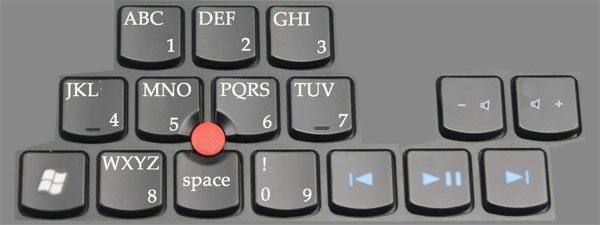
Taken from Lenovo Blog comments http://a.disquscdn.com/uploads/mediaemb ... iginal.jpg
ThinkPad (1992 - 2012): R51, X31, X220, Tablet 8

Adda
Senior Member
Senior Member
Posts: 685
Joined: Fri Dec 04, 2009 1:49 pm
Location: Nørresundby, Denmark

Re: Lenovo 2014 keyboard layout - WARNING !

#19 Post by Adda » Tue Jan 07, 2014 11:20 am

Puppy wrote:
Adda wrote:fewer buttons for the sake of innovation!
Taken from Lenovo Blog comments http://a.disquscdn.com/uploads/mediaemb ... iginal.jpg
That looks great, now all they need to do is upgrade the volume keys in to the play/pause/skip keys!

ThinkPad A30
Pentium III-M 933MHz
Crucial 2x256MB 133MHz CL2
Mobility Radeon 16MB
15" UXGA FlexView
Zheino Classic A 32GB
Samsung SpinPoint M5S 160GB
NEC DVD+-RW ND-6650A
Broadcom MiniPCI BCM43222 802.11n Dual Band
AKE BC168 USB 2.0
26P8287 203 "Malaysia"
46L4697
02K6898
02K6753

bluefruit
Posts: 21
Joined: Wed Nov 27, 2013 6:58 am
Location: Singapore

Re: Lenovo 2014 keyboard layout - WARNING !

#20 Post by bluefruit » Tue Jan 07, 2014 8:44 pm

David Hill on the new X1 Carbon: https://www.youtube.com/watch?v=PE-To8_0etM
T61 | X220 Tablet

Summilux
Junior Member
Junior Member
Posts: 336
Joined: Fri Dec 24, 2010 8:02 am
Location: Paris (Latin Europe)

Re: Lenovo 2014 keyboard layout - WARNING !

#21 Post by Summilux » Fri Jan 17, 2014 5:08 pm

Deathwisher
T60 2007-FSG (stolen)
X220 4287-CTO

QWERTY Andreas
Junior Member
Junior Member
Posts: 460
Joined: Tue Nov 03, 2009 2:40 am
Location: Copenhagen Denmark

Re: Lenovo 2014 keyboard layout - WARNING !

#22 Post by QWERTY Andreas » Sat Jan 18, 2014 4:25 am

I would be all for it, if they did it with physical keys

Ie. the Razor laptop with keys, featuring small OLED displays. Thus it could have been the best of both worlds.
Thinkpad W500 (2.53 GHz P8700, 4 GB RAM, FireGL V5700, WUXGA)
Thinkpad T61F 14" (2.53 GHz QX9300, 6 GB RAM, Quadro FX570m 256 MB, SXGA). Advanced dock with AMD Radeon HD7750
Custom build ITX desktop (i5 4590, 8GB RAM, AMD R7 260X, custom watercooling)
Thinkpad 8, Fujitsu F-07C


FS: T61F

dr_st
Senior ThinkPadder
Senior ThinkPadder
Posts: 6647
Joined: Sat Oct 29, 2005 6:20 am

Re: Lenovo 2014 keyboard layout - WARNING !

#23 Post by dr_st » Sat Jan 18, 2014 5:04 am

Summilux wrote:Peter Bright on the new X1's keyboard: Stop trying to innovate keyboards. You’re just making them worse :twisted:
That's a very well-written one, with some great analogies and examples. Doubly recommended. :thumbs-UP:
Current: X220 4291-4BG, T410 2537-R46, T60 1952-F76, T60 2007-QPG, T42 2373-F7G
Collectibles: T430s (IPS FHD + Classic Keyboard), X32 (IPS Screen)
Retired: X61 7673-V2V, A31p w/ Ultrabay Numpad
Past: Z61t 9440-A23, T60 2623-D3U, X32 2884-M5U

Puppy
Senior ThinkPadder
Senior ThinkPadder
Posts: 2256
Joined: Sat Oct 30, 2004 4:52 am
Location: Prague, Czech Republic

Re: Lenovo 2014 keyboard layout - WARNING !

#24 Post by Puppy » Sat Jan 18, 2014 6:35 am

Summilux wrote:Peter Bright on the new X1's keyboard: Stop trying to innovate keyboards. You’re just making them worse :twisted:
Excellent article :thumbs-UP: Unfortunately it will have zero effect on Lenovo decision on destroying ThinkPad features.
ThinkPad (1992 - 2012): R51, X31, X220, Tablet 8

RealBlackStuff
Admin
Admin
Posts: 17485
Joined: Mon Sep 18, 2006 5:17 am
Location: Mt. Cobb, PA USA
Contact:

Re: Lenovo 2014 keyboard layout - WARNING !

#25 Post by RealBlackStuff » Sat Jan 18, 2014 6:53 am

Those keyboards are gotting more and more disgusting with every new development.
Lenovo keyboard destructors (NOT designers!): you should all be shot! :evil:
Lovely day for a Guinness! (The Real Black Stuff)

Check out The Boardroom for Parts, Mods and Other Services.

dr_st
Senior ThinkPadder
Senior ThinkPadder
Posts: 6647
Joined: Sat Oct 29, 2005 6:20 am

Re: Lenovo 2014 keyboard layout - WARNING !

#26 Post by dr_st » Sat Jan 18, 2014 7:17 am

RealBlackStuff wrote:Lenovo keyboard destructors (NOT designers!): you should all be shot! :evil:
Let it be noted that I was not the one who suggested this! :lol:
Current: X220 4291-4BG, T410 2537-R46, T60 1952-F76, T60 2007-QPG, T42 2373-F7G
Collectibles: T430s (IPS FHD + Classic Keyboard), X32 (IPS Screen)
Retired: X61 7673-V2V, A31p w/ Ultrabay Numpad
Past: Z61t 9440-A23, T60 2623-D3U, X32 2884-M5U

Adda
Senior Member
Senior Member
Posts: 685
Joined: Fri Dec 04, 2009 1:49 pm
Location: Nørresundby, Denmark

Re: Lenovo 2014 keyboard layout - WARNING !

#27 Post by Adda » Sat Jan 18, 2014 8:17 am

RealBlackStuff wrote:Those keyboards are gotting more and more disgusting with every new development.
Lenovo keyboard destructors (NOT designers!): you should all be shot! :evil:
C'mon you should be celebrating like virtually everybody else!

This is the golden age of computers didn't you know?

:banghead:

ThinkPad A30
Pentium III-M 933MHz
Crucial 2x256MB 133MHz CL2
Mobility Radeon 16MB
15" UXGA FlexView
Zheino Classic A 32GB
Samsung SpinPoint M5S 160GB
NEC DVD+-RW ND-6650A
Broadcom MiniPCI BCM43222 802.11n Dual Band
AKE BC168 USB 2.0
26P8287 203 "Malaysia"
46L4697
02K6898
02K6753

emeraldgirl08
ThinkPadder
ThinkPadder
Posts: 1759
Joined: Sun Mar 01, 2009 6:59 pm
Location: Window Rock, Arizona

Re: Lenovo 2014 keyboard layout - WARNING !

#28 Post by emeraldgirl08 » Sat Jan 18, 2014 9:16 am

^^^ Or one could make like a sheep and accept dogmatic spoon-feeding. Really- that new keyboard pales in comparison to the T61 NMB keyboard I am typing on now. Whatever happened to simplicity is the best design? What bothers me is how Lenovo takes their supposedly flagship models slaps questionable design features on them and expects their loyal customers to not say a word. Preposterous indeed. I have refrained from commenting on this topic but after seeing that new keyboard design I would like to say that my expectations from a ThinkPad involve both a certain level of professional and scrupulous planning from the baby-faced ThinkPad design team. After all the ThinkPad will travel nearly everywhere with me and in my two-cent opinion I am the employer and the ThinkPad is my employee. Alas I expect the keyboard design that I am familiar with and love to continue its transformation from a practical tool into some sort of unnecessary design quirkiness/pacifier for the sheeple. At the end of the day it is just about making profits for Lenovo after all :roll:
Thinkpad X230 | Lenovo Yoga Tablet 2 | mATX Haswell Desktop

RealBlackStuff
Admin
Admin
Posts: 17485
Joined: Mon Sep 18, 2006 5:17 am
Location: Mt. Cobb, PA USA
Contact:

Re: Lenovo 2014 keyboard layout - WARNING !

#29 Post by RealBlackStuff » Sat Jan 18, 2014 9:17 am

Adda wrote:C'mon you should be celebrating like virtually everybody else!
Only those destructors at Lenovo are HOPING for that!
"Virtual" means: in your dreams, Lenovo!
Lovely day for a Guinness! (The Real Black Stuff)

Check out The Boardroom for Parts, Mods and Other Services.

Summilux
Junior Member
Junior Member
Posts: 336
Joined: Fri Dec 24, 2010 8:02 am
Location: Paris (Latin Europe)

Re: Lenovo 2014 keyboard layout - WARNING !

#30 Post by Summilux » Sat Jan 18, 2014 9:57 am

But come on, virtuality enhances multitasking :lol:
Deathwisher
T60 2007-FSG (stolen)
X220 4287-CTO

Post Reply
  • Similar Topics
    Replies
    Views
    Last post

Return to “GENERAL ThinkPad News/Comments & Questions”

Who is online

Users browsing this forum: No registered users and 6 guests