
Friend's writing setup

LARGE picture files allowed here. Those with slow connections, beware!!! do NOT go here on your PDA or Cell Phone!
Post Reply
Message
Author
Utwig
Junior Member
Junior Member
Posts: 263
Joined: Sun May 21, 2006 8:52 pm
Location: Slovenia/Europe

Friend's writing setup

#1 Post by Utwig » Sun Feb 17, 2013 2:56 pm

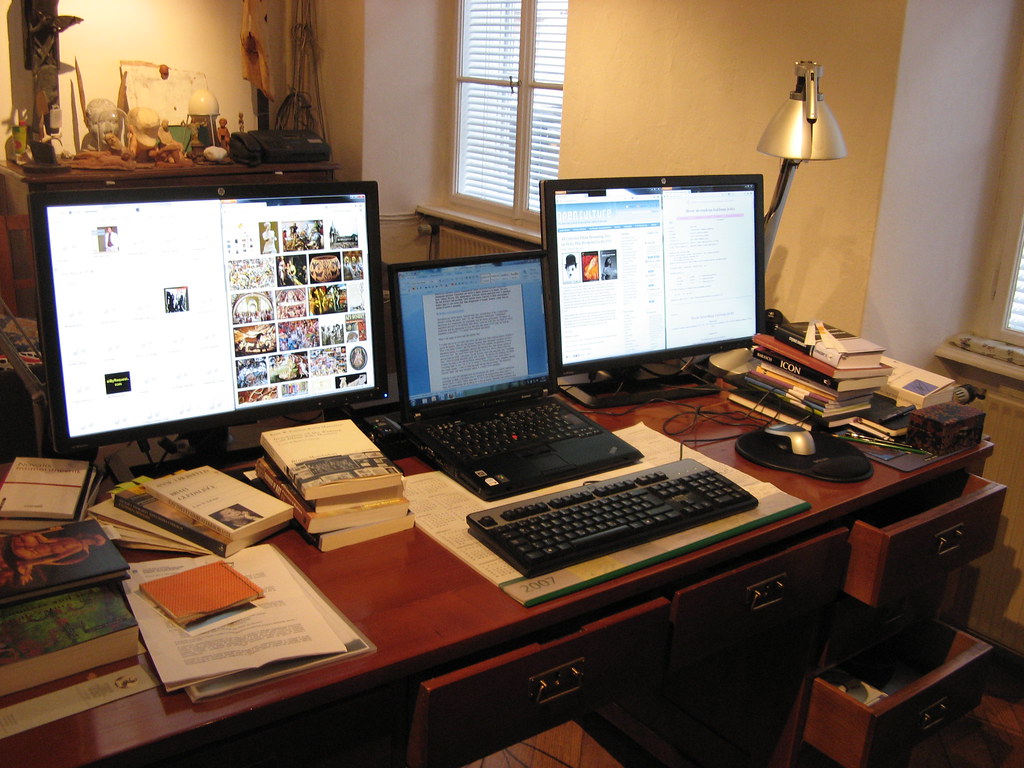
I put together this for a friend who writes and researches a lot:

Existing Thinkpad R60 upgraded with:
Advanced dock + Radeon X1300
dual HP ZR24w screens (one on dock DVI one on PCIe DVI)
Image
T540p, T420s (soon to be T420ps :) ), X61t, T60p, T42p, A21p

JaneL
Admin
Admin
Posts: 4995
Joined: Thu Apr 15, 2004 4:40 am
Location: Greenville SC

Re: Friend's writing setup

#2 Post by JaneL » Sun Feb 17, 2013 5:47 pm

Nice!
Jane
2015 X1 Carbon, ThinkPad Slate, T410s, X301, X300, X200 Tablet, T60p, HP TouchPad, iPad Air 2, iPhone 5S, IdeaTab A2107A, Yoga 3 Pro
Bill Morrow's thinkpads.com Facebook group
I'm on Twitter

I do NOT respond to PM or e-mail requests for personal tech support.

ZaZ
moderator
moderator
Posts: 4454
Joined: Fri May 13, 2005 1:33 pm
Location: Minnesota

Re: Friend's writing setup

#3 Post by ZaZ » Sun Feb 17, 2013 6:36 pm

Very nice indeed. I thought about doing something similar because a ThinkPad with a quad core would be a nice upgrade over my present PC, but I've just got no room for a laptop on my desk.
E7440

emeraldgirl08
ThinkPadder
ThinkPadder
Posts: 1759
Joined: Sun Mar 01, 2009 6:59 pm
Location: Window Rock, Arizona

Re: Friend's writing setup

#4 Post by emeraldgirl08 » Sun Feb 17, 2013 9:43 pm

I love the setup! I have a very small desk so only my T400 (which serves as my desktop replacement) and my X200T (my sketchpad) fit on it. My setup is a bit cramped so I will be looking for a replacement desk later this year.

@Utwig. May I ask what type of literature your friend produces?
Thinkpad X230 | Lenovo Yoga Tablet 2 | mATX Haswell Desktop

Tasurinchi
Senior ThinkPadder
Senior ThinkPadder
Posts: 2009
Joined: Mon Aug 17, 2009 8:38 am
Location: Zurich, Switzerland

Re: Friend's writing setup

#5 Post by Tasurinchi » Mon Feb 18, 2013 3:02 am

Nice and tidy :wink:
IBM Convertible 5140/L40SX/220/240/240X/2*340CSE/360PE/365XD/380D/380E/380XD/380Z/390/560E/560X/2*570/2*600/600E/750Cs/755C/760CD/760EL/760XD/770E
A20p/A22p/A31/i1600/G40/R50p/R61i/S30/SL510/2*T22/4*T4x/11*T6x/6*T40x/6*T5x0/3*W5x0/W700/3*X2x/4*X3x/3*X4x/5*X6x/3*X6xT/12*X2xx/4*X30x/Z60m/3*Z61x

dr_st
Senior ThinkPadder
Senior ThinkPadder
Posts: 6646
Joined: Sat Oct 29, 2005 6:20 am

Re: Friend's writing setup

#6 Post by dr_st » Mon Feb 18, 2013 3:53 am

:thumbs-UP:
Current: X220 4291-4BG, T410 2537-R46, T60 1952-F76, T60 2007-QPG, T42 2373-F7G
Collectibles: T430s (IPS FHD + Classic Keyboard), X32 (IPS Screen)
Retired: X61 7673-V2V, A31p w/ Ultrabay Numpad
Past: Z61t 9440-A23, T60 2623-D3U, X32 2884-M5U

Utwig
Junior Member
Junior Member
Posts: 263
Joined: Sun May 21, 2006 8:52 pm
Location: Slovenia/Europe

Re: Friend's writing setup

#7 Post by Utwig » Mon Feb 18, 2013 9:43 am

emeraldgirl08 wrote:I love the setup! I have a very small desk so only my T400 (which serves as my desktop replacement) and my X200T (my sketchpad) fit on it. My setup is a bit cramped so I will be looking for a replacement desk later this year.

@Utwig. May I ask what type of literature your friend produces?
He is an actor and a sculptor so he writes on art.
T540p, T420s (soon to be T420ps :) ), X61t, T60p, T42p, A21p

QWERTY Andreas
Junior Member
Junior Member
Posts: 460
Joined: Tue Nov 03, 2009 2:40 am
Location: Copenhagen Denmark

Re: Friend's writing setup

#8 Post by QWERTY Andreas » Tue Feb 19, 2013 6:08 pm

One question:
Why have the small display on the laptop as the main display?

Best regards
Thinkpad W500 (2.53 GHz P8700, 4 GB RAM, FireGL V5700, WUXGA)
Thinkpad T61F 14" (2.53 GHz QX9300, 6 GB RAM, Quadro FX570m 256 MB, SXGA). Advanced dock with AMD Radeon HD7750
Custom build ITX desktop (i5 4590, 8GB RAM, AMD R7 260X, custom watercooling)
Thinkpad 8, Fujitsu F-07C


FS: T61F

pianowizard
Senior ThinkPadder
Senior ThinkPadder
Posts: 8364
Joined: Tue Jun 28, 2005 5:07 am
Location: Ann Arbor, MI
Contact:

Re: Friend's writing setup

#9 Post by pianowizard » Wed Feb 20, 2013 4:24 am

QWERTY Andreas wrote:Why have the small display on the laptop as the main display?
Excellent question. I used to do the same thing and it made no sense to me either. Besides, the Thinkpad takes up so much valuable space on this person's desk. Using a desktop computer (that sits under the desk) would free up some space and also eliminate that silly little screen. Laptops save space only if you use them on your lap!
Microsoft Surface 3 (Atom x7-Z8700 / 4GB / 128GB / LTE)
Dell OptiPlex 9010 SFF (Core i3-3220 / 8GB / 8TB); HP 8300 Elite minitower (Core i7-3770 / 16GB / 9.25TB)
Acer T272HUL; Crossover 404K; Dell 3008WFP, U2715H, U2711, P2416D; Monoprice 10734; QNIX QHD2410R; Seiki Pro SM40UNP

dr_st
Senior ThinkPadder
Senior ThinkPadder
Posts: 6646
Joined: Sat Oct 29, 2005 6:20 am

Re: Friend's writing setup

#10 Post by dr_st » Wed Feb 20, 2013 7:49 am

I like my desktop on my desk. It is pretty (I make sure to buy them this way), more accessible, and tends to live longer (possibly due to less dust accumulation). :)
Current: X220 4291-4BG, T410 2537-R46, T60 1952-F76, T60 2007-QPG, T42 2373-F7G
Collectibles: T430s (IPS FHD + Classic Keyboard), X32 (IPS Screen)
Retired: X61 7673-V2V, A31p w/ Ultrabay Numpad
Past: Z61t 9440-A23, T60 2623-D3U, X32 2884-M5U

pianowizard
Senior ThinkPadder
Senior ThinkPadder
Posts: 8364
Joined: Tue Jun 28, 2005 5:07 am
Location: Ann Arbor, MI
Contact:

Re: Friend's writing setup

#11 Post by pianowizard » Wed Feb 20, 2013 11:22 am

dr_st wrote:I like my desktop on my desk. It is pretty (I make sure to buy them this way), more accessible, and tends to live longer (possibly due to less dust accumulation). :)
Is this an ultra small desktop or a regular tower? Also, are the fans very quiet?

I put all my desktops on the floor, but their monitors have USB ports and card readers and so I don't sacrifice accessibility.
Microsoft Surface 3 (Atom x7-Z8700 / 4GB / 128GB / LTE)
Dell OptiPlex 9010 SFF (Core i3-3220 / 8GB / 8TB); HP 8300 Elite minitower (Core i7-3770 / 16GB / 9.25TB)
Acer T272HUL; Crossover 404K; Dell 3008WFP, U2715H, U2711, P2416D; Monoprice 10734; QNIX QHD2410R; Seiki Pro SM40UNP

dr_st
Senior ThinkPadder
Senior ThinkPadder
Posts: 6646
Joined: Sat Oct 29, 2005 6:20 am

Re: Friend's writing setup

#12 Post by dr_st » Wed Feb 20, 2013 12:44 pm

It's a regular tower, and yes, the fans are very quiet.

It's not about accessing USB ports (most of the time). It's just that I'm the kind of person that upgrades / messes with the internals of the tower more than the average person. Even for cleaning, for instance.

In the past when my desktops were under the table, every time I needed to access something, it was a nightmare of cable clutter, being careful not to pull something I shouldn't or break something or hit my head... Even if I found myself needing to do this just once a month I always got annoyed.

This problem can be remedied by having the tower on the floor, not under the desk, but beside it. But then you are essentially sacrificing floor space for table space. Sometimes you might need one more, sometimes the other...

Not to mention that with the tower being on the desk, it is less susceptible to being accidentally knocked off by cats/children. Then again, if they do knock it off, the consequences are potentially more disastrous.

Tradeoffs, no matter where you look. :lol:
Current: X220 4291-4BG, T410 2537-R46, T60 1952-F76, T60 2007-QPG, T42 2373-F7G
Collectibles: T430s (IPS FHD + Classic Keyboard), X32 (IPS Screen)
Retired: X61 7673-V2V, A31p w/ Ultrabay Numpad
Past: Z61t 9440-A23, T60 2623-D3U, X32 2884-M5U

mian824
Posts: 1
Joined: Sat Jun 06, 2015 5:29 am
Location: Houghton, Michigan

Re: Friend's writing setup

#13 Post by mian824 » Sat Jun 06, 2015 5:41 am

Nice Job !

I am interested in knowing that whether IBM thinkpad R60, docked with IBM docking station 2504, provides DVI output together with VGA? (without any additional hardware requirement).

I did read that thinkpad R60 don't provide DVI-D pass through, which I don't understand.

Post Reply
  • Similar Topics
    Replies
    Views
    Last post

Return to “Pictures of your ThinkPad & desk setup”

Who is online

Users browsing this forum: No registered users and 2 guests