Take a look at our
ThinkPads.com HOME PAGE
For those who might want to contribute to the blog, start here: Editors Alley Topic
Then contact Bill with a Private Message

Tooling up for an X220 / X230 Frankenpad

LARGE picture files allowed here. Those with slow connections, beware!!! do NOT go here on your PDA or Cell Phone!
Post Reply
Message
Author
TPFanatic
Senior ThinkPadder
Senior ThinkPadder
Posts: 2824
Joined: Thu Jul 30, 2015 11:29 pm

Tooling up for an X220 / X230 Frankenpad

#1 Post by TPFanatic » Thu Sep 27, 2018 11:41 pm

Image

The first part has arrived, an X230 i5 2.6 motherboard in its bottom case.

Added 4GB, my T430 keyboard, and 128GB SSD tested to OS. Max temps of 95C on max CPU and GPU load are reasonable. I have the Battery Whitelist Removed EC image saved for flashing.

Coming tomorrow: A water damaged X220 and a pair of U.FL/IPX to RP-SMA Bulkhead Female antenna adapters.

Coming Saturday: 2x4 GB PC3 12800s.

Expect more pictures.

axur-delmeria
Senior ThinkPadder
Senior ThinkPadder
Posts: 4413
Joined: Mon May 28, 2012 5:49 am
Location: Metro Manila, Philippines

Re: Tooling up for an X220 / X230 Frankenpad

#2 Post by axur-delmeria » Fri Sep 28, 2018 2:14 am

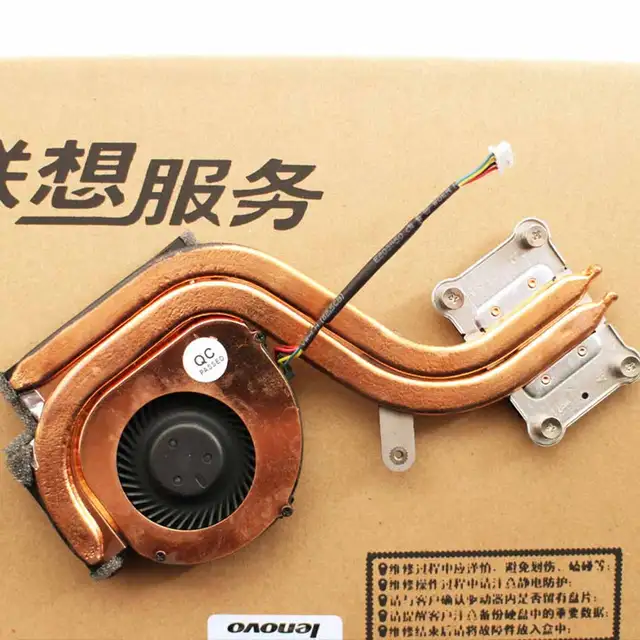
Can you take a picture of the X230 heatsink? I want to see if it looks like this.

I'm referring to the copper plate around the fan where the heatpipes are soldered to -- in the X220 heatsinks I have that part isn't copper. It may be one of the reasons it has lower temps compared to the X220.
Planned Purchase: T480s i5-8350 FHD Touch
Impulse Buy: Thinkpad not named for safety reasons :lol:
RIP: X220 4291-C91 X61 7676-A24 760XD-U9E :cry:

WarhawkCZ
Sophomore Member
Posts: 180
Joined: Wed Nov 12, 2008 4:07 pm
Location: Germany, Czechia

Re: Tooling up for an X220 / X230 Frankenpad

#3 Post by WarhawkCZ » Fri Sep 28, 2018 9:37 am

Just curious, what is the ultimate goal? I call my x220 with x230 MoBo the x225 :)
I have a bunch of pictures if you want. I just need to remove s/n's and the windows key sticker.

TPFanatic
Senior ThinkPadder
Senior ThinkPadder
Posts: 2824
Joined: Thu Jul 30, 2015 11:29 pm

Re: Tooling up for an X220 / X230 Frankenpad

#4 Post by TPFanatic » Fri Sep 28, 2018 12:40 pm

@axur-delmeria: I'll see what it takes and get back to you.

@WarhawkCZ: My X60s just doesn't cut it for mobile use and I'm inspired by the X220/X230 Frankenpad video just posted on the Subreddit. I'm curious about the X220 bodystyle and I can build this reasonably affordably. I checked the serial number on the X220 I purchased and it suggests it has the IPS screen which is another plus.

I'll probably sell it after.

TPFanatic
Senior ThinkPadder
Senior ThinkPadder
Posts: 2824
Joined: Thu Jul 30, 2015 11:29 pm

Re: Tooling up for an X220 / X230 Frankenpad

#5 Post by TPFanatic » Sat Sep 29, 2018 1:25 pm

@axur-delmeria: Indeed, the X220 came with this aluminum piece heatsink and the X230 used copper.

ImageImage

I'm not sure that's enough to make a significant temperature difference, I'd attribute Ivy Bridge just running cooler to that. In my stress test the CPU did downclock to 2.6 ghz while the graphics ran at max alongside it to maintain a max temp of 95C, HWMonitor claiming 41W usage on the package.

The X220's lid, keyboard bezel, keyboard with taped pins, palmrest, drive cover, and ram cover are now installed on the X230 motherboard in X230 bottom case. The X220's keyboard bezel doesn't fit exactly on the left hand side but I'm ignoring it.

The Bluetooth LED doesn't light up.

I'm in need of an EC firmware flash for the classic keyboard and battery whitelist removal. I also need a battery, the one that came with the X220 is in fact a 44+ LGC X230 battery, but it's very dead.

An otherwise complete Frankenpad. The poor condition of the palmrest and touchpad and some minor defects in the IPS panel make me apprehensive to sell the machine, so I guess I'm stuck with it.

Lastly the clickpad is * jumpy cursor and no buttons bull * this is my first Thinkpad where I'm disabling the touchpad. edit: Re-enabled because I reflexively reach for two-finger scrolling. :oops:

TPFanatic
Senior ThinkPadder
Senior ThinkPadder
Posts: 2824
Joined: Thu Jul 30, 2015 11:29 pm

An X220 / X230 Frankenpad

#6 Post by TPFanatic » Sat Sep 29, 2018 10:19 pm

Alright Thinkpadders, here is my X220 / X230 Frankenpad structurally complete.

Image
Image
Image
Image

The body is in sorry condition. There's a crack near the power jack, the drive caddy is hanging, the X220 keyboard bezel doesn't interface fully on the left hand side, the lid is scratchy and the outer indicator lights sticker I had to glue back on. I also re-used the dead battery's feet for the front of the laptop. For $40 it came with an IPS screen, with some minor pressure marks in the corners only visible on a black background, so livable with, and a grade A NMB keyboard (looks untouched). Only the left hand port arrangement reveals this X220's true internals...

Image
Image
Image
Image

I tried the EC firmware flash but nothing seems to have happened... perhaps I need a battery. I do have a 44++ 9 cell on order, when that arrives I'll try again. Until then the keys map as follows:

Fn+Space = Thinklight on/off
Delete = Home
PgUp = Delete
PgBk = PgUp
PgFwd = PgDn
Menu = Printscreen

The machine is quite useless without a battery and even then... what will I use this for exactly? It is the same speed as my T430 with a lower res screen and no optical. I right now leave an X60s in my car (not a lot of car thefts in my area, which isn't actually Boston), the idea being I have a computer on me at all times for on the go email and saving important dashcam data. Unfortunately the X60s is slow af so I lately just take the T430 anyway when I anticipate wanting it. Probably this X220 will take the X60s' place so the poor old thing can at last retire.

axur-delmeria
Senior ThinkPadder
Senior ThinkPadder
Posts: 4413
Joined: Mon May 28, 2012 5:49 am
Location: Metro Manila, Philippines

Re: Tooling up for an X220 / X230 Frankenpad

#7 Post by axur-delmeria » Sun Sep 30, 2018 2:31 am

TPFanatic wrote:
Sat Sep 29, 2018 1:25 pm
@axur-delmeria: Indeed, the X220 came with this aluminum piece heatsink and the X230 used copper.

ImageImage

I'm not sure that's enough to make a significant temperature difference
The best way to find out is to mount the X220 heatsink in the X230. :lol:

IMO the aluminum negatively affects the performance of the heatsink, as it's a layer of lower thermal conductivity in between the heatpipes and the cooling fins. There must be a good reason they switched to an all-copper design in the X230.
Planned Purchase: T480s i5-8350 FHD Touch
Impulse Buy: Thinkpad not named for safety reasons :lol:
RIP: X220 4291-C91 X61 7676-A24 760XD-U9E :cry:

dr_st
Admin
Admin
Posts: 10032
Joined: Sat Oct 29, 2005 6:20 am
Location: Israel

Re: An X220 / X230 Frankenpad

#8 Post by dr_st » Sun Sep 30, 2018 8:31 am

TPFanatic wrote:
Sat Sep 29, 2018 10:19 pm
The machine is quite useless without a battery and even then... what will I use this for exactly? It is the same speed as my T430 with a lower res screen and no optical. I right now leave an X60s in my car (not a lot of car thefts in my area, which isn't actually Boston), the idea being I have a computer on me at all times for on the go email and saving important dashcam data. Unfortunately the X60s is slow af so I lately just take the T430 anyway when I anticipate wanting it. Probably this X220 will take the X60s' place so the poor old thing can at last retire.
The X series are nice light travel machines for light work with long battery life. A T420s/T430s have bigger, higher resolution screens, but their battery life is mediocre, whereas the regular T series can have good battery life with the extended batteries, but are already quite heavy at that point.

Retiring the X60s and replacing it with the X2*0 is probably a good idea.
Thinkpad 25 (20K7), T16 Gen 3 (21MQ), Yoga 14 (20FY), T430s (IPS FHD + Classic Keyboard), X220 4291-4BG
X61 7673-V2V, T60 2007-QPG, T42 2373-F7G, X32 (IPS Screen), A31p w/ Ultrabay Numpad

Post Reply
  • Similar Topics
    Replies
    Views
    Last post

Return to “Pictures of your ThinkPad & desk setup”

Who is online

Users browsing this forum: No registered users and 38 guests