ThinkCentre 8177(-77G)

IBM or Lenovo Desktops, Workstations, ThinkStations, etc. Recent vintage, hardware/software..
Post Reply
Message
Author
A31
Senior Member
Senior Member
Posts: 845
Joined: Mon Dec 21, 2009 11:33 am
Location: Norwich, UK

ThinkCentre 8177(-77G)

#1 Post by A31 » Mon Dec 28, 2009 2:02 pm

Hi all,
At the moment I am currently "upgrading" my ThinkPad A31 (see link in signature for more!), but I do actually have an IBM desktop PC, a ThinkCentre 8177-77G, these are my specs! Which like the ThinkPad, I have upgraded to all my ideal specs!

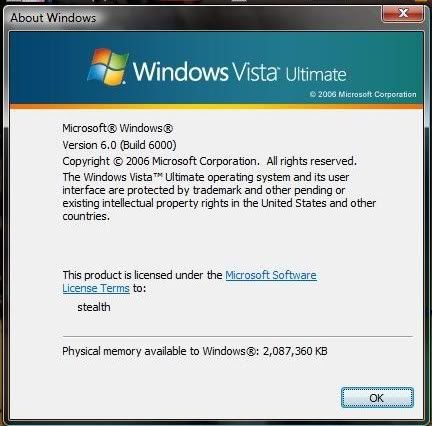
OS: Windows Vista Ultimate (same as my ThinkPad :D )
RAM: 2GB (definitely NOT the same as my ThinkPad at the moment!)
HDD(s): 1x Hitachi 80GB - IDE (Vista is installed on that one, believe this came with the PC as standard)
1x WD 400GB - SATA (nicked this from a faulty External HDD, turns out the only faulty thing about it was the SATA to IDE adapter that the External HDD used. I have both SATA and IDE ports in my ThinkCentre!) - I don't have a floppy drive in my PC anymore as I put the 400GB HDD in it's place!! (400GB hard drive is more importatnt han "floppy" drive!)
DVD/CD drives: 1x Sony DVD RW drive - IDE (believe this also came with the PC as standard - set as master)
1x HP DVD drive (not RW!) - IDE (I installed this myself, set as slave)
"Extras!": Bluetooth USB dongle (ocassioanlly works!)
nVidia GeForce 6.0 graphics card (bought this as playing games on my PC made by EA and Atari!)
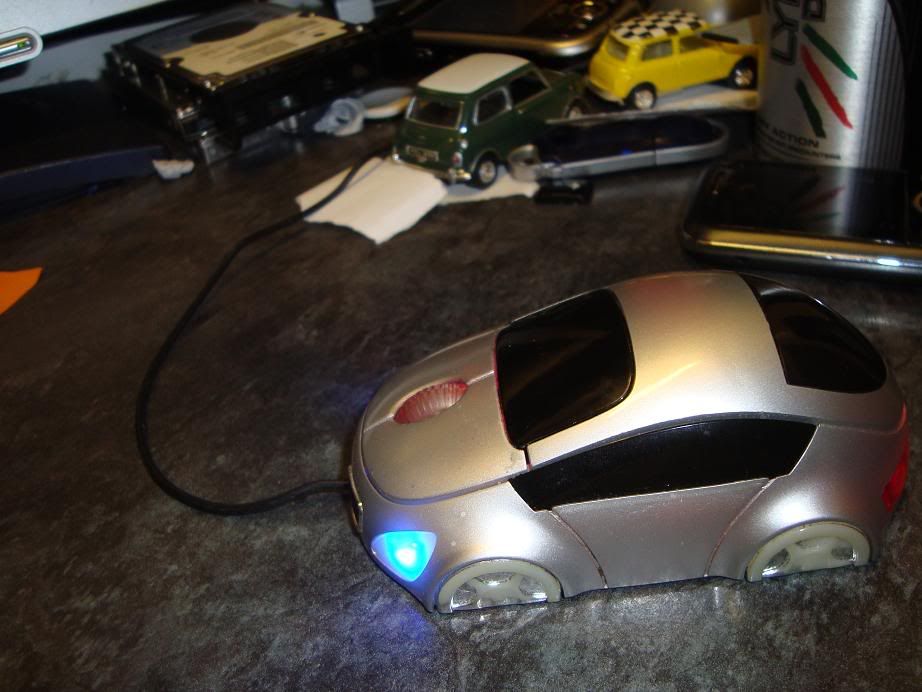
not strictly the PC but I have a really cool mouse that looks like a car
Microphone
All round speakers, but thanks to my sound card, only 3 of the 8 can be used, oh well!
Screen: BenQ FP7IG 17" flat - silver
Keyboard - some HP model!
Lenovo ThinkPad L540 | Core i5 4200M | 8GB 1600MHz RAM | 1920x1080 Display | UltraNav with Fingerprint Reader | Seagate SSHD 1TB | 720p Webcam | 6 Cell 56Wh Battery | Windows 8.1 Pro x64

Past: IBM ThinkPad A31, R40

My custom-built desktop - see pics!

A31
Senior Member
Senior Member
Posts: 845
Joined: Mon Dec 21, 2009 11:33 am
Location: Norwich, UK

Re: ThinkCentre 8177(-77G)

#2 Post by A31 » Mon Dec 28, 2009 2:08 pm

The pictures...
http://i730.photobucket.com/albums/ww30 ... C02465.jpg

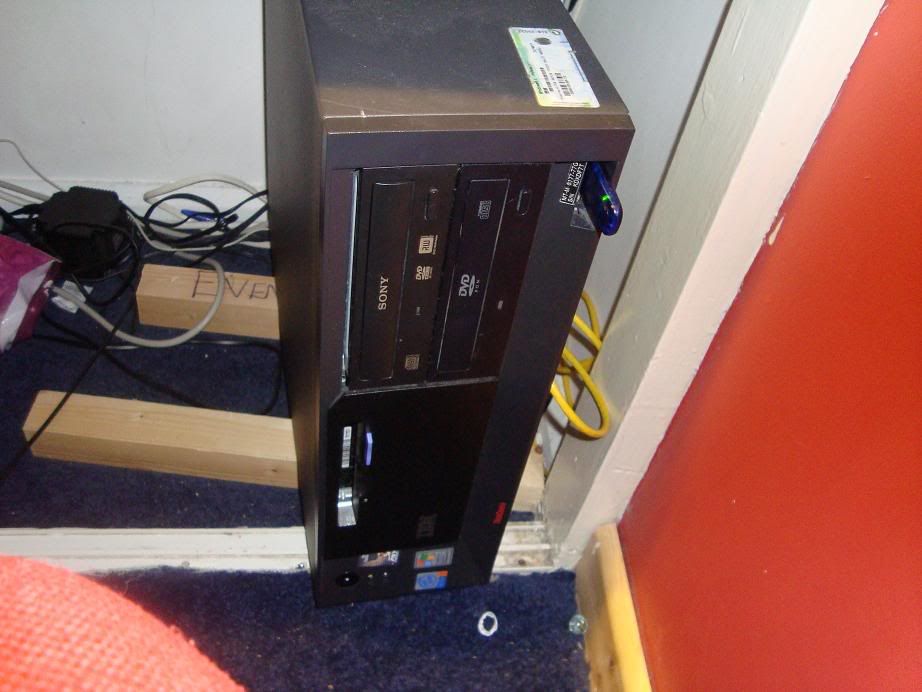
That's my actual ThinkCentre. The yellow cable to the side of it as an internet hook up lead, I used to use it for my A31 but recieved a PCMCIA card for Christmas therefore I don't need the cable anymore. And that blue thing plugged into one of USB's is a bluetooth dongle.

http://i730.photobucket.com/albums/ww30 ... C02466.jpg

My 17" flat, BenQ. And to the side of it are two of my three speakers, the other one is on the floor and is like a "big box" where all the speaker leads plug into to.

http://i730.photobucket.com/albums/ww30 ... C02467.jpg

My mouse!! A StreetMouse "classic". You can buy other Street Mice such as TVR's, Lambo's and even stealth cars... I got mine for £5 from Amazon.co.uk.

And finally, the "about Windows" screen.

http://i730.photobucket.com/albums/ww30 ... /Vista.jpg
Lenovo ThinkPad L540 | Core i5 4200M | 8GB 1600MHz RAM | 1920x1080 Display | UltraNav with Fingerprint Reader | Seagate SSHD 1TB | 720p Webcam | 6 Cell 56Wh Battery | Windows 8.1 Pro x64

Past: IBM ThinkPad A31, R40

My custom-built desktop - see pics!

pianowizard
Senior ThinkPadder
Senior ThinkPadder
Posts: 8368
Joined: Tue Jun 28, 2005 5:07 am
Location: Ann Arbor, MI
Contact:

Re: ThinkCentre 8177(-77G)

#3 Post by pianowizard » Mon Dec 28, 2009 2:40 pm

A31 wrote:HDD(s): 1x Hitachi 80GB - IDE (Vista is installed on that one, believe this came with the PC as standard)...DVD/CD drives: 1x Sony DVD RW drive - IDE (believe this also came with the PC as standard - set as master)
You can go to Lenovo's website to find out what components originally came with the computer. Your desktop was shipped with:
Product: ThinkCentre A50 8177-77G

Original description: Intel® Pentium® 4 2.8GHz (1MB), 533MHz FSB, 256MB, 40GB 7200RPM IDE HDD, PCI Desktop (3x4), Intel 865GV, 48x CD-ROM, Intel 10/100 Ethernet, Windows XP Professional
BTW, it seems to me your A50 uses the same chipset as my Dell Dimension B110, which can run PC3200 RAM at 400MHz. If this is correct and if you are using PC2700 333MHz RAM, upgrading to PC3200 would speed up your machine.
Microsoft Surface 3 (Atom x7-Z8700 / 4GB / 128GB / LTE)
Dell OptiPlex 9010 SFF (Core i3-3220 / 8GB / 8TB); HP 8300 Elite minitower (Core i7-3770 / 16GB / 9.25TB)
Acer T272HUL; Crossover 404K; Dell 3008WFP, U2715H, U2711, P2416D; Monoprice 10734; QNIX QHD2410R; Seiki Pro SM40UNP

A31
Senior Member
Senior Member
Posts: 845
Joined: Mon Dec 21, 2009 11:33 am
Location: Norwich, UK

Re: ThinkCentre 8177(-77G)

#4 Post by A31 » Mon Dec 28, 2009 3:42 pm

my PC is fairly fast...my processor is good at the moment, no need to upgrade yet (until it breaks down!)
Lenovo ThinkPad L540 | Core i5 4200M | 8GB 1600MHz RAM | 1920x1080 Display | UltraNav with Fingerprint Reader | Seagate SSHD 1TB | 720p Webcam | 6 Cell 56Wh Battery | Windows 8.1 Pro x64

Past: IBM ThinkPad A31, R40

My custom-built desktop - see pics!

pianowizard
Senior ThinkPadder
Senior ThinkPadder
Posts: 8368
Joined: Tue Jun 28, 2005 5:07 am
Location: Ann Arbor, MI
Contact:

Re: ThinkCentre 8177(-77G)

#5 Post by pianowizard » Tue Dec 29, 2009 9:42 am

A31 wrote:my processor is good at the moment, no need to upgrade yet
I was talking about the speed of your RAM, not your processor. I believe your RAM is designed to operate at 400MHz, i.e. PC3200. But this machine originally shipped with PC2700 (which can do only up to 333MHz) because PC3200 wasn't available back in 2003. So, it's quite likely that you are still using PC2700, which causes the RAM to underclock to 333MHz, meaning you aren't taking full advantage of the RAM's bandwidth. So it's worth checking what RAM modules are in your machine right now. And you want all RAM slots to be using PC3200 in order to achieve 400MHz. If one of the slots has PC2700, then all slots will underclock to 333MHz.
Microsoft Surface 3 (Atom x7-Z8700 / 4GB / 128GB / LTE)
Dell OptiPlex 9010 SFF (Core i3-3220 / 8GB / 8TB); HP 8300 Elite minitower (Core i7-3770 / 16GB / 9.25TB)
Acer T272HUL; Crossover 404K; Dell 3008WFP, U2715H, U2711, P2416D; Monoprice 10734; QNIX QHD2410R; Seiki Pro SM40UNP

A31
Senior Member
Senior Member
Posts: 845
Joined: Mon Dec 21, 2009 11:33 am
Location: Norwich, UK

Re: ThinkCentre 8177(-77G)

#6 Post by A31 » Fri Jan 08, 2010 11:38 am

Note I may not have this machine for much longer, just been offered a HP DX2200 which I am considering (not a definite yes however)... one annoying thing about the HP though is only 1.0 GB and cannot move RAM from the ThinkCentre into the HP (HP is upgradeable to 2.0GB RAM). But then there are LOTS of pros to this HP, smaller, quieter, has SD card slot on the front, generally a nice machine :D . If I do say yes to the HP offer I'll move over things like my nVIDIDA GeForce graphics card, my 400GB SATA drive (as HP is a SATA), my Sony DVD burner drive, Bluetooth dongle etc...

It's the RAM that is preventing me from saying "yes" though... only upgradeable to 2.0GB whereas my ThinkCentre is upgradebale to 4.0GB and also we are probably getting three of these HP's to replace older machines. I may well be able to transfer RAM from the older machines into my ThinkCentre to give me 3.0GB RAM, as I would have 2x 1GB modules and 2x 512MB modules (DEPENDING on wether the RAM DIMMs from the older machines are supported on my ThinkCentre). The HP has 2x 512MB modules to make 1GB RAM but can obviously be upgraded to 2x 1GB modules to get 2.0GB... do you think it's worth it?? :?: :wink:
Also was thinking about moving the 2x 1GB RAM modules into my ThinkPad as both ThinkCentre and ThinkPad are DDR SDRAM, BUT, the ThinkCentre uses the standard DIMMs and the ThinkPad uses SODIMMs so a bit stuck really!!
Lenovo ThinkPad L540 | Core i5 4200M | 8GB 1600MHz RAM | 1920x1080 Display | UltraNav with Fingerprint Reader | Seagate SSHD 1TB | 720p Webcam | 6 Cell 56Wh Battery | Windows 8.1 Pro x64

Past: IBM ThinkPad A31, R40

My custom-built desktop - see pics!

pianowizard
Senior ThinkPadder
Senior ThinkPadder
Posts: 8368
Joined: Tue Jun 28, 2005 5:07 am
Location: Ann Arbor, MI
Contact:

Re: ThinkCentre 8177(-77G)

#7 Post by pianowizard » Fri Jan 08, 2010 1:10 pm

A31 wrote:one annoying thing about the HP though is only 1.0 GB and cannot move RAM from the ThinkCentre into the HP (HP is upgradeable to 2.0GB RAM).
But this HP uses PC2-5300 DDR2 RAM, which is faster than your ThinkCentre's DDR1 RAM.
A31 wrote:It's the RAM that is preventing me from saying "yes" though... only upgradeable to 2.0GB whereas my ThinkCentre is upgradebale to 4.0GB
But the processor is probably 32-bit, so only about 3 of those 4GB can be utilized. My 2.8GHz Pentium 4 Dell GX280 desktops have this same limitation, so even though they are "upgradeable to 4GB", I have put in only three 1GB sticks.
A31 wrote:The HP has 2x 512MB modules to make 1GB RAM but can obviously be upgraded to 2x 1GB modules to get 2.0GB... do you think it's worth it??
2x512GB of DDR2 RAM in dual channel mode is pretty good, and for Windows XP that may be fast enough for you. Try sticking with 2x512MB for a while to see if that's good enough for your needs.
A31 wrote:Also was thinking about moving the 2x 1GB RAM modules into my ThinkPad as both ThinkCentre and ThinkPad are DDR SDRAM, BUT, the ThinkCentre uses the standard DIMMs and the ThinkPad uses SODIMMs so a bit stuck really!!
Desktops and laptops always use different RAM modules.
Microsoft Surface 3 (Atom x7-Z8700 / 4GB / 128GB / LTE)
Dell OptiPlex 9010 SFF (Core i3-3220 / 8GB / 8TB); HP 8300 Elite minitower (Core i7-3770 / 16GB / 9.25TB)
Acer T272HUL; Crossover 404K; Dell 3008WFP, U2715H, U2711, P2416D; Monoprice 10734; QNIX QHD2410R; Seiki Pro SM40UNP

A31
Senior Member
Senior Member
Posts: 845
Joined: Mon Dec 21, 2009 11:33 am
Location: Norwich, UK

Re: ThinkCentre 8177(-77G)

#8 Post by A31 » Fri Jan 08, 2010 1:22 pm

So you are saying this a worthly upgrade.
Question though - will 1.0GB DDR2 SDRAM make it feel as fast as 2.0GB DDR SDRAM standard?
pianowizard wrote:2x512GB of DDR2 RAM in dual channel mode is pretty good, and for Windows XP that may be fast enough for you. Try sticking with 2x512MB for a while to see if that's good enough for your needs.
Can you run Vista Ultimate properly (and when I say properly I mean runs a reasonable speed) with this amount of RAM, or is a 2GB recommended?
Lenovo ThinkPad L540 | Core i5 4200M | 8GB 1600MHz RAM | 1920x1080 Display | UltraNav with Fingerprint Reader | Seagate SSHD 1TB | 720p Webcam | 6 Cell 56Wh Battery | Windows 8.1 Pro x64

Past: IBM ThinkPad A31, R40

My custom-built desktop - see pics!

pianowizard
Senior ThinkPadder
Senior ThinkPadder
Posts: 8368
Joined: Tue Jun 28, 2005 5:07 am
Location: Ann Arbor, MI
Contact:

Re: ThinkCentre 8177(-77G)

#9 Post by pianowizard » Fri Jan 08, 2010 1:30 pm

A31 wrote:So you are saying this a worthly upgrade.
Absolutely. I am not familiar with this particular HP desktop so I can't address its reliability, but the specs are better than your ThinkCentre's.
A31 wrote:Question though - will 1.0GB DDR2 SDRAM make it feel as fast as 2.0GB DDR SDRAM standard?
It's hard to predict. I think if your RAM usage is under 1GB, then 1GB DDR2 will feel about the same or even faster than 2GB DDR1 RAM, although if you go above 1GB, then 2GB DDR1 would probably feel faster. You can check your RAM usage by pressing Ctrl Alt Del and then clicking the "Performance" tab. Right now, on my Dell GX280 (which runs 32-bit Windows XP Pro), I am multitasking like mad with a dozen windows running simultaneously, and I am still using only 1.00GB of RAM.
A31 wrote:Can you run Vista Ultimate properly (and when I say properly I mean runs a reasonable speed) with this amount of RAM, or is a 2GB recommended?
For Vista, you will most likely notice a difference between 2GB and 1GB, although I ran Vista on a G41 Thinkpad with 1GB RAM for a while and was happy with its performance.
Microsoft Surface 3 (Atom x7-Z8700 / 4GB / 128GB / LTE)
Dell OptiPlex 9010 SFF (Core i3-3220 / 8GB / 8TB); HP 8300 Elite minitower (Core i7-3770 / 16GB / 9.25TB)
Acer T272HUL; Crossover 404K; Dell 3008WFP, U2715H, U2711, P2416D; Monoprice 10734; QNIX QHD2410R; Seiki Pro SM40UNP

A31
Senior Member
Senior Member
Posts: 845
Joined: Mon Dec 21, 2009 11:33 am
Location: Norwich, UK

Re: ThinkCentre 8177(-77G)

#10 Post by A31 » Fri Jan 08, 2010 1:34 pm

Ok then, thanks!! Looks like I might be saying YES to this then!! :D :banana: :thumbs-UP: May be a while yet, but the ThinkCentre will be useful spares.
pianowizard wrote:For Vista, you will most likely notice a difference between 2GB and 1GB
OK, but the computer supports up to 2GB RAM so I may be able to source more RAM from other machines or from the internet.

Actually, I've been onto the MS Website and discovered that Vista Ultimate needs at least 1GB RAM to operate properly (which is probably why my A31 acted rubbish when I installed it on just 768MB RAM! It's back on XP Pro now!) which is OK as that's what the HP has... and it has a 64-Bit processor so will be installing my copy of the 64-Bit Windows Vista Ultimate (when I say copy I mean boxed copy obviously!!). Appartently 64-Bit is faster than 32-Bit.
Lenovo ThinkPad L540 | Core i5 4200M | 8GB 1600MHz RAM | 1920x1080 Display | UltraNav with Fingerprint Reader | Seagate SSHD 1TB | 720p Webcam | 6 Cell 56Wh Battery | Windows 8.1 Pro x64

Past: IBM ThinkPad A31, R40

My custom-built desktop - see pics!

A31
Senior Member
Senior Member
Posts: 845
Joined: Mon Dec 21, 2009 11:33 am
Location: Norwich, UK

Re: ThinkCentre 8177(-77G)

#11 Post by A31 » Sat Jan 09, 2010 7:54 am

I've just seen on the HP site they say this PC model (DX2200) is "Vista Capable" and they recommend the Vista Business OS which is VERY similar to Vista Ultimate, also as I said before, I'll be installing 64 Bit version as this PC has a 64 Bit processor so that'll make everything a bit faster.

Edit (13th Jan 2010), Hi guys! Just to say the HP is now here so the ThinkCentre will no longer be in use. Let the upgrade begin! And I've just discovered it actually has 2x 1GB sticks which means 2GB DDR2 RAM, it feels really very quick on both XP ad Vista!!
Lenovo ThinkPad L540 | Core i5 4200M | 8GB 1600MHz RAM | 1920x1080 Display | UltraNav with Fingerprint Reader | Seagate SSHD 1TB | 720p Webcam | 6 Cell 56Wh Battery | Windows 8.1 Pro x64

Past: IBM ThinkPad A31, R40

My custom-built desktop - see pics!

A31
Senior Member
Senior Member
Posts: 845
Joined: Mon Dec 21, 2009 11:33 am
Location: Norwich, UK

Re: ThinkCentre 8177(-77G)

#12 Post by A31 » Mon Feb 01, 2010 2:14 pm

This computer is now linked up to my monitor, mouse and keyboard via a KVM Switch... at the moment it has 2x 80GB HDD's, 2GB RAM, Windows XP Pro, Office XP (I now it's old, but I have Office 2007 on the HP and Office 2003 on the A31 and I founnd a genuine boxed copy of Office XP yesterday and want to try that...) - it has a temporary DVD-RW drive installed in it at the moment, but soon it will no DVD or CD drvies - unless I can find one from somewhere, as the one I wanted to put in it is faulty and I need 2 DVD drives in my HP for what I do on there.

This computer did have Vista Ultimate on it, however now the NVIDIA Geforce 6200 graphics card is now in my new HP, the Aero obviously is diasabled and a bit pointless really!! Besides, XP Pro is on this particular machine is better...
I'll post some picture soon!
Lenovo ThinkPad L540 | Core i5 4200M | 8GB 1600MHz RAM | 1920x1080 Display | UltraNav with Fingerprint Reader | Seagate SSHD 1TB | 720p Webcam | 6 Cell 56Wh Battery | Windows 8.1 Pro x64

Past: IBM ThinkPad A31, R40

My custom-built desktop - see pics!

Post Reply
  • Similar Topics
    Replies
    Views
    Last post

Return to “IBM or Lenovo Desktops/Workstations/ThinkStations only”

Who is online

Users browsing this forum: No registered users and 3 guests