


 Homepage
 Forum
Forum Drivers
 HMM-Manuals
 MTM
MTM Feed
Feed
Hi, I am brand new here and have already read 70 various threads relating to aspects of a recent 'aquisition' that came my way courtesy of the Salvation Army Thrift Shop.
I got a fairly decent Thinkpad T23 at the local thrift store for $10 a couple days ago.
I was surprised to see the main battery actually holds about a hour charge (in a 10+ year old battery/computer) when I charged it up at home with my Lenovo Ideapad charger,
however it was no surprise to find that the CMOS batter appears dead as it cant hold the time and has a post error 251/271 on boot-up.
I got a CMOS battery off of Ebay and the seller had this advertisement-
"Will Fit-
IBM Thinkpad 570 Series -- 570, 570E, 570X, 570Z
IBM ThinkPad A Series -- A20, A20P, A20M, A21,A21E, A21M, A21P, A22,A22M, A22P, A23, A30,A30P, A31P
IBM ThinkPad T Series -- T20, T21, T22, T23, T30
IBM ThinkPad R Series -- R40, R40e, R50, R50e, R50p, R51, R52
IBM ThinkPad X Series -- X30, X31, X32
IBM xSeries -- 300, 400"
I ordered the CMOS battery from him without checking the FRU # in the IBM T23 manual that I had downloaded, and when it arrived in the mail I went ahead and plugged it in, to no effect whatsoever.
The POST error still remains, even with that new CMOS battery plugged in. I THEN (few days late) referenced the IBM manual and noted that the recommended FRU is "02K6572", and this is also the FRU/Part # that was on the dead CMOS battery that was in the computer when I bought it.
The CMOS battery the seller on ebay sent me was a different FRU/Part # than the "02K6572" specified by IBM, but he is still selling it as compatible with a Thinkpad T23 in his ad.
My basic question is.. are all these computers listed above from his ad REALLY all compatible with the same CMOS plug? Looking at the dead CMOS battery plug and the one the seller sent me with a different #, it seems to look very slightly different, but not in a certain or obvious way to me.. SHOULD all these above computers be able to use the same CMOS plug?
I want to know if there is a more serious (M.B.) problem with this laptop or if getting the "02K6572" battery will solve my CMOS battery issues.
Thanks in advance, I am fairly new to thinkpads except for a butterfly 701c that I picked up few years ago just because it looked interesting, and dont know that much about IBM or Thinkpads. This site is really a massive store of knowledge and I appreciate being allowed to join in.
Take a look at our
ThinkPads.com HOME PAGE
For those who might want to contribute to the blog, start here: Editors Alley Topic
Then contact Bill with a Private Message
ThinkPads.com HOME PAGE
For those who might want to contribute to the blog, start here: Editors Alley Topic
Then contact Bill with a Private Message
T23 CMOS compatibility question?
-
Penultimate
- Freshman Member
- Posts: 53
- Joined: Thu Jun 06, 2013 6:35 pm
- Location: Chicago, Illinois
-
rkawakami
- Admin Emeritus

- Posts: 10327
- Joined: Sun Jun 04, 2006 1:26 am
- Location: San Jose, CA 95120 USA
- Contact:
Re: T23 CMOS compatibility question?
IBM used several different plugs/pinouts for their CMOS batteries. Some are compatible between systems; some are not. Without looking at the relevant systems described in the eBay seller's description, I can't tell you if the 02K6572 will fit in all of them. I do know that the 02K6572 is the correct one for all of the T2x systems. Here's an image of what the 02K6572's plug should look like and two others that are not compatible:
http://www.kawakami-ca.com/images/02k65 ... 2k6715.jpg
The one on the left is the proper one for the T2x. The one on the right (for X2x systems) uses an identical plug but the polarity of the battery is reversed. If that one is plugged into the T2x motherboard, your CMOS (and clock) will definitely not run correctly. It should also not cause any permanent damage as there's a diode on the motherboard that protects the rest of the circuit from the reverse voltage. The middle plug (for 600 series systems and maybe others) is slightly physically different, in addition to having reversed polarity from the 02K6572. It probably should not fit into the T23's motherboard connector, but then again, I haven't actually tried doing so.
http://www.kawakami-ca.com/images/02k65 ... 2k6715.jpg
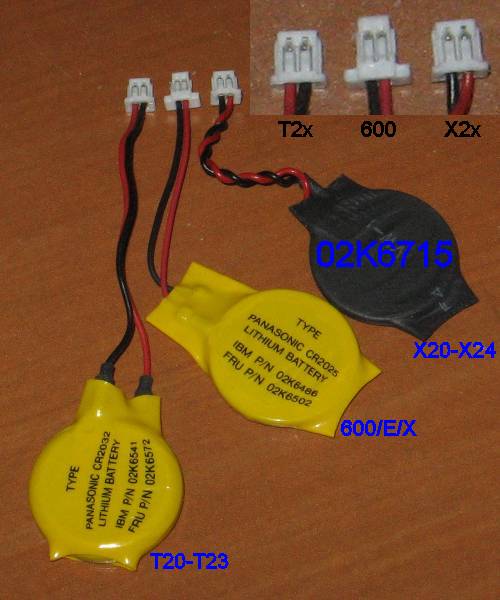
The one on the left is the proper one for the T2x. The one on the right (for X2x systems) uses an identical plug but the polarity of the battery is reversed. If that one is plugged into the T2x motherboard, your CMOS (and clock) will definitely not run correctly. It should also not cause any permanent damage as there's a diode on the motherboard that protects the rest of the circuit from the reverse voltage. The middle plug (for 600 series systems and maybe others) is slightly physically different, in addition to having reversed polarity from the 02K6572. It probably should not fit into the T23's motherboard connector, but then again, I haven't actually tried doing so.
Ray Kawakami
X22 X24 X31 X41 X41T X60 X60s X61 X61s X200 X200s X300 X301 Z60m Z61t Z61p 560 560Z 600 600E 600X T21 T22 T23 T41 T60p T410 T420 T520 W500 W520 R50 A21p A22p A31 A31p
NOTE: All links to PC-Doctor software hosted by me are dead. Files removed 8/28/12 by manufacturer's demand.
X22 X24 X31 X41 X41T X60 X60s X61 X61s X200 X200s X300 X301 Z60m Z61t Z61p 560 560Z 600 600E 600X T21 T22 T23 T41 T60p T410 T420 T520 W500 W520 R50 A21p A22p A31 A31p
NOTE: All links to PC-Doctor software hosted by me are dead. Files removed 8/28/12 by manufacturer's demand.
-
Penultimate
- Freshman Member
- Posts: 53
- Joined: Thu Jun 06, 2013 6:35 pm
- Location: Chicago, Illinois
Re: T23 CMOS compatibility question?
OK, thanks very much. I went ahead and got a couple with the proper FRU# ordered and on the way to me, hopefully that will take care of it.rkawakami wrote:IBM used several different plugs/pinouts for their CMOS batteries. Some are compatible between systems; some are not. Without looking at the relevant systems described in the eBay seller's description, I can't tell you if the 02K6572 will fit in all of them. I do know that the 02K6572 is the correct one for all of the T2x systems. Here's an image of what the 02K6572's plug should look like and two others that are not compatible:
http://www.kawakami-ca.com/images/02k65 ... 2k6715.jpg
The one on the left is the proper one for the T2x. The one on the right (for X2x systems) uses an identical plug but the polarity of the battery is reversed. If that one is plugged into the T2x motherboard, your CMOS (and clock) will definitely not run correctly. It should also not cause any permanent damage as there's a diode on the motherboard that protects the rest of the circuit from the reverse voltage. The middle plug (for 600 series systems and maybe others) is slightly physically different, in addition to having reversed polarity from the 02K6572. It probably should not fit into the T23's motherboard connector, but then again, I haven't actually tried doing so.
The one I bought still had the yellow plastic covering, but different FRU/Part#, and when I pulled the plastic off to check if it had voltage I also found that the red lead was only being held in place by the yellow plastic covering. The solder had broken loose or not been done properly, as well as the battery itself only read .5 volts on a digi multimeter.
The other 'fun' (not so much) anomaly that I found with T23's so far is that there appear to be at least two different models of keyboards that were used in them and that look indentical from the exterior, but do NOT use the same keys.
The only thing really cosmetically wrong with this unit I got is that two of the keys were missing from the keyboard, so I ordered a old keyboard to simply take them off and pop them onto my otherwise perfect worrking keyboard..
When it came in the mail, the used keyboard was in really bad shape ($7-meh..) and the two keyboard buttons I needed in particular had a lot of paint missing from the markings on them, but I took them off anyway to place on my orig keyboard. I found that the buttons on the used Ebay T23 keyboard attached in a completely different way that on my orig T23 keyboard and could not be switched off with one another.
They look identical from the outside but were engineered in totally different attachment methods.
-
rkawakami
- Admin Emeritus
- Posts: 10327
- Joined: Sun Jun 04, 2006 1:26 am
- Location: San Jose, CA 95120 USA
- Contact:
Re: T23 CMOS compatibility question?
That's the difference between the 2 (3?) keyboard manufacturers (NMB, ALPS, and possibly Chicony). They are physically and electrically compatible, meaning you can swap any of the keyboards with a T23 base. However, the key designs are different between them so you can't replace individual keys unless you get a keyboard from the same manufacturer. Here's a random eBay seller who has documented the two designs:
http://www.ebay.com/itm/280468029614
http://www.ebay.com/itm/280468029614
Ray Kawakami
X22 X24 X31 X41 X41T X60 X60s X61 X61s X200 X200s X300 X301 Z60m Z61t Z61p 560 560Z 600 600E 600X T21 T22 T23 T41 T60p T410 T420 T520 W500 W520 R50 A21p A22p A31 A31p
NOTE: All links to PC-Doctor software hosted by me are dead. Files removed 8/28/12 by manufacturer's demand.
X22 X24 X31 X41 X41T X60 X60s X61 X61s X200 X200s X300 X301 Z60m Z61t Z61p 560 560Z 600 600E 600X T21 T22 T23 T41 T60p T410 T420 T520 W500 W520 R50 A21p A22p A31 A31p
NOTE: All links to PC-Doctor software hosted by me are dead. Files removed 8/28/12 by manufacturer's demand.
-
Penultimate
- Freshman Member
- Posts: 53
- Joined: Thu Jun 06, 2013 6:35 pm
- Location: Chicago, Illinois
Re: T23 CMOS compatibility question?
YES.. That is exactly the problem I encountered. I have what that seller refers to as a 'type 1' keyboard that came with the computer, and the one I bought has the 'type 2' pictured keyboard.rkawakami wrote:That's the difference between the 2 (3?) keyboard manufacturers (NMB, ALPS, and possibly Chicony). They are physically and electrically compatible, meaning you can swap any of the keyboards with a T23 base. However, the key designs are different between them so you can't replace individual keys unless you get a keyboard from the same manufacturer. Here's a random eBay seller who has documented the two designs:
http://www.ebay.com/itm/280468029614
The replacement keyboard is in such bad (disgusting really) shape that I do not want to touch it let alone put it on the laptop, so its not a option to swap out the entire board, unless I get a entirely new replacement keyboard.
I do have all the attachment clips still affixed and only need the key itself, but the funny thing is that this seller is out of several of the directional arrow keys, and those are the two keys that I am also missing. There must be a design issue with those particular keys that make them more susceptible for coming loose/falling off, since he is only out of those particular keys and those are the only ones missing from my laptop.
-
Penultimate
- Freshman Member
- Posts: 53
- Joined: Thu Jun 06, 2013 6:35 pm
- Location: Chicago, Illinois
Re: T23 CMOS compatibility question?
FYI, I borrowed a idea I found in another thread on this site relating to the CMOS battery / T23, and simply pulled the leads off of the old battery and taped them onto the new ebay battery that would not work with the FRU# plug that it came with..
It solved the problem with the OLD plug that was taken from the correct FR# (dead) CMOS battery connected to the NEW battery that had its original leads and plug torn off of it.
I now am able to start up windows without any post errors, so the seller claiming all those various thinkpads are compatible with battery he was selling is WRONG. His battery plug does not function with the T2x computers, even though it looks very physically similar.
It solved the problem with the OLD plug that was taken from the correct FR# (dead) CMOS battery connected to the NEW battery that had its original leads and plug torn off of it.
I now am able to start up windows without any post errors, so the seller claiming all those various thinkpads are compatible with battery he was selling is WRONG. His battery plug does not function with the T2x computers, even though it looks very physically similar.
-
skou
- Sophomore Member
- Posts: 189
- Joined: Mon Apr 17, 2006 11:36 pm
- Location: Mesa (near Phoenix) Arizona
Re: T23 CMOS compatibility question?
Ray, it's been my experience that you can swap any keyboard from any of the T2*
series rigs, except the number will be different, on the keyboard. (A T20 k/b will say T-20
up by the power switch, but will work just fine in a T23.)
As far as switching out keys, I've found the same issues.
steve
series rigs, except the number will be different, on the keyboard. (A T20 k/b will say T-20
up by the power switch, but will work just fine in a T23.)
As far as switching out keys, I've found the same issues.
steve
-
rkawakami
- Admin Emeritus
- Posts: 10327
- Joined: Sun Jun 04, 2006 1:26 am
- Location: San Jose, CA 95120 USA
- Contact:
Re: T23 CMOS compatibility question?
That is correct; any of the T20, T21, T22 or T23 keyboards can be swapped with each other. However, it is also possible to swap out the nameplate so that a T23 system retains a T23 keyboard. It's just that some people don't care, are too lazy to do it, or don't even know that it can be done. There have been numerous times I've seen a "T23" system offered on eBay that was definitely not a T23. Somebody at some point in time swapped keyboards and didn't change out the nameplate. So the eBay seller goes by the T23 name on the keyboard. But a close look at the bottom or back panel reveals otherwise; a T23 has a larger MiniPCI cover than the T20-T22 systems. The T20-22 systems have a single USB port, while the T23 has two. Usually I contact the seller and explain to him/her that it's not a T23. Many times they will accept my advice and change their description (I generally tell them to run the model type at the Lenovo Support page). A couple of times I've run into sellers that, no matter how I explain the situation, they adamantly say that "I know it's a T23 because that's what's on the keyboard!" 
Ray Kawakami
X22 X24 X31 X41 X41T X60 X60s X61 X61s X200 X200s X300 X301 Z60m Z61t Z61p 560 560Z 600 600E 600X T21 T22 T23 T41 T60p T410 T420 T520 W500 W520 R50 A21p A22p A31 A31p
NOTE: All links to PC-Doctor software hosted by me are dead. Files removed 8/28/12 by manufacturer's demand.
X22 X24 X31 X41 X41T X60 X60s X61 X61s X200 X200s X300 X301 Z60m Z61t Z61p 560 560Z 600 600E 600X T21 T22 T23 T41 T60p T410 T420 T520 W500 W520 R50 A21p A22p A31 A31p
NOTE: All links to PC-Doctor software hosted by me are dead. Files removed 8/28/12 by manufacturer's demand.
-
Thinkpaddict
- Senior Member

- Posts: 504
- Joined: Fri Sep 09, 2005 9:15 am
- Location: Sacramento, California
Re: T23 CMOS compatibility question?
That's so true...rkawakami wrote:A couple of times I've run into sellers that, no matter how I explain the situation, they adamantly say that "I know it's a T23 because that's what's on the keyboard!"

My remaining X24, which I bought in the spring of 2005 and is still in great condition, says X22 on the faceplate, which led to an initial shock. Thinking back, it's strange because this was an IBM refurbished computer, and I would imagine they would have taken the trouble to change the faceplate, but it doesn't matter. It is a great X24 nonetheless.
Re: T23 CMOS compatibility question?
I never buy a cmos battery from ebay or computer parts shop because they might be from an old stock, it doesn't matter the exp date, it must be fresh(manufactured no more than 12-18 months ago) because even if it's not used it drains itself, using old stock batteries you have to change them more often. Buy a cr2032 battery(renata, panasonic, varta are the best) from a watchmaker(they use a lot of batteries and chances are higher to be fresh) and follow the steps from this link http://www.instructables.com/id/Replace ... /?ALLSTEPS
-
- Similar Topics
- Replies
- Views
- Last post
-
-
T60/T61 RAM Compatibility Question with DDR2 Modules Above 2GB
by annawonka » Wed Nov 12, 2025 11:43 pm » in ThinkPad T60/T61 Series - 2 Replies
- 7464 Views
-
Last post by Glaurung-quena
Thu Nov 13, 2025 2:37 pm
-
-
-
Looking for a CMOS battery for Lenovo X1 tablet gen 3
by babblefish » Thu Feb 05, 2026 4:12 am » in ThinkPad X1 / X1-Carbon / X1-Extreme and later Series - 12 Replies
- 6722 Views
-
Last post by dcfbf
Mon Feb 09, 2026 7:22 pm
-
-
-
Selectadock III Graphics Card Compatibility
by NineVolcanic » Sat Feb 21, 2026 12:22 pm » in ThinkPad Legacy Hardware - 1 Replies
- 1592 Views
-
Last post by panips
Sat Feb 21, 2026 8:19 pm
-
-
- 4 Replies
- 6586 Views
-
Last post by dcfbf
Fri Dec 12, 2025 2:40 am
Who is online
Users browsing this forum: No registered users and 51 guests