T23, SXGA+, changing from CCFL to LED

T2x/T3x series specific matters only
Post Reply
Message
Author
PandorasThinkpad
Sophomore Member
Posts: 200
Joined: Tue Nov 26, 2013 9:54 am
Location: Berlin, Germany
Contact:

T23, SXGA+, changing from CCFL to LED

#1 Post by PandorasThinkpad » Sat Jan 24, 2015 8:45 pm

Hi Folks,

i'm willing to change the dead CCFL of my SXGA+ Display of the T23 with the led kit i'm going to get trough...http://thinkpad-forum.de/threads/183305 ... viele-mehr

Now i like to know if there will be an smooth way to change the ccfl to led, is it just possible to take the corner with the two cables off, how will i be able to do this, break it off...so that i will be able to pull out the CCFL?

This is a picture of the display....Image

Has anyone just done this and can give helpful informations about what to do?

Thanx a lot!

Kind regards,

PanDoRa
My favorite Thinkpad:
T23 with 1,2 GHz PIII-M, CCFL SXGA+ (LG, 46L2495) (will now get LED Mod),
X200s, SL9400, 8GB Ram, AFFS (HV121WX4-120)
R500 with ATI Graphics, P8400, 8GB Ram and WSXGA+ (LP164W02(TL)(10))[if it once will get WUXGA?!]
T430s with I7, 16GB Ram and FHD Mod

PandorasThinkpad
Sophomore Member
Posts: 200
Joined: Tue Nov 26, 2013 9:54 am
Location: Berlin, Germany
Contact:

Re: T23, SXGA+, changing from CCFL to LED

#2 Post by PandorasThinkpad » Tue Jun 16, 2015 7:42 am

Some one in the Thinkpad Forum has done the Mod for me and here's how it has happened....http://thinkpad-forum.de/threads/187710 ... lved/page4

This is the result...http://thinkpad-forum.de/attachment.php ... 1433357938

Note: The Picture will only occur when i'm logged in at the german forum, too.

Update: Does anyone know where the fuse for the backlight (display) is located on the mainboard....and can give an picture of this fuse...it seems to be that i have damaged this fuse on the one mainboard....which was in very good condition, everything worked fine....so i would like to repair this mainboard...so does anyone ecactly now where this fuse is located/ which fuse this is?
Last edited by PandorasThinkpad on Tue Jun 16, 2015 10:09 pm, edited 1 time in total.
My favorite Thinkpad:
T23 with 1,2 GHz PIII-M, CCFL SXGA+ (LG, 46L2495) (will now get LED Mod),
X200s, SL9400, 8GB Ram, AFFS (HV121WX4-120)
R500 with ATI Graphics, P8400, 8GB Ram and WSXGA+ (LP164W02(TL)(10))[if it once will get WUXGA?!]
T430s with I7, 16GB Ram and FHD Mod

rkawakami
Admin
Admin
Posts: 10052
Joined: Sun Jun 04, 2006 1:26 am
Location: San Jose, CA 95120 USA
Contact:

Re: T23, SXGA+, changing from CCFL to LED

#3 Post by rkawakami » Tue Jun 16, 2015 3:15 pm

There's several fuses associated with the LCD. I've never bothered to investigate exactly where they go to/what they protect. They are all located "below" the LCD connector on the motherboard (on top of the board, towards the front edge):

F1 - SMDC075 resettable fuse (polyswitch): probably not your problem as this fuse is designed to reset itself when power is removed and cools down

F4 & F5 - Littelfuse 434002 2A/32V fast blow

Link to board picture is here: http://forum.thinkpads.com/viewtopic.php?t=37956 (Top side w/legend); fuses are located at B6

edit: Corrected spelling of "Littelfuse".
Ray Kawakami
X22 X24 X31 X41 X41T X60 X60s X61 X61s X200 X200s X300 X301 Z60m Z61t Z61p 560 560Z 600 600E 600X T21 T22 T23 T41 T60p T410 T420 T520 W500 W520 R50 A21p A22p A31 A31p
NOTE: All links to PC-Doctor software hosted by me are dead. Files removed 8/28/12 by manufacturer's demand.

PandorasThinkpad
Sophomore Member
Posts: 200
Joined: Tue Nov 26, 2013 9:54 am
Location: Berlin, Germany
Contact:

Re: T23, SXGA+, changing from CCFL to LED

#4 Post by PandorasThinkpad » Tue Jun 16, 2015 5:18 pm

Thanx rkawakami!

So there will be no single fuse for the backlight of the display if i understood you right...that the corrsponding fuse must be sitting in the near of the display plug....this have we already found out in the german forum, but which fuse this is....result will be, throwing this board away....or can anyone really describe/ tell where the fuse/ or fuses can be found...if the backlight of the display won't work anymore.....and IT is the problem of the mainboard on not any other part...

Kindly,

PAnDorA
My favorite Thinkpad:
T23 with 1,2 GHz PIII-M, CCFL SXGA+ (LG, 46L2495) (will now get LED Mod),
X200s, SL9400, 8GB Ram, AFFS (HV121WX4-120)
R500 with ATI Graphics, P8400, 8GB Ram and WSXGA+ (LP164W02(TL)(10))[if it once will get WUXGA?!]
T430s with I7, 16GB Ram and FHD Mod

rkawakami
Admin
Admin
Posts: 10052
Joined: Sun Jun 04, 2006 1:26 am
Location: San Jose, CA 95120 USA
Contact:

Re: T23, SXGA+, changing from CCFL to LED

#5 Post by rkawakami » Tue Jun 16, 2015 6:24 pm

Like I said, I don't know which of the fuses I described protects the LCD backlight (really the inverter). You should test the fuse before replacing. You do this by measuring the resistance across the ends of the fuse without any power applied to the laptop. A good fuse will measure 0 ohms; a bad one will be more than that. When you find out which fuse is bad, solder a good one across the top. It's generally easier to do that instead of trying to remove the old fuse and install the new one, especially when dealing with surface mount parts like that.

The other thing which can cause the backlight to not turn on is the lid switch. On the T23 it should be located nearby the right hinge and is activated by a plastic lever that sticks up through the keyboard bezel. If that switch is stuck down, then that cuts off power going to the inverter and thus the CCFL.
Ray Kawakami
X22 X24 X31 X41 X41T X60 X60s X61 X61s X200 X200s X300 X301 Z60m Z61t Z61p 560 560Z 600 600E 600X T21 T22 T23 T41 T60p T410 T420 T520 W500 W520 R50 A21p A22p A31 A31p
NOTE: All links to PC-Doctor software hosted by me are dead. Files removed 8/28/12 by manufacturer's demand.

PandorasThinkpad
Sophomore Member
Posts: 200
Joined: Tue Nov 26, 2013 9:54 am
Location: Berlin, Germany
Contact:

Re: T23, SXGA+, changing from CCFL to LED

#6 Post by PandorasThinkpad » Tue Jun 16, 2015 8:20 pm

Oh well,

this is going to be a bit to complicated for me...but thanx a lot for the help until now...better to give anyone in the german forum with the knowledge in this the board for a nice trial and error tryhing out...

and no, it isn't this switch....the first mod inverter has had an fault and with this maybe i killed this without any problem working mainboard...have had the luck to have another board of the t23, changed it, used the changed out mod inverter (had got another one)....and the led mod worked....

If there would have been some one telling me this is the fuse or that is the fuse, but so....i better will do what i wrote at the beginning of this message..

Kindly,

PAnDoRa
My favorite Thinkpad:
T23 with 1,2 GHz PIII-M, CCFL SXGA+ (LG, 46L2495) (will now get LED Mod),
X200s, SL9400, 8GB Ram, AFFS (HV121WX4-120)
R500 with ATI Graphics, P8400, 8GB Ram and WSXGA+ (LP164W02(TL)(10))[if it once will get WUXGA?!]
T430s with I7, 16GB Ram and FHD Mod

automobus
Senior Member
Senior Member
Posts: 537
Joined: Sun Jan 24, 2010 5:32 pm
Location: Lincolnwood, Illinois

Re: T23, SXGA+, changing from CCFL to LED

#7 Post by automobus » Thu Jun 18, 2015 1:21 am

rkawakami wrote:There's several fuses associated with the LCD. I've never bothered to investigate exactly where they go to/what they protect. They are all located "below" the LCD connector on the motherboard (on top of the board, towards the front edge):

F1 - SMDC075 resettable fuse (polyswitch): probably not your problem as this fuse is designed to reset itself when power is removed and cools down

F4 & F5 - Littelfuse 434002 2A/32V fast blow
misinformation, Ignore this paragraph.
I think you are mistaken. I believe F1 is SCHURTER USF 0603, Surface Mount Fuse, 1.6 x 0.8 mm, Super-Quick-Acting FF, 32 VAC, 32 VDC, 2 A. F4 is same kind, found few mm right of F1.
misinformation, Ignore this paragraph.

2015-06-19 edit: I spewed misinformation, I said something wrong. Ray is completely correct. I do not know what F1 protects. With confidence, I say, F4 does not protect backlight. F4 is 3.3 volt supply to LCD, alongside LVDS traces.


Thank you, Ray, for your numerous contributions to this forum. Ten years ago, I took for granted that I could wonder about something and get fabulous knowledge from Goolag from WWW. Since then I learned, not to take information for granted. When I was a child, WWW / Internet / Information Superhighway was awe-inspiring. By and by, valuable information is getting crowded-out or discarded. Today, I access Censored Consumer commercialCrap Conduit / spewagenet / Advertisement Supersewer. I should never have taken the existence of people like you for granted. It makes me so happy to see, you are an active member, still contributing expert knowledge to this 'hangout' forum.thinkpads.com. You helped me and countless others. You made ThinkPadding fun. You enabled people to repair or reuse computer machines and material things. I hope your employer, your colleagues, your friends, your community, your state, value you.

Thank you, Ray. I love you.
Last edited by automobus on Fri Jun 19, 2015 10:46 am, edited 3 times in total.

rkawakami
Admin
Admin
Posts: 10052
Joined: Sun Jun 04, 2006 1:26 am
Location: San Jose, CA 95120 USA
Contact:

Re: T23, SXGA+, changing from CCFL to LED

#8 Post by rkawakami » Thu Jun 18, 2015 4:22 pm

Well thanks for that smackdown and pedestal-raising :) .

I think F1 is a resettable fuse based upon some documentation that I read as I didn't have a T23 motherboard with me here at work when I answered the OP. I do have several boards lying around the home office so I'll check those tonight. Fuses F4 and F5 are identical (also based on what I'm reading) so maybe you are confusing F5 with F1. F1 looks to be much larger than 1.6mm x 0.8mm; more like 4mm x 2mm. If what I read is correct, then F1 would be something like what's listed in here:

ref: http://datasheet.elcodis.com/pdf/0/97/9 ... 035f-2.pdf (miniSMDC Series 4.5mmx1.8mm)

Meanwhile, check your inbox!
Ray Kawakami
X22 X24 X31 X41 X41T X60 X60s X61 X61s X200 X200s X300 X301 Z60m Z61t Z61p 560 560Z 600 600E 600X T21 T22 T23 T41 T60p T410 T420 T520 W500 W520 R50 A21p A22p A31 A31p
NOTE: All links to PC-Doctor software hosted by me are dead. Files removed 8/28/12 by manufacturer's demand.

rkawakami
Admin
Admin
Posts: 10052
Joined: Sun Jun 04, 2006 1:26 am
Location: San Jose, CA 95120 USA
Contact:

Re: T23, SXGA+, changing from CCFL to LED

#9 Post by rkawakami » Fri Jun 19, 2015 3:23 am

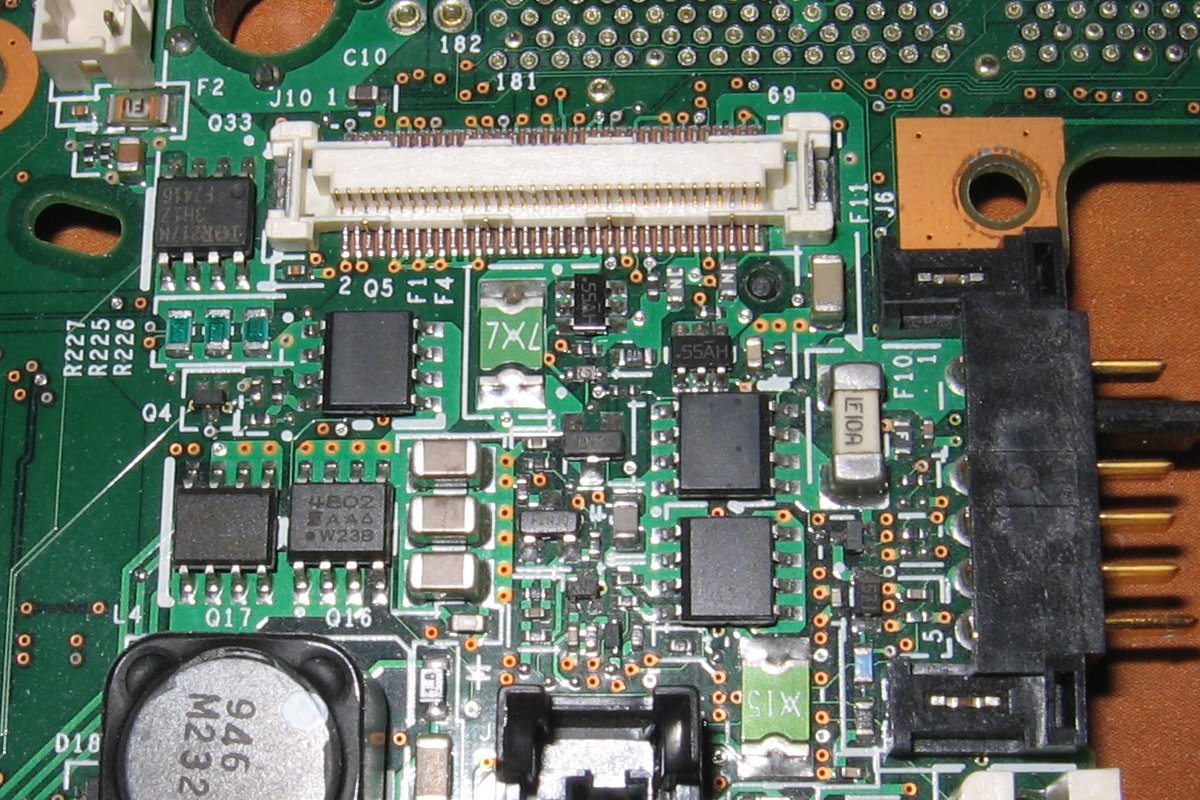
Okay, I think I can see where the confusion exists. Here's a photo of a dead T23 motherboard that I keep around:

Image <-- click for 1200x800 270KB image

"F1 F4" is printed on the board next to a relatively large resettable fuse; the green thing that has a 7, X, and an upside-down 7 printed on top. Fuse F4 (and F5) is to the right of that; count about 11 pins on the LCD connector from the right edge of the resettable fuse and the F4 / F5 fuses are the tiny ones with a "Z" printed on top. Actually, it's an "N" as you are supposed to read the letter with the metal caps of the fuse arranged left and right. Anyway, based upon what I'm reading, F1 is the resettable fuse and F4 and F5 are identical to each other. It probably would have been better if the factory printed all three fuse names on the board but I guess they were limited in space.
Ray Kawakami
X22 X24 X31 X41 X41T X60 X60s X61 X61s X200 X200s X300 X301 Z60m Z61t Z61p 560 560Z 600 600E 600X T21 T22 T23 T41 T60p T410 T420 T520 W500 W520 R50 A21p A22p A31 A31p
NOTE: All links to PC-Doctor software hosted by me are dead. Files removed 8/28/12 by manufacturer's demand.

PandorasThinkpad
Sophomore Member
Posts: 200
Joined: Tue Nov 26, 2013 9:54 am
Location: Berlin, Germany
Contact:

Re: T23, SXGA+, changing from CCFL to LED

#10 Post by PandorasThinkpad » Sat Jun 20, 2015 3:39 am

Hi again,

quite a very good picture...so as the result there is no chance to find out which fuse or fuses are depending on the backlight of the panel...therefore one would need a datasheed from the mainboard of the t23, just to find out what relies to what....right?

Thanx....kindly,

PandoRa
My favorite Thinkpad:
T23 with 1,2 GHz PIII-M, CCFL SXGA+ (LG, 46L2495) (will now get LED Mod),
X200s, SL9400, 8GB Ram, AFFS (HV121WX4-120)
R500 with ATI Graphics, P8400, 8GB Ram and WSXGA+ (LP164W02(TL)(10))[if it once will get WUXGA?!]
T430s with I7, 16GB Ram and FHD Mod

RealBlackStuff
Admin
Admin
Posts: 17485
Joined: Mon Sep 18, 2006 5:17 am
Location: Mt. Cobb, PA USA
Contact:

Re: T23, SXGA+, changing from CCFL to LED

#11 Post by RealBlackStuff » Sat Jun 20, 2015 3:47 am

Jeez, ever heard of a multimeter?
Lovely day for a Guinness! (The Real Black Stuff)

Check out The Boardroom for Parts, Mods and Other Services.

PandorasThinkpad
Sophomore Member
Posts: 200
Joined: Tue Nov 26, 2013 9:54 am
Location: Berlin, Germany
Contact:

Re: T23, SXGA+, changing from CCFL to LED

#12 Post by PandorasThinkpad » Sat Jun 20, 2015 5:39 am

Hi RBS!

Well, this might be a good thing...but without the information where this fuse or fuses might be....which one and on which location....this would be much to much trial and error for me, and no sorry, i haven't such an tool...

Kindly,

PanDoRa
My favorite Thinkpad:
T23 with 1,2 GHz PIII-M, CCFL SXGA+ (LG, 46L2495) (will now get LED Mod),
X200s, SL9400, 8GB Ram, AFFS (HV121WX4-120)
R500 with ATI Graphics, P8400, 8GB Ram and WSXGA+ (LP164W02(TL)(10))[if it once will get WUXGA?!]
T430s with I7, 16GB Ram and FHD Mod

Post Reply
  • Similar Topics
    Replies
    Views
    Last post

Return to “ThinkPad T2x & T3x Series”

Who is online

Users browsing this forum: No registered users and 1 guest