Thinkpad T21 overhaul (warning: 12 photos)

T2x/T3x series specific matters only
Post Reply
Message
Author
berlin
Freshman Member
Posts: 110
Joined: Fri Mar 16, 2007 1:38 pm
Location: San Francisco, CA USA

Thinkpad T21 overhaul (warning: 12 photos)

#1 Post by berlin » Tue May 22, 2007 1:40 am

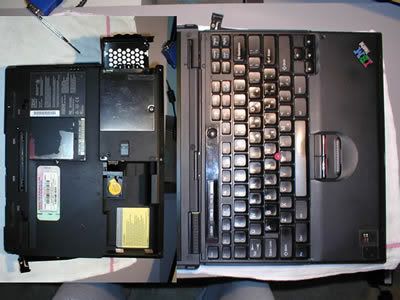
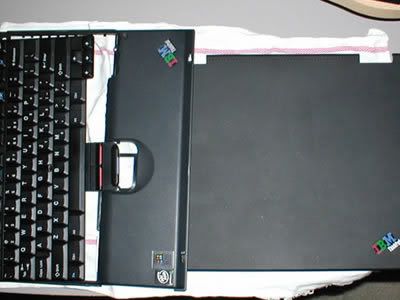
my 7 year old T21 needed some repair: palm rest is broken, lcd lid has marks and scratches all over, and the lcd died. So I purchased parts from ebay: Keyboard ($10.58 ), Lcd Lid ($12.99), Screws ($8.00), Palm Rest ($22.90)


T21 800MHZ / 256MB /40GB /// parts from eBay
ImageImage

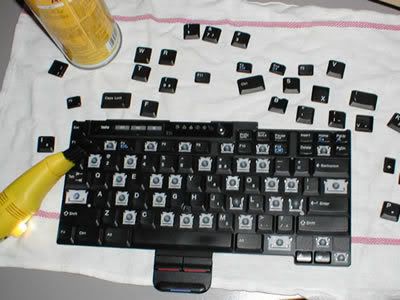
cleaning the keyboard from ebay /// disassembling the laptop (top broke from handling the laptop the wrong way)
ImageImage

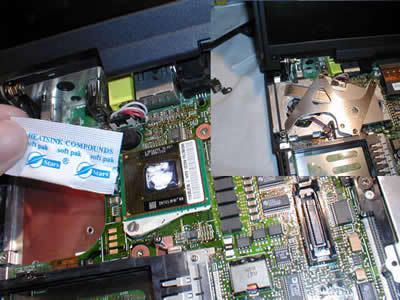
cleaning heatsink assembly /// applying heat compound (I noticed the quality...newer thinkpads now have cheapo parts)
ImageImage


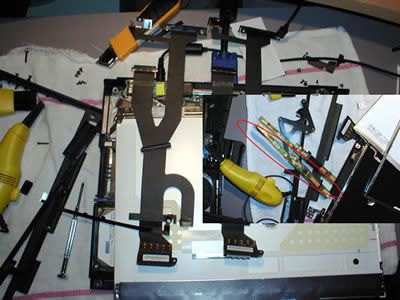
removal of lcd bezel, brackets, locks for transfer to new cover /// ...thought the problem was the inverter but it was the worn out flat lcd cables, parts scavenged from old lcd.
ImageImage

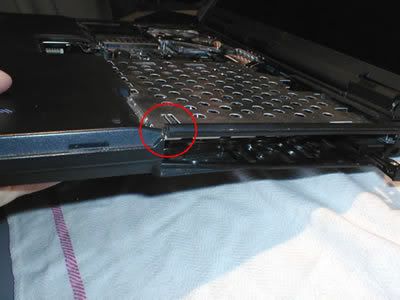
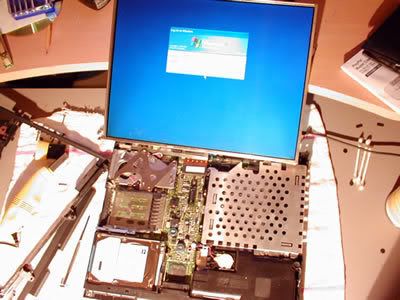
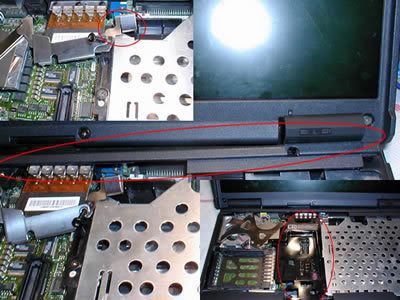
...lcd now working /// ...took me a while to figure out where one tiny part go (circled below)
ImageImage


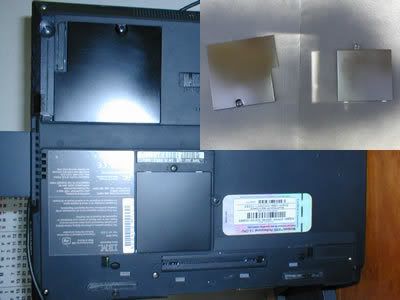
Spray painted bottom network card and ram cover /// T21 now looking new after 3 hours.
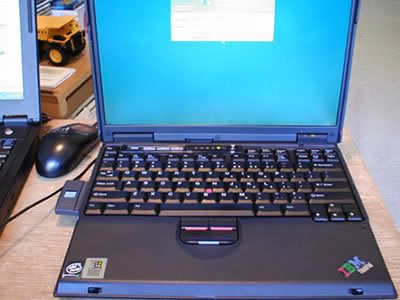
ImageImage

ryengineer
Moderator Emeritus
Moderator Emeritus
Posts: 4393
Joined: Wed Sep 20, 2006 9:29 pm
Location: L.A. (home town) CA, Toronto ON.

#2 Post by ryengineer » Tue May 22, 2007 2:01 am

Wow. Great job, well done. :thumbs-UP:
"I've come a long, long way," she said, "and I will go as far,
With the man who takes me from my horse, and leads me to a bar."
The man who took her off her steed, and stood her to a beer,
Were a bleary-eyed Surveyor and a DRUNKEN ENGINEER.

RealBlackStuff
Admin
Admin
Posts: 17517
Joined: Mon Sep 18, 2006 5:17 am
Location: Mt. Cobb, PA USA
Contact:

#3 Post by RealBlackStuff » Tue May 22, 2007 2:07 am

As they say: there's some life left in the old dog yet!
Nice one!
Lovely day for a Guinness! (The Real Black Stuff)

Check out The Boardroom for Parts, Mods and Other Services.

Purcy
Senior Member
Senior Member
Posts: 921
Joined: Mon Oct 02, 2006 7:29 pm
Location: Pittsburgh PA, USA

#4 Post by Purcy » Tue May 22, 2007 6:04 am

Fantastic job, you did a nice job too of detailing your work in photos. Enjoy your new beauty.
IBM T23 (2648-4NU) 1.13Ghz Pentium III, 1GB, 60GB 5400rpm, CD/DVD-RW, Internal Wireless, Windows XP Pro SP2 [DONOR]

Stargate199
Senior Member
Senior Member
Posts: 708
Joined: Thu Jul 13, 2006 2:51 pm
Location: Atlanta, GA

#5 Post by Stargate199 » Tue May 22, 2007 6:44 am

I did some refurbishing to my T21 too a few months ago. I could stand to have a new (or like new) keyboard and a new inverter, but it works right now and I'm not complaining.
I have finally rejoined the dark side.
ThinkPad T450s, Core i7 5600u, 12GB RAM, Samsung 850 EVO 500GB SSD.
Previous ThinkPads: T41, T21, 600E

dsigma6
Senior ThinkPadder
Senior ThinkPadder
Posts: 2299
Joined: Wed Apr 26, 2006 2:13 pm
Location: Philadelphia, PA
Contact:

#6 Post by dsigma6 » Tue May 22, 2007 7:56 am

Good work! I have a metal piece like the one you circled partially sticking out the back of my T23. :lol:
[Current] [Dell Latitude D630] : [Past] [T43] [T40] [T23] [T20] [R40] [X22] [600E] [570] [765D]

agarza
ThinkPadder
ThinkPadder
Posts: 1492
Joined: Fri Aug 11, 2006 10:31 am
Location: Guadalajara, Jalisco MEXICO

#7 Post by agarza » Tue May 22, 2007 11:07 am

WOW! Great job you did out there. Congratulations.
Current
T440p:
Core i7-4710MQ|8GB RAM|Intel SSD S3700 200GB | 14.1" IPS FHD | Windows 7 Pro, T450 Trackpad, Backlit keyboard, 2nd Caddy
Past: T420 HD+, X61s XGA, T61 14" SXGA+, T42p 14.1 SXGA+, T30, A22e

WarMachine
Junior Member
Junior Member
Posts: 353
Joined: Sat Nov 18, 2006 3:38 pm
Location: Lyon, France
Contact:

#8 Post by WarMachine » Tue May 22, 2007 1:25 pm

Well done !!!

Almost like new ! Nice pics ! :)

I sprayed too the back of my 560. It can transform your machine ! :P

;)

W.
IBM ThinkPads 701Cs | 755Cs | 560 | 2x 600E | 2x T23 | X20 | X24 | 3x X31 | T41p | T42.
lenovo ThinkPads T60 4/3 | T60 16/10 | R60 | X61s | X301 | T400 | T400s | W500 | X200 | T420s.

gator
Moderator Emeritus
Moderator Emeritus
Posts: 3401
Joined: Thu Aug 17, 2006 2:28 am
Location: Gainesville, FL

#9 Post by gator » Tue May 22, 2007 1:48 pm

Fabulous Job, great photos. Thanks for sharing this with us.
Now: T60 2613-EKU | T23 2647-9NU | 600X 2645-9FU | HP 100LX
Past: X31 2673-Y13 | T41 2374-3HU | T22 2647-AEU


Rules of the road :thumbs-UP:

AlphaKilo470
Moderator Emeritus
Moderator Emeritus
Posts: 2737
Joined: Sun Nov 28, 2004 1:42 pm
Location: Atlanta, GA
Contact:

#10 Post by AlphaKilo470 » Tue May 22, 2007 3:59 pm

Great job, that T21 looks fantastic! I'm sure that thing now has many more years of useful life left in it. Actually, reminds me of a similar project I once did with a 760ED a few years ago.

My A21p could go for an overhaul. The lid has scuffs but that's not the big issue. The lid really needs to be replaced because it's warping inward so the center of the screen is closer to the keyboard when closed than the edges. There also lots of scratches on the wrist pad and the keys are shiny enough to double as mirrors.

I recently cleaned the heatsink and applied new thermal compound (Arctic Alumina) and I used an air compressor to get all the dust out.
ThinkPad T60: 2GHZ CD T2500, 3gb RAM, 14.1" XGA, 60gb 7k100, Win 7 Ult
Latitude E7250: i5 5300U 2.3ghz, 12gb RAM, 12" 1080p touch, 256gb SSD, Win 10

Dark Savant0
Freshman Member
Posts: 100
Joined: Fri Jun 30, 2006 11:15 am
Location: Charlotte, NC

#11 Post by Dark Savant0 » Tue May 22, 2007 4:35 pm

What brand and model spray paint did you use?
D630 2GB/120GB/2GHz/Ubuntu 7.10
600E 288MB/40GB/366MHz/WXP
600E 64MB/6GB/600MHz?/Spare

wogeboy
Sophomore Member
Posts: 209
Joined: Sun Oct 31, 2004 9:06 pm
Location: south florida

#12 Post by wogeboy » Tue May 22, 2007 8:51 pm

Excellent Job. The paint is a near perfect match---well done

clickpoint
Sophomore Member
Posts: 208
Joined: Mon Apr 16, 2007 9:45 am
Location: Albany, NY

#13 Post by clickpoint » Tue May 22, 2007 10:32 pm

yes, i'd be interested in what paint u used!!
BTW .. what was wrong with the LCD?? Just dim?

berlin
Freshman Member
Posts: 110
Joined: Fri Mar 16, 2007 1:38 pm
Location: San Francisco, CA USA

#14 Post by berlin » Wed May 23, 2007 2:57 pm

Thanks!

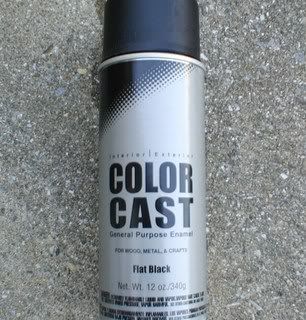
From Lowe's Home Improvement $2.50 2 - 3 light coating max, anything more will turn it glossy

Image

The orig paint peeled off from the heat. So I almost tried the BBQ grill paint from Sears, but they ran out of flat black. The strong paint odor will go away after a few days. The lcd was dim, you couldn't see anything.
X60s 1.83GHZ 3GB 80GB 7200RPM V
X41 1.5GHZ 1GB 40GB XP
T21 800MHZ 256MB 30GB XP
600E PII 400MHZ 256MB 12GB XP

clickpoint
Sophomore Member
Posts: 208
Joined: Mon Apr 16, 2007 9:45 am
Location: Albany, NY

#15 Post by clickpoint » Wed May 23, 2007 3:03 pm

berlin wrote:Thanks!

From Lowe's Home Improvement $2.50 2 - 3 light coating max, anything more will turn it glossy

http://img.photobucket.com/albums/v686/ ... 8af8a7.jpg

The orig paint peeled off from the heat. So I almost tried the BBQ grill paint from Sears, but they ran out of flat black. The strong paint odor will go away after a few days. The lcd was dim, you couldn't see anything.
I might have to try swapping out the cable on mine before I try to change the backlight!! Thanks!

00111100
Posts: 43
Joined: Thu May 24, 2007 10:38 am
Location: San Diego, CA

#16 Post by 00111100 » Wed Jun 06, 2007 9:54 pm

Very, very nice. Your attention to detail is excellent. Another example of T-series longevity and owner iingenuity. Looks like a keeper. Do you have any other plans for it?

Jan_Hoho
Freshman Member
Posts: 93
Joined: Fri May 25, 2007 11:49 am
Location: Portland, OR

#17 Post by Jan_Hoho » Wed Jun 06, 2007 11:45 pm

Really good job, thanks for sharing. This makes me want to get a 600 to practice repairing and overhauling.

AlphaKilo470
Moderator Emeritus
Moderator Emeritus
Posts: 2737
Joined: Sun Nov 28, 2004 1:42 pm
Location: Atlanta, GA
Contact:

#18 Post by AlphaKilo470 » Thu Jun 07, 2007 1:13 am

While this doesn't leave my T20 looking too different cosmetically, I gave it an overhaul recently. I replaced the 6gb Travelstar 4200rpm hard drive with a 40gb Travelstar 5k80 5400rpm hard drive and the 13" XGA screen with a 14" XGA screen which also required new screen bezel and cable. I also cleaned out the inside thoroughly and replaced many of the old screws which had somehow got rust on them. I also have an 800mhz CPU on it's way in the mail to replace the 650mhz CPU currently installed.

The plastics, despite visible wear, still look pretty good on the T20. However, since there is a screw thread broken off and missing from inside the wrist pad, that part might be replaced soon though I've found it hasn't had much impact on structural integrity.

Also, on a side note, when I took the T20 apart, I noticed the underside of the heat sink/fan assembly was polished and very shiny (mirror-like) and a different metal than the rest of the heat sink. I've never seen this on any of the T series laptops I've owned in the past which were all T21s. Another thing I've noticed is that my T20 is heavier than the T21s owned by two friends of mine, even when all units have optical drive, battery, etc removed.
ThinkPad T60: 2GHZ CD T2500, 3gb RAM, 14.1" XGA, 60gb 7k100, Win 7 Ult

Latitude E7250: i5 5300U 2.3ghz, 12gb RAM, 12" 1080p touch, 256gb SSD, Win 10

berlin
Freshman Member
Posts: 110
Joined: Fri Mar 16, 2007 1:38 pm
Location: San Francisco, CA USA

#19 Post by berlin » Wed Jun 13, 2007 12:38 pm

let us know if your new cpu worked. do you plan to sell it?
X60s 1.83GHZ 3GB 80GB 7200RPM V
X41 1.5GHZ 1GB 40GB XP
T21 800MHZ 256MB 30GB XP
600E PII 400MHZ 256MB 12GB XP

Harryc
Moderator Emeritus
Moderator Emeritus
Posts: 13228
Joined: Thu Apr 12, 2007 8:23 am
Location: Upstate New York

#20 Post by Harryc » Wed Jun 13, 2007 1:06 pm

berlin wrote:let us know if your new cpu worked. do you plan to sell it?
I already called dibs on AlphaKilo470's T20 if he ever decides to sell it. It has sentimental value to me...long story :).

AlphaKilo470
Moderator Emeritus
Moderator Emeritus
Posts: 2737
Joined: Sun Nov 28, 2004 1:42 pm
Location: Atlanta, GA
Contact:

#21 Post by AlphaKilo470 » Wed Jun 13, 2007 1:25 pm

The 800mhz CPU works just fine and renders a noticable improvement in performance over the old 650mhz CPU. Also, oddly enough, the 800mhz CPU runs cooler in my system than the old 650 did.
ThinkPad T60: 2GHZ CD T2500, 3gb RAM, 14.1" XGA, 60gb 7k100, Win 7 Ult
Latitude E7250: i5 5300U 2.3ghz, 12gb RAM, 12" 1080p touch, 256gb SSD, Win 10

awdark
Freshman Member
Posts: 110
Joined: Fri Mar 31, 2006 12:11 pm
Location: Southern California

#22 Post by awdark » Fri Jun 15, 2007 11:49 am

Might be strange for me to add, but if you want internal wifi on a T20... (Might have a 21 or 22 mobo but its not a 23) The mini pci cards DO work. Right now I have an Atheros card in mine and I have no idea how do use the supposed 108... but hey it works and im happy.

-_-" yeah my internal network doesnt work but my onboard minipci nic was damaged anyways... it used to give that flash error of some sort, then it gave a funny 4 beeps on every startup was uberly annoying so I had yanked it out.
T20
850mhz, 256mb, T21 hsf, 14.1" (messed up screen), 20gb drive, SMC2532W-B

maxinflixion
Posts: 27
Joined: Mon Jun 18, 2007 7:03 am
Location: Detroit/MI/USA

#23 Post by maxinflixion » Tue Jun 19, 2007 11:57 am

Very nice work here. My new (old) T22 is about to get a similar overhaul.

How difficult is it to remove the LCD lid? Mine is all types of mucked up, and I would like to paint it.

**edit** I just took my LCD apart real quick just to see how difficult of a job this would be.

I will NOT be risking a full tear down of this machine JUST to paint that LCD lid. I will pick up a schticker to cover it up... Besides teh flecible nature of the Thinkpad lide material leads me to believe that paint would crack.
Last edited by maxinflixion on Tue Jun 19, 2007 2:44 pm, edited 1 time in total.

Toe
Freshman Member
Posts: 110
Joined: Mon Nov 22, 2004 3:34 pm
Location: PA,USA
Contact:

#24 Post by Toe » Tue Jun 19, 2007 1:44 pm

Very Impressive!

furiousmonkey
Freshman Member
Posts: 101
Joined: Fri Jan 12, 2007 12:43 pm
Location: Canada

t21 overhauled to a t23

#25 Post by furiousmonkey » Tue Jun 19, 2007 4:10 pm

I just replaced the bottom of my T21 800Mhz with a T23 1.13Ghz Board. My T21 had the power on issue, and so I picked up a T23 motherboard and CPU from ebay for about $135 after shipping and handling. I only had one issue attaching it to the upper part of my T21, the left side keyboard does not line up with the T23 motherboard, so I took a pair of cutters and cut down the plastic assembly on the T23 side and it works awesome!

I will send pictures when I have time!
**********************************
1400i 366Mhz 128Mb Ram
1300i 750Mhz 320Mb Ram 60Gig
T23 1.13GHz 1024Mb Ram 100Gig
T30 2.4GHz 1024Mb Ram 160Gig
T30 2.4GHz 2Gb Ram 120Gig
T60 1.8Ghz Duo 3 Gb RAM 80Gig

Elias
Posts: 4
Joined: Sat Jul 07, 2007 10:06 am
Location: Milwaukee, WI

#26 Post by Elias » Sat Jul 07, 2007 4:26 pm

Were you able to do anything about the crack in the right side by the CD drive? I've got the same crack on both the left and right where the plastic gets thin.

I tried to epoxy it last time I had the thing ripped apart, but that didnt hold at all.
Thinkpad T22, 900mhz, 380mb, 19gb

gearguy
Sophomore Member
Posts: 199
Joined: Sun Jun 11, 2006 5:01 pm
Location: UK

#27 Post by gearguy » Tue Jul 10, 2007 5:03 pm

Yeah... that crap that peels off the panels on the back is piss [censored] annoying...

You'd think after creating such a robust machine they would have had the good sense to actually just coat the metal panels in some form of plastic rather than juse use that thin rubbery paint they used.

Elias wrote:Were you able to do anything about the crack in the right side by the CD drive? I've got the same crack on both the left and right where the plastic gets thin.

I tried to epoxy it last time I had the thing ripped apart, but that didnt hold at all.
I would actually try melting it back together from the inside with a soldering iron then maybe filling whats left of the crack on the outside with epoxy?

Just don't breath in the fumes from the hot plastic :P
760ED All the way.

FEEL THE BURN! From the bottom of that particular laptop... right in the bawsack! eek

Post Reply
  • Similar Topics
    Replies
    Views
    Last post

Return to “ThinkPad T2x & T3x Series”

Who is online

Users browsing this forum: No registered users and 2 guests