


 Homepage
 Forum
Forum Drivers
 HMM-Manuals
 MTM
MTM Feed
Feed
On my T61 14.1 Wide (1440x900 WXGA+) I sometimes use the ThinkPad FullScreen Magnifier Utility, Ver. 1.16 (AKA ThinkPad UltraZoom) with Fn+Space.
Basically it's working but there are some things strange for me.
1.) If the magnifier is activated, I have a new icon in the system tray.
When I click on the icon, I can change between 140 %, 180 % and 230 %.
However I have all these 3 values 3 times in the list: 140 %, 140 %, 140 %, 180 %, 180 %, 180 %, 230 %, 230 %, 230 %!
There is no difference between the same percentage settings: IAW all 140 % have the same resolution (like it should be).
For me this is an error: Each percentage value should appear only once.
2.) My native 1440x900 resolution has a 16:10 ratio.
The resolutions of the magnifier all have a 4:3 ratio!
140 % = 1024x768
180 % = 800x600
230 % = 640x480
For me these resolutions are not correct for a 16:10 display.
Correct 16:10 ratios would be 1280x800 and 960x600. These are also the other two 16:10 ratios which I can set in the Windows Vista Control Panel.
Another interesting thing: In the Control Panel the smallest available resolution is 800x600 but with FullScreen Magnifier the 230 % resolution is 640x480 (and then I can see it also in the Control Panel).
I'd like to have also 16:10 ratios with activated FullScreen Magnifier.
I found the settings in the registry (HKEY_CURRENT_USER\Software\IBM\TPHOTKEY\UltraZoom) but I didn't change them.
The values of the keys are clear for me but the keys itself not at all.
Did someone have the same "problem"?
Did someone change the registry?
Take a look at our
ThinkPads.com HOME PAGE
For those who might want to contribute to the blog, start here: Editors Alley Topic
Then contact Bill with a Private Message
ThinkPads.com HOME PAGE
For those who might want to contribute to the blog, start here: Editors Alley Topic
Then contact Bill with a Private Message
T61 FullScreen Magnifier (UltraZoom) "wrong" res.
Re: T61 FullScreen Magnifier (UltraZoom) "wrong" r
Running a 15.4" t61p in Vista...
Looking for a solution to this myself I have the 1680x1050 screen and I wanted the full screen to be 1280x800 so I edited the registry setting found here:
start run, regedit.
In this section:
computer\hkey_current_user\software\ibm\TPHOTKEY\UltraZoom
Find the key called ExpandMode which has EA on my system, then go down a level to the modes and find 000000EA and then find these 2 keys:
PelsHeight - I changed it from 1024 to 800 (decimal)
But for this to stay this way, I also had to change the permissions on the 000000EA branch to deny full control, delete and write. The utility kept rewriting the data!!
So I right clicked on that 000000EA key, chose permissions, selected my account name, selected advanced, selected my account name again, then edit. On the right side (deny) I made sure the following values were checked thus denying the utility from overwriting my values:
create subkey, enumerate subkeys, create link, delete, write DAC, write owner.
Then click ok, etc to get back and save the values.
Once that was done, I can now go between full res and a larger but proportional enlarged mode. The 800 stays and the 1024 no longer gets re-written each time.
It would sure be nice to see a customizer for this from Lenovo as it is a very handy function.
Warning, this is the registry so use at your own risk/peril.
I'm a happy camper again!
Looking for a solution to this myself I have the 1680x1050 screen and I wanted the full screen to be 1280x800 so I edited the registry setting found here:
start run, regedit.
In this section:
computer\hkey_current_user\software\ibm\TPHOTKEY\UltraZoom
Find the key called ExpandMode which has EA on my system, then go down a level to the modes and find 000000EA and then find these 2 keys:
PelsHeight - I changed it from 1024 to 800 (decimal)
But for this to stay this way, I also had to change the permissions on the 000000EA branch to deny full control, delete and write. The utility kept rewriting the data!!
So I right clicked on that 000000EA key, chose permissions, selected my account name, selected advanced, selected my account name again, then edit. On the right side (deny) I made sure the following values were checked thus denying the utility from overwriting my values:
create subkey, enumerate subkeys, create link, delete, write DAC, write owner.
Then click ok, etc to get back and save the values.
Once that was done, I can now go between full res and a larger but proportional enlarged mode. The 800 stays and the 1024 no longer gets re-written each time.
It would sure be nice to see a customizer for this from Lenovo as it is a very handy function.
Warning, this is the registry so use at your own risk/peril.
I'm a happy camper again!
Re: T61 FullScreen Magnifier (UltraZoom) "wrong" res.
Hello guys,
I need your help, hope your are still alive
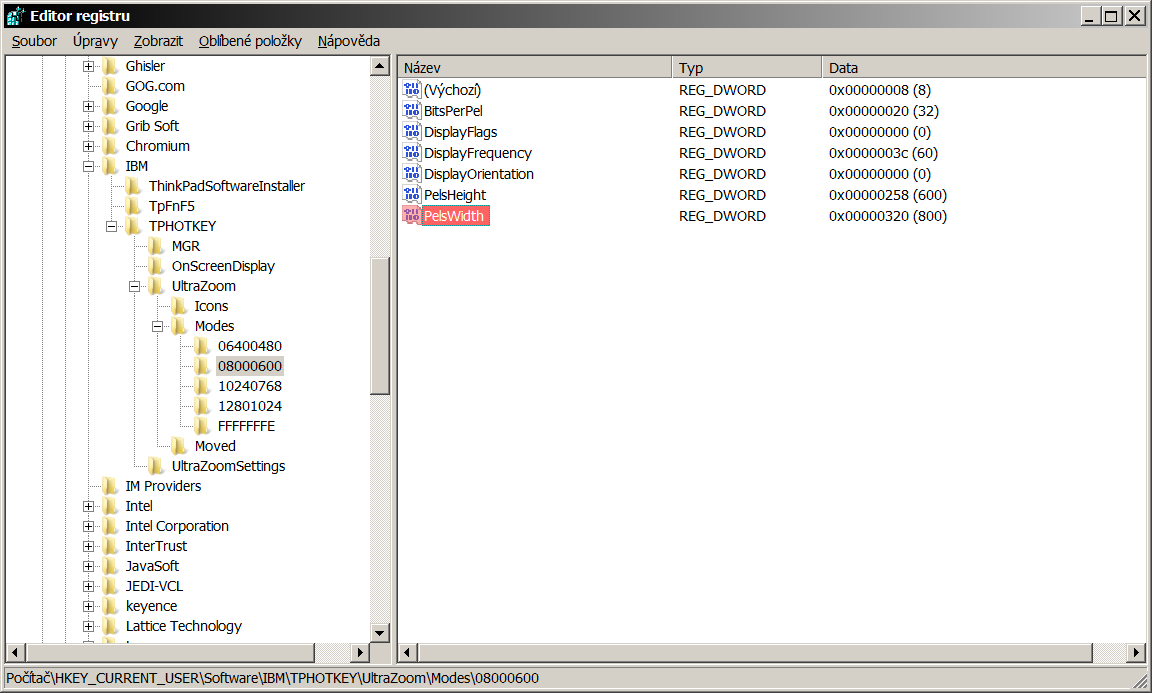
I followed this topic to modify my Hotkey Features Integration and its ThinkPad FullScreen Magnifier utility but unfortunately no success. I think I have found correct key in register but I can not find exactly what is written above. My mode do not contain 000000EA. I followed path you described here but content is a bit different. May be because I have Win7 & last update of Hotkey Features Integration. My ThinkPad is W510 type and I have 1920x1080 as a default resolution & when I am using ThinkPad FullScreen Magnifier utility I have the 800x600 resolution (default). How can I modify registers & permisions? I already tried what I know but I need more experienced person to help me modify resolution from 800x600 to 1600x900 in ThinkPad FullScreen Magnifier utility and its registers.
Screenshot of my register is attached.
Thank you for help.
https://i.postimg.cc/DwtYQTC9/registr.png
FORUM warning:
picture(s) WAY too big, tags removed. Please read the Forum Rules, especially Section 5: viewtopic.php?f=16&t=14339
I need your help, hope your are still alive
I followed this topic to modify my Hotkey Features Integration and its ThinkPad FullScreen Magnifier utility but unfortunately no success. I think I have found correct key in register but I can not find exactly what is written above. My mode do not contain 000000EA. I followed path you described here but content is a bit different. May be because I have Win7 & last update of Hotkey Features Integration. My ThinkPad is W510 type and I have 1920x1080 as a default resolution & when I am using ThinkPad FullScreen Magnifier utility I have the 800x600 resolution (default). How can I modify registers & permisions? I already tried what I know but I need more experienced person to help me modify resolution from 800x600 to 1600x900 in ThinkPad FullScreen Magnifier utility and its registers.
Screenshot of my register is attached.
Thank you for help.
https://i.postimg.cc/DwtYQTC9/registr.png
FORUM warning:
picture(s) WAY too big, tags removed. Please read the Forum Rules, especially Section 5: viewtopic.php?f=16&t=14339

Re: T61 FullScreen Magnifier (UltraZoom) "wrong" res.
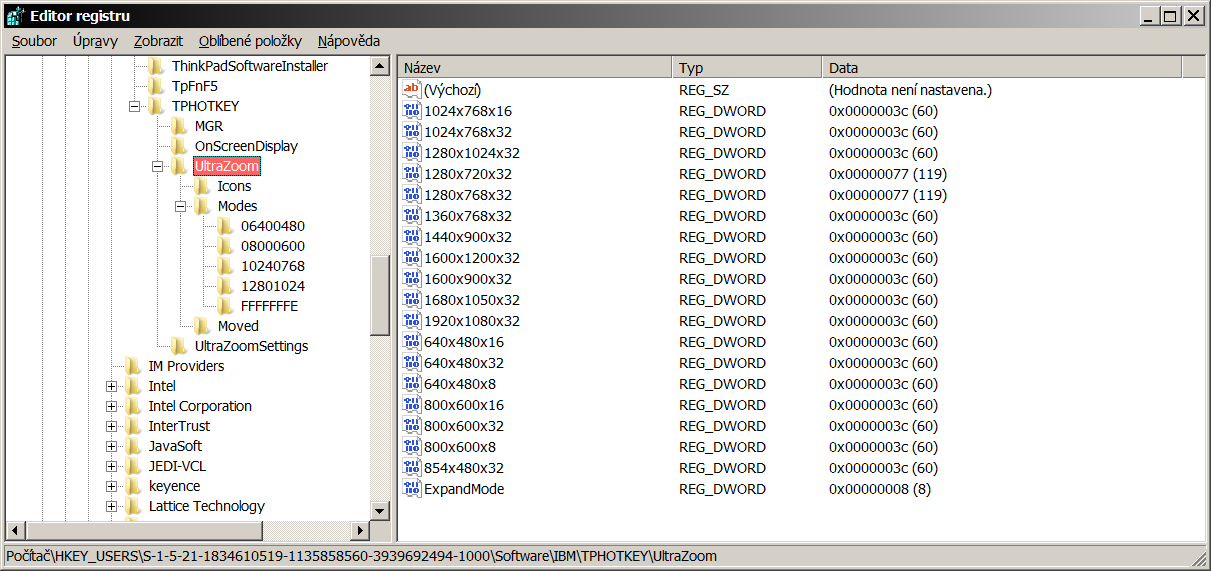
This is how it works: Under the Ultrazoom key, there should be a REG_DWORD value named ExpandMode, with a number.
Then under UltraZoom\Modes, there are multiple keys specifying resolutions. Each one of them has a Default key, which is also REG_DWORD. In your picture the key is 080060600 and the default value is 8. Whatever key has a Default value matching the ExpandMode is the key that gets used. Going between different magnification settings in the utility changes the ExpandMode (and the relevant key).
From that point, you can follow the instructions in the above post on how to modify the registry and prevent the utility from modifying it again.
FYI, on my X220: I have Windows 7, Lenovo System Interface Driver 1.05, On Screen Display 6.73.01, and ThinkPad FullScreen Magnifier 2.42. The screen is 1366x768, and the two modes offered by the magnifier are already widescreen (768x480 and 960x600), without me having to do anything.
I would check which version you have (run the ThinkPad Hotkey Integration Features Setup and choose "View driver and application version information". However, you may be better off with just a third party utility for changing resolution on the fly - like Screen Mode Switcher:
http://micromighty.com/Products/Screen_Mode_Switch.aspx
Then under UltraZoom\Modes, there are multiple keys specifying resolutions. Each one of them has a Default key, which is also REG_DWORD. In your picture the key is 080060600 and the default value is 8. Whatever key has a Default value matching the ExpandMode is the key that gets used. Going between different magnification settings in the utility changes the ExpandMode (and the relevant key).
From that point, you can follow the instructions in the above post on how to modify the registry and prevent the utility from modifying it again.
FYI, on my X220: I have Windows 7, Lenovo System Interface Driver 1.05, On Screen Display 6.73.01, and ThinkPad FullScreen Magnifier 2.42. The screen is 1366x768, and the two modes offered by the magnifier are already widescreen (768x480 and 960x600), without me having to do anything.
I would check which version you have (run the ThinkPad Hotkey Integration Features Setup and choose "View driver and application version information". However, you may be better off with just a third party utility for changing resolution on the fly - like Screen Mode Switcher:
http://micromighty.com/Products/Screen_Mode_Switch.aspx
Thinkpad 25 (20K7), T16 Gen 3 (21MQ), Yoga 14 (20FY), T430s (IPS FHD + Classic Keyboard), X220 4291-4BG
X61 7673-V2V, T60 2007-QPG, T42 2373-F7G, X32 (IPS Screen), A31p w/ Ultrabay Numpad
X61 7673-V2V, T60 2007-QPG, T42 2373-F7G, X32 (IPS Screen), A31p w/ Ultrabay Numpad
Re: T61 FullScreen Magnifier (UltraZoom) "wrong" res.
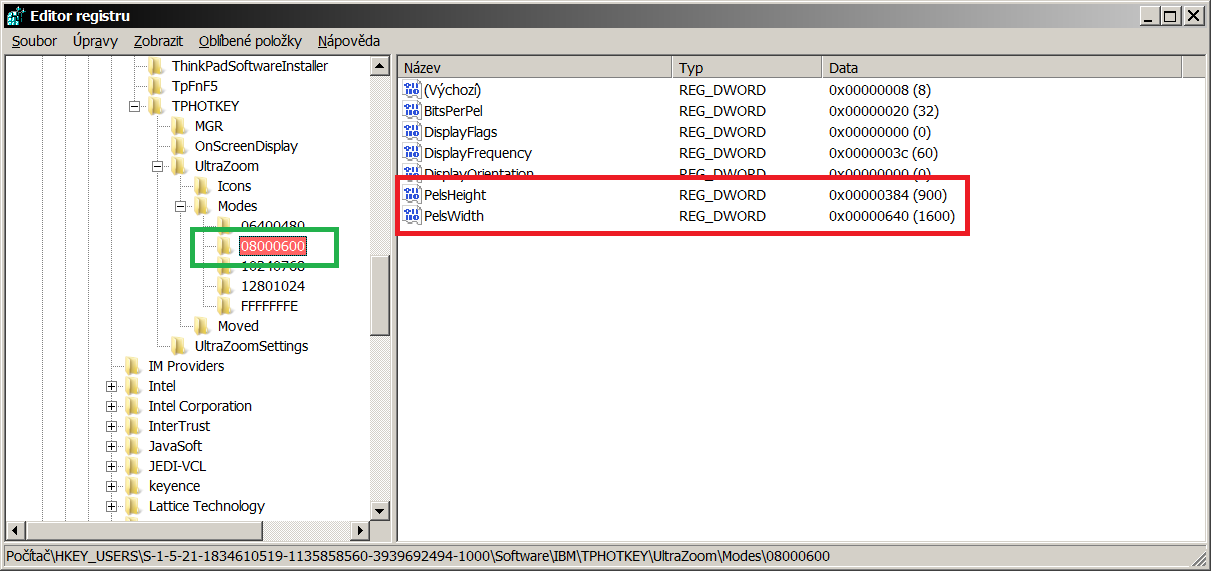
Well, unfortunatelly I do not understand well. I understant that resolution is linked to ExpandMode key & it is changing according of ExpandMode value number. But I am not able co modiy correctly my resolution and keep it permanently. I modidied key 08000600 and its Height & Width from 600 & 800 to 900 & 1600 (red colour) I also right clicked on key 08000600 (green colour) & tried adjust permission of my account according of instruction above but have no succes still yet. It is still rewriting or not working. And anyway I do not understand what does the EA mean from second post. The key 000000EA I can not find.
https://i.postimg.cc/Kv4b4jtN/Ultra-Zoom.png
https://i.postimg.cc/wv0KjYvZ/Ultra-Zoom1.png
https://i.postimg.cc/Kv4b4jtN/Ultra-Zoom.png
https://i.postimg.cc/wv0KjYvZ/Ultra-Zoom1.png
Re: T61 FullScreen Magnifier (UltraZoom) "wrong" res.
EA is just a seemingly random number, assigned by the application, which was the value of ExpandMode on tbThink's computer. In your case, according to your pictures, the value is 8.
It looks like you are modifying the correct locations, but something is wrong with controlling the permissions. I suggest to double-check all the steps.
Just to be certain - why are you accessing the key via HKEY_USERS\S-1-5-21 and not via HKEY_CURRENT_USER?
I am always a bit wary of messing with registry access control, which is why I suggested investigating alternative utilities...
It looks like you are modifying the correct locations, but something is wrong with controlling the permissions. I suggest to double-check all the steps.
Just to be certain - why are you accessing the key via HKEY_USERS\S-1-5-21 and not via HKEY_CURRENT_USER?
I am always a bit wary of messing with registry access control, which is why I suggested investigating alternative utilities...
Thinkpad 25 (20K7), T16 Gen 3 (21MQ), Yoga 14 (20FY), T430s (IPS FHD + Classic Keyboard), X220 4291-4BG
X61 7673-V2V, T60 2007-QPG, T42 2373-F7G, X32 (IPS Screen), A31p w/ Ultrabay Numpad
X61 7673-V2V, T60 2007-QPG, T42 2373-F7G, X32 (IPS Screen), A31p w/ Ultrabay Numpad
Re: T61 FullScreen Magnifier (UltraZoom) "wrong" res.
Well...I also installed SMSwitch software & it works well, thank you for this but I want primarily to use native ThinkPad utility without third-party company software..I mean clean PC as is possible.
I described what I set in a 13. steps according of the pictures.
Do not know, why the resolution does not change because I am sure that I am followed steps above...
1) https://i.postimg.cc/9fYgqRWJ/Sn-mek1.png
2) https://i.postimg.cc/R04X9Scf/Sn-mek2.png
3) https://i.postimg.cc/V6HRjX2B/Sn-mek3.png
4) https://i.postimg.cc/yYRM8NSr/Sn-mek4.png
5) https://i.postimg.cc/g2q13BsV/Sn-mek5.png
6) https://i.postimg.cc/PqX9yzVB/Sn-mek6.png .... only check
7) https://i.postimg.cc/nVj53LTc/Sn-mek7.png
Switching of resolution via Fn+Space does not respond correctly because only window is maximized & one of the ThinkPad Magnifier option disappeared from its scrolling menu of system tray icon
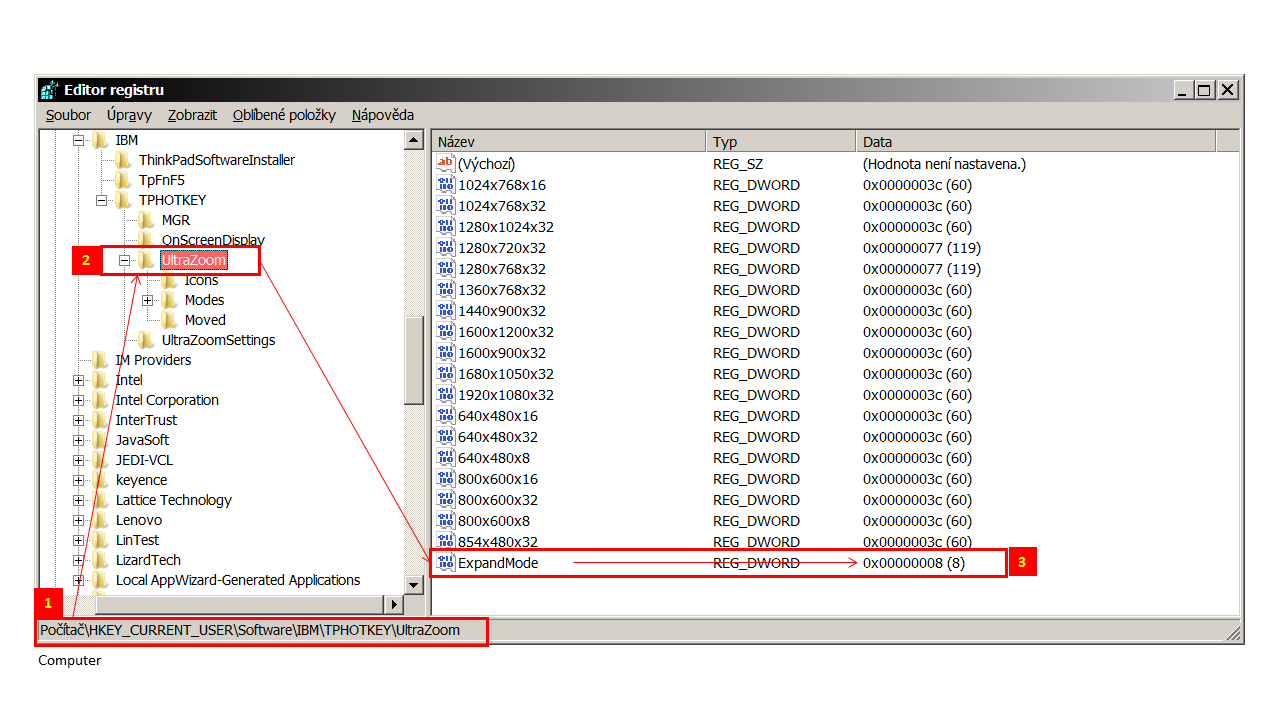
I described what I set in a 13. steps according of the pictures.
Do not know, why the resolution does not change because I am sure that I am followed steps above...
1) https://i.postimg.cc/9fYgqRWJ/Sn-mek1.png
2) https://i.postimg.cc/R04X9Scf/Sn-mek2.png
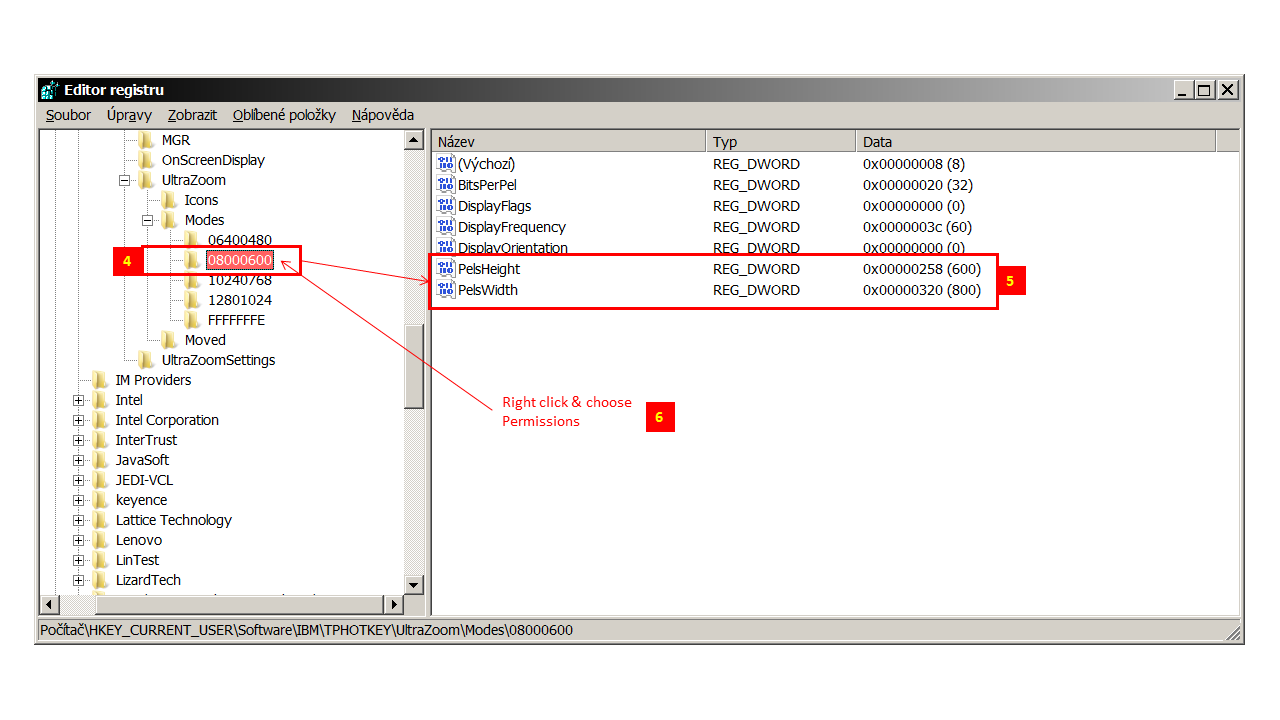
3) https://i.postimg.cc/V6HRjX2B/Sn-mek3.png
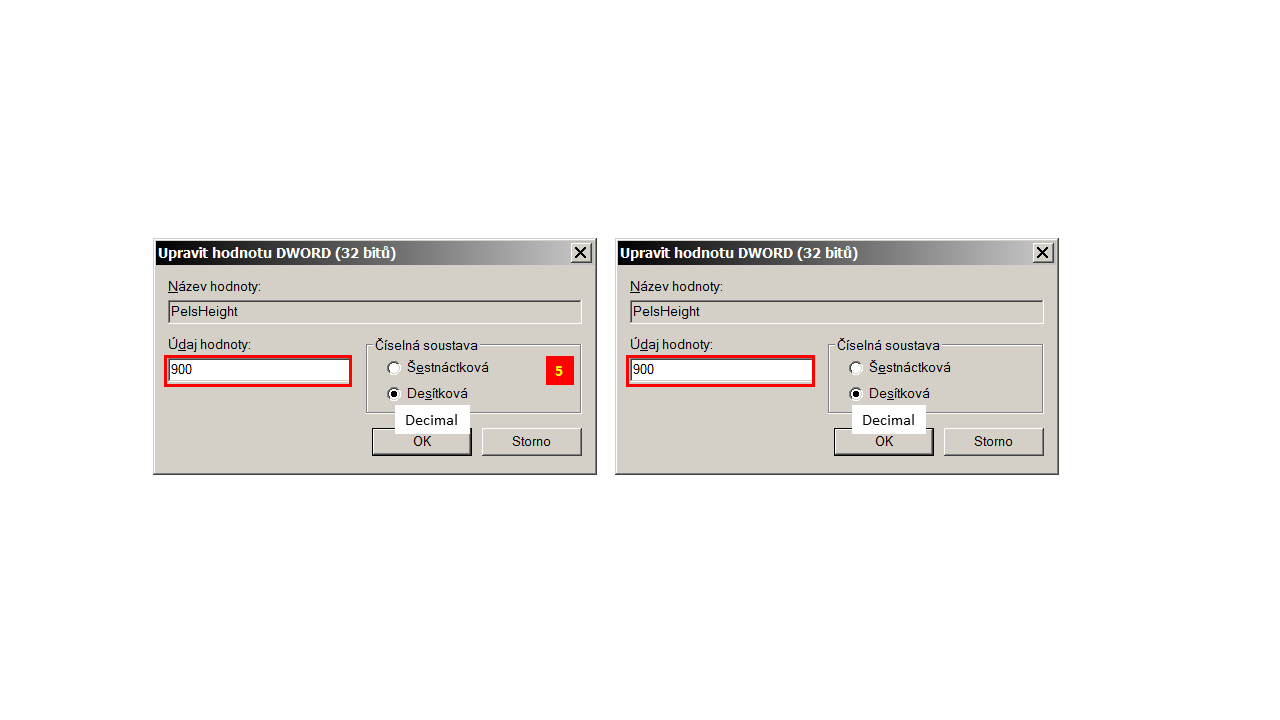
4) https://i.postimg.cc/yYRM8NSr/Sn-mek4.png
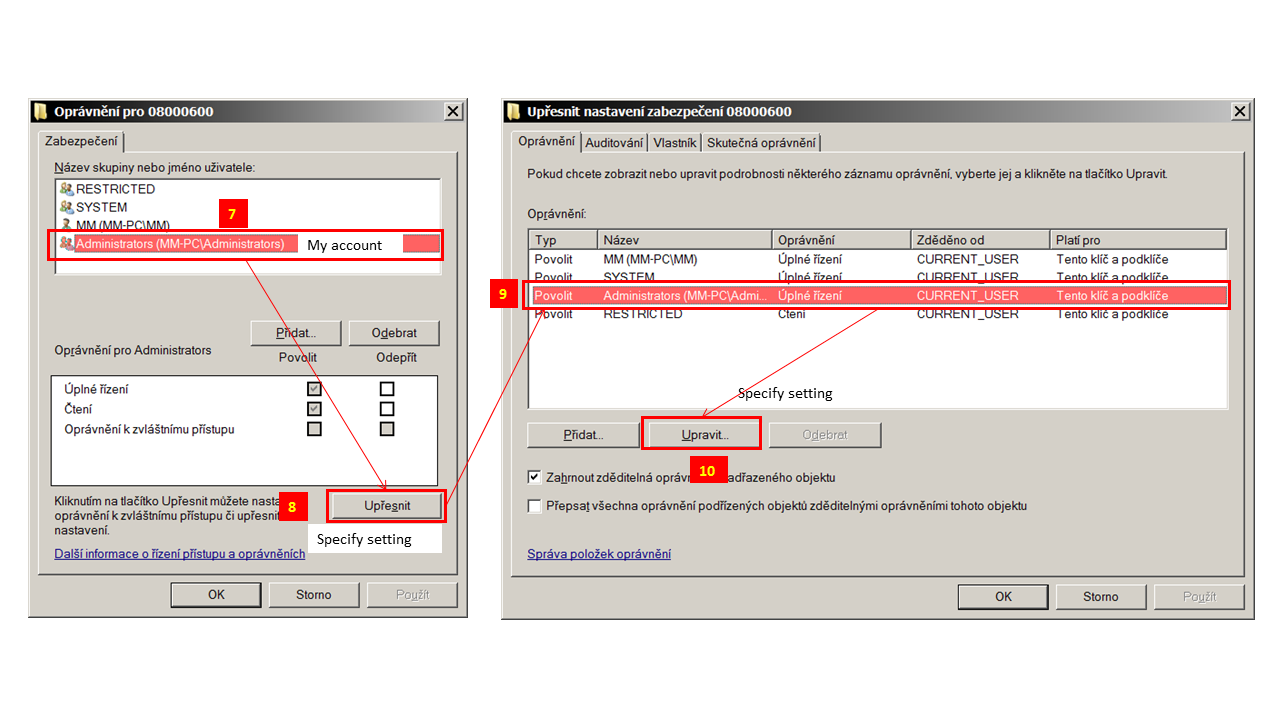
5) https://i.postimg.cc/g2q13BsV/Sn-mek5.png
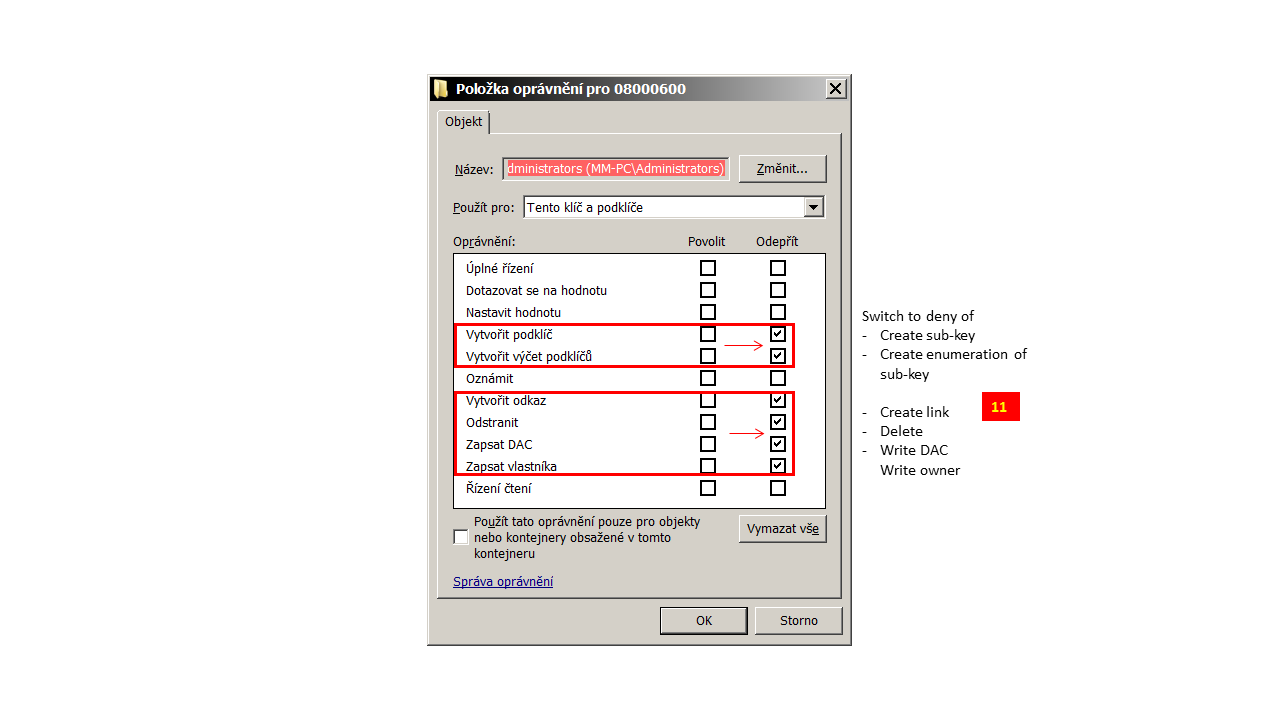
6) https://i.postimg.cc/PqX9yzVB/Sn-mek6.png .... only check
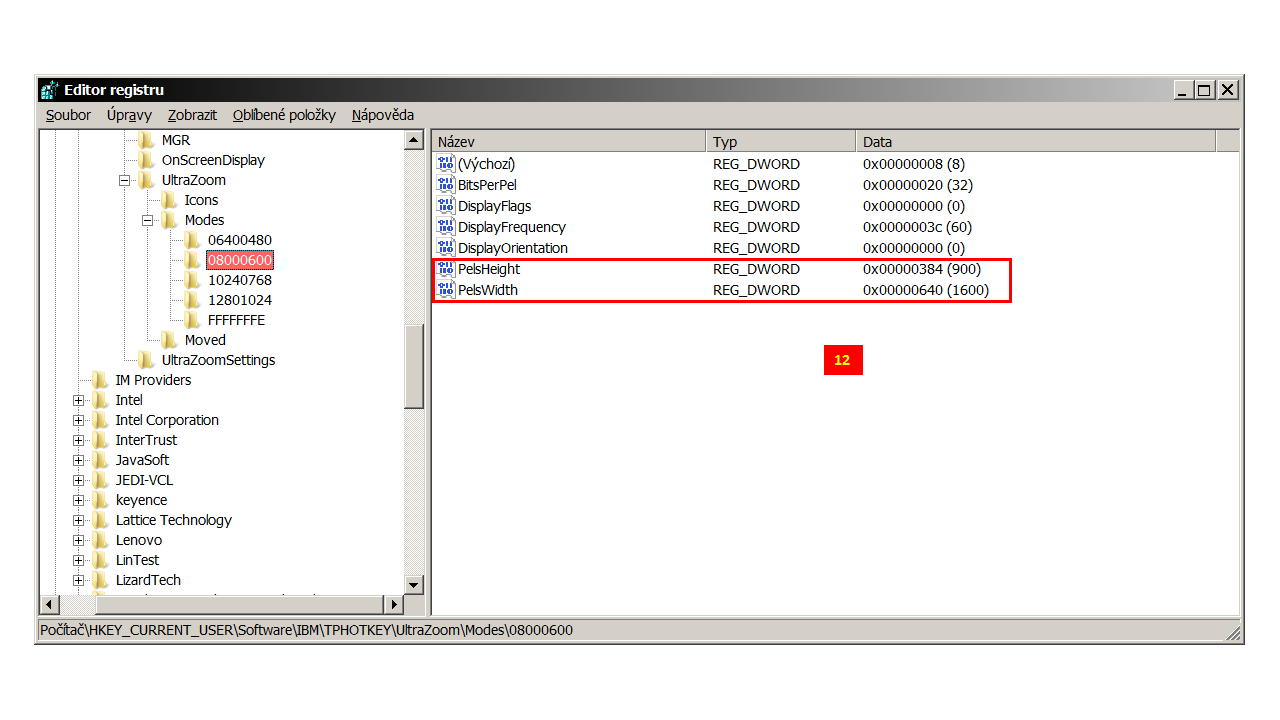
7) https://i.postimg.cc/nVj53LTc/Sn-mek7.png
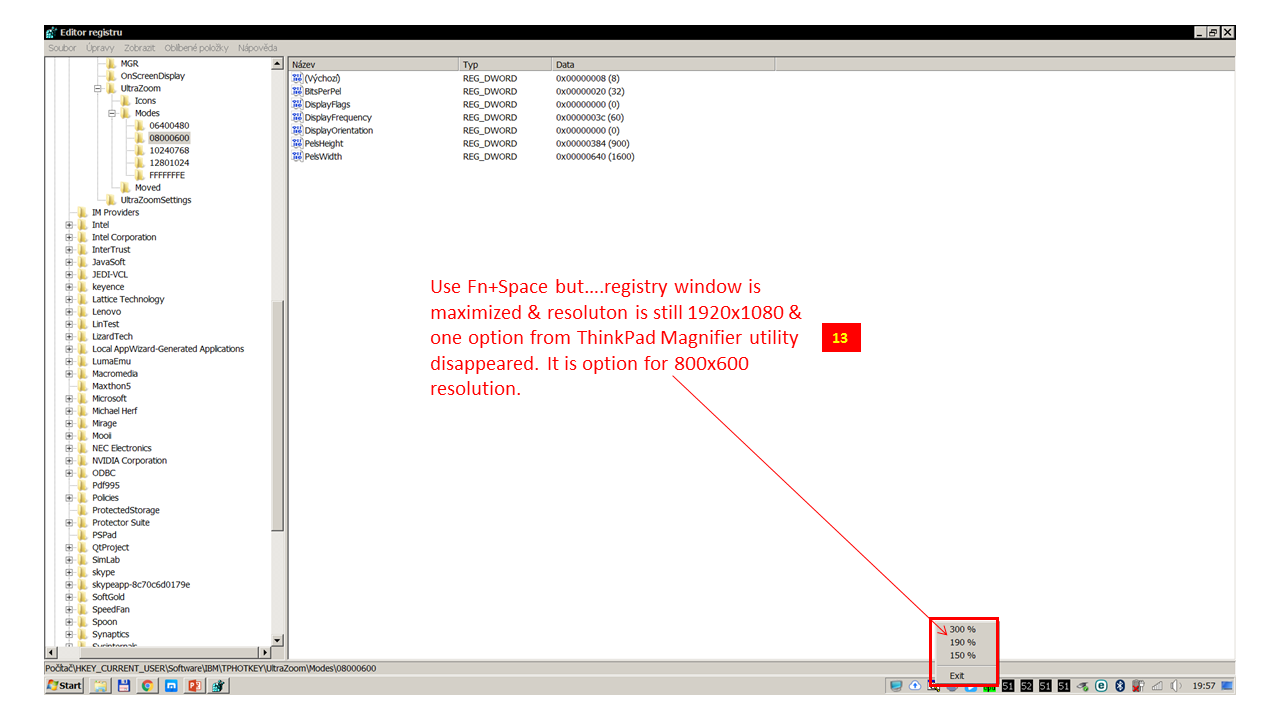
Switching of resolution via Fn+Space does not respond correctly because only window is maximized & one of the ThinkPad Magnifier option disappeared from its scrolling menu of system tray icon
Re: T61 FullScreen Magnifier (UltraZoom) "wrong" res.
So big community and nobody knows? Really?
-
RealBlackStuff
- Admin Emeritus

- Posts: 24727
- Joined: Mon Sep 18, 2006 5:17 am
- Location: Loch Garman, Éire
Re: T61 FullScreen Magnifier (UltraZoom) "wrong" res.
Why not try and create a new Modes key on picture 2 under step 4?
Create 09001600
Into there copy all 08000600 keys from picture 6 (above step # 12)
Save/exit.
Restart, then try.
Create 09001600
Into there copy all 08000600 keys from picture 6 (above step # 12)
Save/exit.
Restart, then try.
Lovely day for a Guinness! (The Real Black Stuff)
But I actually prefer Murphy's from Cork!
But I actually prefer Murphy's from Cork!
Re: T61 FullScreen Magnifier (UltraZoom) "wrong" res.
I already tried to do what you suggested to me but when I copied all keys & restarted my key has been deleted automaticly. Btw even If I check Magnifier utility by Fn+Space my setting did not apeard
-
- Similar Topics
- Replies
- Views
- Last post
-
-
TrackPoint and Bluetooth problems on T61
by giovanazzi » Mon Nov 03, 2025 7:43 am » in ThinkPad T60/T61 Series - 2 Replies
- 11796 Views
-
Last post by giovanazzi
Mon Nov 03, 2025 10:37 am
-
-
-
T60/T61 RAM Compatibility Question with DDR2 Modules Above 2GB
by annawonka » Wed Nov 12, 2025 11:43 pm » in ThinkPad T60/T61 Series - 2 Replies
- 7952 Views
-
Last post by Glaurung-quena
Thu Nov 13, 2025 2:37 pm
-
-
- 2 Replies
- 4035 Views
-
Last post by rssb
Tue Nov 18, 2025 4:34 pm
-
-
I thought 4:3 T61 were supposed to have good hinges
by dcfbf » Mon Dec 01, 2025 5:42 pm » in ThinkPad T60/T61 Series - 5 Replies
- 7699 Views
-
Last post by ajkula66
Wed Dec 03, 2025 7:38 am
-
Who is online
Users browsing this forum: No registered users and 52 guests