


 Homepage
 Forum
Forum Drivers
 HMM-Manuals
 MTM
MTM Feed
Feed
Anyone know how to restore the MBR partition? I accidentaly delete it and now I cant access to the thinkvantage recovery stuff anymore.
Is there any program that can make it or do I have to call lenovo?
Take a look at our
ThinkPads.com HOME PAGE
For those who might want to contribute to the blog, start here: Editors Alley Topic
Then contact Bill with a Private Message
ThinkPads.com HOME PAGE
For those who might want to contribute to the blog, start here: Editors Alley Topic
Then contact Bill with a Private Message
Restore MBR partition
-
Kel Ghu
- Sophomore Member
- Posts: 211
- Joined: Sat Jun 18, 2005 3:04 pm
- Location: Lausanne, Switzerland
Restore MBR partition
T61p - 6457-AN6
X60t - 6363-A7G - NMB - Sanyo[8]
T60p - 2007-83G - TMD - NMB - Sanyo (9)/Panasonic(6)
T43p - 2668-G4G - Hydis - NMB - Sanyo
X60t - 6363-A7G - NMB - Sanyo[8]
T60p - 2007-83G - TMD - NMB - Sanyo (9)/Panasonic(6)
T43p - 2668-G4G - Hydis - NMB - Sanyo
I'm also trying to find out how to make the special hidden partition accessible after modifying the other partition.
I've tried starting from the factory install to split C: into 2 partitions, as well as doing a clean install after doing a recovery to factory settings, and splitting C: during the XP install. I'm assuming it's still possible to have use the hidden partition to access the ThinkVantage R&R software on boot even with a clean install of Windows. Problem is, when I partition C:, the MBR gets changed, thus making the hidden special partition inaccessible. Is there anyway of making it accessible again without having to do a recovery to factory settings?
@Kel Ghu,
If all you want to do is to access the special partition, then just do a recovery using the Recovery Disc set which you should have made when you got it. If you haven't, you've got to get it from IBM/Lenovo.
I've tried starting from the factory install to split C: into 2 partitions, as well as doing a clean install after doing a recovery to factory settings, and splitting C: during the XP install. I'm assuming it's still possible to have use the hidden partition to access the ThinkVantage R&R software on boot even with a clean install of Windows. Problem is, when I partition C:, the MBR gets changed, thus making the hidden special partition inaccessible. Is there anyway of making it accessible again without having to do a recovery to factory settings?
@Kel Ghu,
If all you want to do is to access the special partition, then just do a recovery using the Recovery Disc set which you should have made when you got it. If you haven't, you've got to get it from IBM/Lenovo.

-
Kel Ghu
- Sophomore Member
- Posts: 211
- Joined: Sat Jun 18, 2005 3:04 pm
- Location: Lausanne, Switzerland
I dont know... I still have a approx. 5Gb partition which I guess is the hidden partition. But there was another 500Mb partition, which seemed to be the bootable partition bridge to the hidden partition.
How do you guys use that program if you dont have 1.44Mb drive?
thanks
How do you guys use that program if you dont have 1.44Mb drive?
thanks
T61p - 6457-AN6
X60t - 6363-A7G - NMB - Sanyo[8]
T60p - 2007-83G - TMD - NMB - Sanyo (9)/Panasonic(6)
T43p - 2668-G4G - Hydis - NMB - Sanyo
X60t - 6363-A7G - NMB - Sanyo[8]
T60p - 2007-83G - TMD - NMB - Sanyo (9)/Panasonic(6)
T43p - 2668-G4G - Hydis - NMB - Sanyo
Thanks so much for that link GomJabbar. I was actually considering a recovery to factory settings again tonight. Wasn't really looking forward to it again.
@Kel Ghu,
I've got a couple of USB floppy drives from other/older notebook lying around at home, and so am just using that now. Another option would be to make a floppy image of that boot disk and use cdshell/bcdw to load it from a bootable cd. If you need the image, I could email it to you or something.
Edit: I think I spoke too soon. I'm still not able to access the hidden partition by pressing the ThinkVantage button on boot. I used the diskette to fix the MBR rather than write a new one. I'm worried that I may not be able to boot into C: if I were to write a new MBR. I most certainly do not want to have to do a recovery and a fresh install again. Would it be safe to use the diskette to write a new MBR so that I can still access the hidden partition?
@Kel Ghu,
I've got a couple of USB floppy drives from other/older notebook lying around at home, and so am just using that now. Another option would be to make a floppy image of that boot disk and use cdshell/bcdw to load it from a bootable cd. If you need the image, I could email it to you or something.
Edit: I think I spoke too soon. I'm still not able to access the hidden partition by pressing the ThinkVantage button on boot. I used the diskette to fix the MBR rather than write a new one. I'm worried that I may not be able to boot into C: if I were to write a new MBR. I most certainly do not want to have to do a recovery and a fresh install again. Would it be safe to use the diskette to write a new MBR so that I can still access the hidden partition?
Great, I'm glad it worked for you. 
I have posted this link several times before, but usually the user does not have an external floppy drive to use it with, and doesn't want to spend the money to buy one. I think (IIRC) you might be the first user that has reported back that it worked. I do have a USB floppy drive, but I have not needed this disk to date.
I have posted this link several times before, but usually the user does not have an external floppy drive to use it with, and doesn't want to spend the money to buy one. I think (IIRC) you might be the first user that has reported back that it worked. I do have a USB floppy drive, but I have not needed this disk to date.
DKB
I'm wondering how you and other people have managed to keep the hidden partition accessible after doing a clean install without using this disk? Or, since everyone makes the recovery discs, they don't see the point of keeping the partition around?
If anyone else needs help with using the diskette without a floppy drive, I'd be glad to help.
cheers!
If anyone else needs help with using the diskette without a floppy drive, I'd be glad to help.
cheers!
-
Kamika007z
- Junior Member

- Posts: 354
- Joined: Fri Apr 07, 2006 9:04 am
- Contact:
I don't have a floppy disk.. could you help me out? Thank you so much. My email is kamika007z @ gmail.com
Also, I have split my hdd in 2, so will I be able to keep the other partition and still use the recovery partition? Or do I have to remove the 2nd partition?
Thank you!
Also, I have split my hdd in 2, so will I be able to keep the other partition and still use the recovery partition? Or do I have to remove the 2nd partition?
Thank you!
Last edited by Kamika007z on Sat Jun 03, 2006 2:46 pm, edited 1 time in total.
Request to Ramina for help using diskette w/out floppy
Hi, Ramian,ramian wrote:I'm wondering how you and other people have managed to keep the hidden partition accessible after doing a clean install without using this disk? Or, since everyone makes the recovery discs, they don't see the point of keeping the partition around?
If anyone else needs help with using the diskette without a floppy drive, I'd be glad to help.
cheers!
1. I'm curios too about how you guys are keeping the hidden partition acessible.
2.) Ramian, I would like some help on how to use the diskette without a floppy drive. Please give as much detail as possible.
thanks
DenTP4rm
I don't know if this is directed to me or not. But I have not tried to do a clean install and keep the hidden partition accessible.ramian wrote:I'm wondering how you and other people have managed to keep the hidden partition accessible after doing a clean install without using this disk?
I did do a clean install once as an experiment, but in this case I deleted all partitions first. Right afterwards I used the Product Recovery Discs to restore to factory state. This gave me both partitions and all functions back.
I do have one question. Did you have the BIOS Predesktop Area Security set to Normal, Disabled, or Secure when you performed your clean install (and damaged the MBR)?
DKB
What I'm going to be trying to do is to try to load the floppy image from a bootable floppy. But because (I think) it detects an IBM bios when the diskette boots, it doesn't work on VMWare and so I'm having to burn the CD that I make to actually test it out.
So far, I've tried out 1 method of loading the floppy image, but have been unsuccessful so far. While I can't promise anything, I will definitely try all the ways I that I know.
So far, I've tried out 1 method of loading the floppy image, but have been unsuccessful so far. While I can't promise anything, I will definitely try all the ways I that I know.
I too have split the original C drive into 2 partitions. When I wrote the new MBR from the diskette, the third partition didn't seem to make a difference. I'm assuming that you can have as many partitions you want (over and above the hidden partition) and it still wouldn't matter as only the boot partition (C: drive) and the hidden R&R partition will be changed.Kamika007z wrote:I don't have a floppy disk.. could you help me out? Thank you so much. My email is kamika007z @ gmail.com
Also, I have split my hdd in 2, so will I be able to keep the other partition and still use the recovery partition? Or do I have to remove the 2nd partition?
Thank you!
I'll be working on this for the next few days and will try to update this thread as I get it working (hopefully). Once I actually get it working, I'll post detailed instructions to get it working.DenTP4rm wrote:Hi, Ramian,
1. I'm curios too about how you guys are keeping the hidden partition acessible.
2.) Ramian, I would like some help on how to use the diskette without a floppy drive. Please give as much detail as possible.
thanks
I had it set to Normal which was the default setting. I'm beginning to wonder if the MBR would be affected if it had been set to Secure and a clean install was done. I guess someone is going to have to try this out. I'm not really itching to do another install anytime soon.GomJabbar wrote:I do have one question. Did you have the BIOS Predesktop Area Security set to Normal, Disabled, or Secure when you performed your clean install (and damaged the MBR)?
OK.
I've got the CD done and working. I believe this will be useful for those who can't access the hidden R&R partition after doing a clean XP install or partitioning the C drive. Problem is, I don't have any dedicated web space to host it. I'll temporarily put it up on one of those free file hosting places.
What you'll need to do to get it working.
1. Download the CD image (TPRR.ISO) from the following link: http://www.filefactory.com/?ac16ee
2. Ensure that the MD5 checksum of the file is 921643d7ca69c7aab7f33aeafa1b40af
3. Burn the CD image (ISO) to a CDRW using Nero or your favourite CD burning program
If you're using Nero,
a. Start Nero Burning Rom
b. Close the New Compilation Wizard which pops up
c. Choose Recorder > Burn Image... (This is on Nero 6, look for a similar command on other versions of Nero)
d. Select the ISO, click Open, followed by Burn
4. Once it's done burning, pop the CD into your ThinkPad's optical drive and restart.
5. By default, the bios should have been set to boot from the CD before the 1st harddrive. So, you should not have any problems having the CD boot up.
6. The following screenshot should show what you should see when you first boot the CD.
http://img.photobucket.com/albums/v85/ramian/1.png
Hit F1
7. Read the next screen and hit Enter
http://img.photobucket.com/albums/v85/ramian/2.png
8. Select option 2
http://img.photobucket.com/albums/v85/ramian/3.png
9. Select option A
http://img.photobucket.com/albums/v85/ramian/4.png
10. When it's done, you'll see the following screen
http://img.photobucket.com/albums/v85/ramian/5.png
Hit Enter to exit the program. You may need to turn off your notebook and turn it back on again.
11. When you boot up, you should be able to access your ThinkVantage Rescue & Recovery partition by pressing the blue ThinkVantage button. You may/may not need to hit F11 to enter (depending on whether you're prompted).
That's it.
If anyone has any ideas on how I can improve this, please feel free to reply here. I hope this has been helpful to at least someone.
cheers!
I've got the CD done and working. I believe this will be useful for those who can't access the hidden R&R partition after doing a clean XP install or partitioning the C drive. Problem is, I don't have any dedicated web space to host it. I'll temporarily put it up on one of those free file hosting places.
What you'll need to do to get it working.
1. Download the CD image (TPRR.ISO) from the following link: http://www.filefactory.com/?ac16ee
2. Ensure that the MD5 checksum of the file is 921643d7ca69c7aab7f33aeafa1b40af
3. Burn the CD image (ISO) to a CDRW using Nero or your favourite CD burning program
If you're using Nero,
a. Start Nero Burning Rom
b. Close the New Compilation Wizard which pops up
c. Choose Recorder > Burn Image... (This is on Nero 6, look for a similar command on other versions of Nero)
d. Select the ISO, click Open, followed by Burn
4. Once it's done burning, pop the CD into your ThinkPad's optical drive and restart.
5. By default, the bios should have been set to boot from the CD before the 1st harddrive. So, you should not have any problems having the CD boot up.
6. The following screenshot should show what you should see when you first boot the CD.
http://img.photobucket.com/albums/v85/ramian/1.png
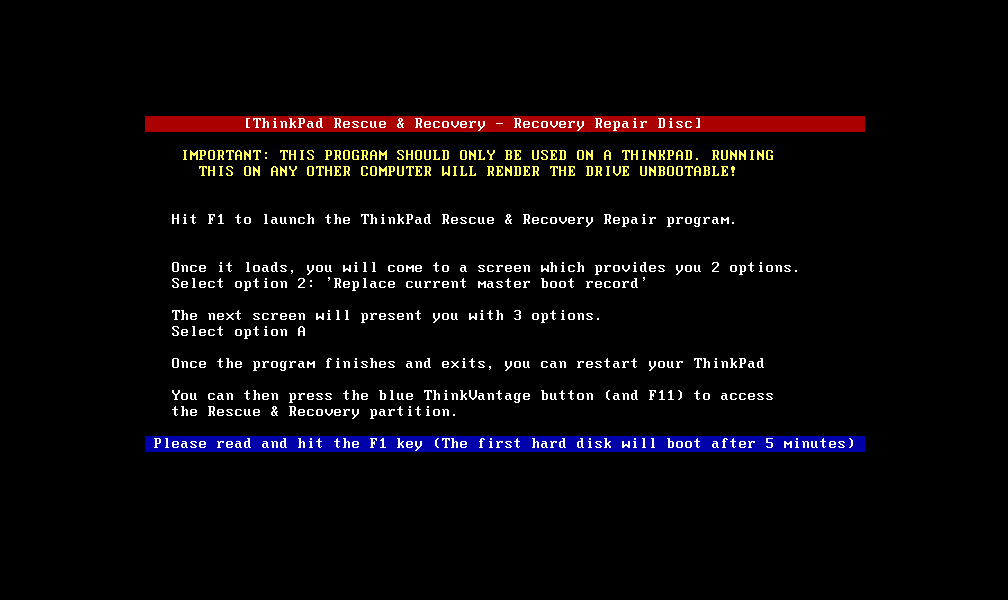
Hit F1
7. Read the next screen and hit Enter
http://img.photobucket.com/albums/v85/ramian/2.png
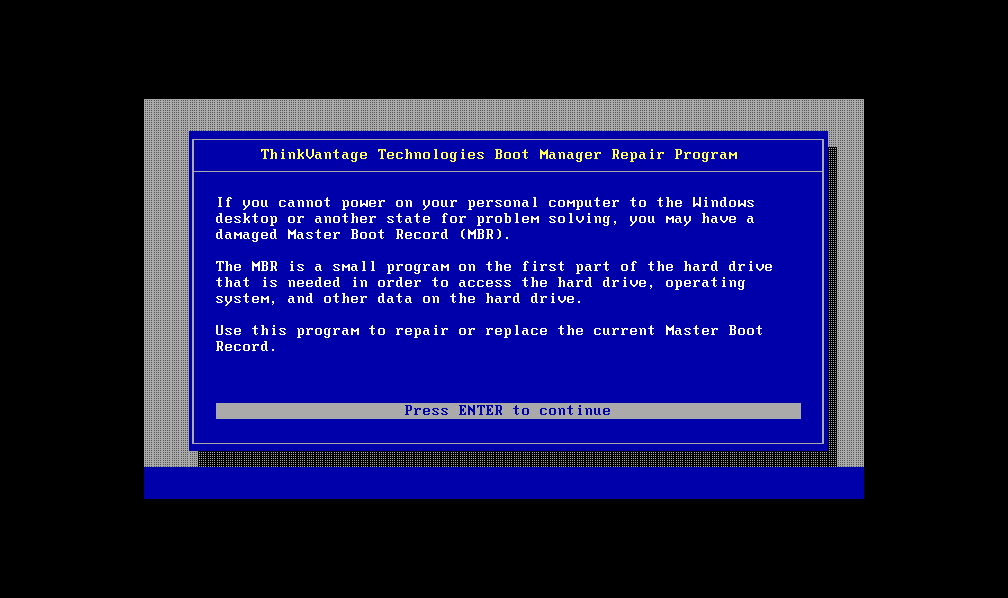
8. Select option 2
http://img.photobucket.com/albums/v85/ramian/3.png
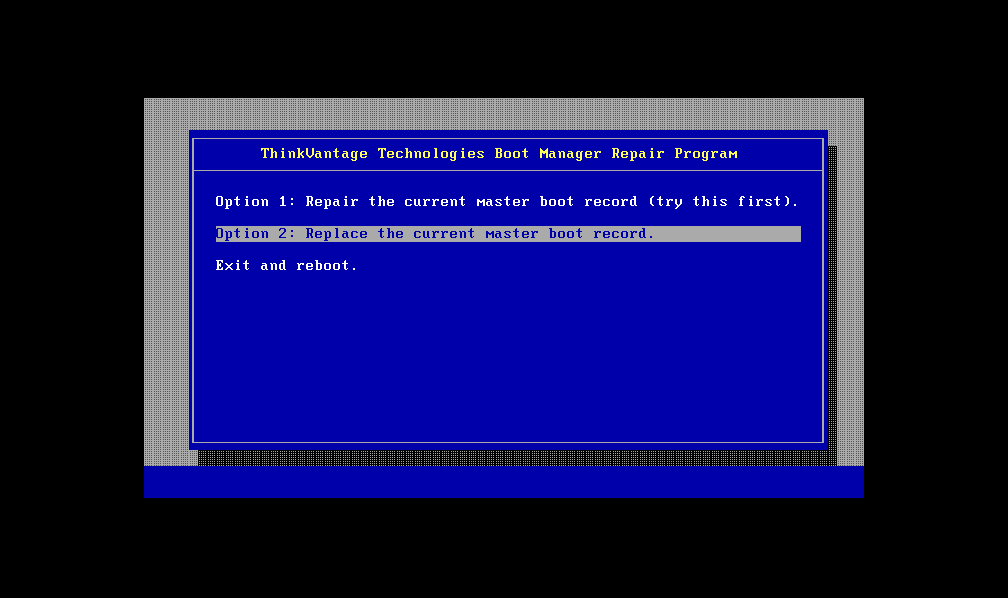
9. Select option A
http://img.photobucket.com/albums/v85/ramian/4.png
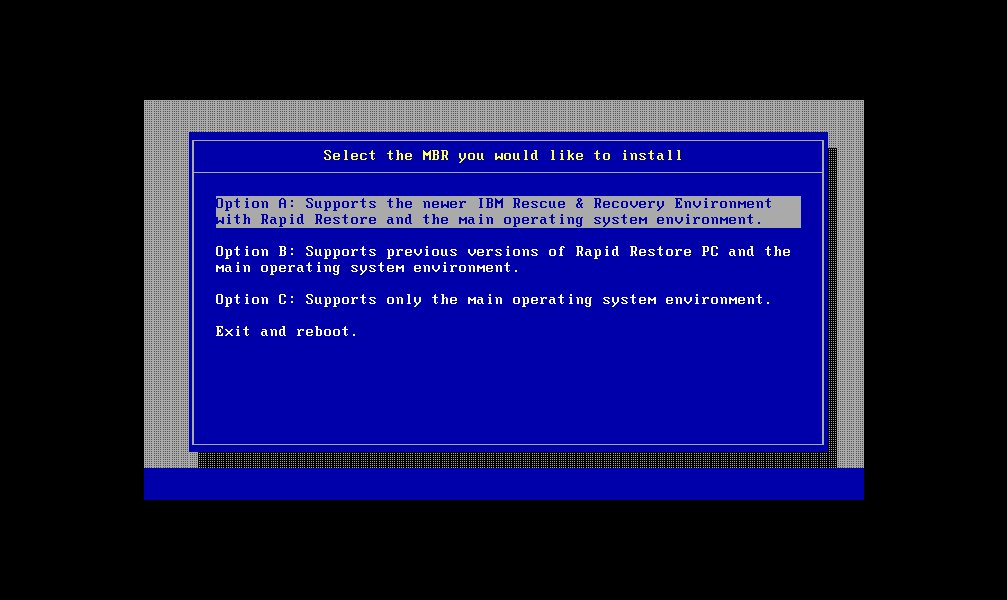
10. When it's done, you'll see the following screen
http://img.photobucket.com/albums/v85/ramian/5.png
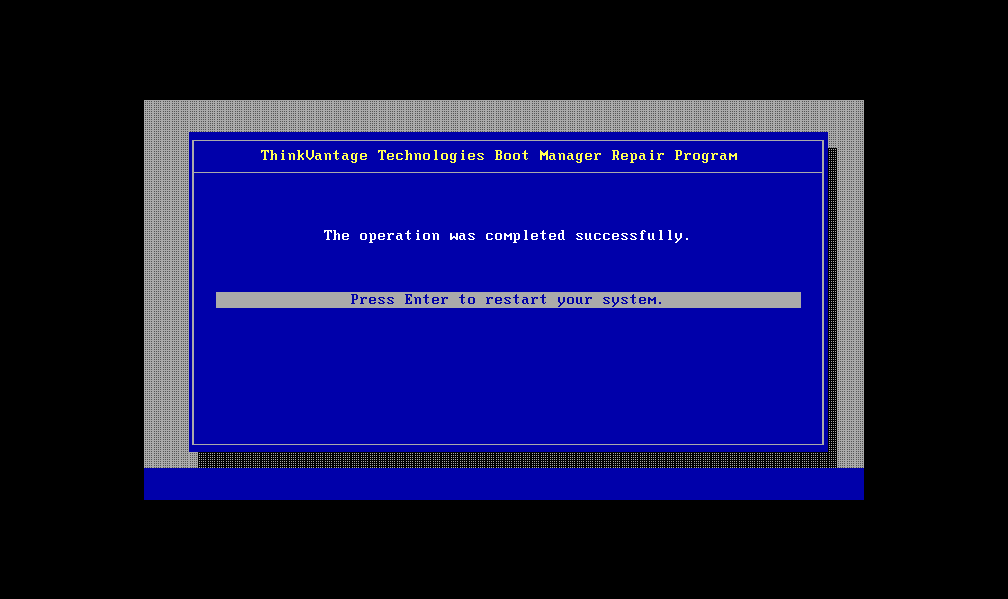
Hit Enter to exit the program. You may need to turn off your notebook and turn it back on again.
11. When you boot up, you should be able to access your ThinkVantage Rescue & Recovery partition by pressing the blue ThinkVantage button. You may/may not need to hit F11 to enter (depending on whether you're prompted).
That's it.
If anyone has any ideas on how I can improve this, please feel free to reply here. I hope this has been helpful to at least someone.
cheers!
Last edited by ramian on Sun Jun 04, 2006 4:49 am, edited 1 time in total.
Ramian, great writeup. It is a pretty scary thing to do for most people, so thanks for taking the time. Cheers, mate!
So my question is, if I blow away the R&R partition, am I still able to restore from R&R backups (the ones the software makes onto your C: drive). What do you use to boot into the recovery console, the first R&R CD?
Once you have made R&R disks, I think the only reason people keep the R&R partition is in case the machine fails when they don't have the disks handy. For me, this is pointless, as the disks are only the Lenovo build and do not have any of my corporate apps or data on them, so even if I could restore the factory build, I could only do very basic things with my machine anyway.ramian wrote:I'm wondering how you and other people have managed to keep the hidden partition accessible after doing a clean install without using this disk? Or, since everyone makes the recovery discs, they don't see the point of keeping the partition around?
So my question is, if I blow away the R&R partition, am I still able to restore from R&R backups (the ones the software makes onto your C: drive). What do you use to boot into the recovery console, the first R&R CD?
60-200763-2500-2.0-1024-1400-14.1-1400-1050-3945-100-5400
I believe you can use the R&R software to backup your current windows install to DVD. So then, you could use the recovery partition to restore your backup, instead of restoring back to factory settings. I did remember seeing an option in the R&R partition to restore only the windows partition from a backup.astro wrote:So my question is, if I blow away the R&R partition, am I still able to restore from R&R backups (the ones the software makes onto your C: drive). What do you use to boot into the recovery console, the first R&R CD?
You can still access the R&R software from the 1st R&R CD if you have lost access to the hidden partition or have completely removed it. I've already restored my T60 to factory settings twice using the recovery disc set which I made. I still haven't installed all the software that I want after I did my fresh install, and so haven't tried creating such a backup using the R&R software.
cheers!
I apologise for that. It worked when I had first uploaded it. I've updated my post above with a new location to download the image.
http://www.filefactory.com/?ac16ee
Problem with FileFactory is that they make you jump through so many hoops before you can finally download the file. I'll be trying other free file servers now and will update here.
Here's a link on YSI: http://www.yousendit.com/transfer.php?a ... 6534CFA1F6
Here's another link on SaveFile: http://www.savefile.com/files.php?fid=2030759
http://www.filefactory.com/?ac16ee
Problem with FileFactory is that they make you jump through so many hoops before you can finally download the file. I'll be trying other free file servers now and will update here.
Here's a link on YSI: http://www.yousendit.com/transfer.php?a ... 6534CFA1F6
Here's another link on SaveFile: http://www.savefile.com/files.php?fid=2030759
The Recovery Console is a Windows term. You can set Windows to give the Recovery Console as a boot option. I did this once. Windows Help and Support off of the Start Menu will give you the procedure to Install the Recovery Console as a startup option.astro wrote:So my question is, if I blow away the R&R partition, am I still able to restore from R&R backups (the ones the software makes onto your C: drive). What do you use to boot into the recovery console, the first R&R CD?
The Recovery Console is useful for some tasks, but not for restoring a R&R backup. For this you need to boot into Rescue and Recovery. You can use the first R&R CD. You can also burn a Rescue Media CD (which I believe is the same thing). Go to Start > All Programs > ThinkVantage > Create Recovery Media > Rescue Media. You can make as many of these Rescue Media CD's as you like. [I am basing this information from my T42. I believe the T60 is the same]
DKB
Great write up ramian 
I am sure your work will help many users here.
If you're not giving away proprietary secrets, what is the trick to make a bootable CD from a floppy? I've seen the option in Nero to add the boot image from a bootable floppy disk. Do you start by actually making the floppy disk, then add all the files from it to the CD, then choose to add the boot image from a bootable floppy disk? Do you use a program like Isobuster to extract the boot image from the floppy, or does Nero do this by itself?
I am sure your work will help many users here.
If you're not giving away proprietary secrets, what is the trick to make a bootable CD from a floppy? I've seen the option in Nero to add the boot image from a bootable floppy disk. Do you start by actually making the floppy disk, then add all the files from it to the CD, then choose to add the boot image from a bootable floppy disk? Do you use a program like Isobuster to extract the boot image from the floppy, or does Nero do this by itself?
Last edited by GomJabbar on Sun Jun 04, 2006 8:18 am, edited 1 time in total.
DKB
Thanks for the vote of confidence!
I've been playing around with creating bootable/bartpe cds for quite a few years now. I've got my own boot CD choke-full of programs to help me access computers when they are unbootable, corrupted, spyware/trojan/virus-infested, etc and fix them. It has come in useful on countless number of occasions when I've had to help fix/save people's computers.
All I did was to create an image of the floppy created by the program in the link you provided, create a menu/loader using cdshell and made the CD image. There was also some trial-and-error involved as I was trying out the different methods of loading the floppy image, but it got narrowed down pretty quickly.
cheers!
I've been playing around with creating bootable/bartpe cds for quite a few years now. I've got my own boot CD choke-full of programs to help me access computers when they are unbootable, corrupted, spyware/trojan/virus-infested, etc and fix them. It has come in useful on countless number of occasions when I've had to help fix/save people's computers.
All I did was to create an image of the floppy created by the program in the link you provided, create a menu/loader using cdshell and made the CD image. There was also some trial-and-error involved as I was trying out the different methods of loading the floppy image, but it got narrowed down pretty quickly.
cheers!
-
Kamika007z
- Junior Member
- Posts: 354
- Joined: Fri Apr 07, 2006 9:04 am
- Contact:
-
Kamika007z
- Junior Member
- Posts: 354
- Joined: Fri Apr 07, 2006 9:04 am
- Contact:
Hey ramian, I just tried what your tutorial, but now nothing comes up or boots, not even the C:\ or even the hidden EISA partition.
I have C:, which was my promary boot, then D:, which is an extended partition, and then the hidden partition, the CD drive is E:
Any help would be appreciated.
Thank you
I have C:, which was my promary boot, then D:, which is an extended partition, and then the hidden partition, the CD drive is E:
Any help would be appreciated.
Thank you
I'm sorry to hear that it didn't work out for you. I will try to see if I can help you solve your problem.
Were you able to get the R&R repair program and did you go through the steps as depicted in the screenshots I posted above?
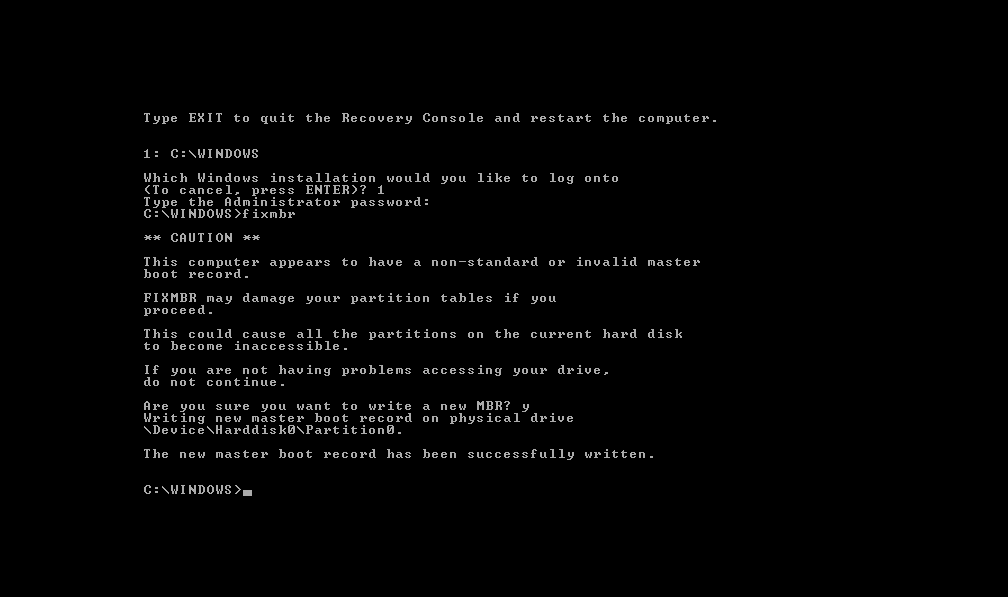
If you did that and were still unable to access either C: or the hidden partition, I would think that your MBR was somehow corrupted. One way of getting back your MBR would be to use a Windows XP CD and the 'fixmbr' program on it to restore the original MBR.
Pop in a Windows XP CD into the drive and let it load. When you get to the screen as shown in the screenshot below, press 'R' to go into the Recovery Console.
http://img.photobucket.com/albums/v85/ramian/6.png
When the following screen loads, type 1 and hit Enter.
http://img.photobucket.com/albums/v85/ramian/7.png
It will next ask for you administrator password. If you didn't set one, just hit Enter. When you get the C:\Windows prompt, run the command fixmbr.
http://img.photobucket.com/albums/v85/ramian/8.png
You will next be prompted to confirm whether you want to fix the MBR. Type y for yes and hit Enter.
If the MBR was correctly written, you should get the following message:
http://img.photobucket.com/albums/v85/ramian/9.png
You can type exit and hit Enter to restart. Now, you should be able to boot into Windows. You can try writing the new MBR again following my earlier post.
If you're still unable to access your hidden partition, I'm afraid that your problem is a bit beyond me. I will be pondering why you couldn't get it working and will update here once I figure things out.
cheers!
Were you able to get the R&R repair program and did you go through the steps as depicted in the screenshots I posted above?
If you did that and were still unable to access either C: or the hidden partition, I would think that your MBR was somehow corrupted. One way of getting back your MBR would be to use a Windows XP CD and the 'fixmbr' program on it to restore the original MBR.
Pop in a Windows XP CD into the drive and let it load. When you get to the screen as shown in the screenshot below, press 'R' to go into the Recovery Console.
http://img.photobucket.com/albums/v85/ramian/6.png
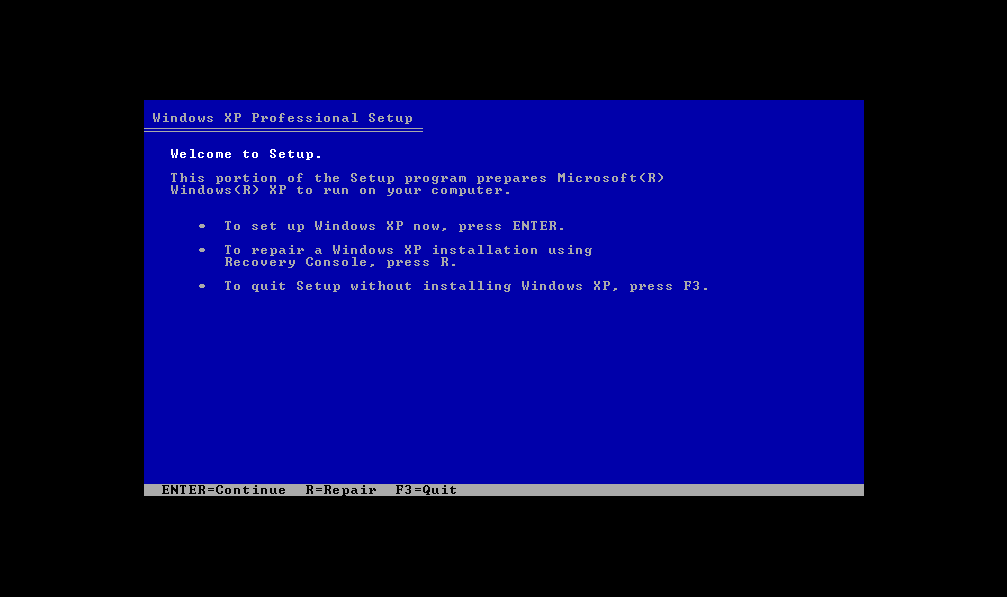
When the following screen loads, type 1 and hit Enter.
http://img.photobucket.com/albums/v85/ramian/7.png
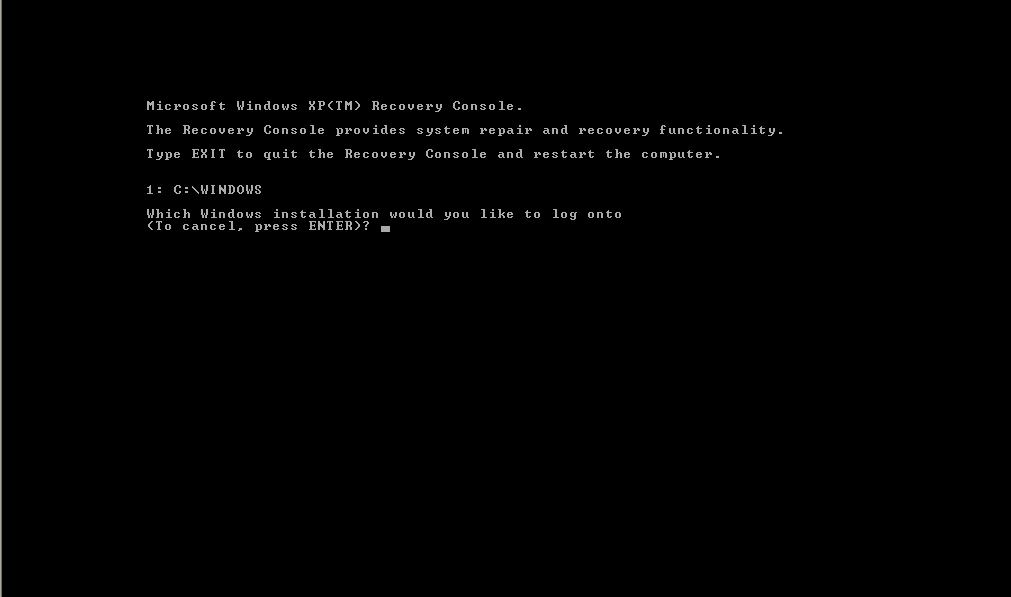
It will next ask for you administrator password. If you didn't set one, just hit Enter. When you get the C:\Windows prompt, run the command fixmbr.
http://img.photobucket.com/albums/v85/ramian/8.png
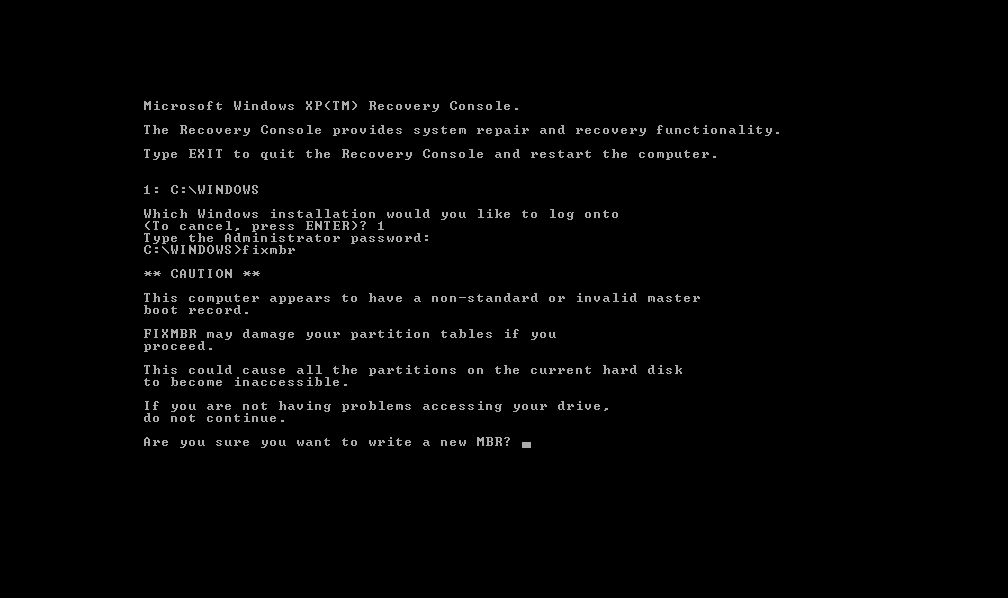
You will next be prompted to confirm whether you want to fix the MBR. Type y for yes and hit Enter.
If the MBR was correctly written, you should get the following message:
http://img.photobucket.com/albums/v85/ramian/9.png
You can type exit and hit Enter to restart. Now, you should be able to boot into Windows. You can try writing the new MBR again following my earlier post.
If you're still unable to access your hidden partition, I'm afraid that your problem is a bit beyond me. I will be pondering why you couldn't get it working and will update here once I figure things out.
cheers!
Can I learn how you took the screenshots?
ramian wrote:I'm sorry to hear that it didn't work out for you. I will try to see if I can help you solve your problem.
Were you able to get the R&R repair program and did you go through the steps as depicted in the screenshots I posted above?
If you did that and were still unable to access either C: or the hidden partition, I would think that your MBR was somehow corrupted. One way of getting back your MBR would be to use a Windows XP CD and the 'fixmbr' program on it to restore the original MBR.
Pop in a Windows XP CD into the drive and let it load. When you get to the screen as shown in the screenshot below, press 'R' to go into the Recovery Console.
http://img.photobucket.com/albums/v85/ramian/6.png
When the following screen loads, type 1 and hit Enter.
http://img.photobucket.com/albums/v85/ramian/7.png
It will next ask for you administrator password. If you didn't set one, just hit Enter. When you get the C:\Windows prompt, run the command fixmbr.
http://img.photobucket.com/albums/v85/ramian/8.png
You will next be prompted to confirm whether you want to fix the MBR. Type y for yes and hit Enter.
If the MBR was correctly written, you should get the following message:
http://img.photobucket.com/albums/v85/ramian/9.png
You can type exit and hit Enter to restart. Now, you should be able to boot into Windows. You can try writing the new MBR again following my earlier post.
If you're still unable to access your hidden partition, I'm afraid that your problem is a bit beyond me. I will be pondering why you couldn't get it working and will update here once I figure things out.
cheers!
It would be nigh impossible to take screenshots on a real PC when doing a Windows install. I ran it in VMWare and took the screenshots of it running.bessel wrote:Can I learn how you took the screenshots?
@Kamika007z,
I know I didn't mention this earlier, but you may want to set the SATA to compatibility mode. That might be why it wasn't working for you. I do apologise for not mentioning this earlier. I guess I just completely forgot about it.
-
Kamika007z
- Junior Member
- Posts: 354
- Joined: Fri Apr 07, 2006 9:04 am
- Contact:
Hey ramian,
No worries. Thank you, I really do appreciate the time that you are taking for replying back back to me.
I did not have my Windows XP cd on me, but I did make an Acronis TI 9.1 backup onto my D drive.
I also have a R&R disk 1 made onto a DVD.
Since I wasn't able to wait this whole weekend to get back to my office and use the XP CD where I had left it. I went ahead to try to restore it from Acronis where I imaged both the C drive and the hidden partiton. Trying to restore that made Acronis said that my backup was not valid.
So then I decided to use the R&R DVD. I got to the point where I was redoing everything. It was reloading the whole computer back to a factory install (I've had my TP for about a week now, so nothing critical was on it). However, I only had that disk 1 with me. Now it keeps asking for the "Product Recovery Supplemental Disc" to continue the recovery, but I never made the rest.
Now I'm trying to install XP from my XP CD and its saying that setup did not find my HDD. Any help? How can I access the BIOS because when I press the blue thinkvantage button, it takes me straight to the R&R.
I am going to try to install a fresh copy of windows, but I would like to know how to restore the backup partition because I do not see it there anymore. Any help whatsoever in anything would be highly appreciated.
Thank you
No worries. Thank you, I really do appreciate the time that you are taking for replying back back to me.
I did not have my Windows XP cd on me, but I did make an Acronis TI 9.1 backup onto my D drive.
I also have a R&R disk 1 made onto a DVD.
Since I wasn't able to wait this whole weekend to get back to my office and use the XP CD where I had left it. I went ahead to try to restore it from Acronis where I imaged both the C drive and the hidden partiton. Trying to restore that made Acronis said that my backup was not valid.
So then I decided to use the R&R DVD. I got to the point where I was redoing everything. It was reloading the whole computer back to a factory install (I've had my TP for about a week now, so nothing critical was on it). However, I only had that disk 1 with me. Now it keeps asking for the "Product Recovery Supplemental Disc" to continue the recovery, but I never made the rest.
Now I'm trying to install XP from my XP CD and its saying that setup did not find my HDD. Any help? How can I access the BIOS because when I press the blue thinkvantage button, it takes me straight to the R&R.
I am going to try to install a fresh copy of windows, but I would like to know how to restore the backup partition because I do not see it there anymore. Any help whatsoever in anything would be highly appreciated.
Thank you
-
Kamika007z
- Junior Member
- Posts: 354
- Joined: Fri Apr 07, 2006 9:04 am
- Contact:
-
- Similar Topics
- Replies
- Views
- Last post
-
-
ECB69E00-CCCDCCCD Files Created in Root of Every Partition: What Are They and How to Remove?
by geometrylitepc » Mon Apr 13, 2026 9:12 pm » in ThinkPad T60/T61 Series - 2 Replies
- 660 Views
-
Last post by RealBlackStuff
Tue Apr 14, 2026 3:42 am
-
-
-
Can I restore T14 Gen2 after reset using backup of SSD?
by Thinkpad2024 » Sat Nov 01, 2025 9:33 pm » in Thinkpad T14/T15/T16 - 4 Replies
- 9363 Views
-
Last post by axur-delmeria
Sun Nov 02, 2025 2:30 pm
-
-
-
X200 Tablet Factory Restore - Help Needed
by Danny_Dorito » Sat Feb 21, 2026 9:49 pm » in ThinkPad X200/X201/X220 and X300/X301 Series - 1 Replies
- 2731 Views
-
Last post by teamde78
Wed Mar 25, 2026 8:29 pm
-
Who is online
Users browsing this forum: No registered users and 75 guests