Vanity Post: Resurrecting a Thinkpad X61s *PICS*

X60/X61 series specific matters only.
Post Reply
Message
Author
gonzales
Posts: 17
Joined: Thu Feb 23, 2006 6:03 am

Vanity Post: Resurrecting a Thinkpad X61s *PICS*

#1 Post by gonzales » Tue Jun 11, 2013 12:23 pm

Image

Image

For the past few years, my primary machine at home has been a 2010 11” MacBook Air which has served me pretty well for light browsing, multimedia and even some light programming in Objective-C and Java. However, I recently picked up ASP.net programming for a personal project and needed a machine running Windows. I could have dual booted my MBA but the meagre 128gb SSD was scarcely enough for Mac OSX, much less dual booting. Thankfully, a co-worker passed me his old Thinkpad X61s and its accompanying dock, thereby reconnecting me with the Thinkpad family (was using a X31 prior to the MBA). The convenience of docking and familiar keyboard layout instantly rekindled my love for Thinkpads. With that, I embarked on a journey to trick out the X61s and bring it up to date with current devices.

Work done so far on the Thinkpad X61s
  • Wireless Card: Replacement of Wifi module with Intel 6250N for Wireless-N and lower heat output. - $9.99 from eBay
  • Battery: Replacement of 4-cell battery with an original Lenovo 8-cell battery for improved battery life. The 4-cell was on its last legs and could only hold charge for about an hour. - $60 from a local dealer after some significant discount.
  • Battery Spacer: Addition of Lenovo Battery Spacer (Part no. 42W3050) so that the X61s sits stable by itself. - $5.99 from Ebay
  • RAM: Installed 4gb (2x2gb) RAM although the max usable on my Win7 32bit is 3gb. - $36 from a local dealer
  • Solid State Disk: Replaced HDD with a KINGMAX SMP35 120gb SSD. It’s not exactly a top-of-the-line SSD but it was the cheapest I could get from where I stay. I figured there wasn’t much point in going high end since the mobo is limited to SATA II anyway. - $93 from a local dealer
  • Laptop Skin: Pasted faux leather skins on the cover and palm-rest to mask the flaky bits on the X61s (my co-worker wasn’t very gentle with his possessions). In fact, I think it looks even better than a brand new machine now! $21 from eBay
  • Thermal Compound: Found the temperature of the X61s to be slightly too high for comfort so I reapplied thermal compound on the heat-sinks with Arctic MX-4. - $10 from a local dealer
  • Fan Cleaning: When reapplying the thermal compound, I took the chance to clean the main fan. – Free
  • Software Installations: Installed Middleton BIOS to enable SATA II (SSD) and device whitelist (Intel 6250N). TPFanControl for better temperature management, which really helped because the X61s stopped crashing when playing HD videos with it installed. – Free
  • [Update: Sep 2013] Broadcom Crystal HD BCM70015: Added a BCM70015 to the second Mini PCI Express port for improved video playback, e.g. 1080p YouTube videos. – $25 from eBay

For around $240, I think I’ve pretty much maxed out what I could do with this machine, and it runs better than I expected it to. I’m not a gamer so the weak graphics card isn’t an issue for me. In fact, I’m spending so much time on the X61s that I’m kinda neglecting my MBA. Much thanks to fellow users who have posted about their customizations and those helped me out with their kind advice (especially on the battery spacer). I’m glad to report that I didn’t have any issues with the screws on the wireless module and they came off easily with a standard screwdriver. However, I did face slight difficulties in removing the palm-rest and it certainly wasn’t as easy as described in the service manual. Also, since I’m located in Asia, I couldn’t get my hands on cheaper alternatives for some of the items listed, which would have cost more if international shipping from US were included.

I could gone all the way with 8gb RAM but there’s no real need for a 64bit OS and they are simply too expensive right now. Also, some would suggest the SXGA+ screen upgrade but I work primarily at a desk, with the dock connected to a Dell 2407WFP so the built-in screen resolution doesn’t hurt me hard enough to warrant an upgrade. Lastly, some might say that the money could have gone towards buying a more capable machine but frankly, the X61s was given to me free and the geek in me wanted to give it a second life so cost was really a secondary concern (though I wouldn’t pay exorbitant amounts for any given functionality, e.g. SSD and RAM).

Pardon my lengthy post but if there are any other suggestions to improve my X61s, do reply here and I’ll definitely consider them. I would also be glad to answer any questions regarding the customizations I’ve done. Cheers!
Last edited by gonzales on Sun Sep 01, 2013 9:21 pm, edited 2 times in total.

dr_st
Senior ThinkPadder
Senior ThinkPadder
Posts: 6651
Joined: Sat Oct 29, 2005 6:20 am

Re: Vanity Post: Resurrecting a Thinkpad X61s *PICS*

#2 Post by dr_st » Wed Jun 12, 2013 3:17 am

It looks totally awesome! :bow:
Current: X220 4291-4BG, T410 2537-R46, T60 1952-F76, T60 2007-QPG, T42 2373-F7G
Collectibles: T430s (IPS FHD + Classic Keyboard), X32 (IPS Screen)
Retired: X61 7673-V2V, A31p w/ Ultrabay Numpad
Past: Z61t 9440-A23, T60 2623-D3U, X32 2884-M5U

ZaZ
moderator
moderator
Posts: 4458
Joined: Fri May 13, 2005 1:33 pm
Location: Minnesota

Re: Vanity Post: Resurrecting a Thinkpad X61s *PICS*

#3 Post by ZaZ » Wed Jun 12, 2013 4:28 am

Very nice indeed.
E7440

axur-delmeria
ThinkPadder
ThinkPadder
Posts: 1270
Joined: Mon May 28, 2012 5:49 am
Location: Metro Manila, Philippines

Re: Vanity Post: Resurrecting a Thinkpad X61s *PICS*

#4 Post by axur-delmeria » Thu Jun 13, 2013 2:01 am

Getting a working Thinkpad for free is certainly a nice gift. :D

Though I'm not a fan of laptop skins, I have to admit that the faux-leather skin looks good on it. I think it's because it retains the business-like demeanor of the Thinkpad. Very nice work. :)
Daily driver: X220 4291-P79 i5-2520M

In reserve: X61 T7500, X60 T2300
In pieces: X60s CS U1300 [board only], two retired but working X61Ts
RIP: 760XD 9546-U9E

gonzales
Posts: 17
Joined: Thu Feb 23, 2006 6:03 am

Re: Vanity Post: Resurrecting a Thinkpad X61s *PICS*

#5 Post by gonzales » Thu Jun 13, 2013 9:22 pm

axur-delmeria wrote:Getting a working Thinkpad for free is certainly a nice gift. :D

Though I'm not a fan of laptop skins, I have to admit that the faux-leather skin looks good on it. I think it's because it retains the business-like demeanor of the Thinkpad. Very nice work. :)
Thanks for the compliment. Was kinda worried about the durability of the skin but it seems to be holding up quite well for now. It was rather effortless to apply too. Will report back after a couple of months on the wear and tear, if any.

Anyway, I was searching for an affordable laptop case for the X61s. There are numerous posts on the forum discussing this topic but many of them are rather dated and the cases are either EOL/OOS or do not fit the X61s with extended battery. It doesn't help that the newer cases are designed for laptops with wide aspect screens so the choices available are really limited. For my MBA, I was using a Case Logic 12" Neoprene Sleeve (LNEO-12-BLACK). It fits the MBA and X61s with 4-cell battery snugly but not the X61s with 8-cell.

Having had a good experience with Case Logic, I started looking through their catalog for a suitable lightweight/compact replacement. There were several sleeves that would have fit, but I preferred one with handles for ease of handling. In the end, I went with the Case Logic 14.1-Inch Laptop Attache(VNA214). It's surprisingly lightweight and offers protection against a secondary device as well (e.g. tablet or even another laptop). Unfortunately, the 14" version is no longer listed on their website so if anyone else is keen, do grab one from Amazon before stocks run dry!

RealBlackStuff
Admin
Admin
Posts: 17500
Joined: Mon Sep 18, 2006 5:17 am
Location: Mt. Cobb, PA USA
Contact:

Re: Vanity Post: Resurrecting a Thinkpad X61s *PICS*

#6 Post by RealBlackStuff » Fri Jun 14, 2013 6:34 am

I travel with an X61s with 8-cell battery.
I'm using this very same bag: http://www.amazon.com/MarWare-SportFoli ... B000E1EFRY
The frontbag is big enough for the charger.
Lovely day for a Guinness! (The Real Black Stuff)

Check out The Boardroom for Parts, Mods and Other Services.

Saucey
Senior Member
Senior Member
Posts: 836
Joined: Tue Nov 06, 2012 9:22 pm
Location: San Diego, California
Contact:

Re: Vanity Post: Resurrecting a Thinkpad X61s *PICS*

#7 Post by Saucey » Wed Aug 07, 2013 3:35 pm

That laptop skin is beautiful, looks very nice as a palmrest. :thumbs-UP:
I think I will "copy" you and get for one of my x series laptops!
Incompitent(sp?) Electronic Recycler: caffeine addicted, techno blasting, ThinkPad hoarder.

Current: T430s, T431s, Pixel, MC207LL/A
Still around: X61T, A31p, T43p
Past: W700ds, X1C3, 701C, T60p

Thinkpaddict
Senior Member
Senior Member
Posts: 504
Joined: Fri Sep 09, 2005 9:15 am
Location: Sacramento, California

Re: Vanity Post: Resurrecting a Thinkpad X61s *PICS*

#8 Post by Thinkpaddict » Wed Aug 07, 2013 4:51 pm

Great job, as mentioned before, that laptop skin looks quite luxurious. :D

Shredder11
Junior Member
Junior Member
Posts: 259
Joined: Sat Jun 30, 2012 6:25 pm
Location: Bradford, West Yorkshire, England

Re: Vanity Post: Resurrecting a Thinkpad X61s *PICS*

#9 Post by Shredder11 » Mon Oct 07, 2013 4:51 pm

Did you also install the Middleton BIOS so the Broadcom BCM970015 HD Crystal Hardware Decoder for 1080i Apple TV would work? I ask because my X61s as a password protected BIOS which I cannot access, but I would dearly love to install this video card!
Z61p x3 (C2D T7600, 3GB, 500GB SSD, BCM70015, Advanced Dock x1, Mini Dock x2)
X61 (C2D T7500, 3GB, 250GB SSD, BCM70015)
X61s (2GB, 120GB SSD)
X60s (CD L2400, 3GB, 160GB)
T43p (P M 760, 2GB, IBM Port Replicator II)
G40 x2 (P4 2.8GHz, 2GB, 60GB)
G41 (P4 3.46GHz, 2GB, 40GB)

Temetka
Senior ThinkPadder
Senior ThinkPadder
Posts: 2790
Joined: Fri Sep 30, 2005 3:27 am
Location: Glendora, CA

Re: Vanity Post: Resurrecting a Thinkpad X61s *PICS*

#10 Post by Temetka » Mon Oct 07, 2013 10:48 pm

I'm not typically a fan of laptop skins either, but I do have to admit that the faux leather one the OP chose does look rather nice.
New:
Thinkpad T430s 8GB DDR3, 1600x900, 128GB + 250GB SSD's, etc.
Old:
E6520, Precision M4400, D630, Latitude E6520
ThinkPad Tablet 16GB 1838-22U
IBM Thinkpad X61T, T61, T43, X41T, T60, T41P, T42, T410, X301

gonzales
Posts: 17
Joined: Thu Feb 23, 2006 6:03 am

Re: Vanity Post: Resurrecting a Thinkpad X61s *PICS*

#11 Post by gonzales » Tue Oct 08, 2013 2:50 am

Shredder11 wrote:Did you also install the Middleton BIOS so the Broadcom BCM970015 HD Crystal Hardware Decoder for 1080i Apple TV would work? I ask because my X61s as a password protected BIOS which I cannot access, but I would dearly love to install this video card!
I installed the Middleton BIOS prior to the Broadcom card, so I wouldn't know whether it is a requirement. However, searching on the forums seems to indicate that it is necessary to have a white-list disabled BIOS (http://forum.thinkpads.com/viewtopic.ph ... 38&start=0).
Last edited by gonzales on Tue Oct 08, 2013 3:02 am, edited 1 time in total.

gonzales
Posts: 17
Joined: Thu Feb 23, 2006 6:03 am

Re: Vanity Post: Resurrecting a Thinkpad X61s *PICS*

#12 Post by gonzales » Tue Oct 08, 2013 3:00 am

Temetka wrote:I'm not typically a fan of laptop skins either, but I do have to admit that the faux leather one the OP chose does look rather nice.
Thanks! Unfortunately, my relatively short journey with the X61s has come to an end. My father required a laptop for work so I passed the X61s to him. On the bright side, I got a X200 for myself as a replacement! Extremely pleased with the higher-resolution screen and cheap DDR3 RAM. Won't be sprucing it up much other than SSD and 8gb RAM for now though.

Shredder11
Junior Member
Junior Member
Posts: 259
Joined: Sat Jun 30, 2012 6:25 pm
Location: Bradford, West Yorkshire, England

Re: Vanity Post: Resurrecting a Thinkpad X61s *PICS*

#13 Post by Shredder11 » Tue Oct 08, 2013 3:20 am

Thanks for the reply and so quick too. I'm going to open up the X61s and disconnect the CMOS battery for a few hours, to see if it will clear the BIOS password and allow me access. If I can then I will upgrade the BIOS with a non-whitelist version and then buy one of those mini-PCI video cards. This laptop belongs to my mum who has been in hospital for four months straight, and is returning home in a couple of days. It would be nice for her to watch decent quality TV and YouTube videos on it.

I'm also wondering about adding the same card to my Z61p which does have a decent-ish discrete ATi Mobility FireGL v5200 video chip, but additional assistance from another card may help with processing duties and lower the overall temps. Not sure yet.
Z61p x3 (C2D T7600, 3GB, 500GB SSD, BCM70015, Advanced Dock x1, Mini Dock x2)
X61 (C2D T7500, 3GB, 250GB SSD, BCM70015)
X61s (2GB, 120GB SSD)
X60s (CD L2400, 3GB, 160GB)
T43p (P M 760, 2GB, IBM Port Replicator II)
G40 x2 (P4 2.8GHz, 2GB, 60GB)
G41 (P4 3.46GHz, 2GB, 40GB)

Temetka
Senior ThinkPadder
Senior ThinkPadder
Posts: 2790
Joined: Fri Sep 30, 2005 3:27 am
Location: Glendora, CA

Re: Vanity Post: Resurrecting a Thinkpad X61s *PICS*

#14 Post by Temetka » Tue Oct 08, 2013 4:07 am

I could be wrong, but if you apply Middleton's BIOS won't that clear the password?

On a side note, I do envy you on the cheap DDR3 RAM.

I'll be adding at least 1 4GB chip to my X61T to take it to 6GB, but a full 8 would be even better. Also a Broadcom card and some other things. I have thread about it, so I won't clutter up yours talking about my build.

Enjoy your new machine. :)
New:
Thinkpad T430s 8GB DDR3, 1600x900, 128GB + 250GB SSD's, etc.
Old:
E6520, Precision M4400, D630, Latitude E6520
ThinkPad Tablet 16GB 1838-22U
IBM Thinkpad X61T, T61, T43, X41T, T60, T41P, T42, T410, X301

Shredder11
Junior Member
Junior Member
Posts: 259
Joined: Sat Jun 30, 2012 6:25 pm
Location: Bradford, West Yorkshire, England

Re: Vanity Post: Resurrecting a Thinkpad X61s *PICS*

#15 Post by Shredder11 » Tue Oct 08, 2013 6:21 am

I left the CMOS disconnected for four hours and the BIOS password is still there, but worse than this I cannot boot into Windows anymore because it demands a BIOS password. :( Think the laptop is bricked now... Any more ideas?
Z61p x3 (C2D T7600, 3GB, 500GB SSD, BCM70015, Advanced Dock x1, Mini Dock x2)
X61 (C2D T7500, 3GB, 250GB SSD, BCM70015)
X61s (2GB, 120GB SSD)
X60s (CD L2400, 3GB, 160GB)
T43p (P M 760, 2GB, IBM Port Replicator II)
G40 x2 (P4 2.8GHz, 2GB, 60GB)
G41 (P4 3.46GHz, 2GB, 40GB)

RealBlackStuff
Admin
Admin
Posts: 17500
Joined: Mon Sep 18, 2006 5:17 am
Location: Mt. Cobb, PA USA
Contact:

Re: Vanity Post: Resurrecting a Thinkpad X61s *PICS*

#16 Post by RealBlackStuff » Tue Oct 08, 2013 7:09 am

Check your new messages.
Lovely day for a Guinness! (The Real Black Stuff)

Check out The Boardroom for Parts, Mods and Other Services.

Shredder11
Junior Member
Junior Member
Posts: 259
Joined: Sat Jun 30, 2012 6:25 pm
Location: Bradford, West Yorkshire, England

Re: Vanity Post: Resurrecting a Thinkpad X61s *PICS*

#17 Post by Shredder11 » Tue Oct 08, 2013 9:48 am

Another few hours later and I am finally back in Windows, after searching the net and finding a method of shorting two pins of a chip on the motherboard to regain access to the BIOS. I then replaced the lost settings for boot order etc, however the BIOS is still protected with a Supervisor Password.
Z61p x3 (C2D T7600, 3GB, 500GB SSD, BCM70015, Advanced Dock x1, Mini Dock x2)
X61 (C2D T7500, 3GB, 250GB SSD, BCM70015)
X61s (2GB, 120GB SSD)
X60s (CD L2400, 3GB, 160GB)
T43p (P M 760, 2GB, IBM Port Replicator II)
G40 x2 (P4 2.8GHz, 2GB, 60GB)
G41 (P4 3.46GHz, 2GB, 40GB)

Shredder11
Junior Member
Junior Member
Posts: 259
Joined: Sat Jun 30, 2012 6:25 pm
Location: Bradford, West Yorkshire, England

Re: Vanity Post: Resurrecting a Thinkpad X61s *PICS*

#18 Post by Shredder11 » Tue Oct 08, 2013 5:25 pm

I've just ordered one of those Broadcom Crystal HD BCM70015 mini-PCI video cards, so I am crossing my fingers that my locked BIOS allows it to work. Bought it from Ebay seller dvbforfun (Digitallife Online Store).
Z61p x3 (C2D T7600, 3GB, 500GB SSD, BCM70015, Advanced Dock x1, Mini Dock x2)
X61 (C2D T7500, 3GB, 250GB SSD, BCM70015)
X61s (2GB, 120GB SSD)
X60s (CD L2400, 3GB, 160GB)
T43p (P M 760, 2GB, IBM Port Replicator II)
G40 x2 (P4 2.8GHz, 2GB, 60GB)
G41 (P4 3.46GHz, 2GB, 40GB)

Temetka
Senior ThinkPadder
Senior ThinkPadder
Posts: 2790
Joined: Fri Sep 30, 2005 3:27 am
Location: Glendora, CA

Re: Vanity Post: Resurrecting a Thinkpad X61s *PICS*

#19 Post by Temetka » Thu Oct 10, 2013 6:49 am

Shredder11 wrote:Another few hours later and I am finally back in Windows, after searching the net and finding a method of shorting two pins of a chip on the motherboard to regain access to the BIOS. I then replaced the lost settings for boot order etc, however the BIOS is still protected with a Supervisor Password.
I believe the password is stored in a separate chip from the BIOS.

Forum rules do not allow us to tell you how to bypass that. Sorry.
New:
Thinkpad T430s 8GB DDR3, 1600x900, 128GB + 250GB SSD's, etc.
Old:
E6520, Precision M4400, D630, Latitude E6520
ThinkPad Tablet 16GB 1838-22U
IBM Thinkpad X61T, T61, T43, X41T, T60, T41P, T42, T410, X301

Shredder11
Junior Member
Junior Member
Posts: 259
Joined: Sat Jun 30, 2012 6:25 pm
Location: Bradford, West Yorkshire, England

Re: Vanity Post: Resurrecting a Thinkpad X61s *PICS*

#20 Post by Shredder11 » Thu Oct 10, 2013 12:04 pm

That's ok I think I have already found the answer to the password problem via Google ;) Trouble is the kit to do it costs as much as another X61s notebook from Ebay, and the kit is one of the cheapest ones! :o
Z61p x3 (C2D T7600, 3GB, 500GB SSD, BCM70015, Advanced Dock x1, Mini Dock x2)
X61 (C2D T7500, 3GB, 250GB SSD, BCM70015)
X61s (2GB, 120GB SSD)
X60s (CD L2400, 3GB, 160GB)
T43p (P M 760, 2GB, IBM Port Replicator II)
G40 x2 (P4 2.8GHz, 2GB, 60GB)
G41 (P4 3.46GHz, 2GB, 40GB)

tjwasiak
Posts: 22
Joined: Fri Apr 19, 2013 3:22 pm
Location: Warsaw, Poland

Re: Vanity Post: Resurrecting a Thinkpad X61s *PICS*

#21 Post by tjwasiak » Thu Oct 10, 2013 12:52 pm

Today I managed to remove supervisor password in X61 I bought for parts (I did not need the mainboard as I already have Penryn equipped one) without any kit. I found solution in the internet - no soldering, no reflashing...

Shredder11
Junior Member
Junior Member
Posts: 259
Joined: Sat Jun 30, 2012 6:25 pm
Location: Bradford, West Yorkshire, England

Re: Vanity Post: Resurrecting a Thinkpad X61s *PICS*

#22 Post by Shredder11 » Thu Oct 10, 2013 5:15 pm

@ tjwasiak

Send me a private message on how to do this please. :)
Z61p x3 (C2D T7600, 3GB, 500GB SSD, BCM70015, Advanced Dock x1, Mini Dock x2)
X61 (C2D T7500, 3GB, 250GB SSD, BCM70015)
X61s (2GB, 120GB SSD)
X60s (CD L2400, 3GB, 160GB)
T43p (P M 760, 2GB, IBM Port Replicator II)
G40 x2 (P4 2.8GHz, 2GB, 60GB)
G41 (P4 3.46GHz, 2GB, 40GB)

Shredder11
Junior Member
Junior Member
Posts: 259
Joined: Sat Jun 30, 2012 6:25 pm
Location: Bradford, West Yorkshire, England

Re: Vanity Post: Resurrecting a Thinkpad X61s *PICS*

#23 Post by Shredder11 » Sat Oct 19, 2013 1:09 pm

I received my Broadcom Crystal HD BCM70015 mini-PCI video card a few days ago, and opened up my X61s to install it but one of the screw heads became rounded with the screwdriver, so I could not remove the WWAN card. I decided to try the card in my Z61p laptop empty WWAN port instead and initially nothing showed up in the Windows 7 device manager, so I flashed the BIOS with a non-whitelist version and the card finally appeared. However it appears in the 'Network adapters' section as a 'Microsoft Virtual WiFi Miniport Adapter'. When I run the Broadcom driver package it says no card is present and abandons the install. So is this what happened when you were installing this card in your X61s, and if so how did you overcome this?
Z61p x3 (C2D T7600, 3GB, 500GB SSD, BCM70015, Advanced Dock x1, Mini Dock x2)
X61 (C2D T7500, 3GB, 250GB SSD, BCM70015)
X61s (2GB, 120GB SSD)
X60s (CD L2400, 3GB, 160GB)
T43p (P M 760, 2GB, IBM Port Replicator II)
G40 x2 (P4 2.8GHz, 2GB, 60GB)
G41 (P4 3.46GHz, 2GB, 40GB)

axur-delmeria
ThinkPadder
ThinkPadder
Posts: 1270
Joined: Mon May 28, 2012 5:49 am
Location: Metro Manila, Philippines

Re: Vanity Post: Resurrecting a Thinkpad X61s *PICS*

#24 Post by axur-delmeria » Sat Oct 19, 2013 3:37 pm

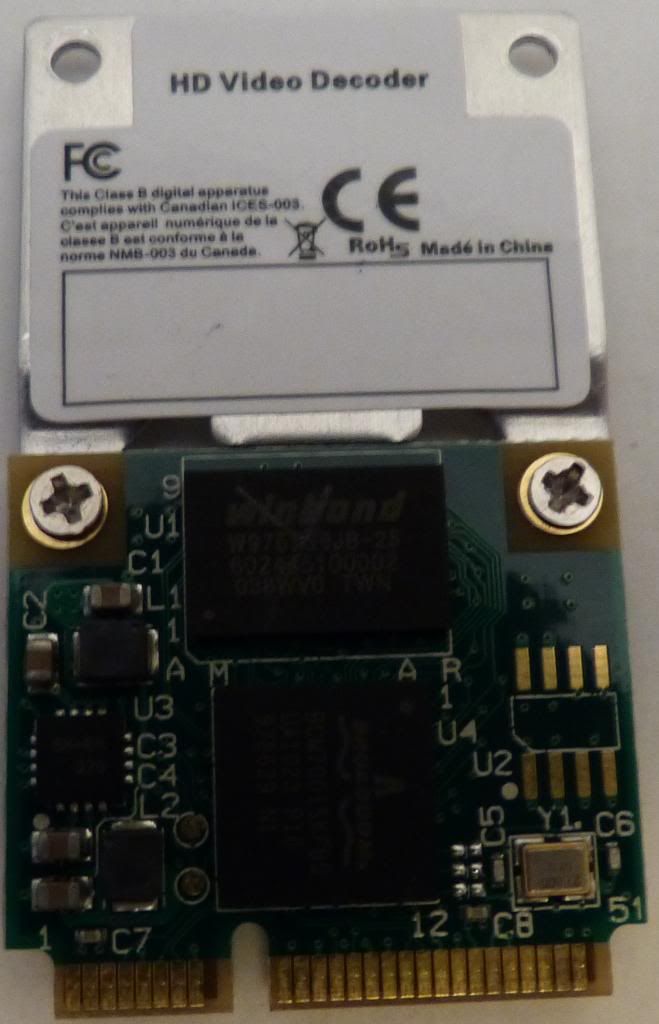
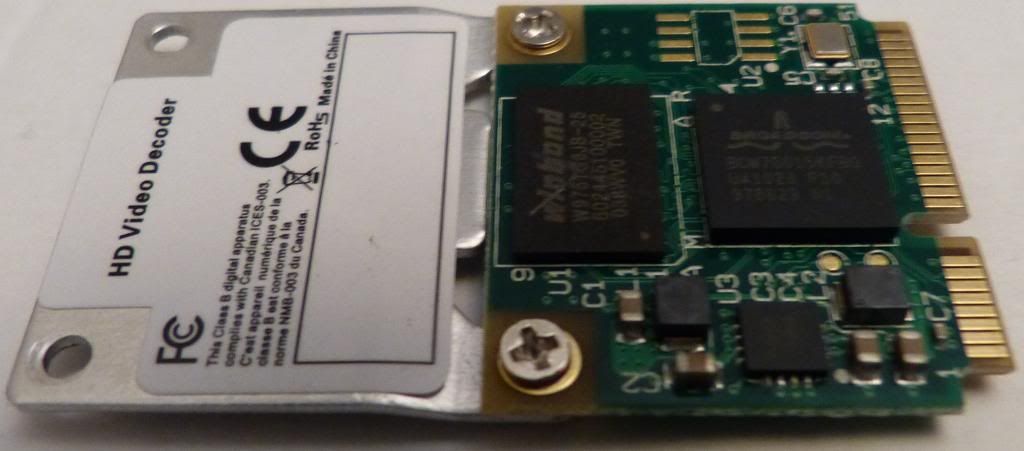
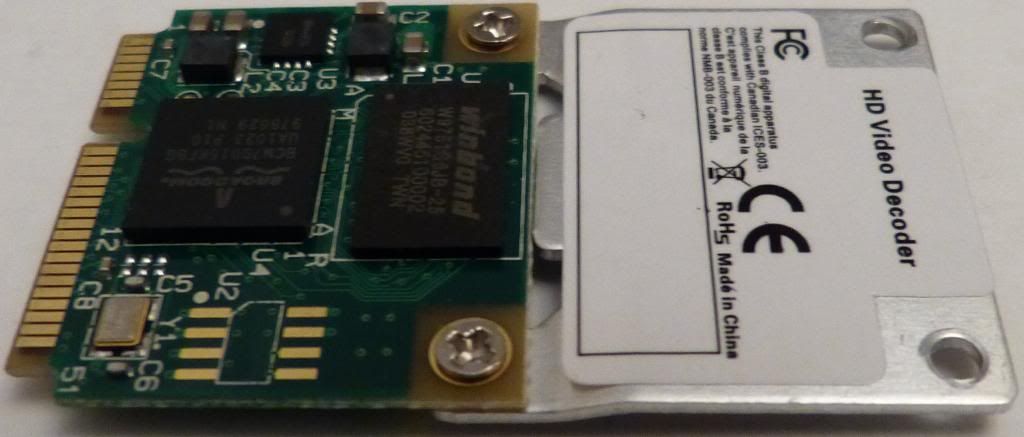
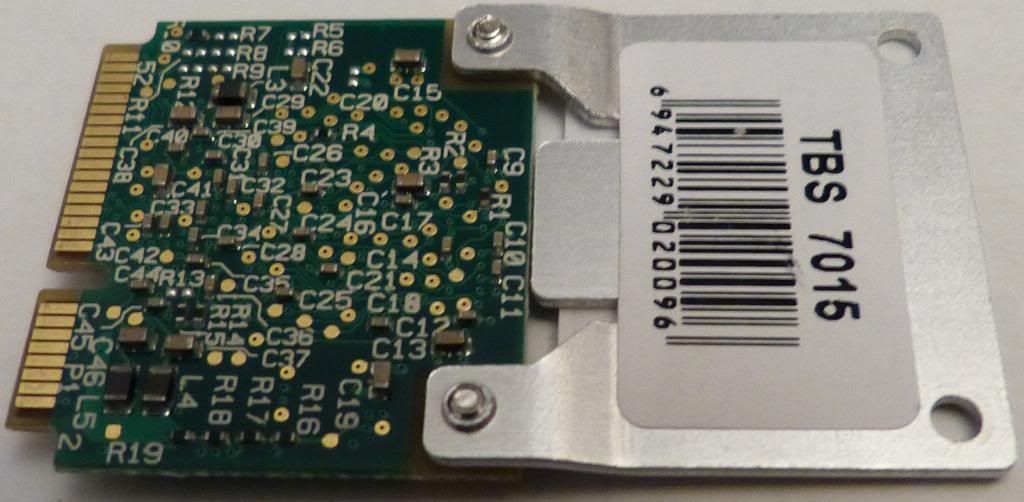
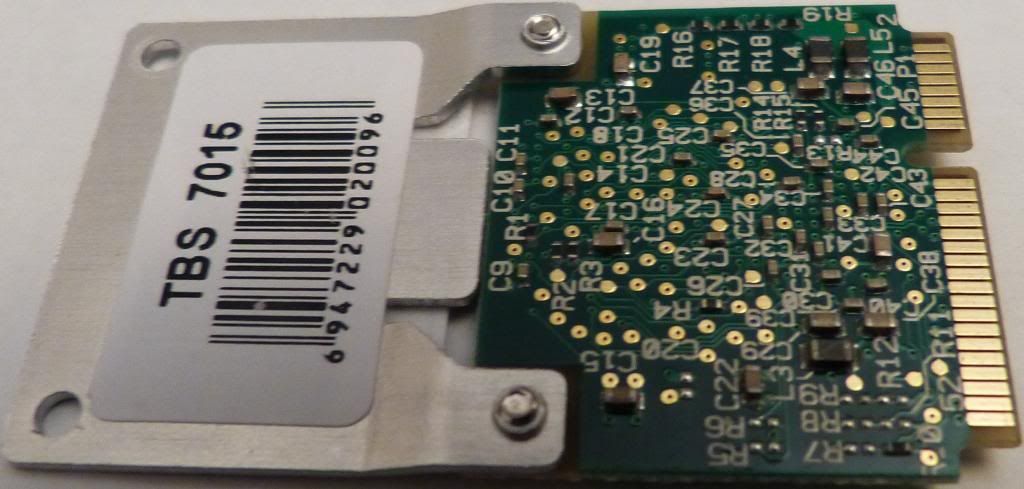
Can you post a picture of the card? You may have received something other than a BCM70015.
Daily driver: X220 4291-P79 i5-2520M

In reserve: X61 T7500, X60 T2300
In pieces: X60s CS U1300 [board only], two retired but working X61Ts
RIP: 760XD 9546-U9E

Shredder11
Junior Member
Junior Member
Posts: 259
Joined: Sat Jun 30, 2012 6:25 pm
Location: Bradford, West Yorkshire, England

Re: Vanity Post: Resurrecting a Thinkpad X61s *PICS*

#25 Post by Shredder11 » Sat Oct 19, 2013 6:02 pm

Z61p x3 (C2D T7600, 3GB, 500GB SSD, BCM70015, Advanced Dock x1, Mini Dock x2)
X61 (C2D T7500, 3GB, 250GB SSD, BCM70015)
X61s (2GB, 120GB SSD)
X60s (CD L2400, 3GB, 160GB)
T43p (P M 760, 2GB, IBM Port Replicator II)
G40 x2 (P4 2.8GHz, 2GB, 60GB)
G41 (P4 3.46GHz, 2GB, 40GB)

Shredder11
Junior Member
Junior Member
Posts: 259
Joined: Sat Jun 30, 2012 6:25 pm
Location: Bradford, West Yorkshire, England

Re: Vanity Post: Resurrecting a Thinkpad X61s *PICS*

#26 Post by Shredder11 » Sat Oct 19, 2013 6:27 pm

One of the chips reads Broadcom BCM70015KFBG and the other Winbond W9751G6JB-25. It seems to be a AzureWave AW-VD920H or a clone of one perhaps. I wonder if it is possible to install the drivers manually without the official .msi installer?
Z61p x3 (C2D T7600, 3GB, 500GB SSD, BCM70015, Advanced Dock x1, Mini Dock x2)
X61 (C2D T7500, 3GB, 250GB SSD, BCM70015)
X61s (2GB, 120GB SSD)
X60s (CD L2400, 3GB, 160GB)
T43p (P M 760, 2GB, IBM Port Replicator II)
G40 x2 (P4 2.8GHz, 2GB, 60GB)
G41 (P4 3.46GHz, 2GB, 40GB)

axur-delmeria
ThinkPadder
ThinkPadder
Posts: 1270
Joined: Mon May 28, 2012 5:49 am
Location: Metro Manila, Philippines

Re: Vanity Post: Resurrecting a Thinkpad X61s *PICS*

#27 Post by axur-delmeria » Sat Oct 19, 2013 11:41 pm

Wait a minute.

The Z61p's WWAN slot is probably is the same as the ones in the T60 and X60: USB only. :(
Daily driver: X220 4291-P79 i5-2520M

In reserve: X61 T7500, X60 T2300
In pieces: X60s CS U1300 [board only], two retired but working X61Ts
RIP: 760XD 9546-U9E

Shredder11
Junior Member
Junior Member
Posts: 259
Joined: Sat Jun 30, 2012 6:25 pm
Location: Bradford, West Yorkshire, England

Re: Vanity Post: Resurrecting a Thinkpad X61s *PICS*

#28 Post by Shredder11 » Sun Oct 20, 2013 5:40 am

Seems you are right as this topic mentions a T60p, which is identical in every way except my Z61p has a few more features.

http://forum.thinkpads.com/viewtopic.ph ... roadcom+hd


So back to my X61s, I could maybe drill the broken screw to try and remove it, and then install the Broadcom video card and hope my BIOS has its whitelist removed (the BIOS is supervisor password protected). Failing this I will have to put the video card away for another day and another laptop.
Z61p x3 (C2D T7600, 3GB, 500GB SSD, BCM70015, Advanced Dock x1, Mini Dock x2)
X61 (C2D T7500, 3GB, 250GB SSD, BCM70015)
X61s (2GB, 120GB SSD)
X60s (CD L2400, 3GB, 160GB)
T43p (P M 760, 2GB, IBM Port Replicator II)
G40 x2 (P4 2.8GHz, 2GB, 60GB)
G41 (P4 3.46GHz, 2GB, 40GB)

Shredder11
Junior Member
Junior Member
Posts: 259
Joined: Sat Jun 30, 2012 6:25 pm
Location: Bradford, West Yorkshire, England

Re: Vanity Post: Resurrecting a Thinkpad X61s *PICS*

#29 Post by Shredder11 » Sun Oct 20, 2013 8:35 am

Another option might possibly be this:

http://phiyo.en.alibaba.com/product/863 ... PHIYO.html


Image
Z61p x3 (C2D T7600, 3GB, 500GB SSD, BCM70015, Advanced Dock x1, Mini Dock x2)
X61 (C2D T7500, 3GB, 250GB SSD, BCM70015)
X61s (2GB, 120GB SSD)
X60s (CD L2400, 3GB, 160GB)
T43p (P M 760, 2GB, IBM Port Replicator II)
G40 x2 (P4 2.8GHz, 2GB, 60GB)
G41 (P4 3.46GHz, 2GB, 40GB)

Post Reply
  • Similar Topics
    Replies
    Views
    Last post

Return to “Thinkpad X6x Series incl. X6x Tablet”

Who is online

Users browsing this forum: E350 and 7 guests