


 Homepage
 Forum
Forum Drivers
 HMM-Manuals
 MTM
MTM Feed
Feed
Well, I just could not resist: yesterday I bought W700, T9600 with beautiful WUXGA display and FX2700. It was in almost perfect condition when it arrived, except I had to replace the keyboard because previous owner spilled Coke on it and totally burned thermal pad on cpu, which caused idle temperatures around 66-67 degrees and up to 85-87 on load. On the other side, gpu is cool as it could be, idling at 39-40 and going up to 48 degrees on load. So I've opened it, cleaned everything, applied new cpu thermal paste and temperatures dropped to 58 at idle, going up to 75 at load. That worries me a little bit because I thought cpu temperatures should be lower, but maybe I'm wrong there as I don't have any experience with T9600. I have also noticed that copper surface on heatsink is not polished at all, that would explain why they used pad instead of paste. I will try to lap it today, hope this will improve heat transfer. My T9300 idles at 43-44 degrees, this is a significant difference. So, here are mine impressions about the machine...
Good:
- display
- numeric keyboard
- two hdd bay
- sturdy abs plastic
- speakers
- easy to disassemble
Bad:
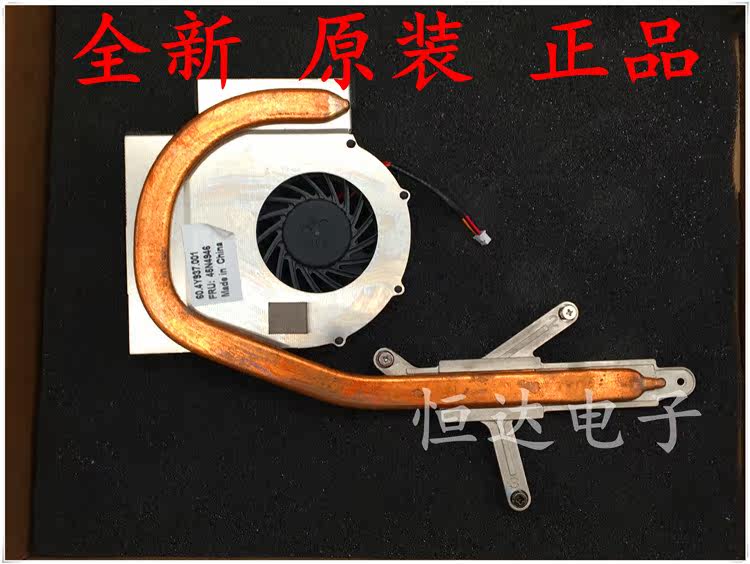
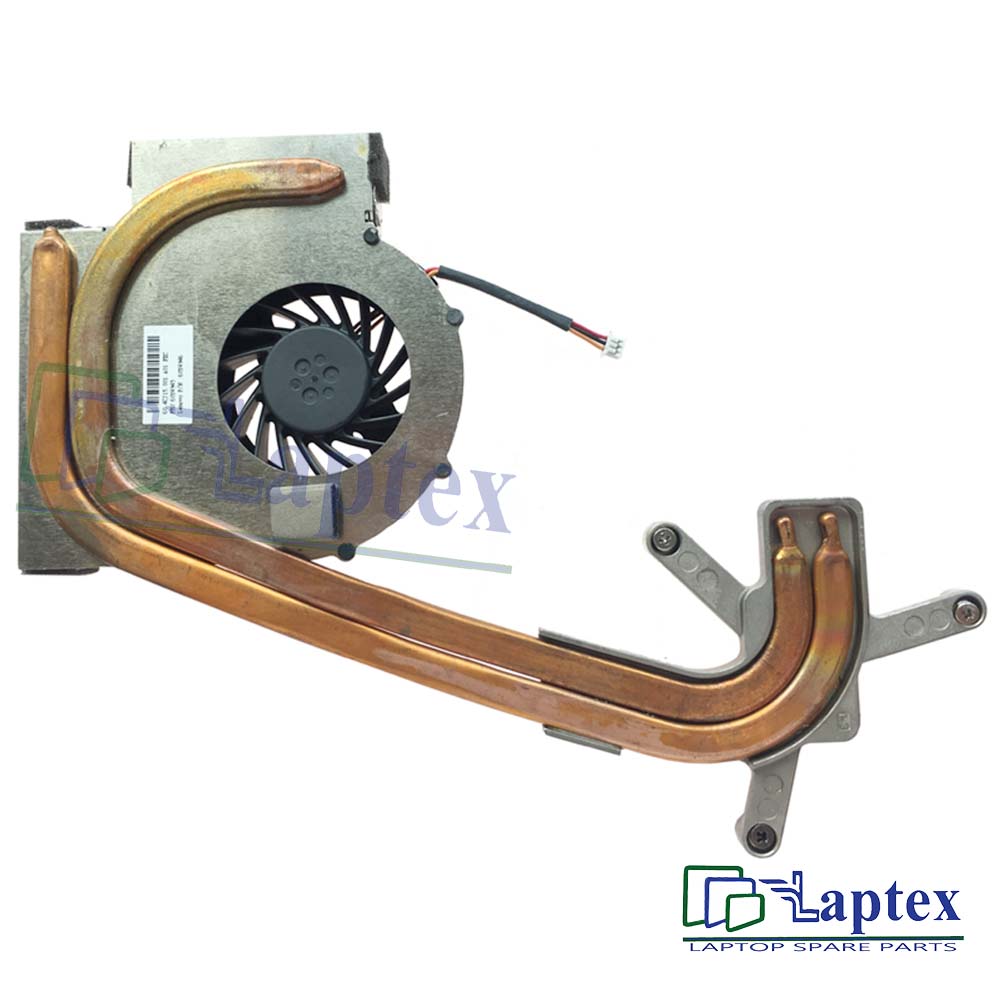
- poor single pipe cpu heatsink design
- it's very heavy and bulky
- microphone and headphones ports position
- USB ports position on the right side
- DC connector design
- DC connector soldered to the motherboard
- huge and heavy solenoid assembly on DC cable, making connector prone to failures
Take a look at our
ThinkPads.com HOME PAGE
For those who might want to contribute to the blog, start here: Editors Alley Topic
Then contact Bill with a Private Message
ThinkPads.com HOME PAGE
For those who might want to contribute to the blog, start here: Editors Alley Topic
Then contact Bill with a Private Message
Monster in the house!

Re: Monster in the house!
What sort of solenoid is on the DC cable and for what use would there be for a solenoid?
A31p P-IV 2Ghz, 2MB, 2653-R6U
T500 T9600 2055-BE9
T510 i5 4384-DV7
T510 i7 4349-A64
T520 i7QM 4242-4UU Highly Modified
T16 i7 1260P 21BV000SUS
T500 T9600 2055-BE9
T510 i5 4384-DV7
T510 i7 4349-A64
T520 i7QM 4242-4UU Highly Modified
T16 i7 1260P 21BV000SUS
Re: Monster in the house!
Solenoid is used for noise filtering in dc cable as far as I know. It's present on every thinkpad ac adapter, round black plastic thingy in front of dc connector, just not as big and heavy as here.
Last edited by zod on Fri Oct 05, 2018 5:46 am, edited 1 time in total.

Re: Monster in the house!
Hope you bought that W700 with a reasonable price tag attached to it, I see a lot of them that are overpriced nearly everywhere.
58C at idle seems a little too high for a T9600, do you have any clue what your ambient temperatures are? I find it odd, considering that a X9100 in my W700 idles at 50-53C with an ambient temperature of about 29-32C. The load temperature seems fine though, 75C is not too bad. While I do agree with you that they should be lower in a 17 inch machine like the W700, I believe that is not the case due to the fan's temperature curve.
They used thermal pads for the W700's heatsink assembly? I don't think I have seen such a thing on my W700; it could be possible that the previous owner may have used a thermal pad for the heatsink.
I am surprised that you find the single-heatpipe design poor, because in my experience, the design actually held up pretty well with the X9100 operating at 3.99GHz (1.425v). With the fan forced to run at its maximum speed, of course.
58C at idle seems a little too high for a T9600, do you have any clue what your ambient temperatures are? I find it odd, considering that a X9100 in my W700 idles at 50-53C with an ambient temperature of about 29-32C. The load temperature seems fine though, 75C is not too bad. While I do agree with you that they should be lower in a 17 inch machine like the W700, I believe that is not the case due to the fan's temperature curve.
They used thermal pads for the W700's heatsink assembly? I don't think I have seen such a thing on my W700; it could be possible that the previous owner may have used a thermal pad for the heatsink.
I am surprised that you find the single-heatpipe design poor, because in my experience, the design actually held up pretty well with the X9100 operating at 3.99GHz (1.425v). With the fan forced to run at its maximum speed, of course.
Re: Monster in the house!
Thank you for your answer Screamer, I need some comparison here. Anything above 70 degrees with bios fan setting is red alert for me, maybe I'm exaggerating. Heatsink design reminds me of cheap Acer machines and I would never expect something like that in Thinkpad. I have noticed few scratches on copper surface, so that was the reason for thermal pad, and I'm absolutely sure that previous (also first and only) owner never opened this machine, I was the first one to do it after it left Lenovo production facilities. Price was very tempting, about 4 times lower than overpriced ones on ebay, so I think it was a good deal after all.
Re: Monster in the house!
I could make my W700 serve as a comparison machine, but I would need to know how hard you pushed your W700 to reach that temperature in the first place.
I guess the copper's surface being scratched and all isn't unusual, but the thermal pad does not seem to ring a bell in my memory. Probably some sort of a assembly change, most likely.
It is a good deal, 4 times lower than the usual overpriced offerings are quite uncommon.
I guess the copper's surface being scratched and all isn't unusual, but the thermal pad does not seem to ring a bell in my memory. Probably some sort of a assembly change, most likely.
It is a good deal, 4 times lower than the usual overpriced offerings are quite uncommon.
Re: Monster in the house!
I'm getting 75-76 degrees at 90% cpu load, room temperature is 22 degrees. Just bought 600, 1000 and 2000 grit sandpaper, we'll see about results after lapping.
Re: Monster in the house!
Well, that is a little vague, but I guess it can do..
I pushed my W700 to the limit (100% load) by running a 1440p60 video on YouTube, which yielded a temperature reading of 79C with the X9100. I guess the temperature for your T9600 is alright, if we are getting the temperature readings from the motherboard's sensors.
This was done with an ambient temperature of 32C, by the way. I don't honestly expect the heatsink to hold the temperature below 70C, since anything below that would require the fan to be spinning at faster speed. Additionally, I brought my X9100's clock speed to match the T9600's, and it nearly gave the same temperature reading of what yours did (hovering at 77C). That more or less, seems normal to me at least. I guess it was just pure exaggeration.
I pushed my W700 to the limit (100% load) by running a 1440p60 video on YouTube, which yielded a temperature reading of 79C with the X9100. I guess the temperature for your T9600 is alright, if we are getting the temperature readings from the motherboard's sensors.
This was done with an ambient temperature of 32C, by the way. I don't honestly expect the heatsink to hold the temperature below 70C, since anything below that would require the fan to be spinning at faster speed. Additionally, I brought my X9100's clock speed to match the T9600's, and it nearly gave the same temperature reading of what yours did (hovering at 77C). That more or less, seems normal to me at least. I guess it was just pure exaggeration.
Re: Monster in the house!
It must be, as I'm getting the same results with lapped heatsink. I have polished it shortly with 600, then little bit longer with 1000, and finished with 2000 until I got perfect mirror effect. At least I have a temperature drop of some 10 degrees from the moment it arrived, so if it was working fine then, it would work even better now.
-
Thinkpad4by3
- Senior ThinkPadder

- Posts: 2670
- Joined: Sun Aug 09, 2015 9:25 am
- Location: N. Bellmore, ny
Re: Monster in the house!
Be careful with the power connector, 9 years of strain, mine broke the power connector on the board clean off.
Thinkpad4by3's Law of the Universe.
The efficiency of two screens equally sized with equal numbers if pixels are equal. The time spent by a 4:3 user complaining about 16:9 is proportional to the inefficiency working with a 16:9 display, therefore the amount of useful work extracted is equal.
The efficiency of two screens equally sized with equal numbers if pixels are equal. The time spent by a 4:3 user complaining about 16:9 is proportional to the inefficiency working with a 16:9 display, therefore the amount of useful work extracted is equal.
Re: Monster in the house!
Yes, I know about power connector. Mine is pretty firm and I don't plan to move this laptop around, so it will be safe. Battery is completely dead, so I've made dummy out of it to cover the hole, it will be connected to ac adapter all the time.
Re: Monster in the house!
Just testing W700 with 50% constant load and tpfan. Switching between 2300rpm and 3800rpm makes only 3-4 degrees difference. I think I would need new heatsink, heat transfer is not good on this one. Most probably due to pipe, although i can't see any damage on it. Fan is working fine, everything is clean as it could be, airflow is fine, contact between cpu and heatsink is good and even, but on 3800rpm it blows almost cool air outside and temperature does not drop as it should.
Re: Monster in the house!
That temperature difference doesn't sound too good, and yes, you definitely need a new heatsink. If the heatsink was working as it should, the temperature drop should be extremely noticeable at 3800RPM. Heck, I believe it is even possible to get your T9600 to idle at room temperature if the heatsink was working right (with the fan running at 3800RPM, of course).
Be sure to get the W700's single heatpipe heatsink, not the W701's two heatpipe heatsink. The W701's improved heatsink does not fit in at the same spot of where the W700's heatsink would usually fit in, if you did not notice.
Be sure to get the W700's single heatpipe heatsink, not the W701's two heatpipe heatsink. The W701's improved heatsink does not fit in at the same spot of where the W700's heatsink would usually fit in, if you did not notice.
Re: Monster in the house!
You must be mindreader. I searched for heatsink and saw two-pipe model for 701. Then I've noticed it does not fit, nor covering the chipset. What a pity. Only reasonable offer on ebay was brand new heatsink for W700 in Texas for 26 USD. Not delivering to Serbia, of course... Fortunately, winter is coming here, so I have few months to find it.
Re: Monster in the house!
Now I'm really confused. I let W700 work over night in order to cure thermal paste, and now cpu idles at 48-49 degrees with higher room temperature (now it's 24 degrees) on bios fan setting (2270 rpm). Google Chrome + TP forum makes it go up to 55 degrees, lower than yesterday idle temp. This really makes no sense at all.
Re: Monster in the house!
You are talking about an RF filter coil. A solenoid is an electro-mechanical device and is something entirely different.
A31p P-IV 2Ghz, 2MB, 2653-R6U
T500 T9600 2055-BE9
T510 i5 4384-DV7
T510 i7 4349-A64
T520 i7QM 4242-4UU Highly Modified
T16 i7 1260P 21BV000SUS
T500 T9600 2055-BE9
T510 i5 4384-DV7
T510 i7 4349-A64
T520 i7QM 4242-4UU Highly Modified
T16 i7 1260P 21BV000SUS
-
CrazyTPFan
- Sophomore Member
- Posts: 198
- Joined: Mon Aug 20, 2018 9:55 pm
Re: Monster in the house!
Does it really matter? We call it solenoid locally, it can be RF filter coil if it is so important. I don't see how it's connected to this topic anyway, unless you're on some kind of error checking & correcting / teaching a lesson mission here. Two posts, not a single word on W700 from you, just provocative attitude. That's really annoying, much more then inadequate terminology I dare to use for RF filter coil.
Last edited by zod on Sat Oct 06, 2018 1:32 pm, edited 4 times in total.
Re: Monster in the house!
Now 26 degrees room temperature, cpu idles at 43 degrees for the last hour. Go figure. It's 15 degrees difference from yesterday test, right after polishing the heatsink and applying fresh MX-4, with ambient temperature being 4 degrees lower. Makes no sense at all, I didn't notice that Arctic Silver need any brake-in period, at least not with such dramatic difference. GPU idles on 44 degrees and it's in accordance with ambient temperature raise.
Re: Monster in the house!
It makes no sense, but hey, you have way better temperatures than before. Also, that is a relief to see too. I was thinking that the problem had something to do with the heatsink.
Either way, at least you have a cheap W700 that works well and is completely fine. Good to know the results, enjoy your W700!
Either way, at least you have a cheap W700 that works well and is completely fine. Good to know the results, enjoy your W700!
Re: Monster in the house!
Well I was absolutely sure something is wrong with heatsink, but it works just fine. You are right, it's time to quit on mystery solving, abandon obsessive temperature monitoring and enjoy this beautiful machine. Many thanks for all your help and concern, Screamer!
Re: Monster in the house!
My apologies for not mentioning your great find. It's a nice system.
My post was not meant to nit-pick your choice of words. We are a technically oriented forum and I'm under the false impression we all know what the names of different devices are whether it be electrical or electro-mechanical.
I was genuinely wondering why a power cable would have a solenoid of some kind connected to it and what it controlled.
My post was not meant to nit-pick your choice of words. We are a technically oriented forum and I'm under the false impression we all know what the names of different devices are whether it be electrical or electro-mechanical.
I was genuinely wondering why a power cable would have a solenoid of some kind connected to it and what it controlled.
A31p P-IV 2Ghz, 2MB, 2653-R6U
T500 T9600 2055-BE9
T510 i5 4384-DV7
T510 i7 4349-A64
T520 i7QM 4242-4UU Highly Modified
T16 i7 1260P 21BV000SUS
T500 T9600 2055-BE9
T510 i5 4384-DV7
T510 i7 4349-A64
T520 i7QM 4242-4UU Highly Modified
T16 i7 1260P 21BV000SUS
-
Thinkpad4by3
- Senior ThinkPadder
- Posts: 2670
- Joined: Sun Aug 09, 2015 9:25 am
- Location: N. Bellmore, ny
Re: Monster in the house!
I'll plug my Thinkpad into my Electromechanical slot machine(it has an outlet inside for some reason and you'll see how I plug my Thinkpads into some solenoids
 .
.Also, I was wondering that too but I was pretty sure I thought it was choke, inductor, or a RF something or other.
Thinkpad4by3's Law of the Universe.
The efficiency of two screens equally sized with equal numbers if pixels are equal. The time spent by a 4:3 user complaining about 16:9 is proportional to the inefficiency working with a 16:9 display, therefore the amount of useful work extracted is equal.
The efficiency of two screens equally sized with equal numbers if pixels are equal. The time spent by a 4:3 user complaining about 16:9 is proportional to the inefficiency working with a 16:9 display, therefore the amount of useful work extracted is equal.
-
axur-delmeria
- Senior ThinkPadder
- Posts: 4413
- Joined: Mon May 28, 2012 5:49 am
- Location: Metro Manila, Philippines
Re: Monster in the house!
The general term is inductor.
In this case it's a choke, as it's used to smoothen the DC input by blocking high-frequency signals.
In this case it's a choke, as it's used to smoothen the DC input by blocking high-frequency signals.
Planned Purchase: T480s i5-8350 FHD Touch
Impulse Buy: Thinkpad not named for safety reasons
RIP: X220 4291-C91 X61 7676-A24 760XD-U9E
Impulse Buy: Thinkpad not named for safety reasons
RIP: X220 4291-C91 X61 7676-A24 760XD-U9E
Re: Monster in the house!
Hi there, you probably meant something else. Solenoid is an actuator which e.g. opens and closes a valve. You probably mean a ferrite bead which acts as an RF filter.

Edit: I started reading from the top and now I see that this has already escalated quickly.

Daily drivers: x225 FrankenPad and t430. Thinkpad x301 overhaul+FSB mod.
Re: Monster in the house!
Glad to see so many unbelievably intelligent, undoubtedly charming and absolutely superior technical savvy guys at one place discussing important matters.

Re: Monster in the house!
I've never owned a W70* of any kind, so congrats to you first and foremost...

Some ThinkPads won't run at full speed unless a working battery is present. You may want to check whether that's the case for W700.
Enjoy !
...Knowledge is a deadly friend when no one sets the rules...(King Crimson)
Cheers,
George (your grouchy retired FlexView farmer)
my music if anyone cares: https://www.youtube.com/@TheWaterMemory
PMs requesting personal tech support will be ignored.
Cheers,
George (your grouchy retired FlexView farmer)
my music if anyone cares: https://www.youtube.com/@TheWaterMemory
PMs requesting personal tech support will be ignored.
-
Thinkpad4by3
- Senior ThinkPadder
- Posts: 2670
- Joined: Sun Aug 09, 2015 9:25 am
- Location: N. Bellmore, ny
Re: Monster in the house!
The W700 does infact use the internal battery from time to time, and needs it even on AC power. It's the only thing that explains why a laptop that has spent ALL of its life on a charger and moved probably a dozen times downstairs to another charger, but the battery drained down to only 5wh capacity.
Thinkpad4by3's Law of the Universe.
The efficiency of two screens equally sized with equal numbers if pixels are equal. The time spent by a 4:3 user complaining about 16:9 is proportional to the inefficiency working with a 16:9 display, therefore the amount of useful work extracted is equal.
The efficiency of two screens equally sized with equal numbers if pixels are equal. The time spent by a 4:3 user complaining about 16:9 is proportional to the inefficiency working with a 16:9 display, therefore the amount of useful work extracted is equal.
Re: Monster in the house!
Thanks George! Benchmarks does not show anything wrong with AC adapter only, but I'm going to get fresh battery for it anyway. I was thinking about recelling this battery, it used Sony cells and power manager tells me it's not good due to normal battery wear. Cells are completely dead, I have measured 0,4V max per single cell. I could try recelling here, but I'm afraid how controller will react to replacement cells. Other option is Chinese replacement battery for 35 EUR, but I would rather have no battery at all.
Re: Monster in the house!
Like eight year old Thinkpads...
A31p P-IV 2Ghz, 2MB, 2653-R6U
T500 T9600 2055-BE9
T510 i5 4384-DV7
T510 i7 4349-A64
T520 i7QM 4242-4UU Highly Modified
T16 i7 1260P 21BV000SUS
T500 T9600 2055-BE9
T510 i5 4384-DV7
T510 i7 4349-A64
T520 i7QM 4242-4UU Highly Modified
T16 i7 1260P 21BV000SUS
Who is online
Users browsing this forum: No registered users and 85 guests