Take a look at our
ThinkPads.com HOME PAGE
For those who might want to contribute to the blog, start here: Editors Alley Topic
Then contact Bill with a Private Message
ThinkPads.com HOME PAGE
For those who might want to contribute to the blog, start here: Editors Alley Topic
Then contact Bill with a Private Message
Help MEEE!!! PLEASE IBM 765D PASSWORD
I cleaned the inside of the computer. The password screen came up when I restarted. Can you help me please?

Re: Help MEEE!!! PLEASE IBM 765D PASSWORD
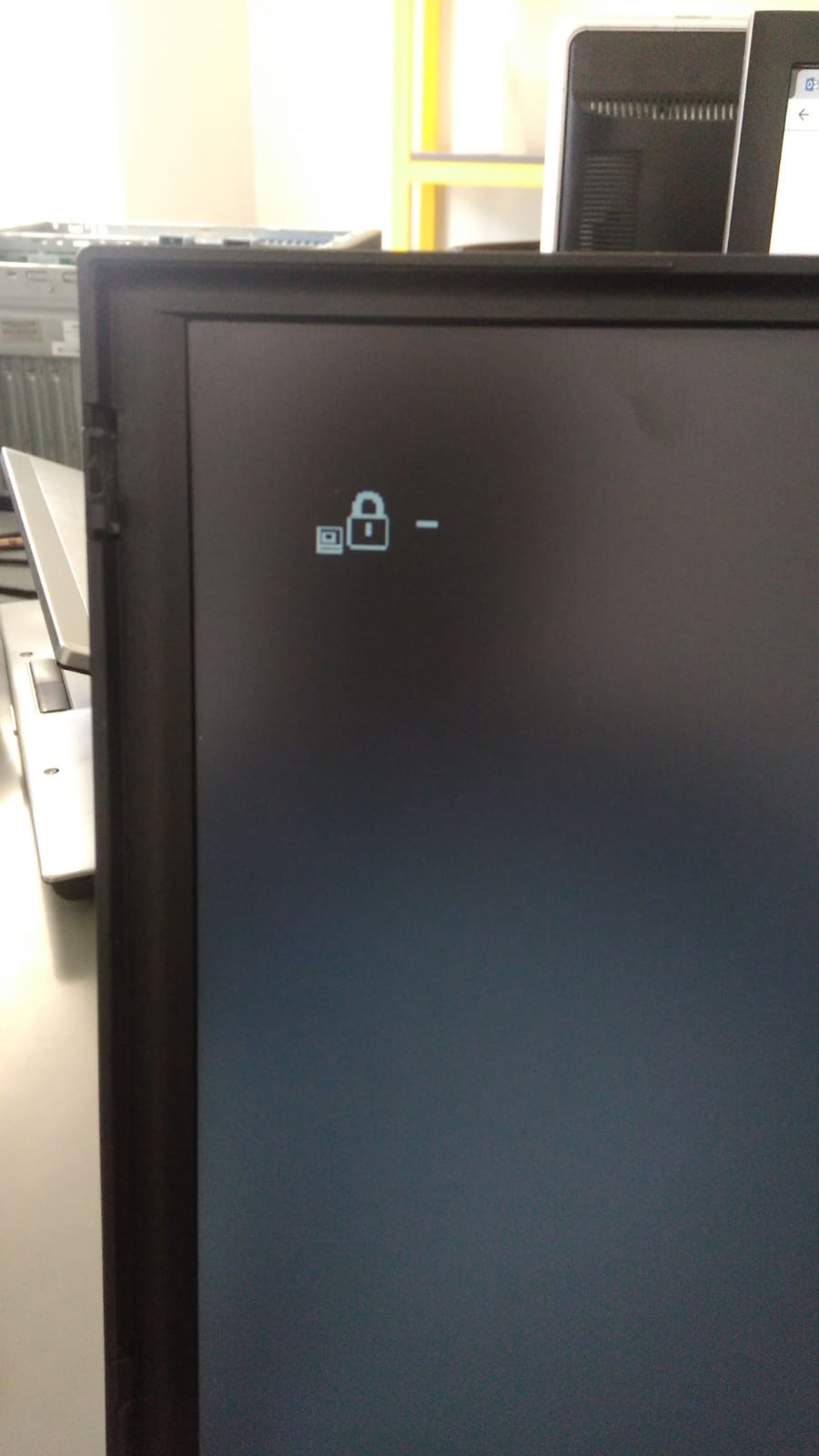
What sign does it show at password request?
If it's Power On Password (which I doubt) then you need to disconnect the CMOS battery and conect it again. Note that there can be two batteries one is CMOS the other is standby battery. So make sure you disconnect the right one.
But I suspect that this is the Supervisor Password. It often pops up if it was set earlier and after that the CMOS battery goes bad or is disconnected.
As far as I know it's not allowed to discuss the mehtods of removing of this password on this forum. So googling will probably help you.
If it's Power On Password (which I doubt) then you need to disconnect the CMOS battery and conect it again. Note that there can be two batteries one is CMOS the other is standby battery. So make sure you disconnect the right one.
But I suspect that this is the Supervisor Password. It often pops up if it was set earlier and after that the CMOS battery goes bad or is disconnected.
As far as I know it's not allowed to discuss the mehtods of removing of this password on this forum. So googling will probably help you.
Thinkpads: 330C, 360CE, 560, 755CD, 760LD, 760EL, A21p, A31p, X60s, X230, X280
Re: Help MEEE!!! PLEASE IBM 765D PASSWORD
Well, this looks like POP (Power on Password) icon. But on some models the SVP (Supervisor password) has the same icon.
So if the trick with CMOS battery does not work then it's SVP.
The passowrd could have been set up long ago (maybe by previous owner, if it had any) and you just did not know it was set untill the battery died and BIOS settings were reset.
So if the trick with CMOS battery does not work then it's SVP.
The passowrd could have been set up long ago (maybe by previous owner, if it had any) and you just did not know it was set untill the battery died and BIOS settings were reset.
Thinkpads: 330C, 360CE, 560, 755CD, 760LD, 760EL, A21p, A31p, X60s, X230, X280
Re: Help MEEE!!! PLEASE IBM 765D PASSWORD
I've done the same things before. I've cleaned the computer before. But I haven't seen anything like that. what I mean cannot be set before.
Re: Help MEEE!!! PLEASE IBM 765D PASSWORD
Did you try removing the battery? And did you enter BIOS before?
I'll just put a quote here:
I didn't know there was a Supervisor Password (SVP) set - did the ThinkPad (TP) set one all by itself ?
Lots of TP users are not aware that their TP has a SVP set.
A TP with a SVP set does NOT prompt for the SVP when switched on and is allowed to boot normally.
This is exactly how I got involved in SVP password recovery.
My TP worked perfectly for many months until one day I needed to change a setting in BIOS setup.
It was only when I pressed F1 to enter BIOS setup that a SVP prompt appeared.
If the CMOS battery goes flat or is disconnected for even a very brief period the Date and Time are reset, next time the TP is switched on it absolutely insists that you go to BIOS setup in order to set the correct Date and time, if there was a SVP set [even though you had no idea a SVP was already set] then it prompts for the SVP.
No, the TP will never set a SVP all by itself, human intervention is always required to set a SVP.
I'll just put a quote here:
I didn't know there was a Supervisor Password (SVP) set - did the ThinkPad (TP) set one all by itself ?
Lots of TP users are not aware that their TP has a SVP set.
A TP with a SVP set does NOT prompt for the SVP when switched on and is allowed to boot normally.
This is exactly how I got involved in SVP password recovery.
My TP worked perfectly for many months until one day I needed to change a setting in BIOS setup.
It was only when I pressed F1 to enter BIOS setup that a SVP prompt appeared.
If the CMOS battery goes flat or is disconnected for even a very brief period the Date and Time are reset, next time the TP is switched on it absolutely insists that you go to BIOS setup in order to set the correct Date and time, if there was a SVP set [even though you had no idea a SVP was already set] then it prompts for the SVP.
No, the TP will never set a SVP all by itself, human intervention is always required to set a SVP.
Thinkpads: 330C, 360CE, 560, 755CD, 760LD, 760EL, A21p, A31p, X60s, X230, X280
Re: Help MEEE!!! PLEASE IBM 765D PASSWORD
the product does not have a battery. working with electric cable.
Re: Help MEEE!!! PLEASE IBM 765D PASSWORD
It's a different battery.
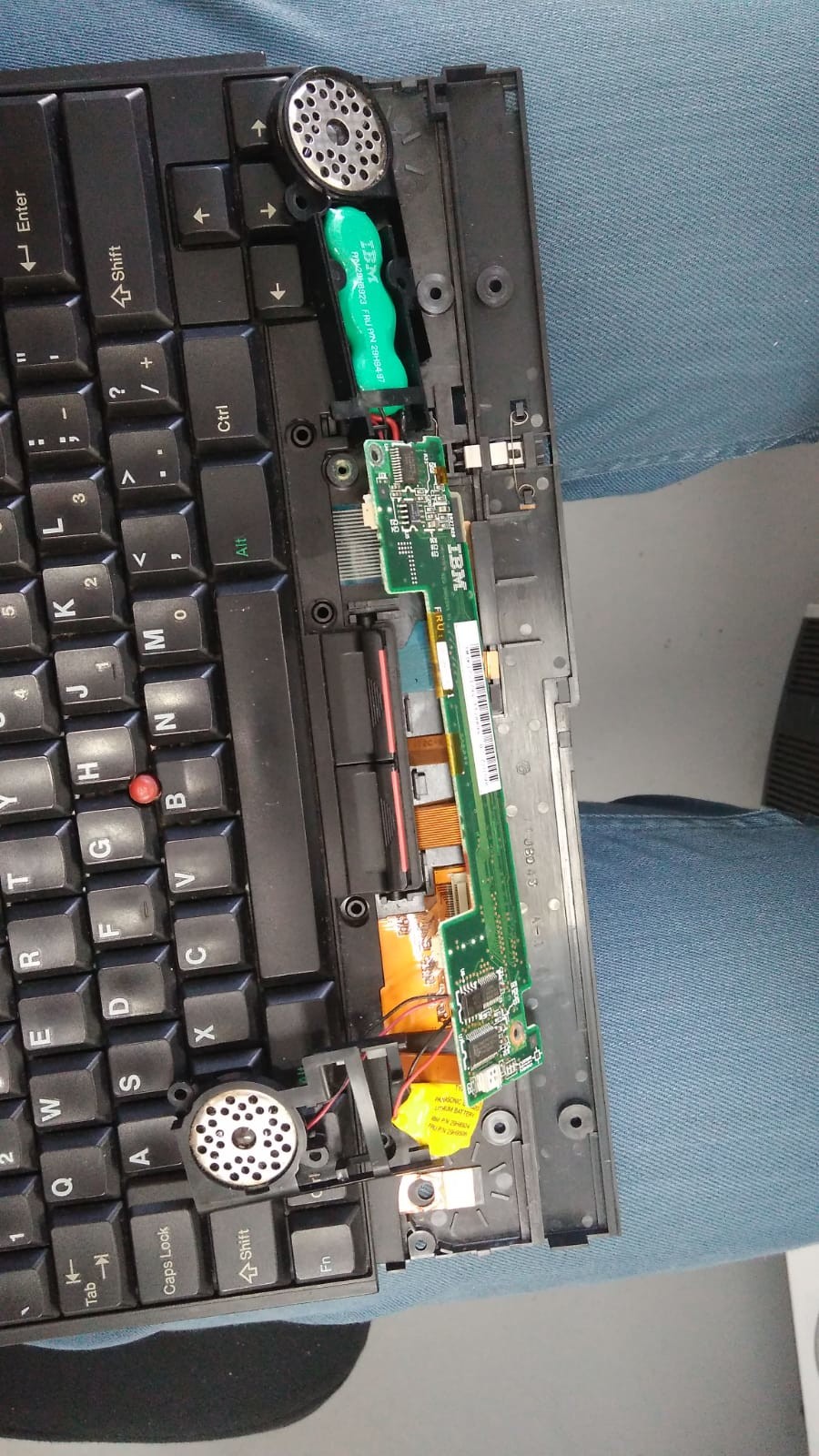
CMOS/backup battery is a small coin cell battery - here is Manual to check it's location https://download.lenovo.com/ibmdl/pub/p ... ol4hmm.pdf
Thinkpads: 330C, 360CE, 560, 755CD, 760LD, 760EL, A21p, A31p, X60s, X230, X280

Re: Help MEEE!!! PLEASE IBM 765D PASSWORD
I tore up the computer. I can't find the bios battery.
Re: Help MEEE!!! PLEASE IBM 765D PASSWORD
it's under the lid on the bottom, where the RAm is.
Thinkpads: 330C, 360CE, 560, 755CD, 760LD, 760EL, A21p, A31p, X60s, X230, X280
Re: Help MEEE!!! PLEASE IBM 765D PASSWORD
It turned out to be under the palmrest - see pages 494-495 of the manual (link above)
Thinkpads: 330C, 360CE, 560, 755CD, 760LD, 760EL, A21p, A31p, X60s, X230, X280
Re: Help MEEE!!! PLEASE IBM 765D PASSWORD
Then it's SPV password. I'll send you a PM now.
Thinkpads: 330C, 360CE, 560, 755CD, 760LD, 760EL, A21p, A31p, X60s, X230, X280
-
Goochbillingham
- Posts: 1
- Joined: Mon Mar 13, 2023 12:32 pm
- Location: Truro, United Kingdom
Re: Help MEEE!!! PLEASE IBM 765D PASSWORD
Hi,
I have a 760XL with the same issue,
Could I trouble you for a PM as well please?
Thank you
I have a 760XL with the same issue,
Could I trouble you for a PM as well please?
Thank you
-
- Similar Topics
- Replies
- Views
- Last post
-
-
Windows password not being accepted...
by PAL_Thailand » Thu Nov 13, 2025 12:50 am » in ThinkPad X20/X30/X40 Series incl. Tablets - 1 Replies
- 5608 Views
-
Last post by RealBlackStuff
Thu Nov 13, 2025 1:05 am
-
-
-
Can't enter wifi-Password in a hotel or anywhere else?
by RealBlackStuff » Mon Dec 22, 2025 2:31 am » in Windows 10/11/etc. - 2 Replies
- 3941 Views
-
Last post by Scorpion8
Mon Dec 22, 2025 6:38 pm
-
-
-
Removing T480 admin BIOS password
by bravo3 » Fri Jan 23, 2026 5:51 am » in ThinkPad T430-T495 / T530-T590 Series - 3 Replies
- 4117 Views
-
Last post by case11
Fri Mar 13, 2026 5:50 pm
-
-
-
X200T - no boot with keyboard plugged in - help.
by GloomySugar » Mon Nov 17, 2025 5:11 am » in ThinkPad X200/X201/X220 and X300/X301 Series - 0 Replies
- 5447 Views
-
Last post by GloomySugar
Mon Nov 17, 2025 5:11 am
-
Who is online
Users browsing this forum: No registered users and 87 guests