


 Homepage
 Forum
Forum Drivers
 HMM-Manuals
 MTM
MTM Feed
Feed
"I saw a P51 at a fraction of its normal price and thought I should buy it and try to fix it, but I don't know much about this laptop or how to fix it."
Sequence of Fault Events
Plug the laptop into the power jack
the power button blinks thrice
Press the Power Button
the fans spin for a second or two and the keyboard lights up briefly
The laptop powers off
Factors which I Consider Possibly Relevant
-The GPU fan, while it spins briefly, originally made a laboured kind of sound until I removed it from its housing during the diagnostic process
-There is RAM in the laptop (I have tried using different pieces in separate ports)
-fitted a new BIOS battery (I don't know if that would help or even make any difference to a laptop powering on while plugged into the mains)
-There is no Hard Drive fitted
-I don't know the history of this laptop
There is no Beep Code though strangely on my initial start attempt, there was
Any help is appreciated, I want to know if this laptop is fixable, how do I know if it's bricked
Take a look at our
ThinkPads.com HOME PAGE
For those who might want to contribute to the blog, start here: Editors Alley Topic
Then contact Bill with a Private Message
ThinkPads.com HOME PAGE
For those who might want to contribute to the blog, start here: Editors Alley Topic
Then contact Bill with a Private Message
P51 Powers but won't Boot to BIOS
-
axur-delmeria
- Senior ThinkPadder

- Posts: 4390
- Joined: Mon May 28, 2012 5:49 am
- Location: Metro Manila, Philippines
Re: P51 Powers but won't Boot to BIOS
Does it sound an error beep code if you power it on without any RAM installed?
Planned Purchase: T480s i5-8350 FHD Touch
Impulse Buy: Thinkpad not named for safety reasons
RIP: X220 4291-C91 X61 7676-A24 760XD-U9E
Impulse Buy: Thinkpad not named for safety reasons
RIP: X220 4291-C91 X61 7676-A24 760XD-U9E
Re: P51 Powers but won't Boot to BIOS
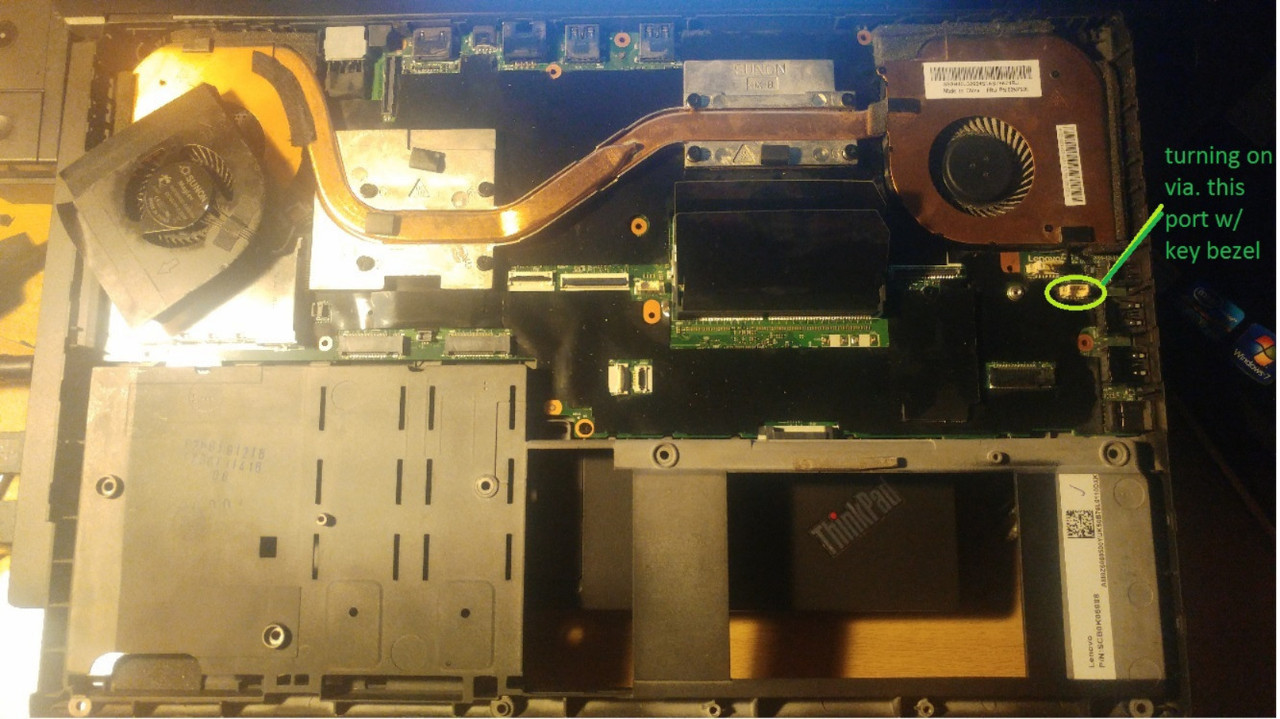
with the RAM plugged or unplugged,
press power button
the fans spin for a moment
and there is no beep code.
the fans also spin for a moment when the ac gets plugged in
they seemed to be spin for a longer few moments before but now very briefly
press power button
the fans spin for a moment
and there is no beep code.
the fans also spin for a moment when the ac gets plugged in
they seemed to be spin for a longer few moments before but now very briefly
-
axur-delmeria
- Senior ThinkPadder
- Posts: 4390
- Joined: Mon May 28, 2012 5:49 am
- Location: Metro Manila, Philippines
Re: P51 Powers but won't Boot to BIOS
IMO there's nothing you can do at this point.
It seems to be a board-level fault-- most likely, the repairs would require specialized equipment like a hot-air soldering station at the very least, a BGA rework station at worst.
It seems to be a board-level fault-- most likely, the repairs would require specialized equipment like a hot-air soldering station at the very least, a BGA rework station at worst.
Planned Purchase: T480s i5-8350 FHD Touch
Impulse Buy: Thinkpad not named for safety reasons
RIP: X220 4291-C91 X61 7676-A24 760XD-U9E
Impulse Buy: Thinkpad not named for safety reasons
RIP: X220 4291-C91 X61 7676-A24 760XD-U9E
Re: P51 Powers but won't Boot to BIOS
thanks, i figured as much
however, how can i get started fixing it?
does the bios perhaps need flashed?
however, how can i get started fixing it?
does the bios perhaps need flashed?
Re: P51 Powers but won't Boot to BIOS
how easy is it to [censored] up a mobo by taking apart the laptop and testing it like this?
-
axur-delmeria
- Senior ThinkPadder
- Posts: 4390
- Joined: Mon May 28, 2012 5:49 am
- Location: Metro Manila, Philippines
Re: P51 Powers but won't Boot to BIOS
Well, the laptop is already in bad shape, the only worse shape it can be is completely dead.
What you can try is disconnect everything on the system board except the absolute minimum required to power it up. That means:
* Power button
* charging port
* heatsink and fan
Disconnect the LCD cable on the system board side, some system boards blow a fuse if the LCD cable is plugged in but no LCD panel is connected.
If it still shuts down immediately, then it's in a really bad state. You can try flashing the BIOS externally, though TBH I've never done that myself.
What you can try is disconnect everything on the system board except the absolute minimum required to power it up. That means:
* Power button
* charging port
* heatsink and fan
Disconnect the LCD cable on the system board side, some system boards blow a fuse if the LCD cable is plugged in but no LCD panel is connected.
If it still shuts down immediately, then it's in a really bad state. You can try flashing the BIOS externally, though TBH I've never done that myself.
Planned Purchase: T480s i5-8350 FHD Touch
Impulse Buy: Thinkpad not named for safety reasons
RIP: X220 4291-C91 X61 7676-A24 760XD-U9E
Impulse Buy: Thinkpad not named for safety reasons
RIP: X220 4291-C91 X61 7676-A24 760XD-U9E
Re: P51 Powers but won't Boot to BIOS
Having done that, the fan just spins up for a second and then, what is left of P51, turns off.
I have stripped it down to the mobo, the components look okay and it certainly has never been disassembled this far prior, I have sppotted the BIOS chip, i have it in my sights
I have stripped it down to the mobo, the components look okay and it certainly has never been disassembled this far prior, I have sppotted the BIOS chip, i have it in my sights
Re: P51 Powers but won't Boot to BIOS


Which of these two is the BIOS chip, please?
-
RealBlackStuff
- Admin Emeritus

- Posts: 24692
- Joined: Mon Sep 18, 2006 5:17 am
- Location: Loch Garman, Éire
Re: P51 Powers but won't Boot to BIOS
It is a bad idea to try and flash the BIOS, if you don't even know WHAT the problem is.
You can only make it worse that way!
Apart from that, the chip should have U5 marked nearby and is one of these:
WINBOND W25Q128FVSIQ
MACRONIX MX25L12873FM2I-10G
MICRON N25Q128A13ESEDFF
You can only make it worse that way!
Apart from that, the chip should have U5 marked nearby and is one of these:
WINBOND W25Q128FVSIQ
MACRONIX MX25L12873FM2I-10G
MICRON N25Q128A13ESEDFF
Lovely day for a Guinness! (The Real Black Stuff)
But I actually prefer Murphy's from Cork!
But I actually prefer Murphy's from Cork!
-
H-Atkinson
- Junior Member

- Posts: 312
- Joined: Tue Sep 10, 2019 10:27 pm
- Location: Glendale, CA USA
Re: P51 Powers but won't Boot to BIOS
Sounds like it may be trying to "learn" the memory config/timings? Let it sit "powered on" for a little while and see what happens. My P53 and P1 Gen 5 both went through this process, and if you've recently unplugged the CMOS battery, that could have something to do with it. Definitely do not try to flash the BIOS... this does not seem like a corrupt BIOS sort of issue at all.
P1 Gen 5
P52
T25 Anniversary
Many more as well!
P52
T25 Anniversary
Many more as well!
Re: P51 Powers but won't Boot to BIOS
My p71 does the learning process just from installing a usb device in the wwan slot.
sent from my iPhone
Registry Tweak To Enable 2 Finger Scroll On Old Synaptics Touchpads
Registry Tweak To Enable 2 Finger Scroll On Old Synaptics Touchpads
-
- Similar Topics
- Replies
- Views
- Last post
-
- 3 Replies
- 8294 Views
-
Last post by NonesensE
Wed Oct 01, 2025 2:57 am
-
-
T480 won't boot - power button just flashes.
by kae2020 » Fri Dec 05, 2025 11:20 am » in ThinkPad T430-T495 / T530-T590 Series - 2 Replies
- 5158 Views
-
Last post by kae2020
Sun Dec 07, 2025 2:03 pm
-
-
- 1 Replies
- 2965 Views
-
Last post by ogopogo
Thu Feb 12, 2026 5:07 pm
-
-
X1 tablet gen 3 won't boot after SSD replacement
by babblefish » Thu Feb 19, 2026 10:22 pm » in ThinkPad X1 / X1-Carbon / X1-Extreme and later Series - 7 Replies
- 1077 Views
-
Last post by babblefish
Fri Feb 20, 2026 7:44 am
-
Who is online
Users browsing this forum: No registered users and 20 guests