Trackpoint middle button scroll

Performance, hardware, software, general buying and gaming discussion..
Post Reply
Message
Author
jcvjcvjcvjcv
Senior Member
Senior Member
Posts: 722
Joined: Tue Jun 26, 2007 8:42 pm
Location: Amsterdam, The Netherlands

Trackpoint middle button scroll

#1 Post by jcvjcvjcvjcv » Sat May 11, 2013 5:41 pm

Hello all

I use both a T61 and W520 with identical settings with regard to the trackpoint/touchpad. The trackpoint is my main mouse and the touchpad is doing what it's doing best with my often dry fingers: scrolling only.

Now, when I press and hold the middle button and move the Trackpoint, it scrolls. Very conveniently. All that worked fine, untill last week, when suddenly the touchpad scroll was reduced to only the edges and the middle button scroll didn't work. In the settings I was unable to get rid of those 'zones' and thus I uninstalled the entire driver and reinstalled it, with properly rebooting in between.

Now I regained the ability to use the entire touchpad for scrolling :D but now the middle mouse button scroll doesn't work as before :x . Pressing and holding it does nothing in combination with moving the trackpoint. When I press and let go and then move the trackpoint, it scrolls, but in a very different way; it does not stop when you let go of the Thinkpad, unless you revert the trackpoint movement. Changing the trackpoint scrolling from 'standard' to 'smooth' or 'auto-select' doesn't change a [censored] thing.

From this page:
http://support.lenovo.com/en_US/researc ... D=HT063273
I've both tried the version 7.0.2.29 and the newer 16.2.19.7; the former being the one I use since I got my W520.

I used to have this icon when scrolling with the middle button and trackpoint:
Image

Now I get this when I press and let go the middle button:
Image


Obviously I'd like to get back the middle button + trackpoint scroll I used to had. If anyone of you know how, please post
W520
T61

rkawakami
Admin
Admin
Posts: 10052
Joined: Sun Jun 04, 2006 1:26 am
Location: San Jose, CA 95120 USA
Contact:

Re: Trackpoint middle button scroll

#2 Post by rkawakami » Sun May 12, 2013 1:10 pm

The following applies to what I've done in Windows XP to change the middle-button scroll feature between those two types of scroll icons:

- In Control Panel / Mouse / TrackPoint tab, select the Scrolling option; you probably have the "Neither" option currently selected

My problem with the Neither option (which I'm using on all my systems) is that trackpoint scrolling doesn't work at all with Windows own Explorer windows. If I select the Scrolling option, then scrolling doesn't work in Firefox. Since I do almost of my trackpoint scrolling in Firefox, I've given up that feature with system windows and instead use the scroll bars.
Ray Kawakami
X22 X24 X31 X41 X41T X60 X60s X61 X61s X200 X200s X300 X301 Z60m Z61t Z61p 560 560Z 600 600E 600X T21 T22 T23 T41 T60p T410 T420 T520 W500 W520 R50 A21p A22p A31 A31p
NOTE: All links to PC-Doctor software hosted by me are dead. Files removed 8/28/12 by manufacturer's demand.

dr_st
Senior ThinkPadder
Senior ThinkPadder
Posts: 6649
Joined: Sat Oct 29, 2005 6:20 am

Re: Trackpoint middle button scroll

#3 Post by dr_st » Mon May 13, 2013 2:50 am

rkawakami wrote: If I select the Scrolling option, then scrolling doesn't work in Firefox.
This is even with the TP4Table.dat fix?
Current: X220 4291-4BG, T410 2537-R46, T60 1952-F76, T60 2007-QPG, T42 2373-F7G
Collectibles: T430s (IPS FHD + Classic Keyboard), X32 (IPS Screen)
Retired: X61 7673-V2V, A31p w/ Ultrabay Numpad
Past: Z61t 9440-A23, T60 2623-D3U, X32 2884-M5U

jcvjcvjcvjcv
Senior Member
Senior Member
Posts: 722
Joined: Tue Jun 26, 2007 8:42 pm
Location: Amsterdam, The Netherlands

Re: Trackpoint middle button scroll

#4 Post by jcvjcvjcvjcv » Wed May 15, 2013 5:20 am

No, I have Scrolling selected, and in one tab deeper I've selected 'Standard'
W520
T61

Tõnis
Junior Member
Junior Member
Posts: 302
Joined: Mon Aug 11, 2008 2:43 pm
Location: Central Falls, RI

Re: Trackpoint middle button scroll

#5 Post by Tõnis » Wed May 15, 2013 6:51 am

In my experience, it's the setting like Ray said. I use the second one you show with the round symbol that shows up when I press the middle button. With it I can just scroll up and down fast on a web page using the trackpoint. I also close tabs by clicking on the tab I want to close with the middle button.

As for the problem with the feature ceasing to work I'll add that I have had that problem before, albeit not for a long time, and I've never done anything with drivers to fix it. I noticed it was happening when I was using Windows' fast user switching and logged off one of the users. It seems Access Connections and other settings the Lenovo software can control (mouse options is one of them) don't play well with fast user switching. Now, I just use the classic Windows log in screen, and it's only one person (me) who is logged on at once. The mouse options I prefer work perfectly and never stop working. On the rare occasion when I have to share my computer with someone else in my household (like recently when the other computer was broken), and I do happen to use the fast user switching option with two users logged on at once, I don't expect a lot from Access Connections, mouse options, etc. as far as consistency and the functionality I'm used to goes.
R61, Core 2 Duo T8300 at 2.40GHz, 15.4" WXGA, XP Pro

jcvjcvjcvjcv
Senior Member
Senior Member
Posts: 722
Joined: Tue Jun 26, 2007 8:42 pm
Location: Amsterdam, The Netherlands

Re: Trackpoint middle button scroll

#6 Post by jcvjcvjcvjcv » Wed May 15, 2013 9:05 am

Yes, but I want to use the option that you have the keep pressure on the trackpoint if you want to keep scrolling. I'm the sole user of my ThinkPad(s), so I don't even have another account on them. :(
W520
T61

Tõnis
Junior Member
Junior Member
Posts: 302
Joined: Mon Aug 11, 2008 2:43 pm
Location: Central Falls, RI

Re: Trackpoint middle button scroll

#7 Post by Tõnis » Wed May 15, 2013 9:34 am

jcvjcvjcvjcv wrote:Yes, but I want to use the option that you have the keep pressure on the trackpoint if you want to keep scrolling. I'm the sole user of my ThinkPad(s), so I don't even have another account on them. :(
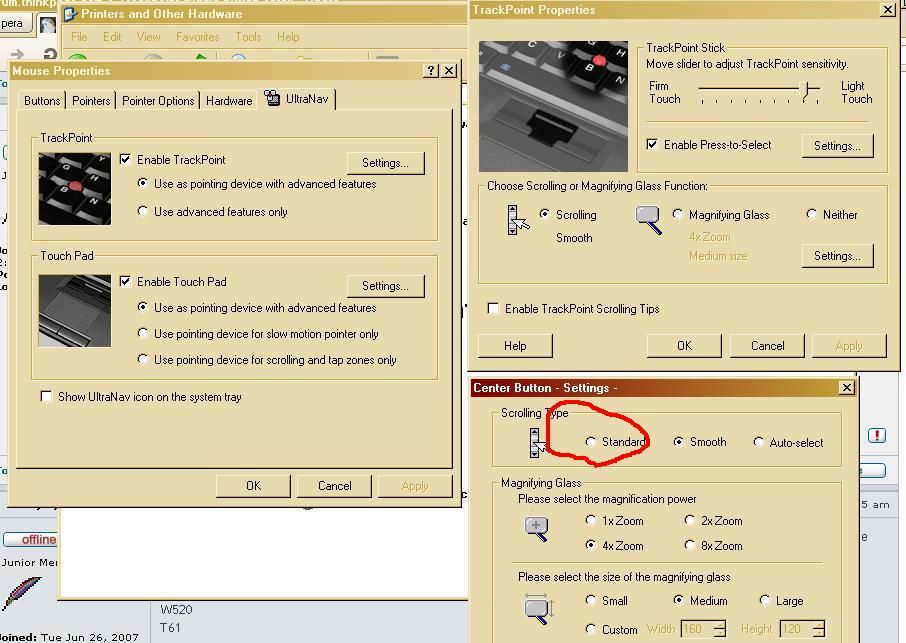
You have to enable "Standard" scrolling in UltraNav settings.

Control Panel>Printers and Other Hardware>Mouse>UltraNav tab>TrackPoint settings>TrackPoint properties>Scrolling Settings change scrolling type to "standard"

This picture shows what I'm using, and it seems you are, too. You want to choose the one I circled in red:

http://i961.photobucket.com/albums/ae96 ... ttings.jpg

That should make it so you have to keep pressure on the middle button while moving the trackpoint to scroll.
R61, Core 2 Duo T8300 at 2.40GHz, 15.4" WXGA, XP Pro

jcvjcvjcvjcv
Senior Member
Senior Member
Posts: 722
Joined: Tue Jun 26, 2007 8:42 pm
Location: Amsterdam, The Netherlands

Re: Trackpoint middle button scroll

#8 Post by jcvjcvjcvjcv » Wed May 15, 2013 5:07 pm

Like I said before: I have that selected.

Now it completely ceased to scroll, at least at the standard setting.
W520
T61

jcvjcvjcvjcv
Senior Member
Senior Member
Posts: 722
Joined: Tue Jun 26, 2007 8:42 pm
Location: Amsterdam, The Netherlands

Re: Trackpoint middle button scroll

#9 Post by jcvjcvjcvjcv » Wed May 15, 2013 5:38 pm

Well, one reinstall later I've regained the trackpoint scroll.... but only when I don't select "scrolling and tapping only" for the touchpad. GRRRRR

On my T61 I have the problem that the touchpad buttons don't works, but they do register when pressed.... Enabling them in settings works, but only as long as you don't touch the pad.

Who writes that crap? :evil:
W520
T61

jcvjcvjcvjcv
Senior Member
Senior Member
Posts: 722
Joined: Tue Jun 26, 2007 8:42 pm
Location: Amsterdam, The Netherlands

Re: Trackpoint middle button scroll

#10 Post by jcvjcvjcvjcv » Wed May 15, 2013 8:39 pm

I tried the driver from Synaptics directly... but that's even worse. Al kind of settings for people that want to use the touchpad with their entire family... no option for just plain 1-finger scrolling. :roll:
W520
T61

rkawakami
Admin
Admin
Posts: 10052
Joined: Sun Jun 04, 2006 1:26 am
Location: San Jose, CA 95120 USA
Contact:

Re: Trackpoint middle button scroll

#11 Post by rkawakami » Wed May 15, 2013 11:35 pm

dr_st wrote:This is even with the TP4Table.dat fix?
Thanks, I was not aware of this fix. I have previously tried a few things I found on the Mozilla boards but they did not work for me. I'll give it a shot in a little bit and see what happens.
Ray Kawakami
X22 X24 X31 X41 X41T X60 X60s X61 X61s X200 X200s X300 X301 Z60m Z61t Z61p 560 560Z 600 600E 600X T21 T22 T23 T41 T60p T410 T420 T520 W500 W520 R50 A21p A22p A31 A31p
NOTE: All links to PC-Doctor software hosted by me are dead. Files removed 8/28/12 by manufacturer's demand.

jcvjcvjcvjcv
Senior Member
Senior Member
Posts: 722
Joined: Tue Jun 26, 2007 8:42 pm
Location: Amsterdam, The Netherlands

Re: Trackpoint middle button scroll

#12 Post by jcvjcvjcvjcv » Thu May 16, 2013 12:55 am

Apparently the Ultranav Utility is separate from the driver.

Anyway, on my USB stick I found the driver I used in August 2012 to install the thing the first time, version 16.1.1.0 instead of the current 16.2.19.7 that's online on the Lenovo driver page.

And finally... the problem is gone.... now I just have to figure out why the fingerprint reader isn't working half the time.

So finally I have 1-finger scroll on the entire touchpad combined with normal scroll when pressing the middle trackpoint button. Like I'm used to...

And I even combined it with [url="http://users.v-lo.krakow.pl/~mwrobel/pr ... iddle.html\"]TPMiddle[/url] to have the middle button work like one.
W520
T61

Tõnis
Junior Member
Junior Member
Posts: 302
Joined: Mon Aug 11, 2008 2:43 pm
Location: Central Falls, RI

Re: Trackpoint middle button scroll

#13 Post by Tõnis » Thu May 16, 2013 6:16 pm

Glad you got it back to the way you like it. :)
R61, Core 2 Duo T8300 at 2.40GHz, 15.4" WXGA, XP Pro

jcvjcvjcvjcv
Senior Member
Senior Member
Posts: 722
Joined: Tue Jun 26, 2007 8:42 pm
Location: Amsterdam, The Netherlands

Re: Trackpoint middle button scroll

#14 Post by jcvjcvjcvjcv » Thu May 16, 2013 11:08 pm

Me too. But now the skin on my thumbs is so dry, the touchpad doesn't register them half the time. That's why I hate touchpad for primary mouse and that's why I'm still happy with a phone with a resistive touchscreen.
W520
T61

rkawakami
Admin
Admin
Posts: 10052
Joined: Sun Jun 04, 2006 1:26 am
Location: San Jose, CA 95120 USA
Contact:

Re: Trackpoint middle button scroll

#15 Post by rkawakami » Fri May 17, 2013 2:55 pm

Sorry, this may be slightly OT:

Well, after playing around with several different changes to the tp4table.dat file and mouse properties, I've arrived at a usable but not perfect setup. I'm now able to scroll around using just the Trackpoint and middle button in all windows (system and applications) but I've lost the function of opening up links in their own tabs in Firefox by clicking the middle button. I've played around with all of the "middle" about:config settings in Firefox but still can't launch the links. When hovering over a link on a page, the cursor turns into the pointing finger icon, the link gets underlined, but clicking on the middle button turns the cursor into the grey slider scrolling icon. Also, in testing the scrolling function with the usual applications I use, I had to add another entry in the tp4table.dat file because scrolling did not initially work for PowerPoint. Here's my setup:

Control Panel: Mouse Properties/TrackPoint:
Scrolling/Standard (Using "Smooth" disables scrolling in Explorer windows and some applications)

Added to tp4table.dat, just above the "Pass 1 rules" section:
; Firefox
*,*,firefox.exe,*,*,MozillaWindowClass,WheelStd,0,9
; PowerPoint
*,*,powerpnt.exe,*,*,*,WheelStd,0,9

One slight problem with the scrolling is that it's fairly rough; not as smooth as before and it sometimes keeps scrolling after releasing the button but it does get the job done. I really miss the middle button launch of links into their own tab since I use that many times a day. Now it's right-click and choose Open Link in New Tab. I'll try using this for awhile and see if it's something I can live with.
Ray Kawakami
X22 X24 X31 X41 X41T X60 X60s X61 X61s X200 X200s X300 X301 Z60m Z61t Z61p 560 560Z 600 600E 600X T21 T22 T23 T41 T60p T410 T420 T520 W500 W520 R50 A21p A22p A31 A31p
NOTE: All links to PC-Doctor software hosted by me are dead. Files removed 8/28/12 by manufacturer's demand.

dr_st
Senior ThinkPadder
Senior ThinkPadder
Posts: 6649
Joined: Sat Oct 29, 2005 6:20 am

Re: Trackpoint middle button scroll

#16 Post by dr_st » Fri May 17, 2013 3:39 pm

Ctrl+Click works just as well for opening links in a new tab. I've been using this all the time, and so never miss the middle button click to open links.

To this date I have never gotten the middle mouse button and middle trackpoint button scrolling to work at the same time. I'm not even sure that's theoretically possible.

As for smoothness of scrolling - I believe it has to do with settings. Possibly the Wheel settings in the Mouse options. Right now I have it scrolling very smoothly, but from time to time I've seen it start misbehaving. Resetting the settings usually helps. I've also noticed that going between trackpoint and external mouse often causes confusion regards scroll speed.
Current: X220 4291-4BG, T410 2537-R46, T60 1952-F76, T60 2007-QPG, T42 2373-F7G
Collectibles: T430s (IPS FHD + Classic Keyboard), X32 (IPS Screen)
Retired: X61 7673-V2V, A31p w/ Ultrabay Numpad
Past: Z61t 9440-A23, T60 2623-D3U, X32 2884-M5U

jcvjcvjcvjcv
Senior Member
Senior Member
Posts: 722
Joined: Tue Jun 26, 2007 8:42 pm
Location: Amsterdam, The Netherlands

Re: Trackpoint middle button scroll

#17 Post by jcvjcvjcvjcv » Fri May 17, 2013 6:17 pm

Yes, I had that with a Logitech MX510 connected to my W520 from time to time. It would always set it back to 1 line scroll instead of the 3 or 6 I want.

As for scrolling with the the trackpoint and having it function as middle click: I have that working with the TPMiddle program from Marek Wróbel ( http://users.v-lo.krakow.pl/~mwrobel/pr ... iddle.html )

When I press and hold the middle button I can scroll with the trackpoint in Windows Explorer, Configuration panel, Firefox (basicly everything) and when I press and let go within a quarter of a second it registers a middle click and opens a new tab in FF when clicking a link.

But that's on my W520. On my T61 (being used to type this) I get some error with TPMiddle. It says "Can't find entrypoint of procedure GetTickCount64 in DLL-file KERNEL32.dll

I guess I just need to reboot after installing Microsoft Visual C++ 2010 SP1 Redistributable Package (x86)
W520
T61

rkawakami
Admin
Admin
Posts: 10052
Joined: Sun Jun 04, 2006 1:26 am
Location: San Jose, CA 95120 USA
Contact:

Re: Trackpoint middle button scroll

#18 Post by rkawakami » Sat May 18, 2013 2:34 pm

dr_st wrote:Ctrl+Click works just as well for opening links in a new tab.
See, you can teach old dogs new tricks :) Thanks! Although this requires two hands to implement, it might work for my typing/mousing style. I've been using single-handed, middle-click method to launch tabs since forever, it's going to take some time to re-train myself.
Ray Kawakami
X22 X24 X31 X41 X41T X60 X60s X61 X61s X200 X200s X300 X301 Z60m Z61t Z61p 560 560Z 600 600E 600X T21 T22 T23 T41 T60p T410 T420 T520 W500 W520 R50 A21p A22p A31 A31p
NOTE: All links to PC-Doctor software hosted by me are dead. Files removed 8/28/12 by manufacturer's demand.

jcvjcvjcvjcv
Senior Member
Senior Member
Posts: 722
Joined: Tue Jun 26, 2007 8:42 pm
Location: Amsterdam, The Netherlands

Re: Trackpoint middle button scroll

#19 Post by jcvjcvjcvjcv » Sat May 18, 2013 4:02 pm

Did you take a look at TPMiddle?

You can still open tabs one-handed with CTRL+left click. You can hit the right CTRL with your right pink (assuming you your right index finger on the trackpoint and your thumbs at the buttons). But not everyone might have the same flexibility and finger length that I have.
W520
T61

rkawakami
Admin
Admin
Posts: 10052
Joined: Sun Jun 04, 2006 1:26 am
Location: San Jose, CA 95120 USA
Contact:

Re: Trackpoint middle button scroll

#20 Post by rkawakami » Sat May 18, 2013 5:45 pm

I thought about that use of the right pinky but it's fairly awkward for me. Right hand span (tip of thumb to tip of pinky) is 8 3/4" (22.2cm), about average I'd say, but the slight case of carpal tunnel in my right wrist, along with age-related general stiffness (I'm 56 and have been using keyboards for over 40 years), makes it uncomfortable. I have not looked at TPMiddle yet; might give it a try later.
Ray Kawakami
X22 X24 X31 X41 X41T X60 X60s X61 X61s X200 X200s X300 X301 Z60m Z61t Z61p 560 560Z 600 600E 600X T21 T22 T23 T41 T60p T410 T420 T520 W500 W520 R50 A21p A22p A31 A31p
NOTE: All links to PC-Doctor software hosted by me are dead. Files removed 8/28/12 by manufacturer's demand.

Czechnology
Sophomore Member
Posts: 133
Joined: Mon Sep 25, 2006 4:48 am
Location: Helsinki.fi, Vienna.at, Prague.cz
Contact:

Re: Trackpoint middle button scroll

#21 Post by Czechnology » Sat Jun 08, 2013 7:34 am

I'm also having some troubles with my trackpoint after I've did a windows update. I was able to get most things to normal but what I still miss is being able to scroll "press and hold middle-click, mouse move, release middle button". Now when i press and hold the middle button, the mouse pointer gets locked and won't move.
Any idea how to get the previous behaviour back withou playing around with the drivers?
Thanks

ThinkPad T450 (20BU-S02N00) [i5-5300U 2.3GHz, 16GB RAM, 14" HD+, Win7x64]
ThinkPad T400 (2764-CTO) [C2D T9400 2.53GHz, 6GB RAM, 14.1" LED WSXGA; Win7x64]
ThinkPad T43 (1871-F1G)
OnePlus X | Samsung NoteII | Dell Streak | Palm TX, Treo 600, m505, m500 | Psion 5 Series

Czechnology
Sophomore Member
Posts: 133
Joined: Mon Sep 25, 2006 4:48 am
Location: Helsinki.fi, Vienna.at, Prague.cz
Contact:

Re: Trackpoint middle button scroll

#22 Post by Czechnology » Sun Jun 09, 2013 9:23 am

...and what's worse, I can't move images around in graphic programs :eek:
Anytime I press my TP middle button, the mouse pointer gets locked...

ThinkPad T450 (20BU-S02N00) [i5-5300U 2.3GHz, 16GB RAM, 14" HD+, Win7x64]
ThinkPad T400 (2764-CTO) [C2D T9400 2.53GHz, 6GB RAM, 14.1" LED WSXGA; Win7x64]
ThinkPad T43 (1871-F1G)
OnePlus X | Samsung NoteII | Dell Streak | Palm TX, Treo 600, m505, m500 | Psion 5 Series

jcvjcvjcvjcv
Senior Member
Senior Member
Posts: 722
Joined: Tue Jun 26, 2007 8:42 pm
Location: Amsterdam, The Netherlands

Re: Trackpoint middle button scroll

#23 Post by jcvjcvjcvjcv » Sun Jun 30, 2013 9:59 pm

None, you have to mess with drivers.

Mine still works great. I have both ways of 'middle button scroll' ('press and hold middle button while moving the trackpoint' AND 'press and release middle button, then move trackpoint) and I have normal middle button functionality thanks to TPmiddle (linked above).
W520
T61

crashnburn
ThinkPadder
ThinkPadder
Posts: 1643
Joined: Sat Apr 22, 2006 4:26 pm
Location: TX, USA & Bombay, India

Re: Trackpoint middle button scroll

#24 Post by crashnburn » Mon May 05, 2014 12:29 pm

Which version of TP Ultranav drivers works well with T61 on Win7 x64.. SP1?
T61 8892-02U: 14.1"SXGA+/2.2C2D/4G/XP|Adv Mini Dock|30" Gateway XHD3000 WQXGA via Dual-link DVI
X61T 7767-96U: 12.1"SXGA+/1.6C2D/3G/Vista|Ultrabase
W510 4319-2PU: 15.6"FHD/i7-720QM/4G/Win7Pro64 (for dad)
T43 1875-DLU: 14.1"XGA/1.7PM-740/1G/XP (Old)

JillE
Posts: 1
Joined: Tue Sep 23, 2014 3:26 am
Location: Seattle, WA

Re: Trackpoint middle button scroll

#25 Post by JillE » Tue Sep 23, 2014 3:42 am

jcvjcvjcvjcv wrote:Yes, I had that with a Logitech MX510 connected to my W520 from time to time. It would always set it back to 1 line scroll instead of the 3 or 6 I want.

As for scrolling with the the trackpoint and having it function as middle click: I have a feeling that this page will explain more about the Bathmate Hydromax and that working with the TPMiddle program from Marek Wróbel.

When I press and hold the middle button I can scroll with the trackpoint in Windows Explorer, Configuration panel, Firefox (basicly everything) and when I press and let go within a quarter of a second it registers a middle click and opens a new tab in FF when clicking a link.

But that's on my W520. On my T61 (being used to type this) I get some error with TPMiddle. It says "Can't find entrypoint of procedure GetTickCount64 in DLL-file KERNEL32.dll

I guess I just need to reboot after installing Microsoft Visual C++ 2010 SP1 Redistributable Package (x86)
Czechnology wrote:...and what's worse, I can't move images around in graphic programs :eek:
Anytime I press my TP middle button, the mouse pointer gets locked...
This is happening to me. Whenever I press the middle button the pointer gets locked. Did you fix yours?
Last edited by JillE on Wed Feb 10, 2016 1:24 pm, edited 2 times in total.

jcvjcvjcvjcv
Senior Member
Senior Member
Posts: 722
Joined: Tue Jun 26, 2007 8:42 pm
Location: Amsterdam, The Netherlands

Re: Trackpoint middle button scroll

#26 Post by jcvjcvjcvjcv » Fri Sep 26, 2014 10:04 pm

Did you try tpmiddle.exe and mess around with the scroll settings for mmb?
W520
T61

crashnburn
ThinkPadder
ThinkPadder
Posts: 1643
Joined: Sat Apr 22, 2006 4:26 pm
Location: TX, USA & Bombay, India

Re: Trackpoint middle button scroll

#27 Post by crashnburn » Sat Apr 11, 2015 1:54 am

Which version of UltraNav works best with Win 8/8.1 x64 on X61T/ T61? Older machines?
T61 8892-02U: 14.1"SXGA+/2.2C2D/4G/XP|Adv Mini Dock|30" Gateway XHD3000 WQXGA via Dual-link DVI
X61T 7767-96U: 12.1"SXGA+/1.6C2D/3G/Vista|Ultrabase
W510 4319-2PU: 15.6"FHD/i7-720QM/4G/Win7Pro64 (for dad)
T43 1875-DLU: 14.1"XGA/1.7PM-740/1G/XP (Old)

jcvjcvjcvjcv
Senior Member
Senior Member
Posts: 722
Joined: Tue Jun 26, 2007 8:42 pm
Location: Amsterdam, The Netherlands

Re: Trackpoint middle button scroll

#28 Post by jcvjcvjcvjcv » Fri Oct 07, 2016 6:32 pm

And another episode on this... this time on the T61;

I installed W10 on it and that brings with it... the cursed "Thinkpad UltraNav Driver" Version 16.2.19.7

Will that thing never die!??!?!

Now I didn't have _any_ middle-mouse-button scroll options. Well, version 16.1.1.0 was still in my archive... and works fine. But someone at Synaptics really failed....

However, now the TPmiddle.exe thing is broken with "Cannot obtain an API object".
W520
T61

TPFanatic
Senior Member
Senior Member
Posts: 540
Joined: Thu Jul 30, 2015 11:29 pm
Location: Hudson, New Hampshire

Re: Trackpoint middle button scroll

#29 Post by TPFanatic » Sat Oct 08, 2016 6:35 pm

There's a registry edit you can do to set the middle scroll to "Smooth".
See:
https://forums.lenovo.com/t5/Windows-10 ... 1678#M1079
or
https://forums.lenovo.com/t5/Windows-8- ... 7877#M4352
duganmatt wrote:I was losing it trying to fix it....reinstalling, rebooting, trying old drivers....nothing worked.....then finally I found this post about the same problem in windows 8...


In my case, with windows 10 I just searched for 'trackpointmode" in regedit......that ended up being here

HKEY_USERS\S-1-5-21-1557542073-2641846280-496700362-1003\SOFTWARE\Synaptics\SynTPEnh\UltraNavPS2
Then...

Change "TrackPointMode" to dword:00002214 from the previous value of 00001214

Thank you jaymemaurice you da real MVP
Worked on my laptop.
Daily driver: lenovo T500 P9700, WUXGA, 8GB
Ultraportable: IBM lenovo X60s
Home theater: lenovo T420

Enable advanced features on older Synaptics touchpads with the registry: http://forum.thinkpads.com/viewtopic.php?f=2&t=122612

jcvjcvjcvjcv
Senior Member
Senior Member
Posts: 722
Joined: Tue Jun 26, 2007 8:42 pm
Location: Amsterdam, The Netherlands

Re: Trackpoint middle button scroll

#30 Post by jcvjcvjcvjcv » Sat Oct 08, 2016 7:53 pm

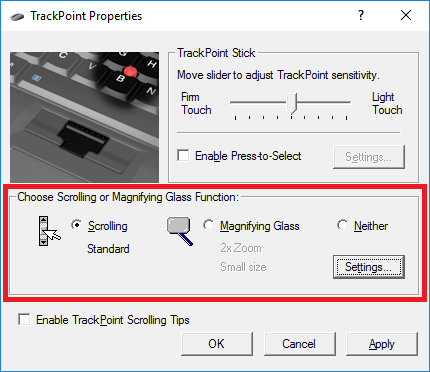
I had no middle scroll _at all_ on the T61 with the 16.2.19.7 driver. Meaning this whole area was absent;
Nor do I want the "smooth" scroll, I'm fine with the "Standard".

Image

However, I did try the regedit you suggested... but I'm not sure what it's supposed to fix. After flipping that key to 2214 it only reversed the buttons... And since I don't want that... I unchecked "reverse buttons" in the driver, and now the key is back to what is was; 1214
Either way; scrolling seems to work only partially. Not in the childish "settings" windows, nor in Edge. But perfectly fine in Firefox..

Still no middle-click functionality though. On the W520 I run TPmiddle.exe to gain that. I've never heard of the standard drivers offering that functionality.

The W520 has a Synaptics driver with version # 19.0.17.85.
W520
T61

Post Reply
  • Similar Topics
    Replies
    Views
    Last post

Return to “Thinkpad - General HARDWARE/SOFTWARE questions”

Who is online

Users browsing this forum: No registered users and 13 guests