


 Homepage
 Forum
Forum Drivers
 HMM-Manuals
 MTM
MTM Feed
Feed
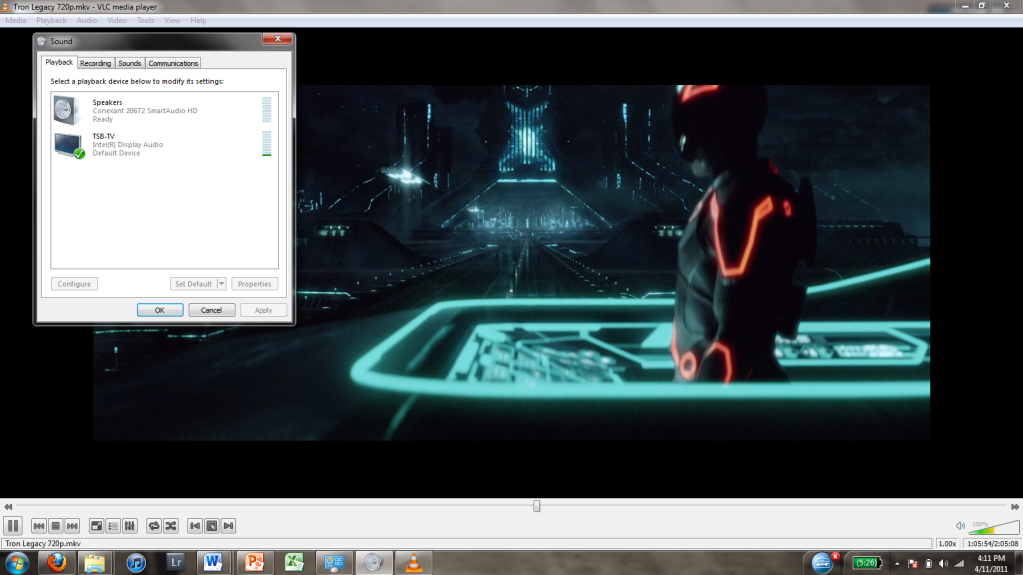
So I ordered Cable Matters Displayport to HDMI adapter and for my T420 and I can get the video to my TV but no sound (can't find no other options from Sound Playback Devices than Conexant SmartAudio HD). I have T420 that has Intel's integrated graphics (Intel HD3000).
Now I need some tips for Displayport-HDMI adapters that also support sound, one that I have found is this adapter: http://www.amazon.com/Startech-DP2HDMI- ... roduct_top but I'm still not 100% sure if this works properly, at least there's a one comment that says it worked with T420 (with sound and all).
Take a look at our
ThinkPads.com HOME PAGE
For those who might want to contribute to the blog, start here: Editors Alley Topic
Then contact Bill with a Private Message
ThinkPads.com HOME PAGE
For those who might want to contribute to the blog, start here: Editors Alley Topic
Then contact Bill with a Private Message
Displayport to HDMI adapters work with T420 (w/sound) PIC
-
rkawakami
- Admin Emeritus

- Posts: 10327
- Joined: Sun Jun 04, 2006 1:26 am
- Location: San Jose, CA 95120 USA
- Contact:
Re: Displayport to HDMI adapters that work with T420 (with s
I have a T410 with Intel graphics running 32-bit Windows 7 Pro, coupled with a passive DisplayPort-to-HDMI adapter that works fine. The audio initially was not automatically passed to the TV as I had to go into one of the audio menus and set the TV as the "default". I'll try to repeat the setup I did a few days ago and come back with precise descriptions for the audio setup, as well as what DisplayPort adapter I'm using (was bought from a local electronics store).
My understanding of this audio problem is that earlier Thinkpad systems were hardware limited and did not pass audio out the DisplayPort. Also some adapters do not provide audio support, even if the DisplayPort does. Furthermore, if your system has the DisplayPort++ logo:

next to the port, it means that it can output both HDMI and DVI signals that the TV can use with a simple passive adapter and not an active one.
ref: http://en.wikipedia.org/wiki/DisplayPort
ref: http://forum.notebookreview.com/lenovo/ ... -easy.html
My understanding of this audio problem is that earlier Thinkpad systems were hardware limited and did not pass audio out the DisplayPort. Also some adapters do not provide audio support, even if the DisplayPort does. Furthermore, if your system has the DisplayPort++ logo:
next to the port, it means that it can output both HDMI and DVI signals that the TV can use with a simple passive adapter and not an active one.
ref: http://en.wikipedia.org/wiki/DisplayPort
ref: http://forum.notebookreview.com/lenovo/ ... -easy.html
Ray Kawakami
X22 X24 X31 X41 X41T X60 X60s X61 X61s X200 X200s X300 X301 Z60m Z61t Z61p 560 560Z 600 600E 600X T21 T22 T23 T41 T60p T410 T420 T520 W500 W520 R50 A21p A22p A31 A31p
NOTE: All links to PC-Doctor software hosted by me are dead. Files removed 8/28/12 by manufacturer's demand.
X22 X24 X31 X41 X41T X60 X60s X61 X61s X200 X200s X300 X301 Z60m Z61t Z61p 560 560Z 600 600E 600X T21 T22 T23 T41 T60p T410 T420 T520 W500 W520 R50 A21p A22p A31 A31p
NOTE: All links to PC-Doctor software hosted by me are dead. Files removed 8/28/12 by manufacturer's demand.
Re: Displayport to HDMI adapters work with T420 (w/sound) PI
Thanks already in advance!
This is the adapter that I now have (it's passive): http://www.amazon.com/Cable-Matters-Gol ... B005H3I38Q
and I don't have that DP++ logo on my T420.
This is the adapter that I now have (it's passive): http://www.amazon.com/Cable-Matters-Gol ... B005H3I38Q
and I don't have that DP++ logo on my T420.
This could be very helpful because I can only find Conexant SmartAudio HD option when I go to Sound and Playback devices when the HDMI cable is plugged on to my TV with this adapter. I know there should be another option like on here: http://i146.photobucket.com/albums/r269 ... apture.png but I don't have that. But when I go to Control panel and Device manager, I can find that Intel(R) Display audio from Sound, video and game controllers menu (and Conexant 20672 SmartAudio HD is there also).The audio initially was not automatically passed to the TV as I had to go into one of the audio menus and set the TV as the "default". I'll try to repeat the setup I did a few days ago and come back with precise descriptions for the audio setup, as well as what DisplayPort adapter I'm using (was bought from a local electronics store).

Re: Displayport to HDMI adapters work with T420 (w/sound) PI
I believe you do. Under the DisplayPort.D-XX wrote:and I don't have that DP++ logo on my T420.
http://www.notebookreview.com/shared/pi ... sp?f=60855
I have the same thing on mt T410 (currently not connected to any displays). I'll see if I can figure out how to get the HDMI audio to appear there.D-XX wrote:This could be very helpful because I can only find Conexant SmartAudio HD option when I go to Sound and Playback devices when the HDMI cable is plugged on to my TV with this adapter. I know there should be another option like on here: http://i146.photobucket.com/albums/r269 ... apture.png but I don't have that. But when I go to Control panel and Device manager, I can find that Intel(R) Display audio from Sound, video and game controllers menu (and Conexant 20672 SmartAudio HD is there also).
Thinkpad 25 (20K7), T16 Gen 3 (21MQ), Yoga 14 (20FY), T430s (IPS FHD + Classic Keyboard), X220 4291-4BG
X61 7673-V2V, T60 2007-QPG, T42 2373-F7G, X32 (IPS Screen), A31p w/ Ultrabay Numpad
X61 7673-V2V, T60 2007-QPG, T42 2373-F7G, X32 (IPS Screen), A31p w/ Ultrabay Numpad
-
RealBlackStuff
- Admin Emeritus

- Posts: 24727
- Joined: Mon Sep 18, 2006 5:17 am
- Location: Loch Garman, Éire
Re: Displayport to HDMI adapters work with T420 (w/sound) PI
I have a T420 here, which also does have the DP++ symbol.
It sits immediately to the right of the Ethernet port, between the Display and USB ports.
I don't have any display cables though, so can't check if/how this works.
It sits immediately to the right of the Ethernet port, between the Display and USB ports.
I don't have any display cables though, so can't check if/how this works.
Lovely day for a Guinness! (The Real Black Stuff)
But I actually prefer Murphy's from Cork!
But I actually prefer Murphy's from Cork!
Re: Displayport to HDMI adapters work with T420 (w/sound) PI
Yeah you were right, there's that DP++ mark, my bad.  Also thanks in advance dr_st if you can check that HDMI audio thing out!
Also thanks in advance dr_st if you can check that HDMI audio thing out!-
rkawakami
- Admin Emeritus
- Posts: 10327
- Joined: Sun Jun 04, 2006 1:26 am
- Location: San Jose, CA 95120 USA
- Contact:
Re: Displayport to HDMI adapters work with T420 (w/sound) PI
That looks pretty much the same as the one I have: http://www.frys.com/product/5815553 (Siig CB-DP0062-S1)D-XX wrote:This is the adapter that I now have (it's passive): http://www.amazon.com/Cable-Matters-Gol ... B005H3I38Q
Sorry I was not able to get around to the audio setup last night (the family was watching their shows and didn't want me fooling around with the set). I'll try again tonight.
Ray Kawakami
X22 X24 X31 X41 X41T X60 X60s X61 X61s X200 X200s X300 X301 Z60m Z61t Z61p 560 560Z 600 600E 600X T21 T22 T23 T41 T60p T410 T420 T520 W500 W520 R50 A21p A22p A31 A31p
NOTE: All links to PC-Doctor software hosted by me are dead. Files removed 8/28/12 by manufacturer's demand.
X22 X24 X31 X41 X41T X60 X60s X61 X61s X200 X200s X300 X301 Z60m Z61t Z61p 560 560Z 600 600E 600X T21 T22 T23 T41 T60p T410 T420 T520 W500 W520 R50 A21p A22p A31 A31p
NOTE: All links to PC-Doctor software hosted by me are dead. Files removed 8/28/12 by manufacturer's demand.

Re: Displayport to HDMI adapters work with T420 (w/sound) PI
I'm using a Delock DP to HDMI cable on my HD3000 T420s without any problem; this one:
http://www.delock.de/produkte/F_159_Dis ... kmale.html
Last week I've bought a Delock miniDP to HDMI adapter for my T430, but I have yet to try it.
http://www.delock.de/produkte/F_159_Dis ... kmale.html
Last week I've bought a Delock miniDP to HDMI adapter for my T430, but I have yet to try it.
T480 · i7-8650U · 32GB RAM · 512GB SSD · FHD · NVIDIA MX150 · Fibocom L830-EB
T420s · i5-2520M · 12GB RAM · 480GB SSD · HD+ · HD3000 · F5521gw
Past: T430, T400, T60, T41, T22, 600X, 390X
T420s · i5-2520M · 12GB RAM · 480GB SSD · HD+ · HD3000 · F5521gw
Past: T430, T400, T60, T41, T22, 600X, 390X
-
rkawakami
- Admin Emeritus
- Posts: 10327
- Joined: Sun Jun 04, 2006 1:26 am
- Location: San Jose, CA 95120 USA
- Contact:
Re: Displayport to HDMI adapters work with T420 (w/sound) PI
Okay, here's what I did to get audio to play through the DisplayPort on my T410:
- Connected a passive DisplayPort-to-HDMI adapter (the Siig unit as described earlier); the other end was connected to my LG TV using a standard 10' HDMI cable
- TV on and proper HDMI port selected
- Running Windows 7 (a factory recovery installation from a restore disk set)
- Press Fn+F6 to bring up the Communications settings utility
- Click on Audio defaults and settings
- TV should appear in listing of Playback tab
- Click the TV device
- Click the Set Default button, then Apply and OK
It sounds like you did just about what I did. Since your TV does not appear under the Playback tab then I would suspect that W7 does not "see" the TV because of:
- the DisplayPort adapter is not functioning correctly
- your T420 DisplayPort is not functioning correctly
- you didn't have the TV on and selected to the appropriate HDMI port
- your TV's HDMI port is not functioning correctly
Best suggestion is to verify that your TV's HDMI port is working by plugging in another component that also is suppose to deliver audio. If that works, then perhaps try another DisplayPort-HDMI adapter. I don't know if there's a way to independently test your laptop's DisplayPort other than trying to connect to another monitor or TV.
- Connected a passive DisplayPort-to-HDMI adapter (the Siig unit as described earlier); the other end was connected to my LG TV using a standard 10' HDMI cable
- TV on and proper HDMI port selected
- Running Windows 7 (a factory recovery installation from a restore disk set)
- Press Fn+F6 to bring up the Communications settings utility
- Click on Audio defaults and settings
- TV should appear in listing of Playback tab
- Click the TV device
- Click the Set Default button, then Apply and OK
It sounds like you did just about what I did. Since your TV does not appear under the Playback tab then I would suspect that W7 does not "see" the TV because of:
- the DisplayPort adapter is not functioning correctly
- your T420 DisplayPort is not functioning correctly
- you didn't have the TV on and selected to the appropriate HDMI port
- your TV's HDMI port is not functioning correctly
Best suggestion is to verify that your TV's HDMI port is working by plugging in another component that also is suppose to deliver audio. If that works, then perhaps try another DisplayPort-HDMI adapter. I don't know if there's a way to independently test your laptop's DisplayPort other than trying to connect to another monitor or TV.
Ray Kawakami
X22 X24 X31 X41 X41T X60 X60s X61 X61s X200 X200s X300 X301 Z60m Z61t Z61p 560 560Z 600 600E 600X T21 T22 T23 T41 T60p T410 T420 T520 W500 W520 R50 A21p A22p A31 A31p
NOTE: All links to PC-Doctor software hosted by me are dead. Files removed 8/28/12 by manufacturer's demand.
X22 X24 X31 X41 X41T X60 X60s X61 X61s X200 X200s X300 X301 Z60m Z61t Z61p 560 560Z 600 600E 600X T21 T22 T23 T41 T60p T410 T420 T520 W500 W520 R50 A21p A22p A31 A31p
NOTE: All links to PC-Doctor software hosted by me are dead. Files removed 8/28/12 by manufacturer's demand.
Re: Displayport to HDMI adapters work with T420 (w/sound) PI
Here's the problem, when I press Fn+F6 I have this screen: http://screenshotuploader.com/i/1407/ok8ns.png and I have no "Audio defaults and settings", only that Microphone settings spot there. Also when I go to "Manage Settings", there are only Camera and VOIP Call settings pages. Before pressing Fn+F6 I had done everything like you had done.rkawakami wrote:Okay, here's what I did to get audio to play through the DisplayPort on my T410:
- Connected a passive DisplayPort-to-HDMI adapter (the Siig unit as described earlier); the other end was connected to my LG TV using a standard 10' HDMI cable
- TV on and proper HDMI port selected
- Running Windows 7 (a factory recovery installation from a restore disk set)
- Press Fn+F6 to bring up the Communications settings utility
- Click on Audio defaults and settings
- TV should appear in listing of Playback tab
- Click the TV device
- Click the Set Default button, then Apply and OK

Re: Displayport to HDMI adapters work with T420 (w/sound) PI
Well, I just did a very simple test. Connected my T410 to a DELL 2408WFP via a passive DP-HDMI adapter + HDMI-HDMI cable. Without having to do anything else - as soon as I connected the display, a new audio device - "DELL 2408WFP on Intel HD Audio" appeared in the Playback Devices. So in my case - it just worked. 
Not sure why it's not working for you. Perhaps it's the adapter, or perhaps the HD Audio driver needs to be updated for whatever reason...
Not sure why it's not working for you. Perhaps it's the adapter, or perhaps the HD Audio driver needs to be updated for whatever reason...
Thinkpad 25 (20K7), T16 Gen 3 (21MQ), Yoga 14 (20FY), T430s (IPS FHD + Classic Keyboard), X220 4291-4BG
X61 7673-V2V, T60 2007-QPG, T42 2373-F7G, X32 (IPS Screen), A31p w/ Ultrabay Numpad
X61 7673-V2V, T60 2007-QPG, T42 2373-F7G, X32 (IPS Screen), A31p w/ Ultrabay Numpad
Re: Displayport to HDMI adapters work with T420 (w/sound) PI
Btw, which Intel HD audio driver version do you have? Mine is 6.14.0.3097.
Re: Displayport to HDMI adapters work with T420 (w/sound) PI
According to my device manager - 6.12.0.3065, provided by Intel, on 21/06/2010.
So yours is newer. Perhaps something got corrupted with the settings. Reinstalling may help (sometimes)...
So yours is newer. Perhaps something got corrupted with the settings. Reinstalling may help (sometimes)...
Thinkpad 25 (20K7), T16 Gen 3 (21MQ), Yoga 14 (20FY), T430s (IPS FHD + Classic Keyboard), X220 4291-4BG
X61 7673-V2V, T60 2007-QPG, T42 2373-F7G, X32 (IPS Screen), A31p w/ Ultrabay Numpad
X61 7673-V2V, T60 2007-QPG, T42 2373-F7G, X32 (IPS Screen), A31p w/ Ultrabay Numpad
Re: Displayport to HDMI adapters work with T420 (w/sound) PI
So I decided to order the same Adapter that you have, I did the order through Amazon because I live in Europe. Hopefully this will solve my problem, let's wait and see.rkawakami wrote:That looks pretty much the same as the one I have: http://www.frys.com/product/5815553 (Siig CB-DP0062-S1)D-XX wrote:This is the adapter that I now have (it's passive): http://www.amazon.com/Cable-Matters-Gol ... B005H3I38Q

-
rkawakami
- Admin Emeritus
- Posts: 10327
- Joined: Sun Jun 04, 2006 1:26 am
- Location: San Jose, CA 95120 USA
- Contact:
Re: Displayport to HDMI adapters work with T420 (w/sound) PI
@D-XX
Additional information:
Here's my Fn+F6 screen (click on it for full size image):

And my Sound window
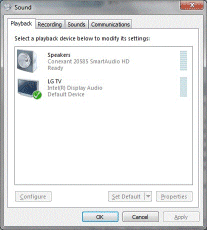
Note that this version of the Fn+F6 keypress occurs if the appropriate ThinkVantage utility/ies has/have been loaded. I received my nVIDIA T410 a couple of days ago and it had a retail (refurb) version of Windows 7 Pro 64-bit. Initially when I pressed Fn+F6 I got no menu. I connected the T410 to my TV and video was played on it but the sound still came through the laptop's speakers. In that case, to get to the Sound window: Control Panel/Hardware and Sound/Sound. Later on after I downloaded and ran System Update, Fn+F6 resulted in the same window you get (0k8ns.png). So my assumption is that you are running a non-factory W7 install.
For this refurb install of 64-bit W7, the Conexant 20585 SmartAudio HD driver was provided by Conexant and is version 4.95.48.50. Since it appears that System Update did not fully install everything that I expected (missing Start Menu access to ThinkVantage among other things), or maybe I did something wrong, I'm planning to do a W7 32-bit factory restore on this system and then test out the DisplayPort connection again.
Additional information:
Here's my Fn+F6 screen (click on it for full size image):
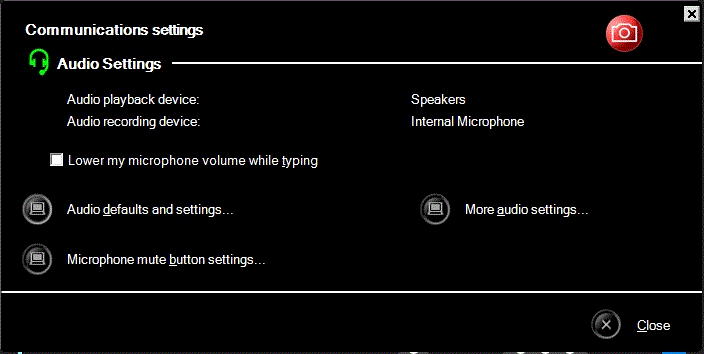
And my Sound window
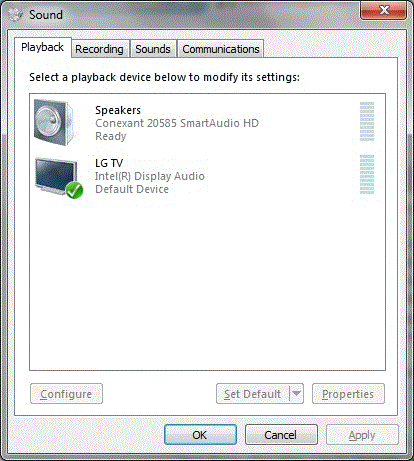
Note that this version of the Fn+F6 keypress occurs if the appropriate ThinkVantage utility/ies has/have been loaded. I received my nVIDIA T410 a couple of days ago and it had a retail (refurb) version of Windows 7 Pro 64-bit. Initially when I pressed Fn+F6 I got no menu. I connected the T410 to my TV and video was played on it but the sound still came through the laptop's speakers. In that case, to get to the Sound window: Control Panel/Hardware and Sound/Sound. Later on after I downloaded and ran System Update, Fn+F6 resulted in the same window you get (0k8ns.png). So my assumption is that you are running a non-factory W7 install.
For this refurb install of 64-bit W7, the Conexant 20585 SmartAudio HD driver was provided by Conexant and is version 4.95.48.50. Since it appears that System Update did not fully install everything that I expected (missing Start Menu access to ThinkVantage among other things), or maybe I did something wrong, I'm planning to do a W7 32-bit factory restore on this system and then test out the DisplayPort connection again.
Ray Kawakami
X22 X24 X31 X41 X41T X60 X60s X61 X61s X200 X200s X300 X301 Z60m Z61t Z61p 560 560Z 600 600E 600X T21 T22 T23 T41 T60p T410 T420 T520 W500 W520 R50 A21p A22p A31 A31p
NOTE: All links to PC-Doctor software hosted by me are dead. Files removed 8/28/12 by manufacturer's demand.
X22 X24 X31 X41 X41T X60 X60s X61 X61s X200 X200s X300 X301 Z60m Z61t Z61p 560 560Z 600 600E 600X T21 T22 T23 T41 T60p T410 T420 T520 W500 W520 R50 A21p A22p A31 A31p
NOTE: All links to PC-Doctor software hosted by me are dead. Files removed 8/28/12 by manufacturer's demand.
Re: Displayport to HDMI adapters work with T420 (w/sound) PI
Thanks for the info but even though I have a different looking Fn+F6 screen, I can still get to Sound window where I only have "Speakers" on playback devices. So maybe that different Fn+F6 screen won't change things for me, I think the problem has to be with the wrong adapter.
My order arrived yesterday BUT somehow amazon screwed that up and they sent the wrong adapter (this one looks like a cheap Displayport to HDMI adapter) because it's definitely not the SIIG adapter: http://pbrd.co/1lKUNEZ
Luckily they'll send me that right adapter for a replacement, hopefully they'll get things right this time and I can finally test that SIIG adapter.
My order arrived yesterday BUT somehow amazon screwed that up and they sent the wrong adapter (this one looks like a cheap Displayport to HDMI adapter) because it's definitely not the SIIG adapter: http://pbrd.co/1lKUNEZ
Luckily they'll send me that right adapter for a replacement, hopefully they'll get things right this time and I can finally test that SIIG adapter.
-
- Similar Topics
- Replies
- Views
- Last post
-
- 8 Replies
- 15399 Views
-
Last post by Loci
Fri Oct 31, 2025 3:02 pm
-
-
PicoPCMCIA - a newly made PCMCIA sound card
by Bondi » Tue Feb 10, 2026 7:17 am » in Off-Topic Stuff - 6 Replies
- 3612 Views
-
Last post by axur-delmeria
Sun Mar 22, 2026 8:49 pm
-
-
-
Virtualization on T420
by Berator » Sat Nov 22, 2025 10:25 am » in ThinkPad T400/T410/T420 and T500/T510/T520 Series - 3 Replies
- 6936 Views
-
Last post by axur-delmeria
Sun Nov 23, 2025 11:56 am
-
-
- 4 Replies
- 6942 Views
-
Last post by Kiriakos
Sun Feb 15, 2026 12:25 pm
Who is online
Users browsing this forum: No registered users and 71 guests