Legacy Red Strips on early Lenovo Thinkpads

Performance, hardware, software, general buying and gaming discussion..
Post Reply
Message
Author
TPFanatic
Senior Member
Senior Member
Posts: 538
Joined: Thu Jul 30, 2015 11:29 pm
Location: Hudson, New Hampshire

Legacy Red Strips on early Lenovo Thinkpads

#1 Post by TPFanatic » Sat Nov 21, 2015 8:14 pm

Early Lenovo Thinkpads: T/R/X/Z 60/61, T/R 400/500, and I guess SL300/400/500 series too.

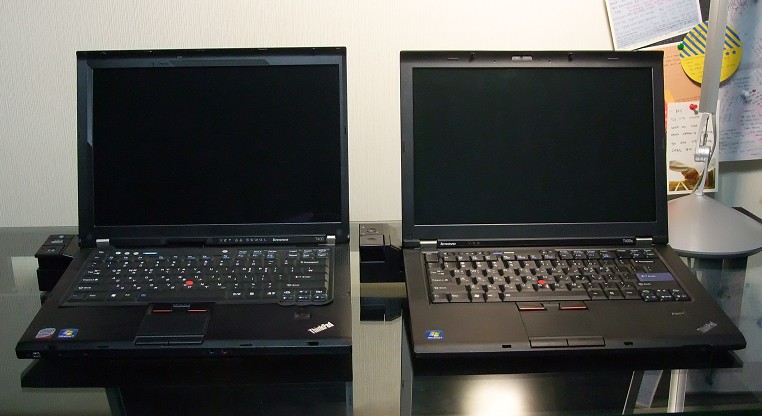
These thinkpads lack the decorative red and blue button coloring that the IBMs had, and Lenovo brought them back. So I'm a bit confused as to where the funky T400 (left) in this picture got its red strips from.

http://tpholic.com/xe/files/attach/imag ... /007/1.jpg

Maybe they got pulled off an X200? I've been wondering if the actual keyboard caps from an X200 could be transplanted onto a same-manufacturer keyboard from any other early Lenovo. Putting a complete X200 keyboard with its fancy retro black volume/power buttons into, say, my T500 seems physically impossible without plastic surgery.

I know it's stupid but I just really like those red strips, so much that I made my own. http://i.imgur.com/XugpVQb.jpg?1 Don't worry, the purist in wouldn't dare if they were not removable.

edit: I find this thread only after I make a thread. :roll:
http://forum.thinkpads.com/viewtopic.php?t=118744

Cool stuff.
Last edited by TPFanatic on Sun Nov 22, 2015 2:02 am, edited 1 time in total.
Daily driver: lenovo T500 P9700, WUXGA, 8GB
Ultraportable: IBM lenovo X60s
Home theater: lenovo T420

Enable advanced features on older Synaptics touchpads with the registry: http://forum.thinkpads.com/viewtopic.php?f=2&t=122612

MikalE
Junior Member
Junior Member
Posts: 452
Joined: Sun Sep 13, 2015 9:51 pm
Location: Marissa, Illinois

Re: Legacy Red Strips on early Lenovo Thinkpads

#2 Post by MikalE » Sat Nov 21, 2015 8:24 pm

Probably the same place my T500 got its red stripes. From a roll of 1/8" automotive pin striping.

http://i63.photobucket.com/albums/h146/ ... 0ynzwj.jpg
T510 i5, T510 i7 4349-A64 - T520 i7 4242-4UU, technically a CTO now.

T520: i7-2760QM(2.40GHz),16GB RAM, 500GB SSD/500GB 7200 RPM Drive, 15.6in 1600x900 LCD, 1GB NVIDIA, DVDRW, Smartcard reader, media card reader, FPR, Win7 Pro64, whitelist BIOS, Ultimate-N 6300 AGN, German KB, Bluetooth 4.0.

Atreides
Junior Member
Junior Member
Posts: 284
Joined: Sun Apr 19, 2009 7:38 pm
Location: Washington, DC

Re: Legacy Red Strips on early Lenovo Thinkpads

#3 Post by Atreides » Mon Nov 30, 2015 6:58 pm

I have an unusual affinity for these as well, including the blue dots on the middle button. Was so pleased that they brought them back with the latest refresh.
Current: X1 Carbon Gen 3 - 20BT-S1LV00 - i5-5300U - 8GB DDR3L - WQHD Touch - 256GB SSD
Previous: X60s - 1702-3QU | X200s - 7466-44U | X230 - 2325-2RU | X240sx - 20AK-A00RHH
Projects: 560 - 2640-2OU | 600E - 2645-3AU | T21 2647-6AU | X60t - 6366-L6U

shawross
Junior Member
Junior Member
Posts: 259
Joined: Mon Oct 28, 2013 5:48 am
Location: Perth Aus / Thailand

Re: Legacy Red Strips on early Lenovo Thinkpads

#4 Post by shawross » Fri Dec 04, 2015 8:13 pm

When Lenovo removed these blue and red strips it was a sign they didn't understand style. Richard Sapper must have choked on his cornflakes when he saw the change to the design.
The affected Thinkpads were great units hardware wise but it was a sign that Lenovo just didn't quite understand marketing.
Active --- Love the X series
X301 SU9400 IDA Mod - W 7 - Main Driver
X201 540M - W 10 - Backup Driver
X61 T7500 - W 7 - Nostalgia

Spares
X301, T43's, T42

Rogue daily driver - Samsung RV511 15.6 " Screen - W 7

dr_st
Senior ThinkPadder
Senior ThinkPadder
Posts: 6647
Joined: Sat Oct 29, 2005 6:20 am

Re: Legacy Red Strips on early Lenovo Thinkpads

#5 Post by dr_st » Sat Dec 05, 2015 4:49 am

TPFanatic wrote:So I'm a bit confused as to where the funky T400 (left) in this picture got its red strips from.

http://tpholic.com/xe/files/attach/imag ... /007/1.jpg

Maybe they got pulled off an X200?
You know, that's a great question.

That does not seem a T400 keyboard. The trackpoint button sizes are off, and the keyboard does not fit as the original would. Nor does it seem an X200 keyboard (volume buttons are silver and not black). I can't recall a Thinkpad that has an original keyboard looking like this. So possibly it's a mix of some kind.
Current: X220 4291-4BG, T410 2537-R46, T60 1952-F76, T60 2007-QPG, T42 2373-F7G
Collectibles: T430s (IPS FHD + Classic Keyboard), X32 (IPS Screen)
Retired: X61 7673-V2V, A31p w/ Ultrabay Numpad
Past: Z61t 9440-A23, T60 2623-D3U, X32 2884-M5U

600X
Senior Member
Senior Member
Posts: 683
Joined: Tue May 21, 2013 3:31 am
Location: Burlington, NC

Re: Legacy Red Strips on early Lenovo Thinkpads

#6 Post by 600X » Sat Dec 05, 2015 5:07 am

dr_st wrote:
TPFanatic wrote:So I'm a bit confused as to where the funky T400 (left) in this picture got its red strips from.

http://tpholic.com/xe/files/attach/imag ... /007/1.jpg

Maybe they got pulled off an X200?
You know, that's a great question.

That does not seem a T400 keyboard. The trackpoint button sizes are off, and the keyboard does not fit as the original would. Nor does it seem an X200 keyboard (volume buttons are silver and not black). I can't recall a Thinkpad that has an original keyboard looking like this. So possibly it's a mix of some kind.
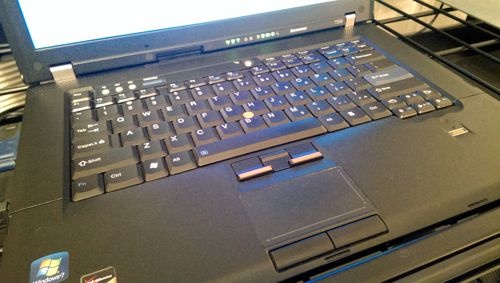
It's a regular T400 keyboard with the red trackpoint buttons from a X200 and a rubber protector on top of it. I should know because my T61 keyboard looks like this:

Image
Daily: T440s
Classics: 600X (850MHz), A31p (FlexView), X41, T60 (LED FlexView), R61 (QXGA FlexView), X301 (AFFS)

dr_st
Senior ThinkPadder
Senior ThinkPadder
Posts: 6647
Joined: Sat Oct 29, 2005 6:20 am

Re: Legacy Red Strips on early Lenovo Thinkpads

#7 Post by dr_st » Sat Dec 05, 2015 5:13 am

Makes sense. Mystery solved. :)
Current: X220 4291-4BG, T410 2537-R46, T60 1952-F76, T60 2007-QPG, T42 2373-F7G
Collectibles: T430s (IPS FHD + Classic Keyboard), X32 (IPS Screen)
Retired: X61 7673-V2V, A31p w/ Ultrabay Numpad
Past: Z61t 9440-A23, T60 2623-D3U, X32 2884-M5U

Post Reply
  • Similar Topics
    Replies
    Views
    Last post

Return to “Thinkpad - General HARDWARE/SOFTWARE questions”

Who is online

Users browsing this forum: No registered users and 1 guest