


 Homepage
 Forum
Forum Drivers
 HMM-Manuals
 MTM
MTM Feed
Feed
I got a 360PE weeks ago and tried to restore it to working condition since last weekend. For the base, it's easy to find some working 360 with audio so totally not a problem. For the software, archive[dot]org has everything to rebuild the hdd. I'd like to say, 360X has really great compatibility and it works flawlessly with 4G CF card plus a CF-IDE adapter. And I picked up a Japanese keyboard to be cool although I do not speak Japanese lol.
The most difficult part is the LCD assembly and the stylus. I don't know what kind of touch pad it uses but it seems your finger does not work but the stylus only. I'm not an expert so I just tried to get a stylus from my friend and started restoring.
Disassembly of LCD is quite easy, there are couple of screws and a hidden one under the IBM logo on the top right corner, after removing all of them, the front cover can then be removed. Next step is to remove some other screws, ccfl cable on the right and two flat cable (one touch, one display), and then the LCD assembly is ready to be replaced.
Now it's the important part. It is almost impossible to get a full assembly of touch lcd assembly today, so you'd better to pray that (at least) the touch pad works. For the DSTN part, well, you can find an alternative although it doesn't fit perfectly. I myself got a working 9.5 inch DSTN from another 360cse, carefully take it apart and replaced my 360PE one.
The 360PE LCD has multiple layers, two pieces of touch panel and the DSTN LCD sandwiched in between. Vinegar syndrome is commonly found in such old LCD and mine suffers from it too. You can insert a DSTN from other 360x into it but some of the capacitors make it does not fit perfectly.
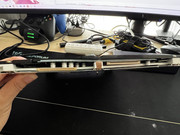
You can then cut and trim it a little bit to make it looks better (but...)
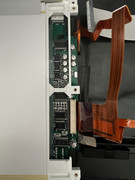
then just simply put everything back, it seems working.
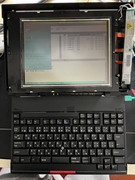
and the stylus works well, too
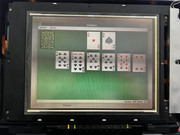
However, this is just the very beginning of a nightmare. After I put the front cover back, it doesn't work.
So I disassembled it, and then carefully removed, cleaned and plugged all connectors. It works. And then, same story, it's dead again when front cover is put back.
The first mistake I made is that I did it about 3 or 4 times until I realized I may damaged some cables. So I reassembled and tested it on each step while plugged and finally I figured it out. Remember the capacitors I mentioned before? Those little guys caused a slight bulge, putting pressure on the display cable. This fragile, 30-year-old ribbon couldn't handle the extra stress and likely suffered permanent damage.
I, then, stopped here, hoping there is just one or two broken wires so I can still patch it by soldering some wires directly.
 510cs, 555bj, 860, Type 2435