


 Homepage
 Forum
Forum Drivers
 HMM-Manuals
 MTM
MTM Feed
Feed
I'm brand new to this forum, so many of you might already know about this issue, but a senior member suggested I post this.
My sister-in-law asked me to look at her T30 which was often reacting very slowly. It had two 256 Mb RAM modules in it, but both the BIOS and Windows XP SP2 showed total memory of only 256 Mb.
After looking through this forum, I found a number of posts regarding the failing memory slots and how to fix them. But since my sister-in-law wanted to upgrade from 512 Mb (which she thought she had) to 1 Gb, I decided to install a 1 Gb PC2700 chip in the good slot. I had also upgraded the BIOS to the latest version from 2006.
The T30 seems to run fine and recognizes the full 1 Gb of system memory. So instead of fixing the bad slot, I just left it empty, and used the 1 Gb chip. I had also tried two 512 Mb chips in both slots, but only one was recognized.
Anyway, this wasn't really a "fix", but instead a very simple workaround to get the full 1 Gb of memory. Maybe this will help others in a similar situation.
Take a look at our
ThinkPads.com HOME PAGE
For those who might want to contribute to the blog, start here: Editors Alley Topic
Then contact Bill with a Private Message
ThinkPads.com HOME PAGE
For those who might want to contribute to the blog, start here: Editors Alley Topic
Then contact Bill with a Private Message
T30 with failing memory slot
T30 with failing memory slot
Ray Kawal
Sequim, WA
Ideapad U110, T60, T60p
Sequim, WA
Ideapad U110, T60, T60p
-
tfflivemb2
- Moderator Emeritus

- Posts: 5605
- Joined: Thu Sep 01, 2005 1:17 pm
- Location: Wisconsin
- Contact:
The bad memory slot problem can easily been solved by just resoldering the pins of the memory slot.
If checked with a magnifying glass then you will find some of the memory slot pins loose from the main board in the corners.
I have fixed several already by just touching the metal pins for a few seconds with my soldering iron, do not try to add new solder to it as this will give you a big mess where all the pins will be connected together. Just heat the pins a bit to reflow the existing solder on the board.
Msmax
If checked with a magnifying glass then you will find some of the memory slot pins loose from the main board in the corners.
I have fixed several already by just touching the metal pins for a few seconds with my soldering iron, do not try to add new solder to it as this will give you a big mess where all the pins will be connected together. Just heat the pins a bit to reflow the existing solder on the board.
Msmax
Thank you for the reply.
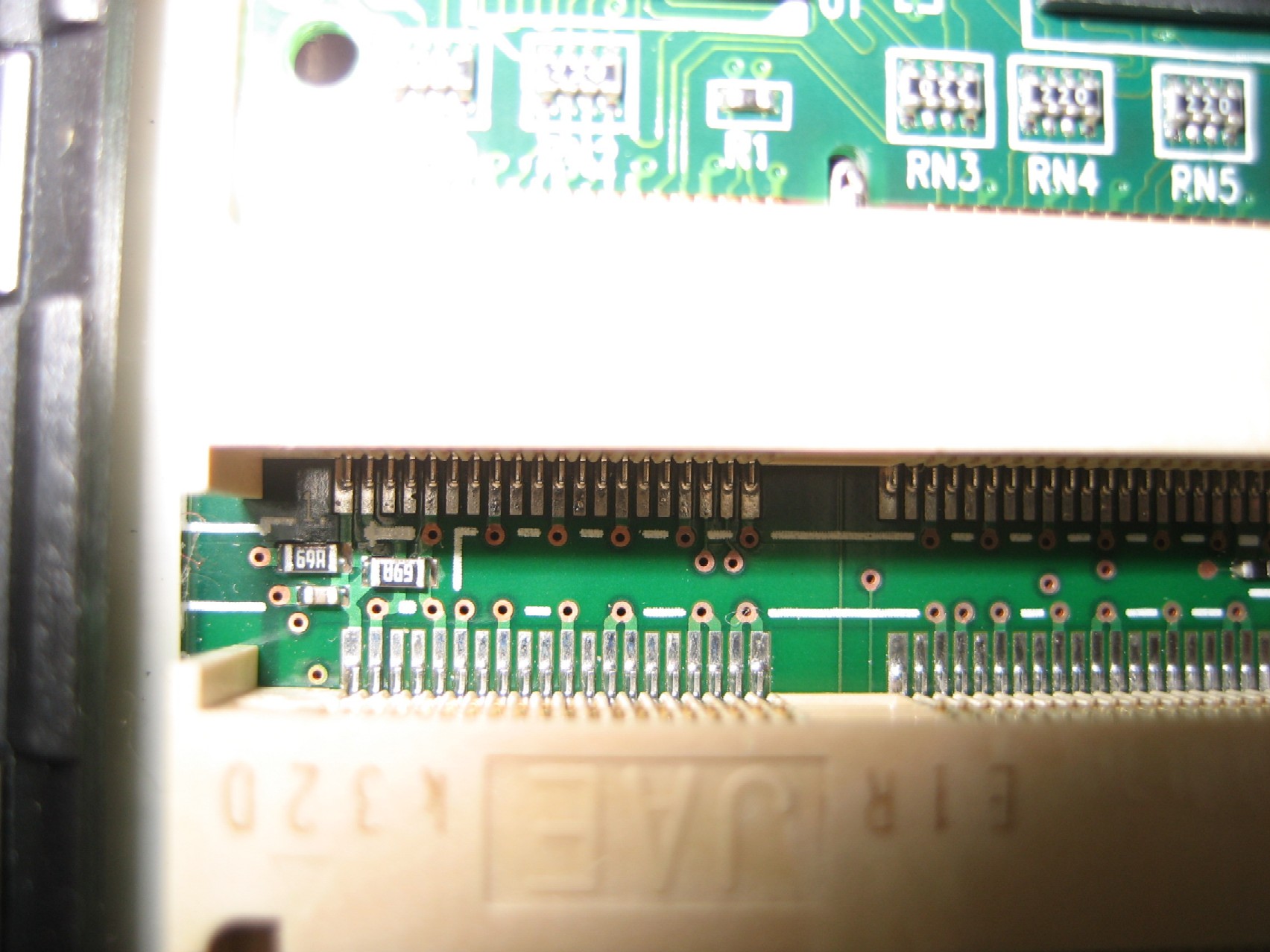
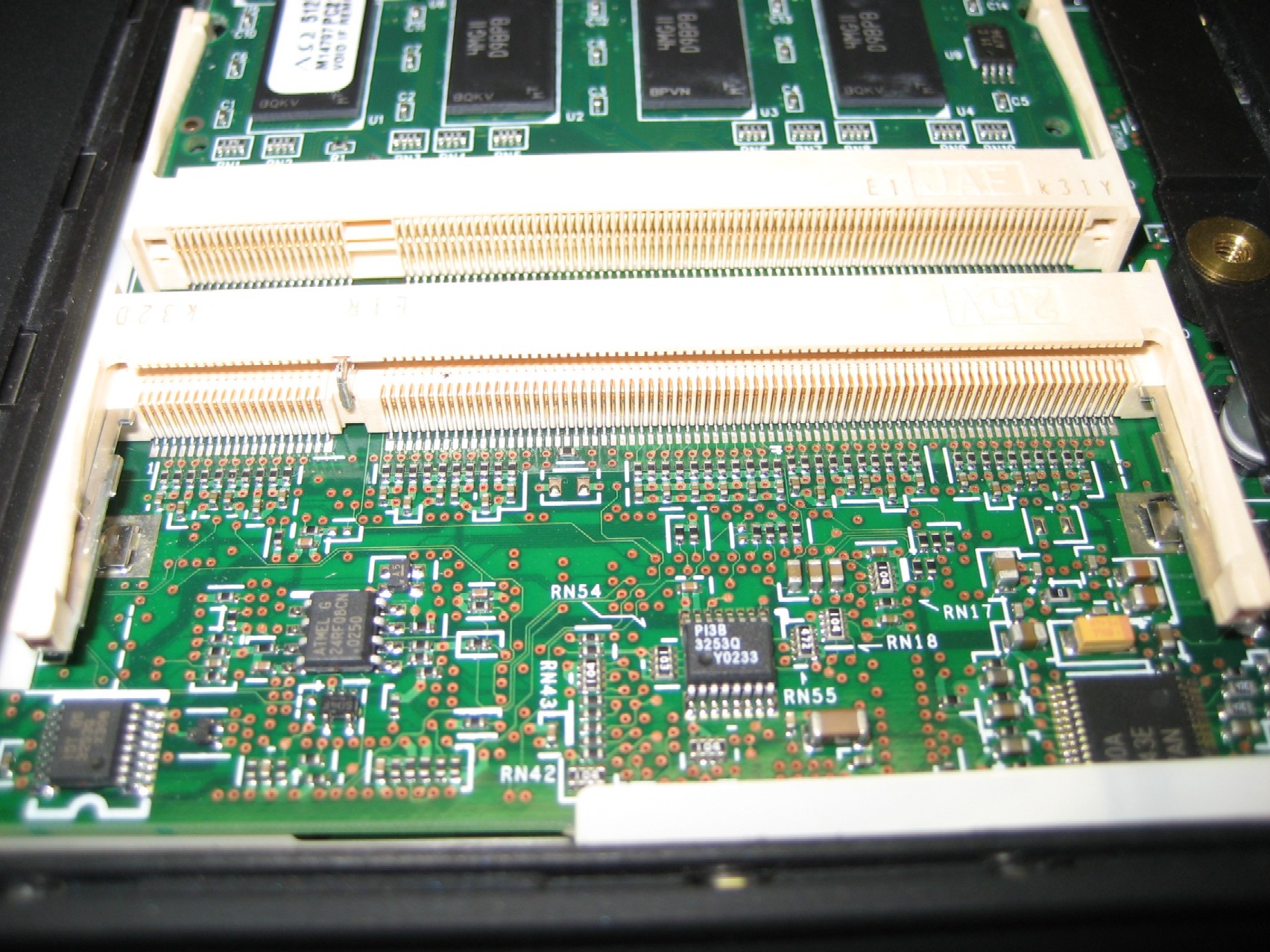
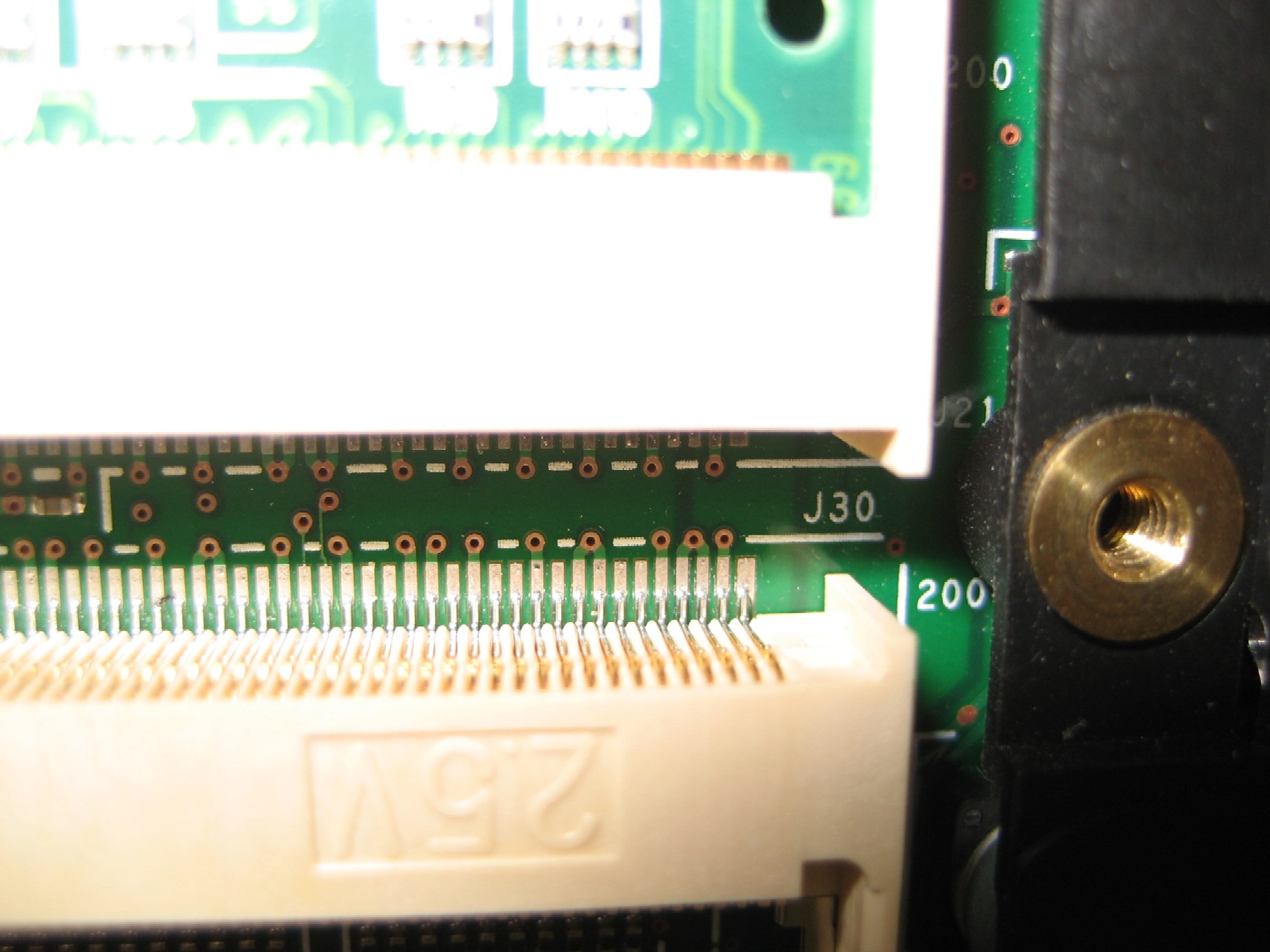
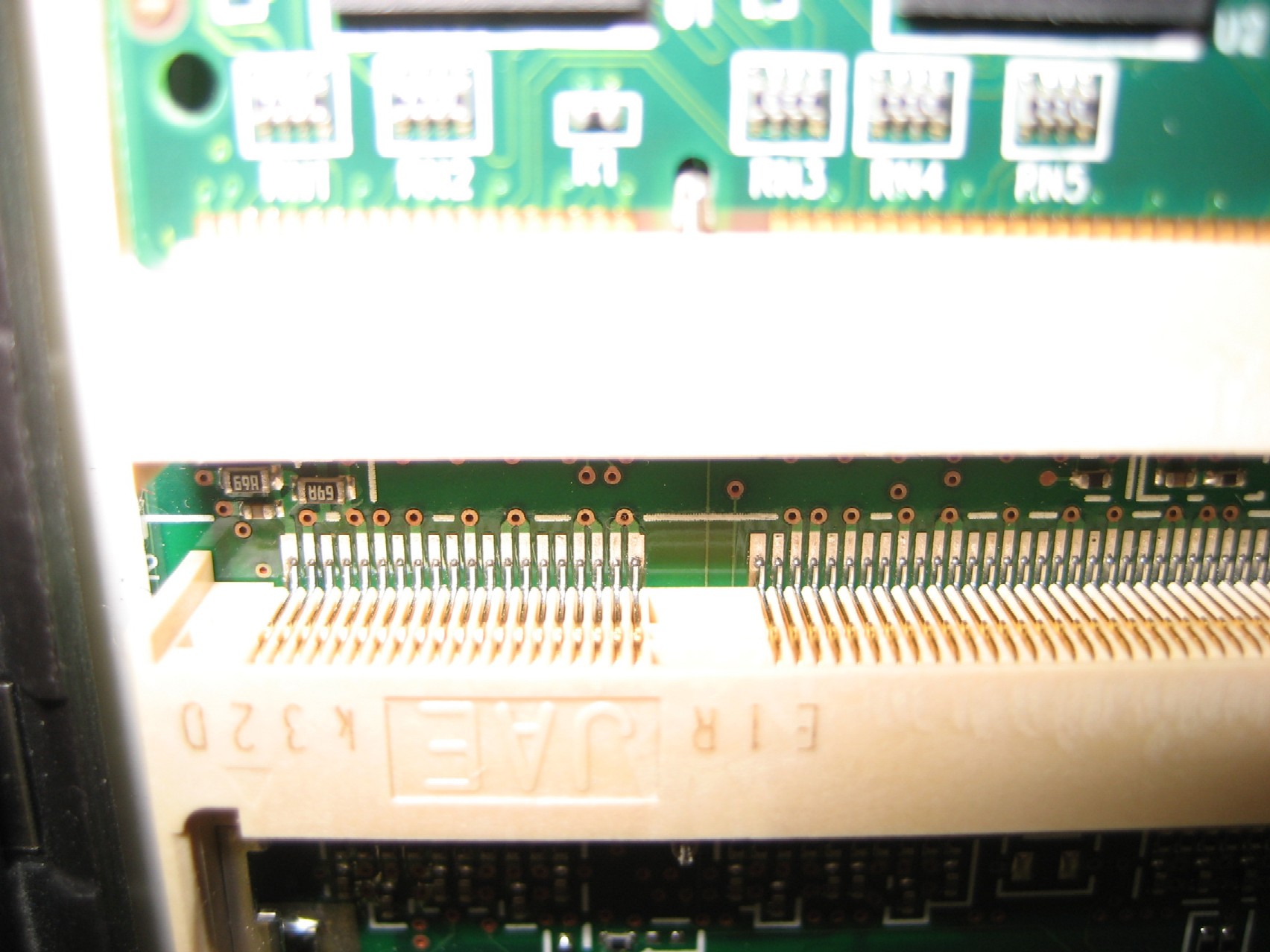
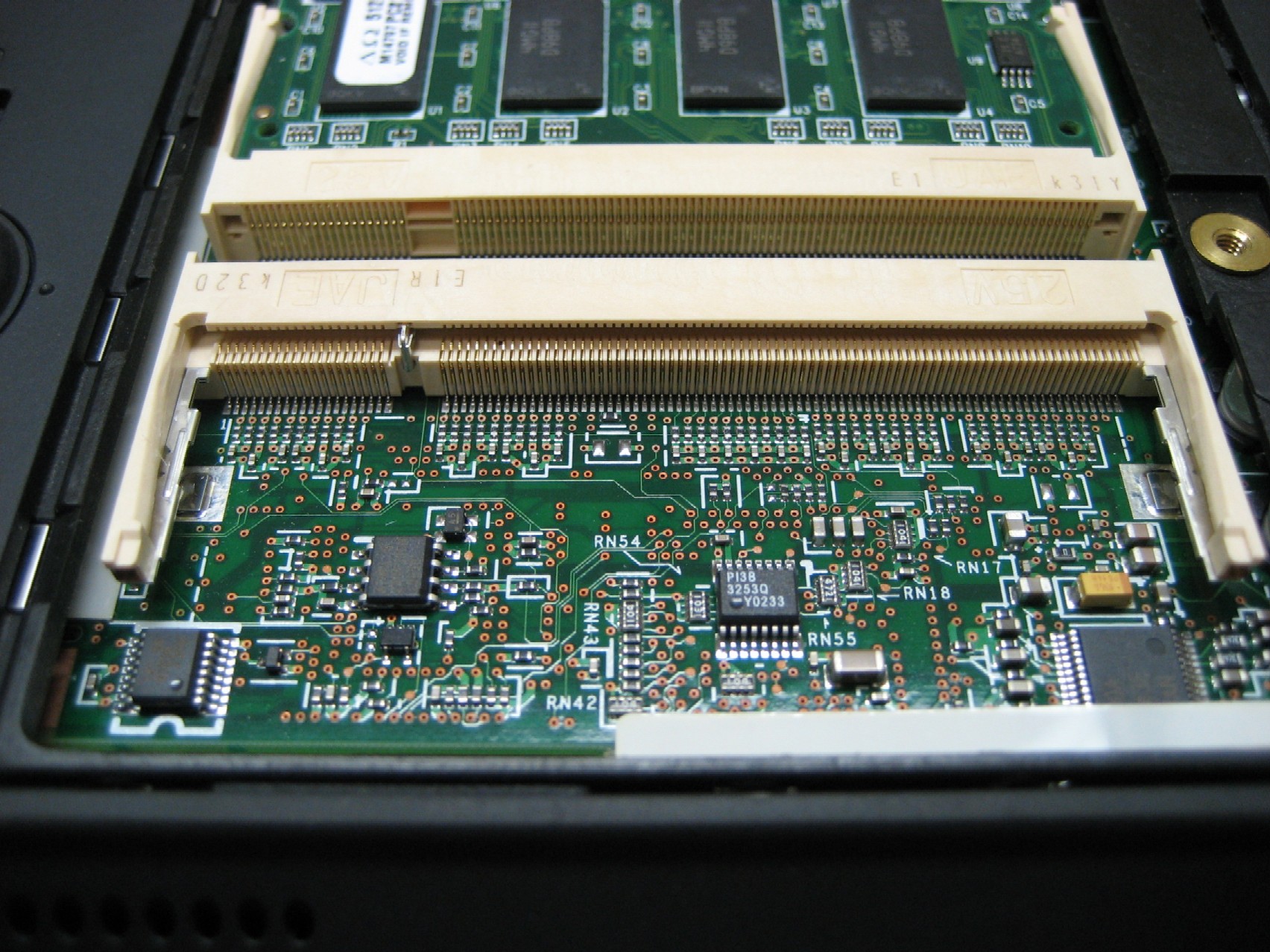
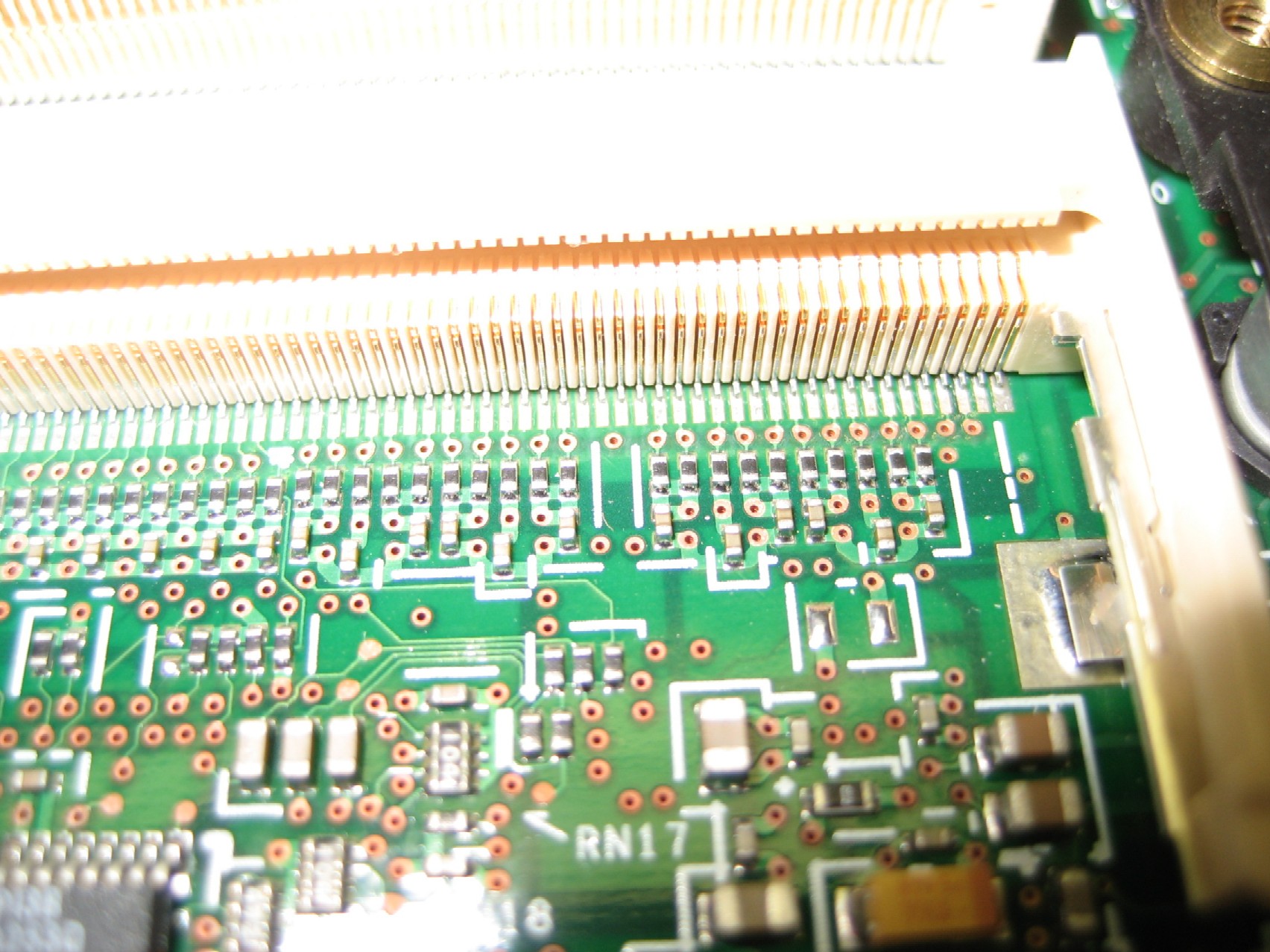
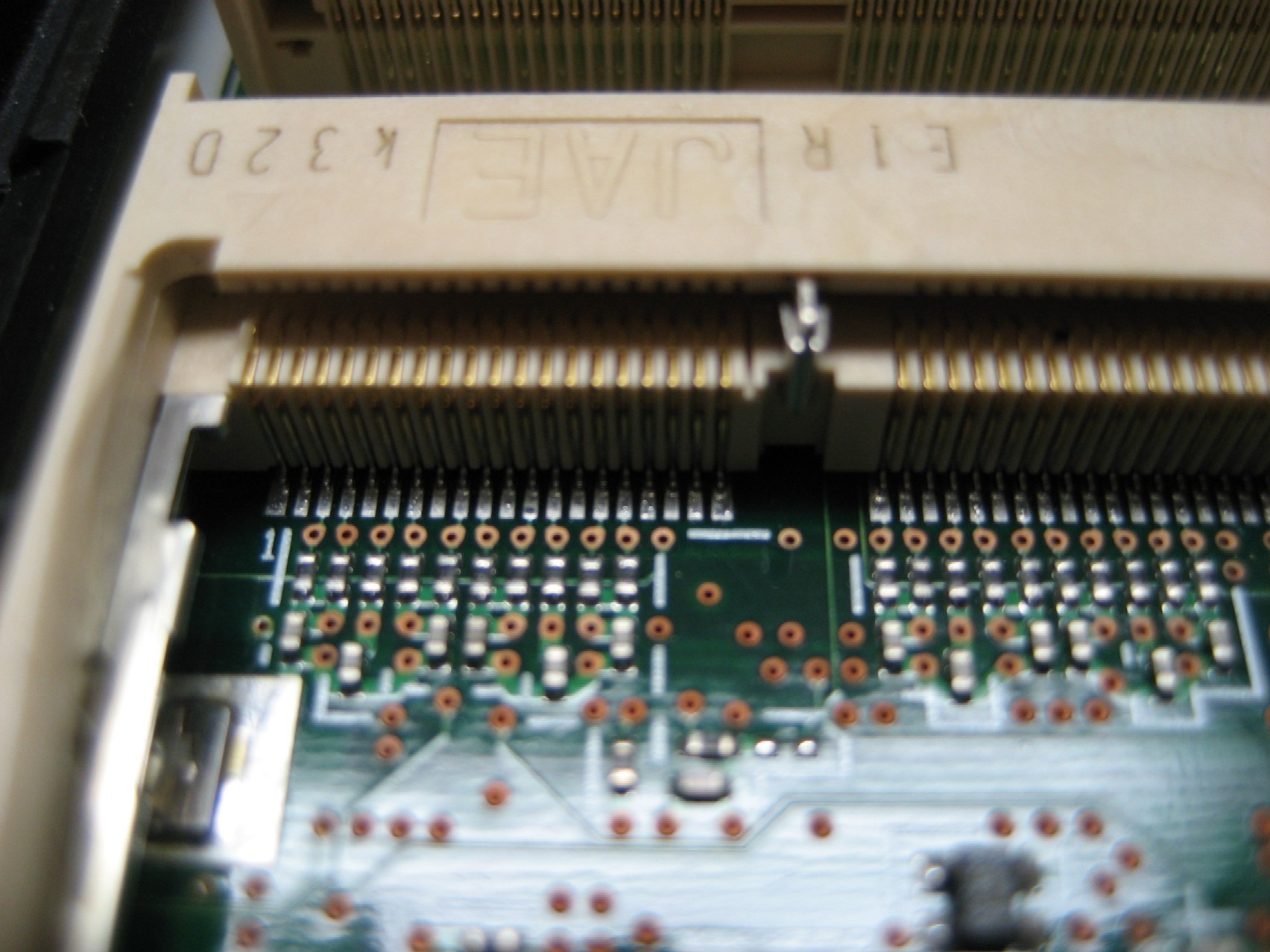
After reading your suggestion, I took a careful look at the slot connections. But even with a magnifying glass, I just can't see any problems. Below are some links to closeup photos. Can you possibly lead me in the right direction, based up the photos?
http://www.kawal.net/upper%20left.jpg
http://www.kawal.net/lower.jpg
http://www.kawal.net/upper%20right.jpg
http://www.kawal.net/upper%20left%202.jpg
http://www.kawal.net/lower%202.jpg
http://www.kawal.net/lower%20right.jpg
http://www.kawal.net/lower%20left.jpg
If you can point me a bit closer, I'll try to look closer.
Thank you for the suggestion.
Moderator edit: Removed HUGE inline images. Please keep images <50KB in size!
After reading your suggestion, I took a careful look at the slot connections. But even with a magnifying glass, I just can't see any problems. Below are some links to closeup photos. Can you possibly lead me in the right direction, based up the photos?
http://www.kawal.net/upper%20left.jpg
http://www.kawal.net/lower.jpg
http://www.kawal.net/upper%20right.jpg
http://www.kawal.net/upper%20left%202.jpg
http://www.kawal.net/lower%202.jpg
http://www.kawal.net/lower%20right.jpg
http://www.kawal.net/lower%20left.jpg
If you can point me a bit closer, I'll try to look closer.
Thank you for the suggestion.
Moderator edit: Removed HUGE inline images. Please keep images <50KB in size!
Ray Kawal
Sequim, WA
Ideapad U110, T60, T60p
Sequim, WA
Ideapad U110, T60, T60p
-
RealBlackStuff
- Admin Emeritus

- Posts: 24727
- Joined: Mon Sep 18, 2006 5:17 am
- Location: Loch Garman, Éire
Msmax,Msmax wrote:Hello Kawal,
Just take a soldering iron and heat up the pins of the bad memory slot as described before.
Msmax
I've added some links in the above post to show some closeup photos of the solder joints. With 200 joints, without a hint, I don't even know where to start. You mentioned "in the corners", but are you referring to the very end solder joint or the last two or three or what have you found to be the problem? Do I need to heat up all 200 joints?
It would be a great help if you could click on the links and refer to at least one of the photos in your description.
Thank you very much.
Ray Kawal
Sequim, WA
Ideapad U110, T60, T60p
Sequim, WA
Ideapad U110, T60, T60p
Hello Kawal,
Even to heat up all the 200 pins is not more then 3-5 minutes of work.
Take out your battery and and backup cell.
Just put the clean tip of your iron on top of the metal pins ( it does not matter if you touch 3 pins at once), count to 5 and continue to the next set.
Make sure you do not have a ball of solder on the tip because that will flow to the areas between the pins and short them. Clean tip is needed!
If you do not have any experience with soldering ask a friend who has.
Regards, Msmax
Even to heat up all the 200 pins is not more then 3-5 minutes of work.
Take out your battery and and backup cell.
Just put the clean tip of your iron on top of the metal pins ( it does not matter if you touch 3 pins at once), count to 5 and continue to the next set.
Make sure you do not have a ball of solder on the tip because that will flow to the areas between the pins and short them. Clean tip is needed!
If you do not have any experience with soldering ask a friend who has.
Regards, Msmax
-
phool@round
- Senior Member

- Posts: 678
- Joined: Sat Nov 18, 2006 11:36 pm
- Location: Traverse City, Michigan
Thank you for all of the help, and I finally got the issue fixed. It turned out that a close friend of mine in our little town does a lot of custom audio designing and building tiny circuit boards as part of their business. I happened to mention this problem and one of his employees was able to fix this in just a few minutes. They had the stereo microscope and tiny soldering equipment, and they were able to show me exactly what the problem was. With tiny tweezers, he showed me how four pins on the end of the bottom (nearest the edge of the computer) right were loose. He resoldered those and it works perfectly with two 512 Mb RAM chips.
Without that microscope, however, I don't see how one would ever find that problem - at least with old eyes like mine.
Thanks again for the forum help!
Without that microscope, however, I don't see how one would ever find that problem - at least with old eyes like mine.
Thanks again for the forum help!
Ray Kawal
Sequim, WA
Ideapad U110, T60, T60p
Sequim, WA
Ideapad U110, T60, T60p
-
Rick Aguinaldo
- Sophomore Member
- Posts: 126
- Joined: Tue Apr 27, 2004 2:52 pm
- Location: Dhahran, Saudi Arabia
Thanks for the tip Msmax; one defective T30 memory slot recovered  . I filed to needle point the tip of my 30W soldering iron, pulled it out a bit from the heater barrel so that there is not too much heat, tinned it with solder, then wiping it off with tissue paper to remove the molten lead, I was ready to go. With magnifying glass on one hand, I just pushed the tip of the iron to the edge of the slot pins for about two seconds and after finishing one row, checked if the loose connection(s) had been reflown. I inserted one module into the formerly defective slot, fired the laptop and bingo! There was no need to go to the back row. Cheers!
. I filed to needle point the tip of my 30W soldering iron, pulled it out a bit from the heater barrel so that there is not too much heat, tinned it with solder, then wiping it off with tissue paper to remove the molten lead, I was ready to go. With magnifying glass on one hand, I just pushed the tip of the iron to the edge of the slot pins for about two seconds and after finishing one row, checked if the loose connection(s) had been reflown. I inserted one module into the formerly defective slot, fired the laptop and bingo! There was no need to go to the back row. Cheers!-
EdipisReks
- Posts: 7
- Joined: Wed Jan 10, 2007 4:09 pm
- Location: cincinnati, ohio
- Contact:
i want to try this on a friend's T30, and just to be sure, i apply heat to the area circled on each pin, right?
http://img410.imageshack.us/img410/6217 ... ghtto0.jpg
stupid question, and i've done soldering before, so i'm sure it can do it, i just want to make sure i'm applying heat to the right place. thanks.
Moderator edit: Changed 92KB inline image to link
http://img410.imageshack.us/img410/6217 ... ghtto0.jpg
stupid question, and i've done soldering before, so i'm sure it can do it, i just want to make sure i'm applying heat to the right place. thanks.
Moderator edit: Changed 92KB inline image to link
-
Rick Aguinaldo
- Sophomore Member
- Posts: 126
- Joined: Tue Apr 27, 2004 2:52 pm
- Location: Dhahran, Saudi Arabia
Yes those are the pins to be heated, and you circled one in the harder-to-reach back row. In my case I started at the front row where there is more room to maneuver my iron. After completing that row I tested it whether the loose connections were gone and it proved positive so I did not have to do the back row. I had better control by targeting the pcb pads (instead of the top of the pins since they are flat) and just let the iron's needle tip touch the edge of those pins. With the magnifying glass on one hand I observed the texture of the solder on the pins change as they are re-flown. I used the visual indication as an aid to approximate how long I had to apply heat. Hope this helpsEdipisReks wrote:... i just want to make sure i'm applying heat to the right place. thanks.

-
EdipisReks
- Posts: 7
- Joined: Wed Jan 10, 2007 4:09 pm
- Location: cincinnati, ohio
- Contact:
Just for your information, the pins that were loose on my T30 were on the other row, the one you see only if you remove the memory chip.
They would be the right four pins in this photo:
http://www.kawal.net/lower%20right.jpg
When the fellow who soldered them showed me the loose pins through the binoculars, he showed me how he could wiggle them with some tweezers. I never could have seen that without the binoculars.
They would be the right four pins in this photo:
http://www.kawal.net/lower%20right.jpg
When the fellow who soldered them showed me the loose pins through the binoculars, he showed me how he could wiggle them with some tweezers. I never could have seen that without the binoculars.
Ray Kawal
Sequim, WA
Ideapad U110, T60, T60p
Sequim, WA
Ideapad U110, T60, T60p
-
kboykowboy
- Posts: 6
- Joined: Mon Feb 18, 2008 11:38 am
- Location: Denmark, copenhagen
-
RealBlackStuff
- Admin Emeritus
- Posts: 24727
- Joined: Mon Sep 18, 2006 5:17 am
- Location: Loch Garman, Éire
There is no specific indication to say which BIOS version you need minimally for 1GB SoDIMMs.
Here's a list of all BIOS-updates and what they corrected.
http://www-307.ibm.com/pc/support/site. ... MIGR-45884
I would suggest, try it first, with just 1 SoDIMM in 1 slot, then try the other.
If none work, it's time to update the BIOS. If it works, leave things alone.
"If it ain't broke, don't fix it!"
Here's a list of all BIOS-updates and what they corrected.
http://www-307.ibm.com/pc/support/site. ... MIGR-45884
I would suggest, try it first, with just 1 SoDIMM in 1 slot, then try the other.
If none work, it's time to update the BIOS. If it works, leave things alone.
"If it ain't broke, don't fix it!"
Lovely day for a Guinness! (The Real Black Stuff)
But I actually prefer Murphy's from Cork!
But I actually prefer Murphy's from Cork!
-
EdipisReks
- Posts: 7
- Joined: Wed Jan 10, 2007 4:09 pm
- Location: cincinnati, ohio
- Contact:
i finally got around to looking at my friend's laptop, a few minutes ago: success! it took about a minute to fix. instead of doing a few and then testing, i just reheated all the pins on the inside of the slot. it took about 4 seconds a pin (i have a very fine needle tip, so i did each individually instead of heating multiple pins simultaneously). , but i had my soldering iron dialed down, so YMMV. i'm just glad i had a magnifying glass! thanks for all the help, everyone!
T30 with failing memory slot
17March2008
Greetings.
Finding/Reading this post actually gives me some hope
about fixing the failed 2nd memory slot on my T30.
(Relating the horror story about the vendor
who sold/shipped me this T30 is or is not Forum etiquette?)
My relevant question -
If/When I find someone competent/equipped
to solder the slot pins, can I/we test the result
by putting the only RAM module I have -
a PC2100 512mb module - in the currently
non-functioning memory slot?
I don't know if it matters which memory slot
one uses on a T30 when one uses only one memory slot.
Should the T30 recognize the RAM module and boot up
regardless of in which memory slot one inserts the RAM?
Any insights appreciated.
Thank you.
Regards,
AEN
Æ
Greetings.
Finding/Reading this post actually gives me some hope
about fixing the failed 2nd memory slot on my T30.
(Relating the horror story about the vendor
who sold/shipped me this T30 is or is not Forum etiquette?)
My relevant question -
If/When I find someone competent/equipped
to solder the slot pins, can I/we test the result
by putting the only RAM module I have -
a PC2100 512mb module - in the currently
non-functioning memory slot?
I don't know if it matters which memory slot
one uses on a T30 when one uses only one memory slot.
Should the T30 recognize the RAM module and boot up
regardless of in which memory slot one inserts the RAM?
Any insights appreciated.
Thank you.
Regards,
AEN
Æ
-
Rick Aguinaldo
- Sophomore Member
- Posts: 126
- Joined: Tue Apr 27, 2004 2:52 pm
- Location: Dhahran, Saudi Arabia
Re: T30 with failing memory slot
If the module and slot are OK, the T30 should recognize the RAM and boot regardless which memory slot the module is inserted. In fact this is one simple way to check which slot is defective using a known good RAM module.AEN007 wrote: Should the T30 recognize the RAM module and boot up
regardless of in which memory slot one inserts the RAM?



I'm in Bremen, Germany and just soldered my T30. I now have 2GB of RAM. With this and a new 100GB 7200RPM drive this little bugger flies!anybody who lives in belgium who is willing to do the soldering for me. Since I have never done it in my life
I could do it for you, but I think I'm about 3 to 4 hours from you.
TJM
T30 with failing memory slot
23March2008
Greetings.
I live/travel in the Bodensee/Alp regions
(Vorarlberg/Schweiz/Konstanz).
Anyone who could repair my failed T30 2nd memory slot
or anyone know someone/somewhere
who could repair my failed T30 2nd memory slot?
Any insights appreciated.
Thank you.
Regards,
AEN
Æ
Greetings.
I live/travel in the Bodensee/Alp regions
(Vorarlberg/Schweiz/Konstanz).
Anyone who could repair my failed T30 2nd memory slot
or anyone know someone/somewhere
who could repair my failed T30 2nd memory slot?
Any insights appreciated.
Thank you.
Regards,
AEN
Æ
-
phool@round
- Senior Member
- Posts: 678
- Joined: Sat Nov 18, 2006 11:36 pm
- Location: Traverse City, Michigan
Which slot is it?
It would appear that my hand-me-down notebook has this issue. Which slot is it that is defective? From what I read, it could be either...
Also is 1 gig the max for this notebook or could it handle two 1 gig sticks?
Also is 1 gig the max for this notebook or could it handle two 1 gig sticks?
-
kboykowboy
- Posts: 6
- Joined: Mon Feb 18, 2008 11:38 am
- Location: Denmark, copenhagen
-
- Similar Topics
- Replies
- Views
- Last post
-
-
M.2 SSD in P14s Gen 3 (Intel) (21AK)'s WWAN slot
by usescomputers » Sat Jan 24, 2026 5:57 am » in ThinkPad P1/P14/P15/P16/P40/P50/P70 and later Series - 0 Replies
- 4901 Views
-
Last post by usescomputers
Sat Jan 24, 2026 5:57 am
-
-
-
Installing SSD in WLAN slot on E14 Gen 3
by catback » Sun Mar 29, 2026 12:05 pm » in ThinkPad Edge / E-series - 0 Replies
- 1514 Views
-
Last post by catback
Sun Mar 29, 2026 12:05 pm
-
-
-
free: ThinkPad 760 memory card w/ ram
by PiZzA EnGiNeEr » Fri Nov 14, 2025 12:16 am » in Marketplace - Forum Members only - 3 Replies
- 7504 Views
-
Last post by RealBlackStuff
Mon Nov 17, 2025 12:29 pm
-
-
-
W510 maximum memory
by tpribors » Tue Feb 24, 2026 12:51 pm » in ThinkPad W500/W510/W520 and W700/W701 Series - 2 Replies
- 2651 Views
-
Last post by tpribors
Tue Feb 24, 2026 1:15 pm
-
Who is online
Users browsing this forum: No registered users and 24 guests