


 Homepage
 Forum
Forum Drivers
 HMM-Manuals
 MTM
MTM Feed
Feed
For whatever reason, I can not get the lcd bulb to light up on my LCD screen.
One day I woke up the computer from sleep mode and it blinked and went dark. I can still see the faint images even from the initial IBM screen after I start it, so I don't think it's a software related issue. It works flawless with an external monitor.
I replaced the following, with the bulb first.
Bulb - didn't fix problem, then bought inverter card, didn't fix problem so i bought a new LCD to start fresh.
LCD - used from ebay, but the light bulb works, as I have tested it with a differnt inverter card.
LCD Cable - new from IBM
Inverter Card, twice. - one new from IBM and one from Global PC parts.
The motherboard was replaced under warranty about 2 years ago.
I want this thing to be mobile again!
Any suggestions? I dug around for awhile in the forums, so I have an idea, but would like to hear your thoughts.
Thank you,
Kyle
Take a look at our
ThinkPads.com HOME PAGE
For those who might want to contribute to the blog, start here: Editors Alley Topic
Then contact Bill with a Private Message
ThinkPads.com HOME PAGE
For those who might want to contribute to the blog, start here: Editors Alley Topic
Then contact Bill with a Private Message
A31p LCD Problem, replaced multiple parts with no luck
-
sjthinkpader
- Senior ThinkPadder

- Posts: 2908
- Joined: Tue Jan 22, 2008 8:29 pm
- Location: San Jose, CA

Re: A31p LCD Problem, replaced multiple parts with no luck
If your cable and inverter are both new, the LCD is a likely culprit. It may be a silly question, but is your replacement LCD UXGA? While swapping panels in A2* series, I noticed that mismatched LCDs and cables would cause what you describe above.wakeskate wrote: LCD - used from ebay, but the light bulb works, as I have tested it with a differnt inverter card.
If thats not it, maybe you have a stuck lid switch?
Okay, I'm done guessing.

Current Thinkpads: 600E, 600X, 701C, A31 (Flexview), R51 (Flexview), R60, T42P (Flexview), TR50E, T60 (Flexview), X61s (Ultralight), Z61m (Ti) Non-Thinkpad: Toshiba 100ct
I have not checked the fuses. Where are they located? Do I need to take off only the keyboard to get at them?
My laptop is an A31p, 2653-H4U
Here is my current LCD setup with cable and inverter
15inch SXGA+ TFT
3 LCD cable assembly 15in SXGA+ 27L0682
5 Inverter card 26P8132
6 LCD panel, 15in SXGA+ (Samsung) for A30 05K9965
Here is what it came with
15inch UXGA IPS TFT
3 LCD cable assembly 15in UXGA IPS 27L0683
5 Inverter card for IPS 26P8133
6 LCD panel, 15in UXGA (DBU) 05K9967
I am pretty sure it's not the LCD because it was working fine when the bulb was being powered from a different inverter card.
Tell me more about these fuses.
Thank you!
Kyle
My laptop is an A31p, 2653-H4U
Here is my current LCD setup with cable and inverter
15inch SXGA+ TFT
3 LCD cable assembly 15in SXGA+ 27L0682
5 Inverter card 26P8132
6 LCD panel, 15in SXGA+ (Samsung) for A30 05K9965
Here is what it came with
15inch UXGA IPS TFT
3 LCD cable assembly 15in UXGA IPS 27L0683
5 Inverter card for IPS 26P8133
6 LCD panel, 15in UXGA (DBU) 05K9967
I am pretty sure it's not the LCD because it was working fine when the bulb was being powered from a different inverter card.
Tell me more about these fuses.
Thank you!
Kyle

Sounds to me like a motherboard issue...and I hope I'm wrong.
...Knowledge is a deadly friend when no one sets the rules...(King Crimson)
Cheers,
George (your grouchy retired FlexView farmer)
my music if anyone cares: https://www.youtube.com/@TheWaterMemory
PMs requesting personal tech support will be ignored.
Cheers,
George (your grouchy retired FlexView farmer)
my music if anyone cares: https://www.youtube.com/@TheWaterMemory
PMs requesting personal tech support will be ignored.
Agreed on the keyboards...and a lot else...
You can contact forum member jamiphar (James) who repairs all types of ThinkPads, and has experience with A31p units, he takes care of my personal A31p stock, and would recommend him highly.
Good luck.
You can contact forum member jamiphar (James) who repairs all types of ThinkPads, and has experience with A31p units, he takes care of my personal A31p stock, and would recommend him highly.
Good luck.
...Knowledge is a deadly friend when no one sets the rules...(King Crimson)
Cheers,
George (your grouchy retired FlexView farmer)
my music if anyone cares: https://www.youtube.com/@TheWaterMemory
PMs requesting personal tech support will be ignored.
Cheers,
George (your grouchy retired FlexView farmer)
my music if anyone cares: https://www.youtube.com/@TheWaterMemory
PMs requesting personal tech support will be ignored.
-
sjthinkpader
- Senior ThinkPadder
- Posts: 2908
- Joined: Tue Jan 22, 2008 8:29 pm
- Location: San Jose, CA
There are close to twenty of these all over the board. The backlight fuse should be close to the LCD connector. Most are labeled with Fx markings. If you are not handy in replacing them, likely is best to leave it to Jamiphar.wakeskate wrote:I have not checked the fuses. Where are they located? Do I need to take off only the keyboard to get at them?
...
T60p 2623-DDU/UXGA IPS/ATI V5200
T60 2623-DCU/SXGA+ IPS/ATI X1400
T43p 2668-H8U/UXGA IPS/ATI V3200
R50p 1832-NU1/UXGA IPS/ATI FireGL T2
X61t 7762-B6U dual touch IPS/64GB SSD
X32 2673-BU6/32GB SSD
755CDV 9545-GBK Transmissive Projection LCD
T60 2623-DCU/SXGA+ IPS/ATI X1400
T43p 2668-H8U/UXGA IPS/ATI V3200
R50p 1832-NU1/UXGA IPS/ATI FireGL T2
X61t 7762-B6U dual touch IPS/64GB SSD
X32 2673-BU6/32GB SSD
755CDV 9545-GBK Transmissive Projection LCD
If your LCD is lighting up, that means the inverter and backlight is working. However, it doesn't mean that the LCD/cable/motherboard are compatible. Are you by any chance trying to install an UXGA screen using SXGA cabling? That might cause a blank screen situation (it did when I tried it on my A22 and A22P systems). What are the FRUs of the replacement screen and cable you bought?wakeskate wrote: I am pretty sure it's not the LCD because it was working fine when the bulb was being powered from a different inverter card.
Current Thinkpads: 600E, 600X, 701C, A31 (Flexview), R51 (Flexview), R60, T42P (Flexview), TR50E, T60 (Flexview), X61s (Ultralight), Z61m (Ti) Non-Thinkpad: Toshiba 100ct
-
sjthinkpader
- Senior ThinkPadder
- Posts: 2908
- Joined: Tue Jan 22, 2008 8:29 pm
- Location: San Jose, CA
Since he can see a faint image on the screen, he has the correct cable.
T60p 2623-DDU/UXGA IPS/ATI V5200
T60 2623-DCU/SXGA+ IPS/ATI X1400
T43p 2668-H8U/UXGA IPS/ATI V3200
R50p 1832-NU1/UXGA IPS/ATI FireGL T2
X61t 7762-B6U dual touch IPS/64GB SSD
X32 2673-BU6/32GB SSD
755CDV 9545-GBK Transmissive Projection LCD
T60 2623-DCU/SXGA+ IPS/ATI X1400
T43p 2668-H8U/UXGA IPS/ATI V3200
R50p 1832-NU1/UXGA IPS/ATI FireGL T2
X61t 7762-B6U dual touch IPS/64GB SSD
X32 2673-BU6/32GB SSD
755CDV 9545-GBK Transmissive Projection LCD
sjthinkpader wrote:Since he can see a faint image on the screen, he has the correct cable.
You're absolutely correct if OP is seeing the faint image. He says there is a faint image on the original LCD, but we need him to come back and confirm whether he's seeing that on the replacement LCD as well.
Current Thinkpads: 600E, 600X, 701C, A31 (Flexview), R51 (Flexview), R60, T42P (Flexview), TR50E, T60 (Flexview), X61s (Ultralight), Z61m (Ti) Non-Thinkpad: Toshiba 100ct
Hi everyone. Thank you for your replies.
I listed the old and new setups for my LCD. I CAN see the faint image on both setups- SXGA and UXGA. All of the FRUs are listed next to the item descriptions in one of my previous posts. My new LCD is SXGA, while my old was UXGA. I replaced the cable and inverter to match the SXGA LCD, so I shouldn't have any problems there.
Again, the new LCD lights up because I connected it to a different inverter, which was on a different computer. So I know it's good. The cable is brand new from IBM, I hope that is good (it should be). The inverter card is from global pc parts (bought from Ebay) and I called to talk to someone and he said that he tested that part for sure and knows that it is a working inverter. Since my inverter from IBM and this one from global pc parts don't work, I think there is something with the Motherboard.
I am going to check fuses tonight. Does anyone have a picture of where they are? I am fine with electronics and will check continuity tonight!
Thank you everyone and hope to hear more.
Kyle
I listed the old and new setups for my LCD. I CAN see the faint image on both setups- SXGA and UXGA. All of the FRUs are listed next to the item descriptions in one of my previous posts. My new LCD is SXGA, while my old was UXGA. I replaced the cable and inverter to match the SXGA LCD, so I shouldn't have any problems there.
Again, the new LCD lights up because I connected it to a different inverter, which was on a different computer. So I know it's good. The cable is brand new from IBM, I hope that is good (it should be). The inverter card is from global pc parts (bought from Ebay) and I called to talk to someone and he said that he tested that part for sure and knows that it is a working inverter. Since my inverter from IBM and this one from global pc parts don't work, I think there is something with the Motherboard.
I am going to check fuses tonight. Does anyone have a picture of where they are? I am fine with electronics and will check continuity tonight!
Thank you everyone and hope to hear more.
Kyle
-
sjthinkpader
- Senior ThinkPadder
- Posts: 2908
- Joined: Tue Jan 22, 2008 8:29 pm
- Location: San Jose, CA
Here you go:
A31 Fuse Map
If it indeed is a fuse problem, and you find which one it is; please post it here.
A31 Fuse Map
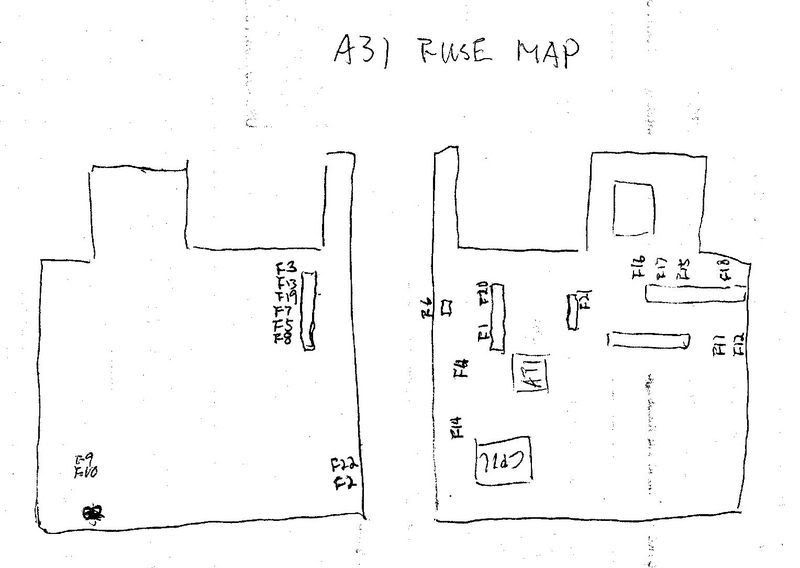
If it indeed is a fuse problem, and you find which one it is; please post it here.
T60p 2623-DDU/UXGA IPS/ATI V5200
T60 2623-DCU/SXGA+ IPS/ATI X1400
T43p 2668-H8U/UXGA IPS/ATI V3200
R50p 1832-NU1/UXGA IPS/ATI FireGL T2
X61t 7762-B6U dual touch IPS/64GB SSD
X32 2673-BU6/32GB SSD
755CDV 9545-GBK Transmissive Projection LCD
T60 2623-DCU/SXGA+ IPS/ATI X1400
T43p 2668-H8U/UXGA IPS/ATI V3200
R50p 1832-NU1/UXGA IPS/ATI FireGL T2
X61t 7762-B6U dual touch IPS/64GB SSD
X32 2673-BU6/32GB SSD
755CDV 9545-GBK Transmissive Projection LCD
Good luck on that project Kyle. It sounds like everything other than the motherboard has been ruled out.
Edit: You might want to read this post: http://forum.thinkpads.com/viewtopic.php?t=59647
Its regarding a T4x machine, but the information about blowing fuses just by checking them might apply.
Edit: You might want to read this post: http://forum.thinkpads.com/viewtopic.php?t=59647
Its regarding a T4x machine, but the information about blowing fuses just by checking them might apply.
Current Thinkpads: 600E, 600X, 701C, A31 (Flexview), R51 (Flexview), R60, T42P (Flexview), TR50E, T60 (Flexview), X61s (Ultralight), Z61m (Ti) Non-Thinkpad: Toshiba 100ct
OK. I wanted to check last night, but I couldn't get the expansion bays out. ( not the CD drive itself, but the metal shields) I am assuming that the fuses are on the underside of the motherboard and everything needs to come out.
I don't mean to disappoint everyone, but I am going to think twice about taking apart the whole computer. I might give in to the dark side and just go buy another one and keep this as a desktop computer. It urks me because I have fixed other stuff before and can't stand to let something sit there broken.
I probably should talk to Jamiphar.
I don't mean to disappoint everyone, but I am going to think twice about taking apart the whole computer. I might give in to the dark side and just go buy another one and keep this as a desktop computer. It urks me because I have fixed other stuff before and can't stand to let something sit there broken.
I probably should talk to Jamiphar.
-
sjthinkpader
- Senior ThinkPadder
- Posts: 2908
- Joined: Tue Jan 22, 2008 8:29 pm
- Location: San Jose, CA
There are quite a few screws on the two Ultrabays. The right side Ultrabay has the 4 screws underneath holding the two CDCs.
The general sequence is to work counter-clockwise from the right side Ultrabay, then PCMCIA slot, Fan, left side Ultrabay.
Assembly is the reverse starting from the left side Ultrabay. Remember to make sure you have the release tab engage the pull levers before you go to the next step.
A step by step in in the long post in this chain.
http://forum.thinkpads.com/viewtopic.ph ... ht=antenna
After removing the 4 major internal assemblies:
1. Remove all the connector threaded studs in the back, three screws. (a metric hex driver helps here).
2. Remove two screws holding the MB, upper right and lower left.
3. Remove the speaker wires. Remember how the two metal pieces go.
Take some pictures how things go so you can reference them later.
Jamiphar is the other alternative.
The general sequence is to work counter-clockwise from the right side Ultrabay, then PCMCIA slot, Fan, left side Ultrabay.
Assembly is the reverse starting from the left side Ultrabay. Remember to make sure you have the release tab engage the pull levers before you go to the next step.
A step by step in in the long post in this chain.
http://forum.thinkpads.com/viewtopic.ph ... ht=antenna
After removing the 4 major internal assemblies:
1. Remove all the connector threaded studs in the back, three screws. (a metric hex driver helps here).
2. Remove two screws holding the MB, upper right and lower left.
3. Remove the speaker wires. Remember how the two metal pieces go.
Take some pictures how things go so you can reference them later.
Jamiphar is the other alternative.
T60p 2623-DDU/UXGA IPS/ATI V5200
T60 2623-DCU/SXGA+ IPS/ATI X1400
T43p 2668-H8U/UXGA IPS/ATI V3200
R50p 1832-NU1/UXGA IPS/ATI FireGL T2
X61t 7762-B6U dual touch IPS/64GB SSD
X32 2673-BU6/32GB SSD
755CDV 9545-GBK Transmissive Projection LCD
T60 2623-DCU/SXGA+ IPS/ATI X1400
T43p 2668-H8U/UXGA IPS/ATI V3200
R50p 1832-NU1/UXGA IPS/ATI FireGL T2
X61t 7762-B6U dual touch IPS/64GB SSD
X32 2673-BU6/32GB SSD
755CDV 9545-GBK Transmissive Projection LCD
-
sausage888
- Posts: 45
- Joined: Mon Oct 30, 2006 1:53 am
- Location: Eastern Pa.
It is my impression that the inverter's only purpose is to light the CCFL. My inverter sometimes loses contact with the cabling to the CCFL and the screen goes dark, but I can see images on the screen with a flashlight (same symptoms as burnt out CCFL). I pull the bezel off and reseat the inverter again (live, so I can see when it contacts) and once it lights the bulb - it works fine for months.
one T530, i7-3820QM(2.7GHz)/9.6GB RAM/160GB HDD
one T530: i7-3720QM(2.6GHz)/8GB RAM/160GB HDD
one T500: P8400(2.26GHz)/2GB RAM/100GB SSD,1TB HDD
three A31P's: 2.4GHz/2GB RAM/1TB HDD, 2.4GHz/2GB RAM/120GB HDD, 2.0GHz/1GB RAM/40GB HDD. (RIP)
one T530: i7-3720QM(2.6GHz)/8GB RAM/160GB HDD
one T500: P8400(2.26GHz)/2GB RAM/100GB SSD,1TB HDD
three A31P's: 2.4GHz/2GB RAM/1TB HDD, 2.4GHz/2GB RAM/120GB HDD, 2.0GHz/1GB RAM/40GB HDD. (RIP)
-
sausage888
- Posts: 45
- Joined: Mon Oct 30, 2006 1:53 am
- Location: Eastern Pa.
I also though to mention about the tiny little on/off switch which is triggered when you close the lid of the laptop. I have had my tiny switch get stuck to off. (just to the left of the "A31" on the bezel)
one T530, i7-3820QM(2.7GHz)/9.6GB RAM/160GB HDD
one T530: i7-3720QM(2.6GHz)/8GB RAM/160GB HDD
one T500: P8400(2.26GHz)/2GB RAM/100GB SSD,1TB HDD
three A31P's: 2.4GHz/2GB RAM/1TB HDD, 2.4GHz/2GB RAM/120GB HDD, 2.0GHz/1GB RAM/40GB HDD. (RIP)
one T530: i7-3720QM(2.6GHz)/8GB RAM/160GB HDD
one T500: P8400(2.26GHz)/2GB RAM/100GB SSD,1TB HDD
three A31P's: 2.4GHz/2GB RAM/1TB HDD, 2.4GHz/2GB RAM/120GB HDD, 2.0GHz/1GB RAM/40GB HDD. (RIP)
Thank you sjthinkpader.
sausage888, I also thought about the cabling. I have moved and wiggled the wires going to the CCFL and that doesn't do anything. I also pulled up and played with the backlight switch for a while. If I do it live, the computer will go into sleep mode, so I think the switch still works properly.
Man I like the computer and hate to see it go, but at some point my sanity is more valuable than it.
sausage888, I also thought about the cabling. I have moved and wiggled the wires going to the CCFL and that doesn't do anything. I also pulled up and played with the backlight switch for a while. If I do it live, the computer will go into sleep mode, so I think the switch still works properly.
Man I like the computer and hate to see it go, but at some point my sanity is more valuable than it.
-
sjthinkpader
- Senior ThinkPadder
- Posts: 2908
- Joined: Tue Jan 22, 2008 8:29 pm
- Location: San Jose, CA
Yes, sometimes you just have to set it aside and call it a day. I hope you did finally get the MB out.wakeskate wrote:...
Man I like the computer and hate to see it go, but at some point my sanity is more valuable than it.
These A31s along with T23s and T30s are still staying in circulation. Much tougher than the later T4x and T5x.
T60p 2623-DDU/UXGA IPS/ATI V5200
T60 2623-DCU/SXGA+ IPS/ATI X1400
T43p 2668-H8U/UXGA IPS/ATI V3200
R50p 1832-NU1/UXGA IPS/ATI FireGL T2
X61t 7762-B6U dual touch IPS/64GB SSD
X32 2673-BU6/32GB SSD
755CDV 9545-GBK Transmissive Projection LCD
T60 2623-DCU/SXGA+ IPS/ATI X1400
T43p 2668-H8U/UXGA IPS/ATI V3200
R50p 1832-NU1/UXGA IPS/ATI FireGL T2
X61t 7762-B6U dual touch IPS/64GB SSD
X32 2673-BU6/32GB SSD
755CDV 9545-GBK Transmissive Projection LCD
well, I broke down and bought a new thinkpad. I hope to have the same life out of the new one as I did with this A31p.
Is anyone interested in buying the parts from me for the monitor? I am sure all of the parts are fine as I've seen the display light, the inverter was tested, the other inverter new from lenovo, and one harness is new with the other in fine shape. I will be using an external monitor from now on with this machine.
Let me know if you want more info on the screen, two harnesses and two inverter cards.
Thanks everyone,
Kyle
Is anyone interested in buying the parts from me for the monitor? I am sure all of the parts are fine as I've seen the display light, the inverter was tested, the other inverter new from lenovo, and one harness is new with the other in fine shape. I will be using an external monitor from now on with this machine.
Let me know if you want more info on the screen, two harnesses and two inverter cards.
Thanks everyone,
Kyle
I'm sorry you had to give up on your A31p. That said, I still feel a bit like a vulture coming to a carcass since I could not help in any way but I am really in need of a inverter card since I'm having screen related problems too.
I sent you a PM about the matter.
I sent you a PM about the matter.
IBM Thinkpad T43, A31p and a 600 project
Found the correct fuse
I had this same problem with an A31. Luckily I had several A31s available, so I could swap LCDs without having to buy parts. After A couple of LCDs and no luck I started searching for a solution and ended up here. In my case the fuse was the culprit. It was the F5 fuse on the bottom of the motherboard, underneath the LCD cable connector. No need for a diagram, look for the F5 stamp. Replaced the fuse and works good as new.
Thanks for the good suggestions!
Thanks for the good suggestions!
-
rkawakami
- Admin Emeritus

- Posts: 10327
- Joined: Sun Jun 04, 2006 1:26 am
- Location: San Jose, CA 95120 USA
- Contact:
@cbraswel: Welcome to thinkpads.com!
For future reference, did you simply take the F5 fuse off one of your other systems or were you able to determine what the fuse's rating was and purchase a new one?
For future reference, did you simply take the F5 fuse off one of your other systems or were you able to determine what the fuse's rating was and purchase a new one?
Ray Kawakami
X22 X24 X31 X41 X41T X60 X60s X61 X61s X200 X200s X300 X301 Z60m Z61t Z61p 560 560Z 600 600E 600X T21 T22 T23 T41 T60p T410 T420 T520 W500 W520 R50 A21p A22p A31 A31p
NOTE: All links to PC-Doctor software hosted by me are dead. Files removed 8/28/12 by manufacturer's demand.
X22 X24 X31 X41 X41T X60 X60s X61 X61s X200 X200s X300 X301 Z60m Z61t Z61p 560 560Z 600 600E 600X T21 T22 T23 T41 T60p T410 T420 T520 W500 W520 R50 A21p A22p A31 A31p
NOTE: All links to PC-Doctor software hosted by me are dead. Files removed 8/28/12 by manufacturer's demand.
-
rkawakami
- Admin Emeritus
- Posts: 10327
- Joined: Sun Jun 04, 2006 1:26 am
- Location: San Jose, CA 95120 USA
- Contact:
Okay, thanks for that info! I was just curious in case I (or somebody) else runs into the same type of issue. Mouser.com and digikey.com both sell surface mounted fuses so I was hoping that you might have a part number or current rating. One of my A31p systems also seems to have a problem with the backlight but I haven't taken the time yet to isolate it to the lamp, inverter, cable or fuse.
Ray Kawakami
X22 X24 X31 X41 X41T X60 X60s X61 X61s X200 X200s X300 X301 Z60m Z61t Z61p 560 560Z 600 600E 600X T21 T22 T23 T41 T60p T410 T420 T520 W500 W520 R50 A21p A22p A31 A31p
NOTE: All links to PC-Doctor software hosted by me are dead. Files removed 8/28/12 by manufacturer's demand.
X22 X24 X31 X41 X41T X60 X60s X61 X61s X200 X200s X300 X301 Z60m Z61t Z61p 560 560Z 600 600E 600X T21 T22 T23 T41 T60p T410 T420 T520 W500 W520 R50 A21p A22p A31 A31p
NOTE: All links to PC-Doctor software hosted by me are dead. Files removed 8/28/12 by manufacturer's demand.
Re: A31p LCD Problem, replaced multiple parts with no luck
Did anybody ever find out what rating the F5 fuse was, and is this the only fuse on the MB for the LCD?
-
- Similar Topics
- Replies
- Views
- Last post
-
-
FS: IBM ThinkPad A31p
by PiZzA EnGiNeEr » Mon Feb 16, 2026 8:51 pm » in Marketplace - Forum Members only - 0 Replies
- 1664 Views
-
Last post by PiZzA EnGiNeEr
Mon Feb 16, 2026 8:51 pm
-
-
-
WTB: T480 i7-8650u motherboard or in parts
by phobiak » Wed Apr 15, 2026 4:15 am » in Marketplace - Forum Members only - 1 Replies
- 427 Views
-
Last post by RealBlackStuff
Wed Apr 15, 2026 5:36 am
-
-
- 5 Replies
- 12019 Views
-
Last post by Python.p
Mon Oct 27, 2025 3:57 am
-
-
LCD IAXG01M works in x22, with caveats
by blegas78 » Sun Nov 02, 2025 7:28 pm » in ThinkPad X20/X30/X40 Series incl. Tablets - 3 Replies
- 7461 Views
-
Last post by Plunkyy
Wed Dec 03, 2025 8:31 pm
-
Who is online
Users browsing this forum: No registered users and 32 guests