


 Homepage
 Forum
Forum Drivers
 HMM-Manuals
 MTM
MTM Feed
Feed
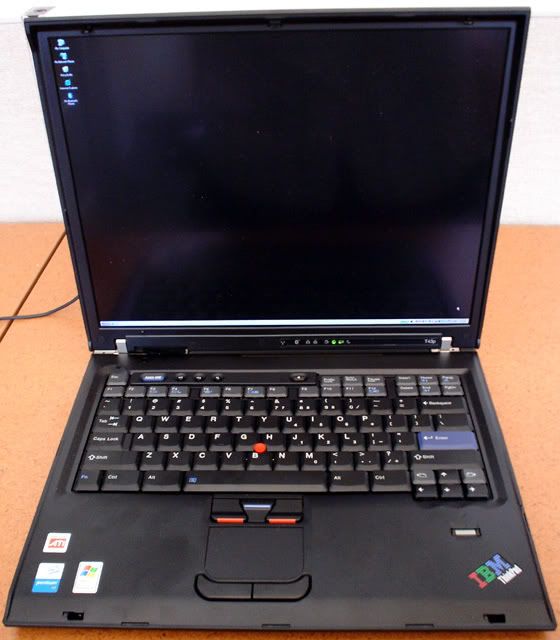
First of all, here's a photo of the finished product:
http://i198.photobucket.com/albums/aa13 ... adT43p.jpg
I've had two R50p's with QXGA Flexview LCD for about a year. While I like them, it felt kind of boring to have two identical machines, so I started contemplating installing QXGA on a T43p. At least two people had done this mod before. The first person did it by replacing the entire display assembly with one from an R50p, suggesting that perhaps the T43p display assembly isn't thick enough to house the QXGA panel which is thicker than the T43p UXGA panel. The second person, on the other hand, claimed that he had successfully installed the QXGA panel into the T43p's original display assembly, but he didn't address whether the thick panel causes the bezel to bulge and/or prevents it from firmly attaching to the lid.
I decided to find out for myself by buying a T43p and swapping display panels (NOT display assemblies) with one of my R50p's. I'm happy to report that this mod is feasible! The display bezel bulges very slightly near the LED indicators, but other than that it looks good. There were several tricky steps, though:
1) The bottom of the panel initially stuck out ~ 2 mm. I solved this by removing the screws attaching the panel to the brackets around it, allowing me to push the panel inward.
2) Because the shape of the ribbon wasn't designed for T43p, it took me over 10 minutes of fiddling around to attach the inverter to the ribbon.
3) I had to cut the R50p's QXGA inverter several mm shorter to get it to fit inside the display assembly. **UPDATE: I subsequently changed it to the T43p's original UXGA inverter and haven't had any issue. This UXGA inverter fits much better into the display housing.
4) I had to remove the block of plastic below the keyboard bezel's display position sensor. As a result, this sensor no longer works, i.e. I can no longer activate sleep mode by closing the display lid. Not a big deal, because I always use Fn + F4 anyway.
After the QXGA upgrade, the weight of this laptop went up from 6.02 lb to 6.35 lb, both measured with a 6-cell battery.
***The R50p is now for sale***
Take a look at our
ThinkPads.com HOME PAGE
For those who might want to contribute to the blog, start here: Editors Alley Topic
Then contact Bill with a Private Message
ThinkPads.com HOME PAGE
For those who might want to contribute to the blog, start here: Editors Alley Topic
Then contact Bill with a Private Message
Latest mod: QXGA (2048x1536) on my new T43p!
-
pianowizard
- Senior ThinkPadder

- Posts: 8556
- Joined: Tue Jun 28, 2005 5:07 am
- Location: Ann Arbor, MI
- Contact:
Latest mod: QXGA (2048x1536) on my new T43p!
Last edited by pianowizard on Sat Jul 19, 2008 11:15 am, edited 5 times in total.
Dell Latitude 7370 (QHD+, 2.84lb); HP Pavilion x2 12-b096ms (FHD+, 3.14lb); Microsoft Surface 3 (FHD+, 2.00lb);
HP Z440 (Xeon E5-1630 v3); Dell OptiPlex 5040 SFF (Core i5-6600), OptiPlex XE2 (Core i7-4770S)
Acer ET322QK, T272HUL; Crossover 404K; QNIX QHD2410R; Seiki Pro SM40UNP
HP Z440 (Xeon E5-1630 v3); Dell OptiPlex 5040 SFF (Core i5-6600), OptiPlex XE2 (Core i7-4770S)
Acer ET322QK, T272HUL; Crossover 404K; QNIX QHD2410R; Seiki Pro SM40UNP

-
underclocker
- Moderator

- Posts: 4020
- Joined: Wed Mar 23, 2005 3:52 pm
- Location: Wash., D.C.
Very nice project and result!
Please post pix!
Awesome! Now get that Pentium M 780 CPU.
Please post pix!
Awesome! Now get that Pentium M 780 CPU.
T510, i7-620m, NVidia, HD+, 8GB, 512GB Intel 545s SSD, Webcam, BT, FPR Home
T400s, C2D SP9400, Intel 4500MHD, WXGA+, 8GB, 160GB Intel X18-M G2 SSD, Webcam, BT, FPR Travel
Edge 14 i5-540m, Intel HD Graphics, HD, 8GB, 180GB Intel Pro 1500 SSD, Webcam, BT, red cover Music
T400s, C2D SP9400, Intel 4500MHD, WXGA+, 8GB, 160GB Intel X18-M G2 SSD, Webcam, BT, FPR Travel
Edge 14 i5-540m, Intel HD Graphics, HD, 8GB, 180GB Intel Pro 1500 SSD, Webcam, BT, red cover Music
-
pianowizard
- Senior ThinkPadder
- Posts: 8556
- Joined: Tue Jun 28, 2005 5:07 am
- Location: Ann Arbor, MI
- Contact:
I just added a link to a photo in my opening post.underclocker wrote:Please post pix!
It already has that! And a 100GB 7200rpm HDD! It's a maxed out T43p with 7 months of warranty and in mint condition, and I got it for only $620 shipped!underclocker wrote:Now get that Pentium M 780 CPU.
Dell Latitude 7370 (QHD+, 2.84lb); HP Pavilion x2 12-b096ms (FHD+, 3.14lb); Microsoft Surface 3 (FHD+, 2.00lb);
HP Z440 (Xeon E5-1630 v3); Dell OptiPlex 5040 SFF (Core i5-6600), OptiPlex XE2 (Core i7-4770S)
Acer ET322QK, T272HUL; Crossover 404K; QNIX QHD2410R; Seiki Pro SM40UNP
HP Z440 (Xeon E5-1630 v3); Dell OptiPlex 5040 SFF (Core i5-6600), OptiPlex XE2 (Core i7-4770S)
Acer ET322QK, T272HUL; Crossover 404K; QNIX QHD2410R; Seiki Pro SM40UNP

This is as powerful as any ThinkPad with QXGA will ever get..of course, courtesy of PW...great job, sir! 
Congrats and enjoy!
Congrats and enjoy!
...Knowledge is a deadly friend when no one sets the rules...(King Crimson)
Cheers,
George (your grouchy retired FlexView farmer)
my music if anyone cares: https://www.youtube.com/@TheWaterMemory
PMs requesting personal tech support will be ignored.
Cheers,
George (your grouchy retired FlexView farmer)
my music if anyone cares: https://www.youtube.com/@TheWaterMemory
PMs requesting personal tech support will be ignored.
-
underclocker
- Moderator
- Posts: 4020
- Joined: Wed Mar 23, 2005 3:52 pm
- Location: Wash., D.C.
That was a nice machine before the QXGA upgrade - now it's really maxed out.pianowizard wrote:It already has that! And a 100GB 7200rpm HDD! It's a maxed out T43p with 7 months of warranty and in mint condition, and I got it for only $620 shipped!
Just the CPU's go for $150 to $200!
I'd love to see the face on a Solectron repair person after they turned on your machine...they wouldn't believe their eyes (but for your sake, I hope they never get a chance!)
T510, i7-620m, NVidia, HD+, 8GB, 512GB Intel 545s SSD, Webcam, BT, FPR Home
T400s, C2D SP9400, Intel 4500MHD, WXGA+, 8GB, 160GB Intel X18-M G2 SSD, Webcam, BT, FPR Travel
Edge 14 i5-540m, Intel HD Graphics, HD, 8GB, 180GB Intel Pro 1500 SSD, Webcam, BT, red cover Music
T400s, C2D SP9400, Intel 4500MHD, WXGA+, 8GB, 160GB Intel X18-M G2 SSD, Webcam, BT, FPR Travel
Edge 14 i5-540m, Intel HD Graphics, HD, 8GB, 180GB Intel Pro 1500 SSD, Webcam, BT, red cover Music
-
wearetheborg
- Senior Member

- Posts: 569
- Joined: Sun Oct 22, 2006 1:12 am
- Location: San Pablo, California
Very nice 
I have a couple of questions:
1) Wont the mods possibly invalidate the warranty if sent in for repair ?
2)Is it possible to do something similar to the T60Ps ?

Pianowizard, have you thought of pinmodding the laptop ?
I have a couple of questions:
1) Wont the mods possibly invalidate the warranty if sent in for repair ?
2)Is it possible to do something similar to the T60Ps ?
I think piano can make it even betterajkula666 wrote: This is as powerful as any ThinkPad with QXGA will ever get..of course, courtesy of PW...great job, sir!
Pianowizard, have you thought of pinmodding the laptop ?
HP NC8000 UXGA; Dell Precision M90 WUXGA; R50P UXGA
Please PM me if you've had experience with SquareTrade warranties
Please PM me if you've had experience with SquareTrade warranties

-
BillMorrow
- *Senior* Admin

- Posts: 7673
- Joined: Tue Apr 13, 2004 9:40 pm
- Location: San Francisco -> Florida -> Georgia
- Contact:
where did you get the panel..?
is it an IPS display..?
nice work..
you now have a real frankenpad..
is it an IPS display..?
nice work..
you now have a real frankenpad..
Bill Morrow, kept by parrots  & cockatoos
Sysop - forum.thinkpads.com
*
She was not what you would call refined,
She was not what you would call unrefined,
She was the type of person who kept a parrot.
~~~Mark Twain~~~
& cockatoosSysop - forum.thinkpads.com
*
She was not what you would call refined,
She was not what you would call unrefined,
She was the type of person who kept a parrot.
~~~Mark Twain~~~
-
pianowizard
- Senior ThinkPadder
- Posts: 8556
- Joined: Tue Jun 28, 2005 5:07 am
- Location: Ann Arbor, MI
- Contact:
I believe so. I think the only parts that are still covered by IBM warranty are the hard drive and optical drive, i.e. parts that can be replaced without sending in the whole laptop for repair.wearetheborg wrote:1) Wont the mods possibly invalidate the warranty if sent in for repair ?
My understanding is that the QXGA panel can be installed on a T60p, but the procedure is much more complicated. See this thread.wearetheborg wrote:2)Is it possible to do something similar to the T60Ps ?
No. It sounds too risky to me.wearetheborg wrote:Pianowizard, have you thought of pinmodding the laptop ?
This is the QXGA panel that was intended for the R50p. Yes, it's IPS. I bought two of them from eBay about a year ago for my two R50p.BillMorrow wrote:where did you get the panel..?
is it an IPS display..?
Dell Latitude 7370 (QHD+, 2.84lb); HP Pavilion x2 12-b096ms (FHD+, 3.14lb); Microsoft Surface 3 (FHD+, 2.00lb);
HP Z440 (Xeon E5-1630 v3); Dell OptiPlex 5040 SFF (Core i5-6600), OptiPlex XE2 (Core i7-4770S)
Acer ET322QK, T272HUL; Crossover 404K; QNIX QHD2410R; Seiki Pro SM40UNP
HP Z440 (Xeon E5-1630 v3); Dell OptiPlex 5040 SFF (Core i5-6600), OptiPlex XE2 (Core i7-4770S)
Acer ET322QK, T272HUL; Crossover 404K; QNIX QHD2410R; Seiki Pro SM40UNP

Looks excellent Pianowizard - and looks like a brand new T43p. 
I have not been able to find a solution, but i fear this is a constructionwise difference between the IAQX10N and IAQX10S. The S-version is only found in the R50p as a CTO option, while the IAQX10N came with a NEC VersaPro notebook i think, along with some other models.
Not sure i want to try these mods again, letting alone finding an IAQX10N... I'm very unlucky with Idtech LCDs and pressure marks occuring during shipping
I have tried with an IAQX10S, which fitted fine into the lid with no detectable bulging. It was reflashed with a modified EDID posted on the 51NB forums, which was originally designed for IAQX10N. I got nothing but a black image. With a UXGA EDID from the original UXGA, i got an UXGA image but only using the 1600x1200 pixels. Using the factory EDID i got red-blue-white vertical stripes and no posting.2)Is it possible to do something similar to the T60Ps ?
I have not been able to find a solution, but i fear this is a constructionwise difference between the IAQX10N and IAQX10S. The S-version is only found in the R50p as a CTO option, while the IAQX10N came with a NEC VersaPro notebook i think, along with some other models.
Not sure i want to try these mods again, letting alone finding an IAQX10N... I'm very unlucky with Idtech LCDs and pressure marks occuring during shipping
-
sjthinkpader
- Senior ThinkPadder
- Posts: 2908
- Joined: Tue Jan 22, 2008 8:29 pm
- Location: San Jose, CA
Most of the newer platform uses cable select to set the controller output resolution. If you know the cable select setting of the R50p QXGA cable, may be you can modify the T4x cable to the same setting and drive this QXGA panel.
These selects are small holes punched in the flex or zero ohm resistor shunts soldered on the cable near the MB connector.
Below are cable select schemes for A30/A31, T30 and R5x:
A30/A31
Pins 1 2 3 4
XGA S S O S
SXGA+S S O O
UXGA O O S O
T30
Pins 1 2 3 4
XGA S S O S
SXGA+S O S O
T4x/R5x
Pins 2 3 4 5
XGA S S O S
SXGA+S O S S
UXGA O O S S
QXGA ??
Pin one counted from the end looks to be GND on the R5x cable. The A30/A31 cable punched holes are very easy to see on the edge. I don't know whether there are other electrical differences in the cables such as single byte or double byte LVDS issues.
Most of these cables are available already set for different resolutions. But there is no QXGA cable for T4x, I wonder if you can try it and tell us if it works?
Edit: added T4x SXGA+ shunts.
These selects are small holes punched in the flex or zero ohm resistor shunts soldered on the cable near the MB connector.
Below are cable select schemes for A30/A31, T30 and R5x:
A30/A31
Pins 1 2 3 4
XGA S S O S
SXGA+S S O O
UXGA O O S O
T30
Pins 1 2 3 4
XGA S S O S
SXGA+S O S O
T4x/R5x
Pins 2 3 4 5
XGA S S O S
SXGA+S O S S
UXGA O O S S
QXGA ??
Pin one counted from the end looks to be GND on the R5x cable. The A30/A31 cable punched holes are very easy to see on the edge. I don't know whether there are other electrical differences in the cables such as single byte or double byte LVDS issues.
Most of these cables are available already set for different resolutions. But there is no QXGA cable for T4x, I wonder if you can try it and tell us if it works?
Edit: added T4x SXGA+ shunts.
T60p 2623-DDU/UXGA IPS/ATI V5200
T60 2623-DCU/SXGA+ IPS/ATI X1400
T43p 2668-H8U/UXGA IPS/ATI V3200
R50p 1832-NU1/UXGA IPS/ATI FireGL T2
X61t 7762-B6U dual touch IPS/64GB SSD
X32 2673-BU6/32GB SSD
755CDV 9545-GBK Transmissive Projection LCD
T60 2623-DCU/SXGA+ IPS/ATI X1400
T43p 2668-H8U/UXGA IPS/ATI V3200
R50p 1832-NU1/UXGA IPS/ATI FireGL T2
X61t 7762-B6U dual touch IPS/64GB SSD
X32 2673-BU6/32GB SSD
755CDV 9545-GBK Transmissive Projection LCD
-
wearetheborg
- Senior Member
- Posts: 569
- Joined: Sun Oct 22, 2006 1:12 am
- Location: San Pablo, California
-
pianowizard
- Senior ThinkPadder
- Posts: 8556
- Joined: Tue Jun 28, 2005 5:07 am
- Location: Ann Arbor, MI
- Contact:
If you're asking about sjthinkpader's method of changing the cable select schemes, I've no idea because I've never tried it. And I don't plan on trying it because it's risky. If you're asking about using the R50p's QXGA cable, I can tell you that someone on this forum tried it on her R51 (which uses the same mobo as some T42, I think) and it didn't work.wearetheborg wrote:Is this mod possible on a 15" T43/T42, or does it require T4xP with UXGA ?
Dell Latitude 7370 (QHD+, 2.84lb); HP Pavilion x2 12-b096ms (FHD+, 3.14lb); Microsoft Surface 3 (FHD+, 2.00lb);
HP Z440 (Xeon E5-1630 v3); Dell OptiPlex 5040 SFF (Core i5-6600), OptiPlex XE2 (Core i7-4770S)
Acer ET322QK, T272HUL; Crossover 404K; QNIX QHD2410R; Seiki Pro SM40UNP
HP Z440 (Xeon E5-1630 v3); Dell OptiPlex 5040 SFF (Core i5-6600), OptiPlex XE2 (Core i7-4770S)
Acer ET322QK, T272HUL; Crossover 404K; QNIX QHD2410R; Seiki Pro SM40UNP
-
sjthinkpader
- Senior ThinkPadder
- Posts: 2908
- Joined: Tue Jan 22, 2008 8:29 pm
- Location: San Jose, CA
That's reasonable. It's your setup after all. I just thought that you may be able to get that standby switch back.pianowizard wrote:...
If you're asking about sjthinkpader's method of changing the cable select schemes, I've no idea because I've never tried it. And I don't plan on trying it because it's risky. ...
It would be nice to know the cable select scheme for that QXGA cable but I am not sure I can find a panel and be able to afford it.
Last edited by sjthinkpader on Tue Jul 01, 2008 12:20 am, edited 1 time in total.
T60p 2623-DDU/UXGA IPS/ATI V5200
T60 2623-DCU/SXGA+ IPS/ATI X1400
T43p 2668-H8U/UXGA IPS/ATI V3200
R50p 1832-NU1/UXGA IPS/ATI FireGL T2
X61t 7762-B6U dual touch IPS/64GB SSD
X32 2673-BU6/32GB SSD
755CDV 9545-GBK Transmissive Projection LCD
T60 2623-DCU/SXGA+ IPS/ATI X1400
T43p 2668-H8U/UXGA IPS/ATI V3200
R50p 1832-NU1/UXGA IPS/ATI FireGL T2
X61t 7762-B6U dual touch IPS/64GB SSD
X32 2673-BU6/32GB SSD
755CDV 9545-GBK Transmissive Projection LCD
The cost of conversion, not including labour, amounts to roughly $350-375 if the parts are still available from where I sourced them for my R50p...a nice chunk of change...
...Knowledge is a deadly friend when no one sets the rules...(King Crimson)
Cheers,
George (your grouchy retired FlexView farmer)
my music if anyone cares: https://www.youtube.com/@TheWaterMemory
PMs requesting personal tech support will be ignored.
Cheers,
George (your grouchy retired FlexView farmer)
my music if anyone cares: https://www.youtube.com/@TheWaterMemory
PMs requesting personal tech support will be ignored.
-
wearetheborg
- Senior Member
- Posts: 569
- Joined: Sun Oct 22, 2006 1:12 am
- Location: San Pablo, California
You too have a QXGA R50p ?ajkula66 wrote:The cost of conversion, not including labour, amounts to roughly $350-375 if the parts are still available from where I sourced them for my R50p...a nice chunk of change...
HP NC8000 UXGA; Dell Precision M90 WUXGA; R50P UXGA
Please PM me if you've had experience with SquareTrade warranties
Please PM me if you've had experience with SquareTrade warranties
Very very nice mod PW. So that's why the R50p was for sale! I just saw this thread. Great job!
Now: T60 2613-EKU | T23 2647-9NU | 600X 2645-9FU | HP 100LX
Past: X31 2673-Y13 | T41 2374-3HU | T22 2647-AEU
Rules of the road
Past: X31 2673-Y13 | T41 2374-3HU | T22 2647-AEU
Rules of the road
weatherborg wrote:
You too have a QXGA R50p ?
Yep. I've been buying parts one by one, and finally a couple of months ago found a machine with a busted LCD...and someone who had owed me a favour since the beginning of time converted it for me, it also has a Dothan 1.8 as well as kajencik's T43p fan mod...it's mostly sitting and doing nothing, though, my wife uses it once in a blue for some of her projects.
You too have a QXGA R50p ?
Yep. I've been buying parts one by one, and finally a couple of months ago found a machine with a busted LCD...and someone who had owed me a favour since the beginning of time converted it for me, it also has a Dothan 1.8 as well as kajencik's T43p fan mod...it's mostly sitting and doing nothing, though, my wife uses it once in a blue for some of her projects.
...Knowledge is a deadly friend when no one sets the rules...(King Crimson)
Cheers,
George (your grouchy retired FlexView farmer)
my music if anyone cares: https://www.youtube.com/@TheWaterMemory
PMs requesting personal tech support will be ignored.
Cheers,
George (your grouchy retired FlexView farmer)
my music if anyone cares: https://www.youtube.com/@TheWaterMemory
PMs requesting personal tech support will be ignored.
-
pianowizard
- Senior ThinkPadder
- Posts: 8556
- Joined: Tue Jun 28, 2005 5:07 am
- Location: Ann Arbor, MI
- Contact:
Quite a few people upgraded their R50p's to QXGA in the past year. Someone had dozens of this screen for sale on eBay last year -- I bought both of mine from him. Now he's sold out.ajkula66 wrote:weatherborg wrote:
You too have a QXGA R50p ?
Yep.
Dell Latitude 7370 (QHD+, 2.84lb); HP Pavilion x2 12-b096ms (FHD+, 3.14lb); Microsoft Surface 3 (FHD+, 2.00lb);
HP Z440 (Xeon E5-1630 v3); Dell OptiPlex 5040 SFF (Core i5-6600), OptiPlex XE2 (Core i7-4770S)
Acer ET322QK, T272HUL; Crossover 404K; QNIX QHD2410R; Seiki Pro SM40UNP
HP Z440 (Xeon E5-1630 v3); Dell OptiPlex 5040 SFF (Core i5-6600), OptiPlex XE2 (Core i7-4770S)
Acer ET322QK, T272HUL; Crossover 404K; QNIX QHD2410R; Seiki Pro SM40UNP
The ones sold by the 97% seller are described as "new" so that's a good sign. His rating does leave something to be desired though...Troels wrote:If you search for IAQX10N you'll find another good deal - don't know about that seller rating of about ~97% though - and neither of the two BIN-auctions are too descriptive...
Reading about the QXGA upgrades makes me want to try it with my T42P. So very useless for me (99% docked with external monitor), but so tempted to try it for fun.

Current Thinkpads: 600E, 600X, 701C, A31 (Flexview), R51 (Flexview), R60, T42P (Flexview), TR50E, T60 (Flexview), X61s (Ultralight), Z61m (Ti) Non-Thinkpad: Toshiba 100ct
-
wearetheborg
- Senior Member
- Posts: 569
- Joined: Sun Oct 22, 2006 1:12 am
- Location: San Pablo, California
Troel, good find !!.virge wrote:The ones sold by the 97% seller are described as "new" so that's a good sign. His rating does leave something to be desired though...Troels wrote:If you search for IAQX10N you'll find another good deal - don't know about that seller rating of about ~97% though - and neither of the two BIN-auctions are too descriptive...
Reading about the QXGA upgrades makes me want to try it with my T42P. So very useless for me (99% docked with external monitor), but so tempted to try it for fun.
Regarding the 97% seller, "microic" bought one on June 6, then bought 4 more on June 30.
So thats also a positive sign.
Anyone think that pianowizard is going to keep his R50P and put a new QXGA screen in it ?
HP NC8000 UXGA; Dell Precision M90 WUXGA; R50P UXGA
Please PM me if you've had experience with SquareTrade warranties
Please PM me if you've had experience with SquareTrade warranties
Re: Latest mod: QXGA (2048x1536) on my new T43p!
Not sure what parts did you use for this mod...
The original T43p inverter or the R50p 91P7339 inverter?
The original T43p LCD cable or the R50p 91P6837?
Thank you very much!
The original T43p inverter or the R50p 91P7339 inverter?
The original T43p LCD cable or the R50p 91P6837?
Thank you very much!
a w520, a couple of T60@T61, a affs modded x201 and some other older stuff.
-
pianowizard
- Senior ThinkPadder
- Posts: 8556
- Joined: Tue Jun 28, 2005 5:07 am
- Location: Ann Arbor, MI
- Contact:
Re: Latest mod: QXGA (2048x1536) on my new T43p!
I swapped inverters among my T42, T43p and two R50p's multiple times and no longer remember which one went where. I think I'm now using the T43p's original inverter but am not sure.obarriel wrote:The original T43p inverter or the R50p 91P7339 inverter?
Definitely the R50p's QXGA cable. The T43p's original cable is for UXGA.obarriel wrote:The original T43p LCD cable or the R50p 91P6837?
Dell Latitude 7370 (QHD+, 2.84lb); HP Pavilion x2 12-b096ms (FHD+, 3.14lb); Microsoft Surface 3 (FHD+, 2.00lb);
HP Z440 (Xeon E5-1630 v3); Dell OptiPlex 5040 SFF (Core i5-6600), OptiPlex XE2 (Core i7-4770S)
Acer ET322QK, T272HUL; Crossover 404K; QNIX QHD2410R; Seiki Pro SM40UNP
HP Z440 (Xeon E5-1630 v3); Dell OptiPlex 5040 SFF (Core i5-6600), OptiPlex XE2 (Core i7-4770S)
Acer ET322QK, T272HUL; Crossover 404K; QNIX QHD2410R; Seiki Pro SM40UNP
Re: Latest mod: QXGA (2048x1536) on my new T43p!
This weekend I have been installing a QXGA panel in my T42p. I have followed the indications in this post as well as the hardware maintenance guide for t42p. I have
been able to do all the steps without much difficulties, but I have a problem: there is no backlight.
I can see image (Windows startup) in the panel if I put it under the sun but I cannot turn the backlight on. I have tried with both
inverters (QXGA and UXGA) with the same result. With both I have image but not backlight. Also I have tried with both lcd cables (UXGA and
QXGA) and, again, with both I have image in the QXGA panel (with the UXGA cable I suppose that the image is only UXGA but it's difficult to
see it without backligth) but there is no backlight. In summary I have tried all the combinations I can imagine with my components and with all of
them I get image in the QXGA panel but not backlight.
I have also tried to go install back to my old UXGA panel and, with it, I have backlight.
Do you have any idea where the problem might be? something else to try?
Thank you very much
been able to do all the steps without much difficulties, but I have a problem: there is no backlight.
I can see image (Windows startup) in the panel if I put it under the sun but I cannot turn the backlight on. I have tried with both
inverters (QXGA and UXGA) with the same result. With both I have image but not backlight. Also I have tried with both lcd cables (UXGA and
QXGA) and, again, with both I have image in the QXGA panel (with the UXGA cable I suppose that the image is only UXGA but it's difficult to
see it without backligth) but there is no backlight. In summary I have tried all the combinations I can imagine with my components and with all of
them I get image in the QXGA panel but not backlight.
I have also tried to go install back to my old UXGA panel and, with it, I have backlight.
Do you have any idea where the problem might be? something else to try?
Thank you very much
a w520, a couple of T60@T61, a affs modded x201 and some other older stuff.
Re: Latest mod: QXGA (2048x1536) on my new T43p!
Due to all the amount of testing and swapping between inverters and cables, and re-verifying that the UXGA LCD works fine, it can only be a dead CCFL in the QXGA LCD.
Is the QXGA new, or has it been used before? Do you remember the date it was manufactured (says on the backside) ?
From what i've heard, replacing CCFLs on the 15" flexviews is not as hard as the 14.1" LCDs, and from what i've heard (someone please correct me), you do not need to take apart the whole assembly (i.e. remove everything) to get to the CCFL in the bottom of the display. As you've probably noted, the design of the QXGA panel is a bit different from the UXGA, so i'm not sure how diy-friendly it is in comparison.
If the display is otherwise in good condition, i think you should either have it repaired with a new CCFL, or do-it-yourself. I'm unsure what diameter of the CCFL which is used in the QXGA, but i'm expecting 2 mm.
EDIT: Ok, just looked at the backside of the QXGA lcd, and one would need to take it apart to change the ccfl - that means, remove four screws from each side of the panel (very small), remove the tape/plastic covering the ccfl area on the backside, near the bottom, and remove the tape/plastic covering the LCD driver board - or atleast remove the adhesive part from the metal. After this one should be able to remove the metal frame and get to the ccfl.
Is the QXGA new, or has it been used before? Do you remember the date it was manufactured (says on the backside) ?
From what i've heard, replacing CCFLs on the 15" flexviews is not as hard as the 14.1" LCDs, and from what i've heard (someone please correct me), you do not need to take apart the whole assembly (i.e. remove everything) to get to the CCFL in the bottom of the display. As you've probably noted, the design of the QXGA panel is a bit different from the UXGA, so i'm not sure how diy-friendly it is in comparison.
If the display is otherwise in good condition, i think you should either have it repaired with a new CCFL, or do-it-yourself. I'm unsure what diameter of the CCFL which is used in the QXGA, but i'm expecting 2 mm.
EDIT: Ok, just looked at the backside of the QXGA lcd, and one would need to take it apart to change the ccfl - that means, remove four screws from each side of the panel (very small), remove the tape/plastic covering the ccfl area on the backside, near the bottom, and remove the tape/plastic covering the LCD driver board - or atleast remove the adhesive part from the metal. After this one should be able to remove the metal frame and get to the ccfl.
Re: Latest mod: QXGA (2048x1536) on my new T43p!
It is a IAQX10S made in philippines 05/38 (not sure if this is the date).
It is not new, I bought it in Ebay but it was supposed to be pulled from an R50P notebook "which was used very little, less than 50 hours".
I don't think I will be able to replace CCFL myself
Thank you
It is not new, I bought it in Ebay but it was supposed to be pulled from an R50P notebook "which was used very little, less than 50 hours".
I don't think I will be able to replace CCFL myself
Thank you
a w520, a couple of T60@T61, a affs modded x201 and some other older stuff.
Re: Latest mod: QXGA (2048x1536) on my new T43p!
I have connected the bulb of an old tp600x to the inverter and it works with the qxga panel installed. So definetely it is problem of the ccfl of the QXGA panel
a w520, a couple of T60@T61, a affs modded x201 and some other older stuff.
-
- Similar Topics
- Replies
- Views
- Last post
-
-
FS: R60 with QXGA $300 continental usa
by TPFanatic » Wed Mar 04, 2026 4:06 pm » in Marketplace - Forum Members only - 0 Replies
- 1709 Views
-
Last post by TPFanatic
Wed Mar 04, 2026 4:06 pm
-
-
-
X32 SXGA+ Bios Mod
by Plunkyy » Wed Dec 03, 2025 3:01 pm » in ThinkPad X20/X30/X40 Series incl. Tablets - 0 Replies
- 4684 Views
-
Last post by Plunkyy
Wed Dec 03, 2025 3:01 pm
-
-
-
Get a dual heatpipe mod for your t480, trust me
by swordslasher » Tue Dec 16, 2025 8:43 am » in ThinkPad T430-T495 / T530-T590 Series - 3 Replies
- 10662 Views
-
Last post by RealBlackStuff
Wed Jan 28, 2026 3:06 am
-
-
-
Upgrade SSD & RAM on New ThinkPad While Keeping Warranty – Who Tried It?
by marcusfrank » Wed Nov 26, 2025 8:24 pm » in Thinkpad - General HARDWARE/SOFTWARE questions - 3 Replies
- 13962 Views
-
Last post by dr_st
Fri Nov 28, 2025 4:18 am
-
Who is online
Users browsing this forum: No registered users and 66 guests