


 Homepage
 Forum
Forum Drivers
 HMM-Manuals
 MTM
MTM Feed
Feed
UPDATE: My 14" SXGA+ panel replacement succeeded with either R52 and T42 cable on R52 motherboard. See my post here for more details.
Hi all,
I swapped my XGA LCD panel with an SXGA+ one, Hydis HT14P12-100, and both of them are 14". But it still outputed an XGA screen on the new panel when booted and in Windows. The screen was odd and not a full screen.
I bought a T42 SXGA+ LCD cable, but it didn't help. And both cables, XGA and SXGA+, use one channel (4 pairs) LVDS, not two. I'm curious about it. Do all T4x SXGA+ LCD cables use single channel LVDS instead of two to commuicate with LCD?
I forgot to say, my R52 is type 1847-HV1 with ATI Mobility Radeon X300 graphics. AFAIK R52 doesn't read EDID from LCD while booting. I guess the default EDID, or somewhat decides the type of video signals, stores in BIOS. If this is true, then are some BIOS mods needed to let R52 know HT14P12 and how to do it?
I changed the driver of LCD panel to an .inf file which contained HT14P12's EDID under Windows. But it didn't help, too.
So can I do now? Any advice will be great appreiciated. Thanks.
Take a look at our
ThinkPads.com HOME PAGE
For those who might want to contribute to the blog, start here: Editors Alley Topic
Then contact Bill with a Private Message
ThinkPads.com HOME PAGE
For those who might want to contribute to the blog, start here: Editors Alley Topic
Then contact Bill with a Private Message
R52 LCD Replacement Problem (SOLVED)
-
yannbelief
- Posts: 9
- Joined: Tue Jun 09, 2009 2:14 pm
- Location: Taipei, Taiwan
R52 LCD Replacement Problem (SOLVED)
Last edited by yannbelief on Thu Feb 25, 2010 10:15 am, edited 14 times in total.

Re: R52 LCD Replacement Problem
Welcome to the forum!
If your R52 has Intel graphics, SXGA+ in a 14" format is not supported.
Hope this helps.
If your R52 has Intel graphics, SXGA+ in a 14" format is not supported.
Hope this helps.
...Knowledge is a deadly friend when no one sets the rules...(King Crimson)
Cheers,
George (your grouchy retired FlexView farmer)
my music if anyone cares: https://www.youtube.com/@TheWaterMemory
PMs requesting personal tech support will be ignored.
Cheers,
George (your grouchy retired FlexView farmer)
my music if anyone cares: https://www.youtube.com/@TheWaterMemory
PMs requesting personal tech support will be ignored.

Re: R52 LCD Replacement Problem
yannbelief wrote:1. My R52 is type 1847-HV1 with ATI Mobility Radeon X300 graphics.
We are going to have to keep looking for another solution...ajkula66 wrote:If your R52 has Intel graphics, SXGA+ in a 14" format is not supported.
This is going to sound stupid, but have you tried to switch the resolution in the Windows Properties/Settings panel? It probably won't change automagically.
Collection = T430 - T500 - R400 - X300 - T61 (14" WXGA+) - R61 (15" SXGA+) - T60 - X40 - T43p - T43 - T42p - A30P
Re: R52 LCD Replacement Problem
I was still half asleep when I was reading the post... 
Since there is no 14" SXGA+ cable for R52, one from T43 must be used and tweaked to fit.
Good luck.
Since there is no 14" SXGA+ cable for R52, one from T43 must be used and tweaked to fit.
Good luck.
...Knowledge is a deadly friend when no one sets the rules...(King Crimson)
Cheers,
George (your grouchy retired FlexView farmer)
my music if anyone cares: https://www.youtube.com/@TheWaterMemory
PMs requesting personal tech support will be ignored.
Cheers,
George (your grouchy retired FlexView farmer)
my music if anyone cares: https://www.youtube.com/@TheWaterMemory
PMs requesting personal tech support will be ignored.
-
yannbelief
- Posts: 9
- Joined: Tue Jun 09, 2009 2:14 pm
- Location: Taipei, Taiwan
Re: R52 LCD Replacement Problem
Thank you, ajkula66.ajkula66 wrote: Since there is no 14" SXGA+ cable for R52, one from T43 must be used and tweaked to fit.
Good luck.
Yeah, I did tweak T42 cable to fit R52 case, but unfortunately I broke the cable and lost some (not all) connections to the inverter. It results in no display of NumLk and Caps Lock states and no functionality of LCD brightness adjustment

Yeah, I tried, but things didn't get better.Neil wrote: This is going to sound stupid, but have you tried to switch the resolution in the Windows Properties/Settings panel? It probably won't change automagically.
I took some photos to explain the situation. Even pixels on each row didn't have valid outputs - in fact, they were either all white or all black. And all XGA signals were displayed in odd columns. It caused that two times the horizontal resolution of XGA, i.e. 2*1024 = 2048, is needed to display the entire XGA screen. Obviously, 2048 > 1440. So I couldn't see the whole screen on my SXGA+ panel.
I think it's because that GPU thought the LCD was an XGA one like before, therefore it provided XGA signals which use 1 channel LVDS. And my cable have only 1 channel connecting to LCD, too. According to the spec of Hydis HT14P12 panel, on page 9, if you have a low voltage input at pin 1, then it will run at dual ch. LVDS mode. I also read the spec of my old XGA LCD, Hydis HT14X19-110, which uses pin 1 as a GDN. I guess it is the reason why my R52 showed those strange screens.
Last edited by yannbelief on Sun Jan 31, 2010 9:39 am, edited 1 time in total.
-
RealBlackStuff
- Admin Emeritus

- Posts: 24727
- Joined: Mon Sep 18, 2006 5:17 am
- Location: Loch Garman, Éire
Re: R52 LCD Replacement Problem
ajkula66 mentioned a T43 cable, which is different from the T42 cable you 'modded'.
R52/T43 use almost identical parts.
You may have blown the GPU by using that T42 cable!
R52/T43 use almost identical parts.
You may have blown the GPU by using that T42 cable!
Lovely day for a Guinness! (The Real Black Stuff)
But I actually prefer Murphy's from Cork!
But I actually prefer Murphy's from Cork!
-
yannbelief
- Posts: 9
- Joined: Tue Jun 09, 2009 2:14 pm
- Location: Taipei, Taiwan
Re: R52 LCD Replacement Problem
I would rather to believe that I didn't blow anythingRealBlackStuff wrote:ajkula66 mentioned a T43 cable, which is different from the T42 cable you 'modded'.
R52/T43 use almost identical parts.
You may have blown the GPU by using that T42 cable!
 .
.I think the GPU is fine. I swapped my old XGA LCD and its cable back. Now I'm writing this article on my R52 w/o any trouble. In fact, no matter what cable I used, the situation was just the same as I mentioned. And both of the cables, T42's and R52's, worked normally when an XGA LCD was installed.
I am wondering that is there any difference between a T42 and a T43 cable? Since I don't have a T43 one, I don't know the answer. If the problem can be solved by simply using a T43 cable, that will be great.
-
yannbelief
- Posts: 9
- Joined: Tue Jun 09, 2009 2:14 pm
- Location: Taipei, Taiwan
Re: R52 LCD Replacement Problem
It seems R52 didn't have I2C bus open to internal LCD, instead they write a method _DDC in ACPI to provide the correct EDID of LCD. But the mechanism of identifing which LCD using is unknown on R52 yet. Here is the simplified code to show how ACPI returns LCD's EDID.
PS.
I still want to ask,
1) Did anyone successfully use 14" SXGA+ LCD on R52 mobo?
2) Which cable was used?
3) Without any BIOS mod?
4) Are T42 and T43 SXGA+ cables identical?
Code: Select all
Device(LCD0)
{
    [...]
    Method(_DDC, 0x1, NotSerialized)
    {
        If(LEqual(\VLID, 0x2))
        {
            Return(EDX1) // EDX1 holds the EDID of ThinkPad LCD 1024x768
        }
        If(LEqual(\VLID, 0x4))
        {
            Return(EDL1) // EDL1 holds the EDID of ThinkPad LCD 1440x1050
        }
        If(LEqual(\VLID, 0x5))
        {
            Return(EDU1) // EDU1 holds the EDID of ThinkPad LCD 1600x1200
        }
        Return(0x0)
    }
    [...]
}
I still want to ask,
1) Did anyone successfully use 14" SXGA+ LCD on R52 mobo?
2) Which cable was used?
3) Without any BIOS mod?
4) Are T42 and T43 SXGA+ cables identical?
Last edited by yannbelief on Sat Feb 06, 2010 5:02 am, edited 10 times in total.
-
yannbelief
- Posts: 9
- Joined: Tue Jun 09, 2009 2:14 pm
- Location: Taipei, Taiwan
Re: R52 LCD Replacement Problem
removed.
-
yannbelief
- Posts: 9
- Joined: Tue Jun 09, 2009 2:14 pm
- Location: Taipei, Taiwan
Re: R52 LCD Replacement Problem
Guys, I have a good news. I modded the LCD cable from T42 and everything works fine. Now I have a 14" SXGA+ version R52 
But I have to repair the broken cable to get back my brightness adjustment function.
But I have to repair the broken cable to get back my brightness adjustment function.
-
yannbelief
- Posts: 9
- Joined: Tue Jun 09, 2009 2:14 pm
- Location: Taipei, Taiwan
Re: R52 LCD Replacement Problem (SOLVED)
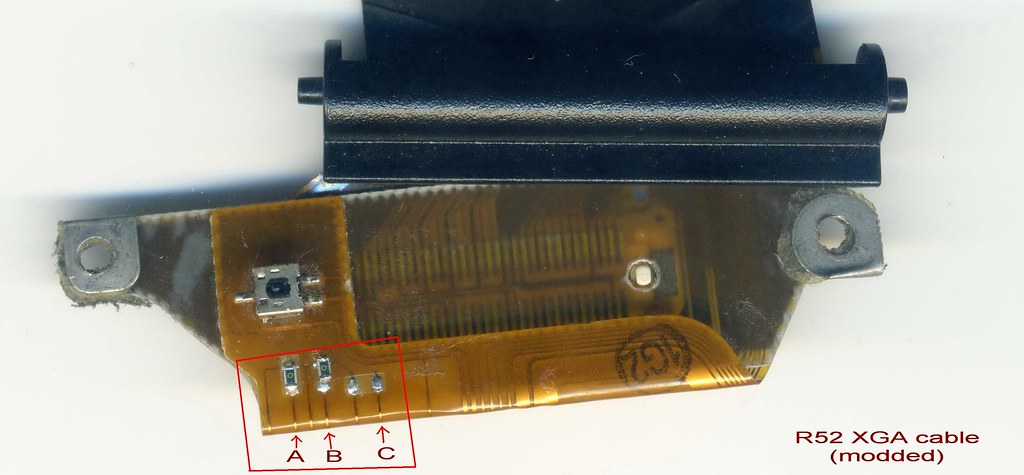
The key point is LCD cable. I found some tiny green cuboids soldered on the top of mobo-side connector. They are conductive, and act as "jumpers". They were soldered across two wires to build colsed circuits. T4/R5 BIOS checks statuses of those circuits at machine boot time, because they don't really know what LCD panel is connected to mobo. Hence my goal was to find out the SXGA+ combination of circuit statuses.
I did some experiments by unsoldering jumpers from closed circuits and resoldering to open circuits. After few trials, I discovered the correct combination - Line A closed, Line B closed, and Line C open. I took the photo of this combination from the R52 cable I moded and I marked locations of those lines. See the left bottom side, there are jumpers.
http://farm3.static.flickr.com/2731/434 ... 19bd_b.jpg
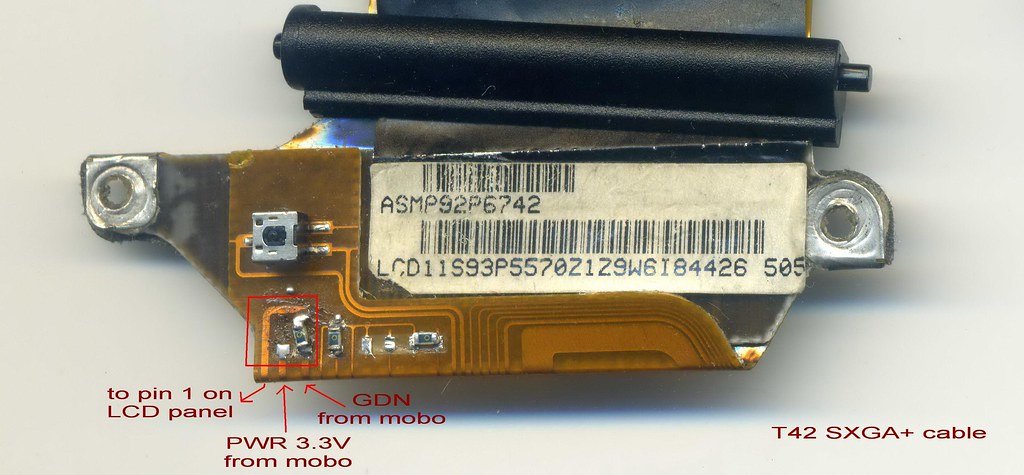
There was one more jumper - the switch of LCD pin 1 - on the leftmost of T42 cable .
http://farm5.static.flickr.com/4065/434 ... 65bc_b.jpg
Since there is no uniform pinout to all internal LCDs, you may need to read datasheet of your LCD for its pinout. For example, Hydis HT14P12-100 (14" SXGA+) needs high voltage input on pin 1 to enable one channel LVDS mode. But Hydis HT14X19-110 (14" XGA) needs ground connection. Be careful of pin assignment especially you have an non-IBM LCD.
PS. Both of my R52 and T42 cable have only one channel LVDS connections.
EDIT:
Actually I was inspired by watching curcuit connections on the T42 cable - where wires came from and went to. I tested the modded the T42 cable first. When it succeeded, I started to wonder how to mod the R52 cable as I did on the T42 cable. There were an advantage and a disavantage to use the R52 cable.
The advantage: The R52 cable naturely fits the R52 case. The T42 cable must be twisted on the part which connects inverter to fit.
The disadvantage: The R52 cable has no LCD pin 1 switch that found on T42 cable.
To overcome this disadvantage, I modified the LCD-side connector on cable. I removed the connection of connector pin 1 from orignal ground line and soldered it with pin 2 to get high voltage input.
With connector modding and jumper changings, the R52 cable also successfully drived Hydis HT14P12 panel.
I did some experiments by unsoldering jumpers from closed circuits and resoldering to open circuits. After few trials, I discovered the correct combination - Line A closed, Line B closed, and Line C open. I took the photo of this combination from the R52 cable I moded and I marked locations of those lines. See the left bottom side, there are jumpers.
http://farm3.static.flickr.com/2731/434 ... 19bd_b.jpg
There was one more jumper - the switch of LCD pin 1 - on the leftmost of T42 cable .
http://farm5.static.flickr.com/4065/434 ... 65bc_b.jpg
Since there is no uniform pinout to all internal LCDs, you may need to read datasheet of your LCD for its pinout. For example, Hydis HT14P12-100 (14" SXGA+) needs high voltage input on pin 1 to enable one channel LVDS mode. But Hydis HT14X19-110 (14" XGA) needs ground connection. Be careful of pin assignment especially you have an non-IBM LCD.
PS. Both of my R52 and T42 cable have only one channel LVDS connections.
EDIT:
Actually I was inspired by watching curcuit connections on the T42 cable - where wires came from and went to. I tested the modded the T42 cable first. When it succeeded, I started to wonder how to mod the R52 cable as I did on the T42 cable. There were an advantage and a disavantage to use the R52 cable.
The advantage: The R52 cable naturely fits the R52 case. The T42 cable must be twisted on the part which connects inverter to fit.
The disadvantage: The R52 cable has no LCD pin 1 switch that found on T42 cable.
To overcome this disadvantage, I modified the LCD-side connector on cable. I removed the connection of connector pin 1 from orignal ground line and soldered it with pin 2 to get high voltage input.
With connector modding and jumper changings, the R52 cable also successfully drived Hydis HT14P12 panel.
Last edited by yannbelief on Tue Mar 02, 2010 6:30 am, edited 2 times in total.
-
yannbelief
- Posts: 9
- Joined: Tue Jun 09, 2009 2:14 pm
- Location: Taipei, Taiwan
Re: R52 LCD Replacement Problem (SOLVED)
I got some free time to finish my previous post. I rewrited some sentences and made them more readable and complete. I've used SXGA+ panel since the replacement succeeded. There was no problem except the color on screen - It's a little yellow when it should be white. I decresed the gamma, brightness, and constrast value of LCD in ATI Catalyst Control Center, and found it more comfortable to my eyes.
Re: R52 LCD Replacement Problem (SOLVED)
You are to be congratulated on this most amazing accomplishment... 
Now, if you can show us how to get an UXGA LCD working on an Intel-based 15" T43 or R52...you would make some of us VERY happy...
Once again, thank you for posting the detailed results of your work, I'm certain they will be useful to many members.
Now, if you can show us how to get an UXGA LCD working on an Intel-based 15" T43 or R52...you would make some of us VERY happy...
Once again, thank you for posting the detailed results of your work, I'm certain they will be useful to many members.
...Knowledge is a deadly friend when no one sets the rules...(King Crimson)
Cheers,
George (your grouchy retired FlexView farmer)
my music if anyone cares: https://www.youtube.com/@TheWaterMemory
PMs requesting personal tech support will be ignored.
Cheers,
George (your grouchy retired FlexView farmer)
my music if anyone cares: https://www.youtube.com/@TheWaterMemory
PMs requesting personal tech support will be ignored.
-
yannbelief
- Posts: 9
- Joined: Tue Jun 09, 2009 2:14 pm
- Location: Taipei, Taiwan
Re: R52 LCD Replacement Problem (SOLVED)
Thank you, ajkula66.ajkula66 wrote:You are to be congratulated on this most amazing accomplishment...
Now, if you can show us how to get an UXGA LCD working on an Intel-based 15" T43 or R52...you would make some of us VERY happy...
Once again, thank you for posting the detailed results of your work, I'm certain they will be useful to many members.
I don't have any 15" screen, cable, or intel-based T43/R52 and I don't plan to buy one recently. All I can do for you is to read the BIOS file. I am not able to understand the machine code of BIOS yet. So I think my help is limited.
I've checked the BIOS file from 70uj29us that applied to an intel-based T43/R52, but found a dissapointing news. In the ACPI3.rom, there is NO EDID for UXGA LCDs. An OS[1], and - not very surely - the driver of graphics, need the EDID which provided by ACPI to identify the LCD if the DDC of the LCD doesn't open. So I think this means if the other parts[2] support an UXGA res., at least an ACPI-modding in BIOS is needed to get an UXGA LCD working under OS.
But I saw the EDIDs of both 14" and 15" SXGA+ LCD are there in the ACPI file. Now my conclusion is that the support to a 14" SXGA+ LCD is hopeful[3], but not very expectable to a 15" UXGA LCD.
By the way, there are two more things to be checked if you want an intel-based T43/R52 to run an UXGA LCD.
1) Whether or not the Intel GMA 900 supports an UXGA res. output. (This is essential.)
2) When the UXGA jumper setting on an LCD cable is read by the BIOS, whether or not the BIOS will tell the graphics to send out UXGA signals? If BIOS doesn't do this job, at least you won't have a correct picture on the screen before an OS is loaded.
And if you ask me what is the UXGA jumper setting, I guess it's a combination of Line A open, Line B closed, Line C closed. It's not been tested yet. I hope and request someone with 15" equipments to verify my theory.
Yann
--
[1] I know that Windows XP and Linux use the EDID. And an "ignore EDID" option is availiable from X11 system under Linux. So you can set the res. of LCD as you like under Linux, and I didn't find the same function under Windows. This coincides with ajkula66's words "One member has managed to modify the machine (a T43 with Intel graphics) enough to accept it, but would only work in Linux and not in Windows, as far as I recall."
[2] which include the graphics and the curcuit-checking by BIOS.
[3] under the condition that the intel graphics output one-channel LVDS signal and the curcuit-checking works.
-
- Similar Topics
- Replies
- Views
- Last post
-
-
WTB: 600E Replacement LCD panel & ribbon (UK)
by MDBenson » Wed Mar 04, 2026 6:14 am » in Marketplace - Forum Members only - 0 Replies
- 1735 Views
-
Last post by MDBenson
Wed Mar 04, 2026 6:14 am
-
-
-
ThinkPad W500 Replacement "TAB" Keycap (I-39 Style)
by Commando303 » Wed Nov 19, 2025 11:27 am » in ThinkPad W500/W510/W520 and W700/W701 Series - 1 Replies
- 6709 Views
-
Last post by Commando303
Fri Nov 21, 2025 7:44 am
-
-
-
Looking for X201 replacement keys/domes and 3mm stem to 4mm adapter.
by ThinkIsaac » Mon Dec 15, 2025 4:17 pm » in ThinkPad X200/X201/X220 and X300/X301 Series - 0 Replies
- 5071 Views
-
Last post by ThinkIsaac
Mon Dec 15, 2025 4:17 pm
-
-
-
x220 tablet battery replacement
by Timpel_800 » Tue Dec 30, 2025 8:29 am » in ThinkPad X200/X201/X220 and X300/X301 Series - 2 Replies
- 3938 Views
-
Last post by Timpel_800
Fri Jan 02, 2026 6:14 am
-
Who is online
Users browsing this forum: No registered users and 33 guests