


 Homepage
 Forum
Forum Drivers
 HMM-Manuals
 MTM
MTM Feed
Feed
I picked up a used T61 laptop SVGA 14" non-wide, that needed the lcd hinge replaced, but other then that the laptop worked flawless. No problems with brightness, color, etc... until now. Now, I'm only getting greyscale color's.
Before I get into the problem, I'll mention I've taken a million of these apart so I'm not a newbie so to speak. While I had the laptop apart, I upgraded the CPU to a T7700, tossed in the Athero's "N" card, and grabbed a new trackpad. Now comes the problem. LCD will only display in greyscale, black and white. Here is a small list of what I've done.
- Checked Inverter cables.
- Checked all LCD cables, inc'ding the cable's on the rear of the LCD.
- Checked for any damaged to any of the LCD cables.
As far as I can tell, all the cables look ok. Laptop works great, I've reset the bios, but I'm only seeing greyscale colors.... where did I go wrong??? Or did I pull on a cable? What are the common causes to having this issue? Thanks in advance.
Take a look at our
ThinkPads.com HOME PAGE
For those who might want to contribute to the blog, start here: Editors Alley Topic
Then contact Bill with a Private Message
ThinkPads.com HOME PAGE
For those who might want to contribute to the blog, start here: Editors Alley Topic
Then contact Bill with a Private Message
T61 only display's in Greyscale color's!

Re: T61 only display's in Greyscale color's!
Which GPU does this T61 have in it?
Collection = T430 - T500 - R400 - X300 - T61 (14" WXGA+) - R61 (15" SXGA+) - T60 - X40 - T43p - T43 - T42p - A30P
-
rkawakami
- Admin Emeritus

- Posts: 10327
- Joined: Sun Jun 04, 2006 1:26 am
- Location: San Jose, CA 95120 USA
- Contact:
Re: T61 only display's in Greyscale color's!
Welcome to thinkpads.com!
Couple of questions:
- Is the display in a true 16/256 shade greyscale (see example here: http://en.wikipedia.org/wiki/Grayscale ) or is it simply black and white?
- Does the "splash screen" appear in color?
- Is the display in BIOS also in greyscale / black and white? If no, then does the display lose color when an OS is booted?
- What does an external display show?
Not sure if there's a common hardware problem associated with these systems. My guess would be if that the BIOS is showing normal colors until an OS is booted, then you're looking at some sort of software / driver issue. If that's the case, then try booting the PC Doctor for DOS diagnostic and running the video tests.
ref: http://support.lenovo.com/en_US/downloa ... MIGR-56222
Couple of questions:
- Is the display in a true 16/256 shade greyscale (see example here: http://en.wikipedia.org/wiki/Grayscale ) or is it simply black and white?
- Does the "splash screen" appear in color?
- Is the display in BIOS also in greyscale / black and white? If no, then does the display lose color when an OS is booted?
- What does an external display show?
Not sure if there's a common hardware problem associated with these systems. My guess would be if that the BIOS is showing normal colors until an OS is booted, then you're looking at some sort of software / driver issue. If that's the case, then try booting the PC Doctor for DOS diagnostic and running the video tests.
ref: http://support.lenovo.com/en_US/downloa ... MIGR-56222
Ray Kawakami
X22 X24 X31 X41 X41T X60 X60s X61 X61s X200 X200s X300 X301 Z60m Z61t Z61p 560 560Z 600 600E 600X T21 T22 T23 T41 T60p T410 T420 T520 W500 W520 R50 A21p A22p A31 A31p
NOTE: All links to PC-Doctor software hosted by me are dead. Files removed 8/28/12 by manufacturer's demand.
X22 X24 X31 X41 X41T X60 X60s X61 X61s X200 X200s X300 X301 Z60m Z61t Z61p 560 560Z 600 600E 600X T21 T22 T23 T41 T60p T410 T420 T520 W500 W520 R50 A21p A22p A31 A31p
NOTE: All links to PC-Doctor software hosted by me are dead. Files removed 8/28/12 by manufacturer's demand.
Re: T61 only display's in Greyscale color's!
GPU is Intel GMA.
Laptop POST's in Greyscale, also in BIOS it's greyscale. Basically greyscale for everything. Not sure about the true greyscale color... I tried booting a CD and when the menu came up, the boot CD's Icon looked alot like "film negative"... if that makes sense. Actually, the LCD looks like greyscale "film negative".
Laptop POST's in Greyscale, also in BIOS it's greyscale. Basically greyscale for everything. Not sure about the true greyscale color... I tried booting a CD and when the menu came up, the boot CD's Icon looked alot like "film negative"... if that makes sense. Actually, the LCD looks like greyscale "film negative".
-
rkawakami
- Admin Emeritus
- Posts: 10327
- Joined: Sun Jun 04, 2006 1:26 am
- Location: San Jose, CA 95120 USA
- Contact:
Re: T61 only display's in Greyscale color's!
Would recommend:
- Verify external video is or is not okay
- Also run memtest86+ (memory diagnostic) since video memory is shared with main memory. Program available here: http://www.memtest.org/#downiso
If everything comes up normal, then I'd consider swapping out the lid with a known good unit. By lid I mean both the LCD and ribbon cable. If that doesn't work, then it sounds like a motherboard issue.
edit: Can you post a link to a picture of the display?
- Verify external video is or is not okay
- Also run memtest86+ (memory diagnostic) since video memory is shared with main memory. Program available here: http://www.memtest.org/#downiso
If everything comes up normal, then I'd consider swapping out the lid with a known good unit. By lid I mean both the LCD and ribbon cable. If that doesn't work, then it sounds like a motherboard issue.
edit: Can you post a link to a picture of the display?
Ray Kawakami
X22 X24 X31 X41 X41T X60 X60s X61 X61s X200 X200s X300 X301 Z60m Z61t Z61p 560 560Z 600 600E 600X T21 T22 T23 T41 T60p T410 T420 T520 W500 W520 R50 A21p A22p A31 A31p
NOTE: All links to PC-Doctor software hosted by me are dead. Files removed 8/28/12 by manufacturer's demand.
X22 X24 X31 X41 X41T X60 X60s X61 X61s X200 X200s X300 X301 Z60m Z61t Z61p 560 560Z 600 600E 600X T21 T22 T23 T41 T60p T410 T420 T520 W500 W520 R50 A21p A22p A31 A31p
NOTE: All links to PC-Doctor software hosted by me are dead. Files removed 8/28/12 by manufacturer's demand.
Re: T61 only display's in Greyscale color's!
External video is perfect, color's are great.
The only other LCD I have on hand to test is a T60 14", can I use this?
The only other LCD I have on hand to test is a T60 14", can I use this?
Re: T61 only display's in Greyscale color's!
I'll post pictures in a few minutes.
Re: T61 only display's in Greyscale color's!
http://i54.tinypic.com/2q1t112.jpg (1024x768; 187KB)
http://i52.tinypic.com/2yl7ecl.jpg (1024x768; 178KB)
Admin note: Changed large (>150KB) inline images to links. The forum has a policy of only allowing small (<50KB) images to be posted as some people are still on dial-up or view the forum via smartphones.

http://i52.tinypic.com/2yl7ecl.jpg (1024x768; 178KB)

Admin note: Changed large (>150KB) inline images to links. The forum has a policy of only allowing small (<50KB) images to be posted as some people are still on dial-up or view the forum via smartphones.
-
rkawakami
- Admin Emeritus
- Posts: 10327
- Joined: Sun Jun 04, 2006 1:26 am
- Location: San Jose, CA 95120 USA
- Contact:
Re: T61 only display's in Greyscale color's!
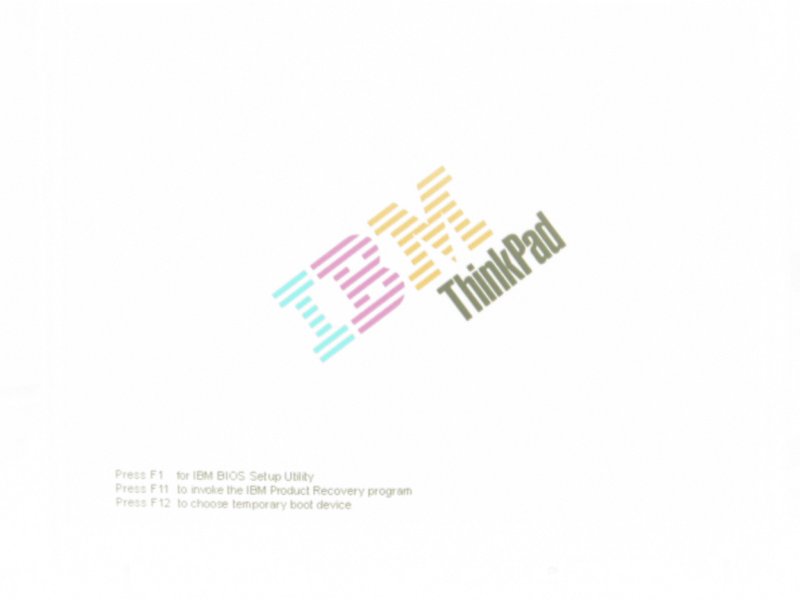
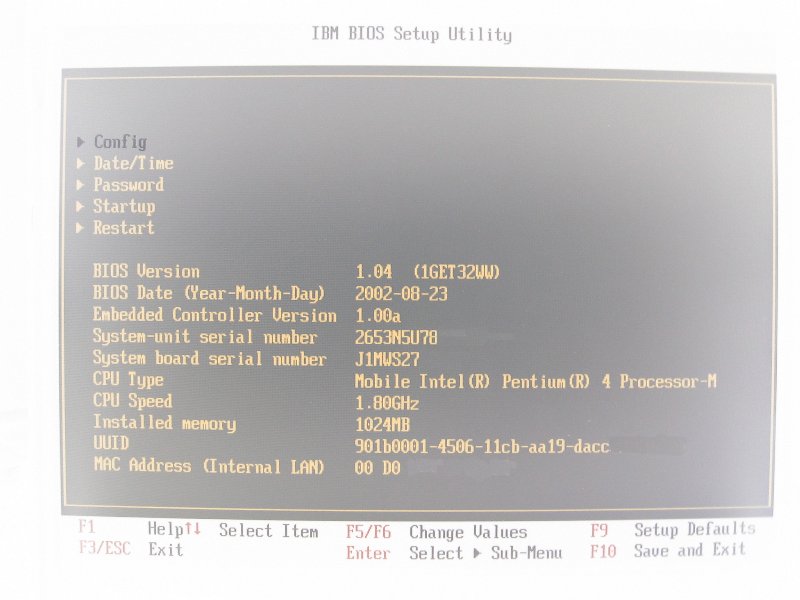
Images are not true greyscale as I see some yellow and red (unless that's a function of your camera's white balance). You are right; it's more of an inversion or negative. I believe the BIOS background should be white and the characters blue (white for selected item). Your screen shows the background black (opposite of white) and the characters yellow (negative of blue). The Fn key legends are supposed to be cyan (light blue); the invert is red.
At this time I'd suspect the ribbon cable, the connection on either end of the cable or the panel to be the problem. I'm not sure if the T60 screen is swappable. You can check the Hardware Maintenance Manual (HMM) to see if the T60 and T61 share a common display.
ref: http://support.lenovo.com/en_US/product ... MIGR-39298 (Main index for HMMs)
edit: Here's some Paint Shop Pro "negatives":
http://www.kawakami-ca.com/images/splash_neg.jpg (IBM red/green/blue is replaced by cyan/purple/yellow)
http://www.kawakami-ca.com/images/BIOS_neg.jpg (Note the slight reddish tint to the F1, F5/F6 characters)
At this time I'd suspect the ribbon cable, the connection on either end of the cable or the panel to be the problem. I'm not sure if the T60 screen is swappable. You can check the Hardware Maintenance Manual (HMM) to see if the T60 and T61 share a common display.
ref: http://support.lenovo.com/en_US/product ... MIGR-39298 (Main index for HMMs)
edit: Here's some Paint Shop Pro "negatives":
http://www.kawakami-ca.com/images/splash_neg.jpg (IBM red/green/blue is replaced by cyan/purple/yellow)
http://www.kawakami-ca.com/images/BIOS_neg.jpg (Note the slight reddish tint to the F1, F5/F6 characters)
Ray Kawakami
X22 X24 X31 X41 X41T X60 X60s X61 X61s X200 X200s X300 X301 Z60m Z61t Z61p 560 560Z 600 600E 600X T21 T22 T23 T41 T60p T410 T420 T520 W500 W520 R50 A21p A22p A31 A31p
NOTE: All links to PC-Doctor software hosted by me are dead. Files removed 8/28/12 by manufacturer's demand.
X22 X24 X31 X41 X41T X60 X60s X61 X61s X200 X200s X300 X301 Z60m Z61t Z61p 560 560Z 600 600E 600X T21 T22 T23 T41 T60p T410 T420 T520 W500 W520 R50 A21p A22p A31 A31p
NOTE: All links to PC-Doctor software hosted by me are dead. Files removed 8/28/12 by manufacturer's demand.
Re: T61 only display's in Greyscale color's!
There really isn't any red, it's hard to get good lighting for a picture but it really is like a "film negative". I was thinking myself it might be the ribbon cable, maybe I pulled on it at some point. I checked for kinks but it looks good. Bacllighting works good, and I can use the FN key to turn the brightness up and down so that's good. This sucks. Color's worked great before.
Re: T61 only display's in Greyscale color's!
I suspect the cable also. If it is not damaged, it may just not be seated correctly in the socket. It easy to not get it plugged into the panel just right. Or, if it's plugged in right, one (or more) pin can easily get pulled loose by the time the panel is back in place. That's the reason for the tape over the connector. My gut feeling is a misaligned connection at the panel.
I have a desktop monitor here right now that displays something like this. It has a broken wire in it's cable. If I twist and turn and manipulate the cable just right I can get it to display correctly, until the cable is moved...
I have a desktop monitor here right now that displays something like this. It has a broken wire in it's cable. If I twist and turn and manipulate the cable just right I can get it to display correctly, until the cable is moved...
Collection = T430 - T500 - R400 - X300 - T61 (14" WXGA+) - R61 (15" SXGA+) - T60 - X40 - T43p - T43 - T42p - A30P
Re: T61 only display's in Greyscale color's!
Ok, i have noticed some of the bios options are in red, eg; F10 to exit and such are in red. Right now I have the lcd out and I'm booting the system with the lcd out of the laptop to make sure the rear lcd cable is secure. Still no luck, even when I'm playing around with the cable... like lightly pressing on places on the cable and the back of the LCD results in no change in the greyscale changing to color.
Re: T61 only display's in Greyscale color's!
Hmmm...must be the LCD panel then. I guess you would have to swap panels to be sure, though. I suppose the panel could have been damaged when the hinge was broken, and it didn't show up until the lid was disassembled. 
Collection = T430 - T500 - R400 - X300 - T61 (14" WXGA+) - R61 (15" SXGA+) - T60 - X40 - T43p - T43 - T42p - A30P
Re: T61 only display's in Greyscale color's!
But if the LCD was damaged at some point, wouldn't it show lines across the screen, etc... Even with the hinge broken, the previous user had zero issues with the LCD, no dead pixels, color's and brightness were 100%. So, somewhere along the way, me taking things apart, knocked something out... 
Re: T61 only display's in Greyscale color's!
Now that I see these pics, this is EXACTLY how my LCD is displaying things.rkawakami wrote:edit: Here's some Paint Shop Pro "negatives":
http://www.kawakami-ca.com/images/splash_neg.jpg (IBM red/green/blue is replaced by cyan/purple/yellow)
http://www.kawakami-ca.com/images/BIOS_neg.jpg (Note the slight reddish tint to the F1, F5/F6 characters)
Is it possible that on the rear of the LCD, at the top where samsung has the Circuit board where the ribbon plugs into, that somehow I've knocked something else out of the circuit board? And would it be easy, and worth it to take apart the top portion of the LCD to check things out?
-
rkawakami
- Admin Emeritus
- Posts: 10327
- Joined: Sun Jun 04, 2006 1:26 am
- Location: San Jose, CA 95120 USA
- Contact:
Re: T61 only display's in Greyscale color's!
With a wholesale change so that the entire panel is displaying the negative color image (i.e., no dead pixels, rows or columns), I'd guess that you're looking at some sort of interface defect. From a quick look at an LCD interface document, there may be one pin/signal that tells the display when or how to interpret the color data being sent from the video controller. If the ribbon cable is open or shorted on that one pin, this could account for what you see. As it's cheaper to obtain a known good ribbon cable (vs. another LCD panel), I'd try that first. Disassembling an LCD panel is not without some risk. You could actually have a perfectly good panel that won't be after you've fiddled around with it. I would still try to swap lid assemblies with another T61 so that you can rule out your motherboard but of course that requires another working T61 system.
ref: http://ics.nxp.com/support/documents/mi ... facing.pdf
ref: http://ics.nxp.com/support/documents/mi ... facing.pdf
Ray Kawakami
X22 X24 X31 X41 X41T X60 X60s X61 X61s X200 X200s X300 X301 Z60m Z61t Z61p 560 560Z 600 600E 600X T21 T22 T23 T41 T60p T410 T420 T520 W500 W520 R50 A21p A22p A31 A31p
NOTE: All links to PC-Doctor software hosted by me are dead. Files removed 8/28/12 by manufacturer's demand.
X22 X24 X31 X41 X41T X60 X60s X61 X61s X200 X200s X300 X301 Z60m Z61t Z61p 560 560Z 600 600E 600X T21 T22 T23 T41 T60p T410 T420 T520 W500 W520 R50 A21p A22p A31 A31p
NOTE: All links to PC-Doctor software hosted by me are dead. Files removed 8/28/12 by manufacturer's demand.
Re: T61 only display's in Greyscale color's!
Hmm. Have you considered the possibility that you're actually a dog?
Need help with Linux or FreeBSD? PM or catch me on IRC: I'm ThinkRob on FreeNode and EFnet.
Laptop: X270, running Fedora
Desktop: Intellistation 285 (currently dead)
Workstation: owned by my employer
Toy: Miata!
Laptop: X270, running Fedora
Desktop: Intellistation 285 (currently dead)
Workstation: owned by my employer
Toy: Miata!
Re: T61 only display's in Greyscale color's!
I've ordered a replacement LCD ribbon cable from Ebay, along with the Inverter...just in case, hopefully that does the trick. I could not locate a T61 LCD to borrow and test with so if it's not the Robbon cable, at least I know what's next lol. I've checked the motherboard LCD connector thoroughly and see zero damage to the pins.
This T61 is starting to become like new lol, Brand new Trackpad, Brand new Keyboard, upgraded to a T7700, dropped in Athero's N card, brand new Hinges, now LCD cable and inverter.... It also came with the DL-DVDRW, the only thing I wish it had was the NV 128/256mb. Think I've dropped close to $200 on parts, plus shipping which was my limit for it being an older laptop, but if the LCD is the problem... I guess I can't stop now.
The T60/T61 are superb laptops, my wife has the T60 and these things are so nice to work on, getting access to the parts is a breeze, and parts are easily obtained. At work, I use the T400, though I can't say the same... the plastics used are garbage, I think Fisher Price wouldn't even go that low in quality. Just has a really cheap feel to it.
This T61 is starting to become like new lol, Brand new Trackpad, Brand new Keyboard, upgraded to a T7700, dropped in Athero's N card, brand new Hinges, now LCD cable and inverter.... It also came with the DL-DVDRW, the only thing I wish it had was the NV 128/256mb. Think I've dropped close to $200 on parts, plus shipping which was my limit for it being an older laptop, but if the LCD is the problem... I guess I can't stop now.
The T60/T61 are superb laptops, my wife has the T60 and these things are so nice to work on, getting access to the parts is a breeze, and parts are easily obtained. At work, I use the T400, though I can't say the same... the plastics used are garbage, I think Fisher Price wouldn't even go that low in quality. Just has a really cheap feel to it.
Re: T61 only display's in Greyscale color's!
Be glad you don't have that GPU! Most of them are defective from the factory no matter which brand of laptop they are in.dave343 wrote:the only thing I wish it had was the NV 128/256mb.
Collection = T430 - T500 - R400 - X300 - T61 (14" WXGA+) - R61 (15" SXGA+) - T60 - X40 - T43p - T43 - T42p - A30P
Re: T61 only display's in Greyscale color's!
The 14.1" 16:10 T61s and T400 use nearly identical chassis designs, and (as far as anyone's been able to determine) use the same materials.dave343 wrote:
The T60/T61 are superb laptops, my wife has the T60 and these things are so nice to work on, getting access to the parts is a breeze, and parts are easily obtained. At work, I use the T400, though I can't say the same... the plastics used are garbage, I think Fisher Price wouldn't even go that low in quality. Just has a really cheap feel to it.
Need help with Linux or FreeBSD? PM or catch me on IRC: I'm ThinkRob on FreeNode and EFnet.
Laptop: X270, running Fedora
Desktop: Intellistation 285 (currently dead)
Workstation: owned by my employer
Toy: Miata!
Laptop: X270, running Fedora
Desktop: Intellistation 285 (currently dead)
Workstation: owned by my employer
Toy: Miata!
Re: T61 only display's in Greyscale color's!
Well, I ment the std-screen size T61's, I've seen a few T61's and yes they do have the same material... cheap cheap. I hate my T400 at work. We've started to distribute T410's and T420's, those are looking a "bit" better but the quality sure has gone down.ThinkRob wrote: The 14.1" 16:10 T61s and T400 use nearly identical chassis designs, and (as far as anyone's been able to determine) use the same materials.
Re: T61 only display's in Greyscale color's!
I managed to find another T61 LCD to borrow and test with... but unfortunately it still doesn't look good...
First I tried the entire borrowed LCD unit to verify the connector on the motherboard was good, and it was. Next, I took the LCD ribbon cable along with the Inverter from the borrowed LCD, and tested those on my LCD. Still getting the "photo negative" effect. So it looks like I'm in for a new $100 LCD... Maybe I'll try and find a glossy. I guess when I disassembled to replace the hinges... something cracked.
First I tried the entire borrowed LCD unit to verify the connector on the motherboard was good, and it was. Next, I took the LCD ribbon cable along with the Inverter from the borrowed LCD, and tested those on my LCD. Still getting the "photo negative" effect. So it looks like I'm in for a new $100 LCD...
Maybe I'll try and find a glossy. I guess when I disassembled to replace the hinges... something cracked.Re: T61 only display's in Greyscale color's!
I was able to find a cheap T61 SXGA screen for replacement however since the Backlight wasn't he greatest, I took the backlight from my broken LCD and tossed it in. That fixed the brightness issue, but now in the bottom left corner it's very bright, light leakage. Looks like the sun is rising from the bottom left corner. Idea's? Where did I go wrong?
Second question, the backlight shines into a plastic pane, but then there are 2 very thin translucent layers that go between the plastic pane and the actual LCD panel. What are these there for? And if I remove them will I increase the brightness?
Thanks.
Second question, the backlight shines into a plastic pane, but then there are 2 very thin translucent layers that go between the plastic pane and the actual LCD panel. What are these there for? And if I remove them will I increase the brightness?
Thanks.
Re: T61 only display's in Greyscale color's!
IIRC, you need about 2mm of black masking on each end of the CCFL to prevent that corner brightness, but, apply too much, and it will leave dark corners. That's one of the things that makes this job so difficult to get right.
And, the LCD panel will not function without all it's layers intact.
And, the LCD panel will not function without all it's layers intact.
Collection = T430 - T500 - R400 - X300 - T61 (14" WXGA+) - R61 (15" SXGA+) - T60 - X40 - T43p - T43 - T42p - A30P
-
RealBlackStuff
- Admin Emeritus

- Posts: 24728
- Joined: Mon Sep 18, 2006 5:17 am
- Location: Loch Garman, Éire
Re: T61 only display's in Greyscale color's!
@Neil,
I have done maybe 30-40 CCFL replacements in various TP models, but have NEVER seen (or even heard of) any black masking on the CCFL.
Enlighten me please.
I have done maybe 30-40 CCFL replacements in various TP models, but have NEVER seen (or even heard of) any black masking on the CCFL.
Enlighten me please.
Lovely day for a Guinness! (The Real Black Stuff)
But I actually prefer Murphy's from Cork!
But I actually prefer Murphy's from Cork!
Re: T61 only display's in Greyscale color's!
Well...I don't have the experience that you do, RBS, and don't recal seeing it on any CCFL before the one T60 I repaired. It had tiny rubber boots on each end of the CCFL, serving as electrical insulators I'm sure, but extending onto the part of the lamp that is not frosted, effectively masking any light that would shine through. I had to cut that away to un-solder the leads. When reassembling, I did not replace that material (thinking it wasn't necessary) resulting in extra light that made the corners brighter. I didn't have time to take the T60 back apart to try and correct the situation, so I could be wrong about what was causing the light bleeed. But just assumed that since I failed to restore one aspect of the original CCFL, that was the culprit. Is there a more likely cause?
Collection = T430 - T500 - R400 - X300 - T61 (14" WXGA+) - R61 (15" SXGA+) - T60 - X40 - T43p - T43 - T42p - A30P
-
RealBlackStuff
- Admin Emeritus
- Posts: 24728
- Joined: Mon Sep 18, 2006 5:17 am
- Location: Loch Garman, Éire
Re: T61 only display's in Greyscale color's!
Now I know what you are talking about, but all the ones I have seen, were white.
They are silicone rubber caps, such as these: http://store.lcdparts.net/thumbnail.asp ... 0&maxy=150
They cover/insulate the soldered ends of the CCFL.
They are silicone rubber caps, such as these: http://store.lcdparts.net/thumbnail.asp ... 0&maxy=150

They cover/insulate the soldered ends of the CCFL.
Lovely day for a Guinness! (The Real Black Stuff)
But I actually prefer Murphy's from Cork!
But I actually prefer Murphy's from Cork!
Re: T61 only display's in Greyscale color's!
@RBS, not exactly. What I found looked more like a tiny black heat shrink wrap that covered the ends of the CCFL and the solder joint of the electrode and wire, extending up the wire just a bit. Actually could have been some of that liquid rubber coating, it was just that thin and tightly stuck. Those white silicone end caps were easily removed, and reused. They originally fit right over the black stuff, which extended a little beyond the end caps. Without the black masking there was a little bit of clear glass showing between the white end caps and the frosting on the CCFL. I assumed that is where the extra light was coming from. It's a little surprising that you've not seen one put together that way!
Collection = T430 - T500 - R400 - X300 - T61 (14" WXGA+) - R61 (15" SXGA+) - T60 - X40 - T43p - T43 - T42p - A30P
-
- Similar Topics
- Replies
- Views
- Last post
-
-
W530 color sensor issues
by astral » Tue Mar 31, 2026 4:23 pm » in ThinkPad W530/W540/W541/W550 Series - 5 Replies
- 2563 Views
-
Last post by astral
Mon Apr 20, 2026 12:03 pm
-
-
-
SOLD: thinkpad X61, T8300, 8GB. SSD, Atheros AR938 - EU ONLY
by zz7 » Wed Oct 29, 2025 10:57 am » in Marketplace - Forum Members only - 0 Replies
- 7379 Views
-
Last post by zz7
Wed Oct 29, 2025 10:57 am
-
-
-
T470s won't allow me to login into Linux -- only UEFI, boot screens and tty interfaces seem to work
by irock » Wed Mar 18, 2026 3:34 pm » in ThinkPad T430-T495 / T530-T590 Series - 4 Replies
- 3405 Views
-
Last post by farmall
Fri Mar 27, 2026 2:26 pm
-
-
- 1 Replies
- 182 Views
-
Last post by RealBlackStuff
Thu Apr 23, 2026 12:30 am
Who is online
Users browsing this forum: axur-delmeria and 136 guests