


 Homepage
 Forum
Forum Drivers
 HMM-Manuals
 MTM
MTM Feed
Feed

On my T450s, I noticed when I go back to my desktop (mainly dark wallpaper) it gradually dims the display, that is at a very visible pace.
When I go back to my excel sheet, I see it's pretty dim, gradually gets brighter.
It's not a huge deal breaker but it's very annoying.
"Adaptive Brightness" is off for both On Battery and Plugged In. at power panel.
Take a look at our
ThinkPads.com HOME PAGE
For those who might want to contribute to the blog, start here: Editors Alley Topic
Then contact Bill with a Private Message
ThinkPads.com HOME PAGE
For those who might want to contribute to the blog, start here: Editors Alley Topic
Then contact Bill with a Private Message
How to disable auto brightness?
How to disable auto brightness?
8/18/11 - X220 i5-2540M, IPS, Intel 6205 Wifi, 8GB, U2312HM
1/15/12 - S405 (Wife's), A6-4455M, 14", 4GB
7/02/15 - T450s i5-5300U, 14" FHD IPS, FP, 12GB
7/1/20 - T490 i5-10210U, 24GB, 14" FHD TS IPS, 512GB NVMe,
5/20/23 - T14 Gen 3 AMD 6650U, 1TB, 32GB, WUXGA

Re: How to disable auto brightness?
Have you checked the intel or nvidia control panel for adaptive brightness as well?
Current Thinkpads: W530 (functional classic keyboard mod), X301, T61, T60, T43, A31p, T23, 600X, 770
Other: mk5 Toughbook cf-19, mk1 Toughbook cf-53
Other: mk5 Toughbook cf-19, mk1 Toughbook cf-53
Re: How to disable auto brightness?
It's Intel.brchan wrote:Have you checked the intel or nvidia control panel for adaptive brightness as well?
Yes, checked, there is no option, even in advanced, I am surprised to see there is no option at all, unless they are hidden in sub menus in advanced panel somewhere.
8/18/11 - X220 i5-2540M, IPS, Intel 6205 Wifi, 8GB, U2312HM
1/15/12 - S405 (Wife's), A6-4455M, 14", 4GB
7/02/15 - T450s i5-5300U, 14" FHD IPS, FP, 12GB
7/1/20 - T490 i5-10210U, 24GB, 14" FHD TS IPS, 512GB NVMe,
5/20/23 - T14 Gen 3 AMD 6650U, 1TB, 32GB, WUXGA
Re: How to disable auto brightness?
OK, I didn't know whether you had the intel or nvidia equipped T450s. Anyway, is there a "Graphics Properties (Intel) > (In advanced mode) Media > Image Enhancement > Toggle "Adaptive Contrast Enhancement" option in the intel control panel? Try switching it off.
Current Thinkpads: W530 (functional classic keyboard mod), X301, T61, T60, T43, A31p, T23, 600X, 770
Other: mk5 Toughbook cf-19, mk1 Toughbook cf-53
Other: mk5 Toughbook cf-19, mk1 Toughbook cf-53

Re: How to disable auto brightness?
This is not the brightness changing, this is a power saving feature in the intel graphics card, you will notice this only happen while on battery.
in Intel's Graphics control panel, under power settings, find something like
'display power saving technology' and
'display refresh rate switching' and
'graphics power plan'.
Disabling the 1st should fix that annoying problem, disabling the 2nd and 3rd may also enhance the experience a little bit .
in Intel's Graphics control panel, under power settings, find something like
'display power saving technology' and
'display refresh rate switching' and
'graphics power plan'.
Disabling the 1st should fix that annoying problem, disabling the 2nd and 3rd may also enhance the experience a little bit .
===
Re: How to disable auto brightness?
I still can't find this option anywhere, unless it's hidden in some other control panel, I don't see it in Intel HD Graphics Control Panel (which is very cartoonish compared to older control panels)brchan wrote:OK, I didn't know whether you had the intel or nvidia equipped T450s. Anyway, is there a "Graphics Properties (Intel) > (In advanced mode) Media > Image Enhancement > Toggle "Adaptive Contrast Enhancement" option in the intel control panel? Try switching it off.
Yes, this was the solution, in fact the setting was hidden in a not-so-obvious menu, where you had to switch Power dropdown menu to Battery before you could see all those options.hhhd1 wrote:This is not the brightness changing, this is a power saving feature in the intel graphics card, you will notice this only happen while on battery.
in Intel's Graphics control panel, under power settings, find something like
'display power saving technology' and
'display refresh rate switching' and
'graphics power plan'.
Disabling the 1st should fix that annoying problem, disabling the 2nd and 3rd may also enhance the experience a little bit .
For anyone else wondering where this is hidden:
This is what you see as default in HD Control Panel when you first open it:
]http://i.gyazo.com/45d4d58f51d27b6cd4cd8e4fc7cead7c.png[/img]
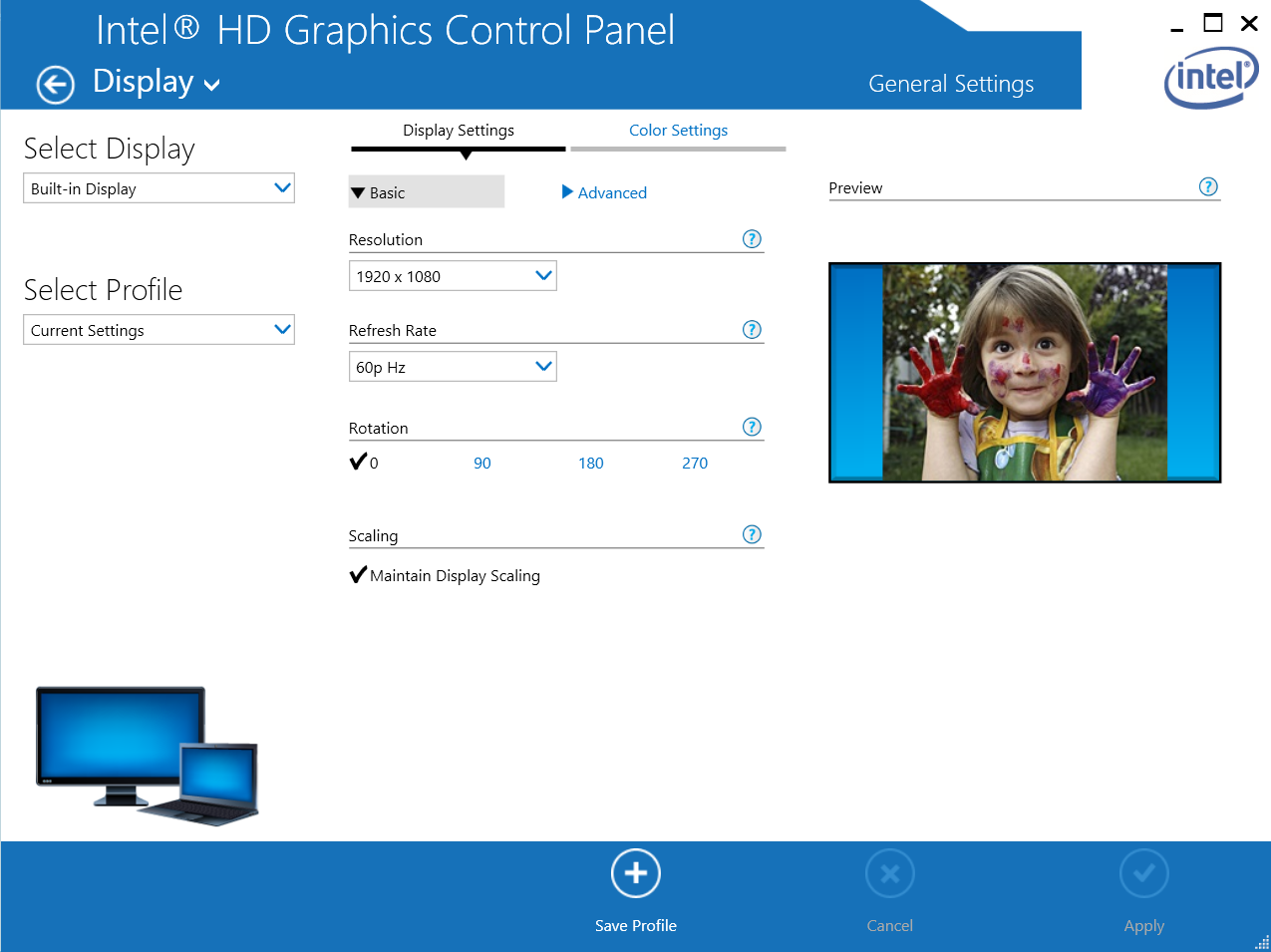
and selecting "Advanced" gives you this:
]http://i.gyazo.com/7f9db2677634d745af373673ed2d3274.png[/img]
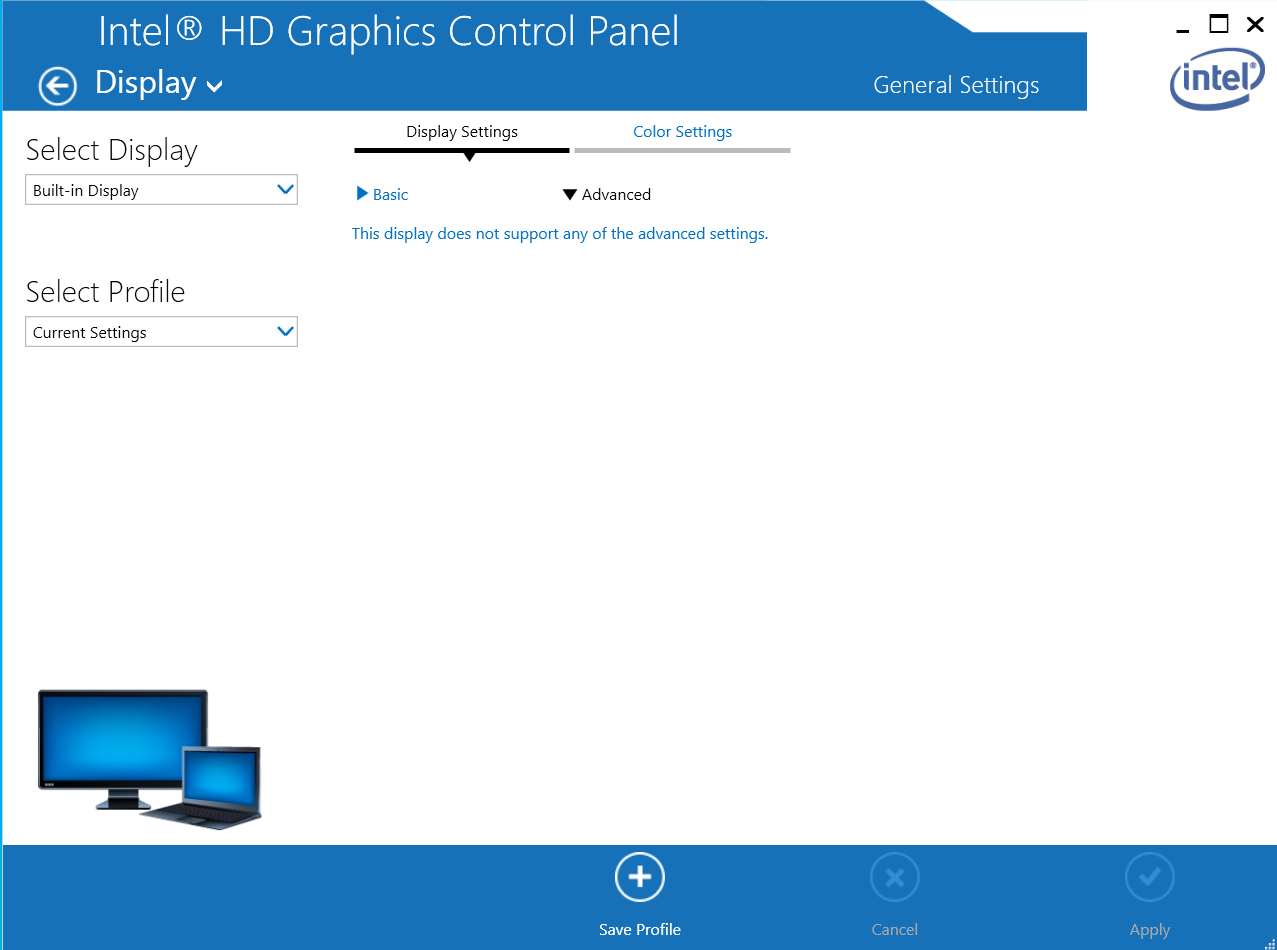
You have to hit that white arrow in circle on top left corner to go back to this:
]http://i.gyazo.com/c3909ff4ecdfea485b88a5585f352de1.png[/img]
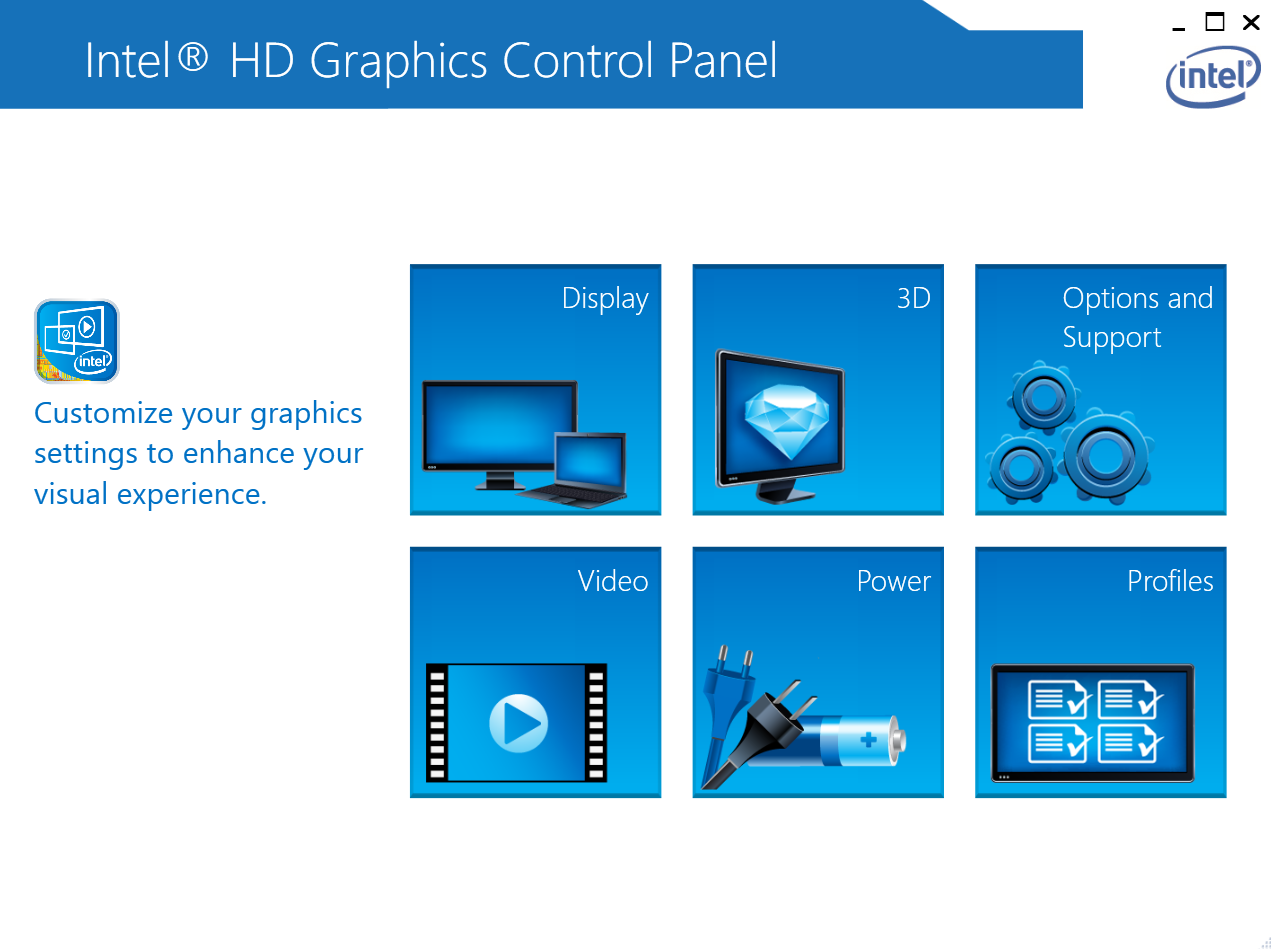
Then hit "Power", then select On Battery which is not very obvious:
]http://i.gyazo.com/eb91b863218520091f7989560cc4437f.png[/img]
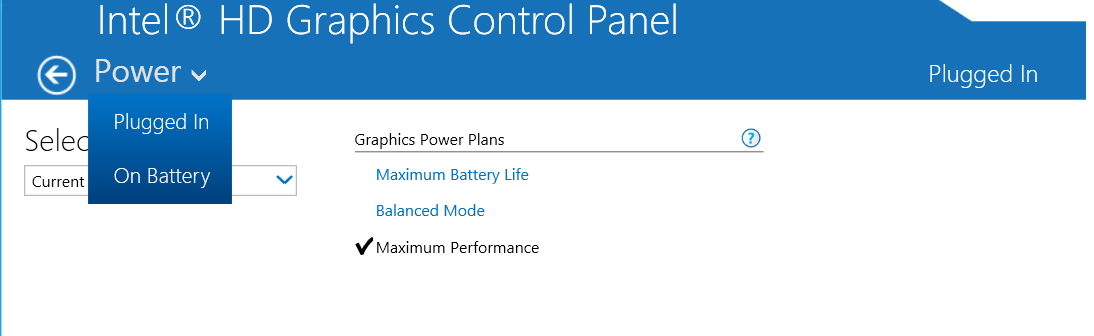
and disable the Display Power Saving Technology:
]http://i.gyazo.com/651e2c6c0d743e6cfb63b9e9b0cfea39.png[/img]
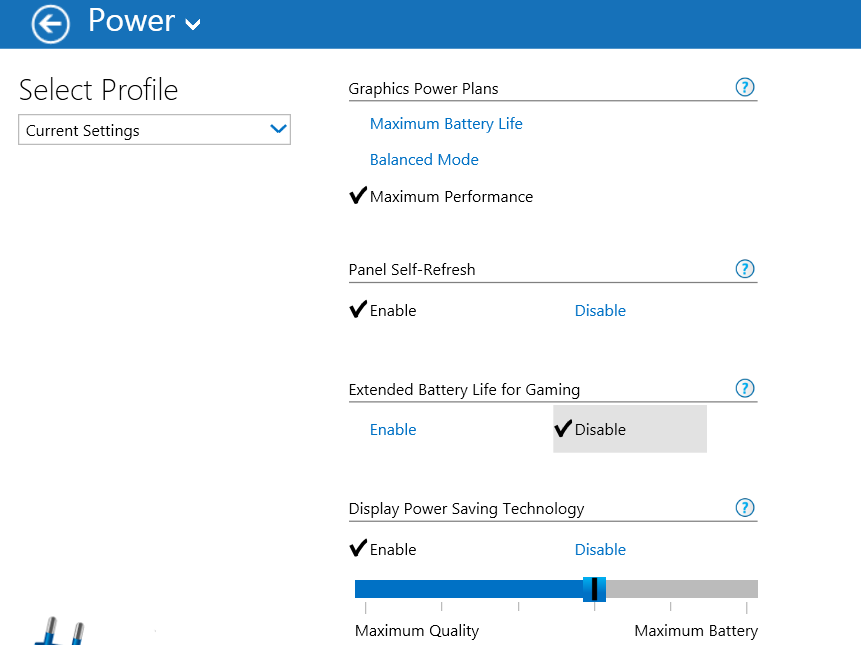
Thank you both for your help and I hope this topic helps someone else who is annoyed by this when their Thinkpad is running on battery power.
MOD Warning: now pay attention! Do NOT post huge pictures, read the Forum Rules and abide by them!
8/18/11 - X220 i5-2540M, IPS, Intel 6205 Wifi, 8GB, U2312HM
1/15/12 - S405 (Wife's), A6-4455M, 14", 4GB
7/02/15 - T450s i5-5300U, 14" FHD IPS, FP, 12GB
7/1/20 - T490 i5-10210U, 24GB, 14" FHD TS IPS, 512GB NVMe,
5/20/23 - T14 Gen 3 AMD 6650U, 1TB, 32GB, WUXGA
-
- Similar Topics
- Replies
- Views
- Last post
-
-
Disable Touchpad on ThinkPad T490?
by Clueless in Seattle » Tue Jan 20, 2026 9:57 pm » in ThinkPad T430-T495 / T530-T590 Series - 3 Replies
- 4856 Views
-
Last post by dcfbf
Sun Feb 08, 2026 1:41 am
-
-
-
Display brightness issue with Win 10 on W520
by jdwis » Tue Nov 04, 2025 2:22 pm » in ThinkPad W500/W510/W520 and W700/W701 Series - 4 Replies
- 17235 Views
-
Last post by jdwis
Thu Nov 13, 2025 8:05 am
-
Who is online
Users browsing this forum: No registered users and 65 guests