


 Homepage
 Forum
Forum Drivers
 HMM-Manuals
 MTM
MTM Feed
Feed
I took it apart according to the instructions in the Hardware Maintenance Manual, cleaned up the fan, replaced the thermal paste to a new one, which required me to detach the LCD screen in order to get to the motherboard and the cooling system (unless I'm missing something and there is a way to do that without detaching the screen? :q ), and assembled it back. But after powering it up, the screen is dark
 When I look at a right angle, I can see some characters displaying on it (some BIOS messages), so I guess the motherboard is working fine. The fan is spinning, there's no overheating (at least for now), but the backlight of the screen is off, and I don't know why, and how to fix it
The cables are connected the same way as they were before I detached them: there's one on the left (but it doesn't seem to be related to the display, because when I detached it, the characters were still displaying, so my guess is that it's for the camera on the lid), and one on the right, wrapped in some tin foil. Both attached as before.
There is a third one, a single wire, with a metal loop at the end, that was originally conneced to the motherboard with a screw. At first I forgot to attach it, but it is attached now and screwed. Could it be that I forgot to attach it at first that might have messed up my display?

But most importantly: any ideas what might be broken and why, and how can I fix it? The display was working just fine before, and the only thing I did to it was that I detached it, cleaned it up with a soft napkin with a bit of rubbing alcohol, and attached back. Nothing hardcore there.
I found in another topic that someone else had similar symptoms and the cause was that a fuse on the motherboard was broken and needed to be replaced. How can I find out if this is the case in my situation too, and where is that fuse located exactly? Can I safely try shorting it to see if the backlight will reappear? (before I properly replace it, of course, in case it will turn out it's broken indeed).
Edit:
As an additional info which I think might be relevant:
From some time ago, I was hearing some weird noises coming out from inside of the laptop, like a high-pitched hiss, somewhat similar to the sound of a connecting modem. At first it was rather quiet, but later it become much more noisy, especially when I turned the laptop off while having the charger still connected. I see some correlation with what appears on the screen and the volume of the noises. When the screen is off, the noise is loud, but the more is going on on the screen, the noise becomes more silent. And it hisses only when the charger is plugged. When I unplug the charger and power it from the battery only, there's no hissing.
So my thoughts wander around a broken inverter, because as far as I know, it raises the voltate, so there is a voltage converter in there, and they have a tendency to hiss when you ignored them for too long :q Could it be a broken inverter then? (But it would be somewhat weird: why did it break only now, after unplugging the screen and plugging it back? :q )
Another think that comes to my mind, is that the laptop may think that the lid is closed, so it turns off the backlight (shouldn't it also turn off the display too, though?), if the sensor that recognizes that the lid is closed is broken from some reason. In that case: where can I find that sensor and check if it's broken or not? It might be broken if it is located somewhere in the palm rest, because I was cleaning it quite intensively today, with water, so maybe something hasn't dry out properly?.. Hmm...

 ) if you tell me where should I look and what voltages should I expect there.


 However it doesn't quite match what I see on the motherboard

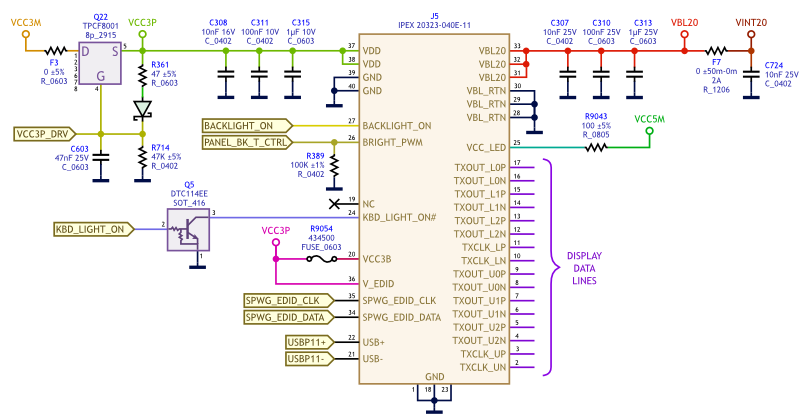
 I wonder how it is even possible that the laptop worked with this charger for so long. My guess is that it switches the power on and off very quickly, so the laptop is switching between power-saving mode very quickly as well, still charging the battery though, and running from the battery as a kind of a buffer that smooths out the voltage.
 The voltage was too low, so it couldn't run without the battery smoothing it out and raising to the correct value. That's why when I was trying to power it with just the charger, it just blinked the diodes and turned off instantly.