


 Homepage
 Forum
Forum Drivers
 HMM-Manuals
 MTM
MTM Feed
Feed
Hi have an x220T that i would like to try MSATA in?
I know you can on the non tablet X220, seen a video on you tube. Can anyone please confirm that the x220T also has an MSATA slot & it is the same kind of procedure?
Just installing in a x220 while it doesnt look too difficult still makes me a little nervous, im not too good at this type of thing!
Im not sure if i would attempt on the tablet if it was any harder lol.
Any tips would be appreciated
Thanks
Take a look at our
ThinkPads.com HOME PAGE
For those who might want to contribute to the blog, start here: Editors Alley Topic
Then contact Bill with a Private Message
ThinkPads.com HOME PAGE
For those who might want to contribute to the blog, start here: Editors Alley Topic
Then contact Bill with a Private Message
X220T Msata?
X220T Msata?
Many Thanks for any advice, shared knowledge & wisdom is a wonderful thing.
1st Thinkpad T42 (Old 570,600e, A21,X31,X40,X41) Current X60s, T60, Z61T,X200
1st Thinkpad T42 (Old 570,600e, A21,X31,X40,X41) Current X60s, T60, Z61T,X200
Re: X220T Msata?
As per Lenovo hardware maintenance manual (X220T is 0a60175_04.pdf) the X220T has mSATA slot in same place as regular X220, so it's just a matter of removing screws to lift up keyboard, then palm rest to put mSATA card in the slot and screw it down. It's straightforward, all you need is a screwdriver of the right size and a few minutes' patience. Only tip I'd give is that you don't need to disconnect the ribbon cable to the palmrest, just gently lift up the palmrest with it connected, put the palmrest upside down where the keyboard was to create space to access mSATA slot.

Re: X220T Msata?
Here's a picture of the mSATA SSD from my X220i, which should be the same:

ThinkPad L14 - 2.1GHz Ryzen 4650U | 16GB | 256GB | 14" FHD | Win11P
ProBook 470 G5 - 1.6GHz Core i5 | 16GB | 2.2TB | 17" FHD | Mint
ProBook 470 G5 - 1.6GHz Core i5 | 16GB | 2.2TB | 17" FHD | Mint

Re: X220T Msata?
How do you like your mSata in those machines? I've got mine running on a SSD, but am thinking about swapping to msata to reduce weight (since I travel a lot w/ this one and each single gram does matter).
Too many thinkpads not enough time!
(stable under reduction)
(stable under reduction)
Re: X220T Msata?
I like it a lot. mSATA/M.2 SSD plus a HDD is the best setup in my opinion. Cause you get the SSD(speed) for the boot drive and a platter drive for storage, where speed is not as critical. Those who don't need the HDD can drop it for weight savings. I never understood why more manufacturers don't use this setup, but what do I know? I read it's coming back on the T470, but I don't want to be forced to use Windows 10.wujstefan wrote:How do you like your mSata in those machines?
ThinkPad L14 - 2.1GHz Ryzen 4650U | 16GB | 256GB | 14" FHD | Win11P
ProBook 470 G5 - 1.6GHz Core i5 | 16GB | 2.2TB | 17" FHD | Mint
ProBook 470 G5 - 1.6GHz Core i5 | 16GB | 2.2TB | 17" FHD | Mint
Re: X220T Msata?
Thanks so much for your help guys & the pics much apprciated. I have managed it so far in my X220i that i use as a music media server hooked up to tv with ultrabase hdd so 1 msata & 2 spinning hdds in it now  .
.
Still not attempted on my X220T but likely to be my next project.
.Still not attempted on my X220T but likely to be my next project.
Many Thanks for any advice, shared knowledge & wisdom is a wonderful thing.
1st Thinkpad T42 (Old 570,600e, A21,X31,X40,X41) Current X60s, T60, Z61T,X200
1st Thinkpad T42 (Old 570,600e, A21,X31,X40,X41) Current X60s, T60, Z61T,X200
Re: X220T Msata?
Dear
Please if you can answer me,
I have Lenovo X220 Tablet, It is a different brand than X220
I would like to upgrade it with mSATA also I would like to keep 2Tb hard disk for data and all my music.
I have seen you have done the same,
I would kindly ask you to confirm if you have X220 tablet. Because the X201 never take or read the mSATAT
Regards
Please if you can answer me,
I have Lenovo X220 Tablet, It is a different brand than X220
I would like to upgrade it with mSATA also I would like to keep 2Tb hard disk for data and all my music.
I have seen you have done the same,
I would kindly ask you to confirm if you have X220 tablet. Because the X201 never take or read the mSATAT
Regards
Re: X220T Msata?
X220 Tablet can use MSATA in its WWAN slot.
sent from my iPhone
Registry Tweak To Enable 2 Finger Scroll On Old Synaptics Touchpads
Registry Tweak To Enable 2 Finger Scroll On Old Synaptics Touchpads
-
axur-delmeria
- Senior ThinkPadder

- Posts: 4413
- Joined: Mon May 28, 2012 5:49 am
- Location: Metro Manila, Philippines
Re: X220T Msata?
I concur. To dispel your doubts, the X220T Hardware Maintenance Manual's Chapter 8, Section 1170 provides the instructions for removing and installing an mSATA SSD.
Planned Purchase: T480s i5-8350 FHD Touch
Impulse Buy: Thinkpad not named for safety reasons
RIP: X220 4291-C91 X61 7676-A24 760XD-U9E
Impulse Buy: Thinkpad not named for safety reasons
RIP: X220 4291-C91 X61 7676-A24 760XD-U9E
Re: X220T Msata?
Hello ladies and gentleman.
I am thinking about upgrading mine with a similar combination, mSATA to run the OS and other programs and a large HDD for files and documents. My only question is regarding the form factor of the mSATA. The correct size is the 2242 and not the 2230, right? Any other requirements I should pay attention to when buying?
Thank you.
I am thinking about upgrading mine with a similar combination, mSATA to run the OS and other programs and a large HDD for files and documents. My only question is regarding the form factor of the mSATA. The correct size is the 2242 and not the 2230, right? Any other requirements I should pay attention to when buying?
Thank you.
-
axur-delmeria
- Senior ThinkPadder
- Posts: 4413
- Joined: Mon May 28, 2012 5:49 am
- Location: Metro Manila, Philippines
Re: X220T Msata?
Both are the wrong size, because "2242" and "2230" are for M.2 SSDs.DC69 wrote: ↑Thu Sep 12, 2024 10:18 amHello ladies and gentleman.
I am thinking about upgrading mine with a similar combination, mSATA to run the OS and other programs and a large HDD for files and documents. My only question is regarding the form factor of the mSATA. The correct size is the 2242 and not the 2230, right? Any other requirements I should pay attention to when buying?
Thank you.
Let's use this side-by-side photo:
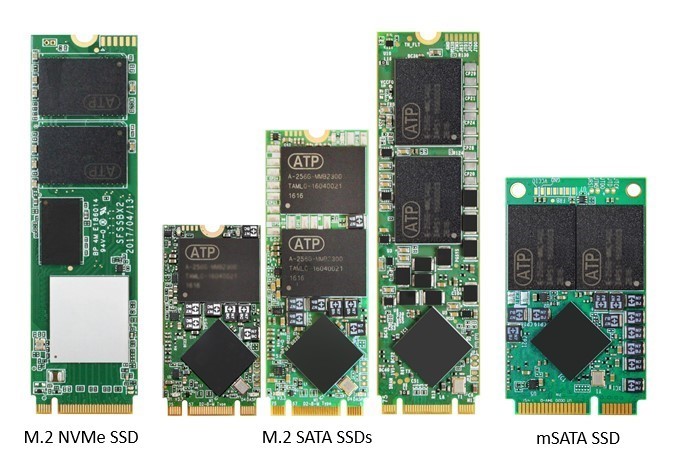
The rightmost one is mSATA. Notice the two holes for the screws.
The second one from the left is an M.2 2242 SSD. Notice that the edge connector (the row of golden contacts at the bottom) is very different from mSATA, and that it's considerably smaller.
Planned Purchase: T480s i5-8350 FHD Touch
Impulse Buy: Thinkpad not named for safety reasons
RIP: X220 4291-C91 X61 7676-A24 760XD-U9E
Impulse Buy: Thinkpad not named for safety reasons
RIP: X220 4291-C91 X61 7676-A24 760XD-U9E
Re: X220T Msata?
Ah, I see. Thank you for explaining.axur-delmeria wrote: ↑Thu Sep 12, 2024 10:25 amBoth are the wrong size, because "2242" and "2230" are for M.2 SSDs.DC69 wrote: ↑Thu Sep 12, 2024 10:18 amHello ladies and gentleman.
I am thinking about upgrading mine with a similar combination, mSATA to run the OS and other programs and a large HDD for files and documents. My only question is regarding the form factor of the mSATA. The correct size is the 2242 and not the 2230, right? Any other requirements I should pay attention to when buying?
Thank you.
Let's use this side-by-side photo:
The rightmost one is mSATA. Notice the two holes for the screws.
The second one from the left is an M.2 2242 SSD. Notice that the edge connector (the row of golden contacts at the bottom) is very different from mSATA, and that it's considerably smaller.
Re: X220T Msata?
note the msata ssd will work at sata 2 speeds (whereas the main ssd at sata 3)
T500 - T9600, 8g ram, 1680x1050
T420 - 2450M, 16g ram, 1366x768
X61t - L7500, 4g ram, 1024x768
W520 - 2760QM, 16g ram, 1920x1080
X201 - 560M, 8g ram, 1280x800
T420 - 2450M, 16g ram, 1366x768
X61t - L7500, 4g ram, 1024x768
W520 - 2760QM, 16g ram, 1920x1080
X201 - 560M, 8g ram, 1280x800
Re: X220T Msata?
Fpr typical usage, that's probably not that noticeable.
ThinkPad L14 - 2.1GHz Ryzen 4650U | 16GB | 256GB | 14" FHD | Win11P
ProBook 470 G5 - 1.6GHz Core i5 | 16GB | 2.2TB | 17" FHD | Mint
ProBook 470 G5 - 1.6GHz Core i5 | 16GB | 2.2TB | 17" FHD | Mint
-
- Similar Topics
- Replies
- Views
- Last post
-
-
X220T Bios Update. USB listed after F12 but will not update.
by ThinkCat » Thu Nov 27, 2025 9:56 am » in ThinkPad X200/X201/X220 and X300/X301 Series - 2 Replies
- 10319 Views
-
Last post by ThinkCat
Fri Nov 28, 2025 6:45 am
-
-
-
Stylus for X220T
by ThinkCat » Thu Dec 18, 2025 4:38 pm » in ThinkPad X200/X201/X220 and X300/X301 Series - 1 Replies
- 3658 Views
-
Last post by dcfbf
Sat Dec 20, 2025 2:40 am
-
-
-
X220T BOM/Replacement Components
by beyonson » Fri Apr 17, 2026 1:28 pm » in ThinkPad X200/X201/X220 and X300/X301 Series - 1 Replies
- 690 Views
-
Last post by RealBlackStuff
Fri Apr 17, 2026 6:40 pm
-
Who is online
Users browsing this forum: No registered users and 48 guests