


 Homepage
 Forum
Forum Drivers
 HMM-Manuals
 MTM
MTM Feed
Feed
Take a look at our
ThinkPads.com HOME PAGE
For those who might want to contribute to the blog, start here: Editors Alley Topic
Then contact Bill with a Private Message
ThinkPads.com HOME PAGE
For those who might want to contribute to the blog, start here: Editors Alley Topic
Then contact Bill with a Private Message
Does the x220t (x220 tablet) have the same 1866MHz RAM BIOS issue?
-
xerxespersrex
- Posts: 3
- Joined: Sat May 22, 2021 8:29 am
- Location: Phoenix, Arizona
Does the x220t (x220 tablet) have the same 1866MHz RAM BIOS issue?
Hello everyone, I just bought myself an x220 tablet from eBay and it's currently shipping to me right now. I have been doing some research about Thinkpads in the meantime so I'd know the right RAM upgrades to buy, and I found that apparently the x220 tablet can take 16GB of PC3-14900 RAM at 1866MHz, which is over the Lenovo specifications. But during my research, I found (on the ThinkWiki and old threads from here) that there's an issue with the regular x220 where if you upgrade the BIOS, your RAM gets capped at 1333MHz. Does this same bug apply to the x220 tablet? I'd like to be able to update the BIOS and embedded controller firmware but I don't want to if there's a major issue like this (or any other similar issue I should know about). I don't plan to coreboot the laptop, at least not in the foreseeable future. Thanks a lot guys!
Re: Does the x220t (x220 tablet) have the same 1866MHz BIOS issue?
I was able to run it only with modded bios and coreboot so apparently you’ll have this issue with your machine running all revisions of official lenovo bios.
There is some improvement in performance, especially when you run graphics processing demanding tasks, so it’s worth the chase
There is some improvement in performance, especially when you run graphics processing demanding tasks, so it’s worth the chase
-
xerxespersrex
- Posts: 3
- Joined: Sat May 22, 2021 8:29 am
- Location: Phoenix, Arizona
Re: Does the x220t (x220 tablet) have the same 1866MHz RAM BIOS issue?
Thanks for the reply, well at least I don't have to worry about it when I upgrade the firmware then lol. Can I still install 16GB of 1866MHz RAM now even though it's going to be throttled so that later when I eventually coreboot it I don't have to buy RAM a second time? There won't be any additional performance hit for using throttled ram besides being limited to 1333MHz right?
-
WarMachine
- Junior Member

- Posts: 472
- Joined: Sat Nov 18, 2006 3:38 pm
- Location: Lyon, France
- Contact:
Does the x220t (x220 tablet) have the same 1866MHz RAM BIOS issue?
Hello and welcome to the forum !
If your CPU is the i5 2520M (but it's the same if it's an i7), then Intel conceived it with an FSB of 1066 or 1333 MHz:
https://ark.intel.com/content/www/us/en ... 0-ghz.html
So, if you have RAM with the same frequency, the CPU will not be limited.
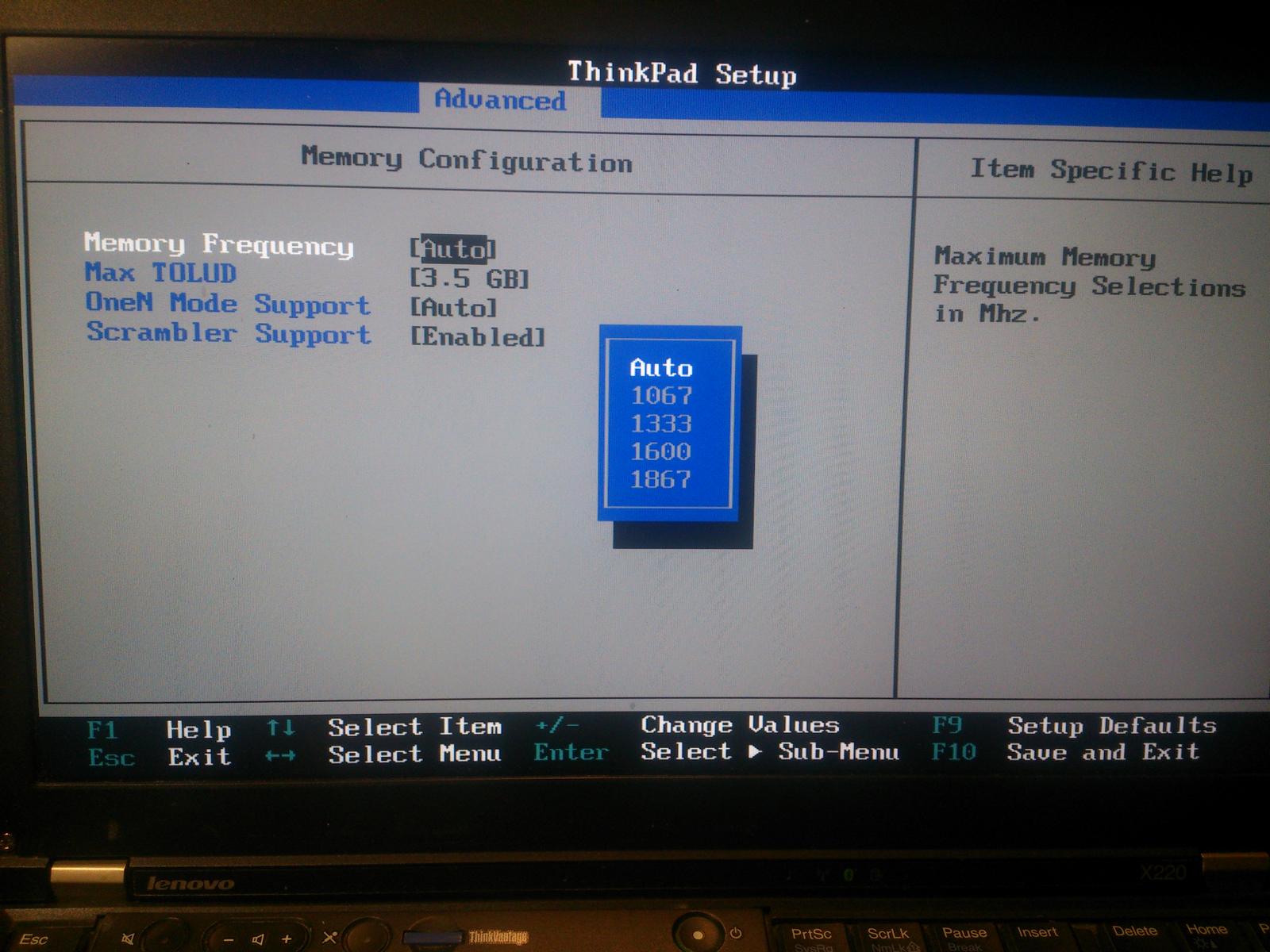
I haven't done a lot of research about the X220 Tablet, as I don't own one at this time, but I own two X220 (not tablet), and the CPU are the same, so it won't be different. If there's a modded BIOS for the tablet, the same kind than the one that exists for the X220 non tablet, then, you'll have the possibility to install 1866 MHz DDR3L RAM sticks, and the BIOS lets you choose the frequency:
https://forum.ixbt.com/post.cgi?id=atta ... 4021:2.jpg
And if you install 1866 MHz RAM with a stock BIOS, it should run fine, but with a frequency of 1333 MHz.
W.
If your CPU is the i5 2520M (but it's the same if it's an i7), then Intel conceived it with an FSB of 1066 or 1333 MHz:
https://ark.intel.com/content/www/us/en ... 0-ghz.html
So, if you have RAM with the same frequency, the CPU will not be limited.
I haven't done a lot of research about the X220 Tablet, as I don't own one at this time, but I own two X220 (not tablet), and the CPU are the same, so it won't be different. If there's a modded BIOS for the tablet, the same kind than the one that exists for the X220 non tablet, then, you'll have the possibility to install 1866 MHz DDR3L RAM sticks, and the BIOS lets you choose the frequency:
https://forum.ixbt.com/post.cgi?id=atta ... 4021:2.jpg
And if you install 1866 MHz RAM with a stock BIOS, it should run fine, but with a frequency of 1333 MHz.
W.
Last edited by WarMachine on Mon May 24, 2021 10:01 am, edited 2 times in total.
701Cs|755Cs|560|600E|T23|X20|X24|X31|T30|R30|T41p|T42|T43|X41
T60|T61|R60|X60t|X61s|X61t|X301|T400|T400s|W500|X200|X201|T410|T410s|X220|T420|T420s|W520|T430|T430s|T431s|X240|T440|T440s|T440p|W541|T450|T450s|X250|X1C3|T460|T460s| X260|P50|T470s|P52|T480s|T580|X280|T490|T490s
T60|T61|R60|X60t|X61s|X61t|X301|T400|T400s|W500|X200|X201|T410|T410s|X220|T420|T420s|W520|T430|T430s|T431s|X240|T440|T440s|T440p|W541|T450|T450s|X250|X1C3|T460|T460s| X260|P50|T470s|P52|T480s|T580|X280|T490|T490s

Re: Does the x220t (x220 tablet) have the same 1866MHz RAM BIOS issue?
Hmm.. interestingly I very rarely have any inclination to check which ram frequency my T520-s and my X220 run at. They just run fine and that's enough for me RAM speed shouldn't make a lot of difference should it? My suggestion would be just to get some decent branded RAM and be done with it.
RAM speed shouldn't make a lot of difference should it? My suggestion would be just to get some decent branded RAM and be done with it.X220, 2 *T520
-
xerxespersrex
- Posts: 3
- Joined: Sat May 22, 2021 8:29 am
- Location: Phoenix, Arizona
Re: Does the x220t (x220 tablet) have the same 1866MHz RAM BIOS issue?
Thanks again for the help guys. I think what I'm going to do is try it out in Linux with the stock 4GB of RAM and upgrade the HDD to an SSD, and if I end up maxing out the 4GB in my usual workflow, I'll probably go ahead and buy a 16GB 1866MHz set of sticks just so it's maximum spec and I don't have to ever buy a replacement. The RAM that I found on Amazon that I'll probably end up buying is... *deep breath* Timetec Hynix IC 16GB KIT (2x8GB) DDR3L 1866MHz PC3-14900 Unbuffered Non-ECC 1.35V CL13 2Rx8 Dual Rank 204 Pin SODIMM Memory. I don't know how good of a brand Hynix is but I see a lot of their RAM products online and I've seen at least one Thinkpad video using it so it seems ok. The other brand offerings I can find are about twice the cost as these, though maybe it's worth it? 
EDIT: I forgot to respond about the modded BIOS. I do know that that exists for the regular x220 but I didn't see anything about a patched BIOS for the x220t. I don't know if they actually use the same BIOS or not, so the same patched BIOS will work? I'm not really sure about that. Seems to be a bit less information out there about the x220t vs the x220 which is why I opened this thread to ask some questions about it.
EDIT: I forgot to respond about the modded BIOS. I do know that that exists for the regular x220 but I didn't see anything about a patched BIOS for the x220t. I don't know if they actually use the same BIOS or not, so the same patched BIOS will work? I'm not really sure about that. Seems to be a bit less information out there about the x220t vs the x220 which is why I opened this thread to ask some questions about it.
-
WarMachine
- Junior Member
- Posts: 472
- Joined: Sat Nov 18, 2006 3:38 pm
- Location: Lyon, France
- Contact:
Does the x220t (x220 tablet) have the same 1866MHz RAM BIOS issue?
Hello,
About Hynix, you'll find a lot of this brand used by the manufacturers in their laptops. Samsung too. I'm writing at this very moment on my X220 (one of them), I have 8 GB on it (2 sticks of 4 GB) and one of them is an Hynix (HMT451S6MFR8C-PB). The other one is a Crucial (CT51264BF160BJ.C8F). There is no official information about compatibility of course with 1866 MHz RAM, but it should be compatible, as it's 2R×8 RAM (and the X220 is not so picky than the previous generation laptops – T410/T410s/X201/X201s). And price is nicer than other brands (always too expensive for a 10-years old machine, but when whe see how much costs 8 GB of DDR2, it's far better).
W.
About Hynix, you'll find a lot of this brand used by the manufacturers in their laptops. Samsung too. I'm writing at this very moment on my X220 (one of them), I have 8 GB on it (2 sticks of 4 GB) and one of them is an Hynix (HMT451S6MFR8C-PB). The other one is a Crucial (CT51264BF160BJ.C8F). There is no official information about compatibility of course with 1866 MHz RAM, but it should be compatible, as it's 2R×8 RAM (and the X220 is not so picky than the previous generation laptops – T410/T410s/X201/X201s). And price is nicer than other brands (always too expensive for a 10-years old machine, but when whe see how much costs 8 GB of DDR2, it's far better).
W.
701Cs|755Cs|560|600E|T23|X20|X24|X31|T30|R30|T41p|T42|T43|X41
T60|T61|R60|X60t|X61s|X61t|X301|T400|T400s|W500|X200|X201|T410|T410s|X220|T420|T420s|W520|T430|T430s|T431s|X240|T440|T440s|T440p|W541|T450|T450s|X250|X1C3|T460|T460s| X260|P50|T470s|P52|T480s|T580|X280|T490|T490s
T60|T61|R60|X60t|X61s|X61t|X301|T400|T400s|W500|X200|X201|T410|T410s|X220|T420|T420s|W520|T430|T430s|T431s|X240|T440|T440s|T440p|W541|T450|T450s|X250|X1C3|T460|T460s| X260|P50|T470s|P52|T480s|T580|X280|T490|T490s
-
- Similar Topics
- Replies
- Views
- Last post
-
-
X220T Bios Update. USB listed after F12 but will not update.
by ThinkCat » Thu Nov 27, 2025 9:56 am » in ThinkPad X200/X201/X220 and X300/X301 Series - 2 Replies
- 10207 Views
-
Last post by ThinkCat
Fri Nov 28, 2025 6:45 am
-
-
-
Will X220 Tablet palmrest fit X230 Tablet?
by tts_rayhan » Sat Feb 07, 2026 7:28 pm » in ThinkPad X230-X280 / X390 Series - 0 Replies
- 4044 Views
-
Last post by tts_rayhan
Sat Feb 07, 2026 7:28 pm
-
-
-
Stylus for X220T
by ThinkCat » Thu Dec 18, 2025 4:38 pm » in ThinkPad X200/X201/X220 and X300/X301 Series - 1 Replies
- 3610 Views
-
Last post by dcfbf
Sat Dec 20, 2025 2:40 am
-
-
-
X220T BOM/Replacement Components
by beyonson » Fri Apr 17, 2026 1:28 pm » in ThinkPad X200/X201/X220 and X300/X301 Series - 1 Replies
- 564 Views
-
Last post by RealBlackStuff
Fri Apr 17, 2026 6:40 pm
-
Who is online
Users browsing this forum: No registered users and 70 guests