


 Homepage
 Forum
Forum Drivers
 HMM-Manuals
 MTM
MTM Feed
Feed
I am confused about the "peel the thin film off from the rubber" sentence on the manual, pag 135
Is this intended for a "new" heat sink, or should I "peel off" something when reapplying thermal paste on my old heat sink?
Additionally:
1) can I put the paste on the processor and GPU instead?
2) how can I fix the rear "thing" that holds the screws of heatsink to the MB when disassembling?
I am experimenting with the X201s which doesn't boot and it is quite impossible to operate with the rear "thing" moving away.
I don't want to mess up with the functioning X201.
thanks in advance,
A.
Take a look at our
ThinkPads.com HOME PAGE
For those who might want to contribute to the blog, start here: Editors Alley Topic
Then contact Bill with a Private Message
ThinkPads.com HOME PAGE
For those who might want to contribute to the blog, start here: Editors Alley Topic
Then contact Bill with a Private Message
X201s: "Peel the thin film off" (pag 135 Manual)
-
RealBlackStuff
- Admin Emeritus

- Posts: 24727
- Joined: Mon Sep 18, 2006 5:17 am
- Location: Loch Garman, Éire
Re: X201s: "Peel the thin film off" (pag 135 Manual)
Originally replacement fans (when bought from Lenovo) came a thermal pad (with protective thin film) on the GPU-part.
Do NOT put paste on the GPU, replace the thermal pad (1mm thick is OK) instead.
Be more precise with your "thing", no idea what you're talking about.
Do NOT put paste on the GPU, replace the thermal pad (1mm thick is OK) instead.
Be more precise with your "thing", no idea what you're talking about.
Lovely day for a Guinness! (The Real Black Stuff)
But I actually prefer Murphy's from Cork!
But I actually prefer Murphy's from Cork!
Re: X201s: "Peel the thin film off" (pag 135 Manual)
Thanks,
for the rear "thing" I mean this triangular-shaped metal plate that holds the heat sink on the back of the motherboard.
Once the screws are removed, this plate detaches from the MB and putting back in place to screw back after placing the heat sink on the "pasted" processor is not easy.
https://m.media-amazon.com/images/I/81w ... SL800_.jpg
A.
for the rear "thing" I mean this triangular-shaped metal plate that holds the heat sink on the back of the motherboard.
Once the screws are removed, this plate detaches from the MB and putting back in place to screw back after placing the heat sink on the "pasted" processor is not easy.
https://m.media-amazon.com/images/I/81w ... SL800_.jpg
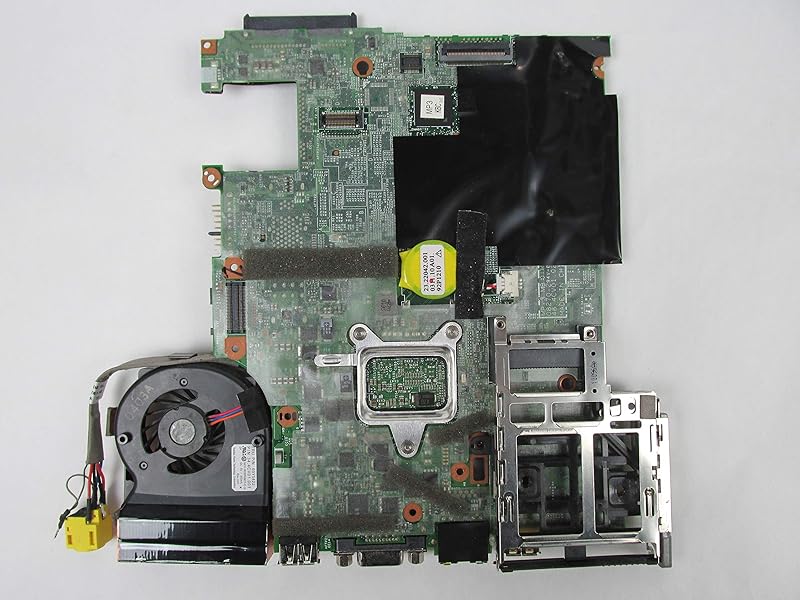
A.
Last edited by dr_st on Fri Feb 11, 2022 8:23 am, edited 1 time in total.
Reason: Removed huge inline image that stretched the page
Reason: Removed huge inline image that stretched the page
-
RealBlackStuff
- Admin Emeritus
- Posts: 24727
- Joined: Mon Sep 18, 2006 5:17 am
- Location: Loch Garman, Éire
Re: X201s: "Peel the thin film off" (pag 135 Manual)
You hold that metal bracket in place underneath the motherboard, then put the fan on.
If you really must, you could use some tape to keep the bracket in its place.
If you really must, you could use some tape to keep the bracket in its place.
Lovely day for a Guinness! (The Real Black Stuff)
But I actually prefer Murphy's from Cork!
But I actually prefer Murphy's from Cork!
-
- Similar Topics
- Replies
- Views
- Last post
-
-
T480 screen shuts off after a few seconds to a minute after starting to use it.
by FranklinHawkings » Wed Oct 22, 2025 5:26 pm » in ThinkPad T430-T495 / T530-T590 Series - 13 Replies
- 29848 Views
-
Last post by RealBlackStuff
Sat Nov 01, 2025 12:09 am
-
Who is online
Users browsing this forum: No registered users and 56 guests