Take a look at our
ThinkPads.com HOME PAGE
For those who might want to contribute to the blog, start here: Editors Alley Topic
Then contact Bill with a Private Message

Tricking Out My T60 [Picture Warning]

T60/T61 Series
Post Reply
Message
Author
TPFanatic
Senior ThinkPadder
Senior ThinkPadder
Posts: 2824
Joined: Thu Jul 30, 2015 11:29 pm

Tricking Out My T60 [Picture Warning]

#1 Post by TPFanatic » Wed Oct 09, 2024 5:58 pm

I don't want a T61 FrankenPad because it doesn't have the Texas Instruments IR Blaster, Soundmax analog volume, and hardware brightness stepping ultimately offered in the T60.

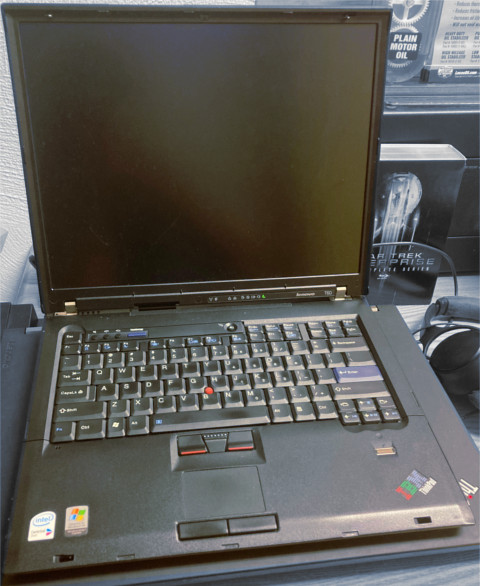
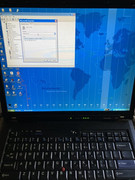
Accordingly, here is my T60.

Image

This beautiful classic has already been upgraded to T7400 2.13ghz, Intel 6200 AGN, IDTech UXGA FlexView, 2x2GB DDR2, 512GB SATA SSD, and Windows 7 Ultimate x64.

But I want to maximize the fun with this thing.

I want to replace the internal WLAN MPCIE card with an NVME drive, and dedicate an unholy amount of this to virtual memory. 3GB memory limit? Never heard of it.

I will remotely harness the power of my P71 and RTX 3060 from the superior I/O of the T60.

I may replace Windows 7 with Server 2008 R2 or find some other way of patching nwifi.sys.

I don't want Linux or Windows 8+ as host OS.

I want to refit internal WLAN with a USB-WWAN-slot-based 802.11n WLAN, but, I want to re-use the internal WLAN antennas.

I will keep the DVD drive.

I want to collect a bunch of Cardbus and Expresscard devices and slide them in and out.

I might hunt down a 2503 dock.

To be continued.


Edit / Continued:

PART 2

I've ordered some toys:
- 2pc IPEX Male to RP-SMA Male cables
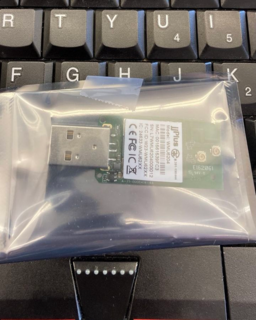
- USB WLAN device FCC ID 2AKC6XHT-WF6D (photos at https://fcc.report/FCC-ID/2AKC6XHT-WF6D/4345625.pdf)
- MPCIE/MSATA to USB 2.0 converter

I already own and need to collect:
- MPCIE to M-Key adapter
- 256GB NVME SSD

I need to:
- run the bootrec stuff to get Bitlocker working :evil:

To be continued.


Edit / Continued:

PART 3

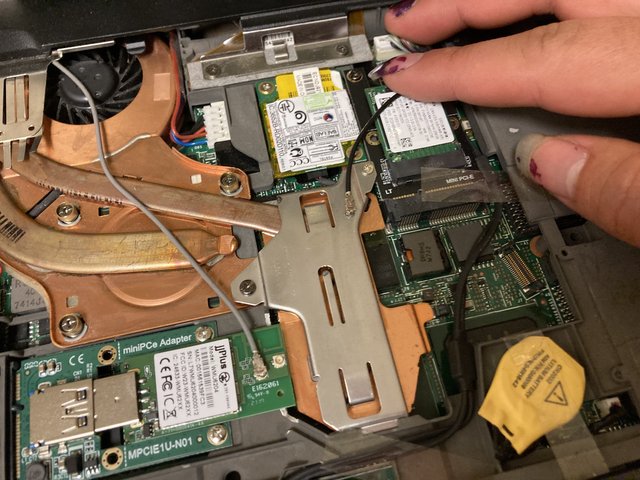
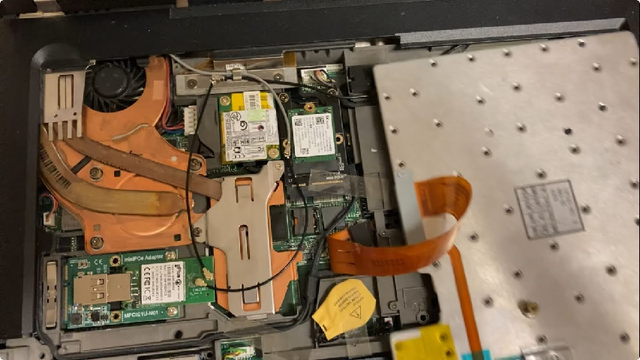
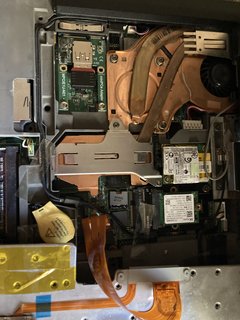
SK-Hynix 256GB MPCIE drive has been installed in the WLAN slot in an M-Key adapter. Internal MPCIE WLAN has been decontented.

A crappy usb knockoff of the Realtek RTL8188EU is occupying the left-hand-side sideways USB port, until my new toys arrive and I can make use of the internal USB port.

I harvested my flush-face PCMCIA USB 2.0 card out of my A31p and the T60 will wear it for now. I'd like to rely on the otherwise-never-used Cardbus for USB to free up total USB throughput for the WLAN.

Expresscard to a joint USB 3.0 and eSATA card is also attached.

I got my Ultrabay Battery in, total of 12 cells attached. The Ultrabay Batt is in bad shape, but it will accommodate hot swapping the main battery without AC power. Accordingly I've got my 3 T500-compatible 6-cells, my last healthy 9-cell, and now the 3-cell Ultrabay Batt for unprecedented runtime.

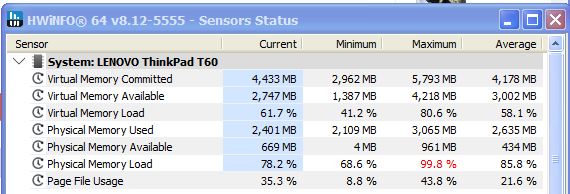
Here is a screenshot of the virtual memory overcompensating for the limited physical memory at this given moment:

https://i.postimg.cc/RZ7x0qYP/virtual-m ... ad-t60.jpg


Edit part 4:

https://i.postimg.cc/6TKK3zjj/IMG-7067.jpg

I accidentally flushed my recovery key down the toilet and coincidentally the t60’s fan developed laringitis again. :oops: the system froze using 8gb virtual memory + 3gb physical memory and trying to encrypt two drives at the same time.

Gonna think about retrofitting a T500 or T61 fan, then Probably going to install some old butt version if win 10 pro n on this with the XP skin, nuke windows update and trusted installer, and call it a day. If i can get pycharm and n++ on this i can make money.


Edit part 5:

https://i.postimg.cc/Y4y2LRWv/IMG-7281.jpg

My techkey USB 802.11ac and my antennas arrived from China. Only problem is my T60 is 60 miles away.

I'm walking back my intention to install Win 10 Pro N on the T60 because I just like Windows 7/XP more. The fact of the matter is a few months ago I cloned the T60's Windows 7 drive onto the drive that is in my X61s, de facto a running backup, and then the X61s's battery died and I never used it again. Therefore I will put the X61s drive in the T60 and carry on with my life. Hooray for running spares. :roll:

game plan therefore is:
- get to the T60
- replace fan with T500 or T61 unit
- install USB WLAN
- replace drive with one from X61s, initialize bitlocker
- have fun


edit 10-27-2024:

https://i.postimg.cc/dksjxj9b/IMG-7366.jpg

T60 is back up and running from system cloned from X61s. I somehow locked the X61s to the X6 media slice and flushed the physical key down the toilet, so the battery is sandwiched in and so is the drive. I booted the X61s and cloned the system over USB to the T60's 512GB, then put the 512GB back in the T60.

https://i.postimg.cc/0Nv0c8zP/IMG-7365.jpg

As proof of concept, I can plug the awful knockoff Realtek 802.11n into the USB-MPCIE header and it is detected by the system, but at this time does not function.

When I ride the T60 60 miles back to my dorm where my 802.11ac WLAN is, I may have to break off parts of the mag frame to fit everything, but in the end I think I'll have something working.

edit 10-29-2024:

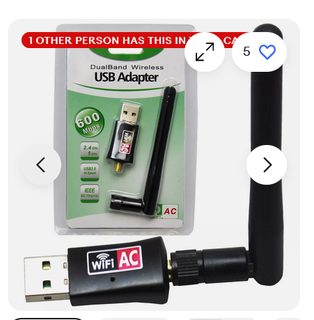
The 802.11ac adapter is too big to fit in the laptop. :evil: If I get familiar with soldering I can move the antenna jacks onto the board itself rather than using the big RP-SMA adapters. But I don't like soldering. :roll: i could probably pay someone to do the job. cheaper yet would be to find a more suitable adapter. --edit to add: just ordered this for $6

https://i.postimg.cc/wTRjkYYW/6-dollar- ... -80211.png

considering USB caps at 450mbps anyway, it's not a big deal to only utilize one aerial. the other can always be used for somethin else.
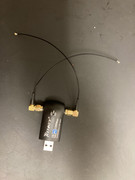
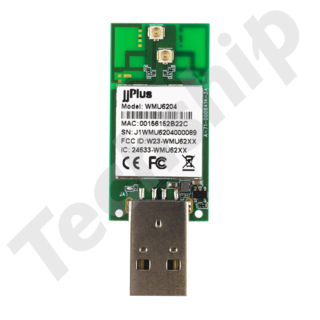
-- edit to add: I found online and ordered this. 8) "EmWicon WMU6204 802.11ac/abgn + Bluetooth USB (Type A) | 2× u.FL | Realtek RTL8822BU" Most likely I will need ufl cable extenders but not a big deal.

https://i.postimg.cc/MKx8nnmm/10863-190401.png

I'm gonna have so many USB WLANs when this is over LMAO i might plug them all into a docking station and irradiate myself --edit to add: https://www.emwicon.com/products/ these guys sell some awesome stuff!!!

11-2-2024 edit to add:

Link to img https://postimg.cc/FdFb0vCG

The single-antenna version showed up but it's still to tall for the keeb to seat.
So now I'll await the arrival of the PCB version. :roll: I now have like 6? of these [censored] USB 802.11s.


edit 11-4-2024:

Image

This is the most beautiful thing I've ever seen.
Last edited by TPFanatic on Mon Nov 04, 2024 12:05 pm, edited 15 times in total.

Plunkyy
Freshman Member
Posts: 56
Joined: Sat Apr 27, 2024 12:35 pm
Location: Barrie, Ontario, Canada

Re: Tricking Out My T60 [Picture Warning]

#2 Post by Plunkyy » Thu Oct 10, 2024 2:30 pm

Very interesting project! I'm daily driving my T7600 T60 with a minimal Linux install and it's still fairly capable for general tasks. It seems like every other machine of this era has it's weird quirks and/or design flaws while the T60 has truly stood the test of time. Best of luck on the project :D

Out of curiosity, how much of a speed difference would there be between the MPCIE SSD and a normal SATA SSD locked at SATA 1 speeds be?
600X: 650Mhz Speedstep

600X
Senior Member
Senior Member
Posts: 803
Joined: Tue May 21, 2013 3:31 am
Location: Raleigh, NC

Re: Tricking Out My T60 [Picture Warning]

#3 Post by 600X » Thu Oct 10, 2024 2:36 pm

Seeing a T60 with the red trackpoint buttons brings back memories...

I've had FrankenPads and T60s, and I also prefer the T60 board. Everything on it is just one step up in quality. It was also the last ThinkPad to sport what I'd consider to be a genuinely good DAC.
Daily: Custom Mini-ITX (Ryzen 7, 4070 FE, 3:2)
ThinkPads: 600X (i3), A31p (FlexView), T43, T60 (FlexView), X61 (SXGA+), R61 (QXGA), X301 (AFFS), X1

TPFanatic
Senior ThinkPadder
Senior ThinkPadder
Posts: 2824
Joined: Thu Jul 30, 2015 11:29 pm

Re: Tricking Out My T60 [Picture Warning]

#4 Post by TPFanatic » Thu Oct 10, 2024 4:59 pm

Plunkyy wrote:
Thu Oct 10, 2024 2:30 pm
Out of curiosity, how much of a speed difference would there be between the MPCIE SSD and a normal SATA SSD locked at SATA 1 speeds be?
I believe MPCIE 1x is actually faster than SATA 1. Compared to the main bay, it’ll be as good as RAM.

See this reddit:
https://www.reddit.com/r/thinkpad/comme ... wwan_slot/

T60’s expresscard slot can also hold an NVME.

Edit to add:

I need to collect my ultrabay battery and collection of T500 batteries so i can powerbridge this T60.

TPFanatic
Senior ThinkPadder
Senior ThinkPadder
Posts: 2824
Joined: Thu Jul 30, 2015 11:29 pm

Re: Tricking Out My T60 [Picture Warning]

#5 Post by TPFanatic » Tue Nov 12, 2024 6:26 pm

Finally coming up with a photo of the USB WLAN.
Image

With the single antenna it is awful. I've ordered extenders on amazon to try and improve that situation. All this is to avoid external antennas for a clean bento box look. External antennas is for my Ugly Access Point ThinkPad which this Classic T60 is NOT.
https://www.amazon.com/U-fl-Female-Ante ... nav_signin

The Realtek adapter does combine BT and 802.11ac. I ought to disable the ThinkPad's built in BT since the USB BT is better.

dr_st
Admin
Admin
Posts: 10032
Joined: Sat Oct 29, 2005 6:20 am
Location: Israel

Re: Tricking Out My T60 [Picture Warning]

#6 Post by dr_st » Wed Nov 13, 2024 10:01 am

TPFanatic wrote:
Wed Oct 09, 2024 5:58 pm
I don't want a T61 FrankenPad because it doesn't have the Texas Instruments IR Blaster, Soundmax analog volume, and hardware brightness stepping ultimately offered in the T60.
Does the 15" R61 which is basically an R60 with Santa Rosa HW have any of these?
TPFanatic wrote:
Wed Oct 09, 2024 5:58 pm
I want to collect a bunch of Cardbus and Expresscard devices and slide them in and out.
Ooh, I have a bunch of these which I acquired for the purpose of reviewing them. Nowadays I keep the CardBus to SDHC and ExpressCard to USB3.0 permanently in that T60. And the laptop is on the 2504 dock 99.9% of the time.
TPFanatic wrote:
Thu Oct 10, 2024 4:59 pm
I need to collect my ultrabay battery and collection of T500 batteries so i can powerbridge this T60.
I got a used 6-cell for my T60 when the original one died, and I also have a spare 9-cell (which was working last time I checked), and a 43 Ultrabay battery (used typically in the T430s but compatible with the T60).

I love the T60!
Thinkpad 25 (20K7), T16 Gen 3 (21MQ), Yoga 14 (20FY), T430s (IPS FHD + Classic Keyboard), X220 4291-4BG
X61 7673-V2V, T60 2007-QPG, T42 2373-F7G, X32 (IPS Screen), A31p w/ Ultrabay Numpad

TPFanatic
Senior ThinkPadder
Senior ThinkPadder
Posts: 2824
Joined: Thu Jul 30, 2015 11:29 pm

T60 Makes Me Happy

#7 Post by TPFanatic » Thu Nov 21, 2024 8:46 pm

Image

R61 15" only shares the case of R60, it does not retain soundmax or HW brightness.

Notably R60 was the first to lose the IR blaster. Z61 series, T60, and X60 are the final models with IR blaster.

I don't even particularly have a use for the IR blaster except for the fact that it was there on my childhood ThinkPads and I'm debilitatingly sentimental about fine little details like that.

Furthermore on the T60 (pictured supra):

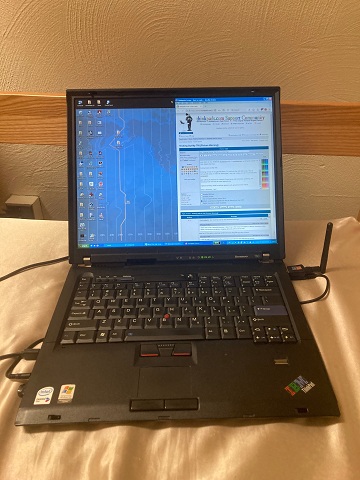
Pending arrival of my ufl extenders, I'm utilizing the USB 802.11ac. This is convenient since if I want to disconnect I can just unplug it and I'm immediately airgapped.

got nothing to hide but in a world of ignorance and prejudice, anything you broadcast can and will be used against you.

accordingly since internal WLAN is no longer important in my life, utilizing the internal USB slot for something else is becoming of more interest to me. not yet sure what to install, but the possibilities are as limitless as are USB devices. secondary boot drive? tertiary storage? who knows. already got the NVME onboard. usb to nvme is not out of the question, it'll just be as slow as IDE.

rights to privacy exist to defend against such ignorance and malice.

take it seriously, i do. can't wear your heart on your sleeve to everyone. tried that and it's time to get selective.

i've ordered a replacement 2504 (mine are lost to homelessness) and will likely mate that to the laptop permanently. i need more ports.

TPFanatic
Senior ThinkPadder
Senior ThinkPadder
Posts: 2824
Joined: Thu Jul 30, 2015 11:29 pm

Re: Tricking Out My T60 [Picture Warning]

#8 Post by TPFanatic » Mon Nov 25, 2024 6:59 pm

Image

Internal USB WLAN is all done.

The antenna extenders showed up. After taking the photo I made sure they were to the left of the pressure plate since they were bulging the keyboard slightly. Signal strength is adequate, it's using the onboard aerials saving me stuff sticking out of the side of the laptop. WLAN can be controlled by Fn+F5 and/or the hardware switch up front. No function from the bezel indicator but that's fine. Having onboard NVME for 256GB VRAM is more important than a WLAN indicator.

Ordered a Startech 2x USB 3.0 to replace my Startech 1x USB in the T60, so long as the T60 can fit the wider card. My 1x USB card did come with a plastic spacer to fill the 54mm space but I got kicked out of my home so I can't go back and get it. :evil: Can't reason with haters. But I have this T60 which is nice.

TPFanatic
Senior ThinkPadder
Senior ThinkPadder
Posts: 2824
Joined: Thu Jul 30, 2015 11:29 pm

Re: Tricking Out My T60 [Picture Warning]

#9 Post by TPFanatic » Wed Nov 27, 2024 4:58 am

starting to get back into video editing on the 4:3. like i used to on t42p and a31p with Windows XP with Movie Maker 2.6.

got my old Camtasia licensed.

install .net 4.6 and 4.7 for win7 from legacyupdate.net so i can run Camtasia 9 and Handbrake 1.3.3

use handbrake to downscale video files copied from the iPhone to hwatever is lite enough for T7400 and X1400 to handle. 8)

who said can teach an old dog new tricks, they're right.

starting to wonder if the fact the machine has two seperate BT modules in it now (one in the lid, one in the USB 802.11ac) can be of any use, I was of the impression that Windows wouldn't know how to handle two different BTs.

edit: some research indicates operating two BT radios at once in Windows would likely not work. from: https://superuser.com/questions/1291037 ... dows-10-pc

From Microsoft: 2 radios in one system is not possible (without VM hardware redirection): https://social.technet.microsoft.com/Fo ... n-plus-usb

Limitations based on drivers, versions, etc. Windows will only load drivers for the first radio and error 10 any others.
in any case the new USB based BT seems to work better for connecting to the iPhone than the original ThinkPad BT in the lid. now i will obsess over what i can use the usb port in the lid for instead.

Post Reply
  • Similar Topics
    Replies
    Views
    Last post

Return to “ThinkPad T60/T61 Series”

Who is online

Users browsing this forum: No registered users and 90 guests